





Executive summary
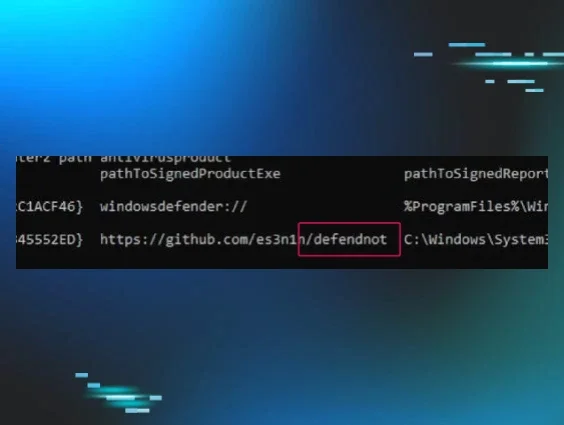
defendnot, a tool developed by es3n1n, represents a unique method for disabling Windows Defender. Unlike conventional methods that attempt to modify registry settings or use administrative policies, defendnot takes a more sophisticated approach by registering an antivirus product. defendnot achieves its objective by leveraging undocumented Windows Security Center (WSC) APIs to register a fabricated antivirus product. This action inherently forces Windows Defender into a disabled state, significantly lowering the barrier for subsequent malware deployment and execution.
This post is not intended as a re-examination of defendnot's core capability—which es3n1n has written a phenomenal blog on—but rather focuses on the defensive perspective: identifying the critical indicators and techniques for detecting this evasion within an enterprise environment. We’ve included Sigma rules that can be used to detect this tool in various stages of execution.
Background
defendnot emerged as a successor to "no-defender," an earlier project by the same developer, which was eventually removed from GitHub following a DMCA takedown notice. The original iteration reportedly reused code from existing commercial antivirus solutions. In contrast, defendnot was rebuilt from scratch, a testament to direct reverse engineering of Windows Security Center (WSC) Component Object Model (COM) methods.
The Windows Security Center (WSC) service is integral to managing security products on Windows systems. Critically, it incorporates undocumented functions and interfaces, access to which Microsoft typically restricts under Non-Disclosure Agreements (NDAs) to legitimate antivirus vendors.
At its core, defendnot exploits the IWscAvStatus COM interface to register a custom antivirus, a technique which Huntress calls a Malicious Security Product AV bypass. This process predominantly relies on two main methods:
-
Register: This method initiates the registration of the purported antivirus.
-
UpdateStatus: This method subsequently activates the fake AV, signaling its operational status to the WSC.

 Figure 1: New Registry Entries Created
 Figure 2: Default Defender Registry Entries
However, the WSC incorporates signature validation checks to ensure the legitimacy of registering processes. An arbitrary process cannot simply invoke these COM methods. es3n1n went to significant lengths to reverse engineer and replicate these WSC signature checks. This work yielded a list of potential binaries that, if injected into, would pass these stringent validation routines. defendnot, as implemented, hardcodes Taskmgr.exe (Windows Task Manager) as its designated kVictimProcess for injection prior to initiating the AV registration sequence.

Figure 3: Taskmgr.exe hardcoded as kVictimProcess
There are several important limitations of the tool to note here, as the tool author has noted in the project:
- The file needs to stay on disk (persistence) to continue functioning as a Malicious Security Product and thus disabling Defender.
- Defender currently detects defendnot as VirTool:Win64/Defnot.A when on disk.
- Because WSC is not supported on Windows Server, defendnot will not function properly on Windows Servers.
(Crude) Attack diagram
To better contextualize the operation, let's visualize the attack progression. While rudimentary, this diagram illustrates the key stages of defendnot execution:
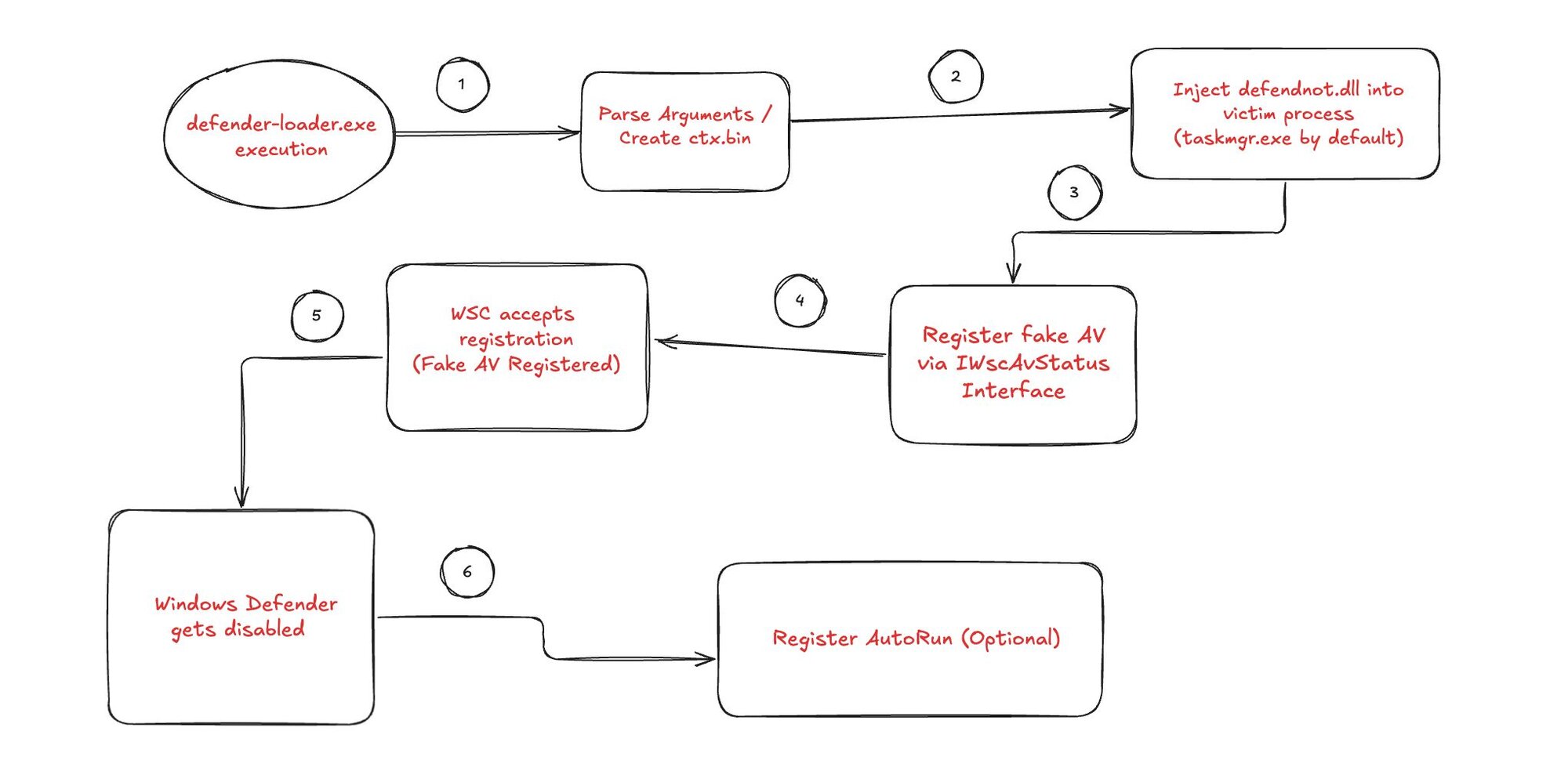 Figure 4: defendnot (crude) attack diagram
The above attack flow diagram illustrates a multi-phase execution process designed to disable Windows Defender through fraudulent antivirus registration. Each numbered step in this attack chain
presents unique detection opportunities that security teams can leverage to identify and interrupt the malicious activity before the ultimate goal of defense evasion is achieved.
Initial execution
defender-loader.exe execution
This phase represents the initial execution where the primary loader component begins operation. The loader serves as the orchestrator for the entire attack chain, responsible for parsing configuration parameters and initiating subsequent phases.
Key detection considerations include monitoring for newly created processes, especially those with suspicious names or operating from unusual locations. Process creation events should be correlated with file system activities and network connections to establish baseline behavior patterns.
 Figure 5: Sysmon Event ID 1 - defendnot-loader
Sigma Rule: defendnot Execution
The successful execution of the defender-loader.exe component triggers the next phase of the attack, where defendnot begins processing its operational parameters.
YARA Rule for defendnot binaries
Argument parsing & payload creation
Parse Arguments / Create ctx.bin
Following initial execution, the tool immediately transitions into argument processing mode, analyzing command-line parameters to determine its operational configuration. During this phase, defendnot generates a context file (ctx.bin) containing configuration data or encrypted payloads necessary for subsequent injection activities.
This transition from execution to configuration represents a critical detection window, as defendnot must perform file system operations that generate observable telemetry. The creation of ctx.bin serves as a preparatory step for the injection phase, containing target process information and payload data.
 Figure 6: Sysmon Event ID 11 - ctx.bin file creation
Sigma Rule: defendnot File Creation
With the configuration file successfully created, defendnot now possesses all necessary components to begin the process injection sequence.
Process injection
Inject defendnot.dll into victim process (taskmgr.exe by default)
Armed with its configuration data from the previous phase, defendnot now initiates the core injection sequence. The defendnot.dll component, guided by parameters established during argument parsing, targets the Task Manager process (taskmgr.exe) as its default injection victim, though other processes may be specified through command-line arguments.
This injection represents the transition from a standalone process to operating within the context of a legitimate Windows system component, providing both privilege elevation and evasion capabilities.
 Figure 7: Sysmon Event ID 1 - Taskmgr.exe process creation
Sigma Rule: Taskmgr Child Process of defendnot

Figure 8: Sysmon Event ID 7 - Taskmgr Load event
Once successfully injected into the target process, it has privileges and positioning to manipulate Windows security infrastructure.
Related Sigma rules for these behaviors:
Sigma Rule: defendnot.dll Loaded Via Taskmgr
Sigma Rule: Suspicious Image Loaded into Taskmgr
The below shows the resulting telemetry defendnot exhibited when performing process injection. This classic DLL injection technique shows us that
defendnot-loader must first access the taskmgr process (ProcessAccess - Sysmon EID 10), allocation of virtual memory (not seen in Sysmon but could be picked up via the
Threat-Intelligence ETW provider), performing a
memory write action (again, not seen with Sysmon but could be via
Threat-Intelligence ETW provider), and the
creation/execution of the remote thread (CreateRemoteThread - Sysmon EID 8). A couple of things to keep in mind:
-
The process injection technique can change (from a classic DLL injection to another process injection technique).
-
defendnot is using TaskMgr as its target process, but there could be a different target process.

Figure 9: Other possible victim processes identified by es3n1n (screenshot courtesy of es3n1n)
 Figure 10: CreateRemoteThread Event logged
Sigma Rule: MsMpEng.exe Process Access defendnot loader

Figure 11: Sysmon Event ID 10 - Process Access defendnot-loader
 Figure 12: Sysmon Event ID 10 - Process Access Taskmgr
AV evasion registration
Register fake AV (Malicious Security Product) via IWscAvStatus Interface
Operating from within the injected process context, defendnot now leverages its elevated position to interact with WSC API IWscAvStatus to register itself as a legitimate antivirus product, beginning the process of security software manipulation.
This phase represents the transition from covert injection to active system manipulation, as it begins establishing its presence within Windows security infrastructure.
The registration request now awaits processing by the Windows Security Center, setting the stage for acceptance as a legitimate security product.
AV registration acceptance
WSC accepts registration (fake AV Registered)
The Windows Security Center processes the fraudulent registration request and accepts it as a legitimate security product (AV). This acceptance marks a critical transition point where an external threat becomes an accepted component of the system's security posture.
This successful registration provides the privileges and necessary mechanism to proceed with disabling competing security solutions without triggering user suspicion.
 Figure 13: Sysmon Event ID 13 - Registry Key set
 Figure 14: Sysmon Event ID 13 - Additional registry key set
Sigma Rule: Modification to Security Center AV Registry Key
With its legitimacy established within the security framework, defendnot can now optionally establish persistence mechanisms before proceeding to its primary objective.
Persistence (Optional)
Register AutoRun (Optional)
Having successfully been established as a registered security product, the additional option exists to implement persistence to ensure survival across system reboots. This optional phase involves creating autorun registry entries that will reactivate the malicious security product following system restarts.
 Figure 15: Scheduled Task Creation
Sigma Rule: defendnot Scheduled Task Creation - Security

Figure 16: Scheduled Task Updated
Whether persistence is established or not, defendnot now proceeds to execute its primary mission: neutralizing Windows Defender.
Defense evasion outcome
Windows Defender gets disabled
The attack chain culminates with the successful disabling of Windows Defender, leveraging the established position as a registered security product to justify the deactivation of competing protection mechanisms. This final phase represents the achievement of the primary objective: creating an environment where additional malicious activities can proceed without interference from the system's primary security solution.
The successful completion of this phase demonstrates the effectiveness of the entire attack chain, from initial execution through security framework manipulation.
 Figure 17: Windows Event ID 15 - Defender State Off
 Figure 18: Windows Event ID 15 - Defender State On
Sigma Rule: defendnot Windows Defender State Toggle Events
With Windows Defender neutralized, the environment is now prepared for follow-on malicious activities, having successfully circumvented the system's primary defensive mechanisms through a sophisticated multi-stage evasion technique.
 Figure 19: GUI Settings for Defender have been altered
 Figure 20: Fake AV has been successfully registered
Detection layers
When considering how to approach detecting any threat, it is important to consider data sources and layers of abstraction, as well as Pyramid of Pain levels, to optimize the methods
for detection. The Summiting the Pyramid framework from MITRE gives further context to detection approaches by looking at detection robustness strategies. The basic
Summiting Levels are:
Level 5: Core to Sub-Technique or Technique
Level 4: Core to Some Implementations of (Sub-)Technique
Level 3: Core to Pre-Existing Tools or Inside Boundary
Level 2: Core to Adversary-Brought Tool or Outside Boundary
Level 1: Ephemeral Values
Robustness & Summiting the Pyramid
Robustness in detection means how resistant a detection is to evasion or trivial changes by an attacker:
-
Lower Pyramid layers (Hashes, IPs/Domains) are fragile—easy to bypass by recompiling, renaming, or changing infrastructure.
-
Upper Pyramid layers (Behaviors/TTPs) are robust—hard to change without fundamentally altering the attacker’s workflow or objectives.
Summiting the Pyramid means striving for behavioral/TTP-based detection, which is more robust to attacker changes.
The idea is that the most effective and robust
detections use methods as close to the core of the technique as possible. Rather than focusing on ephemeral values or IOCs like file hashes, use Windows API calls specific to the
technique used by the malware or tool instead. This isn’t always possible, and can be noisy at times. The best method is often to combine detection methods at each level: to be
precise and high fidelity with lower level detections while using more broad higher levels of detection on top of that to cover for evasion techniques of the lower level
detections.
For example, let’s look at some possible methods at various levels to detect the defendnot tool and its technique and compare their effectiveness and robustness.
| Pyramid Layer | Example in defendnot | Detection Source | Robustness Term | Evasion Difficulty |
|---|---|---|---|---|
| Hash | SHA256 of defendnot.dll | File scan, AV, YARA | Weakly related | Trivial |
| Artifact | Scheduled Task, Registry Run | Event Logs, Sysmon, Registry Monitor | Generally related | Moderate |
| Tool | defendnot process/DLL name, usage | EDR, process listing, SIEM correlation | Closely tied to technique | Harder |
| Behavior (TTP) | WSC COM abuse, process injection | Sysmon events, EDR, SIEM, Analytics | Core to the technique | Very Hard |
So, for example, the file hash of the tool is weakly related to the core technique, not very robust, and trivial to evade. While it can be a good and easy way to detect default
use of the tool (so why not use it?), it should not be relied upon to ensure the best defense against other use of the tool. Using process injection detection methods or even
detecting the actual WSC COM abuse occurring is more robust and much harder to evade detection because it is the core technique used by the tool and cannot be changed without
changing the way the tool works (in which case it would be something entirely different with new detection methods needed anyway).
Levels of robustness applied to defendnot
 Figure 21: Levels of Robustness applied to defendnot
Now let’s look at some of the specific sources that can be used to detect the various characteristics, artifacts left behind, and techniques used by the tool.
defendnot detection methods and sources with host-based event robustness levels applied
Key takeaways for building detections on defendnot
-
Core to the technique (Behavior/TTPs): Detecting WSC abuse (e.g., unauthorized COM registration activity) or process injection is extremely robust—attackers would need to fundamentally change their approach to evade.
-
Closely tied to the technique (Tool): Monitoring for defendnot’s known process or DLL names, or seeing Taskmgr.exe as an injection target is robust but still vulnerable to renaming.
-
Generally related (Artifacts): Autorun tasks, registry keys, and other artifacts are useful, but can be swapped or cleaned up by attackers.
Conclusion
defendnot represents a sophisticated approach to bypassing Windows Defender by taking advantage of legitimate mechanisms (creating a Malicious Security Product) rather than attempting to break them directly. It demonstrates how undocumented APIs intended for use by legitimate security vendors can be reverse-engineered and exploited.
The techniques used by defendnot—particularly the process injection into trusted Windows processes and interaction with undocumented APIs—highlight the need for defense-in-depth strategies that focus on behavioral monitoring rather than simple file-based detections.
For defenders, this tool serves as a reminder of the importance of monitoring system behavior and security product status, as well as the need to continuously evolve detection capabilities to address emerging evasion techniques.
Thanks to Jonathan Johnson (@jsecurity101) for his help in reviewing this blog post.