

Don’t let overlooked obligations become incidents. Learn how.
Utility navigation bar redirect icon
Portal LoginSupportContact
Search
Close search
Huntress Logo in Teal
  • Platform Overview
    Managed EDR

    Get full endpoint visibility, detection, and response.

    Managed EDR

    Get full endpoint visibility, detection, and response.

    Managed ITDR

    Protect your Microsoft 365 identities and email environments.

    Managed ITDR

    Protect your Microsoft 365 identities and email environments.

    Managed SIEM

    Managed threat response and robust compliance support at a predictable price.

    Managed SIEM

    Managed threat response and robust compliance support at a predictable price.

    Managed Security Awareness Training

    Empower your teams with science-backed security awareness training.

    Managed Security Awareness Training

    Empower your teams with science-backed security awareness training.

    Managed ISPM

    Continuous Microsoft 365 and identity hardening, managed and enforced by Huntress experts.

    Managed ISPM

    Continuous Microsoft 365 and identity hardening, managed and enforced by Huntress experts.

    Managed ESPM

    Proactively secure endpoints against attacks.

    Managed ESPM

    Proactively secure endpoints against attacks.

    Integrations
    Integrations
    Support Documentation
    Support Documentation
    See Huntress in Action

    Quickly deploy and manage real-time protection for endpoints, email, and employees - all from a single dashboard.

    Huntress Cybersecurity
    See Huntress in Action

    Quickly deploy and manage real-time protection for endpoints, email, and employees - all from a single dashboard.

    Huntress Cybersecurity
  • Threats We Stop
    Phishing
    Phishing
    Business Email Compromise
    Business Email Compromise
    Ransomware
    Ransomware
    Infostealers
    Infostealers
    View Allright arrowView Allright arrow
    Industries We Serve
    Education
    Education
    Financial Services
    Financial Services
    State and Local Government
    State and Local Government
    Healthcare
    Healthcare
    Law Firms
    Law Firms
    Manufacturing
    Manufacturing
    Utilities
    Utilities
    View Allright arrowView Allright arrow
    Tailored Solutions
    MSPs
    MSPs
    Resellers
    Resellers
    SMBs
    SMBs
    Compliance
    Compliance
    What Gets Overlooked Gets Exploited

    Most days, nothing happens. But one day, something will.

    Huntress Cybersecurity
    Cybercriminals Have Evolved

    Get the intel on today’s cybercriminal groups and learn how to protect yourself.

    Huntress Cybersecurity
  • Pricing
  • Community Series
    The Product Lab

    Shape the next big thing in cybersecurity together.

    The Product Lab

    Shape the next big thing in cybersecurity together.

    Fireside Chat

    Real people. Real perspectives. Better conversations.

    Fireside Chat

    Real people. Real perspectives. Better conversations.

    Tradecraft Tuesday

    No products, no pitches – just tradecraft.

    Tradecraft Tuesday

    No products, no pitches – just tradecraft.

    _declassified

    Exposing hidden truths in the world of cybersecurity.

    _declassified

    Exposing hidden truths in the world of cybersecurity.

    Resources
    Upcoming Events
    Upcoming Events
    Ebooks
    Ebooks
    On-Demand Webinars
    On-Demand Webinars
    Videos
    Videos
    Whitepapers
    Whitepapers
    Datasheets
    Datasheets
    Cybersecurity Education
    Cybersecurity 101
    Cybersecurity 101
    Cybersecurity Guides
    Cybersecurity Guides
    Threat Library
    Threat Library
    Real Tradecraft, Real Results
    Real Tradecraft, Real Results
    2026 Cyber Threat Report
    2026 Cyber Threat Report
    The Huntress Blog
    Huntress Lands on the Microsoft Marketplace
    Huntress Cybersecurity
    Huntress Lands on the Microsoft Marketplace
    Huntress Cybersecurity
    How Huntress & DEFCERT Are Streamlining CMMC Assessment Prep
    Huntress Cybersecurity
    How Huntress & DEFCERT Are Streamlining CMMC Assessment Prep
    Huntress Cybersecurity
    Live Hacking Into Microsoft 365 with Kyle Hanslovan
    Huntress Cybersecurity
    Live Hacking Into Microsoft 365 with Kyle Hanslovan
    Huntress Cybersecurity
  • Why Huntress

    Go beyond AI in the fight against today’s hackers with Huntress Managed EDR purpose-built for your needs

    Huntress Cybersecurity
    Why Huntress

    Go beyond AI in the fight against today’s hackers with Huntress Managed EDR purpose-built for your needs

    Huntress Cybersecurity
    The Huntress SOC

    24/7 Security Operations Center

    The Huntress SOC

    24/7 Security Operations Center

    Reviews

    Why businesses of all sizes trust Huntress to defend their assets

    Reviews

    Why businesses of all sizes trust Huntress to defend their assets

    Case Studies

    Learn directly from our partners how Huntress has helped them

    Case Studies

    Learn directly from our partners how Huntress has helped them

    Community

    Get in touch with the Huntress Community team

    Community

    Get in touch with the Huntress Community team

    Compare Huntress
    Bitdefender
    Bitdefender
    Blackpoint
    Blackpoint
    Breach Secure Now!
    Breach Secure Now!
    Crowdstrike
    Crowdstrike
    Datto
    Datto
    SentinelOne
    SentinelOne
    Sophos
    Sophos
    Compare Allright arrowCompare Allright arrow
  • HUNTRESS HUB

    Login to access top-notch marketing resources, tools, and training.

    Huntress Cybersecurity
    HUNTRESS HUB

    Login to access top-notch marketing resources, tools, and training.

    Huntress Cybersecurity
    Partners
    MSPs

    Join our partner community to deliver expert-led managed security.

    MSPs

    Join our partner community to deliver expert-led managed security.

    Resellers

    Partner program designed to grow your cybersecurity business.

    Resellers

    Partner program designed to grow your cybersecurity business.

    Tech Alliances

    Driving innovation through global technology Partnerships

    Tech Alliances

    Driving innovation through global technology Partnerships

    Microsoft Partnership

    A Level-Up for Your Business Security

    Microsoft Partnership

    A Level-Up for Your Business Security

  • Press Release
    Huntress Announces Collaboration with Microsoft to Strengthen Cybersecurity for Businesses of All Sizes
    Huntress Cybersecurity
    Press Release
    Huntress Announces Collaboration with Microsoft to Strengthen Cybersecurity for Businesses of All Sizes
    Huntress Cybersecurity
    Our Story

    We're on a mission to shatter the barriers to enterprise-level security.

    Our Story

    We're on a mission to shatter the barriers to enterprise-level security.

    Newsroom

    Explore press releases, news articles, media interviews and more.

    Newsroom

    Explore press releases, news articles, media interviews and more.

    Meet the Team

    Founded by former NSA Cyber Operators. Backed by security researchers.

    Meet the Team

    Founded by former NSA Cyber Operators. Backed by security researchers.

    Careers

    Ready to shake up the cybersecurity world? Join the hunt.

    Careers

    Ready to shake up the cybersecurity world? Join the hunt.

    Awards
    Awards
    Contact Us
    Contact Us
  • Portal Login
  • Support
  • Contact
  • Search
  • Get a Demo
  • Start for Free
Portal LoginSupportContact
Search
Close search
Get a Demo
Start for Free
HomeBlog
Silencing the EDR Silencers
Last Updated:
November 18, 2024

Silencing the EDR Silencers

By:
Jonathan Johnson
Share icon
Glitch effectGlitch effectGlitch effect

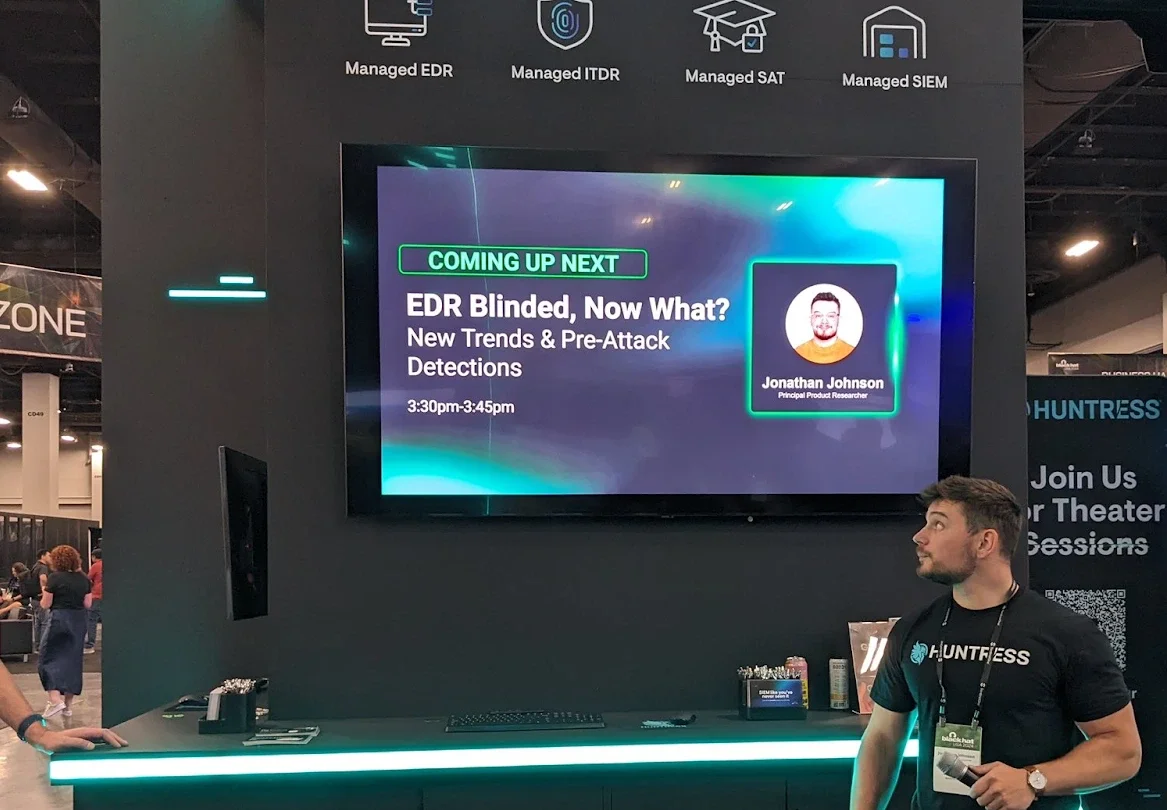
As many security practitioners know, tampering with Endpoint Detection and Response (EDR) products is a deep desire for threat actors and red teamers alike. I spoke about this briefly at BlackHat this year in my “EDR Blinded, Now What?” Huntress booth talk.
__wf_reserved_inherit
Speaking at BlackHat. Photo cred to my twin John Hammond.

In one of the slides, I talked about how one of the most common ways to “blind” EDRs is to apply firewall rules against the desired EDR applications. This technique is unique in the way that an attacker doesn’t need to directly access an EDR’s application themselves (open a handle to the process or file). Instead, they alter the application’s ability to communicate outbound to their server, as well as alter the server’s ability to communicate inbound to the application. So, although the EDR can collect telemetry of an action, those actions aren't being sent up for detections or investigations. In this blog, I'll touch on this technique and discuss how products can protect themselves from this attack. 


Blocking Mechanisms 

While we discuss the various ways one might block application's network communications, two ways really come to mind that are the most prevalent today: 

  1. Creating Windows Defender Firewall with Advanced Security rules
  2. Creating Windows Filtering Platform (WFP) rules 

Now, that might sound repetitive because it slightly is. That’s because the built-in Windows Defender Firewall leverages the Windows Filtering Platform to enforce its rules. However, I call it out because, as we’ll see later, we have to adjust the solution because depending on how you interact with each feature, the settings are set in different locations. 

Note: Before we proceed, it’s important to state that we’ll only be looking at default Windows firewall capabilities, not third-party ones. This blog also only focuses on when firewall rules are set via the Windows Firewall or WFP.

Windows FirewallI

The Windows Firewall has the ability to create custom rules that either allow or disallow an application to speak out through the network. Both inbound and outbound. There are no restrictions on which processes are targeted by these firewall rules, so as long as an attacker has local administrator rights they can successfully add an EDR agent into the firewall rule and block network connections. Most people have probably seen the following page as it relates to the Windows Firewall:
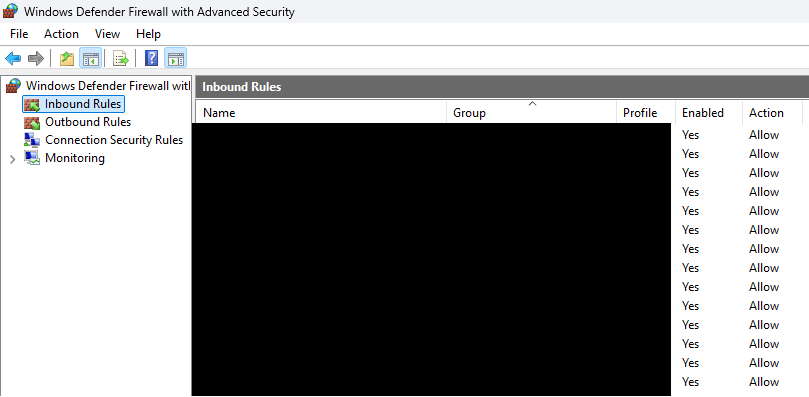
Figure 1: Windows Defender Firewall with Advanced Security Window

There is also an easy built-in tool to create firewall rules called netsh:
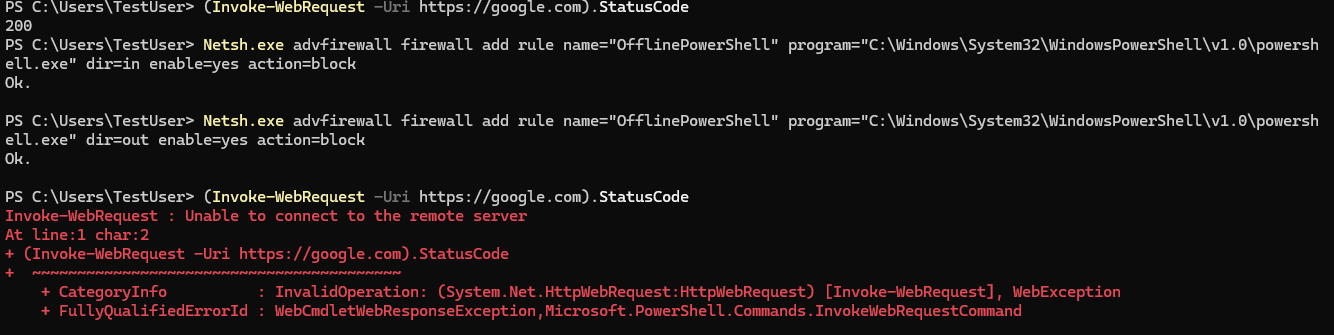
Figure 2: netsh advfirewall example

For something more custom, someone could leverage the INetFwRule and INetFwRules COM interfaces. Users can implement this themselves quite easily. A well-known tool that does this is EDRSandblast, which eventually leverages the Add method in the INetFwRules COM interface to create a new firewall rule against a known EDR binary.

Figure 3: EDRSandblast firewall creation example

Now, it’s good to note that with Windows AV turned on, Defender does block firewall rules being made against MsMpEng.exe. However, the key point is that this can be done against any EDR, and if they’re not monitoring, the network communications will be cut off. When these firewall rules are created, they’re actually stored in the registry under:

HKLM\System\CurrentControlSet\Services\SharedAccess\Parameters\FirewallPolicy\FirewallRules\{GUID}

{GUID} represents the firewall rule. This is stored as a REG_SZ value where the data holds the information about the rule:

v2.32|Action=Block|Active=TRUE|Dir=In|App={application-path}|Name={firewall-rule-name}|Desc={firewall-rule-name}|

Let’s touch on the most important bits of this rule: 

  • Action - the firewall action to take (allow or block)
  • Active - whether or not the firewall rule is currently active or not
  • Dir - direction to permit or deny communication between either In(bound) or Out(bound)
  • App - the application to block or allow
  • Name - firewall rule name
  • Desc (optional) - description of the firewall

There are other optional flags that can be put into the string as well. The three biggest tags here are Action, Dir, and App.

So before we move forward into the WFP, let’s remember the registry key HKLM\System\CurrentControlSet\Services\SharedAccess\Parameters\FirewallPolicy\FirewallRules\{GUID}. This will come in handy later when we discuss solutions.

Windows Filtering Platform (WFP)

The Windows Firewall leverages the Windows Filtering Platform to enforce its rules. Here, we won’t go in-depth about the internals of the WFP simply because we believe that a lot of other great researchers have. In fact, the following are great resources: 

  • Understanding Network Access in Windows AppContainers by James Forshaw
  • What The Filter (WTF) is Going on With Windows Filtering Platform by Sagie Dulce

Interacting with the WFP is a lot easier because there are direct APIs that we can take advantage of. A list of WFP APIs can be found here. For purposes of creating a WFP filter, the desired API is FwpmFilterAdd0. Many reading this blog have likely heard of EDRSilencer. This function is leveraged to create a WFP filter for both IPv4 and IPv6 addresses. When these rules are applied, there are two things that have to exist:

  • A provider - policy provider that is used for the management of the filter
  • A filter (inbound and outbound) - rule that if the conditions are met, takes the actions specified 

There are four types of run-time filters that users can interact with. Dynamic, Static, Persistent, and Built-in. The most valuable are persistent filters to an attacker, as they live until the filter is removed. When filters are set, they’re stored in the registry just like firewall rules, just in a different location:

Figure 4: Procmon output of WFP filters and provider being set

Each provider and filter is stored as a {GUID}value, and the filter data is stored as a byte array (REG_BINARY).
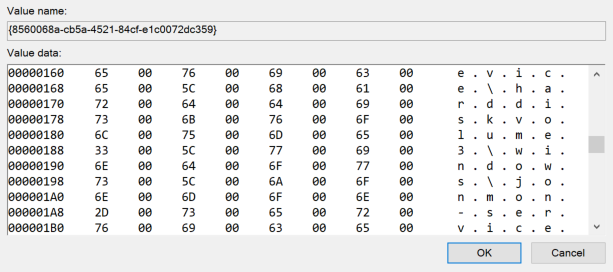
Figure 5: WFP filter byte array example

This can make parsing this data a little more difficult than the firewall rules above just because it isn’t just a simple string value. However, an easy way to interact with filters is with the Get-FwFilter PowerShell cmdlet. For example, you can get the information about a filter via the Get-FwFilter cmdlet if you have the FilterId or FilterKey:

FilterID
Loading Gist...
FilterKey
Loading Gist...

This is a great option if you’re curious what a specific filter is doing on your machine. Now, let’s see how to stop this from happening against an EDR application!


Solution 

We’ve identified that firewall rules and WFP filters are both eventually set in the registry. This is great for anyone trying to pick up on this activity because there are multiple ways to monitor the registry. We’d like to propose two avenues that a product could take if they want to stop this tampering technique in its tracks: Prevention and Immediate Removal.

Prevention

Products can either prevent it by leveraging a pre-callback routine for RegSetValue (RegNtPreSetValueKey). If a product has access to the kernel via a driver, then they could leverage RegNtPreSetValueKey to receive notifications when any registry value set operation is performed in the registry. Upon doing so, they could parse out the registry path and the data being set, and if it matched, they could return STATUS_ACCESS_DENIED to prevent that key from being set. A successful implementation would look something like the following: 
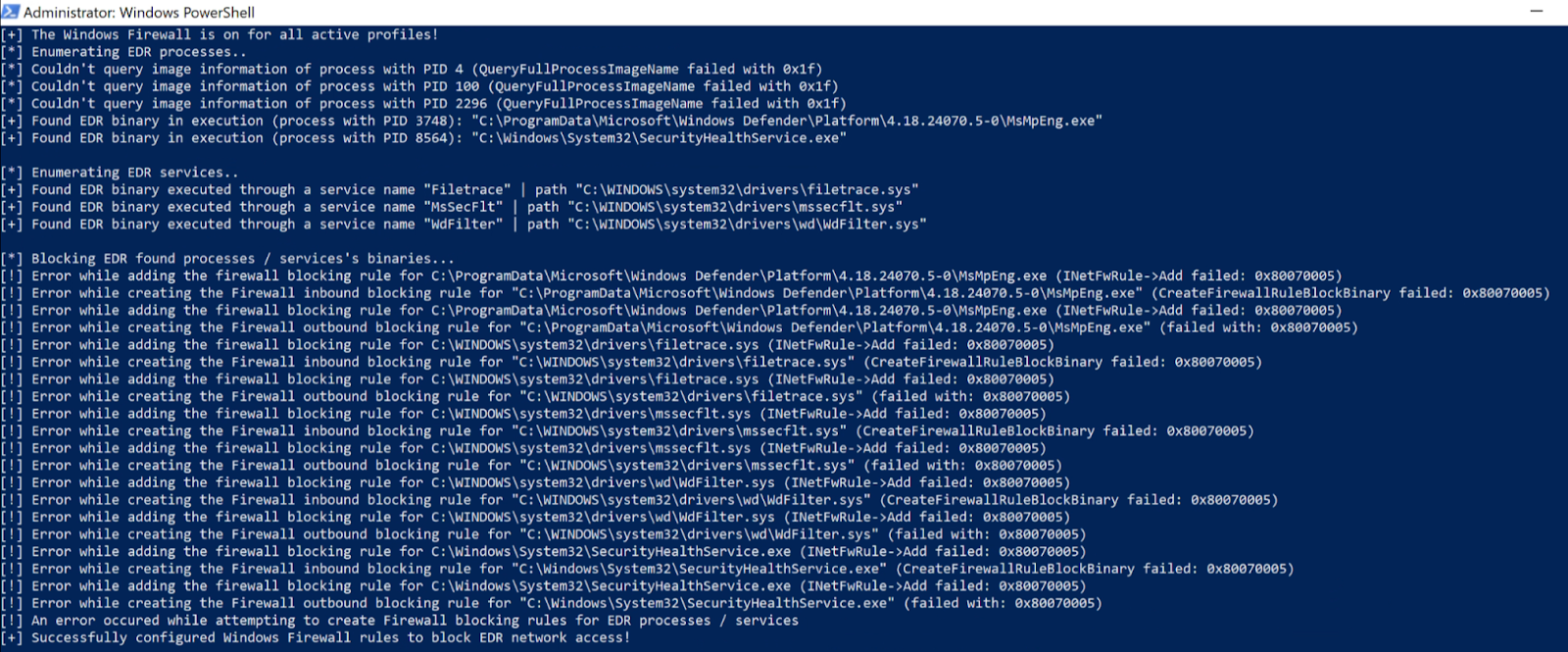
Figure 6: EDRSandblast failing to create firewall rules

You can see that the firewall rules aren't successfully created because they're blocked through the registry pre-callback RegNtPreSetValueKey notification. This works great from a prevention standpoint, but to be honest, I don’t always think it’s a good idea to parse or process data in the kernel unless it’s really lightweight. And although this works well for the firewall rules, that data is stored as a string value, where the WFP filters are stored as a byte array. Like the firewall rules above, this shouldn’t be processed/parsed in the kernel.

Immediate Removal

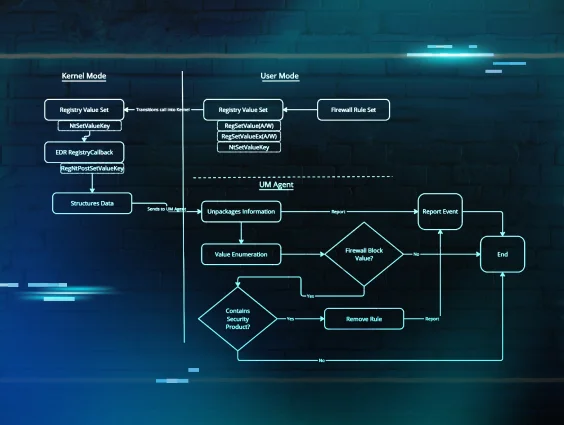
The methodology of “immediate removal” is similar to the method above, except that you’re technically allowing the undesired action to take place before doing anything about it. This can be done by monitoring for these registry value set operations via a post-callback (RegNtPostSetValueKey). This callback is notified once the action has already taken place in the registry. Now, someone could still process/parse this data in the kernel and deal with it, but I recommend storing the post-callback data and shipping it down to a user-mode agent so that it can take care of the parsing and processing. Figure 7 shows a very high-level architecture of how this can be done. There are many ways to do this, and this isn’t the only right way, but this is just how I did it when I created the proof-of-concept within JonMon.
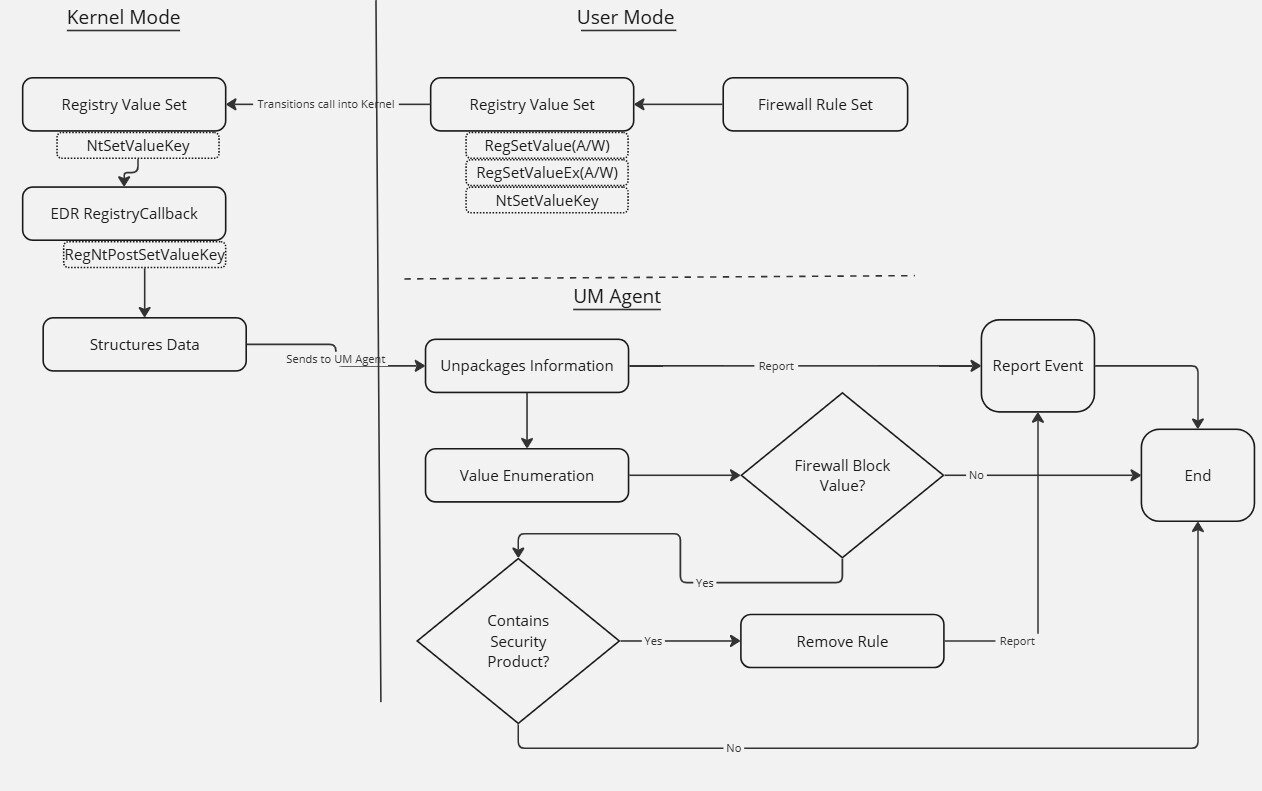
Figure 7: Basic EDR architecture for registry post-callback

Once the data is successfully shipped down to the user-mode agent and parsed, then the agent can safely get rid of the rules. You can’t just delete the registry keys because the rules/filters aren't immediately reset. Instead, you must remove them in a way so that the filtering engine refreshes after the removal. You could delete the registry key, but then you’d have to reboot the machine. Obviously, this approach isn’t an appropriate option, as products want to do modifications during runtime. There are some effective options to achieve this, however. For firewall rules, I leveraged COM to do this:
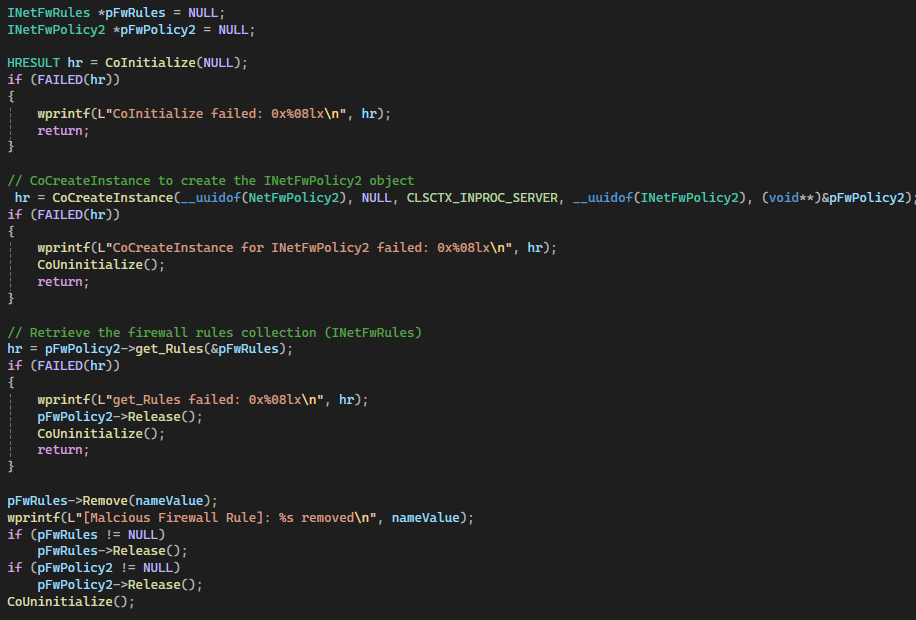
Figure 8: Code example for INetFwRules::Remove

I validated that the registry value held the undesired firewall policy and used the INetFwRules Remove Method to remove the firewall policy. Figure 9 shows how it looks after implementation:
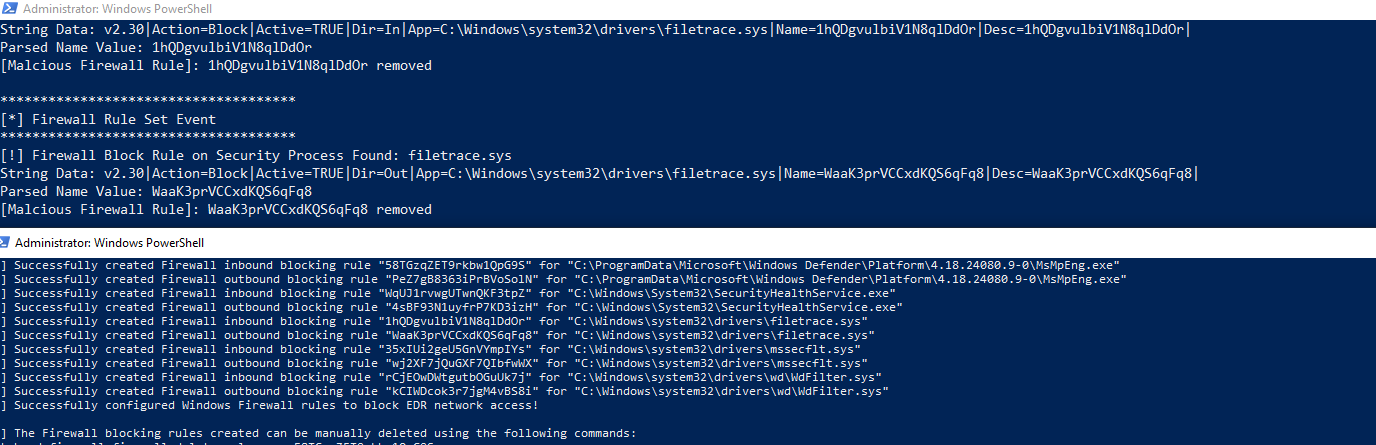
Figure 9: Example of malicious firewall rules being removed in real-time

You can see the rules were successfully created but immediately removed, rendering the tampering technique useless. 

For the filters and providers within the WFP, I leveraged the FwpmFilterDeleteById0 function to delete the filter and the FwpmProviderDeleteByKey0 function to delete the provider.
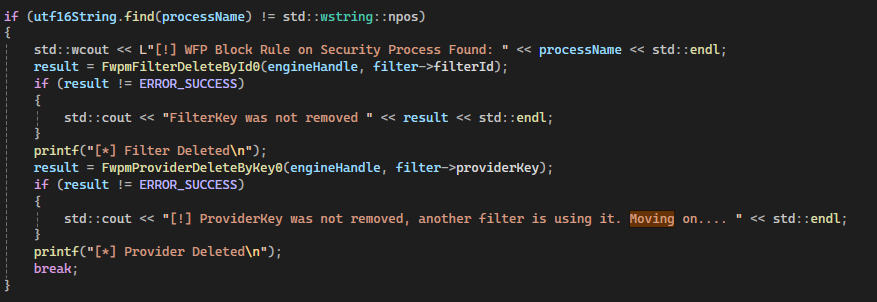
Figure 10: Code example of removing malicious WFP filters and providers

After this is implemented, we can see the filters and providers that are created, with EDRSilencer successfully deleted:
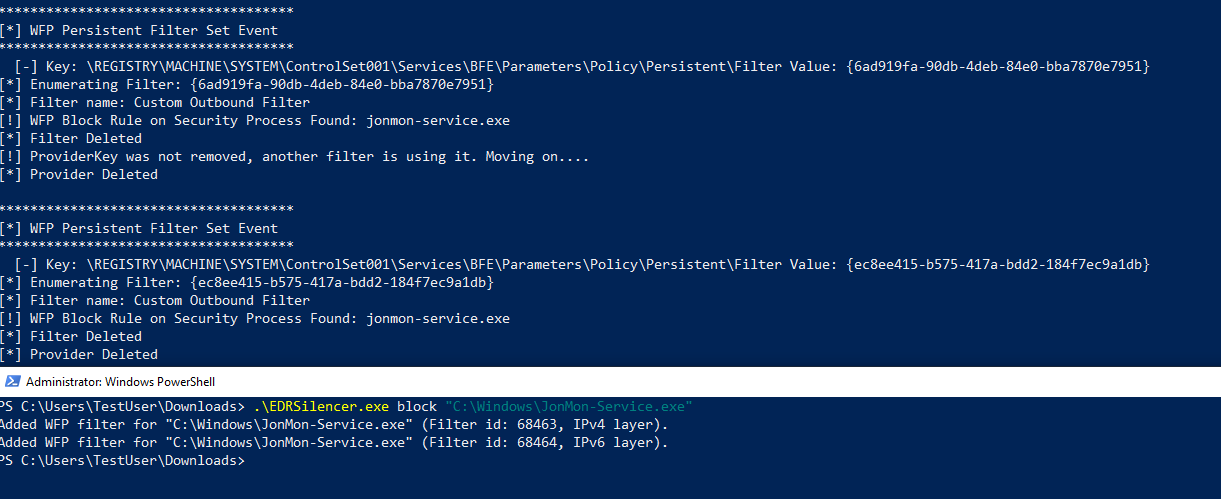
Figure 11: Example of malicious WFP filters being removed in real-time

While this method might not be "preventing" the rules from being written, it's just as effective. The product doesn’t need to parse and process this data in the kernel, and the removal is almost immediate. Lastly, you don’t have to use the registry callbacks, as the WFP has the 5447 security event that states when a new rule is created. Someone could monitor for that and perform the same actions as above to remove that rule.


Conclusion

Tampering with EDRs is a very hot topic, and I see many people talking about leveraging firewall policies and WFP filters to blind EDRs. It’s clear this is very effective. It’s also unique, as the attacker doesn’t have to interface with the EDR’s processes directly. I’ve yet to see anyone go in-depth on how to stop or mitigate this tamper technique, so I wanted to provide some potential solutions. I hope this helps you understand this tampering technique better and how to mitigate it.


Want to dive into even more attacker techniques? Join us at Tradecraft Tuesday! No products, no pitches—just tradecraft.

Categories
Threat Analysis
Summarize this postClose Speech Bubble
ChatGPTClaudePerplexityGoogle AI

See Huntress in action

Our platform combines a suite of powerful managed detection and response tools for endpoints and Microsoft 365 identities, science-backed security awareness training, and the expertise of our 24/7 Security Operations Center (SOC).

Book a Demo
Share
Facebook iconTwitter X iconLinkedin iconDownload icon
Glitch effect

You Might Also Like

  • From Code to Coverage (Part 1): The OID Transformation That Hinders LDAP Detection

    Learn why your LDAP detection rules never fire and how to fix them. Hint: it's the OID-to-bitwise transformation.
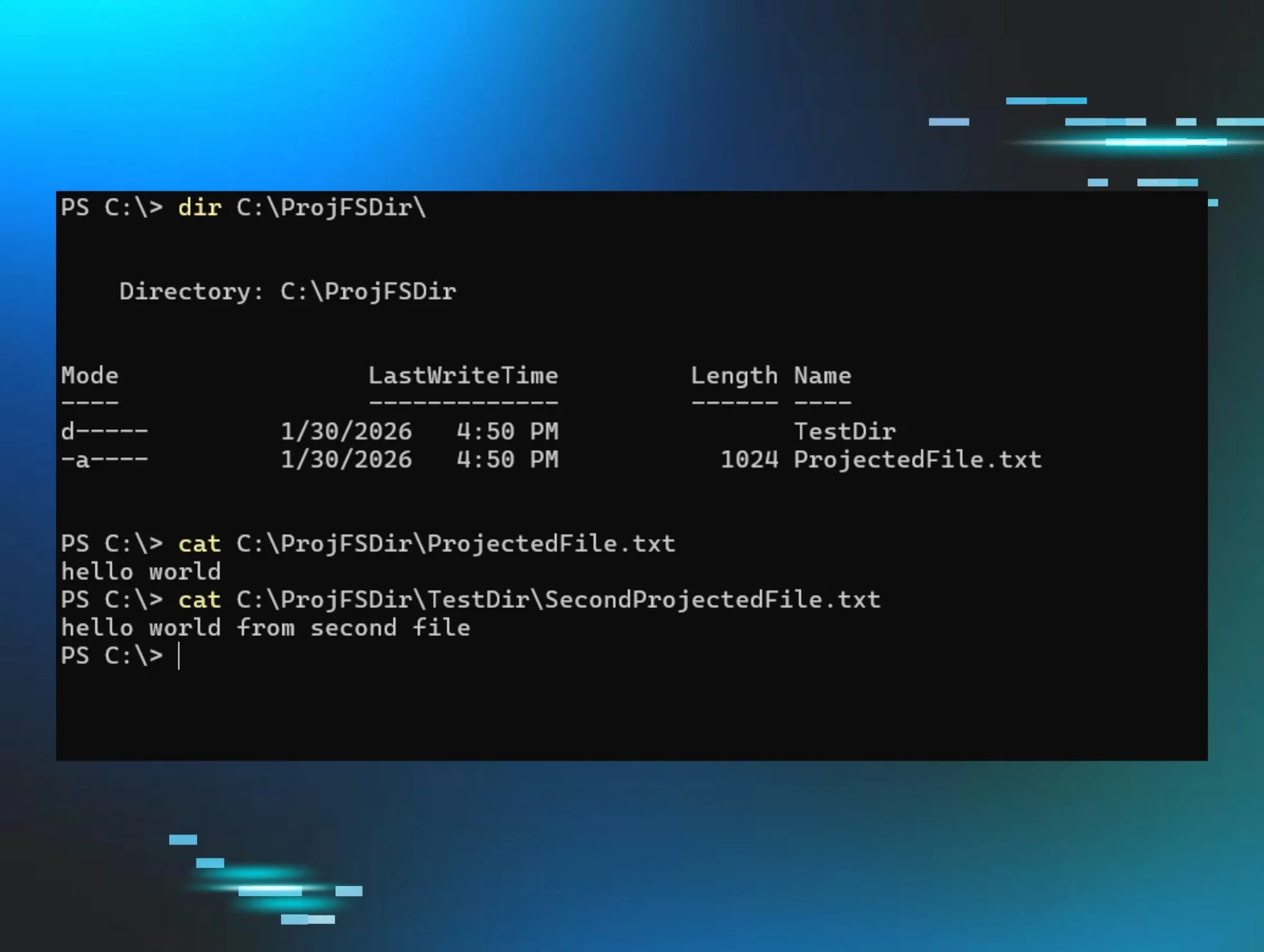
  • The Phantom File System: Inside the Windows ProjFS

    Huntress uncovers the mechanics of the Windows Projected File System. Explore the ProjFS driver, virtualization roots, and the PowerShell commands.
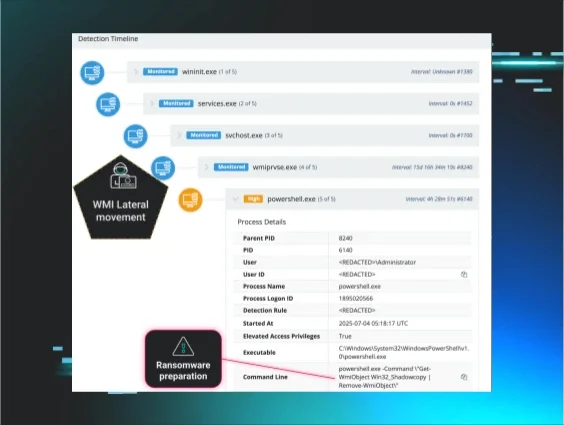
  • The Commented Kill Chain: Why Old Ransomware Playbooks Never Die

    When a clearly commented script revealed an attacker's tactics, Huntress prevented encryption. Read on to learn more about the evolution of recycled ransomware playbooks used by multiple threat actors.
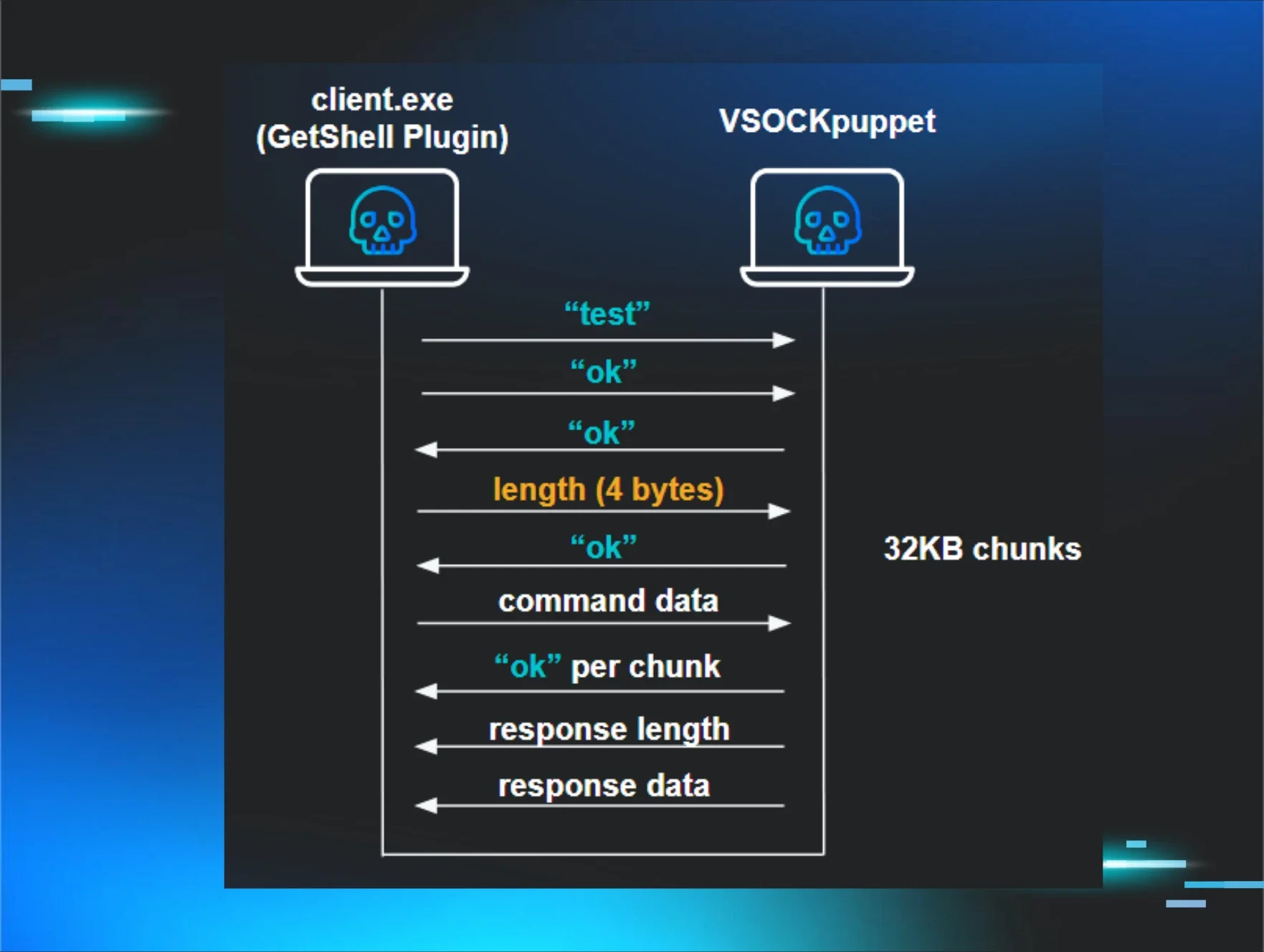
  • The Great VM Escape: ESXi Exploitation in the Wild

    Huntress outlines a complex, multi-step attack designed to break out of guest VMs and target the ESXi hypervisor, using potential zero-day vulnerabilities and sneaky VSOCK communication.
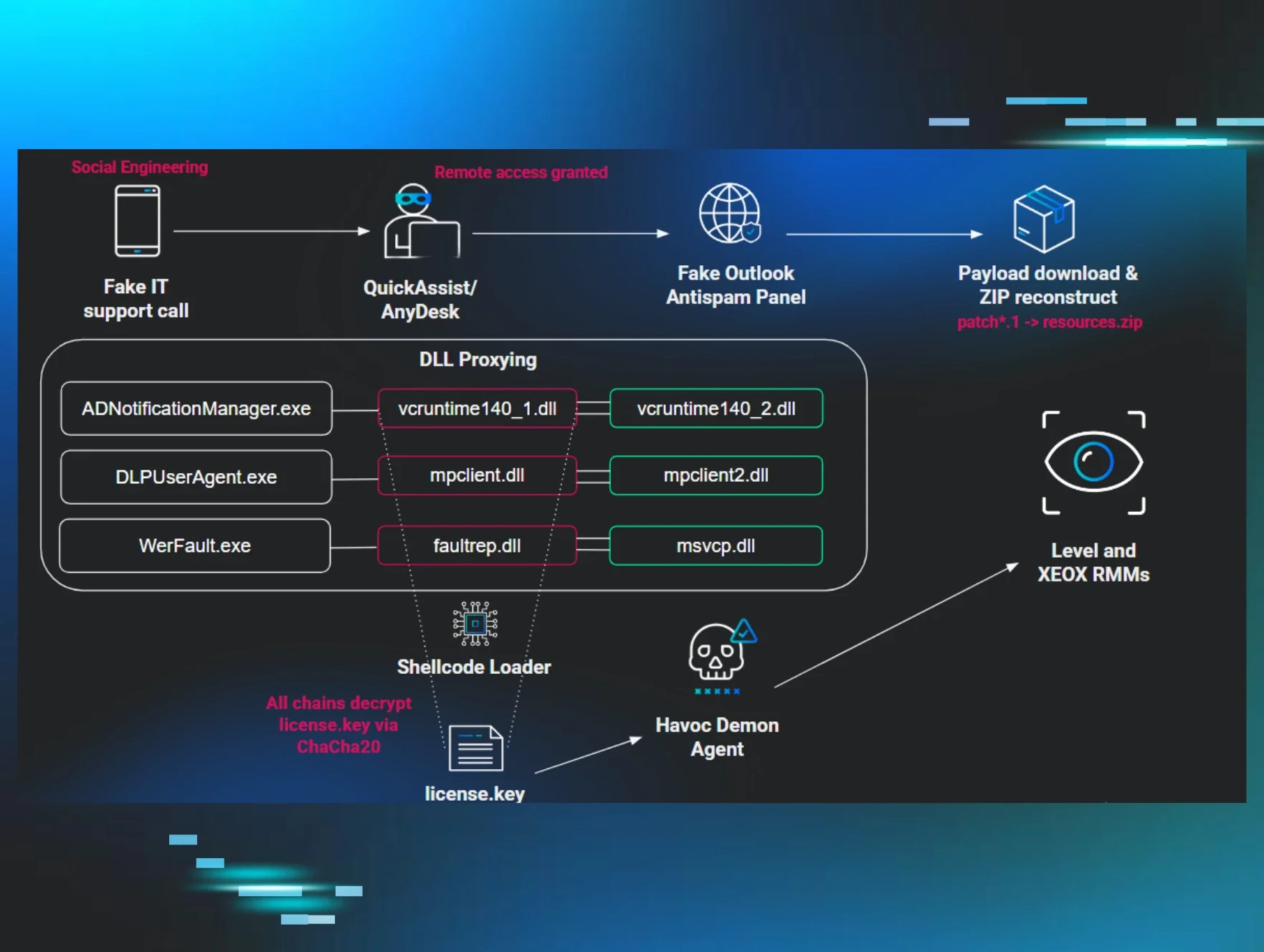
  • Exorcising Demons: Fake Tech Support Delivers Havoc Command & Control

    Adversaries leverage fake tech support to deploy a modified Havoc C2 agent, employing DLL sideloading, syscall evasion (HellsGate), and RMM tools for persistent access.
  • defendnot? Defend YES! Detecting Malicious Security Product Bypass Techniques

    "defendnot" bypasses Windows Defender using undocumented APIs. Learn detection strategies and robust defenses against this sophisticated evasion technique.
  • From Code to Coverage (Part 3): SDFlags - The Log Field I'd Been Ignoring That Unlocked Attack Path Detection

    While investigating LDAP filters and attributes, I completely missed "SDFlags" in my Event 1644 logs. When I finally noticed it, the investigation led to nTSecurityDescriptor, attack path discovery, and a high-confidence detection signature.
  • Unlocking SIEM: The Role of Smart Filtering

    Learn how our Smart Filtering Engine changes the game on how you view log data ingestion and management.

Sign Up for Huntress Updates

Get insider access to Huntress tradecraft, killer events, and the freshest blog updates.
Privacy • Terms
By submitting this form, you accept our Terms of Service & Privacy Policy
Thank you! Your submission has been received!
Oops! Something went wrong while submitting the form.
Huntress Managed Security PlatformManaged EDRManaged EDR for macOSManaged EDR for LinuxManaged ITDRManaged SIEMManaged Security Awareness TrainingManaged ISPMManaged ESPMBook a Demo
PhishingComplianceBusiness Email CompromiseEducationFinanceHealthcareManufacturingState & Local Government
Managed Service ProvidersResellersIT & Security Teams24/7 SOCCase Studies
BlogResource CenterCybersecurity 101Upcoming EventsSupport Documentation
Our CompanyLeadershipNews & PressCareersContact Us
Huntress white logo

Protecting 215k+ customers like you with enterprise-grade protection.

Privacy PolicyCookie PolicyTerms of UseCookie Consent
Linkedin iconTwitter X iconYouTube iconInstagram icon
© 2025 Huntress All Rights Reserved.

Join the Hunt

Get insider access to Huntress tradecraft, killer events, and the freshest blog updates.

By submitting this form, you accept our Terms of Service & Privacy Policy