



Don’t let overlooked obligations become incidents. Learn how.
Utility navigation bar redirect icon
Portal LoginSupportContact
Search
Close search
Huntress Logo in Teal
  • Platform Overview
    Managed EDR

    Get full endpoint visibility, detection, and response.

    Managed EDR

    Get full endpoint visibility, detection, and response.

    Managed ITDR

    Protect your Microsoft 365 identities and email environments.

    Managed ITDR

    Protect your Microsoft 365 identities and email environments.

    Managed SIEM

    Managed threat response and robust compliance support at a predictable price.

    Managed SIEM

    Managed threat response and robust compliance support at a predictable price.

    Managed Security Awareness Training

    Empower your teams with science-backed security awareness training.

    Managed Security Awareness Training

    Empower your teams with science-backed security awareness training.

    Managed ISPM

    Continuous Microsoft 365 and identity hardening, managed and enforced by Huntress experts.

    Managed ISPM

    Continuous Microsoft 365 and identity hardening, managed and enforced by Huntress experts.

    Managed ESPM

    Proactively secure endpoints against attacks.

    Managed ESPM

    Proactively secure endpoints against attacks.

    Integrations
    Integrations
    Support Documentation
    Support Documentation
    See Huntress in Action

    Quickly deploy and manage real-time protection for endpoints, email, and employees - all from a single dashboard.

    Huntress Cybersecurity
    See Huntress in Action

    Quickly deploy and manage real-time protection for endpoints, email, and employees - all from a single dashboard.

    Huntress Cybersecurity
  • Threats We Stop
    Phishing
    Phishing
    Business Email Compromise
    Business Email Compromise
    Ransomware
    Ransomware
    Infostealers
    Infostealers
    View Allright arrowView Allright arrow
    Industries We Serve
    Education
    Education
    Financial Services
    Financial Services
    State and Local Government
    State and Local Government
    Healthcare
    Healthcare
    Law Firms
    Law Firms
    Manufacturing
    Manufacturing
    Utilities
    Utilities
    View Allright arrowView Allright arrow
    Tailored Solutions
    MSPs
    MSPs
    Resellers
    Resellers
    SMBs
    SMBs
    Compliance
    Compliance
    What Gets Overlooked Gets Exploited

    Most days, nothing happens. But one day, something will.

    Huntress Cybersecurity
    Cybercriminals Have Evolved

    Get the intel on today’s cybercriminal groups and learn how to protect yourself.

    Huntress Cybersecurity
  • Pricing
  • Community Series
    The Product Lab

    Shape the next big thing in cybersecurity together.

    The Product Lab

    Shape the next big thing in cybersecurity together.

    Fireside Chat

    Real people. Real perspectives. Better conversations.

    Fireside Chat

    Real people. Real perspectives. Better conversations.

    Tradecraft Tuesday

    No products, no pitches – just tradecraft.

    Tradecraft Tuesday

    No products, no pitches – just tradecraft.

    _declassified

    Exposing hidden truths in the world of cybersecurity.

    _declassified

    Exposing hidden truths in the world of cybersecurity.

    Resources
    Upcoming Events
    Upcoming Events
    Ebooks
    Ebooks
    On-Demand Webinars
    On-Demand Webinars
    Videos
    Videos
    Whitepapers
    Whitepapers
    Datasheets
    Datasheets
    Cybersecurity Education
    Cybersecurity 101
    Cybersecurity 101
    Cybersecurity Guides
    Cybersecurity Guides
    Threat Library
    Threat Library
    Real Tradecraft, Real Results
    Real Tradecraft, Real Results
    2026 Cyber Threat Report
    2026 Cyber Threat Report
    The Huntress Blog
    Huntress Lands on the Microsoft Marketplace
    Huntress Cybersecurity
    Huntress Lands on the Microsoft Marketplace
    Huntress Cybersecurity
    How Huntress & DEFCERT Are Streamlining CMMC Assessment Prep
    Huntress Cybersecurity
    How Huntress & DEFCERT Are Streamlining CMMC Assessment Prep
    Huntress Cybersecurity
    Live Hacking Into Microsoft 365 with Kyle Hanslovan
    Huntress Cybersecurity
    Live Hacking Into Microsoft 365 with Kyle Hanslovan
    Huntress Cybersecurity
  • Why Huntress

    Go beyond AI in the fight against today’s hackers with Huntress Managed EDR purpose-built for your needs

    Huntress Cybersecurity
    Why Huntress

    Go beyond AI in the fight against today’s hackers with Huntress Managed EDR purpose-built for your needs

    Huntress Cybersecurity
    The Huntress SOC

    24/7 Security Operations Center

    The Huntress SOC

    24/7 Security Operations Center

    Reviews

    Why businesses of all sizes trust Huntress to defend their assets

    Reviews

    Why businesses of all sizes trust Huntress to defend their assets

    Case Studies

    Learn directly from our partners how Huntress has helped them

    Case Studies

    Learn directly from our partners how Huntress has helped them

    Community

    Get in touch with the Huntress Community team

    Community

    Get in touch with the Huntress Community team

    Compare Huntress
    Bitdefender
    Bitdefender
    Blackpoint
    Blackpoint
    Breach Secure Now!
    Breach Secure Now!
    Crowdstrike
    Crowdstrike
    Datto
    Datto
    SentinelOne
    SentinelOne
    Sophos
    Sophos
    Compare Allright arrowCompare Allright arrow
  • HUNTRESS HUB

    Login to access top-notch marketing resources, tools, and training.

    Huntress Cybersecurity
    HUNTRESS HUB

    Login to access top-notch marketing resources, tools, and training.

    Huntress Cybersecurity
    Partners
    MSPs

    Join our partner community to deliver expert-led managed security.

    MSPs

    Join our partner community to deliver expert-led managed security.

    Resellers

    Partner program designed to grow your cybersecurity business.

    Resellers

    Partner program designed to grow your cybersecurity business.

    Tech Alliances

    Driving innovation through global technology Partnerships

    Tech Alliances

    Driving innovation through global technology Partnerships

    Microsoft Partnership

    A Level-Up for Your Business Security

    Microsoft Partnership

    A Level-Up for Your Business Security

  • Press Release
    Huntress Announces Collaboration with Microsoft to Strengthen Cybersecurity for Businesses of All Sizes
    Huntress Cybersecurity
    Press Release
    Huntress Announces Collaboration with Microsoft to Strengthen Cybersecurity for Businesses of All Sizes
    Huntress Cybersecurity
    Our Story

    We're on a mission to shatter the barriers to enterprise-level security.

    Our Story

    We're on a mission to shatter the barriers to enterprise-level security.

    Newsroom

    Explore press releases, news articles, media interviews and more.

    Newsroom

    Explore press releases, news articles, media interviews and more.

    Meet the Team

    Founded by former NSA Cyber Operators. Backed by security researchers.

    Meet the Team

    Founded by former NSA Cyber Operators. Backed by security researchers.

    Careers

    Ready to shake up the cybersecurity world? Join the hunt.

    Careers

    Ready to shake up the cybersecurity world? Join the hunt.

    Awards
    Awards
    Contact Us
    Contact Us
  • Portal Login
  • Support
  • Contact
  • Search
  • Get a Demo
  • Start for Free
Portal LoginSupportContact
Search
Close search
Get a Demo
Start for Free
HomeBlog
The ClickFix Attack That Wasn’t: From a Fake AnyDesk Installer to MetaStealer
Published:
August 29, 2025

The ClickFix Attack That Wasn’t: From a Fake AnyDesk Installer to MetaStealer

By:
John Hammond
Alden Schmidt
Lindsey O'Donnell-Welch
Share icon
Glitch effectGlitch effectGlitch effect

ClickFix attacks have been ticking up for over a year now, as attackers find success in tricking users into executing malicious code on their computers using CAPTCHA-based lures. We’ve seen quite a bit of these types of attacks on our end - but we’ve also seen threat actors adopting ClickFix-esque techniques in attacks that don’t follow the exact ClickFix playbook.

Recently, our very own John Hammond received an email from someone who had come across a fake AnyDesk installer while searching for the AnyDesk remote tool. 

While early indicators of the attack look like it would turn into another ClickFix scam, a little bit of digging shows a unique infection chain that involves a fake Cloudflare Turnstile lure, the Windows search protocol, and an MSI package disguised as a PDF that cleverly grabs the victim’s hostname. The attack ultimately aims to drop MetaStealer, a commodity infostealer that’s been around since 2022 and is known for harvesting credentials and stealing files.


ClickFix, FileFix, and other ‘fix’ variants

First, a quick primer on the widely used ClickFix technique. The premise of ClickFix is that threat actors convince users to “fix” a purported issue, usually with a CAPTCHA on a webpage that they arrive on via a phishing message, or otherwise. The “solution” is copying and pasting a command fed to victims via an attacker-controlled prompt, which quietly kicks off the attack chain.

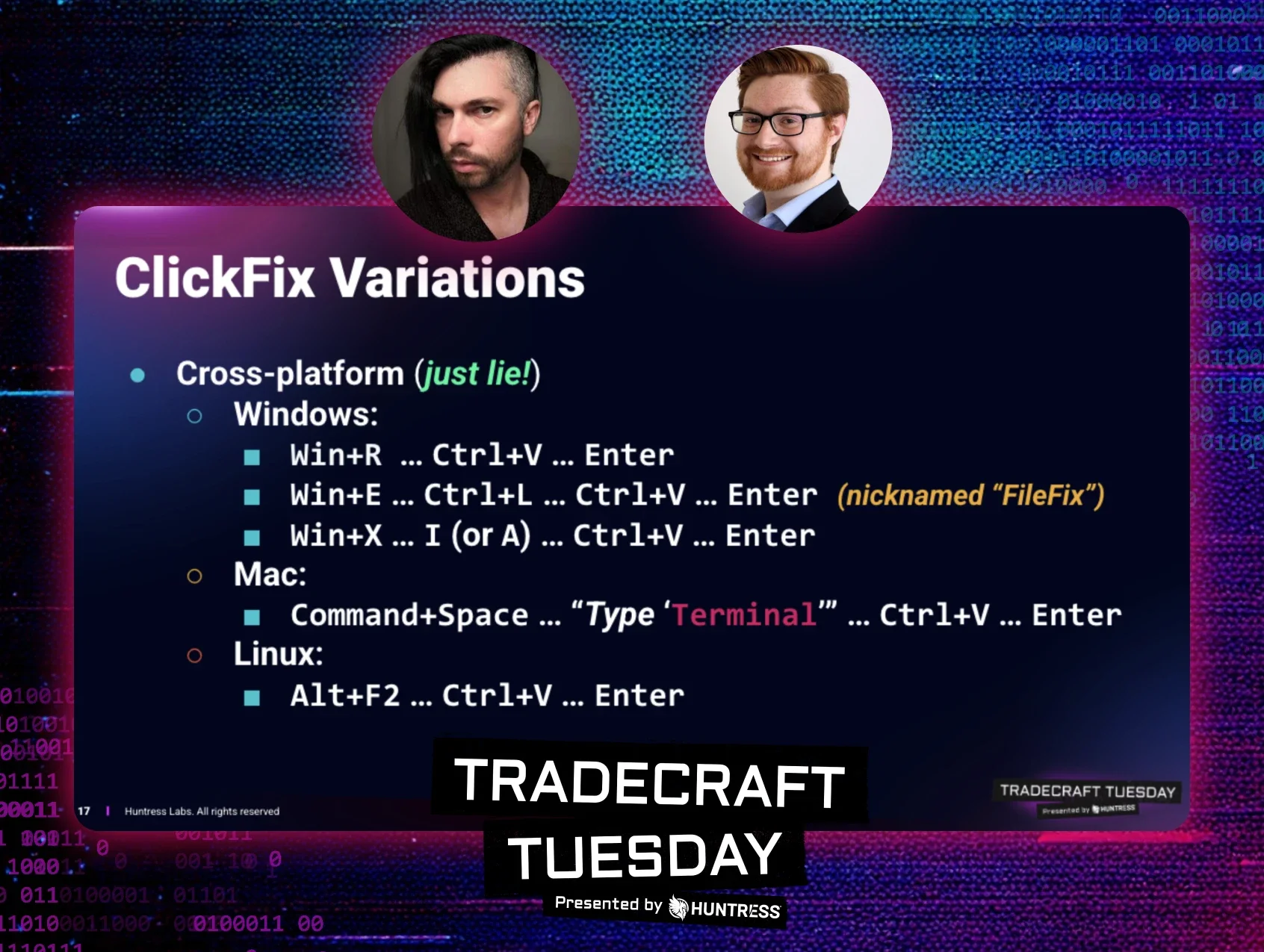
While the classic ClickFix attack tricks users to paste and run commands in their Windows Run dialog box or via PowerShell, other variants of the attack have also sprung up that take a different approach. A few months ago, attackers turned to a similar technique, dubbed FileFix, which involves Windows File Explorer instead of the Run dialog box.

We’ve seen a number of incidents that stem from ClickFix attacks. In the August 26 incident shown in Figure 1 below, for instance, we responded to an attack where a user executed a malicious command given to them via a fake Cloudflare Turnstile, which is Cloudflare’s verification tool meant to replace CAPTCHAs for weeding out bots. This then downloaded and installed an infostealer. 

Closer investigation revealed that the victim had visited the landing page teams-one[.]com. This page showed a Cloudflare Turnstile and marked the beginning stage of the ClickFix attack. 
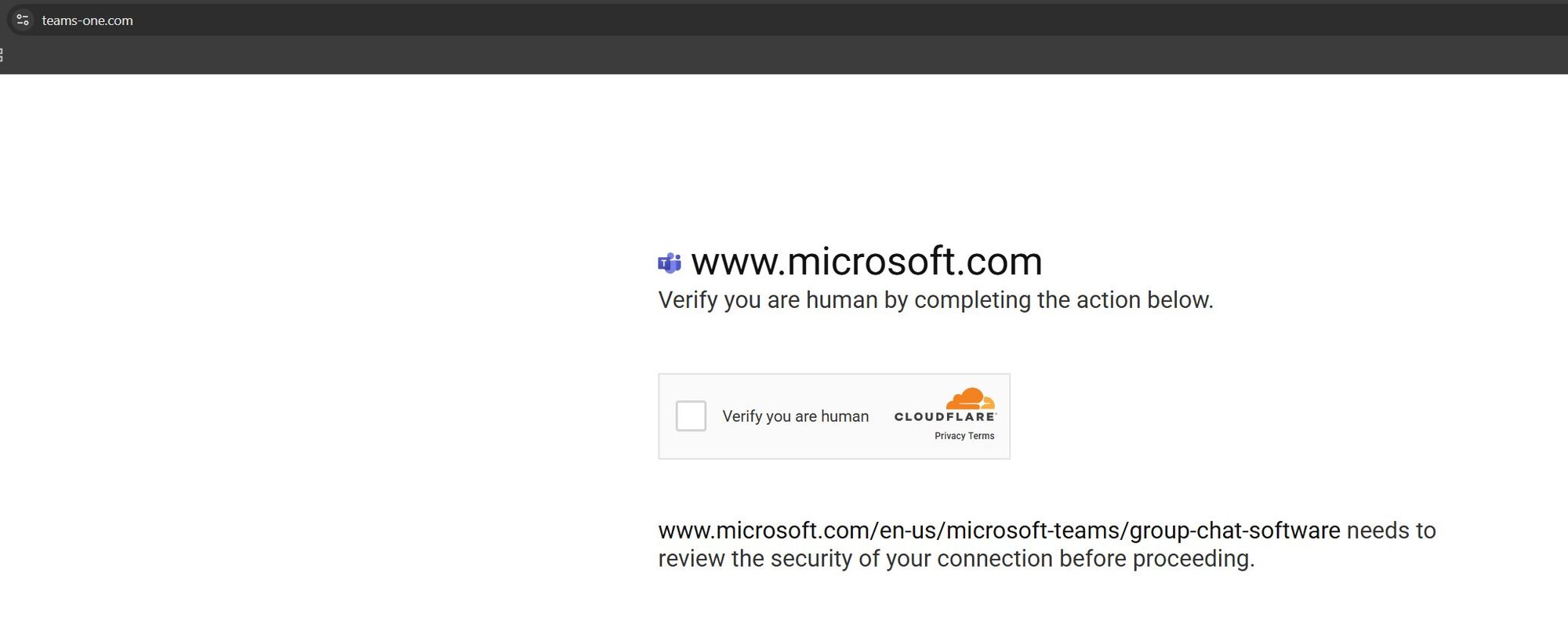
Figure 1: Another attack involving a Cloudflare Turnstile - this time an actual ClickFix attack 


Though there are similarities that we’ll outline below, the run-of-the-mill ClickFix incident demonstrated above differs significantly from the MetaStealer attack that we recently came across.


A ClickFix-turned-not-fix attack: What we saw

The initial link for the fake AnyDesk installer redirects users to https[://]anydeesk[.]ink/download/anydesk[.]html, which displays a Cloudflare Turnstile - and a very questionable UI. The page purports to support “Secure Access Verification”, prompting the user to click a single button on the Cloudflare Turnstile to “verify you are human.”
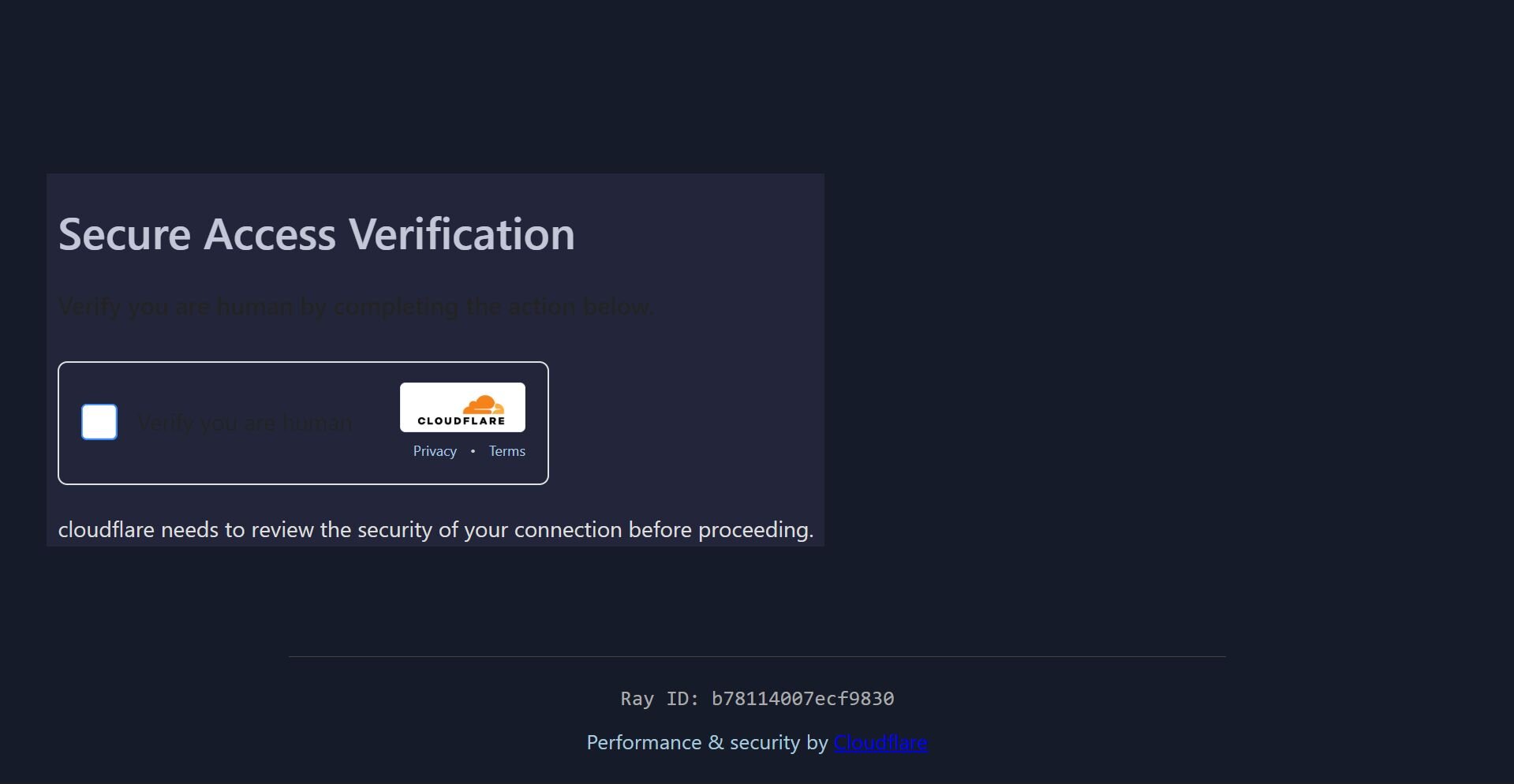

Figure 2: The initial link that redirects users to a fake Cloudflare Turnstile 

A quick look at the underlying HTML for the webpage (using View Source) is shrouded by obfuscated JavaScript, but that can be easily unraveled with JavaScript deobfuscation tools available in the browser tools console. This reveals the actual source code and reveals the window.location.href value to be https[://]verification[.]anydeesk[.]ink/reCAPTCHA-v2[.]php.

Up to this point, this has all the tell-tale signs of a ClickFix campaign: it involves a classic human verification social engineering piece, and sets the end user up to click on a box. 

However, when the victim clicks the box, the prompts in this attack lead to Windows File Explorer, Windows’ file management tool, as opposed to the Windows Run dialog box as we have seen with ClickFix. This is more indicative of a FileFix attack—but this attack still isn’t strictly FileFix, where victims are prodded to launch the address bar in Windows File Explorer (using a Ctrl+L and Ctrl+V combination to paste a PowerShell command that was automatically copied to their clipboard).

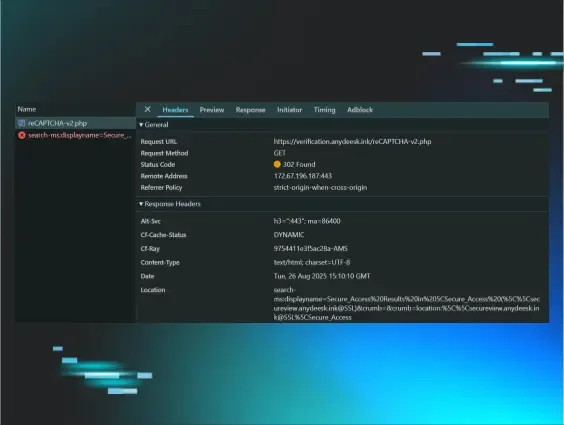
Instead, in this attack, the PHP above redirects users to the Windows protocol handler (search-ms URI), a legitimate feature enabling applications to kick off specific search queries in Windows File Explorer. 
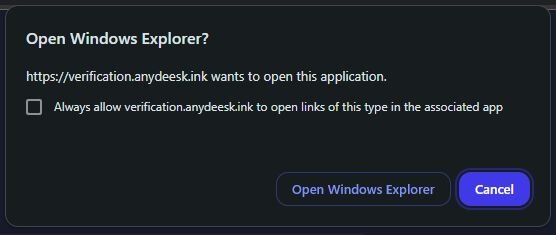
Figure 3: The attack chain redirects users to a prompt asking them to Open Windows File Explorer  


The specific Windows File Explorer “Search” redirect location can be seen in Figure 4 below, which displays the name for a custom search query as part of the search-ms URI protocol.
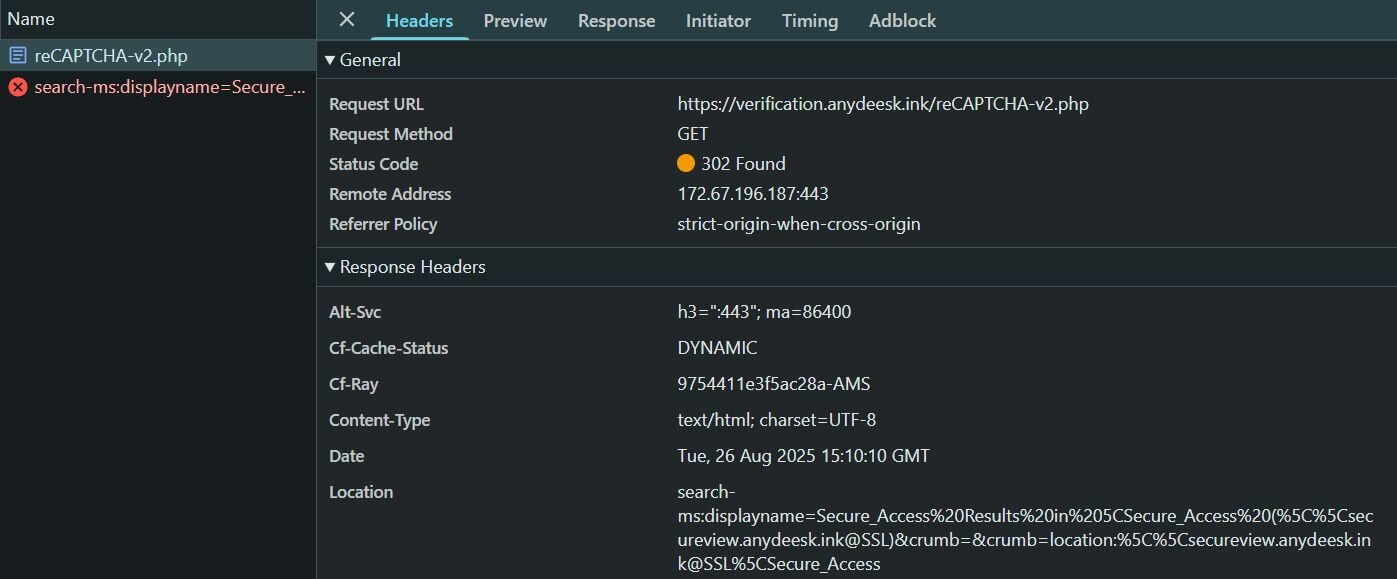

Figure 4: The displayname parameter for search-ms reveals the next phase of the attack


As seen in Figure 5 below, Windows File Explorer then directs the victim to an attacker-controlled SMB share, essentially a remote file share allowing clients to access files on a remote server over a network. Here, victims are presented with a Windows shortcut LNK file; however, this LNK file is disguised as a PDF file called Readme Anydesk.pdf.
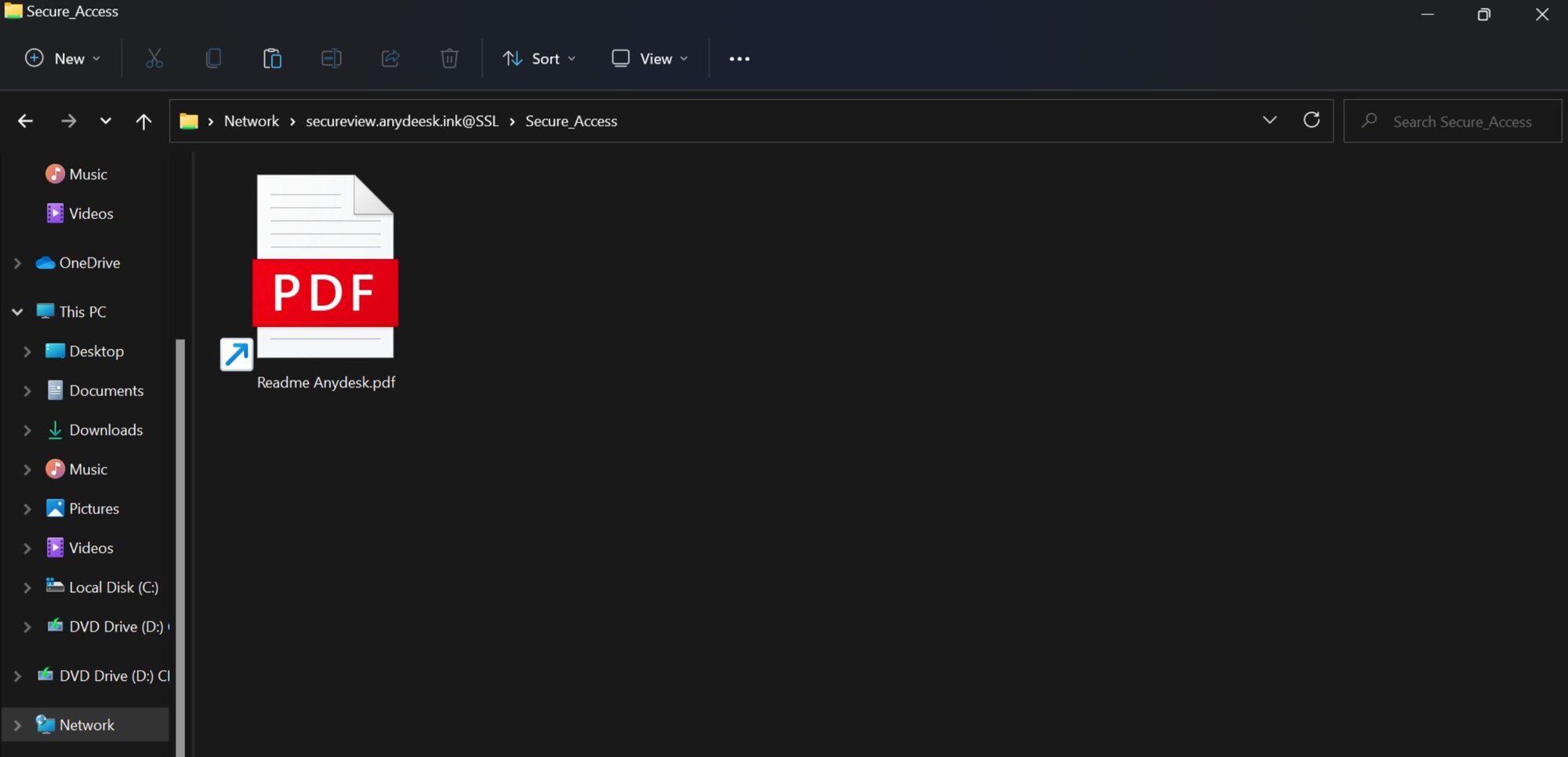

Figure 5: A Windows shortcut file disguised as a decoy AnyDesk PDF


Fake PDF lure: Snagging victim hostnames

As you can see below, the LNK file’s payload is:

Once clicked, this file’s payload kicks off a few processes. Here, cmd.exe starts the automatic download of a legitimate AnyDesk installer on Microsoft Edge, possibly as a way to avoid suspicion for the victim. Meanwhile, it also begins a download for another purported “PDF,” which is downloaded from chat1[.]store and dropped into the temporary directory. 

Notably, this fake PDF is configured to grab the %COMPUTERNAME% environment variable as a subdomain. Subdomains don’t need to know the user’s hostname ahead of time, so this is a clever way for the attacker to nab that information from the victim.  

The fake PDF is then installed by msiexec (revealing that it’s actually an MSI package) and the cmd.exe process is then killed.

Upon closer inspection of chat1[.]store (reached through a curl user agent), we can see everything from the MSI package, including files that would have been triggered as part of the attack chain. The two important files in the MSI package are a DLL (CustomActionDLL) and a CAB archive (Binary.bz.WrappedSetupProgram) which contains several other files. The CAB file contains two additional malicious files: 1.js which is responsible for cleaning up the infection chain, and ls26.exe which is the MetaStealer dropper. The MetaStealer file (ls26.exe) is a very large binary and is protected with Private EXE Protector. Upon further inspection, the executable reveals the same types of behavior that we’ve seen in known samples of MetaStealer, such as stealing from crypto wallets. 


ClickFix variants and lessons learned

ClickFix, FileFix, and even this alternate-ClickFix attack we recently found show the power of blending social engineering with mundane processes, like CAPTCHAs or other verification tools. Additionally, these types of attacks that require some level of manual interaction from the victim, as they work to “fix” the purported broken process themselves, work in part because they can potentially circumvent security solutions. 

The guidance for organizations in regards to ClickFix has previously centered around taking measures like disallowing users to use the Windows Run dialog box if it’s not needed for everyday tasks. While this can be effective against traditional ClickFix attacks, the variants like the one above show that threat actors are continuing to move the needle in their infection chains, throwing a wrench into detection and prevention.

Organizations should take additional measures, including educating users about the lures linked to ClickFix-like attacks. Users should be trained on spotting CAPTCHAs that prompt them to copy and paste into the Run dialog box or redirect to Windows File Explorer. 


IOCs

Indicator 

Description

https[://]anydeesk[.]ink/download/anydesk[.]html

Domain with fake Cloudflare Turnstile 

macawiwmaacckuow[.]xyz

MetaStealer C2 Domain

yeosyyyaewokgioa[.]xyz

MetaStealer C2 Domain

cmqsqomiwwksmcsw[.]xyz

MetaStealer C2 Domain

38[.]134[.]148[.]74

MetaStealer C2 IP Address

ls26.exe


SHA256
0fc76b7f06aa80a43abafc1e9b88348734e327feb306d700c877c6a210fbd5e7

MetaStealer dropper PE

CustomActionDLL


SHA256
fd622cf73ea951a6de631063aba856487d77745dd1500adca61902b8dde56fe1

File found in MSI package

Binary.bz.WrappedSetupProgram


SHA256
513992d7076984d5c5a42affc12b6a00eef820f3254af75c9958ef3310190317

CAB file containing malicious components


Categories
Threat Analysis
Summarize this postClose Speech Bubble
ChatGPTClaudePerplexityGoogle AI

See Huntress in action

Our platform combines a suite of powerful managed detection and response tools for endpoints and Microsoft 365 identities, science-backed security awareness training, and the expertise of our 24/7 Security Operations Center (SOC).

Book a Demo
Share
Facebook iconTwitter X iconLinkedin iconDownload icon
Glitch effect

You Might Also Like

  • The Craftiest Trends, Scams, and Tradecraft of 2025 (So Far)

    John Hammond and Greg Linares with Huntress discuss the top tradecraft we’ve seen this year so far, from ClickFix attacks to deepfake social engineering
  • Don’t Sweat the *Fix Techniques

    Learn how ClickFix techniques like FileFix, TerminalFix, and DownloadFix trick users into compromising. Then, learn proven detection methods using chokepoint strategies and behavioral analytics.
  • ClickFix Gets Creative: Malware Buried in Images

    Huntress uncovered an attack utilizing a ClickFix lure to initiate a multi-stage malware execution chain. This analysis reveals how threat actors use steganography to conceal infostealers like LummaC2 and Rhadamanthys within seemingly harmless PNGs.
  • Five Shady Phishing Email Techniques We Spotted in 2025

    From fake UPS shipping notifications to PayPal-themed callback phishing, here are the five top phishing techniques we’re seeing this year.
  • Rapid Response: Microsoft Office RCE - “Follina” MSDT Attack

    A new attack vector enables hackers to more easily compromise users with malicious Microsoft Office documents.
  • The Threats Security Pros Are Now Explaining at the Holiday Dinner Table

    From "React2Shell" exploitation to sophisticated "Living off Trusted Sites" phishing, Huntress experts break down the threats targeting both enterprises and families today.
  • Velociraptor Misuse, Pt. I: WSUS-Up?

    Huntress has seen an uptick in threat actors abusing the Velociraptor open-source DFIR tool in a range of attacks, including a recent incident involving WSUS exploitation.
  • Ask Huntress: Fake .XPS Invoice Leading to Credential Phishing

    Explore this phishing campaign used the age-old “Please remit payment” spiel to lure potential victims into opening the attached file.

Sign Up for Huntress Updates

Get insider access to Huntress tradecraft, killer events, and the freshest blog updates.
Privacy • Terms
By submitting this form, you accept our Terms of Service & Privacy Policy
Thank you! Your submission has been received!
Oops! Something went wrong while submitting the form.
Huntress Managed Security PlatformManaged EDRManaged EDR for macOSManaged EDR for LinuxManaged ITDRManaged SIEMManaged Security Awareness TrainingManaged ISPMManaged ESPMBook a Demo
PhishingComplianceBusiness Email CompromiseEducationFinanceHealthcareManufacturingState & Local Government
Managed Service ProvidersResellersIT & Security Teams24/7 SOCCase Studies
BlogResource CenterCybersecurity 101Upcoming EventsSupport Documentation
Our CompanyLeadershipNews & PressCareersContact Us
Huntress white logo

Protecting 215k+ customers like you with enterprise-grade protection.

Privacy PolicyCookie PolicyTerms of UseCookie Consent
Linkedin iconTwitter X iconYouTube iconInstagram icon
© 2025 Huntress All Rights Reserved.

Join the Hunt

Get insider access to Huntress tradecraft, killer events, and the freshest blog updates.

By submitting this form, you accept our Terms of Service & Privacy Policy