


The story so far
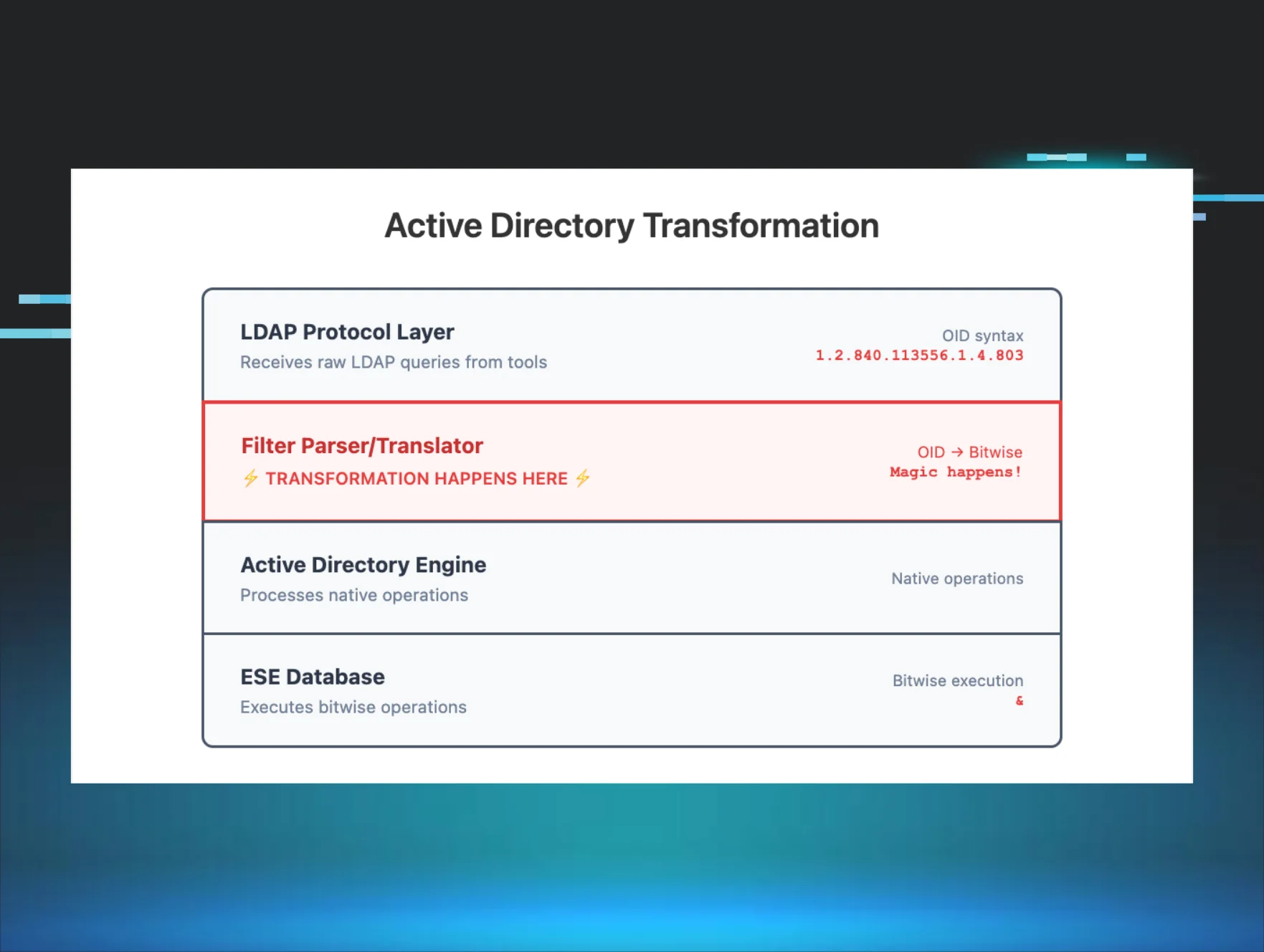
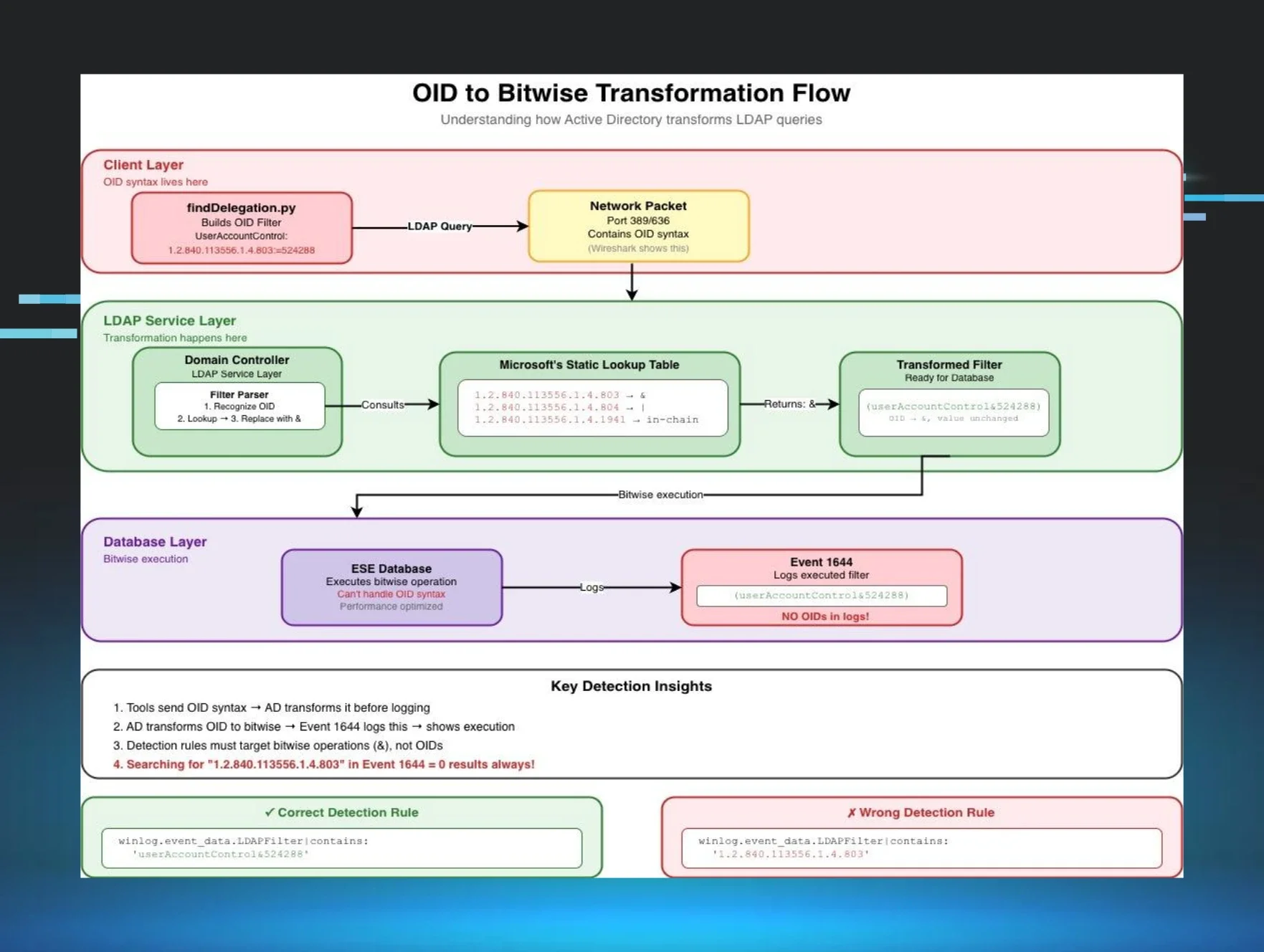
In Part 1, we learned that Impacket's LDAP reconnaissance tools use OID-based filters that get transformed into bitwise operations in Event ID 1644 logs, breaking our string-matching detection rules.
Part 2 revealed how whitespace variations in LDAP filter formatting can cause identical queries to log differently, creating another detection blind spot.
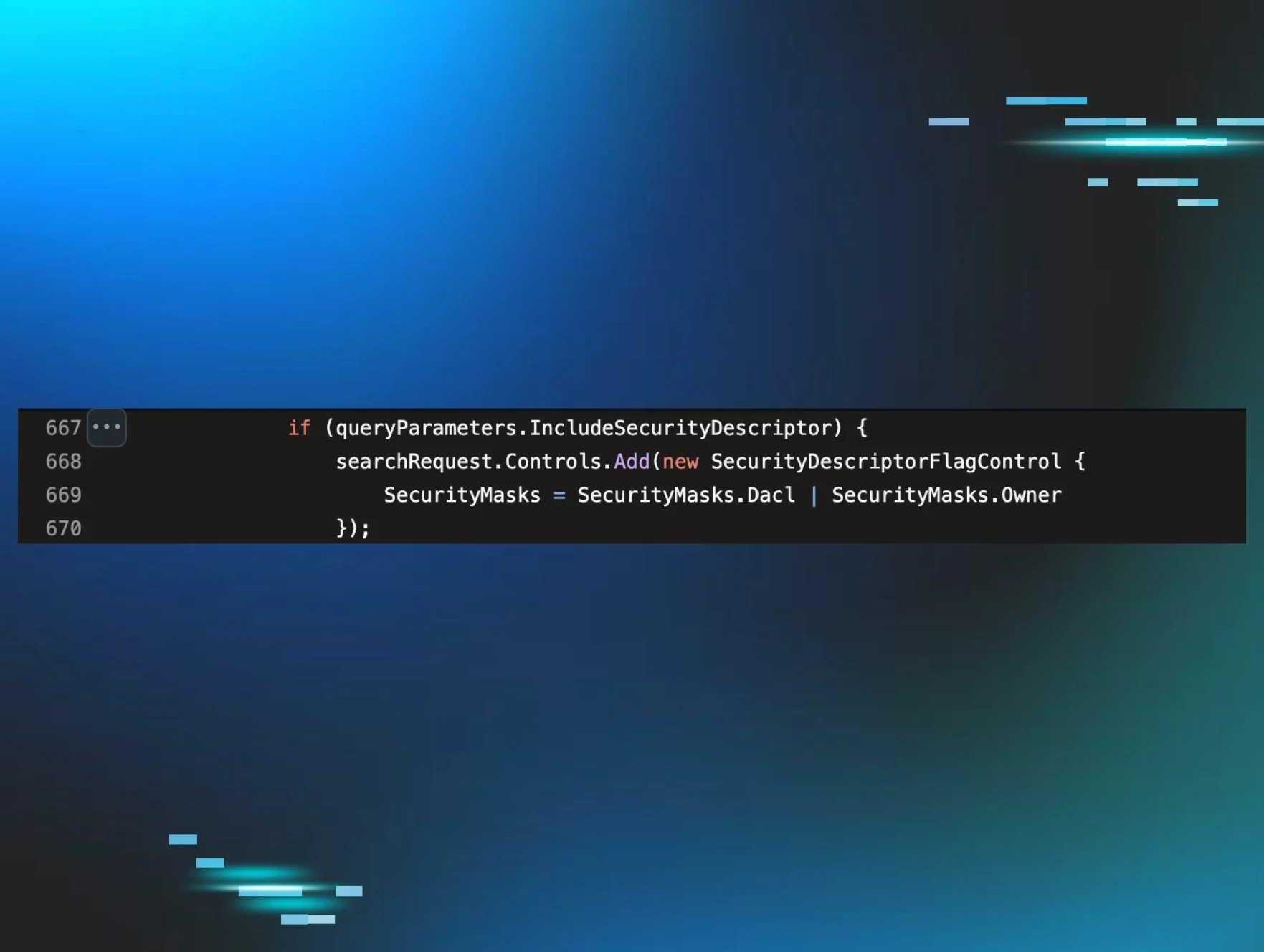
Part 3 introduced SDFlags (Security Descriptor Flags)—a hidden LDAP parameter that changes how Domain Controllers process and log queries, allowing attackers to enumerate permissions while evading signature-based detection.
Today, we're discovering a fourth challenge that fundamentally changes how we think about LDAP detection: queries that transform completely before logging.
If you've been building detection rules based on known tool signatures, you're about to learn why certain enumeration patterns are invisible to your SIEM. It involves a tool called SOAPHound, a non-existent LDAP attribute, and a transformation that happens before your logs are written.
The problem: The query (!soaphound=*) never appears in your logs—it becomes (! (FALSE)) through LDAP optimization, and most defenders have never seen this pattern before.
The discovery
While testing various AD enumeration tools for detection patterns, I made sure to include SOAPHound by FalconForce. Unlike the LDAP-based tools from Parts 1-3, SOAPHound uses Active Directory Web Services (ADWS) on port 9389, communicating via SOAP/XML. This architecture means Event 1644 shows Client: [::1] (localhost) because ADWS proxies the LDAP query locally. This localhost proxy makes attribution challenging.
Examining the source code, I found something unusual:
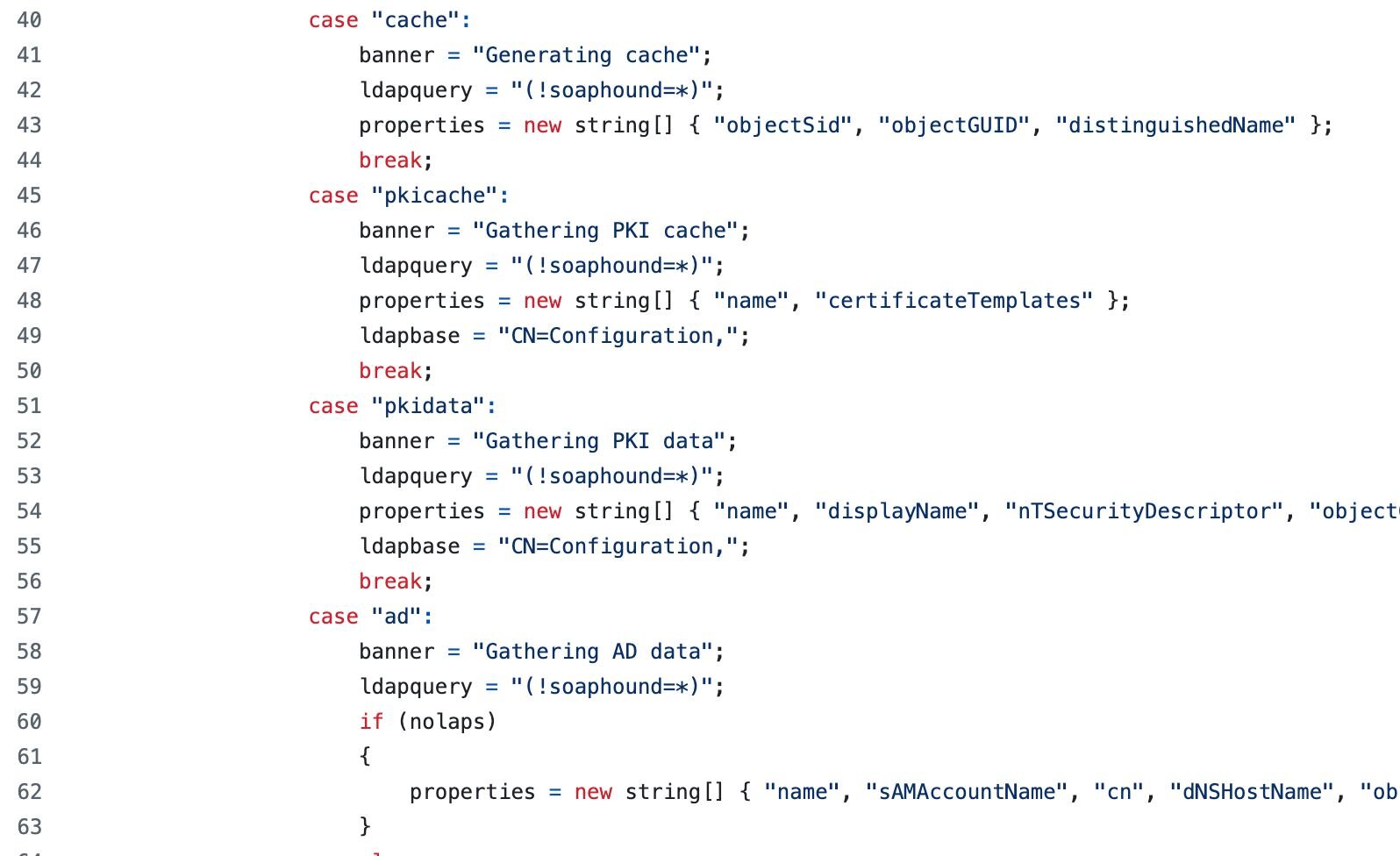
That (!soaphound=*) query immediately stood out. "soaphound" isn't a valid LDAP attribute in any Active Directory schema. It's not in Microsoft's attribute reference, and it wouldn't pass schema validation.
So why use it? And more importantly - what happens when you query for an attribute that doesn't exist?
Testing the mystery query
I set up a lab with Event ID 1644 logging enabled (using the configuration from Part 1) and ran the query directly:
# Test the SOAPHound query directly using ADSI
$searcher = [adsisearcher]"(!soaphound=*)"
$searcher.PageSize = 1000 # Ensure we get all results
$results = $searcher.FindAll()
Write-Host "Query: (!soaphound=*)"
Write-Host "Results: $($results.Count) objects"
Output:
Query: (!soaphound=*)
Results: 311 objects
The query worked! It returned every single object in my test domain (311 objects). But this shouldn't be possible—we're querying for an attribute that doesn't exist.
The Event Log revelation
When I checked Event ID 1644 to see how this query was logged, I found something unexpected:
Internal event: A client issued a search operation with the following options.
Client:
[fe80::f196:f23f:d7bf:b6c30]:56005
Starting node:
DC=marvel,DC=local
Filter:
( ! (FALSE) )
Search scope:
subtree
Attribute selection:
[all]
Server controls:
[none]
Visited entries:
3815
Returned entries:
334
User:
MARVEL\thanos
The query (!soaphound=*) had been logged as (! (FALSE)). The tool's signature had completely vanished!
Understanding the transformation
This behavior is actually documented, though not widely known. According to Microsoft's Active Directory Technical Specification, undefined filter conditions (including references to non-existent attributes) evaluate to FALSE rather than undefined.
While RFC 4511 specifies that filters with unrecognized attributes should evaluate to Undefined (which would return no results), Active Directory's implementation deviates from the standard by converting these to FALSE instead."
The complete transformation breakdown
WHO: The Domain Controller's LDAP service performs this transformation
WHAT: Any non-existent attribute query with negation becomes (! (FALSE))
WHERE: The transformation occurs server-side during query parsing, before execution
WHEN: After schema validation but before logging to Event ID 1644
WHY: LDAP optimization - the DC simplifies the expression for efficiency
HOW: Here's the exact process:
Figure 2: LDAP query transformation process showing how (!soaphound=*) becomes (! (FALSE)) through server-side optimization. The Domain Controller evaluates the non-existent attribute, returns FALSE, then optimizes the negation.
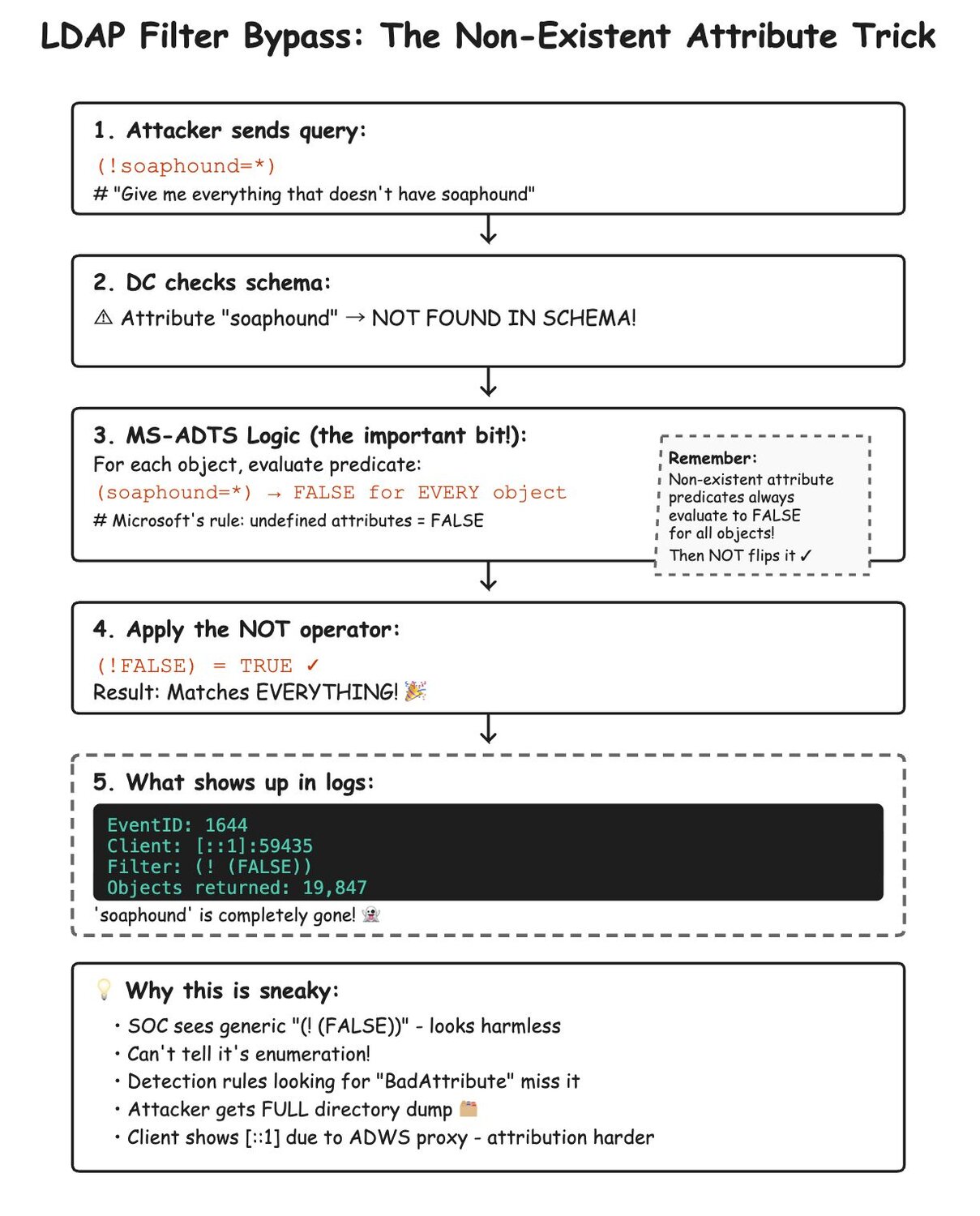
This is brilliant from an attacker's perspective—the tool's name is embedded in the query as a calling card, but it disappears before logging.
Verifying the pattern
To confirm this wasn't unique to "soaphound", I tested various non-existent attributes:
Figure 3: Testing various non-existent attribute queries demonstrates this is universal LDAP behavior, not specific to SOAPHound. Each query returns all domain objects while logging as (! (FALSE)).
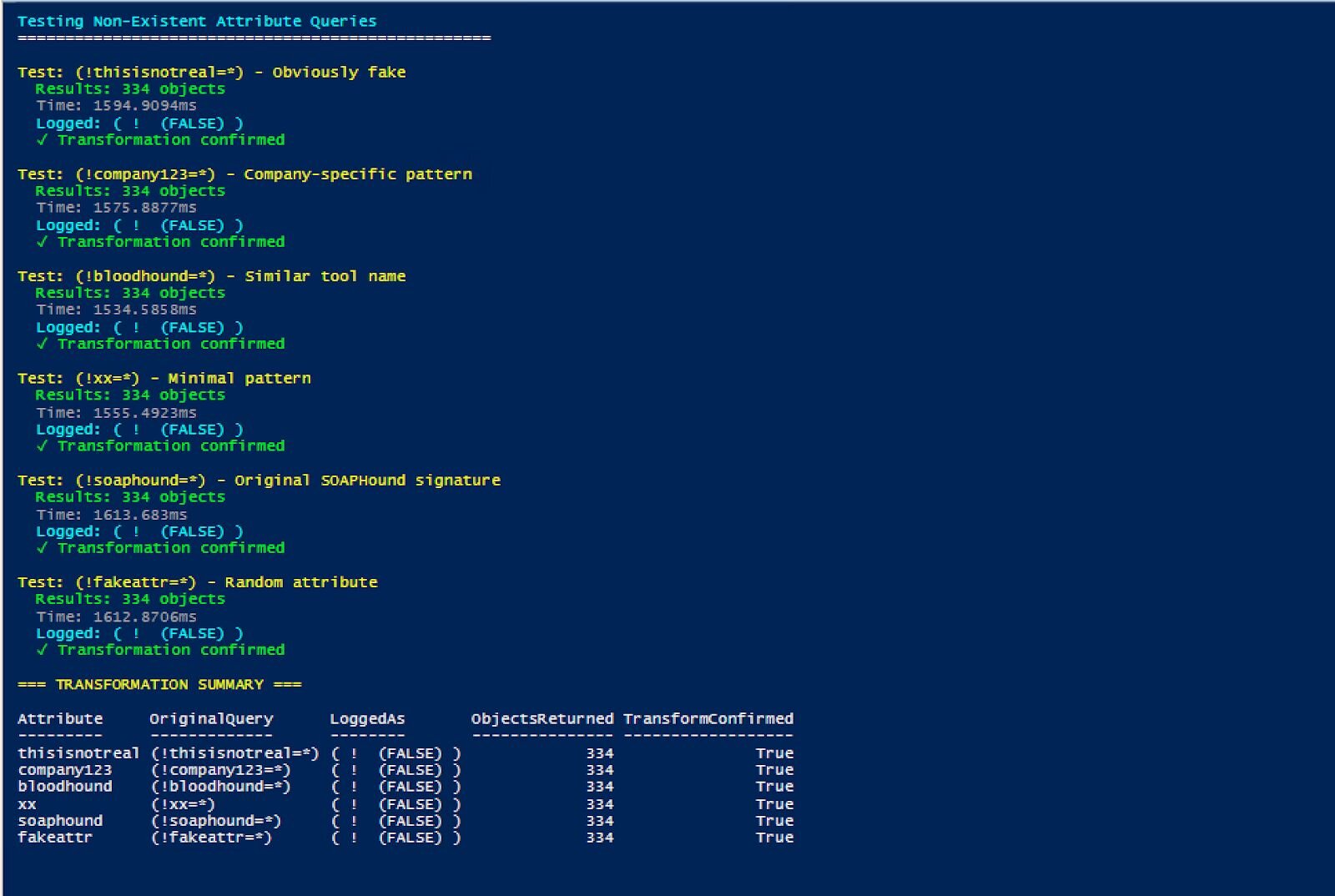
Every non-existent attribute query produced identical results and logging patterns. This is a universal behavior, not specific to SOAPHound.
Real SOAPHound vs. test queries: The SDFlags connection
When I captured actual SOAPHound execution and compared it to our test queries, an important difference emerged that connects back to Part 3:
Test query (no specific attributes)
Filter: ( ! (FALSE) )
Attribute selection: [all]
Server controls: [none]
User: MARVEL\thanos
Actual SOAPHound execution
Filter: ( ! (FALSE) )
Attribute selection:
name,sAMAccountName,cn,dNSHostName,objectSid,objectGUID,primaryGroupID,distinguishedName,lastLogonTimestamp,pwdLastSet,servicePrincipalName,
description,operatingSystem,sIDHistory,nTSecurityDescriptor,userAccountControl,whenCreated,lastLogon,displayName,title,homeDirectory,
userPassword,unixUserPassword,scriptPath,adminCount,member,msDS-Behavior-Version,msDS-AllowedToDelegateTo,gPCFileSysPath,gPLink,gPOptions,objectClass
Server controls: SDFlags:0x7
User: MARVEL\loki
SOAPHound consistently uses SDFlags:0x7 across all LDAP-based enumeration modes (buildcache, bhdump, certdump), even when not requesting security descriptors. This appears to be hardcoded behavior in its ADWS implementation. This differs significantly from SharpHound (Part 3), which uses SDFlags:0x4 or 0x5 only when needed for security descriptor enumeration.
For SOAPHound detection, the combination of FALSE pattern + SDFlags:0x7 + attribute list provides the strongest indicator. SDFlags:0x7 requests Owner (0x1) + Group (0x2) + DACL (0x4) = 0x7, which is everything except SACL. This is significant because SOAPHound requests this even in buildcache mode where it doesn't request nTSecurityDescriptor - confirming it's hardcoded behavior.
The FalconForce team explained this requirement in their blog: "Initially, our attempts to retrieve the nTSecurityDescriptor attributes of objects failed due to permission errors... To get around the limitation above and still query the nTSecurityDescriptor, you need to use an LDAP control to specify you do not want the SACL. The control is LDAP_SERVER_SD_FLAGS_OID. As a result, we added the above control in our EnumerationContext requests, which resulted in proper retrieval of nTSecurityDescriptor attributes via ADWS."
This explains why SOAPHound hardcodes SDFlags:0x7. Without it, non-privileged users can't retrieve security descriptors at all. However, our testing revealed SOAPHound uses this flag even when not requesting nTSecurityDescriptor (like in buildcache mode), confirming it's implemented as a blanket setting rather than conditional logic.
The attributes in Event ID 1644 match the source code exactly—this is a perfect signature.
Real-world SOAPHound patterns
When I ran actual SOAPHound in the lab, here's what appeared in Event ID 1644:
Pattern 1: Domain object enumeration
Client: [::1]:59435
Starting node: DC=marvel,DC=local
Filter: ( ! (FALSE) )
Search scope: subtree
Attribute selection:
name,sAMAccountName,cn,dNSHostName,objectSid,objectGUID,primaryGroupID,
distinguishedName,lastLogonTimestamp,pwdLastSet,servicePrincipalName,
description,operatingSystem,sIDHistory,nTSecurityDescriptor,userAccountControl,
whenCreated,lastLogon,displayName,title,homeDirectory,userPassword,
unixUserPassword,scriptPath,adminCount,member,msDS-Behavior-Version,
msDS-AllowedToDelegateTo,gPCFileSysPath,gPLink,gPOptions,objectClass
Server controls: SDFlags:0x7
Visited entries: 3815
Returned entries: 334
Pattern 2: Certificate template enumeration
Client: [::1]:59435
Starting node: CN=Configuration,DC=marvel,DC=local
Filter: ( ! (FALSE) )
Search scope: subtree
Attribute selection:
name,displayName,nTSecurityDescriptor,objectGUID,dNSHostName,
certificateTemplates,cACertificate,msPKI-Minimal-Key-Size,
msPKI-Certificate-Name-Flag,msPKI-Enrollment-Flag,msPKI-Private-Key-Flag,
pKIExtendedKeyUsage,pKIOverlapPeriod,pKIExpirationPeriod,objectClass
Server controls: SDFlags:0x7
Visited entries: 147
Returned entries: 147
The (! (FALSE)) pattern appeared consistently across all enumeration types, always paired with extensive attribute lists that indicate complete reconnaissance.
Building reliable detection
Now that we understand the transformation, let's build detection rules that account for the patterns we've discovered:
SIGMA Rule 1: High-fidelity SOAPHound detection
detection:
selection_base:
EventID: 1644
Message|contains: '(! (FALSE))'
# SOAPHound-specific attributes
selection_soaphound_attrs:
Message|contains|all:
- 'msDS-Behavior-Version'
- 'gPCFileSysPath'
- 'gPLink'
- 'gPOptions'
- 'nTSecurityDescriptor'
# High-risk attributes
selection_sensitive:
Message|contains:
- 'userPassword'
- 'unixUserPassword'
- 'msDS-AllowedToDelegateTo'
condition: selection_base and (selection_soaphound_attrs or selection_sensitive)
SIGMA Rule 2: SOAPHound detection with expected SDFlags:0x7
detection:
selection_base:
EventID: 1644
Message|contains:
- '(! (FALSE))'
- 'SDFlags:0x7'
selection_attrs:
Message|contains|all:
- 'nTSecurityDescriptor'
- 'msDS-Behavior-Version'
condition: all of selection_*
Comparison: Enumeration tool signatures across all four parts
Here's how different AD enumeration tools appear across the detection challenges we've explored:
|
Tool |
Part 1: OID Transform |
Part 2: Whitespace |
Part 3: SDFlags |
Part 4: FALSE Negation |
Unique Signature |
|
Impacket GetUserSPNs |
userAccountControl&512 |
Standard spacing |
None |
No |
Bitwise UAC filter |
|
SharpHound |
userAccountControl&512 |
Varies |
SDFlags:0x4 or 0x5 |
No |
SDFlags + group queries |
|
SOAPHound |
No |
Standard |
Always SDFlags:0x7 |
(! (FALSE)) |
FALSE + SDFlags:0x7 + attributes |
|
Custom Scripts |
Varies |
Often irregular |
Rarely |
Possible |
Inconsistent patterns |
Detection priority matrix
|
Pattern |
Confidence |
False Positive Rate |
Detection Coverage |
|
FALSE + SDFlags:0x7 + Attributes |
Critical (99%) |
Near zero |
SOAPHound specific |
|
FALSE Negation alone |
High (85%) |
Very low |
Any non-existent attribute query |
|
SDFlags:0x4/0x5 + Mass queries |
High (80%) |
Low |
SharpHound |
|
OID transformations |
Medium (70%) |
Medium |
Most .NET tools |
|
Whitespace anomalies |
Low (40%) |
High |
Various tools |
Key takeaways
LDAP transformations are multi-layered: We've now seen four different transformation types, each at a different processing stage.
The FALSE negation pattern is uniquely deceptive: Unlike the other patterns, where something changes, here the original query completely disappears.
Documentation is important: Microsoft's specifications and RFCs explain these behaviors, turning mysterious transformations into detectable patterns.
Simple patterns can be highly reliable: The (! (FALSE)) pattern is unusual enough to be a strong indicator with few false positives.
Complete detection requires understanding all layers: Attackers may combine techniques from all four parts, requiring layered detection.
SOAPHound's SDFlags behavior differs from SharpHound:
SharpHound: Consistently uses SDFlags:0x7 across all operations
SOAPHound: SDFlags:0x7 appears only when nTSecurityDescriptor is explicitly requested in the attribute list
When SOAPHound uses default [all] attributes, no SDFlags appear
SDFlags:0x7 breakdown: Owner (0x1) + Group (0x2) + DACL (0x4) = everything except SACL
The reliable detection pattern for SOAPHound:
FALSE filter negation (!(FALSE))
Client [::1] (localhost/IPv6)
Specific attribute list matching SOAPHound's patterns
SDFlags:0x7 when nTSecurityDescriptor is in the attribute list (mode-dependent)
Conclusion
The transformation of (!soaphound=*) to (! (FALSE)) represents the culmination of our LDAP detection journey. Combined with SDFlags from Part 3, we now have a complete picture of how SOAPHound evades traditional detection while leaving distinctive forensic artifacts.
This series has revealed four layers of LDAP transformation:
Syntax (Part 1): OID to bitwise conversion
Format (Part 2): Whitespace normalization
Control (Part 3): SDFlags modification
Logic (Part 4): Non-existent attribute optimization
SOAPHound cleverly combines techniques from Parts 3 and 4, using both SDFlags for permission enumeration and FALSE negation for signature evasion. Yet paradoxically, this combination creates an even more distinctive pattern for detection.
The (! (FALSE)) pattern is perhaps the most elegant evasion technique we've encountered—it exploits documented LDAP behavior to create a signature that vanishes through optimization. But now that we understand the transformation, it becomes our strongest indicator.
Remember: Your adversaries are reading specifications and finding clever optimizations. Your detection must be equally sophisticated.
Thanks to Jonathan Johnson, Charlie Clark, Anton Ovrutsky, Matt Anderson, Tyler Bohlmann, Lindsey O'Donnell-Welch, Michael Haag, Nasreddine Bencherchali, and Adam Bienvenu for their help in reviewing this post.