






Don’t let overlooked obligations become incidents. Learn how.
Utility navigation bar redirect icon
Portal LoginSupportContact
Search
Close search
Huntress Logo in Teal
  • Platform Overview
    Managed EDR

    Get full endpoint visibility, detection, and response.

    Managed EDR

    Get full endpoint visibility, detection, and response.

    Managed ITDR

    Protect your Microsoft 365 identities and email environments.

    Managed ITDR

    Protect your Microsoft 365 identities and email environments.

    Managed SIEM

    Managed threat response and robust compliance support at a predictable price.

    Managed SIEM

    Managed threat response and robust compliance support at a predictable price.

    Managed Security Awareness Training

    Empower your teams with science-backed security awareness training.

    Managed Security Awareness Training

    Empower your teams with science-backed security awareness training.

    Managed ISPM

    Continuous Microsoft 365 and identity hardening, managed and enforced by Huntress experts.

    Managed ISPM

    Continuous Microsoft 365 and identity hardening, managed and enforced by Huntress experts.

    Managed ESPM

    Proactively secure endpoints against attacks.

    Managed ESPM

    Proactively secure endpoints against attacks.

    Integrations
    Integrations
    Support Documentation
    Support Documentation
    See Huntress in Action

    Quickly deploy and manage real-time protection for endpoints, email, and employees - all from a single dashboard.

    Huntress Cybersecurity
    See Huntress in Action

    Quickly deploy and manage real-time protection for endpoints, email, and employees - all from a single dashboard.

    Huntress Cybersecurity
  • Threats We Stop
    Phishing
    Phishing
    Business Email Compromise
    Business Email Compromise
    Ransomware
    Ransomware
    Infostealers
    Infostealers
    View Allright arrowView Allright arrow
    Industries We Serve
    Education
    Education
    Financial Services
    Financial Services
    State and Local Government
    State and Local Government
    Healthcare
    Healthcare
    Law Firms
    Law Firms
    Manufacturing
    Manufacturing
    Utilities
    Utilities
    View Allright arrowView Allright arrow
    Tailored Solutions
    MSPs
    MSPs
    Resellers
    Resellers
    SMBs
    SMBs
    Compliance
    Compliance
    What Gets Overlooked Gets Exploited

    Most days, nothing happens. But one day, something will.

    Huntress Cybersecurity
    Cybercriminals Have Evolved

    Get the intel on today’s cybercriminal groups and learn how to protect yourself.

    Huntress Cybersecurity
  • Pricing
  • Community Series
    The Product Lab

    Shape the next big thing in cybersecurity together.

    The Product Lab

    Shape the next big thing in cybersecurity together.

    Fireside Chat

    Real people. Real perspectives. Better conversations.

    Fireside Chat

    Real people. Real perspectives. Better conversations.

    Tradecraft Tuesday

    No products, no pitches – just tradecraft.

    Tradecraft Tuesday

    No products, no pitches – just tradecraft.

    _declassified

    Exposing hidden truths in the world of cybersecurity.

    _declassified

    Exposing hidden truths in the world of cybersecurity.

    Resources
    Upcoming Events
    Upcoming Events
    Ebooks
    Ebooks
    On-Demand Webinars
    On-Demand Webinars
    Videos
    Videos
    Whitepapers
    Whitepapers
    Datasheets
    Datasheets
    Cybersecurity Education
    Cybersecurity 101
    Cybersecurity 101
    Cybersecurity Guides
    Cybersecurity Guides
    Threat Library
    Threat Library
    Real Tradecraft, Real Results
    Real Tradecraft, Real Results
    2026 Cyber Threat Report
    2026 Cyber Threat Report
    The Huntress Blog
    Huntress Lands on the Microsoft Marketplace
    Huntress Cybersecurity
    Huntress Lands on the Microsoft Marketplace
    Huntress Cybersecurity
    How Huntress & DEFCERT Are Streamlining CMMC Assessment Prep
    Huntress Cybersecurity
    How Huntress & DEFCERT Are Streamlining CMMC Assessment Prep
    Huntress Cybersecurity
    Live Hacking Into Microsoft 365 with Kyle Hanslovan
    Huntress Cybersecurity
    Live Hacking Into Microsoft 365 with Kyle Hanslovan
    Huntress Cybersecurity
  • Why Huntress

    Go beyond AI in the fight against today’s hackers with Huntress Managed EDR purpose-built for your needs

    Huntress Cybersecurity
    Why Huntress

    Go beyond AI in the fight against today’s hackers with Huntress Managed EDR purpose-built for your needs

    Huntress Cybersecurity
    The Huntress SOC

    24/7 Security Operations Center

    The Huntress SOC

    24/7 Security Operations Center

    Reviews

    Why businesses of all sizes trust Huntress to defend their assets

    Reviews

    Why businesses of all sizes trust Huntress to defend their assets

    Case Studies

    Learn directly from our partners how Huntress has helped them

    Case Studies

    Learn directly from our partners how Huntress has helped them

    Community

    Get in touch with the Huntress Community team

    Community

    Get in touch with the Huntress Community team

    Compare Huntress
    Bitdefender
    Bitdefender
    Blackpoint
    Blackpoint
    Breach Secure Now!
    Breach Secure Now!
    Crowdstrike
    Crowdstrike
    Datto
    Datto
    SentinelOne
    SentinelOne
    Sophos
    Sophos
    Compare Allright arrowCompare Allright arrow
  • HUNTRESS HUB

    Login to access top-notch marketing resources, tools, and training.

    Huntress Cybersecurity
    HUNTRESS HUB

    Login to access top-notch marketing resources, tools, and training.

    Huntress Cybersecurity
    Partners
    MSPs

    Join our partner community to deliver expert-led managed security.

    MSPs

    Join our partner community to deliver expert-led managed security.

    Resellers

    Partner program designed to grow your cybersecurity business.

    Resellers

    Partner program designed to grow your cybersecurity business.

    Tech Alliances

    Driving innovation through global technology Partnerships

    Tech Alliances

    Driving innovation through global technology Partnerships

    Microsoft Partnership

    A Level-Up for Your Business Security

    Microsoft Partnership

    A Level-Up for Your Business Security

  • Press Release
    Huntress Announces Collaboration with Microsoft to Strengthen Cybersecurity for Businesses of All Sizes
    Huntress Cybersecurity
    Press Release
    Huntress Announces Collaboration with Microsoft to Strengthen Cybersecurity for Businesses of All Sizes
    Huntress Cybersecurity
    Our Story

    We're on a mission to shatter the barriers to enterprise-level security.

    Our Story

    We're on a mission to shatter the barriers to enterprise-level security.

    Newsroom

    Explore press releases, news articles, media interviews and more.

    Newsroom

    Explore press releases, news articles, media interviews and more.

    Meet the Team

    Founded by former NSA Cyber Operators. Backed by security researchers.

    Meet the Team

    Founded by former NSA Cyber Operators. Backed by security researchers.

    Careers

    Ready to shake up the cybersecurity world? Join the hunt.

    Careers

    Ready to shake up the cybersecurity world? Join the hunt.

    Awards
    Awards
    Contact Us
    Contact Us
  • Portal Login
  • Support
  • Contact
  • Search
  • Get a Demo
  • Start for Free
Portal LoginSupportContact
Search
Close search
Get a Demo
Start for Free
HomeBlog
Traitorware and Living Off the Land: Using Splunk to Exfiltrate Data
Published:
April 11, 2023

Traitorware and Living Off the Land: Using Splunk to Exfiltrate Data

By:
Adam Rice
Share icon
Glitch effectGlitch effectGlitch effect

In a previous life before joining Huntress, I was a Splunk administrator and architect. Over time I noticed a few features/behaviors of Splunk that I thought might be exploitable and wanted to dive into that suspicion and see if I was correct. Over the last year, I've been tinkering with the viability of using Splunk as a "living off the land" command and control (C2) server. 

Fun Fact: A Living off the Land (LotL) attack describes a cyberattack in which intruders use legitimate software and functions available in the system to perform malicious actions on it. LotL cyberattack operators forage on target systems for tools, such as operating system components or installed software, they can use to achieve their goals. LotL attacks are often classified as fileless because they do not leave any artifacts behind. (Kaspersky)

What I found is not only is it possible, but it’s scary in terms of capabilities. I want to inform the wider community since these are issues that can be fixed with easy architectural changes.

Your security tools are just as likely to be attacked as anything else. Companies should be paying just as much attention to the activities going on around their IT and Security tools as their critical systems. Traitorware is a fun term I recently found to describe the technique of using established tools to live off the land.

Did you know? Traitorware, as defined by Alberto Rodriguez and Erik Hunstad, is
1. Software that betrays the trust placed in it to perform malicious actions
2. Trusted software with benign original intent used for malicious actions

Using Splunk's core features (being a log ingestion tool), it can very easily be abused to steal data from a system. 

***IMPORTANT DISCLAIMER***

This is not a vulnerability, bug, or new exploit within Splunk. These are configurations supported by Splunk, and even provided in their documentation. This is just a demonstration to show that malicious actors can abuse IT / Security tooling and use the core functionality for malicious intent.

Diving In

Splunk’s Universal Forwarder (UF) contains remote code execution (RCE) as a feature; I did not need to use that for this proof of concept (POC). Using custom Splunk configurations, I could define a new "output" for logs to be shipped, which was a malicious rsyslog server that I controlled. Splunk uses cascading configuration files to function, and each "app" within Splunk is a configuration bundle that will override the same configurations specified in the system directory (the “root” configuration). For example,

system\outputs.conf

Screenshot 2023-04-10 at 4.39.05 PM

192.168.0.255 is the real Splunk server receiving logs from this system.

<app directory>\local\outputs.conf

Screenshot 2023-04-10 at 4.39.11 PM

Both configuration files are valid and will be loaded into memory. The APP configuration would take precedence if the [tcpout:<NAME>] line were identical between both files. 

This is the base that I used to abuse Splunk's logic. Since I could add configurations to the outputs.conf file loaded in memory, all I had to do was ensure I was creating new configurations instead of overwriting existing configurations. In an enterprise Splunk environment, changes to existing configurations will likely be noticed quickly since they would have an immediate impact on existing log streams. However, additional downstream configurations can be hard to track.

So, I created a new Splunk app to be deployed with the following two configurations:

outputs.conf

Screenshot 2023-04-10 at 4.40.37 PM

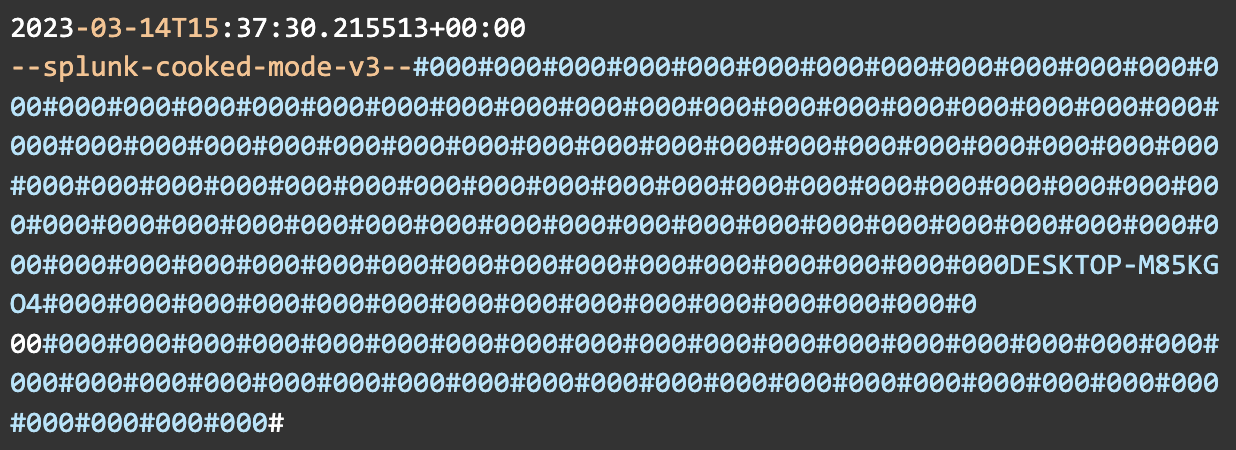
The above defines the output for the logs; in this instance, it's an Ubuntu server running rsyslog on port 514. The sendCookedData=false attribute disables the sending of Splunk's cooked data, which is metadata and additional information used by Splunk. This needs to be disabled when using a third-party receiver. Otherwise, you'll end up with results that look like this:
Screenshot 2023-04-10 at 4.41.12 PM

inputs.conf

Screenshot 2023-04-10 at 4.41.55 PM

This file tells the Splunk UF the directory to monitor and forces the log routing to use the "syslog" route defined in outputs.conf, but only for this directory. The rest of the logs on the system will be sent to Splunk as expected, allowing us to monitor and absorb these files virtually undetected. In general, Splunk can ingest any file saved to disk using this method. For our use case, it's just monitoring a single txt file.

contents of secretpassword.txt:

Screenshot 2023-04-10 at 4.42.58 PM

After these configuration bundles are sent to the endpoint, either by manually placing them in the SplunkUniversalForwarder folder or by using a Splunk Deployment Server, the Splunk Universal Forwarder will begin reading and shipping logs based on the inputs.conf and outputs.conf files it finds defined under <Splunk Install>\etc\*. The files created for this POC are under <Splunk Install>\etc\apps\MaliciousAppName\local

And a few minutes later, on the rsyslog server, hidden amongst the noise of the internal Splunk UF logs, we have our exfiltrated data:
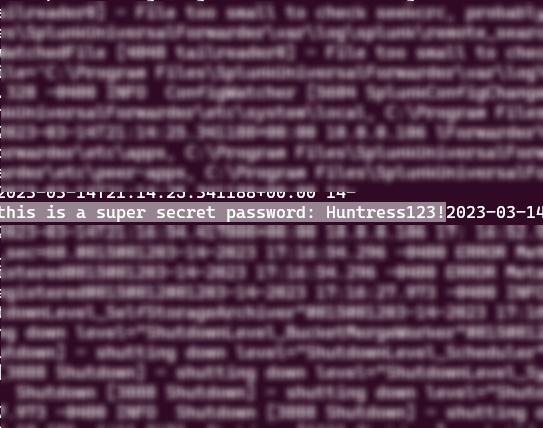
image1-Apr-10-2023-09-36-52-7150-PM

Remediation

This attack can be performed either locally on a compromised endpoint or remotely from a compromised deployment server.

For Splunk:

  • Divide Splunk roles across different appliances, and perform network segmentation as necessary
  • Use TLS for inter-Splunk communication if desired, especially recommended if any of the Splunk infrastructure is exposed to the internet 
  • Splunk’s documentation for configuring TLS
  • Use a randomly generated administrator password, or disable the default administrator account
  • Limit the outbound traffic allowed by Splunk, such as limiting traffic to Splunk-only ports or disabling internet access
  • Avoid installing the Splunk UF on desktop endpoints
  • If your deployment of Splunk requires installing the UF on desktop endpoints, ensure there are other compensating controls in place to protect the agent from tampering. The Splunk UF runs as NT Authority\System by default on Windows; ensuring users are not administrators significantly limits tampering capabilities.
  • Use Splunk’s reference architecture as a baseline for a secure deployment 

General recommendations for IT / Security tooling:

  • Monitor the internal logs of IT / Security tools for suspicious behavior
  • Network segmentation of these tools
  • Limit outbound traffic to only necessary ports and protocols
  • Use a layered defense strategy for both network and host-based detection methods.

Summarize this postClose Speech Bubble
ChatGPTClaudePerplexityGoogle AI

See Huntress in action

Our platform combines a suite of powerful managed detection and response tools for endpoints and Microsoft 365 identities, science-backed security awareness training, and the expertise of our 24/7 Security Operations Center (SOC).

Book a Demo
Share
Facebook iconTwitter X iconLinkedin iconDownload icon

Sign Up for Huntress Updates

Get insider access to Huntress tradecraft, killer events, and the freshest blog updates.
Privacy • Terms
By submitting this form, you accept our Terms of Service & Privacy Policy
Thank you! Your submission has been received!
Oops! Something went wrong while submitting the form.
Huntress Managed Security PlatformManaged EDRManaged EDR for macOSManaged EDR for LinuxManaged ITDRManaged SIEMManaged Security Awareness TrainingManaged ISPMManaged ESPMBook a Demo
PhishingComplianceBusiness Email CompromiseEducationFinanceHealthcareManufacturingState & Local Government
Managed Service ProvidersResellersIT & Security Teams24/7 SOCCase Studies
BlogResource CenterCybersecurity 101Upcoming EventsSupport Documentation
Our CompanyLeadershipNews & PressCareersContact Us
Huntress white logo

Protecting 215k+ customers like you with enterprise-grade protection.

Privacy PolicyCookie PolicyTerms of UseCookie Consent
Linkedin iconTwitter X iconYouTube iconInstagram icon
© 2025 Huntress All Rights Reserved.

Join the Hunt

Get insider access to Huntress tradecraft, killer events, and the freshest blog updates.

By submitting this form, you accept our Terms of Service & Privacy Policy
