


Don’t let overlooked obligations become incidents. Learn how.
Utility navigation bar redirect icon
Portal LoginSupportContact
Search
Close search
Huntress Logo in Teal
  • Platform Overview
    Managed EDR

    Get full endpoint visibility, detection, and response.

    Managed EDR

    Get full endpoint visibility, detection, and response.

    Managed ITDR

    Protect your Microsoft 365 identities and email environments.

    Managed ITDR

    Protect your Microsoft 365 identities and email environments.

    Managed SIEM

    Managed threat response and robust compliance support at a predictable price.

    Managed SIEM

    Managed threat response and robust compliance support at a predictable price.

    Managed Security Awareness Training

    Empower your teams with science-backed security awareness training.

    Managed Security Awareness Training

    Empower your teams with science-backed security awareness training.

    Managed ISPM

    Continuous Microsoft 365 and identity hardening, managed and enforced by Huntress experts.

    Managed ISPM

    Continuous Microsoft 365 and identity hardening, managed and enforced by Huntress experts.

    Managed ESPM

    Proactively secure endpoints against attacks.

    Managed ESPM

    Proactively secure endpoints against attacks.

    Integrations
    Integrations
    Support Documentation
    Support Documentation
    See Huntress in Action

    Quickly deploy and manage real-time protection for endpoints, email, and employees - all from a single dashboard.

    Huntress Cybersecurity
    See Huntress in Action

    Quickly deploy and manage real-time protection for endpoints, email, and employees - all from a single dashboard.

    Huntress Cybersecurity
  • Threats We Stop
    Phishing
    Phishing
    Business Email Compromise
    Business Email Compromise
    Ransomware
    Ransomware
    Infostealers
    Infostealers
    View Allright arrowView Allright arrow
    Industries We Serve
    Education
    Education
    Financial Services
    Financial Services
    State and Local Government
    State and Local Government
    Healthcare
    Healthcare
    Law Firms
    Law Firms
    Manufacturing
    Manufacturing
    Utilities
    Utilities
    View Allright arrowView Allright arrow
    Tailored Solutions
    MSPs
    MSPs
    Resellers
    Resellers
    SMBs
    SMBs
    Compliance
    Compliance
    What Gets Overlooked Gets Exploited

    Most days, nothing happens. But one day, something will.

    Huntress Cybersecurity
    Cybercriminals Have Evolved

    Get the intel on today’s cybercriminal groups and learn how to protect yourself.

    Huntress Cybersecurity
  • Pricing
  • Community Series
    The Product Lab

    Shape the next big thing in cybersecurity together.

    The Product Lab

    Shape the next big thing in cybersecurity together.

    Fireside Chat

    Real people. Real perspectives. Better conversations.

    Fireside Chat

    Real people. Real perspectives. Better conversations.

    Tradecraft Tuesday

    No products, no pitches – just tradecraft.

    Tradecraft Tuesday

    No products, no pitches – just tradecraft.

    _declassified

    Exposing hidden truths in the world of cybersecurity.

    _declassified

    Exposing hidden truths in the world of cybersecurity.

    Resources
    Upcoming Events
    Upcoming Events
    Ebooks
    Ebooks
    On-Demand Webinars
    On-Demand Webinars
    Videos
    Videos
    Whitepapers
    Whitepapers
    Datasheets
    Datasheets
    Cybersecurity Education
    Cybersecurity 101
    Cybersecurity 101
    Cybersecurity Guides
    Cybersecurity Guides
    Threat Library
    Threat Library
    Real Tradecraft, Real Results
    Real Tradecraft, Real Results
    2026 Cyber Threat Report
    2026 Cyber Threat Report
    The Huntress Blog
    Huntress Lands on the Microsoft Marketplace
    Huntress Cybersecurity
    Huntress Lands on the Microsoft Marketplace
    Huntress Cybersecurity
    How Huntress & DEFCERT Are Streamlining CMMC Assessment Prep
    Huntress Cybersecurity
    How Huntress & DEFCERT Are Streamlining CMMC Assessment Prep
    Huntress Cybersecurity
    Live Hacking Into Microsoft 365 with Kyle Hanslovan
    Huntress Cybersecurity
    Live Hacking Into Microsoft 365 with Kyle Hanslovan
    Huntress Cybersecurity
  • Why Huntress

    Go beyond AI in the fight against today’s hackers with Huntress Managed EDR purpose-built for your needs

    Huntress Cybersecurity
    Why Huntress

    Go beyond AI in the fight against today’s hackers with Huntress Managed EDR purpose-built for your needs

    Huntress Cybersecurity
    The Huntress SOC

    24/7 Security Operations Center

    The Huntress SOC

    24/7 Security Operations Center

    Reviews

    Why businesses of all sizes trust Huntress to defend their assets

    Reviews

    Why businesses of all sizes trust Huntress to defend their assets

    Case Studies

    Learn directly from our partners how Huntress has helped them

    Case Studies

    Learn directly from our partners how Huntress has helped them

    Community

    Get in touch with the Huntress Community team

    Community

    Get in touch with the Huntress Community team

    Compare Huntress
    Bitdefender
    Bitdefender
    Blackpoint
    Blackpoint
    Breach Secure Now!
    Breach Secure Now!
    Crowdstrike
    Crowdstrike
    Datto
    Datto
    SentinelOne
    SentinelOne
    Sophos
    Sophos
    Compare Allright arrowCompare Allright arrow
  • HUNTRESS HUB

    Login to access top-notch marketing resources, tools, and training.

    Huntress Cybersecurity
    HUNTRESS HUB

    Login to access top-notch marketing resources, tools, and training.

    Huntress Cybersecurity
    Partners
    MSPs

    Join our partner community to deliver expert-led managed security.

    MSPs

    Join our partner community to deliver expert-led managed security.

    Resellers

    Partner program designed to grow your cybersecurity business.

    Resellers

    Partner program designed to grow your cybersecurity business.

    Tech Alliances

    Driving innovation through global technology Partnerships

    Tech Alliances

    Driving innovation through global technology Partnerships

    Microsoft Partnership

    A Level-Up for Your Business Security

    Microsoft Partnership

    A Level-Up for Your Business Security

  • Press Release
    Huntress Announces Collaboration with Microsoft to Strengthen Cybersecurity for Businesses of All Sizes
    Huntress Cybersecurity
    Press Release
    Huntress Announces Collaboration with Microsoft to Strengthen Cybersecurity for Businesses of All Sizes
    Huntress Cybersecurity
    Our Story

    We're on a mission to shatter the barriers to enterprise-level security.

    Our Story

    We're on a mission to shatter the barriers to enterprise-level security.

    Newsroom

    Explore press releases, news articles, media interviews and more.

    Newsroom

    Explore press releases, news articles, media interviews and more.

    Meet the Team

    Founded by former NSA Cyber Operators. Backed by security researchers.

    Meet the Team

    Founded by former NSA Cyber Operators. Backed by security researchers.

    Careers

    Ready to shake up the cybersecurity world? Join the hunt.

    Careers

    Ready to shake up the cybersecurity world? Join the hunt.

    Awards
    Awards
    Contact Us
    Contact Us
  • Portal Login
  • Support
  • Contact
  • Search
  • Get a Demo
  • Start for Free
Portal LoginSupportContact
Search
Close search
Get a Demo
Start for Free
HomeBlog
Legitimate Apps as Traitorware for Persistent Microsoft 365 Compromise
Published:
August 3, 2023

Legitimate Apps as Traitorware for Persistent Microsoft 365 Compromise

By:
Sharon Martin
Share icon
Glitch effectGlitch effectGlitch effect

The idea of “persistence” in a cloud environment is not a well-studied topic. At most, you hear instances of the attacker creating backup logins to maintain their long-term presence in a cloud environment.

To continue our series exposing the tradecraft around business email compromise (BEC), this blog will dive into how Huntress identified a threat actor using a novel form of persistence (M365 applications) in order to try to stay under the radar and avoid detection. We discovered a compromised user account with the ability to add apps during the beta phase of our newest product, Huntress Managed Identity Threat Detection and Response.

What Happened

This is another unfortunate case of compromised credentials without additional security controls. 

There was a failed login from a US IP, and then shortly thereafter, a successful login via a US IP. However, it was clear quite quickly that this wasn’t a normal IP—it was a proxy/VPN IP. Here’s an overall screenshot of the timeline of events that will be explained in more detail below:
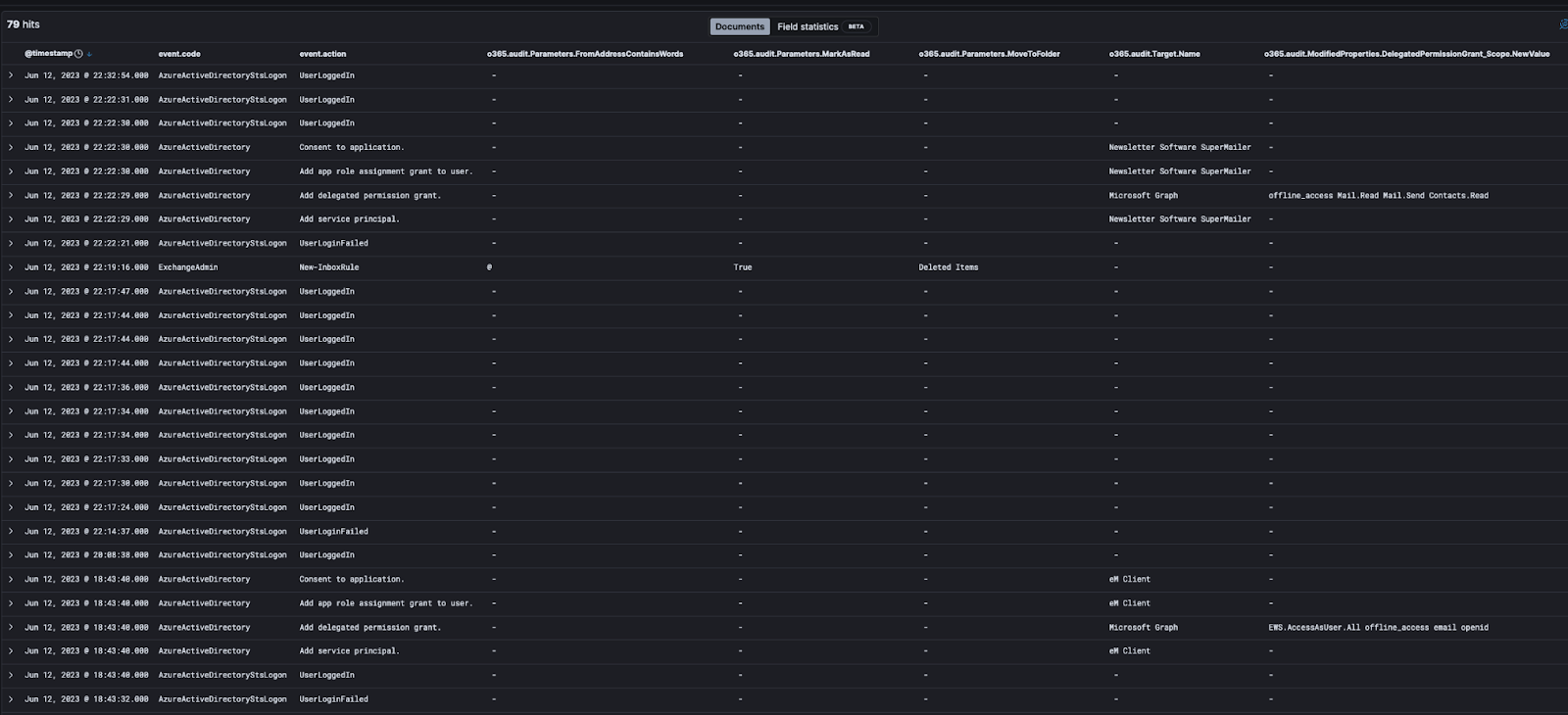
Click to enlarge

Detailed Event Breakdown

The events you saw above are where it started to get more interesting. We saw an application added with several events in Azure around it:

“Add service principal.” 

  • When you register a new application in Azure AD, a service principal is automatically created for the app registration. For more details, see this Microsoft write-up.
  • The important detail to note here is that the “Target.Name” has the name of the application which was added, “eM Client”. eM Client is an app that can integrate with email, calendar, etc. The “InterSystemsId” can also be used to help correlate this eM Client target with other event logs—it’s the GUID used to track actions across components in the Office 365 service.

“Add delegated permission grant.”

  • When an application that’s added requires access, a delegated permission grant is created for the permissions needed by the application on behalf of the user. For more details, this article provides some great background.
  • The “InterSystemsId” was the same as the previous event, showing that it’s related to the eM Client application being added.
  • Actual permissions granted are shown in “ModifiedProperties.DelegatedPermissionGrant_Scope.NewValue”. In this case, the application was granted the following permissions: 
  • “EWS.AccessAsUser.All” - This configures the app for delegated authentication. The app would have the same access to mailboxes as the signed-in user via Exchange web services.
  • “Offline_access” - This gives the app access to resources on behalf of the user for an extended period of time. On the permission page itself that would pop up, it’s described as “Maintain access to data you have given it access to.” When a user approves this access scope, the app can receive long-lived refresh tokens from the Microsoft Identity platform token endpoint and then reach out to get an updated access token when the older one expires—all without user intervention.
  • “Email” - This can be used along with the “Openid” scope and gives the app access to the user’s primary email address.
  • “Openid” - This indicated the app signed in by using OpenID Connect. It allows the app to get a unique identifier for the user (a sub-claim), which can then be used to acquire identity tokens that are used for authentication.

“Add app role assignment grant to user.”

  • We saw the same “InterSystemsId” as the above events correlating it to the same email app.
  • This means the app has been assigned to a user via Azure AD so that the user can access the app. The “ModifiedProperties.User_UPN.NewValue” indicates which user it’s been assigned to. In this case, it’s the same user the threat actor was logged into.

“Consent to application.”

  • In a well-configured Azure environment, admin approval and consent should be needed to add any new apps. These configurations are called risk-based or step-up consent. 
  • Alas, the “Actor.UPN” of our hacked user account along with the success of the log for “InterSystemsId” show that consent was able to be granted by this user. So either they were an admin or one of the consent models was not configured, allowing any user to add any application.

Wait, There’s More?

Adding just one app was apparently not enough for this threat actor—or perhaps, the app didn’t allow them to do everything they wanted to do, which seems to be sending and receiving emails on behalf of the user. But before adding another app, the threat actor again showed some more sophistication in their attack. 

When there’s a risk that something you’re doing as a threat actor can generate emails to the user, the obvious solution is to prevent the user from seeing said emails. How? Well, of course, with our favorite Microsoft 365 threat actor tradecraft of using email inbox rules. 🦹 

The rules added were pretty much as expected. They set up a rule that matched “@”. Yes, it would have matched any email. Then, messages were marked as read and moved to Deleted Items. 🪣

Once that was in place, the threat actor went through the step of adding another app to manage email. This time it was Newsletter Software SuperMailer, another legitimate app that’s great for sending mass amounts of emails in a short period of time. This app had some slightly different permissions in addition to “offline_access”:

  • Mail.Read - Allows the app to read email in user mailboxes. 
  • Mail.Send - Allows the app to send mail as users in the organization. 
  • Contacts.Read - Allows the app to read user contacts.

The permissions paired with the app name seem to indicate that the intent is to send emails to all the contacts of the user that look like they are coming from the user. Perhaps follow-on phishing emails so the threat actor can gain access to more valuable user accounts? 

Setting the probability of the app sending a welcome email aside, another reason the threat actor would not want the user to see any emails arriving in their inbox is simple: the legitimate user would be alerted faster to the compromise if any contacts reply asking “what in the world is this email you just sent me?”

Why Is This a Big Deal?

Let’s go back to the meaning of the “offline_access” permission. Any app with this access permission can continue to get new authentication tokens from Microsoft, even after the threat actor no longer controls the compromised account. So, the threat actor would have continued happily reading and sending emails all on behalf of this user account until the application access was revoked; thus maintaining persistent access to the compromised account. 

Imagine someone stole your car keys including your key fob, then cloned the key fob. Even if you got back your original set of keys, they can use that cloned key fob to keep unlocking your car because that code is authorized to control the car alarm. That’s essentially what the threat actor was doing.

Closing Thoughts

So what’s the best way to prevent this kind of attack?

  • MFA, MFA, MFA. If this account had been protected via two-factor or multi-factor authentication, this would have made our threat actor’s job much more difficult. 
  • Normal users should not be allowed to add new apps. This is like allowing any user to install any application on their PC—you never know what they will install. In Microsoft 365, this is as simple as turning the user consent to apps feature off.

As always, we hope this helps those of you hunting sneaky threat actors in the Microsoft Cloud. If ever you decide you need someone to provide some Managed Identity Threat Detection and Response, so you don’t have to make your eyes bleed reviewing arcane logging events, you know who to call. 😉

Catch up on the other BEC tradecraft we exposed in part one, part two, part three, and part four.

Categories
Threat Analysis
Summarize this postClose Speech Bubble
ChatGPTClaudePerplexityGoogle AI

See Huntress in action

Our platform combines a suite of powerful managed detection and response tools for endpoints and Microsoft 365 identities, science-backed security awareness training, and the expertise of our 24/7 Security Operations Center (SOC).

Book a Demo
Share
Facebook iconTwitter X iconLinkedin iconDownload icon
Glitch effect

You Might Also Like

  • The Case For SigParser

    Court is in session! In this blog post, we examine the use of a legitimate Microsoft 365 application called “SigParser” identified during an identity compromise. How are OAuth apps used during identity intrusions? Find out here!
  • Never Just One Termite: Six Months of Researching OAuth Application Attacks

    There’s never just one termite. Huntress has spent the last 6 months researching and cracking down on malicious OAuth applications. Read about what we’ve found in this blog!
  • Business Email Compromise via Azure Administrative Privileges

    Explore how Huntress stopped a massive business email compromise (BEC) attack targeting multiple user accounts within a single organization.
  • Huntress MDR for Microsoft 365: The Full Story

    Read up on how and why Huntress built its Managed ITDR (formerly MDR for Microsoft 365) solution to help combat the growing threat of business email compromise (BEC).
  • Thwarting Financial Fraud: Shutting Down Hackers in Microsoft 365

    In this blog, explore how Huntress caught an attempt at financial fraud through business email compromise (BEC) in Microsoft 365.
  • Huntress MDR for Microsoft 365 Update

    An update on our MDR for Microsoft 365 product, some recent improvements, and what fixes and features are coming soon.
  • Beware of Traitorware: Using Splunk for Persistence

    This blog illustrates how the Splunk Universal Forwarder (UF) can be used as traitorware for persistence and remote code execution.
  • Understanding GDAP and Its Operational Impact

    Everything you need to know about Microsoft's authentication control, Granular Delegated Admin Privileges (GDAP).

Sign Up for Huntress Updates

Get insider access to Huntress tradecraft, killer events, and the freshest blog updates.
Privacy • Terms
By submitting this form, you accept our Terms of Service & Privacy Policy
Thank you! Your submission has been received!
Oops! Something went wrong while submitting the form.
Huntress Managed Security PlatformManaged EDRManaged EDR for macOSManaged EDR for LinuxManaged ITDRManaged SIEMManaged Security Awareness TrainingManaged ISPMManaged ESPMBook a Demo
PhishingComplianceBusiness Email CompromiseEducationFinanceHealthcareManufacturingState & Local Government
Managed Service ProvidersResellersIT & Security Teams24/7 SOCCase Studies
BlogResource CenterCybersecurity 101Upcoming EventsSupport Documentation
Our CompanyLeadershipNews & PressCareersContact Us
Huntress white logo

Protecting 215k+ customers like you with enterprise-grade protection.

Privacy PolicyCookie PolicyTerms of UseCookie Consent
Linkedin iconTwitter X iconYouTube iconInstagram icon
© 2025 Huntress All Rights Reserved.

Join the Hunt

Get insider access to Huntress tradecraft, killer events, and the freshest blog updates.

By submitting this form, you accept our Terms of Service & Privacy Policy