



When it comes to cybersecurity, there will never be a silver bullet, but multi-factor authentication (MFA) might be one of the closest contenders for that title. MFA is a vital security layer in protecting businesses from the rising tide of cyber threats in the world. Despite its proven effectiveness, many businesses either fail to configure it correctly, underutilize it, or struggle with its deployment.
As our defenses evolve and adapt, so do cybercriminals, targeting weak points to bypass MFA barriers. From high-profile data breaches to expanded compliance requirements, MFA is as much a necessity as it is a challenge for modern businesses of all sizes.
This blog is your guide to understanding MFA, why you shouldn’t ever skip it, and how to make it a seamless part of your security strategy.
(And stay tuned for more in our series as we break down different types of MFA for business pain points through a managed security technical lens!)
What is MFA?
MFA (two or more factors) is how users confirm their identity beyond just a username and password (single-factor) for access to systems, applications, and devices. There are three categories of authentication factors:
- Something you know: passwords or PINs
- Something you have: a one-time passcode (OTP) sent to a mobile device or a physical security key
- Something you are: biometric identifiers like fingerprints or facial recognition
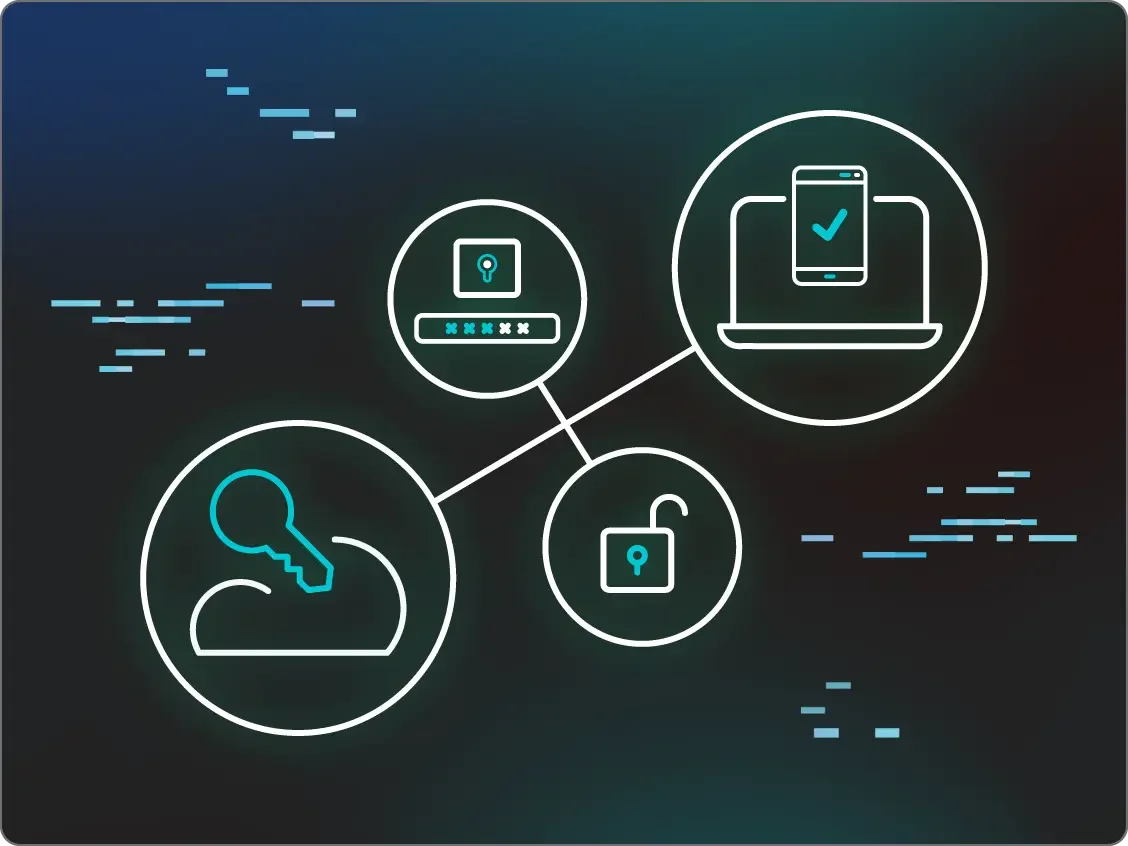
MFA adds extra layers of security to your attack surface, making it harder for attackers to break through your security perimeter. Here’s an example of how MFA typically works:
- Input something you know, like a complex and unique password
- Followed by something you have, like a numeric code sent via SMS, or something you are, like facial recognition
- Authentication: the first and second factors are confirmed by the system, device, or application you’re requesting access to
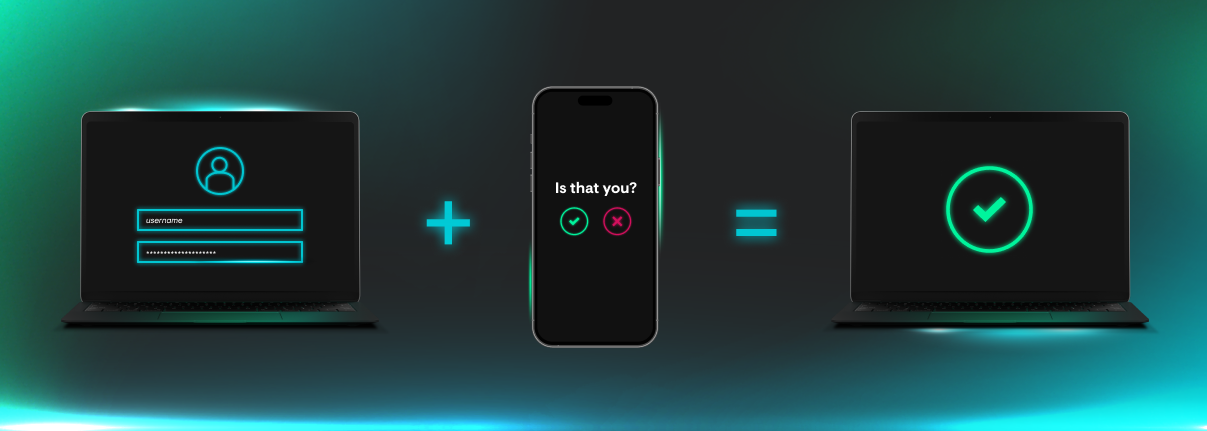
Figure 1: Example of MFA
Benefits of MFA for businesses
MFA matters to businesses of all sizes because it significantly reduces the risk of unauthorized access to sensitive accounts, devices, and systems. In fact, according to Microsoft, MFA can block up to 99.2% of account compromise attacks. Relying on single-factor authentication for access isn’t enough anymore because passwords can be guessed, stolen, and bought.
Don’t make things easy for attackers: build multiple perimeter barriers that make unauthorized access exponentially more difficult—or even impossible.
Common roadblocks to MFA adoption
High costs and complex deployment
Putting MFA in your security stack isn’t a simple “set up and then forget about it” scenario. Just like any other type of security solution, costs vary from free to per-user models and required licenses. While some MFA options like Microsoft 365 and Azure AD are available at no extra cost, other considerations like employee training, additional expert guidance for deployment, and ongoing support may introduce more costs than you planned for, especially for small and medium-sized businesses. In fact, MFA usage surges at 78% in businesses with 1,001 to 10,000 employees, but drops to 34% in smaller companies with fewer than 100 employees.
Balancing security and usability
There’s a common debate about MFA implementation: how do you balance top-notch security with a frictionless user experience? If security processes are too cumbersome, employees may bypass them, request to temporarily turn them off, or resist adoption altogether. A clunky setup could also deter customers if they’re required to use MFA to access certain services.
But foregoing MFA for any of the reasons listed above (or anything else) puts your organization at risk of common attacks like brute force and VPN compromise. MFA might be a small, inconvenient step for a user, but the aftermath of a compromised Remote Desktop Protocol (RDP) or VPN because MFA wasn’t enabled is a much bigger inconvenience for the entire business.
Navigating compliance and cyber insurance requirements
Regulatory compliance and cyber insurance have become critical mandates for businesses who need to protect themselves, their data, and their customers. Sectors like healthcare and finance are under constant scrutiny when it comes to privacy laws, data protection, and security compliance.
Many security and compliance frameworks now strongly recommend or require MFA:
-
Payment Card Industry Data Security Standard (PCI DSS): MFA for certain roles and access levels, especially admin access to cardholder data environments
-
Systems and Organization Controls 2 (SOC 2): MFA helps secure customer dataand prevents unauthorized access
-
Cybersecurity Maturity Model Certification (CMMC 2.0): phishing-resistant MFA for federal contractors dealing with sensitive government data
-
Health Insurance Portability and Accountability Act (HIPAA): recommended best practice for protecting Electronic Protected Health Information (ePHI)
Meanwhile, cyber insurance providers increasingly demand strong MFA protocols as part of their underwriting process. Failure to implement compliant MFA could result in coverage denial or even fines for regulatory violations.
The MFA threat landscape
Here’s the tough truth many businesses overlook: MFA isn’t 100% foolproof. Cybercriminals continuously seek to bypass MFA wherever they can on your attack surface. However, and you’ve probably heard this again and again if you’re a seasoned security professional, but we’ll still shout it off the rooftops: MFA is absolutely essential.
A lack of MFA makes threat actors’ lives easy
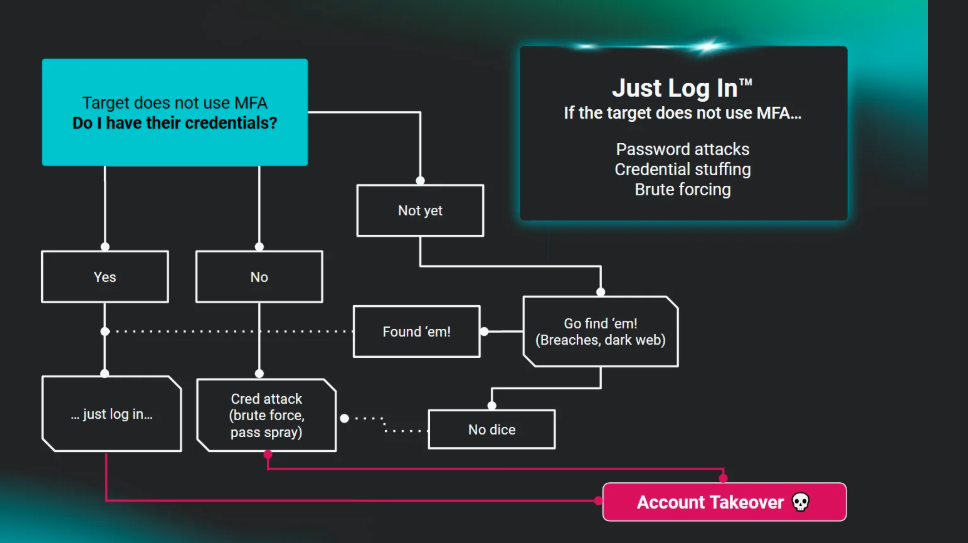
Threat actors use credential stuffing, brute force attacks, and other methods to take advantage of people who have reused passwords or easy-to-guess passwords. In fact, in the Huntress 2025 Managed Identity Threat Detection and Response (ITDR) Report, 50% of respondents said that they expect credential theft/stuffing attacks to increase over the next 12 months. Threat actors also trick people into handing over their passwords with easy phishing emails. MFA could trip up attackers in all of these different scenarios.
But we don’t have to just tell you about the importance of MFA. A simple list of high-profile breaches that have made the top security headlines over the past year shows several that stemmed from compromised credentials with no MFA:
-
In 2024, threat actors were able to compromise the official Twitter account of the US Securities and Exchange Commission, which didn't have MFA enabled
-
The 2024 Change Healthcare ransomware attack, which led to widespread prescription delays, was the result of a Citrix remote access portal account that didn’t have MFA enabled
MFA makes threat actors’ lives harder, but it’s not foolproof
MFA is also a great example of the cat-and-mouse pattern between defenders and adversaries that we frequently see. When businesses implement a new security protection, threat actors find ways to get around it in their attacks. That may make you want to throw your hands in the air, but consider this: these defenses prevent most attacks, and also raise the cost, time, and effort that it takes for threat actors if they attempt to bypass them. We’ll say it again for good measure: it’s still absolutely critical to make sure that MFA is enabled.
In certain cases, threat actors are finding ways to skirt around different forms of two-factor authentication (2FA) or MFA, using SIM swapping, social engineering, or push bombing. SIM swapping happens when attackers transfer phone numbers to another device without authorization so they can get voice and SMS communications linked to that number. This effectively enables them to bypass 2FA if targets rely on texts or calls to that phone number as the second form of authentication for various accounts.
Social engineering is another method used by threat actors like Scattered Spider or Lapsus$. They either pretend to be help desk personnel and convince targets to share their one-time password or target help desk workers themselves and trick them into resetting MFA tokens to take over victim accounts.
In fact, Scattered Spider has used several different techniques to get past MFA. The group is also known for using push bombing attacks (also known as MFA fatigue attacks), where they spam targets with MFA prompts until they approve one, either out of habit or frustration.
MFA incidents from the Huntress Security Operations Center (SOC)
Our 24/7 human-powered SOC sees a wide range of attacks that aim to bypass or disable different types of MFA. Here are some common types of incidents that we’ve seen in the wild.
Brute force attacks on applications without MFA
Many accounts, applications, and services don’t have MFA enabled at all, opening the front door for threat actors to compromise an organization. We’ll often see threat actors targeting services like RDP with brute force attacks as a way to get initial access, as seen in the May incident outlined in Figure 3.
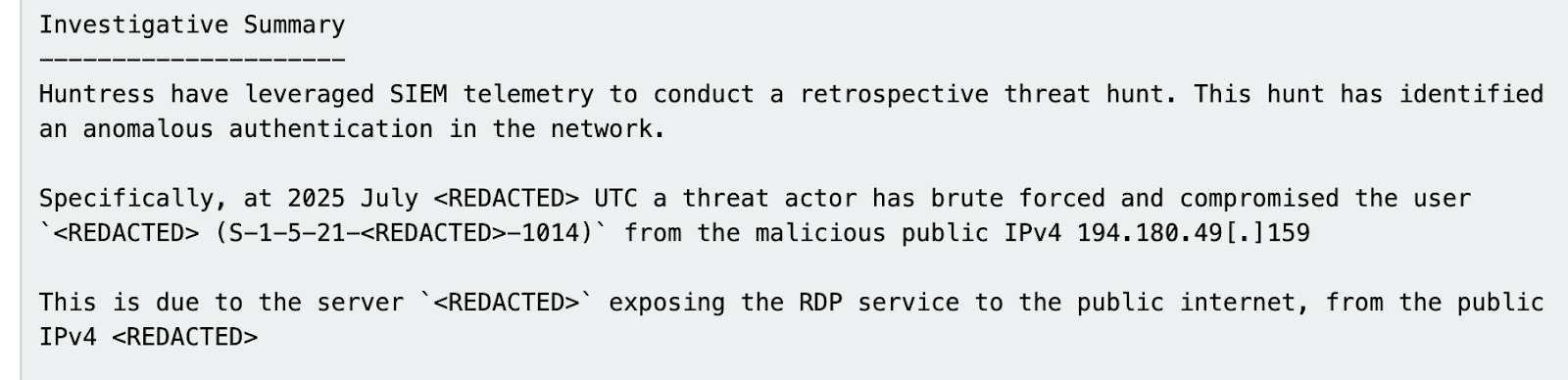
Figure 3: A Huntress investigative summary of an incident involving an RDP brute force attack
One of the top preventive measures for these incidents is making sure that RDP isn’t publicly exposed. In instances where external services must be exposed, however, MFA should absolutely be enabled.
Disabling MFA post-compromise
In June, Huntress analysts observed an incident where a threat actor was working to disable an MFA security application post-compromise. After initial access, the threat actor was seen executing the following command: cmd.exe /Q /c reg delete “HKLM\Software\Duo Security” 1> \Windows\Temp\gGutd1 2>&1

Figure 4: A threat actor attempts to disable Duo Security
The aim of deleting the Registry key through the command above is to disable Duo Security.
The use of Evilginx and Adversary-in-the-Middle (AiTM) attacks
Huntress has seen attackers attempt to hijack or steal session tokens, the unique identifiers that temporarily track user sessions after they log in. With these stolen tokens, threat actors can bypass certain types of MFA entirely. In fact, we found that incidents where threat actors tried to steal tokens made up almost 6% of all ITDR events in 2024.
Attackers use AiTM as a common method to hijack session tokens. In this type of attack, threat actors create phishing emails that have links to fake login pages. They then trick a victim into authenticating via the login page. However, the login page is sitting behind a transparent proxy, meaning that attackers can intercept all user input. Meanwhile, the proxy relays the authentication process back to the legitimate service, so when the victim signs in, the AiTM login page looks indistinguishable from the legitimate login page.
Threat actors can use toolkits to carry out this attack, including the well-known Evilginx (as well as offerings by phishing-as-a-service platforms). The video below explains how Evilginx helps threat actors deceive their targets.
Get your business MFA in order
With MFA, there’s no one-size-fits-all solution. There are several types of MFA, each with varying levels of security, costs, and ease of implementation, making it easier for companies to find the right fit for their needs.
2FA (SMS or email-based MFA) is common because it’s affordable and relatively easy to roll out. A code gets sent to your phone or inbox, and BOOM—you’re in. It’s a good starting point for smaller companies or those on tighter budgets. However, as we’ve outlined above, 2FA is easy for threat actors like Scattered Spider to get around with tactics like SIM-swapping.
Then there are app-based authenticators like Microsoft Authenticator. They’re still budget-friendly and work for most businesses that want tighter protection without overcomplicating things. The setup is a bit more hands-on, but it's definitely worth it.
For companies with bigger budgets and a stronger focus on security, hardware tokens are a great option. These are physical devices (like a Yubikey) that employees use to verify their identity. They’re incredibly secure and make attacks harder for threat actors, but they might not be the easiest to distribute and manage in large, remote teams.
Some businesses might even go high-tech with biometric MFA—think fingerprint scans, facial recognition, or voice verification. It’s slick, secure, and fast, but integrating it can be pricey and depend on having the right hardware. This is great for enterprises that prioritize security above all else and have the cash to back it.
A top-notch security stack with technologies like Managed ITDR and Managed Endpoint Detection and Response (EDR) is also critical for making sure MFA is working like you think it is to keep attackers out of your environment.
At the end of the day, it’s all about balance. Companies need to weigh their needs, resources, and budgets to figure out what type of MFA works best. Whatever route you pick, just having an MFA in place is already a big leap toward better security.
Closing thoughts
MFA isn’t just a nice-to-have anymore—it’s a must for keeping your business safe from cyber threats. Taking the time to set up and deploy MFA the right way means you’re not only protecting your organization but also staying on top of industry compliance. The cyber world is only getting tougher and more dangerous, and MFA is a critical part of your defense plan to help you stay ahead. Don’t wait until you’re on the brink of a data breach to get MFA in place and keep the bad guys out.
Frequently Asked Questions
1. What are the main benefits of MFA for companies?
The primary benefit is a massive reduction in the risk of unauthorized access. By requiring more than just a password, you protect sensitive company and customer data from being compromised, which helps prevent financial loss, reputational damage, and operational downtime.
2. How does MFA work in a business environment?
When an employee tries to access a company system, they first enter their password (something they know). Then, they must provide a second factor, such as a code from an authenticator app (something they have) or a fingerprint scan (something they are). The system verifies both before granting access.
3. How do you implement MFA for employees?
Start by choosing an MFA solution that fits your company's budget and security needs. Plan a phased rollout, beginning with a pilot group. Provide clear communication and training for all employees, including simple step-by-step guides and support resources to ensure a smooth transition and high MFA adoption in business.
4. What are the best MFA solutions for businesses?
The "best" solution depends on your needs. App-based authenticators offer a great balance of security and usability for most businesses. Hardware tokens are ideal for high-security environments, while biometric MFA provides a seamless user experience. It's crucial to assess your risk and budget to make the right choice.