


Don’t let overlooked obligations become incidents. Learn how.
Utility navigation bar redirect icon
Portal LoginSupportContact
Search
Close search
Huntress Logo in Teal
  • Platform Overview
    Managed EDR

    Get full endpoint visibility, detection, and response.

    Managed EDR

    Get full endpoint visibility, detection, and response.

    Managed ITDR

    Protect your Microsoft 365 identities and email environments.

    Managed ITDR

    Protect your Microsoft 365 identities and email environments.

    Managed SIEM

    Managed threat response and robust compliance support at a predictable price.

    Managed SIEM

    Managed threat response and robust compliance support at a predictable price.

    Managed Security Awareness Training

    Empower your teams with science-backed security awareness training.

    Managed Security Awareness Training

    Empower your teams with science-backed security awareness training.

    Managed ISPM

    Continuous Microsoft 365 and identity hardening, managed and enforced by Huntress experts.

    Managed ISPM

    Continuous Microsoft 365 and identity hardening, managed and enforced by Huntress experts.

    Managed ESPM

    Proactively secure endpoints against attacks.

    Managed ESPM

    Proactively secure endpoints against attacks.

    Integrations
    Integrations
    Support Documentation
    Support Documentation
    See Huntress in Action

    Quickly deploy and manage real-time protection for endpoints, email, and employees - all from a single dashboard.

    Huntress Cybersecurity
    See Huntress in Action

    Quickly deploy and manage real-time protection for endpoints, email, and employees - all from a single dashboard.

    Huntress Cybersecurity
  • Threats We Stop
    Phishing
    Phishing
    Business Email Compromise
    Business Email Compromise
    Ransomware
    Ransomware
    Infostealers
    Infostealers
    View Allright arrowView Allright arrow
    Industries We Serve
    Education
    Education
    Financial Services
    Financial Services
    State and Local Government
    State and Local Government
    Healthcare
    Healthcare
    Law Firms
    Law Firms
    Manufacturing
    Manufacturing
    Utilities
    Utilities
    View Allright arrowView Allright arrow
    Tailored Solutions
    MSPs
    MSPs
    Resellers
    Resellers
    SMBs
    SMBs
    Compliance
    Compliance
    What Gets Overlooked Gets Exploited

    Most days, nothing happens. But one day, something will.

    Huntress Cybersecurity
    Cybercriminals Have Evolved

    Get the intel on today’s cybercriminal groups and learn how to protect yourself.

    Huntress Cybersecurity
  • Pricing
  • Community Series
    The Product Lab

    Shape the next big thing in cybersecurity together.

    The Product Lab

    Shape the next big thing in cybersecurity together.

    Fireside Chat

    Real people. Real perspectives. Better conversations.

    Fireside Chat

    Real people. Real perspectives. Better conversations.

    Tradecraft Tuesday

    No products, no pitches – just tradecraft.

    Tradecraft Tuesday

    No products, no pitches – just tradecraft.

    _declassified

    Exposing hidden truths in the world of cybersecurity.

    _declassified

    Exposing hidden truths in the world of cybersecurity.

    Resources
    Upcoming Events
    Upcoming Events
    Ebooks
    Ebooks
    On-Demand Webinars
    On-Demand Webinars
    Videos
    Videos
    Whitepapers
    Whitepapers
    Datasheets
    Datasheets
    Cybersecurity Education
    Cybersecurity 101
    Cybersecurity 101
    Cybersecurity Guides
    Cybersecurity Guides
    Threat Library
    Threat Library
    Real Tradecraft, Real Results
    Real Tradecraft, Real Results
    2026 Cyber Threat Report
    2026 Cyber Threat Report
    The Huntress Blog
    Huntress Lands on the Microsoft Marketplace
    Huntress Cybersecurity
    Huntress Lands on the Microsoft Marketplace
    Huntress Cybersecurity
    How Huntress & DEFCERT Are Streamlining CMMC Assessment Prep
    Huntress Cybersecurity
    How Huntress & DEFCERT Are Streamlining CMMC Assessment Prep
    Huntress Cybersecurity
    Live Hacking Into Microsoft 365 with Kyle Hanslovan
    Huntress Cybersecurity
    Live Hacking Into Microsoft 365 with Kyle Hanslovan
    Huntress Cybersecurity
  • Why Huntress

    Go beyond AI in the fight against today’s hackers with Huntress Managed EDR purpose-built for your needs

    Huntress Cybersecurity
    Why Huntress

    Go beyond AI in the fight against today’s hackers with Huntress Managed EDR purpose-built for your needs

    Huntress Cybersecurity
    The Huntress SOC

    24/7 Security Operations Center

    The Huntress SOC

    24/7 Security Operations Center

    Reviews

    Why businesses of all sizes trust Huntress to defend their assets

    Reviews

    Why businesses of all sizes trust Huntress to defend their assets

    Case Studies

    Learn directly from our partners how Huntress has helped them

    Case Studies

    Learn directly from our partners how Huntress has helped them

    Community

    Get in touch with the Huntress Community team

    Community

    Get in touch with the Huntress Community team

    Compare Huntress
    Bitdefender
    Bitdefender
    Blackpoint
    Blackpoint
    Breach Secure Now!
    Breach Secure Now!
    Crowdstrike
    Crowdstrike
    Datto
    Datto
    SentinelOne
    SentinelOne
    Sophos
    Sophos
    Compare Allright arrowCompare Allright arrow
  • HUNTRESS HUB

    Login to access top-notch marketing resources, tools, and training.

    Huntress Cybersecurity
    HUNTRESS HUB

    Login to access top-notch marketing resources, tools, and training.

    Huntress Cybersecurity
    Partners
    MSPs

    Join our partner community to deliver expert-led managed security.

    MSPs

    Join our partner community to deliver expert-led managed security.

    Resellers

    Partner program designed to grow your cybersecurity business.

    Resellers

    Partner program designed to grow your cybersecurity business.

    Tech Alliances

    Driving innovation through global technology Partnerships

    Tech Alliances

    Driving innovation through global technology Partnerships

    Microsoft Partnership

    A Level-Up for Your Business Security

    Microsoft Partnership

    A Level-Up for Your Business Security

  • Press Release
    Huntress Announces Collaboration with Microsoft to Strengthen Cybersecurity for Businesses of All Sizes
    Huntress Cybersecurity
    Press Release
    Huntress Announces Collaboration with Microsoft to Strengthen Cybersecurity for Businesses of All Sizes
    Huntress Cybersecurity
    Our Story

    We're on a mission to shatter the barriers to enterprise-level security.

    Our Story

    We're on a mission to shatter the barriers to enterprise-level security.

    Newsroom

    Explore press releases, news articles, media interviews and more.

    Newsroom

    Explore press releases, news articles, media interviews and more.

    Meet the Team

    Founded by former NSA Cyber Operators. Backed by security researchers.

    Meet the Team

    Founded by former NSA Cyber Operators. Backed by security researchers.

    Careers

    Ready to shake up the cybersecurity world? Join the hunt.

    Careers

    Ready to shake up the cybersecurity world? Join the hunt.

    Awards
    Awards
    Contact Us
    Contact Us
  • Portal Login
  • Support
  • Contact
  • Search
  • Get a Demo
  • Start for Free
Portal LoginSupportContact
Search
Close search
Get a Demo
Start for Free
HomeBlog
Ask the Mac Guy: What's the Deal with Full Disk Access For Mac
Last Updated:
October 23, 2024

Ask the Mac Guy: What's the Deal with Full Disk Access For Mac

By:
Stuart Ashenbrenner
Share icon
Glitch effectGlitch effectGlitch effect

Here we are! Another edition of Ask the Mac Guy. In this series, we've been discussing some of the basic principles around macOS security, such as debunking common macOS security myths and the basics of securing Macs. Today, we're going to get slightly more granular and drill down into Apple's technology to learn more about full disk access for Mac.

In other articles, I've spoken about the technology that Apple ships with their product—their built-in security tools, if you will. One of the ways that Apple attempts to keep users safe is with Transparency, Consent, and Control (TCC). The TL;DR is that TCC is a collection of SQLite databases on disk, and when software desires to access parts of your hardware or software that may contain sensitive/personal information, it gives the users an interactive alert that requires the user to Allow or Deny the request. It makes explicit approval by the user a requirement for the software to access the service it's requesting. For example, if I am a Zoom user, the first time I try to turn on my camera, macOS will prompt me to Allow or Don't Allow Zoom's access to my camera. If I say 'Don't Allow,' then Zoom cannot toggle my camera on. I give this context because today, we're talking about a very specific part of TCC, which is a service called Full Disk Access.

Understanding Full Disk Access for macOS

Why is Full Disk Access for Macs important? Good question.

Apple introduced Full Disk Access (FDA) as part of macOS Mojave to provide users with greater control over which applications can access their entire system. This feature is vital in protecting user privacy and maintaining the security of personal data. When enabled, Full Disk Access for Mac allows specific applications to bypass certain security restrictions, allowing them to read and write to files that other apps cannot.

Certain applications, Zoom being a prime example, cannot operate properly or to their fullest potential without specific TCC permissions. In some cases, this TCC permission is FDA. This is applicable to the future of Managed ITDR. 

The FDA permission within the TCC database is arguably one of the most critical services when it comes to privacy. When TCC bypasses have been disclosed, the largest concern typically centers around FDA. We’ve seen TCC bypassed by some sophisticated malware like XCSSET, where malware was able to piggyback on other TCC permissions. If the malware had full disk access, it would be able to access all of the user’s sensitive data. This could lead to lateral movement across the network, higher chances for future social engineering attacks, spying on users, etc. On the flip side, if I were a blue teamer and needed to perform incident response on an endpoint using Aftermath, my Terminal would need full disk access so my IR tool could collect all of the relevant and important data from the device in order to perform a proper investigation.

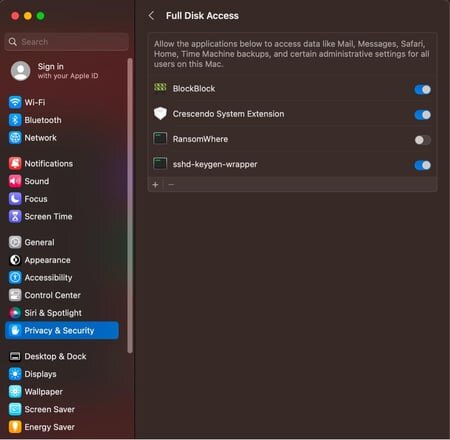
In the TCC database, Apple refers to Full Disk Access using the field kTCCServiceSystemPolicyAllFiles . When we see this field in the database, you can see the client that made the request.
Picture

To the end user, if you navigate to System Settings > Privacy & Security > Full Disk Access , you can see all of the applications (clients - as they're referred to in the database) that have requested FDA and whether or not the user approved or denied the request.

In our second edition of Ask the Mac Guy, we spoke about FDA when it comes to best practices for securing your Mac. Here, we spoke about auditing your TCC permissions. One way, at the business level, to ensure these are not tampered with is to roll Mobile Device Management (MDM) software. There are a handful of MDMs that are out there—Microsoft Intune, Jamf Pro, Addigy, and more.

MDMs get more leeway from Apple when it comes to TCC and FDA. MDMs have features called PPPC (Privacy Preferences Policy Control). This allows administrators to deploy a payload that contains a series of key/value pairs. Having specific keys and values can grant software TCC access, such as FDA.

For example, if I want to give the Huntress agent full disk access permissions, I would create a payload in my MDM and push it to the endpoint. To view it, I would check System Settings > Profiles.

Picture

This image shows how the Huntress agent is allowed full disk access using the bundle identifier com.huntresslabs.www.

It's worth noting how helpful an MDM can be when deploying software or working with applications and software on macOS. It can deploy software to multiple devices at once, as well as grant permission to applications, without the need to physically be on the device itself.

If you’re ever interested in taking a deeper dive into the TCC databases on the system—one at the root level and one for each user, you can do so from the Terminal or whatever CLI you prefer. Although the schema for these two databases is identical, what they hold within differs. The root TCC database, which lives at /Library/Application Support/com.apple.TCC/TCC.db, holds more sensitive information, such as full disk access, screenshots, or input monitoring. The per-user TCC database, located at ~/Library/Application Support/com.apple.TCC/TCC.db, holds the permissions for microphone access, camera access, folder access (Desktop, Downloads, etc.), location data, and more.

If we take a look at our local TCC database, you can see a list of what applications (based on their bundle identifier), what they requested, and the action taken. Here, the command I run is:

sqlite3 ~/Library/Application\ Support/com.apple.TCC/TCC.db

This will open my user (~) TCC database; then, I run the following SQLite command.

SELECT client, service, auth_value, auth_reason, datetime(last_modified, "unixepoch") FROM access ORDER BY last_modified DESC;
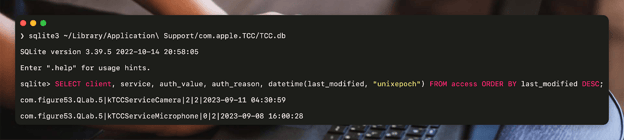
This can apply to full disk access as well, and much more information about TCC can be found in our Built-In macOS Security Tools blog.


FAQs

What is Full Disk Access for Mac?

Full Disk Access for Mac is a security feature that allows selected applications to access and modify system files that are typically restricted. This setting is crucial for apps that need deep system access to function correctly, such as security tools and backup software.

How do I grant Full Disk Access on my Mac?

To grant Full Disk Access on your Mac, navigate to System Settings > Privacy & Security > Full Disk Access. From there, you can add or remove applications, ensuring that only trusted apps have this level of access.

What are the risks of improperly managed Full Disk Access permissions?

If your Full Disk Access permissions aren’t properly managed, they can create some serious security risks. Malicious apps could access all your sensitive data, leading to potential breaches or even letting hackers move around your network more freely. This could also open you up to more targeted attacks or spying. So, it’s massively important to make sure only your trusted apps have this level of access to keep your Mac safe.

How can Mobile Device Management (MDM) tools enhance the management of Full Disk Access for Macs?

MDM tools like Jamf Pro or Microsoft Intune make managing Full Disk Access on Macs a whole lot easier, especially for businesses. They let you set up and control permissions remotely, so you don’t have to physically be at each device. With MDM, you can quickly push out the right settings to make sure only trusted apps get Full Disk Access, keeping everything secure and compliant without the hassle. It’s a streamlined way to stay on top of your Mac’s security game across all your devices.

Closing Thoughts

When applications are not functioning as expected, ensuring the application has the proper or necessary permissions—like full disk access—should be a common troubleshooting step. It often trips up administrators and end users, and can cause frustrations in usability. The design by Apple is to help restrict applications from overreaching, and although it's replete with 0-days, I truly believe that the desire behind it was honest and well-intended.


Categories
Cybersecurity Education
Summarize this postClose Speech Bubble
ChatGPTClaudePerplexityGoogle AI

See Huntress in action

Our platform combines a suite of powerful managed detection and response tools for endpoints and Microsoft 365 identities, science-backed security awareness training, and the expertise of our 24/7 Security Operations Center (SOC).

Book a Demo
Share
Facebook iconTwitter X iconLinkedin iconDownload icon
Glitch effect

You Might Also Like

  • Full Transparency: Controlling Apple's TCC

    Dive into Apple's TCC framework, decoding its role in user privacy. Explore permissions, challenges, and the encryption safeguarding sensitive data.
  • Full Transparency: Controlling Apple's TCC Part II

    The primary goal of Apple's Transparency, Consent, and Control (TCC) is to empower users with transparency regarding how their data is accessed and used by applications. In this Part 2, dig even deeper into the mechanism that runs TCC and what's happening in the background.
  • Ask the Mac Guy: macOS Security Myths

    Discover the truth about macOS security. The Huntress Mac Guy answers common macOS security questions like why you should protect your Mac computers.
  • Ask the Mac Guy: Best Practices for Securing Macs

    Tips from a Mac expert. Discover the best practices users and administrators can use to secure your Mac devices or your Mac fleet.
  • The Battle for macOS Management: MDM vs. RMM

    Explore the two primary methods for managing macOS devices, MDM (Mobile Device Management) and RMM (Remote Monitoring and Management).
  • Ask the Mac Guy: Do I Need AV on My Mac?

    In this blog, our Mac expert answers the existential question: As a Mac user, do you need to use an antivirus (AV) to protect your Mac?
  • macOS (Not)ifications

    In this blog, we dive into macOS notifications—and the intentional design behind them.
  • Endpoint Security In a macOS World

    It would take hours to cover everything endpoint security can do, but this blog covers it in a few aspects: a high-level overview, a deeper dive and how detection engineers can leverage it.

Sign Up for Huntress Updates

Get insider access to Huntress tradecraft, killer events, and the freshest blog updates.
Privacy • Terms
By submitting this form, you accept our Terms of Service & Privacy Policy
Thank you! Your submission has been received!
Oops! Something went wrong while submitting the form.
Huntress Managed Security PlatformManaged EDRManaged EDR for macOSManaged EDR for LinuxManaged ITDRManaged SIEMManaged Security Awareness TrainingManaged ISPMManaged ESPMBook a Demo
PhishingComplianceBusiness Email CompromiseEducationFinanceHealthcareManufacturingState & Local Government
Managed Service ProvidersResellersIT & Security Teams24/7 SOCCase Studies
BlogResource CenterCybersecurity 101Upcoming EventsSupport Documentation
Our CompanyLeadershipNews & PressCareersContact Us
Huntress white logo

Protecting 215k+ customers like you with enterprise-grade protection.

Privacy PolicyCookie PolicyTerms of UseCookie Consent
Linkedin iconTwitter X iconYouTube iconInstagram icon
© 2025 Huntress All Rights Reserved.

Join the Hunt

Get insider access to Huntress tradecraft, killer events, and the freshest blog updates.

By submitting this form, you accept our Terms of Service & Privacy Policy