


Don’t let overlooked obligations become incidents. Learn how.
Utility navigation bar redirect icon
Portal LoginSupportContact
Search
Close search
Huntress Logo in Teal
  • Platform Overview
    Managed EDR

    Get full endpoint visibility, detection, and response.

    Managed EDR

    Get full endpoint visibility, detection, and response.

    Managed ITDR

    Protect your Microsoft 365 identities and email environments.

    Managed ITDR

    Protect your Microsoft 365 identities and email environments.

    Managed SIEM

    Managed threat response and robust compliance support at a predictable price.

    Managed SIEM

    Managed threat response and robust compliance support at a predictable price.

    Managed Security Awareness Training

    Empower your teams with science-backed security awareness training.

    Managed Security Awareness Training

    Empower your teams with science-backed security awareness training.

    Managed ISPM

    Continuous Microsoft 365 and identity hardening, managed and enforced by Huntress experts.

    Managed ISPM

    Continuous Microsoft 365 and identity hardening, managed and enforced by Huntress experts.

    Managed ESPM

    Proactively secure endpoints against attacks.

    Managed ESPM

    Proactively secure endpoints against attacks.

    Integrations
    Integrations
    Support Documentation
    Support Documentation
    See Huntress in Action

    Quickly deploy and manage real-time protection for endpoints, email, and employees - all from a single dashboard.

    Huntress Cybersecurity
    See Huntress in Action

    Quickly deploy and manage real-time protection for endpoints, email, and employees - all from a single dashboard.

    Huntress Cybersecurity
  • Threats We Stop
    Phishing
    Phishing
    Business Email Compromise
    Business Email Compromise
    Ransomware
    Ransomware
    Infostealers
    Infostealers
    View Allright arrowView Allright arrow
    Industries We Serve
    Education
    Education
    Financial Services
    Financial Services
    State and Local Government
    State and Local Government
    Healthcare
    Healthcare
    Law Firms
    Law Firms
    Manufacturing
    Manufacturing
    Utilities
    Utilities
    View Allright arrowView Allright arrow
    Tailored Solutions
    MSPs
    MSPs
    Resellers
    Resellers
    SMBs
    SMBs
    Compliance
    Compliance
    What Gets Overlooked Gets Exploited

    Most days, nothing happens. But one day, something will.

    Huntress Cybersecurity
    Cybercriminals Have Evolved

    Get the intel on today’s cybercriminal groups and learn how to protect yourself.

    Huntress Cybersecurity
  • Pricing
  • Community Series
    The Product Lab

    Shape the next big thing in cybersecurity together.

    The Product Lab

    Shape the next big thing in cybersecurity together.

    Fireside Chat

    Real people. Real perspectives. Better conversations.

    Fireside Chat

    Real people. Real perspectives. Better conversations.

    Tradecraft Tuesday

    No products, no pitches – just tradecraft.

    Tradecraft Tuesday

    No products, no pitches – just tradecraft.

    _declassified

    Exposing hidden truths in the world of cybersecurity.

    _declassified

    Exposing hidden truths in the world of cybersecurity.

    Resources
    Upcoming Events
    Upcoming Events
    Ebooks
    Ebooks
    On-Demand Webinars
    On-Demand Webinars
    Videos
    Videos
    Whitepapers
    Whitepapers
    Datasheets
    Datasheets
    Cybersecurity Education
    Cybersecurity 101
    Cybersecurity 101
    Cybersecurity Guides
    Cybersecurity Guides
    Threat Library
    Threat Library
    Real Tradecraft, Real Results
    Real Tradecraft, Real Results
    2026 Cyber Threat Report
    2026 Cyber Threat Report
    The Huntress Blog
    Huntress Lands on the Microsoft Marketplace
    Huntress Cybersecurity
    Huntress Lands on the Microsoft Marketplace
    Huntress Cybersecurity
    How Huntress & DEFCERT Are Streamlining CMMC Assessment Prep
    Huntress Cybersecurity
    How Huntress & DEFCERT Are Streamlining CMMC Assessment Prep
    Huntress Cybersecurity
    Live Hacking Into Microsoft 365 with Kyle Hanslovan
    Huntress Cybersecurity
    Live Hacking Into Microsoft 365 with Kyle Hanslovan
    Huntress Cybersecurity
  • Why Huntress

    Go beyond AI in the fight against today’s hackers with Huntress Managed EDR purpose-built for your needs

    Huntress Cybersecurity
    Why Huntress

    Go beyond AI in the fight against today’s hackers with Huntress Managed EDR purpose-built for your needs

    Huntress Cybersecurity
    The Huntress SOC

    24/7 Security Operations Center

    The Huntress SOC

    24/7 Security Operations Center

    Reviews

    Why businesses of all sizes trust Huntress to defend their assets

    Reviews

    Why businesses of all sizes trust Huntress to defend their assets

    Case Studies

    Learn directly from our partners how Huntress has helped them

    Case Studies

    Learn directly from our partners how Huntress has helped them

    Community

    Get in touch with the Huntress Community team

    Community

    Get in touch with the Huntress Community team

    Compare Huntress
    Bitdefender
    Bitdefender
    Blackpoint
    Blackpoint
    Breach Secure Now!
    Breach Secure Now!
    Crowdstrike
    Crowdstrike
    Datto
    Datto
    SentinelOne
    SentinelOne
    Sophos
    Sophos
    Compare Allright arrowCompare Allright arrow
  • HUNTRESS HUB

    Login to access top-notch marketing resources, tools, and training.

    Huntress Cybersecurity
    HUNTRESS HUB

    Login to access top-notch marketing resources, tools, and training.

    Huntress Cybersecurity
    Partners
    MSPs

    Join our partner community to deliver expert-led managed security.

    MSPs

    Join our partner community to deliver expert-led managed security.

    Resellers

    Partner program designed to grow your cybersecurity business.

    Resellers

    Partner program designed to grow your cybersecurity business.

    Tech Alliances

    Driving innovation through global technology Partnerships

    Tech Alliances

    Driving innovation through global technology Partnerships

    Microsoft Partnership

    A Level-Up for Your Business Security

    Microsoft Partnership

    A Level-Up for Your Business Security

  • Press Release
    Huntress Announces Collaboration with Microsoft to Strengthen Cybersecurity for Businesses of All Sizes
    Huntress Cybersecurity
    Press Release
    Huntress Announces Collaboration with Microsoft to Strengthen Cybersecurity for Businesses of All Sizes
    Huntress Cybersecurity
    Our Story

    We're on a mission to shatter the barriers to enterprise-level security.

    Our Story

    We're on a mission to shatter the barriers to enterprise-level security.

    Newsroom

    Explore press releases, news articles, media interviews and more.

    Newsroom

    Explore press releases, news articles, media interviews and more.

    Meet the Team

    Founded by former NSA Cyber Operators. Backed by security researchers.

    Meet the Team

    Founded by former NSA Cyber Operators. Backed by security researchers.

    Careers

    Ready to shake up the cybersecurity world? Join the hunt.

    Careers

    Ready to shake up the cybersecurity world? Join the hunt.

    Awards
    Awards
    Contact Us
    Contact Us
  • Portal Login
  • Support
  • Contact
  • Search
  • Get a Demo
  • Start for Free
Portal LoginSupportContact
Search
Close search
Get a Demo
Start for Free
HomeBlog
Endpoint Security In a macOS World
Published:
April 25, 2023

Endpoint Security In a macOS World

By:
Stuart Ashenbrenner
Share icon
Glitch effectGlitch effectGlitch effect

At the Worldwide Developer Conference (WWDC) in 2019, Apple announced the release of macOS Catalina and along with it, system extensions and, something they referred to as the Endpoint Security Framework, or ESF.

The following year, at WWDC2020, they discussed building endpoint security tools (or applications) by leveraging ESF.
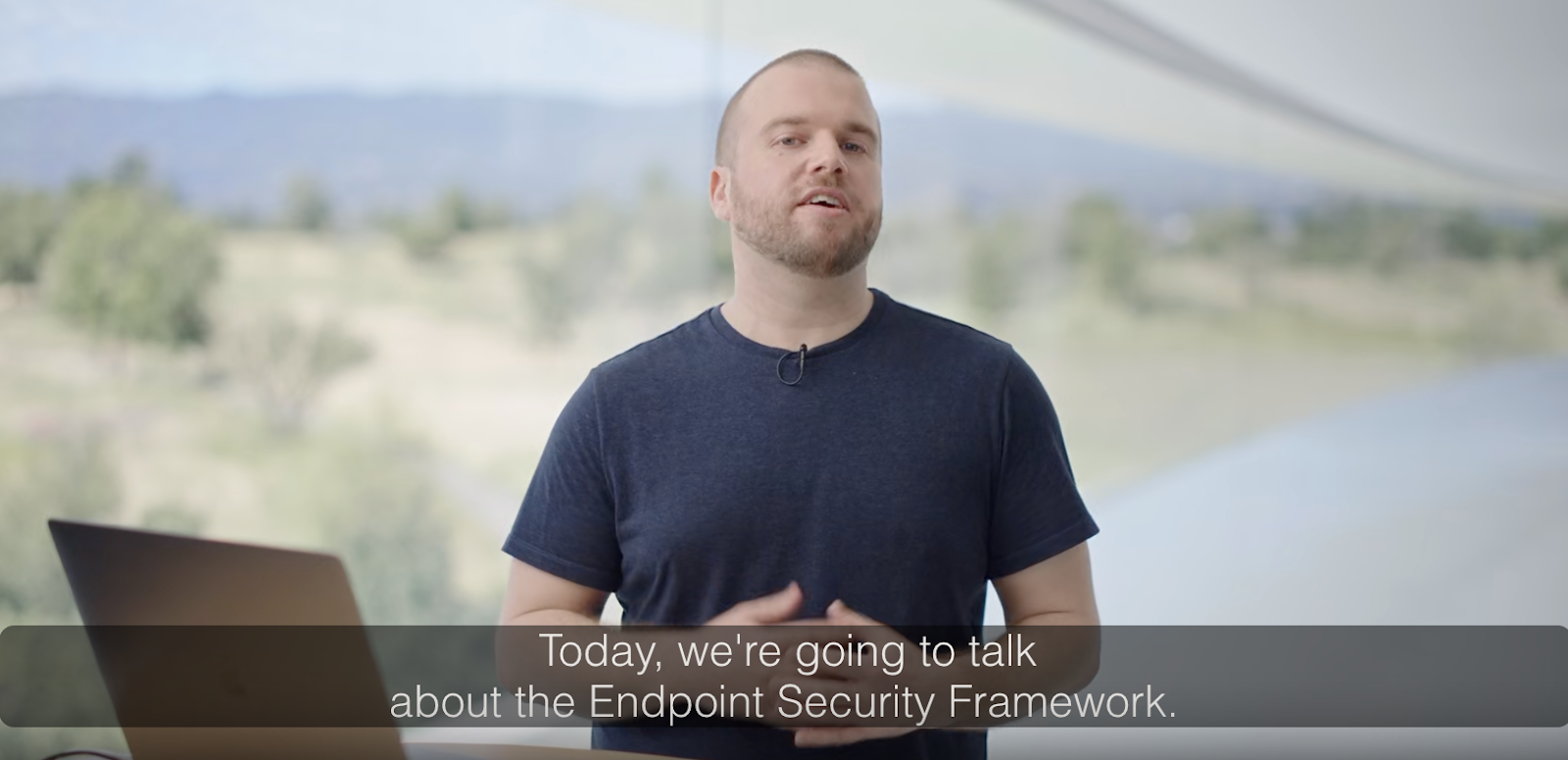
image7

A discussion about Endpoint Security from WWDC2019

Now before we dive in too deep, it's important to note that at some point since its release, ESF has been renamed, or at the very least, there has been a call to be more specific. Because of that, I will do my best to refer to it as either Endpoint Security or ES, although I must admit, old habits die hard.

Just a PSA on behalf of the engineering folks who work on it: There is no single "Endpoint Security Framework" or "ESF", it's just "Endpoint Security" or "ES" for short, optionally combined with "API" if you want to be extra-fancy 👍

Just a PSA on behalf of the engineering folks who work on it: There is no single "Endpoint Security Framework" or "ESF", it's just "Endpoint Security" or "ES" for short, optionally combined with "API" if you want to be extra-fancy 👍

— Pepijn Bruienne 🐶🌲🧀💴 (@bruienne) October 6, 2022

Endpoint Security is quite a complex, in-depth topic. It would take hours (days?) to cover everything ES can do, but I want to cover it in a few aspects—a high-level overview, a deeper dive into how it works and how detection engineers can potentially leverage some of the information ES provides.

High-level Overview

Let’s start with a high-level, not overly technical run-through before we dive into the deep end of the pool here. Endpoint Security is available to those on macOS Catalina, which is 10.15, or higher. If you’re not running this operating system or higher, you should be (unless your device literally can’t run anything more recent). One of the most important things to do to keep yourself—and your Mac—secure is to keep your software and operating system up to date. Flaws are often fixed with supplemental or security updates, so running an outdated OS can make you or your users more susceptible to exploits. 

To the end user, ES probably doesn’t mean much, but to the software that runs on their Mac, it means much more. Let’s start with what ES allows. Its primary function is to allow applications to look for malicious activity by providing visibility into certain parts of their system. The activity that ES subsequently returns can be analyzed, whether by a human or automated service. It can be reviewed, and as such, the activity can be blocked. This is how your more traditional macOS antiviruses (AVs) operate—by leveraging Endpoint Security.

Juxtaposed to offering applications deeper visibility and insight through ES is Apple's expansion of what I call, 'end user transparency', allowing the end user acknowledgment into what applications are doing on the system. Although this means more alerts to the user, and could potentially lead to alert fatigue, it is a purposeful design by Apple to give users more knowledge behind what applications have access and visibility to their system. This means that when installing any type of system extension (which ES is typically bundled into) on your system, and whether it leverages ES or not is moot, it requires explicit approval from the end user (although this does not necessarily apply to users enrolled in an MDM—but that’s a story for another blog post).

image4

Not only will the user need to approve the system extension, but they will need to allow Full Disk Access (FDA) permissions to the ES application as well. Fortunately, if this application is using a system extension, upon install, the FDA request is pre-populated with the System Settings, making it a little easier for the user or admin to accept this FDA request.

Going Deeper

If we start to explore a little deeper, Endpoint Security is a C API, which is part of the System Extension framework. The idea was that ES would replace a few different functions of macOS - the KAuth KPI, Kernel Extensions (kexts), and OpenBSM audit trail. System Extensions are entitlements granted by Apple to have access to some of these lower level system events. If you’re a developer, you would be required to hold a com.apple.developer.endpoint-security.client entitlement in order to use ES. This means that your application could be developed to use the events generated by Endpoint Security.

An additional security mechanism that is utilized by this process is code signing. In order to request and subsequently use this entitlement, you must possess a developer’s license, or Developer/Team ID. This 10-digit, alphanumeric string ties your software back to the developer. Although there is such a thing as a malicious team ID (someone who uses their Team ID for nefarious purposes), it provides an extra layer of security to the process.

When creating an ES system extension, you first create your ES client.
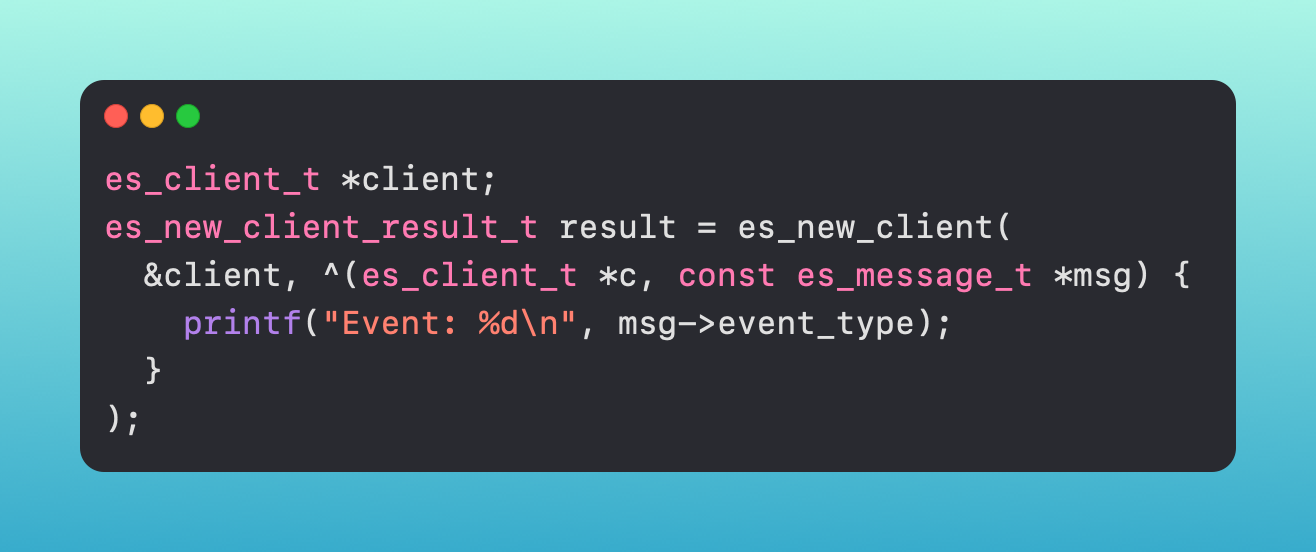
image2

Once you have your client, you pick which event types you want to subscribe to via an event stream - ES_EVENT_TYPE_NOTIFY_EXEC, ES_EVENT_TYPE_AUTH_MOUNT, etc., etc.
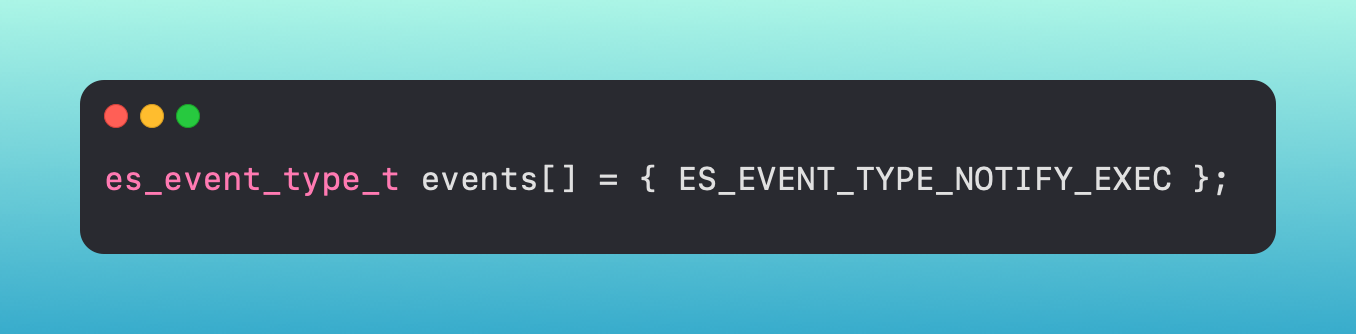
image9

There are two types of events, NOTIFY events and AUTH events (you can see the NOTIFY event in the above screenshot). Notify events are just as their name alludes to - they notify you that an event occurred. Auth events are different in that your application has a chance to take action against it first - meaning you could potentially block a process from executing if you are subscribing to the ES_EVENT_TYPE_AUTH_EXEC event.

When your application receives the messages from the client you created, if it is an auth event, you can then handle those cases. This is accomplished by your application queuing up the messages, then handling them based on the conditions set by the application.
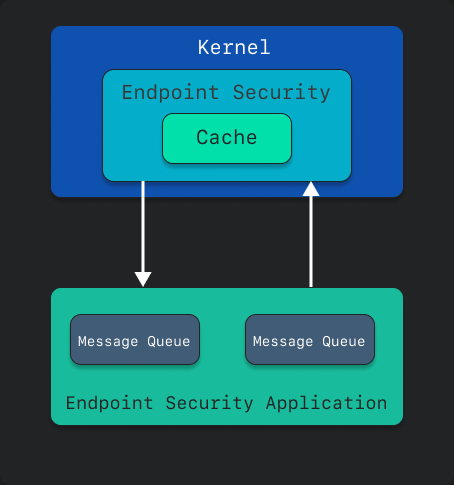
image8

Because all of this is handled without leaving the kernel, if your application is set up to block that process, it can be halted before executing its commands.

System Extensions, in general, also persist, so when the system boots, these system extensions are immediately executed and started. They don’t need to be manually started or triggered once the machine boots, which can help make your application somewhat of a ‘set it and forget it’ item.

Detections

It is possible to use rules from Sigma or writing predicates with NSPredicate that can be backed by data from ES. These can be ingested into a SIEM to capture and iterate over that data. These rules will allow you to look at events, or potentially in the case of AUTH events, take action against the processes based on your logic within your application.

There are tools like Apple's eslogger (see below), ESFPlayground from The Mitten Mac, or Appmon by Chris Ross that can print out raw data of Endpoint Security events.
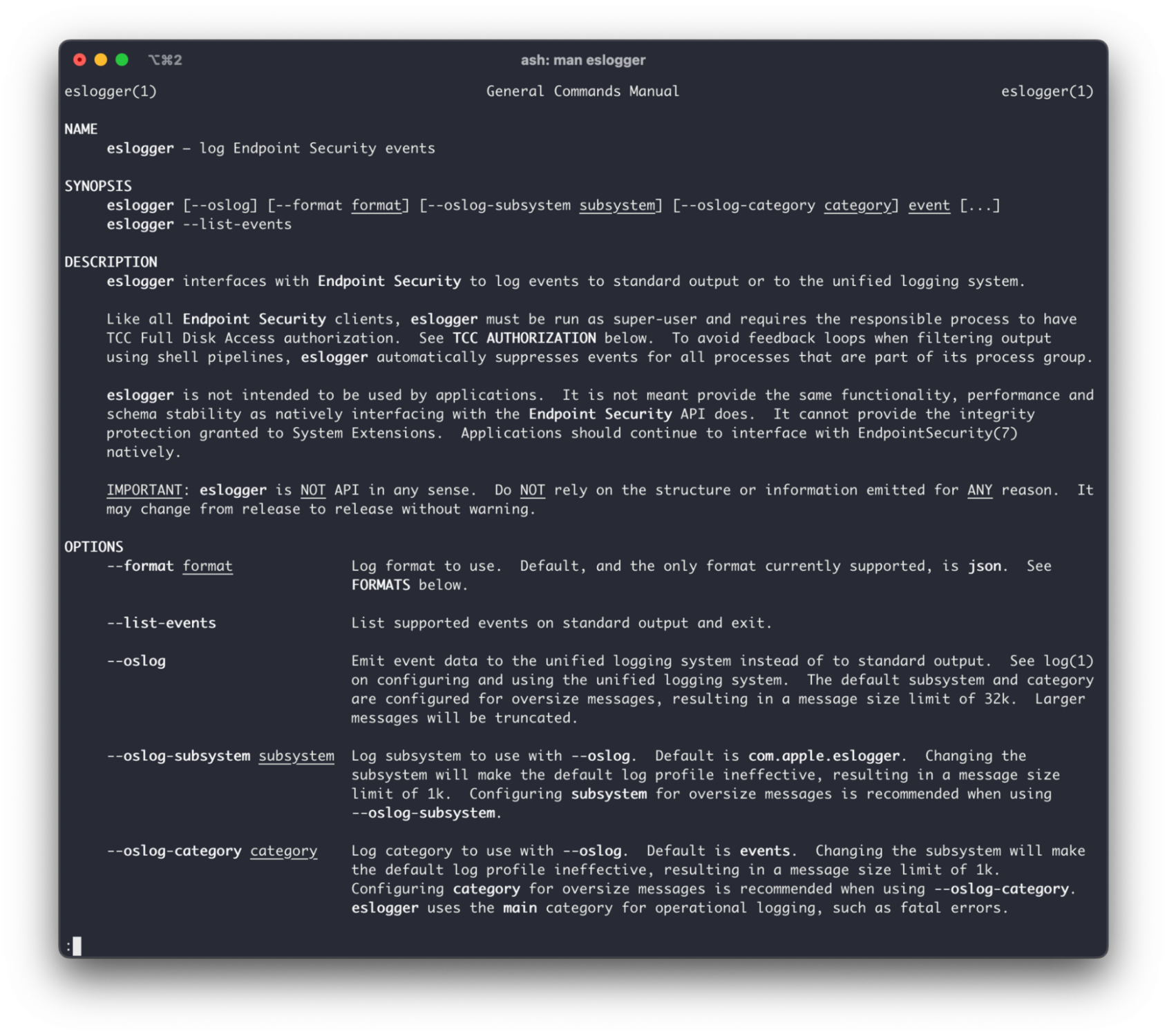
image6

The output is a robust json blob with a pile of information that can be parsed and analyzed. Below, we have an ES_EVENT_TYPE_NOTIFY_EXEC, or ‘exec event’, event that occurred when we simply open the Calculator application.

Information provided from this object like the event::exec::target::executable::path gives you the path of the executable, whereas the event::exec::args shows the arguments, as an array, that were executed. We could look at these fields, and based on their contents, make an informed decision according to what was observed. That can include what the path is, or use some regex to check for very specific cases.

Some of the different event types that may be useful when looking to detect threats are:
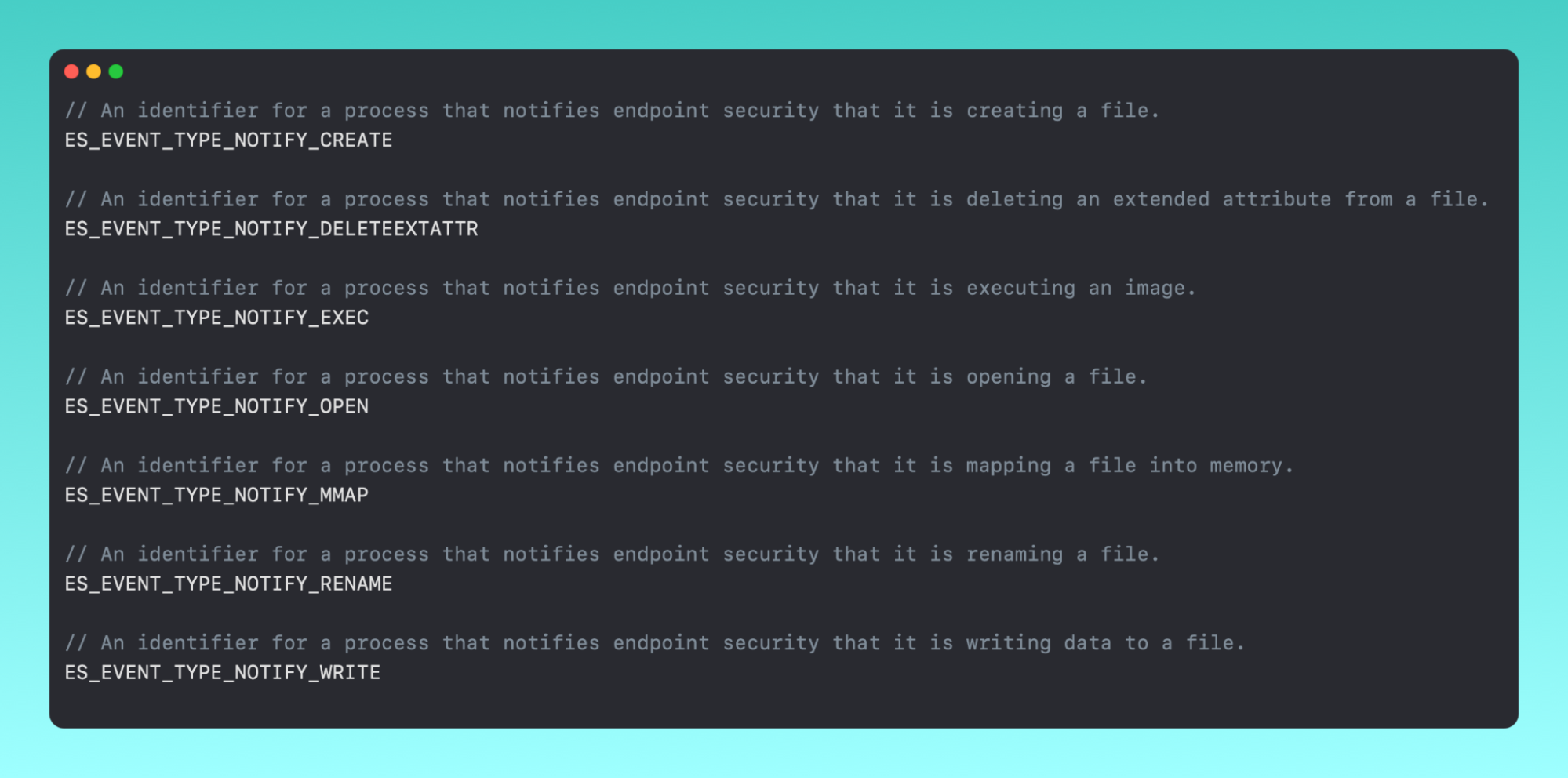
image5

For me, the ES_EVENT_TYPE_NOTIFY_EXEC gives me the most immediate benefit when looking at macOS malware. If we look at the sample below, we can see the Shlayer malware running some commands from the command line. We can see all of the arguments, in an array, that Shlayer is running here. The actual command is openssl enc -base64 -d -aes-256-cbc -nosalt -pass pass:10595727573, which we can see on line 135 of this ES output.

It's worth noting that although the information these events give visibility into are valuable, some of these events can also be very noisy, especially if you have lots of noise on your system (an MDM that is constantly running system_profiler for example 🙈).

image3

In addition, there are some constants that detection engineers may find useful.

The entire list of events is available in es_event_type_t, and obviously, they can be used in whichever way you find valuable.

Epilogue

Endpoint Security, although still relatively infantile in comparison to other macOS features, is arguably one of the biggest game-changers to the macOS security stack. It gives invaluable information and context around the processes and files that are executing and changing on your system. Under the hood, it is complex, but with many different tools, it is possible to get a good understanding of what is happening on your system and protect yourself against malicious activity. 

ES is designed to give security applications more detailed access to system events, all while being able to ignore direct interaction with the kernel. In the end, this reiterates Apple’s stance on protecting their end users.


Categories
Cybersecurity Education
Summarize this postClose Speech Bubble
ChatGPTClaudePerplexityGoogle AI

See Huntress in action

Our platform combines a suite of powerful managed detection and response tools for endpoints and Microsoft 365 identities, science-backed security awareness training, and the expertise of our 24/7 Security Operations Center (SOC).

Book a Demo
Share
Facebook iconTwitter X iconLinkedin iconDownload icon
Glitch effect

You Might Also Like

  • macOS Terms and Trends You Should Know About

    A look inside the evolving landscape of macOS malware. Dive into the current state of macOS threats and learn from a glossary of essential macOS terms.
  • macOS (Not)ifications

    In this blog, we dive into macOS notifications—and the intentional design behind them.
  • Built-in macOS Security Tools

    We discuss some of our favorite and most interesting built-in macOS security tools.
  • dmXProtect: Stop, Drop, Shut Malware Down Before It Opens Up Shop

    Do you need third-party security for macOS? Discover if Apple’s malware prevention products, XProtect and XProtect Remediator, are good enough solutions to keep users safe.
  • Pursuing Parity: Attempting to Bring Cross-Platform Unity

    Huntress researchers weigh in on the challenge of getting feature parity across Windows, macOS, and Linux. And learn how unique security models and platform maturity shape the way products are built.
  • Insistence on Persistence

    In this blog, we'll explore our new Mac agent, what we look for and why—and where we’re heading.
  • Full Transparency: Controlling Apple's TCC Part II

    The primary goal of Apple's Transparency, Consent, and Control (TCC) is to empower users with transparency regarding how their data is accessed and used by applications. In this Part 2, dig even deeper into the mechanism that runs TCC and what's happening in the background.
  • What Is Endpoint Detection and Response?

    What is endpoint detection and response (EDR) and why is it important? Dive into what EDR is, its history and what to look for in EDR solutions today.

Sign Up for Huntress Updates

Get insider access to Huntress tradecraft, killer events, and the freshest blog updates.
Privacy • Terms
By submitting this form, you accept our Terms of Service & Privacy Policy
Thank you! Your submission has been received!
Oops! Something went wrong while submitting the form.
Huntress Managed Security PlatformManaged EDRManaged EDR for macOSManaged EDR for LinuxManaged ITDRManaged SIEMManaged Security Awareness TrainingManaged ISPMManaged ESPMBook a Demo
PhishingComplianceBusiness Email CompromiseEducationFinanceHealthcareManufacturingState & Local Government
Managed Service ProvidersResellersIT & Security Teams24/7 SOCCase Studies
BlogResource CenterCybersecurity 101Upcoming EventsSupport Documentation
Our CompanyLeadershipNews & PressCareersContact Us
Huntress white logo

Protecting 215k+ customers like you with enterprise-grade protection.

Privacy PolicyCookie PolicyTerms of UseCookie Consent
Linkedin iconTwitter X iconYouTube iconInstagram icon
© 2025 Huntress All Rights Reserved.

Join the Hunt

Get insider access to Huntress tradecraft, killer events, and the freshest blog updates.

By submitting this form, you accept our Terms of Service & Privacy Policy