


Don’t let overlooked obligations become incidents. Learn how.
Utility navigation bar redirect icon
Portal LoginSupportContact
Search
Close search
Huntress Logo in Teal
  • Platform Overview
    Managed EDR

    Get full endpoint visibility, detection, and response.

    Managed EDR

    Get full endpoint visibility, detection, and response.

    Managed ITDR

    Protect your Microsoft 365 identities and email environments.

    Managed ITDR

    Protect your Microsoft 365 identities and email environments.

    Managed SIEM

    Managed threat response and robust compliance support at a predictable price.

    Managed SIEM

    Managed threat response and robust compliance support at a predictable price.

    Managed Security Awareness Training

    Empower your teams with science-backed security awareness training.

    Managed Security Awareness Training

    Empower your teams with science-backed security awareness training.

    Managed ISPM

    Continuous Microsoft 365 and identity hardening, managed and enforced by Huntress experts.

    Managed ISPM

    Continuous Microsoft 365 and identity hardening, managed and enforced by Huntress experts.

    Managed ESPM

    Proactively secure endpoints against attacks.

    Managed ESPM

    Proactively secure endpoints against attacks.

    Integrations
    Integrations
    Support Documentation
    Support Documentation
    See Huntress in Action

    Quickly deploy and manage real-time protection for endpoints, email, and employees - all from a single dashboard.

    Huntress Cybersecurity
    See Huntress in Action

    Quickly deploy and manage real-time protection for endpoints, email, and employees - all from a single dashboard.

    Huntress Cybersecurity
  • Threats We Stop
    Phishing
    Phishing
    Business Email Compromise
    Business Email Compromise
    Ransomware
    Ransomware
    Infostealers
    Infostealers
    View Allright arrowView Allright arrow
    Industries We Serve
    Education
    Education
    Financial Services
    Financial Services
    State and Local Government
    State and Local Government
    Healthcare
    Healthcare
    Law Firms
    Law Firms
    Manufacturing
    Manufacturing
    Utilities
    Utilities
    View Allright arrowView Allright arrow
    Tailored Solutions
    MSPs
    MSPs
    Resellers
    Resellers
    SMBs
    SMBs
    Compliance
    Compliance
    What Gets Overlooked Gets Exploited

    Most days, nothing happens. But one day, something will.

    Huntress Cybersecurity
    Cybercriminals Have Evolved

    Get the intel on today’s cybercriminal groups and learn how to protect yourself.

    Huntress Cybersecurity
  • Pricing
  • Community Series
    The Product Lab

    Shape the next big thing in cybersecurity together.

    The Product Lab

    Shape the next big thing in cybersecurity together.

    Fireside Chat

    Real people. Real perspectives. Better conversations.

    Fireside Chat

    Real people. Real perspectives. Better conversations.

    Tradecraft Tuesday

    No products, no pitches – just tradecraft.

    Tradecraft Tuesday

    No products, no pitches – just tradecraft.

    _declassified

    Exposing hidden truths in the world of cybersecurity.

    _declassified

    Exposing hidden truths in the world of cybersecurity.

    Resources
    Upcoming Events
    Upcoming Events
    Ebooks
    Ebooks
    On-Demand Webinars
    On-Demand Webinars
    Videos
    Videos
    Whitepapers
    Whitepapers
    Datasheets
    Datasheets
    Cybersecurity Education
    Cybersecurity 101
    Cybersecurity 101
    Cybersecurity Guides
    Cybersecurity Guides
    Threat Library
    Threat Library
    Real Tradecraft, Real Results
    Real Tradecraft, Real Results
    2026 Cyber Threat Report
    2026 Cyber Threat Report
    The Huntress Blog
    Huntress Lands on the Microsoft Marketplace
    Huntress Cybersecurity
    Huntress Lands on the Microsoft Marketplace
    Huntress Cybersecurity
    How Huntress & DEFCERT Are Streamlining CMMC Assessment Prep
    Huntress Cybersecurity
    How Huntress & DEFCERT Are Streamlining CMMC Assessment Prep
    Huntress Cybersecurity
    Live Hacking Into Microsoft 365 with Kyle Hanslovan
    Huntress Cybersecurity
    Live Hacking Into Microsoft 365 with Kyle Hanslovan
    Huntress Cybersecurity
  • Why Huntress

    Go beyond AI in the fight against today’s hackers with Huntress Managed EDR purpose-built for your needs

    Huntress Cybersecurity
    Why Huntress

    Go beyond AI in the fight against today’s hackers with Huntress Managed EDR purpose-built for your needs

    Huntress Cybersecurity
    The Huntress SOC

    24/7 Security Operations Center

    The Huntress SOC

    24/7 Security Operations Center

    Reviews

    Why businesses of all sizes trust Huntress to defend their assets

    Reviews

    Why businesses of all sizes trust Huntress to defend their assets

    Case Studies

    Learn directly from our partners how Huntress has helped them

    Case Studies

    Learn directly from our partners how Huntress has helped them

    Community

    Get in touch with the Huntress Community team

    Community

    Get in touch with the Huntress Community team

    Compare Huntress
    Bitdefender
    Bitdefender
    Blackpoint
    Blackpoint
    Breach Secure Now!
    Breach Secure Now!
    Crowdstrike
    Crowdstrike
    Datto
    Datto
    SentinelOne
    SentinelOne
    Sophos
    Sophos
    Compare Allright arrowCompare Allright arrow
  • HUNTRESS HUB

    Login to access top-notch marketing resources, tools, and training.

    Huntress Cybersecurity
    HUNTRESS HUB

    Login to access top-notch marketing resources, tools, and training.

    Huntress Cybersecurity
    Partners
    MSPs

    Join our partner community to deliver expert-led managed security.

    MSPs

    Join our partner community to deliver expert-led managed security.

    Resellers

    Partner program designed to grow your cybersecurity business.

    Resellers

    Partner program designed to grow your cybersecurity business.

    Tech Alliances

    Driving innovation through global technology Partnerships

    Tech Alliances

    Driving innovation through global technology Partnerships

    Microsoft Partnership

    A Level-Up for Your Business Security

    Microsoft Partnership

    A Level-Up for Your Business Security

  • Press Release
    Huntress Announces Collaboration with Microsoft to Strengthen Cybersecurity for Businesses of All Sizes
    Huntress Cybersecurity
    Press Release
    Huntress Announces Collaboration with Microsoft to Strengthen Cybersecurity for Businesses of All Sizes
    Huntress Cybersecurity
    Our Story

    We're on a mission to shatter the barriers to enterprise-level security.

    Our Story

    We're on a mission to shatter the barriers to enterprise-level security.

    Newsroom

    Explore press releases, news articles, media interviews and more.

    Newsroom

    Explore press releases, news articles, media interviews and more.

    Meet the Team

    Founded by former NSA Cyber Operators. Backed by security researchers.

    Meet the Team

    Founded by former NSA Cyber Operators. Backed by security researchers.

    Careers

    Ready to shake up the cybersecurity world? Join the hunt.

    Careers

    Ready to shake up the cybersecurity world? Join the hunt.

    Awards
    Awards
    Contact Us
    Contact Us
  • Portal Login
  • Support
  • Contact
  • Search
  • Get a Demo
  • Start for Free
Portal LoginSupportContact
Search
Close search
Get a Demo
Start for Free
HomeBlog
Insistence on Persistence
Published:
January 10, 2023

Insistence on Persistence

By:
Stuart Ashenbrenner
Share icon
Glitch effectGlitch effectGlitch effect

At Huntress, we aim to serve the 99%. Although Windows is still overwhelmingly leading the market in enterprise endpoints, Apple is beginning to make a dent, increasing their market share in the enterprise each year. 

Due to the increasing number of Macs in corporate enterprises, Huntress set out to match their own Windows agent with a Mac equivalent. Let’s take a look at our new Mac agent, what we look for and why—and where we’re heading.
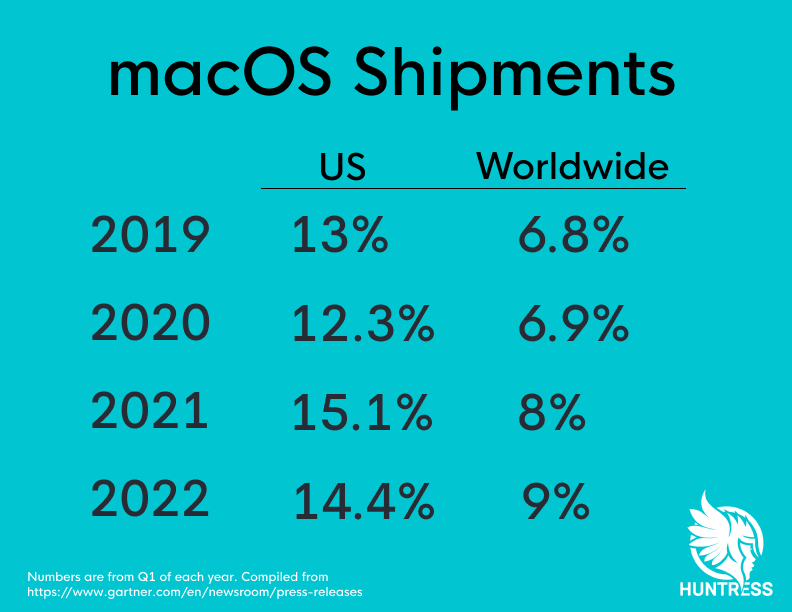
image2

The Huntress macOS Agent

Right now, the main focus of our agent is looking at Launch Items. This refers to Launch Daemons and Launch Agents. Now before we dive deeper into each of these, let’s discuss why it’s important to collect these.

If your phone or computer has ever behaved strangely and you take it to a repair shop or your IT department, the odds are high that the first thing they will ask you to do is to “turn it off and turn it back on again.” Not only is this a wise triage step, but it actually has an effect on potential malware as well.

For malware to truly be effective, it must persist. This means if rebooting your computer disables the malware, it isn’t very sophisticated. 

Malware authors, for the most part, understand that rebooting the computer will be an early–if not first–step in the triage process, so they typically aim to persist their malware. This would mean that rebooting the computer would just launch the malware yet again, continuing to infect the end user. 

This is why we started here. 

Types of Persistence

There are many different forms of persistence on macOS, and although Huntress currently just monitors for the Launch Items (Launch Daemons and Launch Agents), there are plans to expand that capability to other persistence mechanisms as well. 

We only gather these two for the time being for a reason: they are by far the most common. They are both frequently used legitimately; unfortunately, this also means threat actors prefer to use this avenue for creating persistence with the hopes of hiding amongst the other Launch Items. 

Launch Daemons

Launch Daemons are property list files (plist) that live in one of a few different locations on disk. These are executed at the system level, making them not specific to any user. This means they will launch when the system starts up. 

When the system boots, the plists are processed, meaning that they execute a binary to which they’re pointed. If the plist is in the System directory, then it is protected by System Integrity Protection (SIP). Anything located here will be signed by Apple proper, whereas developers outside of that scope will have to install their Launch Daemons to the root Library.

Locations

/System/Library/LaunchDaemons/

/Library/LaunchDaemons/

Launch Agents

Similar to Launch Daemons in the sense that they execute specific binaries from a plist, Launch Agents are only used within the context of an interactive user session. Where the Launch Daemons execute at the system level, these require a user session. This means the Launch Agents usually have more restrictive permissions as they cannot be executed at the system level. 

For this reason, there is also a directory of Launch Agents in the user’s home folder (notated by the tilde ~ below). These Launch Items are designed to point at executables (Mach-O binaries). If the user wishes to have a script execute at startup instead, they will need to use a different persistence option.

Launch Agents are the most typical way that developers persist their software, and unfortunately, probably the most common way malware persists. Since you will frequently see Launch Agents from legitimate sources(think MDM software, Google services, or Microsoft updaters) it is important to get a human involved in the process. At Huntress, our ThreatOps analysts look through these to verify validity and origin.

Locations

/System/Library/LaunchAgents/

/Library/LaunchAgents/

~/Library/LaunchAgents/

Login Hooks

Residing in the root /Library/Preferences directory, this plist contains a subset of key/value pairs (dictionary objects) that can trigger a script to run at Login or Logout. You can add a login/logout hook by simply writing a script, then setting that script as the value in the plist (key: LoginHook, value: /path/to/script). Creating this entry can be achieved by running:

sudo defaults write /Library/Preferences/com.apple.loginwindow LoginHook /path/to/script

This will result in the following plist:
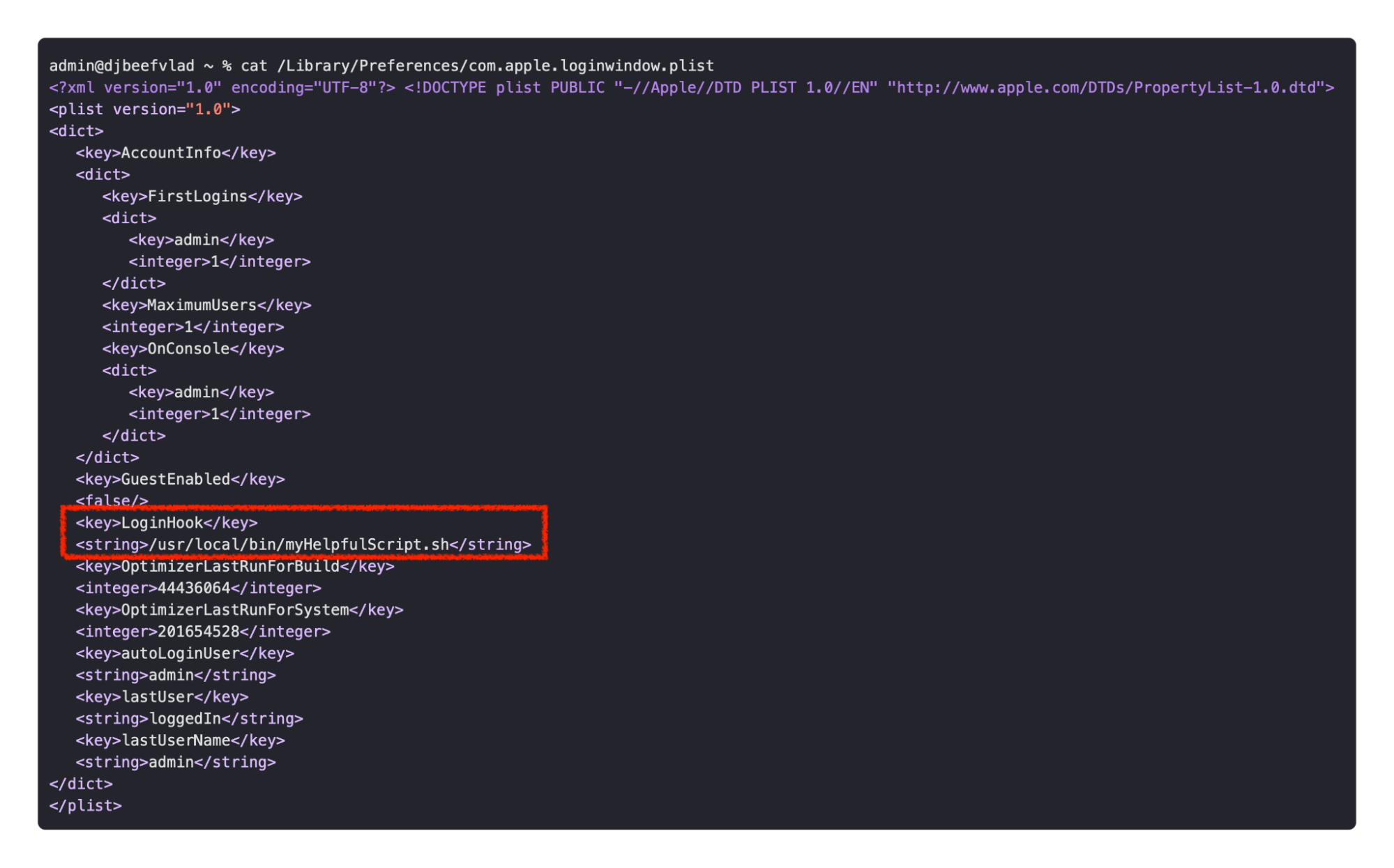
image3

We can see the Login Hook pointed at our script. Now each time we log in, our script will run. 

Location

/Library/Preferences/com.apple.loginwindow.plist

Login Items

These items, which are visible to the user in the UI, are located in the user’s System Preferences. From here, users can pick what applications automatically start when the user logs in. 

This is most common for applications that the user wants to open right when they log in. Many people use this to launch their preferred browser, password managers, or updater applications. This is done at the user level, so each individual user can have their own selection.

That System Preferences pane reads the items from an Apple binary property list.

Location

~/Library/Application Support/com.apple.backgroundtaskmanagementagent/backgrounditems.btm

Cron

Using cron jobs is a slightly older Unix-esque method for infecting users, and although its use is much rarer nowadays on macOS, it is still possible to persist using cron.

On macOS, this is achieved using crontabs. This can be done by writing a “cron expression” and saving it to a file then registering that cron expression via the crontab command. This will then execute it on some type of user-specified schedule.
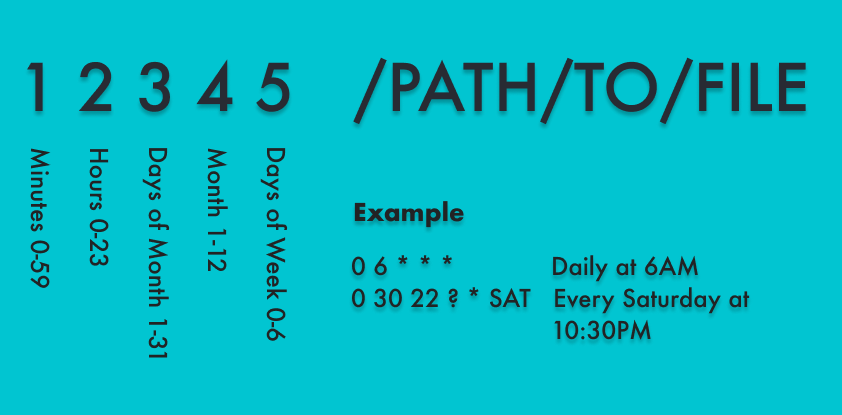
image4

A note from crontab’s main page:

(Darwin note: Although cron(8) and crontab(5) are officially supported under Darwin, their functionality has been absorbed into launchd(8), which provides a more flexible way of automatically executing commands. See launchctl(1) for more information.)

Locations

/usr/lib/cron/jobs

/usr/lib/cron/tabs

/var/at/tabs

Periodic Scripts

Periodic scripts have some similarity to cron, but instead there are three folder locations that will automatically run your script on a predetermined cadence. There is a daily, weekly, and monthly option.

These cadences are enforced by their own SIP-protected Launch Daemons.
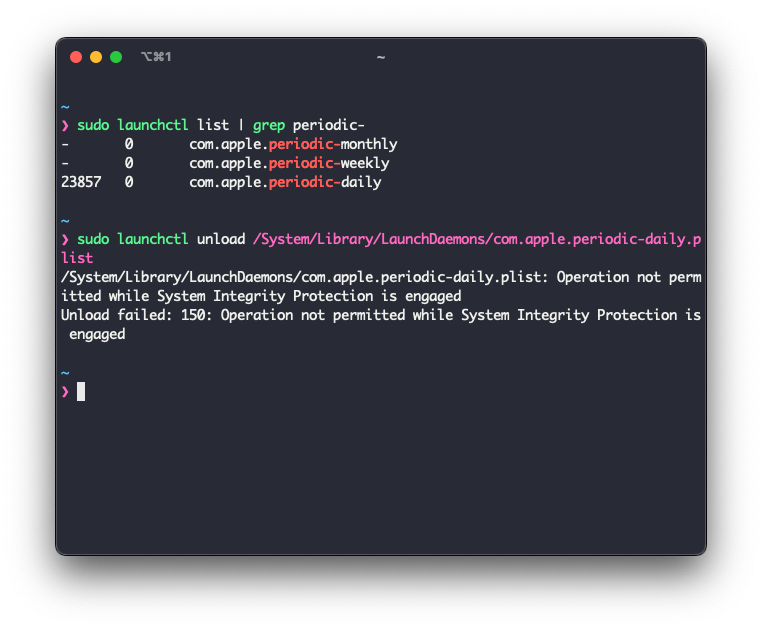
image1

The scripts that these execute are stored in the /etc/periodic/ directory. If you drop your script into one of these locations it will execute on the schedule of its parent folder.

Locations

/etc/periodic/daily

/etc/periodic/weekly

/etc/periodic/monthly

Overrides

The overrides file is a relatively straightforward plist that, although used quite rarely, can still be used to persist on macOS. This plist is designed to override a value in a LaunchDaemon or LaunchAgent, so regardless if a 'Disabled' value is set to true or not in one of those plists, whatever value is present in the overrides file will be implemented. 

For example, if I wrote a plist called myApp.plist and had the Disabled key set to “true” (which effectively disables my plist from loading), but in the overrides plist I had an entry setting that value to “false,” the next time I ran sudo launchctl load ~/Library/LaunchAgent/myApp.plist, that plist would load even though in the myApp.plist it says it should be disabled.

This is an uncommon method of persisting by threat actors but could still potentially be abused by adversaries.

Location

/var/db/launchd.db/com.apple.launchd/overrides.plist

Emond (macOS 12 and Earlier)

Emond, which stands for event monitor daemon, is a daemon that is executed on OS startup. There is a collection of files in the /etc/emond.d/ directory that contains files like rules plists that can be written to trigger certain items at certain times (startup, periodic).
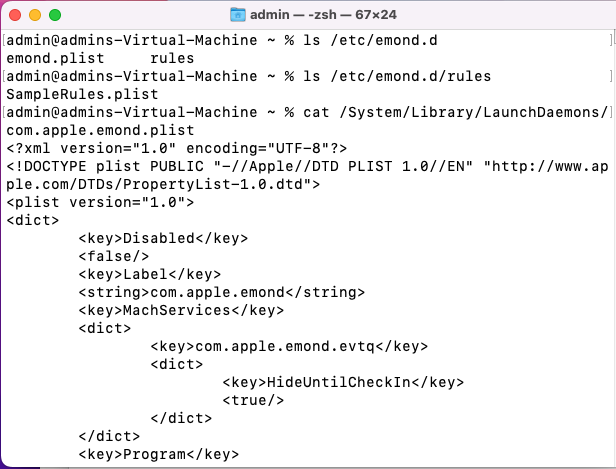
image5

Security Researcher Chris Ross of Zoom has gone into great detail on how emond could potentially be leveraged by attackers in his blog.

Note: As of macOS Ventura 13.0, emond and its associated files are no longer present on disk.

System Extensions

I left System Extensions for last because they are somewhat anomalous in comparison to the other types of persistence above. It is a way of persisting, but in most of the other types I’ve spoken about herein can be somewhat easily weaponized by threat actors. 

System Extensions are incredibly more difficult, and I don’t believe I have seen an instance in which they have been abused. System Extensions are built into and alongside application development and can be leveraged to access more low-level APIs of the system, such as Endpoint Security or DriverKit. 

Not just anyone can use a System Extension. In fact, in order to use one, you have to request an entitlement directly from Apple and explain how you’ll be using that entitlement within the application you’re developing. The vetting process, to my understanding, is quite in-depth and rigorous.

Location

/Library/SystemExtensions/

Wrap-Up

Persistence is the primary focus of malware, allowing it to continue to run on the infected system even after the machine is rebooted. Getting visibility into these items is paramount to protect end users. It is the best place to start when analyzing Mac malware, which is why this is where we started. We wanted to make sure that we could walk before we start running, so this is just the beginning of our macOS agent.

Categories
Threat Analysis
Summarize this postClose Speech Bubble
ChatGPTClaudePerplexityGoogle AI

See Huntress in action

Our platform combines a suite of powerful managed detection and response tools for endpoints and Microsoft 365 identities, science-backed security awareness training, and the expertise of our 24/7 Security Operations Center (SOC).

Book a Demo
Share
Facebook iconTwitter X iconLinkedin iconDownload icon
Glitch effect

You Might Also Like

  • Say Hello to Mac Malware: A Tradecraft Tuesday Recap

    In this month’s Tradecraft Tuesday, we talked about how threat actors are finetuning their macOS malware in order to maintain persistent access and avoid detection by Apple’s security features.
  • macOS Terms and Trends You Should Know About

    A look inside the evolving landscape of macOS malware. Dive into the current state of macOS threats and learn from a glossary of essential macOS terms.
  • macOS Support Is Here!

    We're excited to announce the general availability of the Huntress macOS agent! And don't worry – Persistent Footholds are just the beginning.
  • macOS (Not)ifications

    In this blog, we dive into macOS notifications—and the intentional design behind them.
  • AMOS Stealer Exploits AI Trust: Malware Delivered Through ChatGPT and Grok

    Attackers are exploiting user trust in AI and aggressive SEO to deliver an evolved Atomic macOS Stealer. Learn why this social engineering tradecraft bypasses traditional network controls and the future of macOS infostealer defense.
  • Pursuing Parity: Attempting to Bring Cross-Platform Unity

    Huntress researchers weigh in on the challenge of getting feature parity across Windows, macOS, and Linux. And learn how unique security models and platform maturity shape the way products are built.
  • What Is a Persistent Foothold?

    We hunt for persistent footholds, but what exactly does that mean? In this blog, we define what a foothold is and why it's a hacker favorite.
  • Beware of Traitorware: Using Splunk for Persistence

    This blog illustrates how the Splunk Universal Forwarder (UF) can be used as traitorware for persistence and remote code execution.

Sign Up for Huntress Updates

Get insider access to Huntress tradecraft, killer events, and the freshest blog updates.
Privacy • Terms
By submitting this form, you accept our Terms of Service & Privacy Policy
Thank you! Your submission has been received!
Oops! Something went wrong while submitting the form.
Huntress Managed Security PlatformManaged EDRManaged EDR for macOSManaged EDR for LinuxManaged ITDRManaged SIEMManaged Security Awareness TrainingManaged ISPMManaged ESPMBook a Demo
PhishingComplianceBusiness Email CompromiseEducationFinanceHealthcareManufacturingState & Local Government
Managed Service ProvidersResellersIT & Security Teams24/7 SOCCase Studies
BlogResource CenterCybersecurity 101Upcoming EventsSupport Documentation
Our CompanyLeadershipNews & PressCareersContact Us
Huntress white logo

Protecting 215k+ customers like you with enterprise-grade protection.

Privacy PolicyCookie PolicyTerms of UseCookie Consent
Linkedin iconTwitter X iconYouTube iconInstagram icon
© 2025 Huntress All Rights Reserved.

Join the Hunt

Get insider access to Huntress tradecraft, killer events, and the freshest blog updates.

By submitting this form, you accept our Terms of Service & Privacy Policy