

Don’t let overlooked obligations become incidents. Learn how.
Utility navigation bar redirect icon
Portal LoginSupportContact
Search
Close search
Huntress Logo in Teal
  • Platform Overview
    Managed EDR

    Get full endpoint visibility, detection, and response.

    Managed EDR

    Get full endpoint visibility, detection, and response.

    Managed ITDR

    Protect your Microsoft 365 identities and email environments.

    Managed ITDR

    Protect your Microsoft 365 identities and email environments.

    Managed SIEM

    Managed threat response and robust compliance support at a predictable price.

    Managed SIEM

    Managed threat response and robust compliance support at a predictable price.

    Managed Security Awareness Training

    Empower your teams with science-backed security awareness training.

    Managed Security Awareness Training

    Empower your teams with science-backed security awareness training.

    Managed ISPM

    Continuous Microsoft 365 and identity hardening, managed and enforced by Huntress experts.

    Managed ISPM

    Continuous Microsoft 365 and identity hardening, managed and enforced by Huntress experts.

    Managed ESPM

    Proactively secure endpoints against attacks.

    Managed ESPM

    Proactively secure endpoints against attacks.

    Integrations
    Integrations
    Support Documentation
    Support Documentation
    See Huntress in Action

    Quickly deploy and manage real-time protection for endpoints, email, and employees - all from a single dashboard.

    Huntress Cybersecurity
    See Huntress in Action

    Quickly deploy and manage real-time protection for endpoints, email, and employees - all from a single dashboard.

    Huntress Cybersecurity
  • Threats We Stop
    Phishing
    Phishing
    Business Email Compromise
    Business Email Compromise
    Ransomware
    Ransomware
    Infostealers
    Infostealers
    View Allright arrowView Allright arrow
    Industries We Serve
    Education
    Education
    Financial Services
    Financial Services
    State and Local Government
    State and Local Government
    Healthcare
    Healthcare
    Law Firms
    Law Firms
    Manufacturing
    Manufacturing
    Utilities
    Utilities
    View Allright arrowView Allright arrow
    Tailored Solutions
    MSPs
    MSPs
    Resellers
    Resellers
    SMBs
    SMBs
    Compliance
    Compliance
    What Gets Overlooked Gets Exploited

    Most days, nothing happens. But one day, something will.

    Huntress Cybersecurity
    Cybercriminals Have Evolved

    Get the intel on today’s cybercriminal groups and learn how to protect yourself.

    Huntress Cybersecurity
  • Pricing
  • Community Series
    The Product Lab

    Shape the next big thing in cybersecurity together.

    The Product Lab

    Shape the next big thing in cybersecurity together.

    Fireside Chat

    Real people. Real perspectives. Better conversations.

    Fireside Chat

    Real people. Real perspectives. Better conversations.

    Tradecraft Tuesday

    No products, no pitches – just tradecraft.

    Tradecraft Tuesday

    No products, no pitches – just tradecraft.

    _declassified

    Exposing hidden truths in the world of cybersecurity.

    _declassified

    Exposing hidden truths in the world of cybersecurity.

    Resources
    Upcoming Events
    Upcoming Events
    Ebooks
    Ebooks
    On-Demand Webinars
    On-Demand Webinars
    Videos
    Videos
    Whitepapers
    Whitepapers
    Datasheets
    Datasheets
    Cybersecurity Education
    Cybersecurity 101
    Cybersecurity 101
    Cybersecurity Guides
    Cybersecurity Guides
    Threat Library
    Threat Library
    Real Tradecraft, Real Results
    Real Tradecraft, Real Results
    2026 Cyber Threat Report
    2026 Cyber Threat Report
    The Huntress Blog
    Huntress Lands on the Microsoft Marketplace
    Huntress Cybersecurity
    Huntress Lands on the Microsoft Marketplace
    Huntress Cybersecurity
    How Huntress & DEFCERT Are Streamlining CMMC Assessment Prep
    Huntress Cybersecurity
    How Huntress & DEFCERT Are Streamlining CMMC Assessment Prep
    Huntress Cybersecurity
    Live Hacking Into Microsoft 365 with Kyle Hanslovan
    Huntress Cybersecurity
    Live Hacking Into Microsoft 365 with Kyle Hanslovan
    Huntress Cybersecurity
  • Why Huntress

    Go beyond AI in the fight against today’s hackers with Huntress Managed EDR purpose-built for your needs

    Huntress Cybersecurity
    Why Huntress

    Go beyond AI in the fight against today’s hackers with Huntress Managed EDR purpose-built for your needs

    Huntress Cybersecurity
    The Huntress SOC

    24/7 Security Operations Center

    The Huntress SOC

    24/7 Security Operations Center

    Reviews

    Why businesses of all sizes trust Huntress to defend their assets

    Reviews

    Why businesses of all sizes trust Huntress to defend their assets

    Case Studies

    Learn directly from our partners how Huntress has helped them

    Case Studies

    Learn directly from our partners how Huntress has helped them

    Community

    Get in touch with the Huntress Community team

    Community

    Get in touch with the Huntress Community team

    Compare Huntress
    Bitdefender
    Bitdefender
    Blackpoint
    Blackpoint
    Breach Secure Now!
    Breach Secure Now!
    Crowdstrike
    Crowdstrike
    Datto
    Datto
    SentinelOne
    SentinelOne
    Sophos
    Sophos
    Compare Allright arrowCompare Allright arrow
  • HUNTRESS HUB

    Login to access top-notch marketing resources, tools, and training.

    Huntress Cybersecurity
    HUNTRESS HUB

    Login to access top-notch marketing resources, tools, and training.

    Huntress Cybersecurity
    Partners
    MSPs

    Join our partner community to deliver expert-led managed security.

    MSPs

    Join our partner community to deliver expert-led managed security.

    Resellers

    Partner program designed to grow your cybersecurity business.

    Resellers

    Partner program designed to grow your cybersecurity business.

    Tech Alliances

    Driving innovation through global technology Partnerships

    Tech Alliances

    Driving innovation through global technology Partnerships

    Microsoft Partnership

    A Level-Up for Your Business Security

    Microsoft Partnership

    A Level-Up for Your Business Security

  • Press Release
    Huntress Announces Collaboration with Microsoft to Strengthen Cybersecurity for Businesses of All Sizes
    Huntress Cybersecurity
    Press Release
    Huntress Announces Collaboration with Microsoft to Strengthen Cybersecurity for Businesses of All Sizes
    Huntress Cybersecurity
    Our Story

    We're on a mission to shatter the barriers to enterprise-level security.

    Our Story

    We're on a mission to shatter the barriers to enterprise-level security.

    Newsroom

    Explore press releases, news articles, media interviews and more.

    Newsroom

    Explore press releases, news articles, media interviews and more.

    Meet the Team

    Founded by former NSA Cyber Operators. Backed by security researchers.

    Meet the Team

    Founded by former NSA Cyber Operators. Backed by security researchers.

    Careers

    Ready to shake up the cybersecurity world? Join the hunt.

    Careers

    Ready to shake up the cybersecurity world? Join the hunt.

    Awards
    Awards
    Contact Us
    Contact Us
  • Portal Login
  • Support
  • Contact
  • Search
  • Get a Demo
  • Start for Free
Portal LoginSupportContact
Search
Close search
Get a Demo
Start for Free
HomeCybersecurity GuidesPhishing Guide
Phishing Red Flags

How to Spot a Phishing Email: Key Red Flags to Watch For

Last Updated:
February 5, 2026

Gone are the days when a poorly written email from a "Nigerian prince" was the standard for phishing attempts. Modern cybercriminals use sophisticated techniques that can fool even the most security-conscious professionals. They use AI to craft convincing messages, mirror legitimate company branding with pixel-perfect accuracy, and exploit current events to create a sense of urgency.

A single successful phishing attack can lead to data breaches, financial losses, and damaged reputations. But learning how to spot a phishing email is your first and most effective line of defense.

This guide will walk you through the evolution of phishing tactics and give you the knowledge to identify red flags before they cause damage.


Try Huntress for Free
Get a Free Demo
Topics
How to Spot a Phishing Email: Key Red Flags to Watch For
Down arrow
Topics
  1. Types of Phishing Attacks You Should Be Aware of
  2. Statistics on Phishing Attacks
  3. Don’t Get Caught! How to Prevent Phishing in Business
  4. Credential Harvesting Phishing: How Attackers Steal Login Credentials?
  5. How to Spot a Phishing Email: Key Red Flags to Watch For
    • How phishing has evolved over time
    • 8 red flags that signal a phishing email
    • You’ve spotted a phishing email. What’s next?
    • Don’t get phished with proactive security
  6. Spoofing vs. Phishing: Understanding the Key Differences
  7. Spear Phishing: How Targeted Attacks Bypass Traditional Defenses
  8. Phishing Risk Assessment: How to Evaluate and Reduce Your Exposure?
  9. Whaling vs. Spear Phishing: How Cybercriminals Target Executives and Organizations?
  10. How to Create an Effective Incident Response Plan for a Phishing Attack
  11. Indicators of a Phishing Attempt: How to Detect and Avoid Scams
  12. Man-in-the-Middle Phishing Attacks: How Hackers Intercept Sensitive Information
  13. Best Phishing Protection Solutions
  14. Supply Chain Phishing: How Attackers Exploit Vendor Relationships?
  15. The Phishing Red Flags Your Employees Need to Know
  16. SMS Phishing (Smishing) Attacks: How to Recognize and Prevent Them?
  17. Pretexting vs. Phishing: Social Engineering Tactics Explained
  18. Spear Phishing vs. Phishing: Why Every Attack Feels Targeted
Share
Facebook iconTwitter X iconLinkedin iconDownload icon

How to Spot a Phishing Email: Key Red Flags to Watch For

Last Updated:
February 5, 2026

Gone are the days when a poorly written email from a "Nigerian prince" was the standard for phishing attempts. Modern cybercriminals use sophisticated techniques that can fool even the most security-conscious professionals. They use AI to craft convincing messages, mirror legitimate company branding with pixel-perfect accuracy, and exploit current events to create a sense of urgency.

A single successful phishing attack can lead to data breaches, financial losses, and damaged reputations. But learning how to spot a phishing email is your first and most effective line of defense.

This guide will walk you through the evolution of phishing tactics and give you the knowledge to identify red flags before they cause damage.


Try Huntress for Free
Get a Free Demo

How phishing has evolved over time

From obvious scams to sophisticated attacks

Remember those laughably bad phishing emails from the early 2000s? The ones riddled with typos, claiming you'd inherited millions from distant relatives, or offering miracle weight loss solutions? Those amateur-hour attempts were easy to spot and dismiss, and delete.
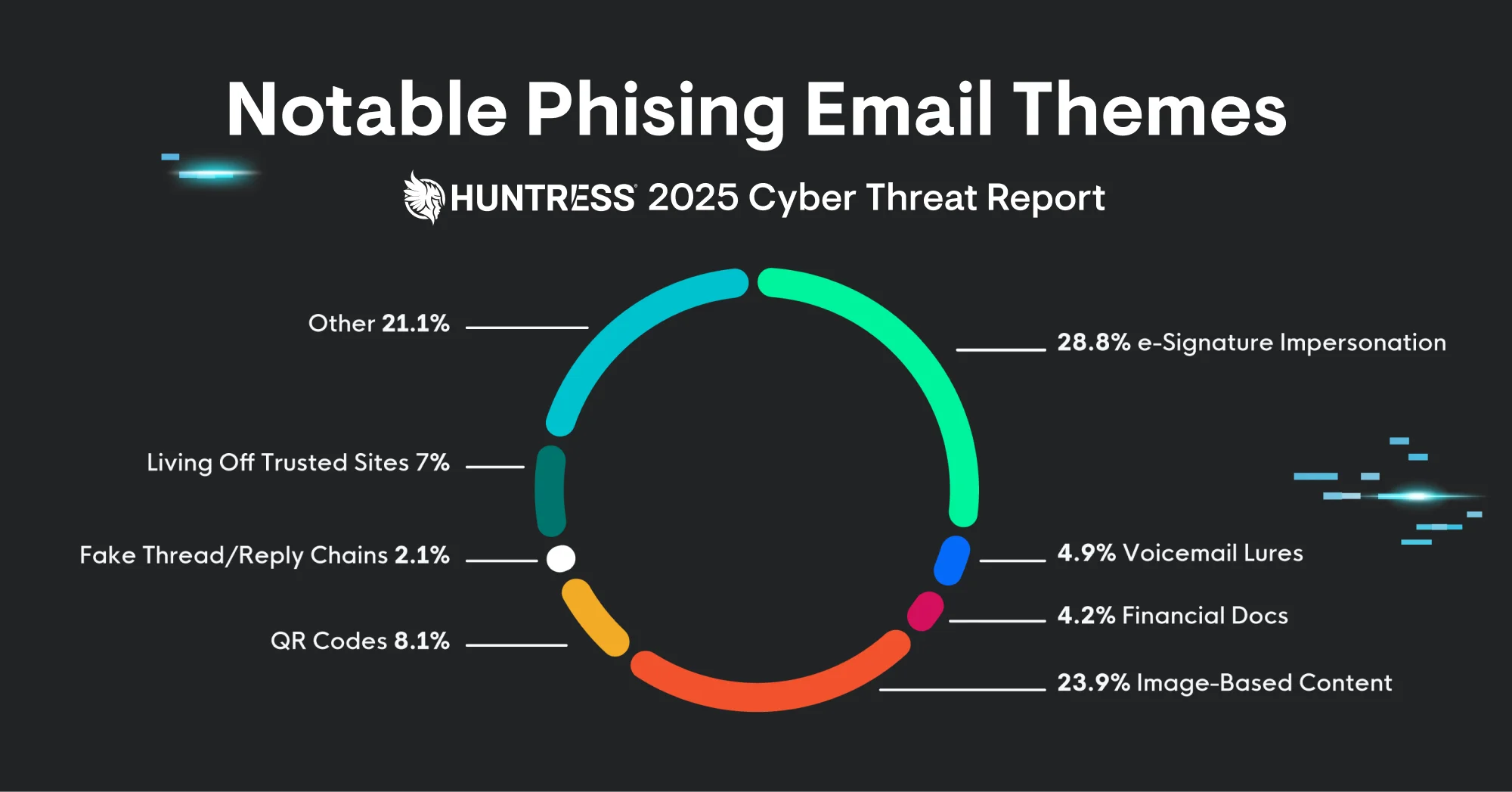

Back then, phishing emails were usually filled with broken English, pixelated logos, and outrageous promises. They cast wide nets, hoping to catch the most vulnerable users. While some people fell for these obvious scams, most recipients could clock them a mile away.

Today's modern phishing tactics

Fast-forward to today, and the phishing landscape has transformed dramatically. Cybercriminals now use AI-powered tools to craft grammatically perfect emails that mirror legitimate communications. They study company communication styles, replicate exact formatting, and even time their attacks to coincide with regular business activities.

Modern phishing attempts often target specific individuals or organizations (known as spear phishing). Attackers research their victims on social media, company websites, and professional networks to create highly personalized messages. They might reference recent company news, mutual connections, or industry-specific words and phrases to build credibility.

These sophisticated attacks can fool even the most savvy internet users. The key difference lies in the details—subtle inconsistencies that become apparent when you know what to look for.

Beyond email – new phishing channels

Phishing has expanded beyond traditional email to include multiple attack vectors. QR code phishing (or "quishing") has surged in popularity, with attackers embedding malicious links in seemingly innocent QR codes. Victims scan the code expecting legitimate content but land on credential-stealing websites.

SMS phishing, or "smishing," targets mobile users with fake text messages claiming urgent account issues or prize notifications. Social media platforms have become hunting grounds for phishers who create fake profiles to impersonate trusted people and brands.

These multi-channel approaches make detection more challenging, so users have to stay vigilant across all digital communications.



8 red flags that signal a phishing email

  1. Suspicious or misspelled sender addresses

Always look at the sender's email address closely. Legitimate companies use consistent, professional email domains. Phishing emails often use look-alike domains with subtle misspellings—think "amazom.com" instead of "amazon.com" or "paypa1.com" with a number instead of the letter "l."

Pay attention to the display name versus the actual email address. Scammers might show "Microsoft Security Team" as the sender name while using a completely unrelated email address like "updates@suspicious-domain.net."

  1. Urgency and fear tactics in the message

Phishing emails thrive on creating panic. They'll claim your account will be suspended, your security has been compromised, or immediate action is required to avoid consequences. Legitimate companies rarely demand instant responses or threaten account closures without proper notice.

Common urgent language includes phrases like "Act now," "Immediate action required," "Your account will be terminated," or "Respond within 24 hours." These pressure tactics aim to bypass your critical thinking and force hasty decisions.

  1. Generic greetings instead of personalization

Authentic business communications typically include your name or specific account information. Phishing emails often use generic greetings like "Dear Customer," "Dear Account Holder," or "To Whom It May Concern."

While some legitimate companies do send generic communications, be extra cautious when combined with other red flags.

  1. Unexpected attachments or odd file types

Be wary of unsolicited attachments, especially executable files (.exe), compressed files (.zip, .rar), or documents that request that you enable macros. Legitimate businesses rarely send unexpected attachments, especially from security or billing departments.

Even seemingly innocent files like PDFs can contain malicious code. When in doubt, verify the sender's identity through a separate communication channel before opening any attachments.

  1. Mismatched or hidden URLs

Hover over links without clicking to reveal their true destinations. Phishing emails often hide malicious URLs behind innocent-looking text. A link that says "Click here to verify your PayPal account" might actually lead to "evil-phishing-site.com."

Look for URL shorteners (bit.ly, tinyurl.com) in professional communications, as these can mask the true destination. Legitimate companies typically use their branded domains for all communications.

  1. Too good to be true offers or rewards

Unexpected prize notifications, incredible discounts, or "exclusive" opportunities are classic phishing baits. Scammers know people love free stuff and use fake rewards to lure victims into providing personal information.

If you didn't enter a contest or aren't an existing customer, be skeptical of congratulatory messages about winnings or special offers.

  1. Poor grammar and spelling (still common, even with AI assistance!)

While AI has improved the quality of phishing emails, many still have grammatical errors, awkward phrasing, or spelling mistakes. Professional organizations have editing processes that catch these issues before sending communications.

Look for inconsistent formatting, unusual punctuation, or phrases that don't sound quite right in context.

  1. Unusual or sensitive requests

Legitimate companies never ask for sensitive information via email. This includes passwords, Social Security numbers, full credit card details, or requests to purchase gift cards for any reason.

Be especially suspicious of requests to change payment methods, update banking information, or provide verification codes you didn't request.


You’ve spotted a phishing email. What’s next?

When you spot a phishing email, don’t click, reply, or download any attachments. Even clicking links to "unsubscribe" can confirm your email address is active, leading to more attacks.

Report the email to your IT department or security team immediately. Most organizations have established procedures for handling suspected phishing attempts and can take steps to protect other employees.

Use your email client's built-in reporting features. Both Outlook and Gmail offer phishing report buttons that help improve their spam filters and protect the broader community.

Delete or quarantine the suspicious message after reporting it. Some email systems allow you to move phishing attempts to special folders for further analysis.

Share your findings with colleagues to raise awareness. Many phishing campaigns target multiple employees within the same organization, so your vigilance could prevent others from falling victim.


Don’t get phished with proactive security

Cybersecurity is always a team effort—and phishing defense works best when everyone is trained to recognize the signs. By spotting and reporting suspicious emails, you’re not only protecting yourself but also keeping your entire organization safe. Make phishing detection part of your daily routine, reinforce these skills through regular security awareness training, and encourage your colleagues to do the same. The more prepared your team is, the fewer opportunities attackers have to succeed.

Ready to dive deeper into the current threat landscape? Download the Huntress 2025 Cyber Threat Report for comprehensive insights into how cybercriminals are adapting their tactics. For organizations seeking robust, around-the-clock protection, explore Huntress 24/7 SOC services to complement your internal security awareness efforts.


Continue Reading

Spoofing vs. Phishing: Understanding the Key Differences

Right arrow

Protect What Matters

Secure endpoints, email, and employees with the power of our 24/7 SOC. Try Huntress for free and deploy in minutes to start fighting threats.
Try Huntress for Free
Huntress Managed Security PlatformManaged EDRManaged EDR for macOSManaged EDR for LinuxManaged ITDRManaged SIEMManaged Security Awareness TrainingManaged ISPMManaged ESPMBook a Demo
PhishingComplianceBusiness Email CompromiseEducationFinanceHealthcareManufacturingState & Local Government
Managed Service ProvidersResellersIT & Security Teams24/7 SOCCase Studies
BlogResource CenterCybersecurity 101Upcoming EventsSupport Documentation
Our CompanyLeadershipNews & PressCareersContact Us
Huntress white logo

Protecting 215k+ customers like you with enterprise-grade protection.

Privacy PolicyCookie PolicyTerms of UseCookie Consent
Linkedin iconTwitter X iconYouTube iconInstagram icon
© 2025 Huntress All Rights Reserved.

Join the Hunt

Get insider access to Huntress tradecraft, killer events, and the freshest blog updates.

By submitting this form, you accept our Terms of Service & Privacy Policy