


Don’t let overlooked obligations become incidents. Learn how.
Utility navigation bar redirect icon
Portal LoginSupportContact
Search
Close search
Huntress Logo in Teal
  • Platform Overview
    Managed EDR

    Get full endpoint visibility, detection, and response.

    Managed EDR

    Get full endpoint visibility, detection, and response.

    Managed ITDR

    Protect your Microsoft 365 identities and email environments.

    Managed ITDR

    Protect your Microsoft 365 identities and email environments.

    Managed SIEM

    Managed threat response and robust compliance support at a predictable price.

    Managed SIEM

    Managed threat response and robust compliance support at a predictable price.

    Managed Security Awareness Training

    Empower your teams with science-backed security awareness training.

    Managed Security Awareness Training

    Empower your teams with science-backed security awareness training.

    Managed ISPM

    Continuous Microsoft 365 and identity hardening, managed and enforced by Huntress experts.

    Managed ISPM

    Continuous Microsoft 365 and identity hardening, managed and enforced by Huntress experts.

    Managed ESPM

    Proactively secure endpoints against attacks.

    Managed ESPM

    Proactively secure endpoints against attacks.

    Integrations
    Integrations
    Support Documentation
    Support Documentation
    See Huntress in Action

    Quickly deploy and manage real-time protection for endpoints, email, and employees - all from a single dashboard.

    Huntress Cybersecurity
    See Huntress in Action

    Quickly deploy and manage real-time protection for endpoints, email, and employees - all from a single dashboard.

    Huntress Cybersecurity
  • Threats We Stop
    Phishing
    Phishing
    Business Email Compromise
    Business Email Compromise
    Ransomware
    Ransomware
    Infostealers
    Infostealers
    View Allright arrowView Allright arrow
    Industries We Serve
    Education
    Education
    Financial Services
    Financial Services
    State and Local Government
    State and Local Government
    Healthcare
    Healthcare
    Law Firms
    Law Firms
    Manufacturing
    Manufacturing
    Utilities
    Utilities
    View Allright arrowView Allright arrow
    Tailored Solutions
    MSPs
    MSPs
    Resellers
    Resellers
    SMBs
    SMBs
    Compliance
    Compliance
    What Gets Overlooked Gets Exploited

    Most days, nothing happens. But one day, something will.

    Huntress Cybersecurity
    Cybercriminals Have Evolved

    Get the intel on today’s cybercriminal groups and learn how to protect yourself.

    Huntress Cybersecurity
  • Pricing
  • Community Series
    The Product Lab

    Shape the next big thing in cybersecurity together.

    The Product Lab

    Shape the next big thing in cybersecurity together.

    Fireside Chat

    Real people. Real perspectives. Better conversations.

    Fireside Chat

    Real people. Real perspectives. Better conversations.

    Tradecraft Tuesday

    No products, no pitches – just tradecraft.

    Tradecraft Tuesday

    No products, no pitches – just tradecraft.

    _declassified

    Exposing hidden truths in the world of cybersecurity.

    _declassified

    Exposing hidden truths in the world of cybersecurity.

    Resources
    Upcoming Events
    Upcoming Events
    Ebooks
    Ebooks
    On-Demand Webinars
    On-Demand Webinars
    Videos
    Videos
    Whitepapers
    Whitepapers
    Datasheets
    Datasheets
    Cybersecurity Education
    Cybersecurity 101
    Cybersecurity 101
    Cybersecurity Guides
    Cybersecurity Guides
    Threat Library
    Threat Library
    Real Tradecraft, Real Results
    Real Tradecraft, Real Results
    2026 Cyber Threat Report
    2026 Cyber Threat Report
    The Huntress Blog
    Huntress Lands on the Microsoft Marketplace
    Huntress Cybersecurity
    Huntress Lands on the Microsoft Marketplace
    Huntress Cybersecurity
    How Huntress & DEFCERT Are Streamlining CMMC Assessment Prep
    Huntress Cybersecurity
    How Huntress & DEFCERT Are Streamlining CMMC Assessment Prep
    Huntress Cybersecurity
    Live Hacking Into Microsoft 365 with Kyle Hanslovan
    Huntress Cybersecurity
    Live Hacking Into Microsoft 365 with Kyle Hanslovan
    Huntress Cybersecurity
  • Why Huntress

    Go beyond AI in the fight against today’s hackers with Huntress Managed EDR purpose-built for your needs

    Huntress Cybersecurity
    Why Huntress

    Go beyond AI in the fight against today’s hackers with Huntress Managed EDR purpose-built for your needs

    Huntress Cybersecurity
    The Huntress SOC

    24/7 Security Operations Center

    The Huntress SOC

    24/7 Security Operations Center

    Reviews

    Why businesses of all sizes trust Huntress to defend their assets

    Reviews

    Why businesses of all sizes trust Huntress to defend their assets

    Case Studies

    Learn directly from our partners how Huntress has helped them

    Case Studies

    Learn directly from our partners how Huntress has helped them

    Community

    Get in touch with the Huntress Community team

    Community

    Get in touch with the Huntress Community team

    Compare Huntress
    Bitdefender
    Bitdefender
    Blackpoint
    Blackpoint
    Breach Secure Now!
    Breach Secure Now!
    Crowdstrike
    Crowdstrike
    Datto
    Datto
    SentinelOne
    SentinelOne
    Sophos
    Sophos
    Compare Allright arrowCompare Allright arrow
  • HUNTRESS HUB

    Login to access top-notch marketing resources, tools, and training.

    Huntress Cybersecurity
    HUNTRESS HUB

    Login to access top-notch marketing resources, tools, and training.

    Huntress Cybersecurity
    Partners
    MSPs

    Join our partner community to deliver expert-led managed security.

    MSPs

    Join our partner community to deliver expert-led managed security.

    Resellers

    Partner program designed to grow your cybersecurity business.

    Resellers

    Partner program designed to grow your cybersecurity business.

    Tech Alliances

    Driving innovation through global technology Partnerships

    Tech Alliances

    Driving innovation through global technology Partnerships

    Microsoft Partnership

    A Level-Up for Your Business Security

    Microsoft Partnership

    A Level-Up for Your Business Security

  • Press Release
    Huntress Announces Collaboration with Microsoft to Strengthen Cybersecurity for Businesses of All Sizes
    Huntress Cybersecurity
    Press Release
    Huntress Announces Collaboration with Microsoft to Strengthen Cybersecurity for Businesses of All Sizes
    Huntress Cybersecurity
    Our Story

    We're on a mission to shatter the barriers to enterprise-level security.

    Our Story

    We're on a mission to shatter the barriers to enterprise-level security.

    Newsroom

    Explore press releases, news articles, media interviews and more.

    Newsroom

    Explore press releases, news articles, media interviews and more.

    Meet the Team

    Founded by former NSA Cyber Operators. Backed by security researchers.

    Meet the Team

    Founded by former NSA Cyber Operators. Backed by security researchers.

    Careers

    Ready to shake up the cybersecurity world? Join the hunt.

    Careers

    Ready to shake up the cybersecurity world? Join the hunt.

    Awards
    Awards
    Contact Us
    Contact Us
  • Portal Login
  • Support
  • Contact
  • Search
  • Get a Demo
  • Start for Free
Portal LoginSupportContact
Search
Close search
Get a Demo
Start for Free
HomeBlog
Threat Hunting and Tactical Malware Analysis
Published:
August 29, 2023

Threat Hunting and Tactical Malware Analysis

By:
Team Huntress
Contributors:
Special thanks to our Contributors:
David Carter
Anthony Smith
Kaleigh Slayton
Joe Slowik
Share icon
Glitch effectGlitch effectGlitch effect

What are the basics of threat hunting and malware analysis? Our experts sought to answer this burning question in a recent episode of Tradecraft Tuesday, featuring Huntress' Lead Threat Hunter Anthony Smith and Senior Security Researcher David Carter. 

Both threat hunting and malware analysis work hand-in-hand to provide a better understanding of an environment's risk level, places to explore when searching a system, and where a hidden threat may be lurking. Let’s dive into each. 

The Basics of Threat Hunting

Threat hunting is a critical function for proactive security that combines multiple data inputs to form a hypothesis for discovering unknown threats and security gaps in your environment. Data inputs can be any combination of external or internal threat intelligence, security tool alerts, or logs from numerous sources. Input information helps to determine what type of hunt you should conduct: 

  • Intelligence-driven - Using intelligence from various sources
  • Data-driven - Using internal data sources on lower-priority alerts
  • Knowledge-driven - Using aggregated data on adversary tactics, techniques, and procedures (TTPs)
  • Hybrid - Using a combination of the three above to narrow the scope of the hunt
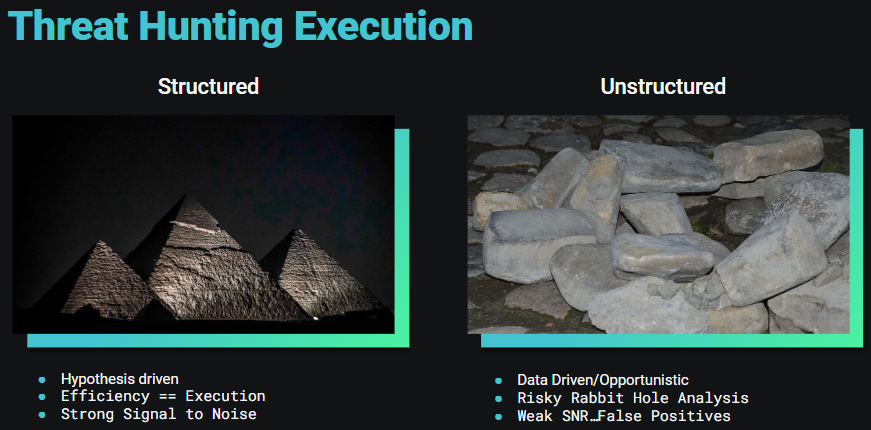
A threat hunt can be either structured or unstructured. The difference between these two hunts is that structured threat hunting is hypothesis-driven with strong research to back it. On the other hand, unstructured threat hunting is more data-driven and opportunistic, usually spurred on by a hunch.

The most efficient and recommended hunting approach is structured. In the structured threat hunting process, time is spent to form a well-scoped hypothesis that will result in the most useful hunts and investigations. The unstructured approach tends to lead to an inefficient hunt that could waste countless hours pursuing partially formed ideas while chasing preliminary hypotheses. 

Why Should You Threat Hunt?

The importance of threat hunting boils down to one simple fact: Detectors can only find known threats. Typically, detectors are created after a new threat is discovered in an environment or from information publicly shared. But, threat hunting lives in the space between the unknown threats and detectors. It answers questions like:

  • What are common TTPs of well-known threat actors?
  • What drives hackers? Money, data extortion, or general chaos?
  • What might a threat actor do next?

These evaluations help fill security gaps that were otherwise not thought of or not prioritized. The overall goal is to be able to assess what (if any) threats were missed by current security measures. 

Tactical Malware Analysis Defined

What is malware? The simplest definition is a program, process, or service doing something it's not supposed to do. There are immeasurable variations of malware, some that are super stealthy, and others that are more obvious if you look for certain behaviors. 

Tactical malware analysis involves analyzing a system to discover malware and adversary activity using built-in system tools and capabilities.

The below list doesn't cover every TTP malware may use, but it’s the starting point for a search. If you see something that is doing at least two of these three things, you should consider it odd behavior and a big RED flag:

  • The process takes up a large amount of your system resources
  • The process sends and receives network communications, but normally should not
  • The process performs behaviors that help it hide in your system

Tools for Tactical Malware Analysis

Disclaimer: Do not perform any of these actions during an active incident as you could accidentally compromise forensic data. Volatile artifacts are temporary digital traces residing in a system's volatile memory (RAM), offering crucial insights into its operational state during a compromise. However, interacting with malware during triage can significantly impact these artifacts. Engaging with malware can modify running processes and network connections, potentially distorting the accuracy of investigative findings. Inadequate preservation before system restarts or shutdowns can result in the loss of volatile data, eliminating vital evidence needed for analysis. Mishandling malware during triage might unintentionally trigger further malicious actions, complicating the understanding of the initial attack. Triage activities have the potential to introduce new traces into volatile memory, confounding efforts to distinguish between original and post-triage states. Given these risks, it's essential to conduct a comprehensive forensic investigation before any form of triage to ensure the accurate preservation and interpretation of volatile artifacts.

Learning what to look for and determining unusual behavior takes repetition, a keen eye, and an appropriate toolset. Thankfully, Microsoft has several native tools to help you get a proper lay of the land.
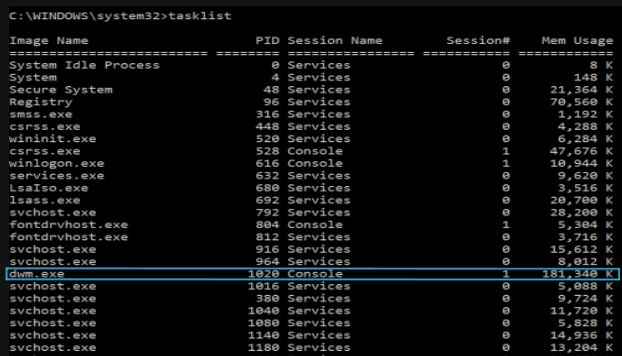
A good place to start is with the process list using the tasklist command line tool. Looking at a process list may seem a bit daunting at first, but after you learn what should be there, it makes it a lot easier to see something that shouldn't. Often, malware will try to masquerade as a regular process by switching up the order of letters or using the same name but in a different folder location. This is also a good place to see if a process is using an unusually high amount of memory.

Now that you've checked out the process list (keep that info handy), you want to bring up network connections using the netstat command line tool and the -anob options. This will show you all connections, associated IP addresses, and the process ID (PID)/executable making the connection or opening the listening port. Start by looking for processes that should never make network connections or ports that seem very obviously bad (think 1337). When you find one, note the PID and go back to your process list to see where the file is located.  

After you've looked at the process list, you've looked at network connections, but where does the malware actually live? Unless the malware is running in memory only, its original executable and the mechanism that kicks it off hides somewhere on the system. 

Finding persistence is arguably the most difficult step in tactical malware analysis, but there are some common places to always check: Services, Scheduled Tasks, and the Registry. While Services and Scheduled Tasks can be easily viewed via command line tools, it may be easiest to check all three possible persistence locations in the Registry using the Registry Editor application. The keys to search for are:

  • "HKLM\SYSTEM\CurrentControlSet\Services"
  • "HKLM\Software\Microsoft\Windows NT\CurrentVersion\Schedule\TaskCache”
  • "HKLM\SOFTWARE\Microsoft\Windows\CurrentVersion\Run"
  • "HKLM\SOFTWARE\Microsoft\Windows\CurrentVersion\RunOnce"

There are many, many more registry keys that you could check, but this is a good starting place. You want to look for the possible malware names that you found while searching the process list and network connections. If you find them, you may have found the persistence! 

Warning: Everything in Windows lives in the Registry, use caution when interacting with it and do not modify anything unless you know what you are doing!

It’s worth noting that until you spend hours and hours learning about the Windows system, you will go down many rabbit holes looking at things that are actually normal. This is okay and also a good way to educate yourself. Also, this blog gives a very high-level overview of threat hunting and tactical malware analysis and is not at all comprehensive. These are two subjects that take years to master, and even then you will find you have more to learn. 

If you’re curious about learning more or starting your journey, check out these resources below. 

Resources

  • Process List (tasklist): https://learn.microsoft.com/en-us/windows-server/administration/windows-commands/tasklist
  • Network Connections (netstat): https://learn.microsoft.com/en-us/windows-server/administration/windows-commands/netstat
  • Services (sc query): https://learn.microsoft.com/en-us/windows-server/administration/windows-commands/sc-query
  • Scheduled tasks (schtasks): https://learn.microsoft.com/en-us/windows-server/administration/windows-commands/schtasks
  • Registry (Registry Editor): https://support.microsoft.com/en-us/windows/how-to-open-registry-editor-in-windows-10-deab38e6-91d6-e0aa-4b7c-8878d9e07b11

Special thanks to David Carter, Anthony Smith, Kaleigh Slayton, and Joe Slowik for their contributions to this write-up.

Want a more in-depth discussion of the basics of threat hunting and tactical malware analysis? Watch our Tradecraft Tuesday episode on-demand here.

If you’re not already registered, register for the series today!

Categories
Cybersecurity Education
Summarize this postClose Speech Bubble
ChatGPTClaudePerplexityGoogle AI

See Huntress in action

Our platform combines a suite of powerful managed detection and response tools for endpoints and Microsoft 365 identities, science-backed security awareness training, and the expertise of our 24/7 Security Operations Center (SOC).

Book a Demo
Share
Facebook iconTwitter X iconLinkedin iconDownload icon
Glitch effect

You Might Also Like

  • What Is Cyber Threat Hunting? Types, Tricks, and Tips

    What is cyber threat hunting, and what do threat hunters do? In this blog, we define what threat hunting actually is and the strategy and skill behind it.
  • Breaking Down the Threat Hunting Process

    Discover the key phases of the threat hunting process and how threat hunters structure their hunts to proactively seek out threats.
  • What Is Human-Powered Threat Hunting?

    In this blog, we define what threat hunting is, the differences between human analysis and automation, plus an example of human-powered threat hunting.
  • Manual Malware Analysis: Step-by-Step Techniques & Tools for Threat Researchers

    Learn manual malware analysis techniques used by threat researchers. Explore static & dynamic analysis, reverse engineering tools, and real-world investigation methods.
  • ThreatOps Analysis: Keyed Malware

    Dive into a threat analysis with us as we dissect a PowerShell command with an environmentally keyed malware payload.
  • Information to Insights: Intrusion Analysis Methodology

    Transform raw Windows event data into actionable insights. Learn expert methodologies for intrusion analysis, authentication events, credential dumping, and RDP activity to stay ahead of threats.
  • Evolution of USB-Borne Malware, Raspberry Robin

    A deep dive into the USB-borne Raspberry Robin malware and how Huntress Managed EDR and Managed Antivirus can detect and mitigate this threat.
  • Utilizing ASNs for Hunting & Response

    Autonomous system numbers are like the address book of the internet, and not every IP address belongs to a “friendly” address. Learn more about how the Huntress Hunt & Response teams utilize ASNs.

Sign Up for Huntress Updates

Get insider access to Huntress tradecraft, killer events, and the freshest blog updates.
Privacy • Terms
By submitting this form, you accept our Terms of Service & Privacy Policy
Thank you! Your submission has been received!
Oops! Something went wrong while submitting the form.
Huntress Managed Security PlatformManaged EDRManaged EDR for macOSManaged EDR for LinuxManaged ITDRManaged SIEMManaged Security Awareness TrainingManaged ISPMManaged ESPMBook a Demo
PhishingComplianceBusiness Email CompromiseEducationFinanceHealthcareManufacturingState & Local Government
Managed Service ProvidersResellersIT & Security Teams24/7 SOCCase Studies
BlogResource CenterCybersecurity 101Upcoming EventsSupport Documentation
Our CompanyLeadershipNews & PressCareersContact Us
Huntress white logo

Protecting 215k+ customers like you with enterprise-grade protection.

Privacy PolicyCookie PolicyTerms of UseCookie Consent
Linkedin iconTwitter X iconYouTube iconInstagram icon
© 2025 Huntress All Rights Reserved.

Join the Hunt

Get insider access to Huntress tradecraft, killer events, and the freshest blog updates.

By submitting this form, you accept our Terms of Service & Privacy Policy