


Don’t let overlooked obligations become incidents. Learn how.
Utility navigation bar redirect icon
Portal LoginSupportContact
Search
Close search
Huntress Logo in Teal
  • Platform Overview
    Managed EDR

    Get full endpoint visibility, detection, and response.

    Managed EDR

    Get full endpoint visibility, detection, and response.

    Managed ITDR

    Protect your Microsoft 365 identities and email environments.

    Managed ITDR

    Protect your Microsoft 365 identities and email environments.

    Managed SIEM

    Managed threat response and robust compliance support at a predictable price.

    Managed SIEM

    Managed threat response and robust compliance support at a predictable price.

    Managed Security Awareness Training

    Empower your teams with science-backed security awareness training.

    Managed Security Awareness Training

    Empower your teams with science-backed security awareness training.

    Managed ISPM

    Continuous Microsoft 365 and identity hardening, managed and enforced by Huntress experts.

    Managed ISPM

    Continuous Microsoft 365 and identity hardening, managed and enforced by Huntress experts.

    Managed ESPM

    Proactively secure endpoints against attacks.

    Managed ESPM

    Proactively secure endpoints against attacks.

    Integrations
    Integrations
    Support Documentation
    Support Documentation
    See Huntress in Action

    Quickly deploy and manage real-time protection for endpoints, email, and employees - all from a single dashboard.

    Huntress Cybersecurity
    See Huntress in Action

    Quickly deploy and manage real-time protection for endpoints, email, and employees - all from a single dashboard.

    Huntress Cybersecurity
  • Threats We Stop
    Phishing
    Phishing
    Business Email Compromise
    Business Email Compromise
    Ransomware
    Ransomware
    Infostealers
    Infostealers
    View Allright arrowView Allright arrow
    Industries We Serve
    Education
    Education
    Financial Services
    Financial Services
    State and Local Government
    State and Local Government
    Healthcare
    Healthcare
    Law Firms
    Law Firms
    Manufacturing
    Manufacturing
    Utilities
    Utilities
    View Allright arrowView Allright arrow
    Tailored Solutions
    MSPs
    MSPs
    Resellers
    Resellers
    SMBs
    SMBs
    Compliance
    Compliance
    What Gets Overlooked Gets Exploited

    Most days, nothing happens. But one day, something will.

    Huntress Cybersecurity
    Cybercriminals Have Evolved

    Get the intel on today’s cybercriminal groups and learn how to protect yourself.

    Huntress Cybersecurity
  • Pricing
  • Community Series
    The Product Lab

    Shape the next big thing in cybersecurity together.

    The Product Lab

    Shape the next big thing in cybersecurity together.

    Fireside Chat

    Real people. Real perspectives. Better conversations.

    Fireside Chat

    Real people. Real perspectives. Better conversations.

    Tradecraft Tuesday

    No products, no pitches – just tradecraft.

    Tradecraft Tuesday

    No products, no pitches – just tradecraft.

    _declassified

    Exposing hidden truths in the world of cybersecurity.

    _declassified

    Exposing hidden truths in the world of cybersecurity.

    Resources
    Upcoming Events
    Upcoming Events
    Ebooks
    Ebooks
    On-Demand Webinars
    On-Demand Webinars
    Videos
    Videos
    Whitepapers
    Whitepapers
    Datasheets
    Datasheets
    Cybersecurity Education
    Cybersecurity 101
    Cybersecurity 101
    Cybersecurity Guides
    Cybersecurity Guides
    Threat Library
    Threat Library
    Real Tradecraft, Real Results
    Real Tradecraft, Real Results
    2026 Cyber Threat Report
    2026 Cyber Threat Report
    The Huntress Blog
    Huntress Lands on the Microsoft Marketplace
    Huntress Cybersecurity
    Huntress Lands on the Microsoft Marketplace
    Huntress Cybersecurity
    How Huntress & DEFCERT Are Streamlining CMMC Assessment Prep
    Huntress Cybersecurity
    How Huntress & DEFCERT Are Streamlining CMMC Assessment Prep
    Huntress Cybersecurity
    Live Hacking Into Microsoft 365 with Kyle Hanslovan
    Huntress Cybersecurity
    Live Hacking Into Microsoft 365 with Kyle Hanslovan
    Huntress Cybersecurity
  • Why Huntress

    Go beyond AI in the fight against today’s hackers with Huntress Managed EDR purpose-built for your needs

    Huntress Cybersecurity
    Why Huntress

    Go beyond AI in the fight against today’s hackers with Huntress Managed EDR purpose-built for your needs

    Huntress Cybersecurity
    The Huntress SOC

    24/7 Security Operations Center

    The Huntress SOC

    24/7 Security Operations Center

    Reviews

    Why businesses of all sizes trust Huntress to defend their assets

    Reviews

    Why businesses of all sizes trust Huntress to defend their assets

    Case Studies

    Learn directly from our partners how Huntress has helped them

    Case Studies

    Learn directly from our partners how Huntress has helped them

    Community

    Get in touch with the Huntress Community team

    Community

    Get in touch with the Huntress Community team

    Compare Huntress
    Bitdefender
    Bitdefender
    Blackpoint
    Blackpoint
    Breach Secure Now!
    Breach Secure Now!
    Crowdstrike
    Crowdstrike
    Datto
    Datto
    SentinelOne
    SentinelOne
    Sophos
    Sophos
    Compare Allright arrowCompare Allright arrow
  • HUNTRESS HUB

    Login to access top-notch marketing resources, tools, and training.

    Huntress Cybersecurity
    HUNTRESS HUB

    Login to access top-notch marketing resources, tools, and training.

    Huntress Cybersecurity
    Partners
    MSPs

    Join our partner community to deliver expert-led managed security.

    MSPs

    Join our partner community to deliver expert-led managed security.

    Resellers

    Partner program designed to grow your cybersecurity business.

    Resellers

    Partner program designed to grow your cybersecurity business.

    Tech Alliances

    Driving innovation through global technology Partnerships

    Tech Alliances

    Driving innovation through global technology Partnerships

    Microsoft Partnership

    A Level-Up for Your Business Security

    Microsoft Partnership

    A Level-Up for Your Business Security

  • Press Release
    Huntress Announces Collaboration with Microsoft to Strengthen Cybersecurity for Businesses of All Sizes
    Huntress Cybersecurity
    Press Release
    Huntress Announces Collaboration with Microsoft to Strengthen Cybersecurity for Businesses of All Sizes
    Huntress Cybersecurity
    Our Story

    We're on a mission to shatter the barriers to enterprise-level security.

    Our Story

    We're on a mission to shatter the barriers to enterprise-level security.

    Newsroom

    Explore press releases, news articles, media interviews and more.

    Newsroom

    Explore press releases, news articles, media interviews and more.

    Meet the Team

    Founded by former NSA Cyber Operators. Backed by security researchers.

    Meet the Team

    Founded by former NSA Cyber Operators. Backed by security researchers.

    Careers

    Ready to shake up the cybersecurity world? Join the hunt.

    Careers

    Ready to shake up the cybersecurity world? Join the hunt.

    Awards
    Awards
    Contact Us
    Contact Us
  • Portal Login
  • Support
  • Contact
  • Search
  • Get a Demo
  • Start for Free
Portal LoginSupportContact
Search
Close search
Get a Demo
Start for Free
HomeBlog
A Series of Unfortunate (RMM) Events
Published:
December 18, 2025

A Series of Unfortunate (RMM) Events

By:
Austin Worline
Lindsey O'Donnell-Welch
Share icon
Glitch effectGlitch effectGlitch effect

At this point, it’s no secret that threat actors are abusing remote monitoring and management (RMM) tools in their attacks for access to and persistence in victim environments. 

While businesses use RMMs to increase efficiencies and reduce cost, threat actors have also been compromising legacy RMM tools or installing their own RMM once they gained access to the endpoint. And, in several cases this year, Huntress has also observed incidents involving multiple RMM tools. These incidents have involved all kinds of RMM platforms, including ScreenConnect, TeamViewer, Atera, NinjaRMM, and more. 

Recently, the Huntress Security Operations Center (SOC) has seen a very specific pattern emerge in this attack chain involving RMM tools: incidents that start with threat actors using PDQ or GoTo Resolve in order to then deploy secondary RMM tools, such as ScreenConnect or SimpleHelp. 

There are several reasons why threat actors may deploy multiple RMM tools. The use of a second (and even third or fourth) RMM tool can help ensure longer term access, even if the first tool is blocked. Below are a few examples of what our SOC is seeing, including some of the popular social engineering lures that threat actors are using to trick victims into downloading rogue RMMs, and the use of different RMM instances beyond ScreenConnect.


GoTo Resolve to ScreenConnect 

On October 7, an employee at a real estate company received a phishing email through Outlook, which led to them installing Open Revised Contract (2).exe. This executable file was actually a renamed GoTo Resolve instance signed by GoTo Technologies USA, LLC, as seen in Figure 1. 

A Windows Scheduled task was also created to start the GoTo Resolve service for persistence purposes: C:\WINDOWS\system32\sc.exe start GoToResolve_2362921307173827601
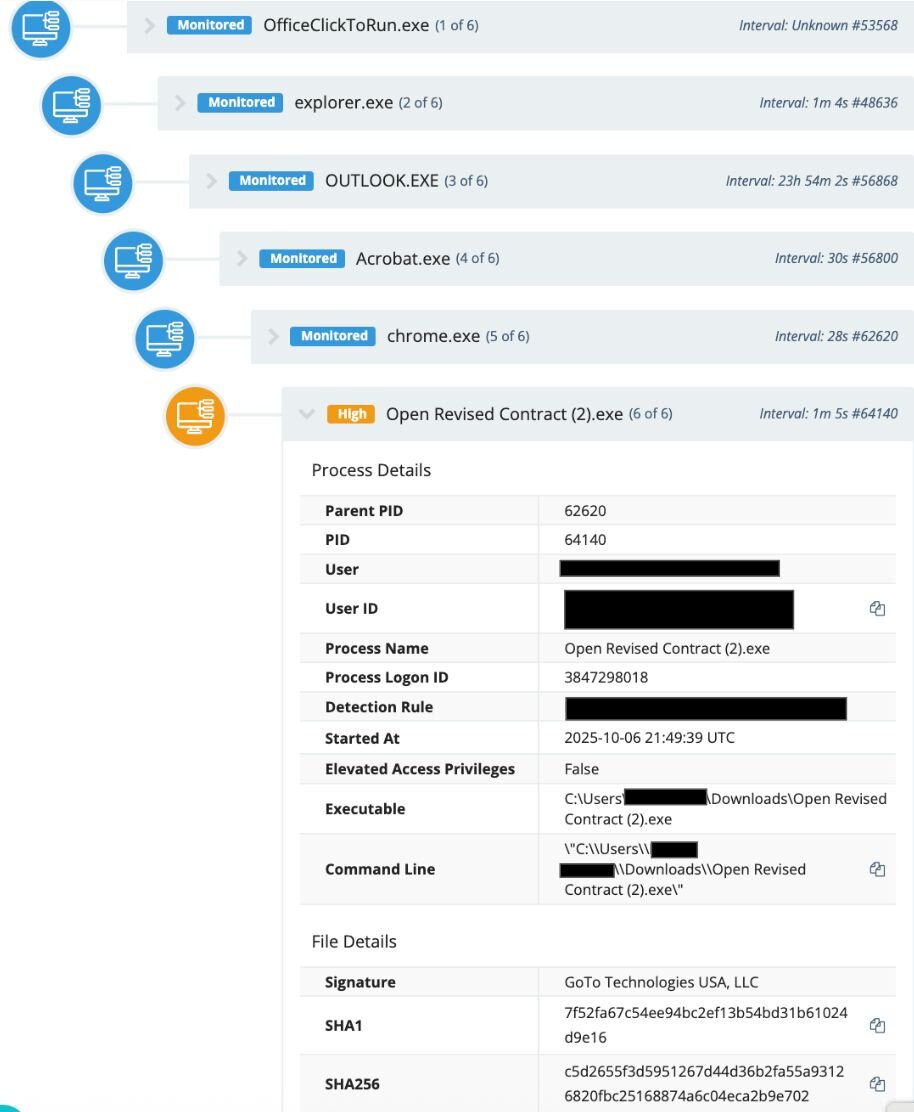
Figure 1: Process tree showing the download of Open Revised Contract (2).exe via phishing 
 

Then, the threat actor used their access through this initial GoTo Resolve installation to infect the victim with another RMM, ScreenConnect, via the file path:

c:\program files (x86)\screenconnect client (fdeeb5df8057eef0)\screenconnect.clientservice.exe

A search for the ScreenConnect binary (f1b5c000794f046259121c63ed37f9eff0cfe1258588eca6fd85e16d3922767e) on VirusTotal shows the “Execution Parents” revealing the names of different lures connected to the execution chains (as seen in Figure 2).
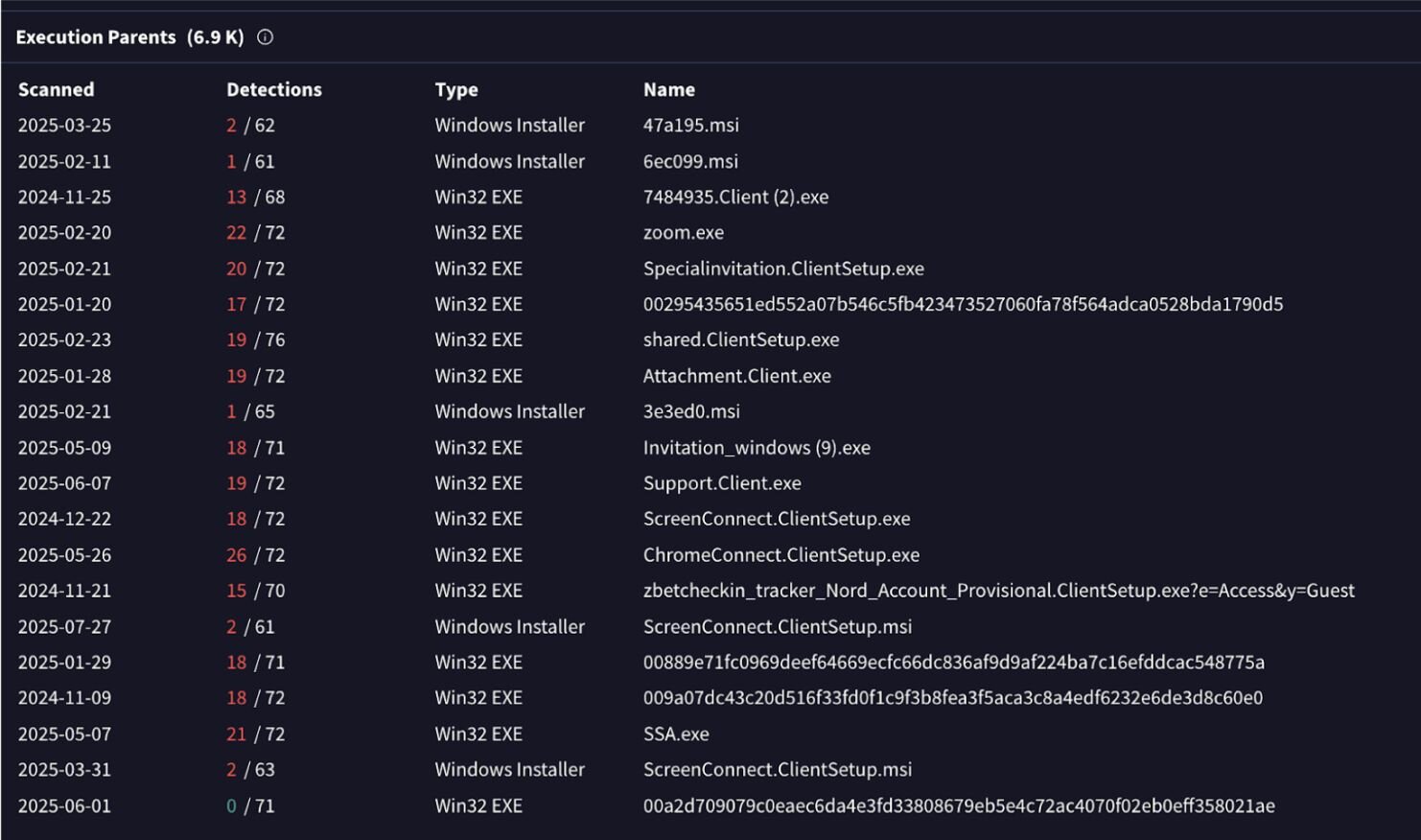
Figure 2: VirusTotal results outlining the “Execution Parents” for the ScreenConnect binary


The SOC identified this threat through a retrospective threat hunting exercise, which allows us to query various telemetries with specific security hypotheses. Huntress is constantly using new technologies and threat intelligence to deploy retrospective threat hunting across our existing telemetries; this helps us continuously reassess past and present telemetries. For this specific case, we worked with the business to neutralize the rogue RMMs.


PDQ to SimpleHelp instance

We’ve seen multiple instances that start with the installation of PDQ, and then use a secondary RMM in the next phase of the attack.   

In September, a user at an investment firm downloaded a file (C:\Users\REDACTED\Downloads\276Special%10Invitation9756.msi) from hxxp[://]elegantparty[.]de, which led to the download of a renamed PDQ Installer.

The threat actor then used PDQ to install a malicious SimpleHelp instance (NewAMG2908.exe), which was signed by SimpleHelp Ltd. and configured to connect to the domain stsmithchurchitems[.]shop. 

Any domains or IP addresses for SimpleHelp can be pulled from the configuration file from the following path: C:\ProgramData\JWrapper-Remote Access\JWAppsSharedConfig\serviceconfig.xml

This rogue SimpleHelp RMM was installed in the path: C:\ProgramData\JWrapper-Remote Access\JWAppsSharedConfig\restricted\SimpleService.exe
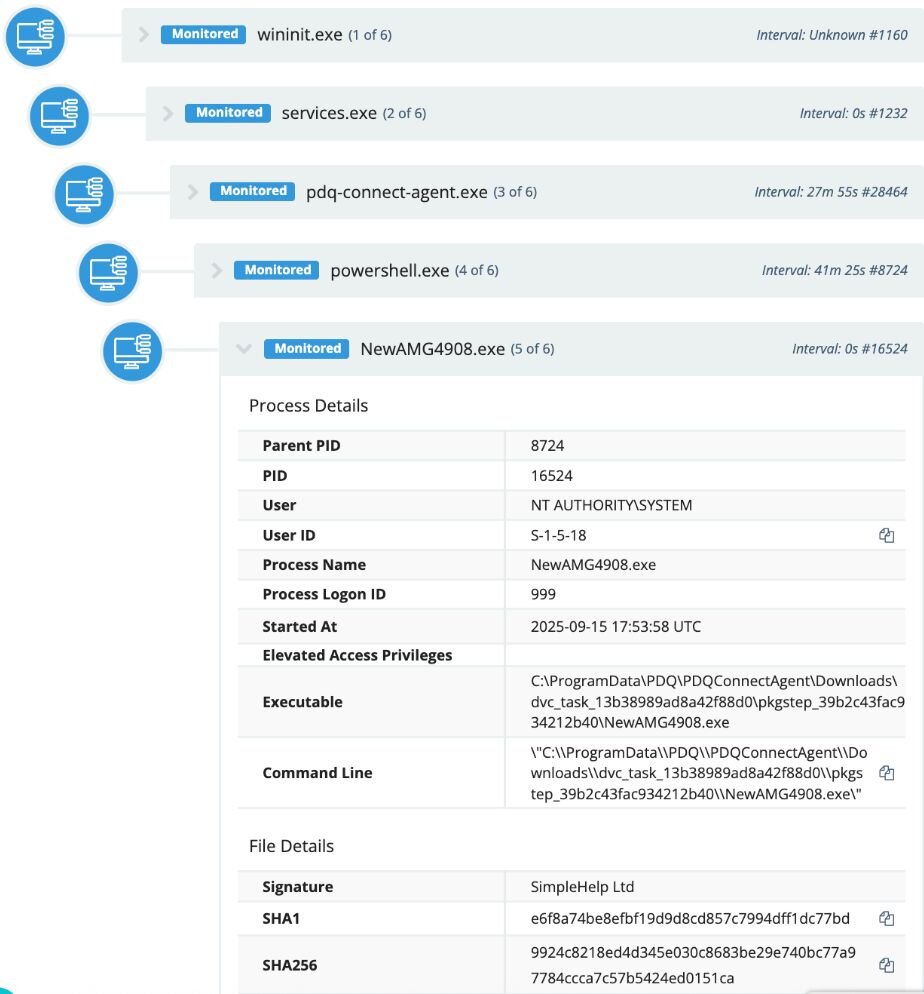
Figure 3: Process tree showing the attack that involved both PDQ and the execution of the SimpleHelp installer
         

At this point, SOC analysts stopped the attack before it could escalate, isolating the host to prevent further ingress and working with the impacted business on remediation steps.


Other RMM instances

The SOC also sees a number of other RMM types, such as malicious Chrome Remote Desktop, Atera, and ITarian instances. The latter RMM has popped up in a couple of recent incidents in November, leading to threat actors executing a secondary ScreenConnect installer. 

On November 24, the SOC team conducted a retrospective threat hunt that revealed that a company employee had downloaded a rogue ITarian RMM installer earlier that day. A closer look into the user’s Chrome browser history showed that the installer was downloaded from ssaaccount-helper[.]icu. 

Figure 4 shows that the lure linked to this domain had to do with a purported social security account statement. Once the victim clicked “Download SSA Documents,” it kicked off the download for the rogue RMM installer (em_GIRMOlf8_installer_Win7-Win11_x86_x64.msi).
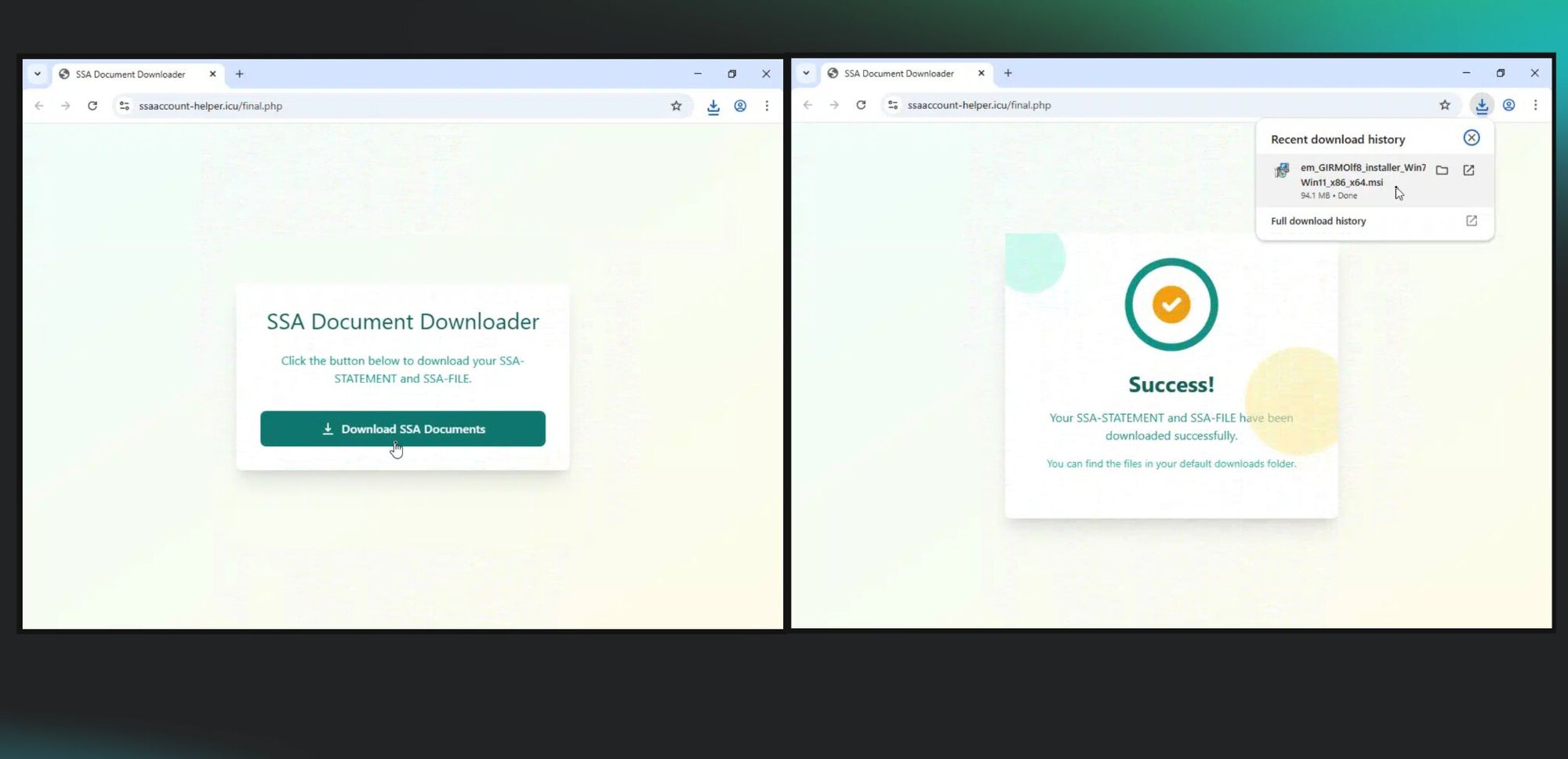
Figure 4: The domain from which the malicious installer was downloaded


The ITarian installer then used its own CMD script module from the RMM management site in order to launch a .CMD file (on disk for a short period of time). That file ( seen on the endpoint in C:\Users\REDACTED\AppData\Local\Temp\7ZSfx000.cmd) then installed a rogue ScreenConnect instance, which was configured to a recently registered domain, deuwre[.]com.

At this point, the SOC team intervened in the attack, stopping the threat actor from escalating any further. 


A longer chain of RMM downloads

In October, Huntress observed a user at a car dealer execute the file OPENINVITATION.exe, which is a rogue GoTo Resolve RMM installer. The file was downloaded from the domain abre[.]ai. 

The threat actor then used their access via GoTo Resolve to install a rogue SimpleHelp RMM (SimpleService.exe) on the host, in the following directory: 

C:\ProgramData\JWrapper-Remote Access\JWAppsSharedConfig\restricted\

The instance was configured to communicate with the domain xtroloozyanimailfeeddeals[.]shop. 

But it didn’t stop there. 

Threat actors then used the SimpleHelp RMM to install a malicious ScreenConnect instance, configured with the domain support[.]innerschapel[.]com, in the directory:

C:\Program Files (x86)\ScreenConnect Client (2f193a6e5e15c3cc)\
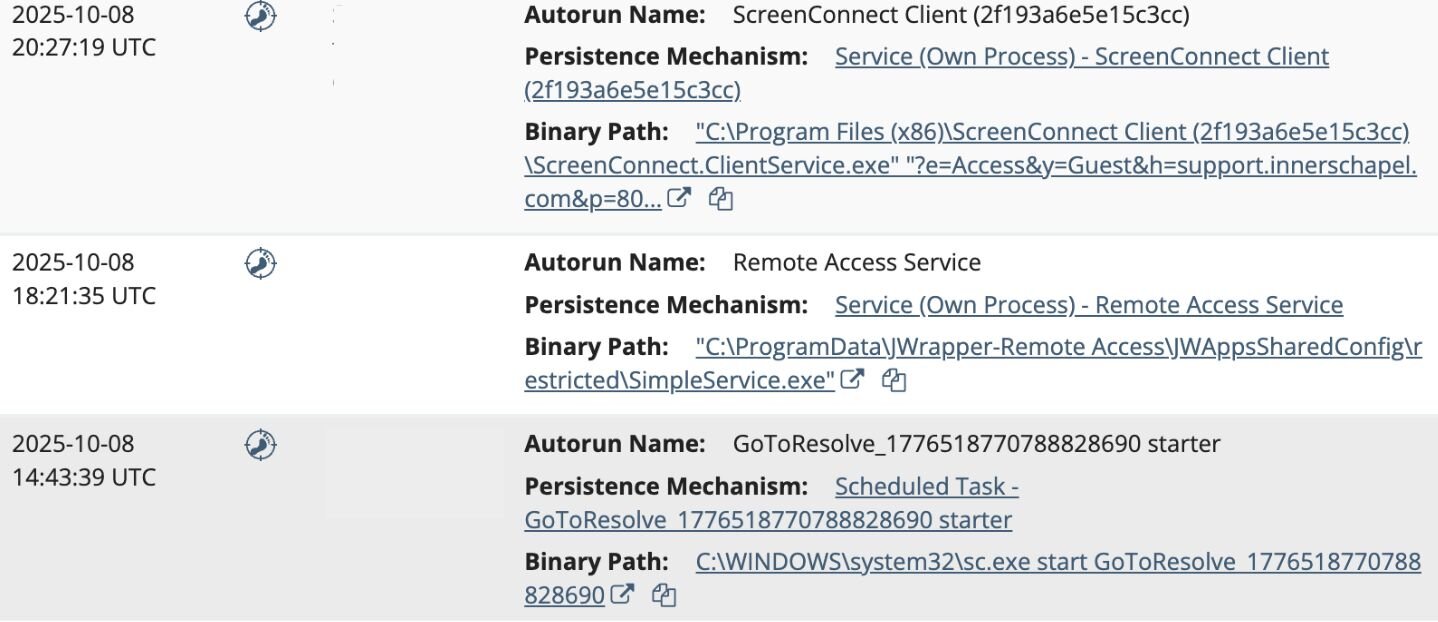
Figure 5: The threat actor used GoTo Resolve, ScreenConnect, and SimpleHelp in one attack

At this point, Huntress SOC analysts caught and stopped the threat actor before they could deploy any further processes or persistence mechanisms. 


Continued use of social engineering 

One way that threat actors spread RMMs is via phishing emails that use various lures to convince victims to download them. Recently, a few social engineering lures caught our eyes:

  • The Holiday Lure: On November 2, a user was tricked into executing a malicious process (Thanksgiving-iv.exe) from the directory C:\Users\REDACTED\Downloads\ on the impacted host. Further inspection revealed that this file is a rogue installer for GoTo Resolve RMM. The victim’s Firefox browser artifacts revealed that this installer was downloaded from the URL https[:]//pub-0e9274b4f4a74997bcafd5c5c778bf91[.]r2[.]dev/Thanksgiving-iv.exe. The malicious RMM then deployed a rogue ScreenConnect installer into the directory C:\Program Files (x86)\ScreenConnect Client (3bf4055180e70e5b), which was configured for the domain wilkensealsivc[.]shop. 

  • The Fake Bid Transcript: On October 15, a phishing message purporting to contain a Bid Transcript from Microsoft Teams duped a user into downloading and executing the file Contract Revised.exe, as seen in Figure 6 below. The file was actually a GoTo Resolve rogue RMM, downloaded from https[:]//auctechnologies[.]com/revv/index%20(1)[.]html. After installation, the instance executed several executables (HideUL.exe and PIN.exe), but they weren’t accessible for further analysis on disk.

  • The Evite (A Classic): Fake invitations are a popular type of lure used by threat actors, which we have seen across many different rogue RMM incidents. On November 3,  a user was tricked into executing EVITEINVITERSOLVELIST.exe, which was actually a malicious GoTo Resolve installer. Interestingly, threat actors jumped from GoTo Resolve to then make use of living-off-the-land (LotL) techniques by downloading and executing a rogue ScreenConnect installer with msiexec via a remote domain (https[:]//con[.]wepivifllc[.]de/Bin/ReadAdobe_MICR0S0FTxxPDF.ClientSetup[.]msi). 
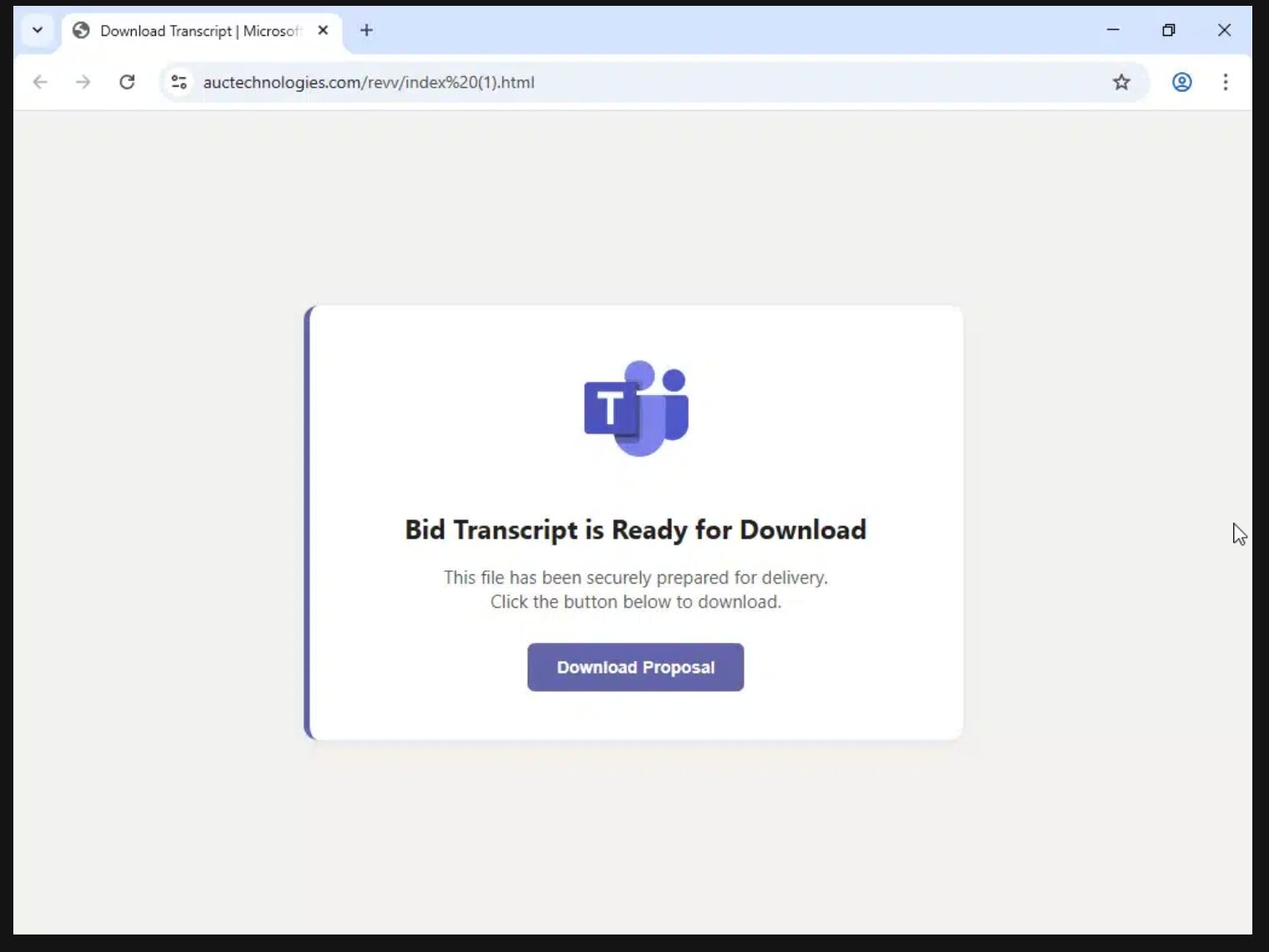
Figure 6: A rogue RMM lure that purported to be a Bid Transcript, complete with a Microsoft Teams logo


Multiple RMMs and the power of a managed SOC

Threat actors find success in using RMMs for the same reason that malicious instances are hard to weed out: they are legitimate tools, and therefore it’s difficult to discern what stems from end user behavior versus what is malicious.

This is where the value of a managed SOC can help: SOC analysts look at indicators like where instances are calling out to, where they’re being installed on the system, and how they’re being installed. 

For instance, an RMM might be installed out of a temp directory (which is more suspicious) versus an application directory (with other legitimate applications). Or, maybe a rogue RMM instance calls out to an RMM free trial domain, versus a domain name that’s associated with the business that’s actually using the RMM legitimately. 

There are several steps that businesses can take to attempt to prevent the threat of rogue RMMs in the first place, however. That includes:

  • Developing an asset inventory to take into account installed applications and create application controls to cover RMMs (and block unauthorized programs)
  • Audit and monitor RMMs in order to track ones that are currently used or authorized. Check curated lists like LOLRMM to better understand what RMM tools could potentially be abused by threat actors
  • Check logs for instances where RMMs were executed to weed out suspicious RMM use

The incidents that we've outlined above are only a small fraction of the cases that the Huntress SOC team experiences daily when it comes to rogue RMM deployments. The SOC sees not only individual RMM installations, but multiple layers of rogue RMMs across various endpoints as threat actors seek to ensure persistence in their attacks.  Businesses should prioritize the threat of RMM abuse accordingly. 


Indicators of Compromise


ScreenConnect


Item

Description

support[.]innerschapel[.]com

Download source

wilkensealsivc[.]shop

Download source

deuwre[.]com

Attacker-controlled domain

wilkensealsivc[.]shop

Attacker-controlled domain

https[:]//con[.]wepivifllc[.]de

Download source


SimpleHelp


Item

Description

stsmithchurchitems[.]shop

Attacker-controlled domain

xtroloozyanimailfeeddeals[.]shop

Attacker-controlled domain


PDQ


Item

Description

hxxp[://]elegantparty[.]de

Download source


GoTo Resolve


Item

Description

abre[.]ai

Download source


ITarian


Item

Description

ssaaccount-helper[.]icu

Download source


Categories
Threat Analysis
Summarize this postClose Speech Bubble
ChatGPTClaudePerplexityGoogle AI

See Huntress in action

Our platform combines a suite of powerful managed detection and response tools for endpoints and Microsoft 365 identities, science-backed security awareness training, and the expertise of our 24/7 Security Operations Center (SOC).

Book a Demo
Share
Facebook iconTwitter X iconLinkedin iconDownload icon
Glitch effect

You Might Also Like

  • Daisy-Chaining Rogue RMM Tools: How Threat Actors Abuse Remote Management Software for Initial Access

    The abuse of remote monitoring and management (RMM) tools is surging. See how threat actors daisy chain RMM software for initial access, persistence, and detection evasion.
  • Rogue RMMs: Common Social Engineering Tactics We Saw in 2025

    From lures involving Social Security statements to top domains and hashes used in attacks, here's an in-depth look at incidents involving ScreenConnect in 2025.
  • Insights: RMM Tools

    Over the past year, the Huntress team has posted a number of blog posts related to remote monitoring and management (RMM) tools being installed or abused by threat actors.
  • Employee Monitoring and SimpleHelp Software Abused in Ransomware Operations

    Huntress uncovers ransomware operations abusing employee monitoring software and SimpleHelp RMM for persistence, and ransomware deployment.
  • Tales of Too Many RMMs

    In a highly interconnected world, remote monitoring and management (RMM) tools are critical to reducing cost and increasing efficiencies. However, these tools pose challenges and even significant risk if not properly managed.
  • RMM Abuse: When IT Convenience Bites Back

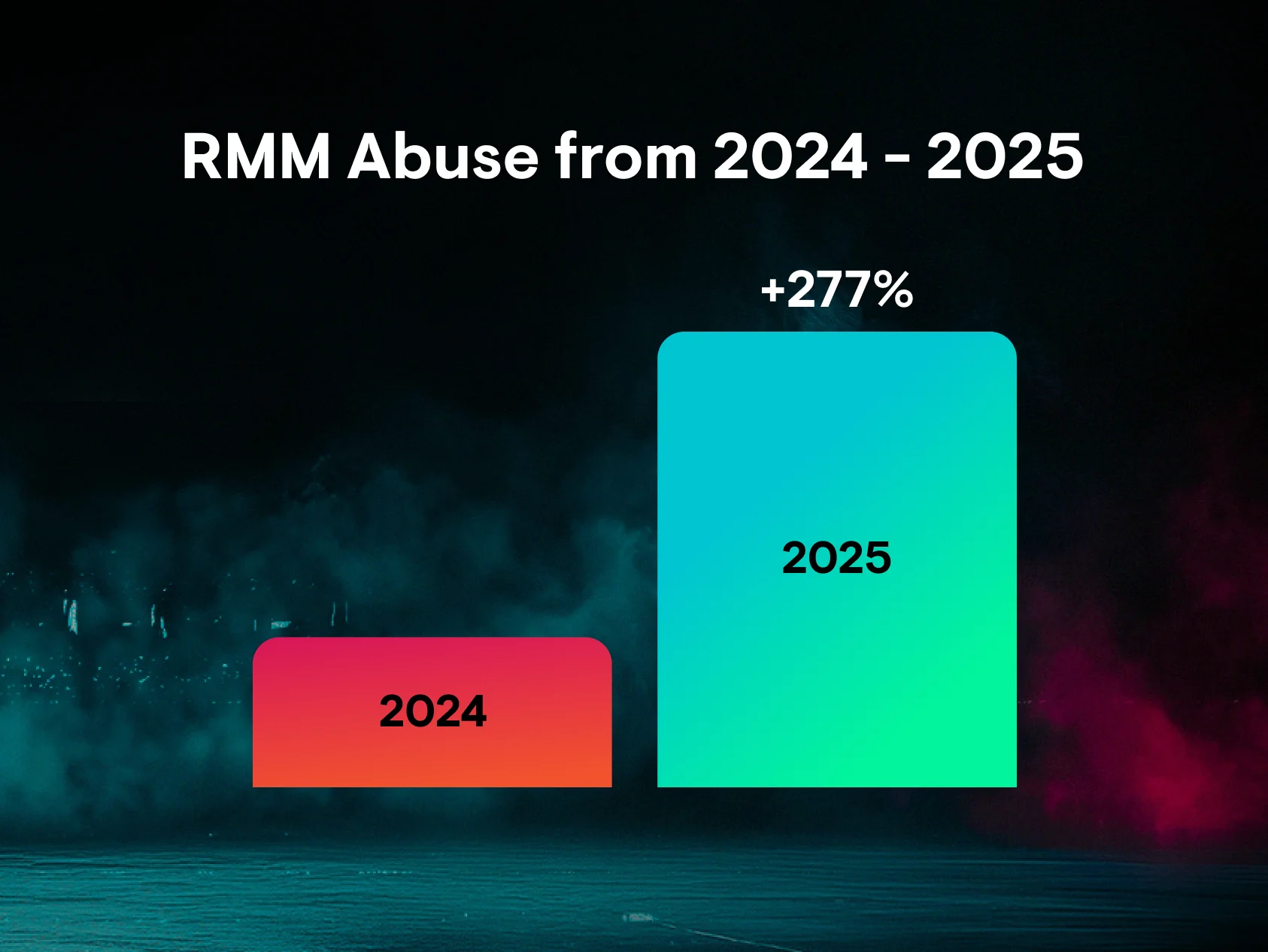
    Cybercrime and RMM abuse is up 277% as attackers exploit trusted tools for stealthy access. Learn how to shift from overtrust to verifying behavior and secure your network.
  • Velociraptor Misuse, Pt. I: WSUS-Up?

    Huntress has seen an uptick in threat actors abusing the Velociraptor open-source DFIR tool in a range of attacks, including a recent incident involving WSUS exploitation.
  • RATs! Remote Management Software from the Hacker’s Perspective

    Tips and tricks to hunt down RMM abuse. Remote access tools for persistence. Are RMMs really just command and control? January’s Tradecraft Tuesday was wild. Here’s the recap.

Sign Up for Huntress Updates

Get insider access to Huntress tradecraft, killer events, and the freshest blog updates.
Privacy • Terms
By submitting this form, you accept our Terms of Service & Privacy Policy
Thank you! Your submission has been received!
Oops! Something went wrong while submitting the form.
Huntress Managed Security PlatformManaged EDRManaged EDR for macOSManaged EDR for LinuxManaged ITDRManaged SIEMManaged Security Awareness TrainingManaged ISPMManaged ESPMBook a Demo
PhishingComplianceBusiness Email CompromiseEducationFinanceHealthcareManufacturingState & Local Government
Managed Service ProvidersResellersIT & Security Teams24/7 SOCCase Studies
BlogResource CenterCybersecurity 101Upcoming EventsSupport Documentation
Our CompanyLeadershipNews & PressCareersContact Us
Huntress white logo

Protecting 215k+ customers like you with enterprise-grade protection.

Privacy PolicyCookie PolicyTerms of UseCookie Consent
Linkedin iconTwitter X iconYouTube iconInstagram icon
© 2025 Huntress All Rights Reserved.

Join the Hunt

Get insider access to Huntress tradecraft, killer events, and the freshest blog updates.

By submitting this form, you accept our Terms of Service & Privacy Policy