

Don’t let overlooked obligations become incidents. Learn how.
Utility navigation bar redirect icon
Portal LoginSupportContact
Search
Close search
Huntress Logo in Teal
  • Platform Overview
    Managed EDR

    Get full endpoint visibility, detection, and response.

    Managed EDR

    Get full endpoint visibility, detection, and response.

    Managed ITDR

    Protect your Microsoft 365 identities and email environments.

    Managed ITDR

    Protect your Microsoft 365 identities and email environments.

    Managed SIEM

    Managed threat response and robust compliance support at a predictable price.

    Managed SIEM

    Managed threat response and robust compliance support at a predictable price.

    Managed Security Awareness Training

    Empower your teams with science-backed security awareness training.

    Managed Security Awareness Training

    Empower your teams with science-backed security awareness training.

    Managed ISPM

    Continuous Microsoft 365 and identity hardening, managed and enforced by Huntress experts.

    Managed ISPM

    Continuous Microsoft 365 and identity hardening, managed and enforced by Huntress experts.

    Managed ESPM

    Proactively secure endpoints against attacks.

    Managed ESPM

    Proactively secure endpoints against attacks.

    Integrations
    Integrations
    Support Documentation
    Support Documentation
    See Huntress in Action

    Quickly deploy and manage real-time protection for endpoints, email, and employees - all from a single dashboard.

    Huntress Cybersecurity
    See Huntress in Action

    Quickly deploy and manage real-time protection for endpoints, email, and employees - all from a single dashboard.

    Huntress Cybersecurity
  • Threats We Stop
    Phishing
    Phishing
    Business Email Compromise
    Business Email Compromise
    Ransomware
    Ransomware
    Infostealers
    Infostealers
    View Allright arrowView Allright arrow
    Industries We Serve
    Education
    Education
    Financial Services
    Financial Services
    State and Local Government
    State and Local Government
    Healthcare
    Healthcare
    Law Firms
    Law Firms
    Manufacturing
    Manufacturing
    Utilities
    Utilities
    View Allright arrowView Allright arrow
    Tailored Solutions
    MSPs
    MSPs
    Resellers
    Resellers
    SMBs
    SMBs
    Compliance
    Compliance
    What Gets Overlooked Gets Exploited

    Most days, nothing happens. But one day, something will.

    Huntress Cybersecurity
    Cybercriminals Have Evolved

    Get the intel on today’s cybercriminal groups and learn how to protect yourself.

    Huntress Cybersecurity
  • Pricing
  • Community Series
    The Product Lab

    Shape the next big thing in cybersecurity together.

    The Product Lab

    Shape the next big thing in cybersecurity together.

    Fireside Chat

    Real people. Real perspectives. Better conversations.

    Fireside Chat

    Real people. Real perspectives. Better conversations.

    Tradecraft Tuesday

    No products, no pitches – just tradecraft.

    Tradecraft Tuesday

    No products, no pitches – just tradecraft.

    _declassified

    Exposing hidden truths in the world of cybersecurity.

    _declassified

    Exposing hidden truths in the world of cybersecurity.

    Resources
    Upcoming Events
    Upcoming Events
    Ebooks
    Ebooks
    On-Demand Webinars
    On-Demand Webinars
    Videos
    Videos
    Whitepapers
    Whitepapers
    Datasheets
    Datasheets
    Cybersecurity Education
    Cybersecurity 101
    Cybersecurity 101
    Cybersecurity Guides
    Cybersecurity Guides
    Threat Library
    Threat Library
    Real Tradecraft, Real Results
    Real Tradecraft, Real Results
    2026 Cyber Threat Report
    2026 Cyber Threat Report
    The Huntress Blog
    Huntress Lands on the Microsoft Marketplace
    Huntress Cybersecurity
    Huntress Lands on the Microsoft Marketplace
    Huntress Cybersecurity
    How Huntress & DEFCERT Are Streamlining CMMC Assessment Prep
    Huntress Cybersecurity
    How Huntress & DEFCERT Are Streamlining CMMC Assessment Prep
    Huntress Cybersecurity
    Live Hacking Into Microsoft 365 with Kyle Hanslovan
    Huntress Cybersecurity
    Live Hacking Into Microsoft 365 with Kyle Hanslovan
    Huntress Cybersecurity
  • Why Huntress

    Go beyond AI in the fight against today’s hackers with Huntress Managed EDR purpose-built for your needs

    Huntress Cybersecurity
    Why Huntress

    Go beyond AI in the fight against today’s hackers with Huntress Managed EDR purpose-built for your needs

    Huntress Cybersecurity
    The Huntress SOC

    24/7 Security Operations Center

    The Huntress SOC

    24/7 Security Operations Center

    Reviews

    Why businesses of all sizes trust Huntress to defend their assets

    Reviews

    Why businesses of all sizes trust Huntress to defend their assets

    Case Studies

    Learn directly from our partners how Huntress has helped them

    Case Studies

    Learn directly from our partners how Huntress has helped them

    Community

    Get in touch with the Huntress Community team

    Community

    Get in touch with the Huntress Community team

    Compare Huntress
    Bitdefender
    Bitdefender
    Blackpoint
    Blackpoint
    Breach Secure Now!
    Breach Secure Now!
    Crowdstrike
    Crowdstrike
    Datto
    Datto
    SentinelOne
    SentinelOne
    Sophos
    Sophos
    Compare Allright arrowCompare Allright arrow
  • HUNTRESS HUB

    Login to access top-notch marketing resources, tools, and training.

    Huntress Cybersecurity
    HUNTRESS HUB

    Login to access top-notch marketing resources, tools, and training.

    Huntress Cybersecurity
    Partners
    MSPs

    Join our partner community to deliver expert-led managed security.

    MSPs

    Join our partner community to deliver expert-led managed security.

    Resellers

    Partner program designed to grow your cybersecurity business.

    Resellers

    Partner program designed to grow your cybersecurity business.

    Tech Alliances

    Driving innovation through global technology Partnerships

    Tech Alliances

    Driving innovation through global technology Partnerships

    Microsoft Partnership

    A Level-Up for Your Business Security

    Microsoft Partnership

    A Level-Up for Your Business Security

  • Press Release
    Huntress Announces Collaboration with Microsoft to Strengthen Cybersecurity for Businesses of All Sizes
    Huntress Cybersecurity
    Press Release
    Huntress Announces Collaboration with Microsoft to Strengthen Cybersecurity for Businesses of All Sizes
    Huntress Cybersecurity
    Our Story

    We're on a mission to shatter the barriers to enterprise-level security.

    Our Story

    We're on a mission to shatter the barriers to enterprise-level security.

    Newsroom

    Explore press releases, news articles, media interviews and more.

    Newsroom

    Explore press releases, news articles, media interviews and more.

    Meet the Team

    Founded by former NSA Cyber Operators. Backed by security researchers.

    Meet the Team

    Founded by former NSA Cyber Operators. Backed by security researchers.

    Careers

    Ready to shake up the cybersecurity world? Join the hunt.

    Careers

    Ready to shake up the cybersecurity world? Join the hunt.

    Awards
    Awards
    Contact Us
    Contact Us
  • Portal Login
  • Support
  • Contact
  • Search
  • Get a Demo
  • Start for Free
Portal LoginSupportContact
Search
Close search
Get a Demo
Start for Free
HomeBlog
What are LOLBins? How to Detect These Shady Malicious Threats
Last Updated:
January 9, 2025

What are LOLBins? How to Detect These Shady Malicious Threats

By:
Harlan Carvey
Share icon
Glitch effectGlitch effectGlitch effect
LOLBin stands for "Living Off the Land Binaries," tools that are pre-installed as part of an operating system. LOLBins are not malicious in themselves but can be used maliciously by cyberattackers.

To fly under the radar, cyberattackers need to stay one step ahead. One sneaky way hackers attempt to remain unnoticed? LOLBins, a tempting target for hackers to leverage. 

LOLBins––otherwise known as “Living Off the Land Binaries”––are components native to an operating system, such as Windows or macOS. They can be leveraged and exploited by bad actors to gain additional access or permissions.

Discerning the difference between legitimate and malicious use of native utilities and exploiting these differences for detection opportunities allows cybersecurity platforms like Huntress to disrupt the threat actor’s activities much earlier in the attack chain.

Discover how LOLBins work, learn ways to identify native versus malicious LOLBins, and how to prevent future threats. 
LOLBins are defined as when attackers use legitimate system tools for malicious purposes.

How Do Threat Actors Use LOLBins Maliciously?

LOLBins are a significant threat to cybersecurity due to their inherent stealth and difficulty detecting malicious use. Since these tools are pre-installed and routinely used for legitimate purposes, security software may not flag their activity as suspicious. 

This can allow attackers to operate undetected and execute malicious commands, such as:

  • Data exfiltration
  • System reconnaissance
  • Privilege escalation
  • Lateral movement within a network
  • Persistence (maintaining access to the system)

How To Detect and Mitigate LOLBin Attacks: 4 Examples

The biggest challenge with detecting LOLBin attacks is that they mimic regular system operations. Below are some examples of regular operations and how a LOLBin attack may mimic them. 

1. User Accounts and net.exe

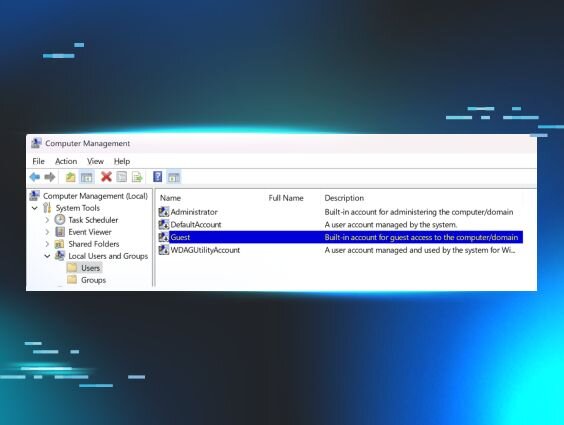
On Windows endpoints, there are a number of ways to create user accounts. User accounts can be created and managed via PowerShell, WMI, or the Local Users and Groups Manager, as illustrated in Figure 1.
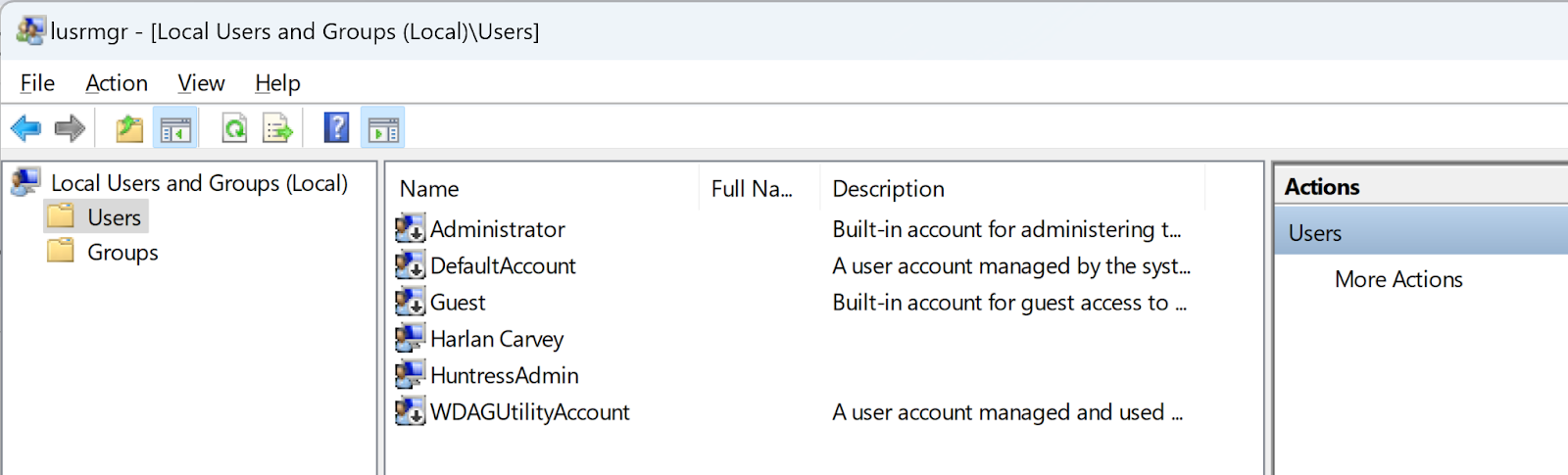
Figure 1: Local User Manager (lusrmgr.msc)

By clicking on “Users” in the Local Users and Groups Manager, and selecting “New User,” you’ll see the new user dialog illustrated in Figure 2.
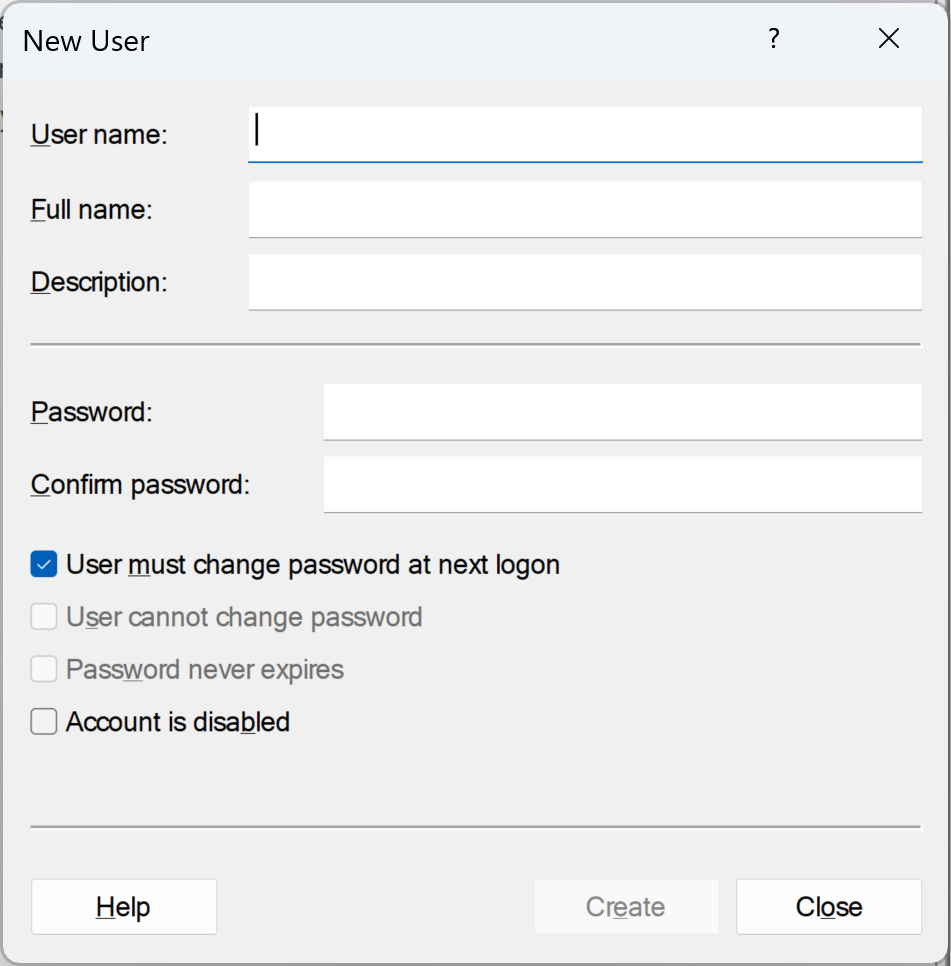
Figure 2: New User dialog

Completing the New User dialog form and clicking “Create” will create a new user account. In addition, there are a number of commercial products available that can be used within an organization to create and manage large groups of user accounts across an entire infrastructure.

Another means for creating user accounts involves the native utility, net.exe. Many administrators use this LOLBin to create, manage, and remove user accounts. Threat actors do so as well. 

How To Detect It

When it comes to cybersecurity and detecting the malicious use of native utilities such as net.exe to create user accounts within your organization, the first step is to:

  • Understand whether or not your administrators use the native utility as part of normal operations and workflow
  • If not, that’s a clear indicator that a LOLBin is being used maliciously
  • If you see net.exe being run with arguments such as  user, localgroup, or add, then you can likely assume that the use of the LOLBin is malicious in nature

If your organization does use net.exe to create user accounts, ask yourself these questions:

  • Do you have specific administrators who use net.exe?
  • Which endpoint do they usually access from?
  • Is a specific account used to create and manage user accounts?
  • Does this always happen from a specific system?

If so, any activity outside of those guardrails should be considered suspicious in nature and given a closer look.
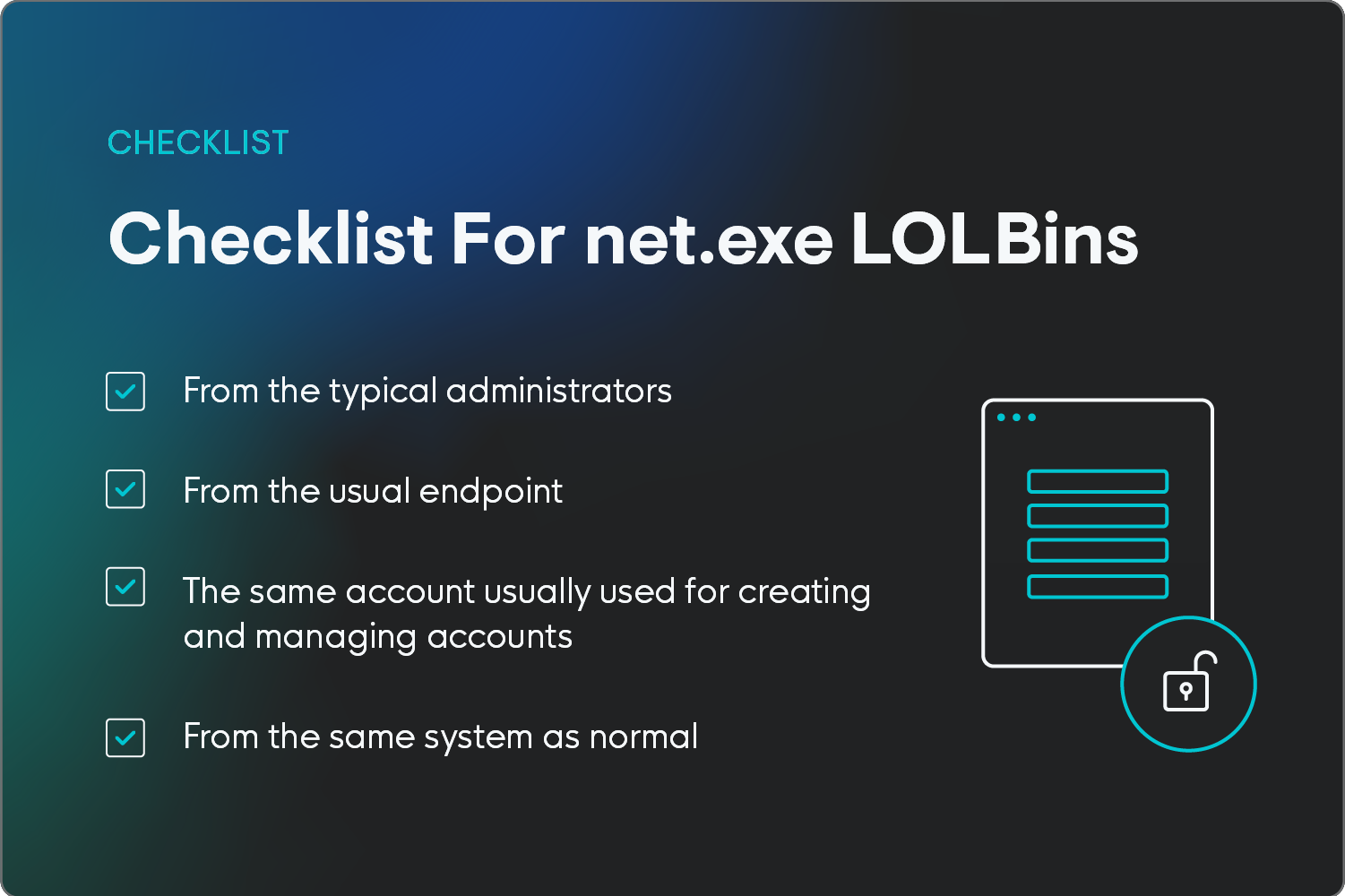
Checklist items to evaluate net.exe and LOLBins.

2. cmd.exe and Explorer.exe

Another aspect regarding the use of native utilities is how those utilities are launched. One common means for doing so is for administrators to log into a system, open a command prompt, and type the command (illustrated in Figure 3), or run the command from a batch file.
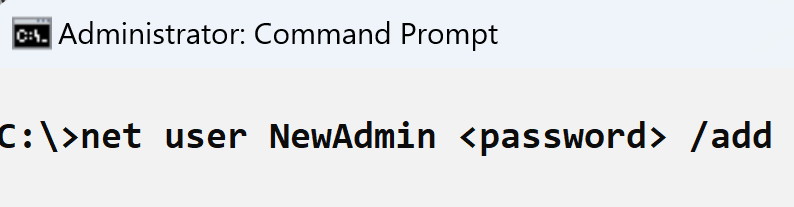
Figure 3: Creating New Account

In this case, the process lineage has cmd.exe as the process parent and Explorer.exe (the Windows Explorer shell) as the process grandparent.

How To Detect It

Any observed command line where the process parent or grandparent is one of the following should be considered malicious:

  • wmiprvse.exe (indicating that the command was run over a type 3 remote network connection)
  • PSExec.exe (free Microsoft utility for privilege escalation)
  • sqlservr.exe (MS SQL Server)

3. Username and Password Conventions

Most organizations have standard username and password conventions that are used across the various interfaces. This can include conventions like using first initial and last name in emails or setting up passwords to follow particular requirements, like including a capital letter, number, and symbol. 

How To Detect It

If what you’re seeing in the suspicious activity differs from typical organizational conventions, then the activity is likely malicious.

For example, if your organization uses a naming convention for new user accounts that includes a reference to a department or team, or consists of the user’s first name and last name (together, or separated with a “.”), then any new user accounts created that don’t follow that convention should be considered malicious. 

4. Command Line Structure

Yet another way aspect to help identify the malicious use of the net.exe LOLBin is the structure of the command line itself. Many times when net.exe is used legitimately, the structure of the command line appears as follows:

net user <username> <password> /add

Note that the /add switch for creating a new user (not using the switch changes the password of the user account) falls at the end of the command line. However, it doesn’t have to; this is simply a convention that many administrators tend to follow. 

How To Detect It

Huntress analysts have observed the following command line being used to create user accounts on several instances against multiple customers:

net  /add user WDAGUtilltyAccount Ujmqaz5055 /y

Note the subtle misspelling of the username, with the second “l” that should be an “i.” Huntress analysts also observed the following command line employed on a customer network:

net /add user ASP.NET Ujmqaz5055

Note that the use of this password by threat actors has also been observed by others and similarly reported.

Huntress analysts have also captured a number of usernames and passwords seen repeatedly used by threat actors over a considerable period. One example of a commonly used password is from the previous example: 

Ujmqaz5055

Other observed examples include P@ssw0rd01!, Nullpass123, JapanNight!128, and Noface66Nocase!.

Examples of usernames commonly used by threat actors include:

  • adm
  • sqladmin
  • Adminstrator (note the missing “i”)
  • installl
  • backupsql

Protect Your Organization From LOLBin Attacks

A threat actor’s use of LOLBins doesn't mean it’s game over for the defender or the impacted organization. Using native utilities doesn’t have to mean that a threat actor’s activities blend in with legitimate activity. 

In fact, with a little thought and just a bit of foresight, the threat actor’s use of those native utilities can instead be exploited as a detection opportunity, allowing defenders to disrupt the threat actor’s activities much earlier in the attack chain. 

Understanding who uses those utilities, when, how they use them, and from which endpoints within the infrastructure presents a number of valuable opportunities to inhibit or even entirely avoid attacks.

Get enterprise-grade endpoint protection with Huntress’s Managed EDR today. 

FAQ

Which Type of Malware Relies on LOLBins? 

Fileless malware often relies on LOLBins. By leveraging legitimate system tools, fileless malware can execute malicious code without ever dropping a file to disk, making it difficult to detect and remove.

What Is the Most Used LOLBins?

PowerShell is arguably the most commonly used LOLBin. Other common ones include CMD, rundll32, and regsvr32. 

What Are LOLBins vs. LOLBAS? 

LOLBAS, or "Living Off The Land Binaries And Scripts," is a superset of LOLBins, encompassing a wider range of legitimate system components that attackers can leverage.

Categories
Cybersecurity Education
Summarize this postClose Speech Bubble
ChatGPTClaudePerplexityGoogle AI

See Huntress in action

Our platform combines a suite of powerful managed detection and response tools for endpoints and Microsoft 365 identities, science-backed security awareness training, and the expertise of our 24/7 Security Operations Center (SOC).

Book a Demo
Share
Facebook iconTwitter X iconLinkedin iconDownload icon
Glitch effect

You Might Also Like

  • Detecting Malicious Use of LOLBins, Pt. II

    Rhetoric within the cybersecurity community has leaned heavily towards threat actor use of LOLBins as a means of “hiding amongst the noise” of normal, administrative and operational activity. However, as Huntress SOC analysts can attest, this is often far from the case.
  • Exposing Data Exfil: LOLBins, TTPs, and Binaries…Oh, My!

    Threat actors often steal data during the course of their attacks. This is particularly true for ransomware threat actors, who do it before deploying file encryption in order to engage in “double extortion” activities. This activity can be difficult to detect, particularly if it’s not dissimilar to legitimate actions taken by system administrators.
  • The Unwanted Guest

    Threat actors are enabling the built-in Windows Guest account to maintain persistence. Learn how they gain access and how to detect this activity.
  • Credential Theft: From Initial Access to Lateral Movement

    What is credential theft? Learn how threat actors use phishing, brute force, and tools like Mimikatz or Registry hive dumps to gain initial access and move laterally.
  • LOLBin to INC Ransomware

    Huntress has observed INC ransomware deployed in the past but recent activity indicates a possible continued shift in/or improvement of tactics employed by these threat actors.
  • Attack Behaviors

    In the cybersecurity community, we may hear analysts say, “Oh, threat actors change their tactics…”, and at times, they may include the word “always” as part of that statement. However, the question at hand is, “Does the data really show that to be the case?” What are we truly seeing in real-world incidents?
  • Can’t Touch This: Data Exfiltration via Finger

    Threat actors frequently make use of native utilities during incidents. However, this blog post discusses a rarely-observed means of data exfiltration.
  • Credential Theft: Expanding Your Reach, Pt. II

    As with many tactics within the MITRE ATT&CK framework, credential theft consists of a number of different techniques. Showing what many of them look like on an endpoint helps other security professionals understand what to look for and how to detect and respond to similar activity.

Sign Up for Huntress Updates

Get insider access to Huntress tradecraft, killer events, and the freshest blog updates.
Privacy • Terms
By submitting this form, you accept our Terms of Service & Privacy Policy
Thank you! Your submission has been received!
Oops! Something went wrong while submitting the form.
Huntress Managed Security PlatformManaged EDRManaged EDR for macOSManaged EDR for LinuxManaged ITDRManaged SIEMManaged Security Awareness TrainingManaged ISPMManaged ESPMBook a Demo
PhishingComplianceBusiness Email CompromiseEducationFinanceHealthcareManufacturingState & Local Government
Managed Service ProvidersResellersIT & Security Teams24/7 SOCCase Studies
BlogResource CenterCybersecurity 101Upcoming EventsSupport Documentation
Our CompanyLeadershipNews & PressCareersContact Us
Huntress white logo

Protecting 215k+ customers like you with enterprise-grade protection.

Privacy PolicyCookie PolicyTerms of UseCookie Consent
Linkedin iconTwitter X iconYouTube iconInstagram icon
© 2025 Huntress All Rights Reserved.

Join the Hunt

Get insider access to Huntress tradecraft, killer events, and the freshest blog updates.

By submitting this form, you accept our Terms of Service & Privacy Policy