


Initial access is a hot topic for security practitioners. Those on the offensive end of our wonderfully large industry are always looking for novel ways to break into networks, free from the prying eyes of those on the defensive end.
Looking at the MITRE ATT&CK Initial Access category, we see 10 techniques and various sub-techniques below. Should you be instrumenting yours or your clients' networks to catch all these techniques? Or are others utilized more than others?
This question drives to the proverbial meat and potatoes of this blog. Join us as we dive into initial access vectors observed by the Huntress Security Operations Center (SOC) and Tactical Response teams.
Tactical Response
Those of you who've read closely or have attended previous webinars may have seen or heard of the Huntress Tactical Response Team. But what does this team do exactly, and what sets them apart from the Huntress SOC?
The Huntress Tactical Response team works closely with the SOC and acts as an escalation point for intrusions that span multiple hosts or are determined to be “hands-on keyboards.”
A SOC analyst will often isolate hosts—or the entire network, if deemed necessary—and will then pass the case over to Tactical Response.
Tactical Response analysts focus on identifying the initial access vector for intrusions so that our partners can rapidly identify the source of an intrusion and take the necessary steps to take corrective action.
In many cases, Tactical Response will pull Windows events from affected hosts and will work with our internal SOC support teams to request additional telemetry from partners. This telemetry can include logs from edge devices or any other relevant telemetry the partner may be able to provide.
Although this isn’t a full-blown incident response service, we do—often within minutes of receiving the telemetry—offer partners valuable insights, such as which hosts were affected by the incident and, when we’re able, the initial access vector as well.
Utilizing this broad remit, Tactical Response has completed a large number of engagements, with very interesting findings that we’re sharing in this blog.
Initial Access Analysis
Now that we’ve set the stage, let’s dive into analyzing the initial access methods observed by the Tactical Response team.
Due to the sensitive nature of this information, exact numbers are not provided. However, when reviewing the various categories of initial access vectors discovered, a clear pattern begins to emerge:
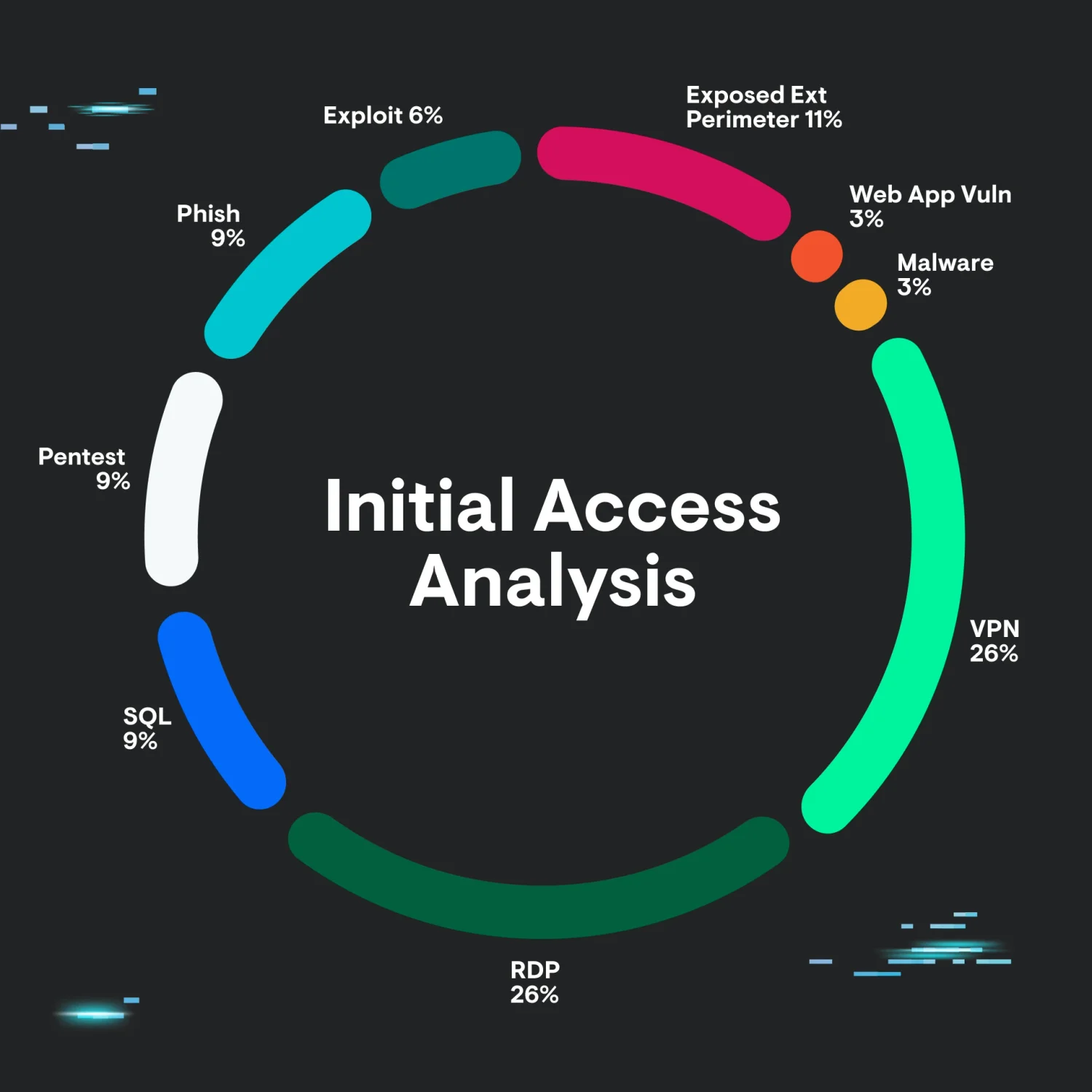
We can see that the top methods of initial access are Remote Desktop (RDP) and VPN, with exposed external perimeter coming in at a close second.
Of course, these numbers have some nuances. Namely, they don’t include cases where we were unable to determine the initial access avenue, either due to missing telemetry or other reasons.
Also, for the VPN category, we don’t count any exploits here—only logins via stolen or otherwise compromised credentials. This sample, and the resulting data, should therefore not be considered representative. But it does paint a very interesting picture.
Given the immense and understandable industry focus on 0 days, exploitation, and phishing, it’s perhaps surprising that these categories make up a small (or smaller) percentage of detected intrusion vectors.
We can view this dynamic from the point of view of a threat actor to help us gain greater understanding. Given the choice of exploiting a device versus using valid-yet-compromised credentials, we can begin to see why this avenue of compromise is more attractive for a threat actor. Devices may be patched, exploits may be unreliable or difficult to create, and, in contrast, authentication via valid accounts/credentials may be seen as “flying under the radar.”
The exploitation of valid accounts may also lend itself more to opportunistic type exploitation, where threat actors have a list of edge devices and usernames and attempt to brute force or password spray these devices, looking for a foothold into corporate networks.
Now that we have a good picture of the most “popular” initial access targets used by threat actors and given what the data shows above, let’s focus our attention on the VPN, RDP, and exposed perimeter avenues. These are heavily overrepresented and make up the vast majority of observed intrusion vectors, so they’re worth analyzing in some detail.
Exposed Perimeter & RDP
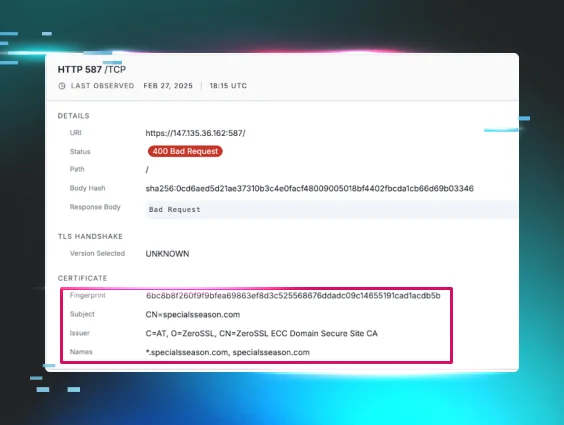
For the purposes of this blog, it makes sense to categorize RDP and exposed perimeter together, as these vectors are tightly related to each other.
Indeed, the Tactical Response team worked on a large portion of cases involving initial access through an exposed perimeter.
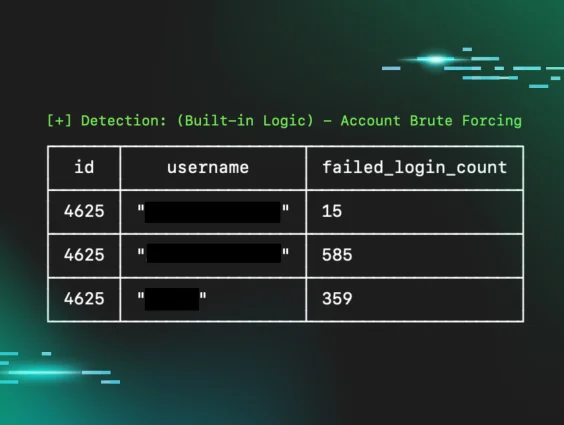
For RDP-related intrusions, we often see brute-forcing attempts followed by a successful login:
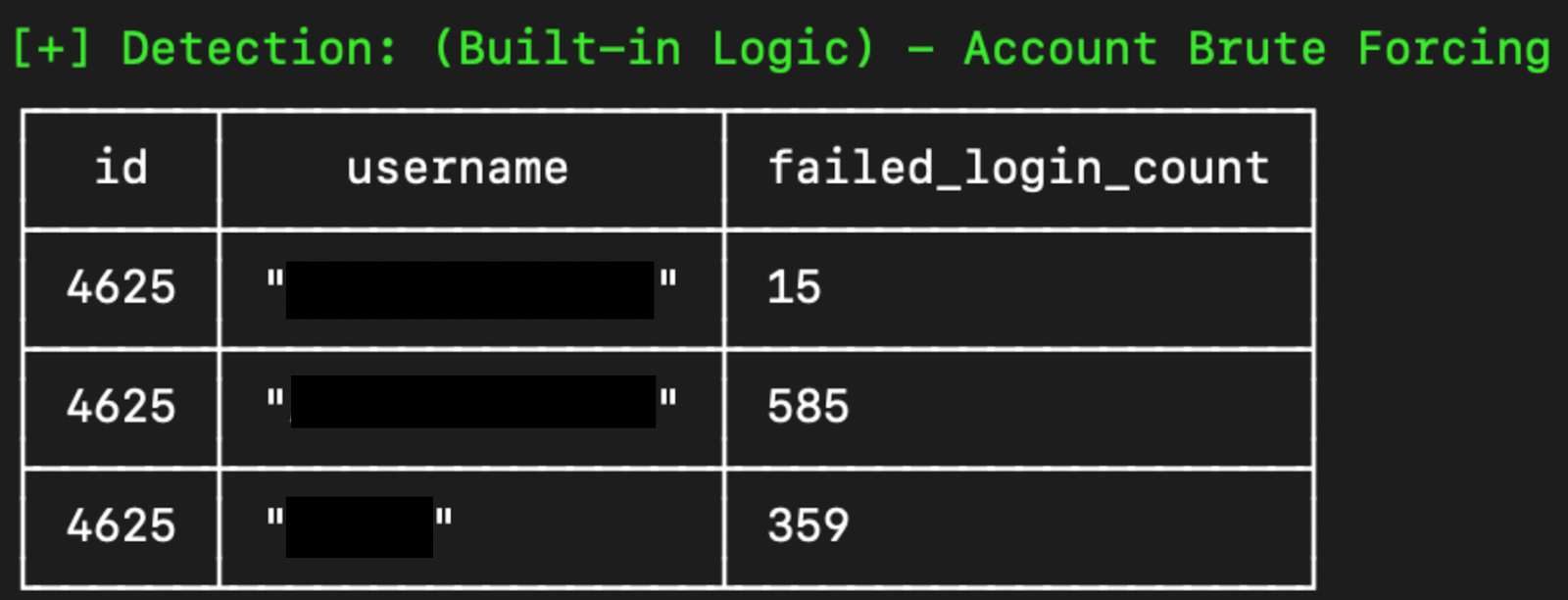
In other cases, we don’t observe any brute force activity but simply a login from an account stemming from a suspicious IP address. In these cases, we can perhaps conclude that the user's credentials were compromised previously and reused in a credential stuffing-type attack. Admittedly, this hypothesis is difficult to prove via event logs alone.
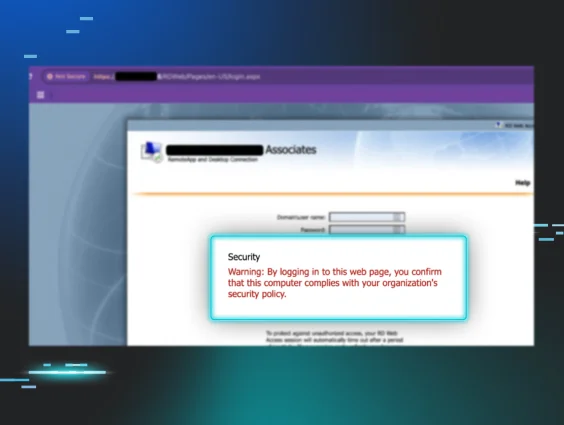
Remote Desktop services can also be exposed through a Remote Desktop Gateway (RDG). The methods of access through RDG are similar to those targeting the RDP service directly; however, the telemetry used to identify such activity differs slightly.
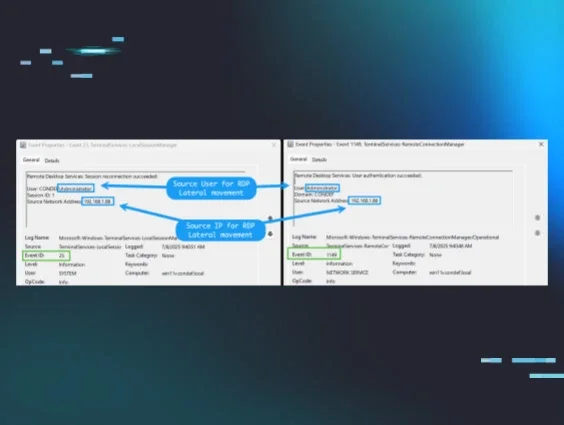
When investigating RDP-related intrusions, it’s important to remember to go beyond the Security log and to also look at the following log channels:
Microsoft-Windows-TerminalServices-Gateway
Microsoft-Windows-TerminalServices-LocalSessionManager
In addition, RDG servers will have an IIS log file present, which may also be used to detect malicious activity.
Although this occurs less frequently than exposed RDP or RDG services, some organizations unfortunately expose their server message block (SMB) interface(s) directly to the internet.
This is an extremely dangerous scenario, as the SMB protocol doesn't support any type of multi-factor authentication (MFA), so any threat actor with valid credentials to an account with proper permissions will be able to gain a foothold into the environment with relative ease.
Locking Down RDP/RDG & SMB
Now that we have a better understanding of how threat actors are exploiting exposed perimeters, let’s spend some time on the important part: what you can do about it!
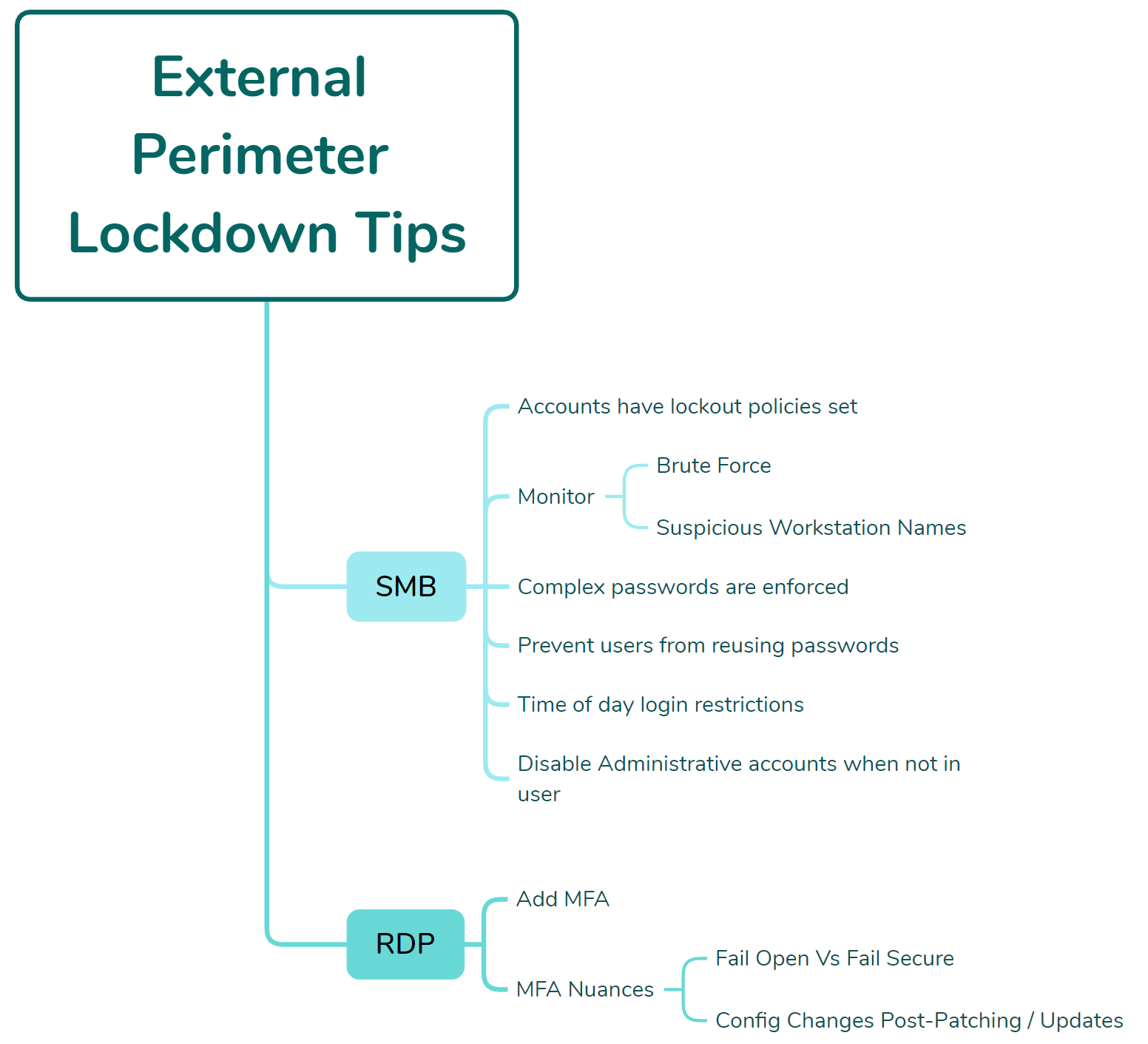
If you have absolutely no choice but to expose SMB directly to the internet for business-justified reasons, ensure that:
- Accounts have lockout policies set
- Monitoring is in place for brute force-type attacks
- Monitoring is in place for authentication via suspicious workstation names
- Complex passwords are enforced
- All effort is made to prevent users from reusing passwords
- Time-of-day login restrictions are added to accounts
- Accounts—particularly those with administrative privileges—are disabled when not in use
In some cases, we’ve observed a partner expose both SMB and RDP to the internet, with MFA wrapped around RDP. This is fantastic! However, there's a rather large caveat here.
A threat actor with valid credentials wouldn’t be able to successfully access the RDP service without successfully performing the MFA challenge. However, if those credentials belonged to an account with the proper permissions, they can be used to successfully authenticate to the SMB service instead, which, as previously mentioned, has no concept of MFA. This dynamic illustrates how important it is to understand what you expose to the internet and adjust controls accordingly.
In yet another nuance, we’ve also observed cases where only RDP was exposed, with MFA wrapped around it. However, the application tasked with providing the MFA challenge was configured to “fail open.” This means that if the application crashed or became unresponsive, it would allow authentication without an MFA challenge.
This dynamic is fully understandable for critical business applications that must function 24/7. Partners may not want to block all logins wholesale if an application fails. It is important, however, to be aware of this dynamic and to get alerted when an application crashes or stops functioning normally, as this could potentially mean that a critical security control such as MFA is removed.
A final “gotcha” for locking down exposed perimeters is to test your authentication flows after patching cycles or software updates. In some cases, and working with our partners, we were able to determine that MFA software settings were changed, updated, or otherwise modified to allow authentication without MFA after patching and/or software updates. We therefore recommend that authentication flows, particularly those protected by MFA be tested after any patching or software updates. Although this may add a little bit of time and effort, it pales in comparison to the amount of effort required to rebuild an entire network post-ransomware deployment.
Initial Access via VPN Appliance
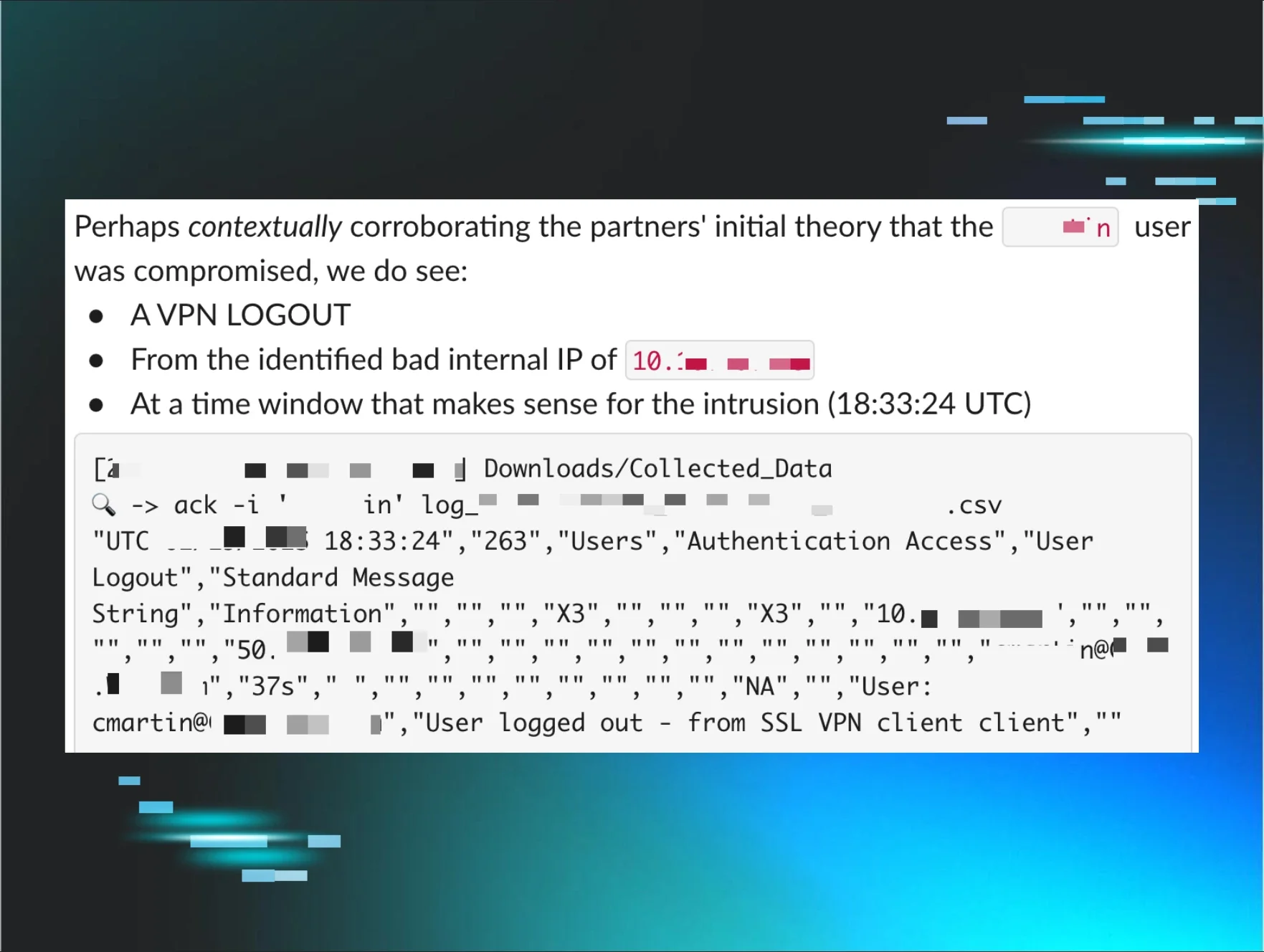
Second place amongst the initial access methods observed by the Tactical Response team is initial access through a VPN appliance. This category includes malicious logins through the appliance via stolen or brute-forced credentials and not exploitation of the VPN appliance.
There's a bit of a nuance here that may skew results. In many cases, telemetry from the VPN appliance was unavailable or didn't cover the time horizon for a given intrusion. It’s important to keep this in mind when drawing definitive conclusions from the analysis presented here.
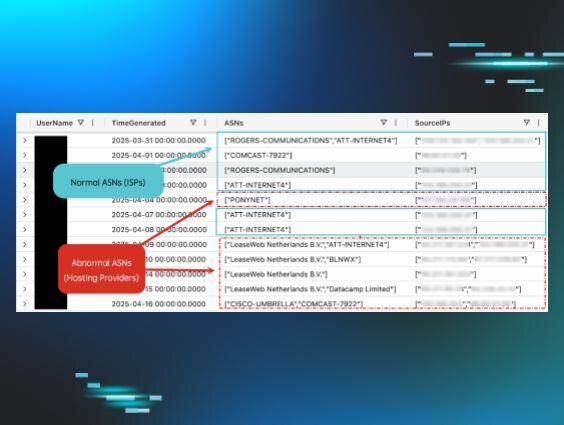
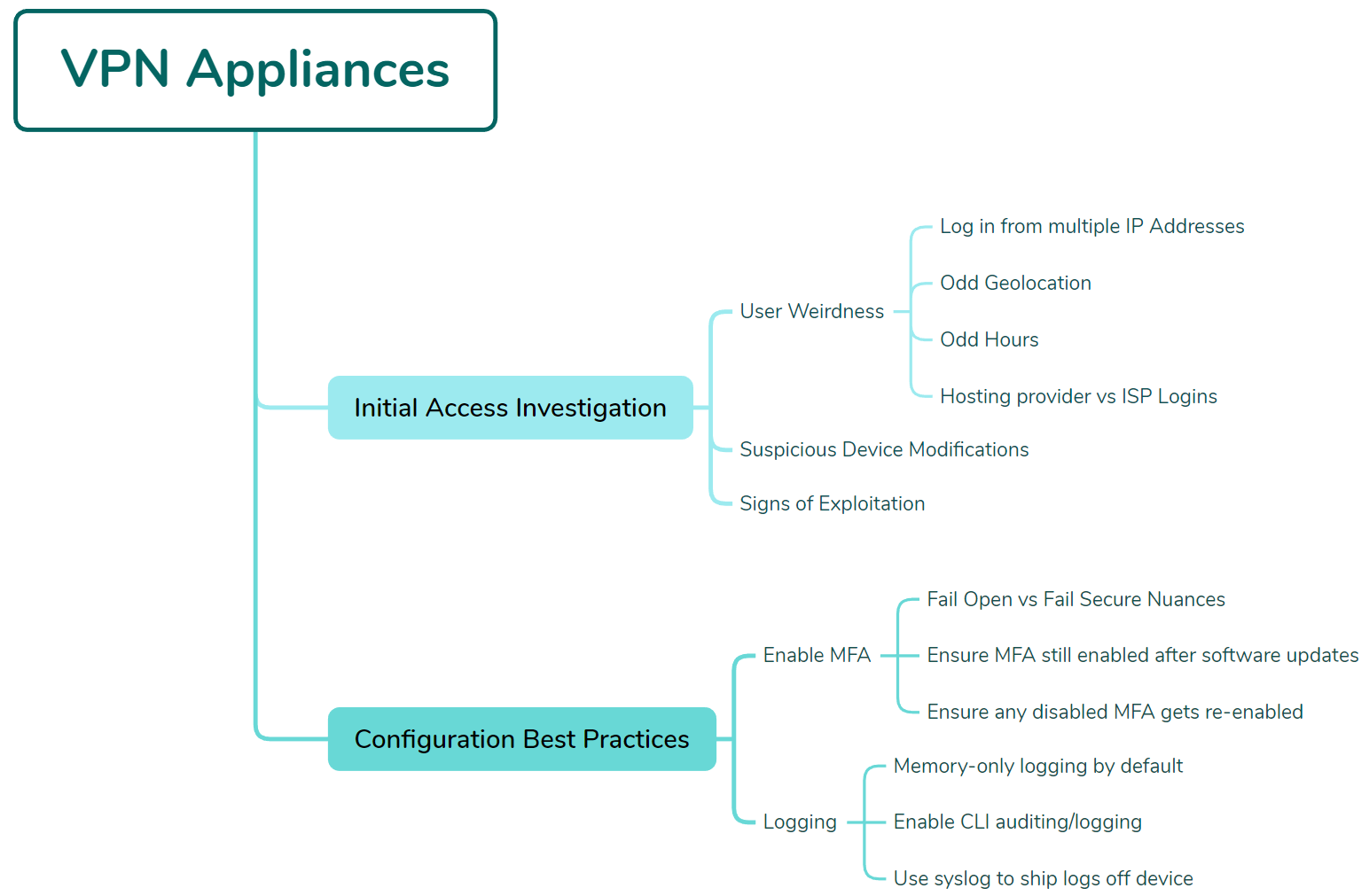
When looking at VPN appliance telemetry, the Tactical Response team focuses on the following areas:
- Any user logging in from multiple IP addresses
- Users logging in from odd geolocations
- Users logging in at odd hours of the day
- Suspicious configuration modifications to appliance settings
- Any obvious signs of exploitation
- Users logging in from hosting providers and not residential ISPs
A few dynamics work to make VPN appliance analysis difficult, particularly in less-resourced environments.
Firstly, because VPN appliances are by nature internet-exposed, they’re often targets for various scans and probes—indeed, the internet is a very noisy place.
Compounding this dynamic is a lack of proper logging configuration on the devices themselves. This often means that logs are stored in memory on the device and aren't retained for very long, which, given the noise hitting the appliance, means security-relevant telemetry is often overwritten by internet noise. In some observed cases, user sign-in data was available for only 40 minutes from a device that was the suspected source of an intrusion.
Given these challenges, let’s cover some actionable guidance that you can perform on your own VPN appliances to ensure that proper logging is both configured and retained. Here, we’ll be using a Fortinet device as an example, but the tips can apply to any type of VPN appliance as well.
Setting Up for Success: VPN Appliance Configuration
As mentioned in the RDP and external perimeter sections of this blog, multi-factor authentication is critical for anything internet facing, and this dynamic applies to VPN appliances as well.
The same nuances regarding "fail open" versus closed and patching/updating all apply to VPN appliances as well. We have had many cases of VPN MFA configurations being modified or otherwise disabled inadvertently.
Additionally, if MFA is removed from an account for troubleshooting purposes, ensure that this is tracked and MFA is turned back on when the account is back in a working state.
In addition to these broad recommendations, it’s also important to examine the logging and telemetry configuration of your VPN appliances and devices.
Taking a Fortinet device as our example, we can check where the device is logging to via the get sys status command:
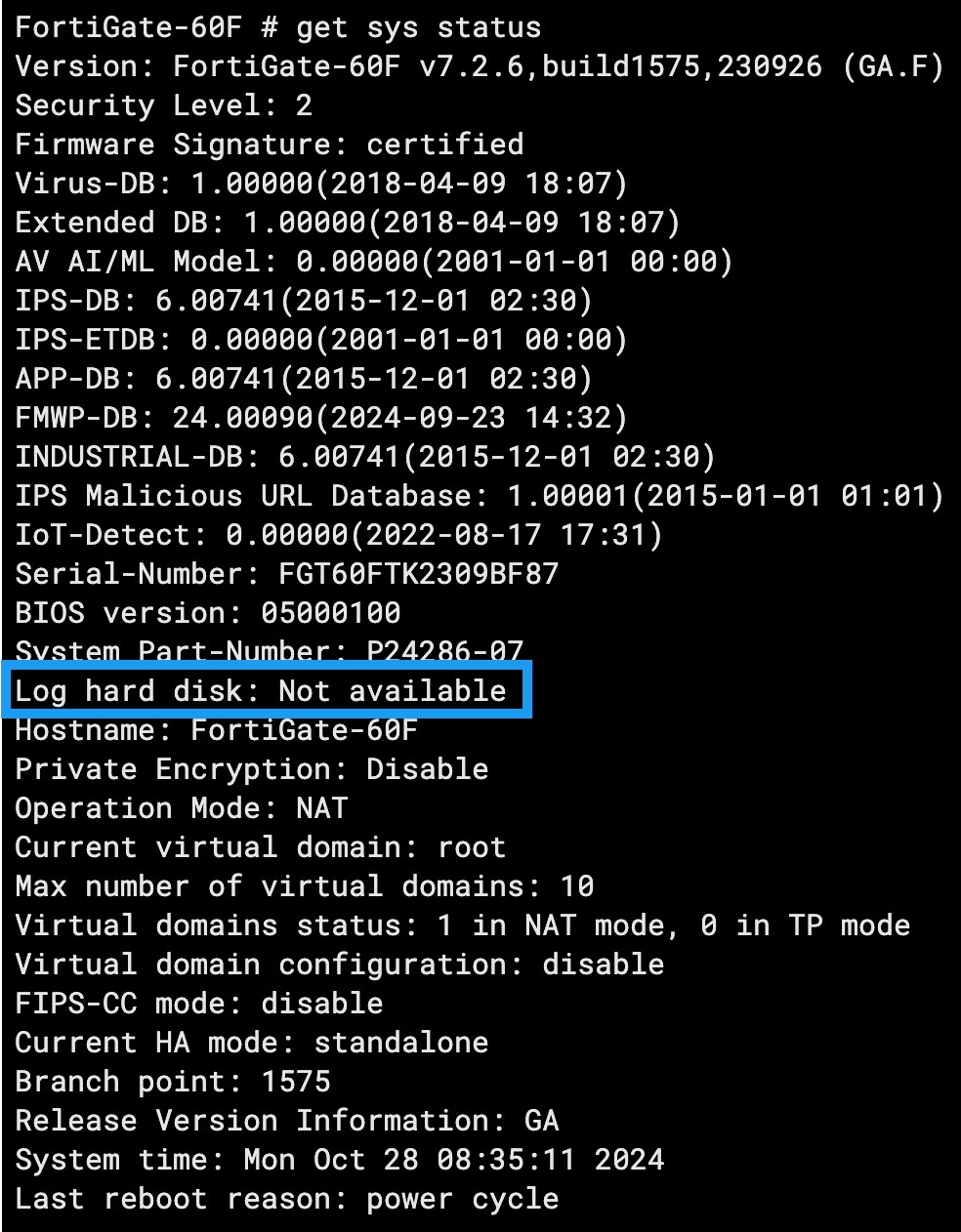
In this example, we can see the Log hard disk setting is showing as Not available. This means that the device is logging to its memory only and is likely to overwrite telemetry fairly quickly given that the device will be exposed to the internet and subject to various scans and authentication requests.
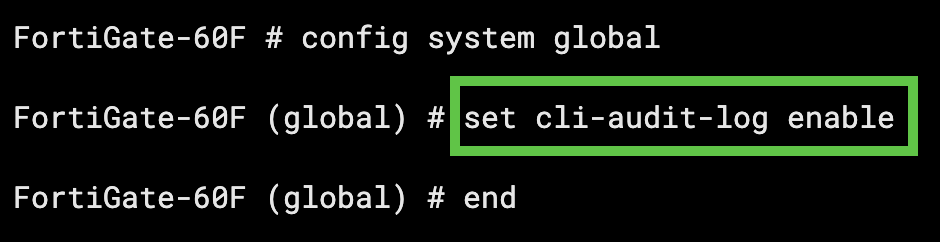
By default, Fortinet devices will not log Command Line (CLI) commands. This means that any administrative actions taken on the command line via the virtual or physical console of the device will not be logged.
This logging can be enabled by placing the device into configuration mode: config system global and then setting the CLI audit to enable set cli-audit-log enable:
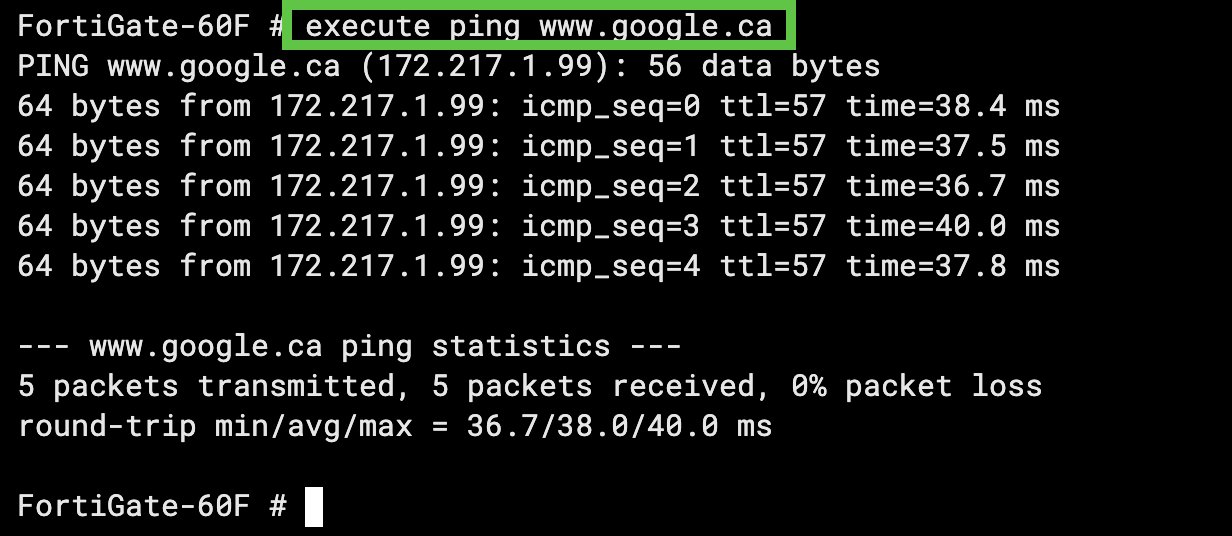
With CLI auditing enabled, if we run a simple command like execute pingwww[.]google[.]ca this will get logged:
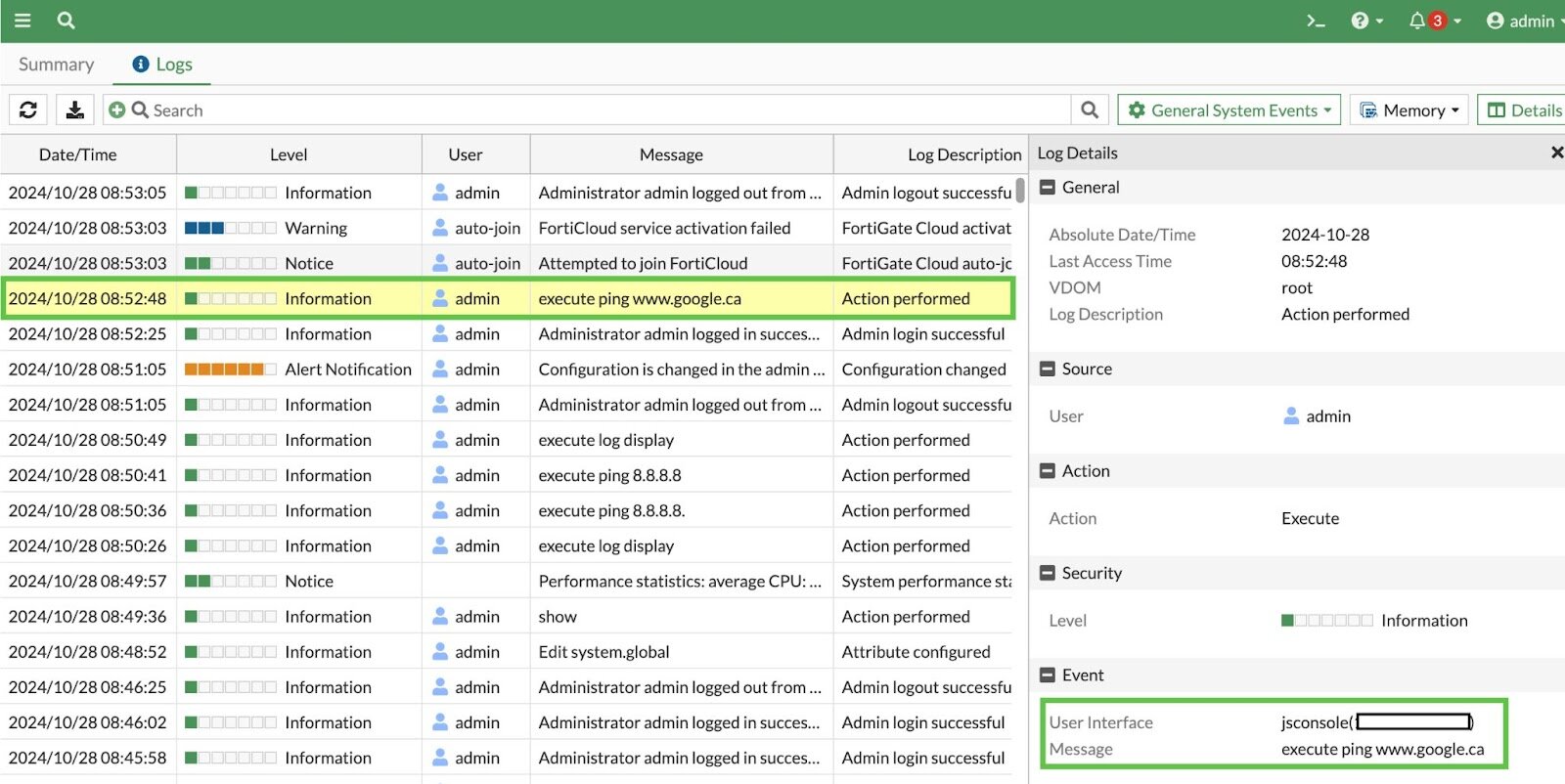
Okay, cool, we have logs enabled on our device, but at this point, all these logs will be logged to memory only, as mentioned previously.
Although the device can be configured to log to a local disk, not all models come with a hard disk installed. In addition, it’s always better to ship the logs off the device to avoid any situation where these logs can be cleared or modified by a threat actor.
Modifying this setting is relatively simple:
- First, we enter into the
syslogdsetting:config log syslogd setting - Then we enable the setting:
set status enable - Then we tell the appliance where we want to send syslog to:
set server <syslog_server_ip> - Finally, we set the format:
set format { default | cev | cef }
With this configuration, the device should both log CLI commands and be configured to ship logs to a secondary server where they can be ingested and analyzed. This dynamic provides security teams with relevant visibility and preserves the telemetry's integrity, disallowing modification or erasure.
Wrapping Up & Takeaways
In this blog we’ve shared data and insights gleaned from many completed Tactical Response cases.
We found that the vast majority of intrusions began with an exposed perimeter or weak authentication controls on a VPN appliance.
What can we do with this data? Does this mean that phishing, malware, or exploit-driven initial access vectors are any less important? Unfortunately, numbers often tell a story that’s not rooted in reality, particularly the reality of a resource-strapped businesses.
Put another way, if your organization got breached due to a phishing attack, you probably wouldn’t care that this particular initial access method is any less or more popular than others. You’d just want to prevent it from occurring again.
This is the unfortunate reality that today's organizations exist in—having to cover more with less.
Although organizations large and small have to protect themselves against both advanced exploits and more “basic” tradecraft such as brute force or credential stuffing, perhaps the main takeaway from the analysis in this blog is that we may not be doing the basics as well as we would like or hope for.
Despite the existence of numerous 0 days, exploits, and phishing techniques, threat actors are finding success via tried and true methods of exploitation.
It’s up to all of us to make them work harder.