



Once upon a time, I had my butt handed to me in a post-incident response debrief.
I thought it was a good report. It was actually one of my first, many years ago.
However, one or two executives in that debrief session began to question the credibility of the report. “Why wasn’t it one hundred pages?”, and “how could you say for sure something happened during a window of time?”, and even “how can we be sure you’ve given this your full attention?”
Smelling blood in the water, one dissenting voice turned into a frenzy of sharks all trying to take a chunk of my derriere. The rest of that session was not spent explaining the nuance of their intrusion, but instead re-gaining the trust, credibility and confidence that my report had failed to instill in the client after their incident.

An unlucky constellation of factors meant one of my first IR reports was not well-received. Some of it was my inexperience and very apparent youth. A major failing was that I had not used the report to its full potential; I had failed to use the report to establish the impression of credibility in my reader.
Triangulating for Credibility
We are intertwined in our incident reports, our summary of new zero-days, our Twitter threads. A bit of ego and vanity goes into technical writing, and any doubt about the efficacy of what we are writing is, by extension, a doubt of our credibility.
I don’t want you to flail at the first hit of criticism. Instead, I want you to protect your vanity and reputation by leaving your reader with zero doubt that you are an expert who makes well-founded, evidence-driven conclusions. With and through evidence, you’ll be speaking with impeccable authority.
Triangulation is an investigative concept from the social sciences we can kindly borrow and transpose. Here, the investigator enriches the validity and reliability of their claims by leveraging multiple methods and layering evidence from multiple sources of data that all speak to the same phenomenon.
Put more specifically for infosec folk, triangulating involves using multiple sources of telemetry on a machine to hone in one theory at a time to disprove or prove it.
After that terrible debrief session, I changed the way I wrote. Triangulation was one of many techniques I deployed to ensure a reader received (implicitly or explicitly) the impression that this report was as close to fact as possible, and I was an investigator of good repute and attentiveness.
Now, you and I know that I am a clown (if not the whole circus) for most things, even if your only exposure to me has been through my blogs. But not when it comes to reports—I mean business when I write reports. And I would like you to also mean business when you write your reports.
I would like you to write technical reports that contain zero assumptions or assertions and instead act as your own first-layer peer-reviewer. You can triangulate your findings to corroborate your hypotheses, theories and ideas, and produce reports that convey unshakable confidence in your reader as well as contain technical excellence.
Triangulation IRL
When have I ever given you the recipe without bringing something fresh out the kitchen too? We’ll use a real case as an example of how triangulation can be used in real investigations.

Just the other day, my colleague Cat Contillo and I found some spare time to do some honest security work. We had an alert come through that was a bit too vague for our liking, so we decided to flesh it out and make a report for the partner that had a good context with even better actionable findings.
We’re rarely so fortunate to have good security-enabled Windows Event logs on any given machine. On this occasion, Cat and I didn’t find much from the logs, but we did leverage some digital forensic artefacts to mount our investigation from.
The alert we received was about potential lateral movement that ended up being PsExec. We could have just sent a generic report that did the bare minimum of communicating a threat….but that’s not our style. Instead, we leveraged a number of data sources in order to tell a far more detailed, convincing story that offered the partner confidence in our report and our recommendations.
To triangulate PsExec, I’ll recreate our investigation and show you a couple of cool artefacts we can collect, contrast and compare:
- The Windows registry data related to PsExec
- The record from Background Activity Moderator (BAM)
- The frequency of execution from Prefetch
A Moment on PsExec
Our enquiry should lead with a good foundation of the phenomenon we want to study. So let’s dwell on PsExec for a moment.
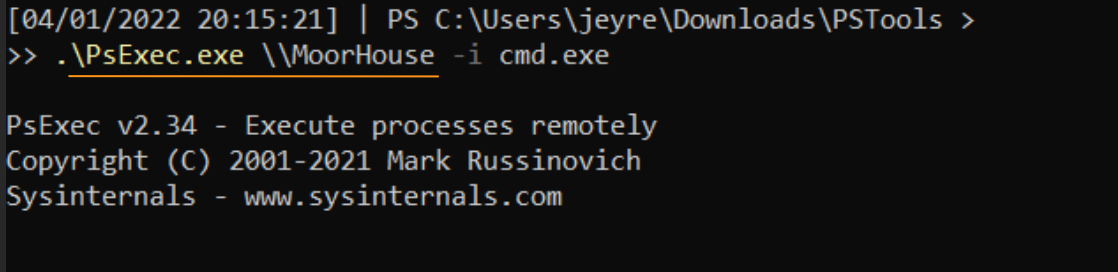
PsExec is a legitimate system administration tool as much as it is a tool for adversaries to laterally move in a domain. In our example for this article, when we launch PsExec from our host machine (Thornfield), we’re creating a remote session in the target machine (MoorHouse), and gain an interactive session with our ‘JEyre’ user.
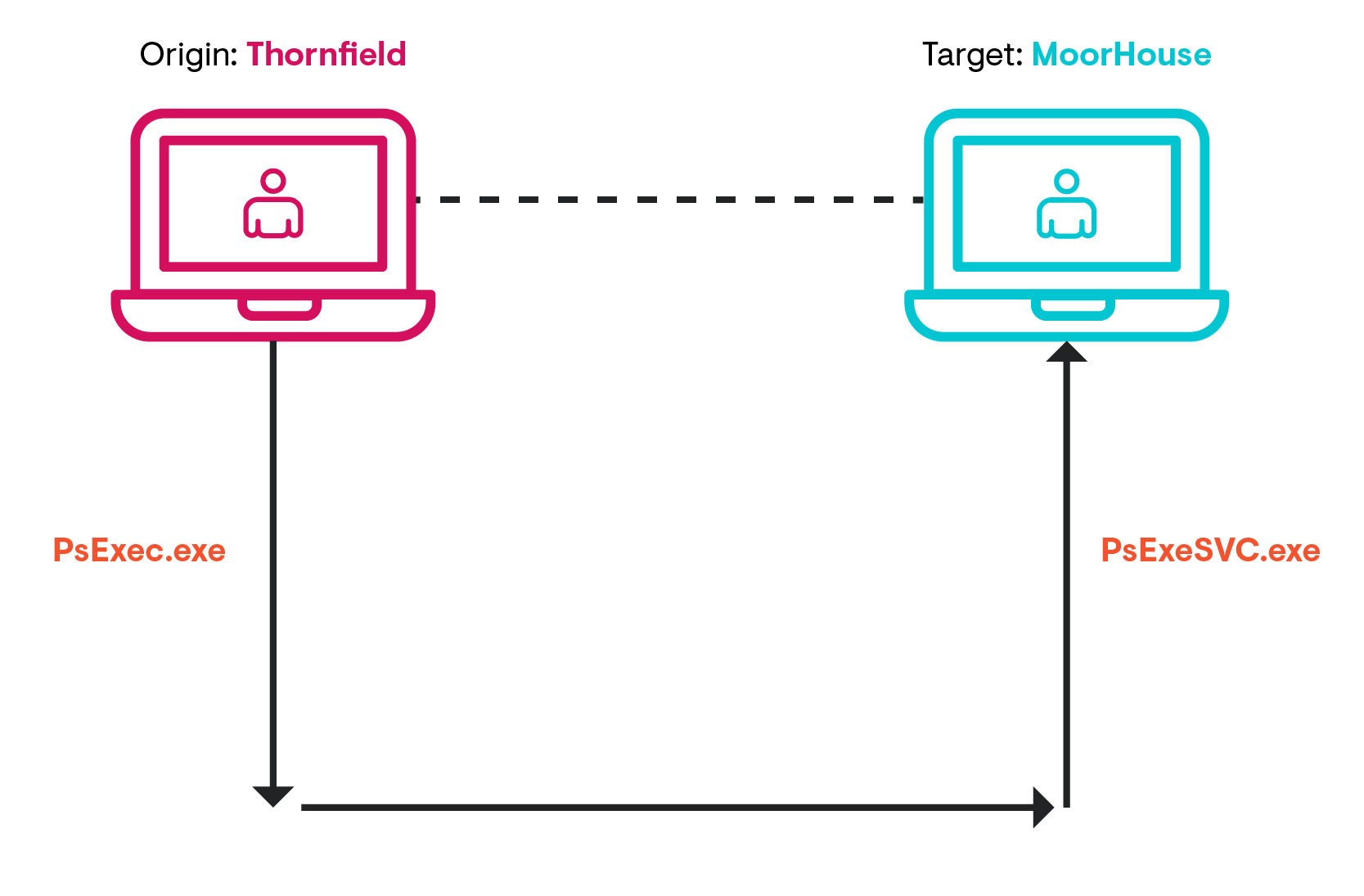
Simplified explanation. For greater detail, please read ExtraHops' blog post.
An unappreciated part of PsExec is the reciprocating agent that ephemerally appears on the target machine.
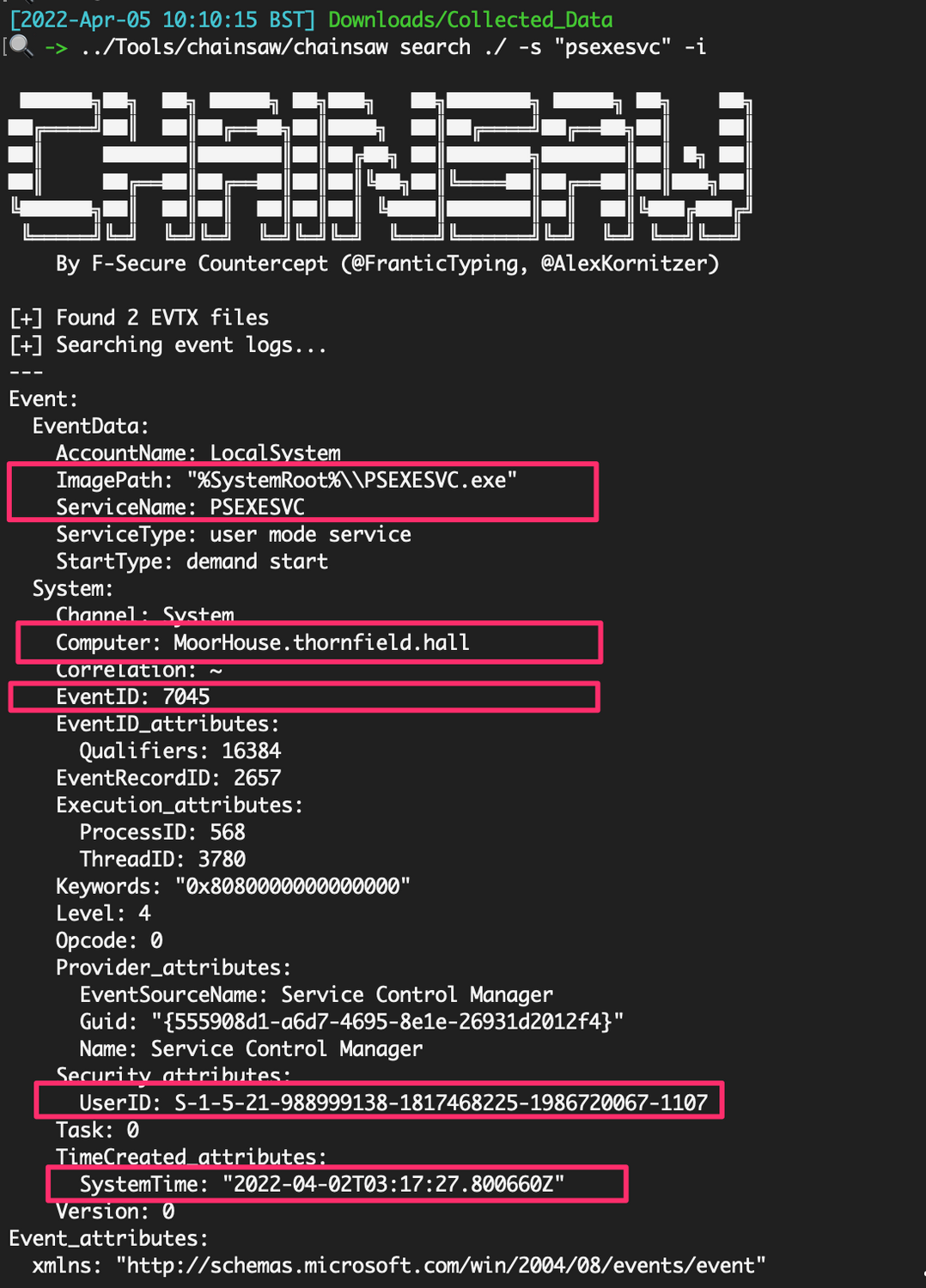
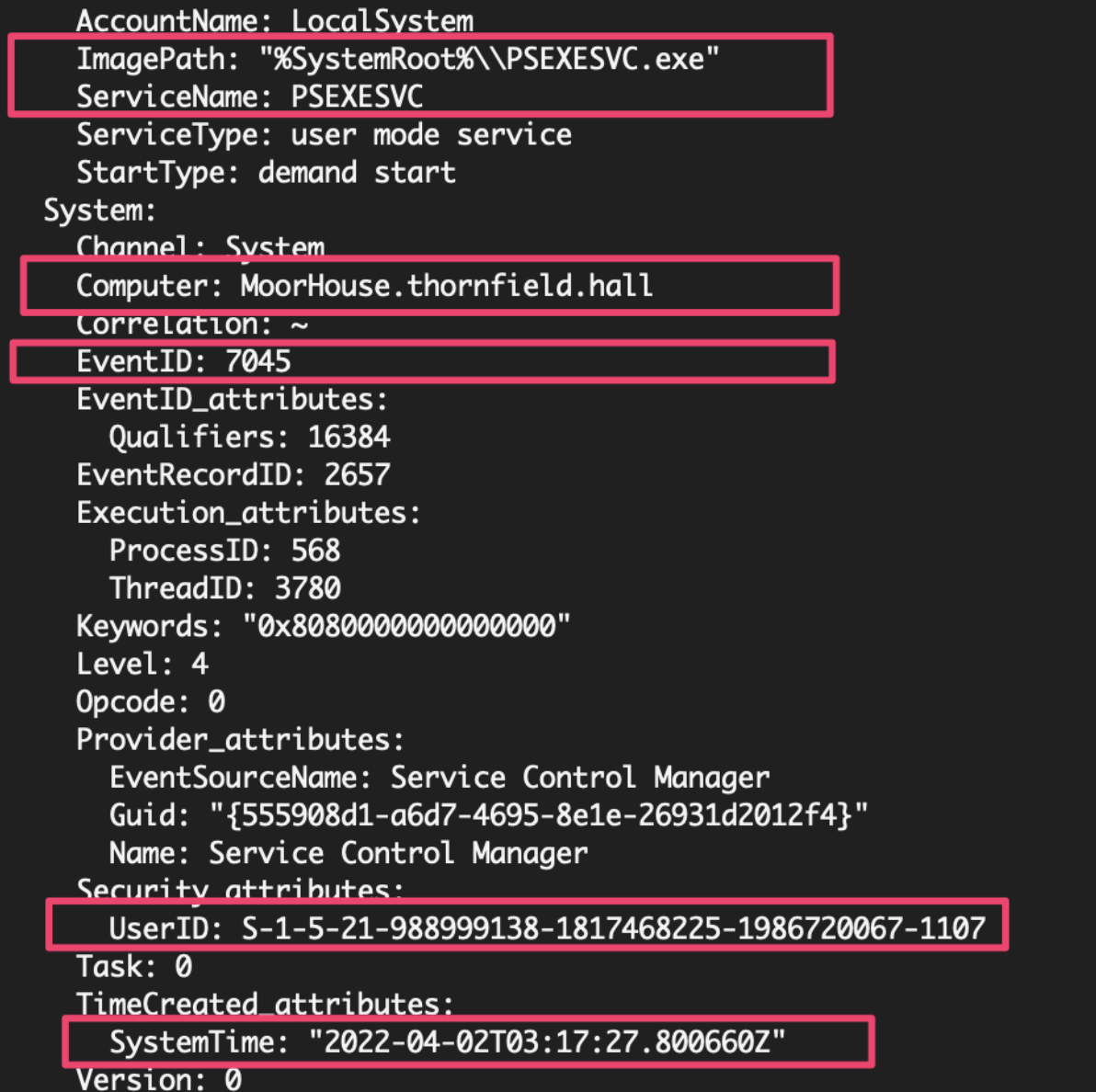
Monitoring for PsExeSVC.exe to pop up somewhere in your environment is a great opportunity for detection. A PsExec connection will instigate an EventID 7045 (Service) on the target machine’s System.evtx for PsExeSVC. It will offer the connection time for us to focus on, as well as confirm the user account via SID (which I’ll show you how to convert in a minute).
But note, adversaries can control the service name by using the `-r` flag on PsExec, and is therefore not a foolproof method of detection.
Now we have spent some time on PsExec and gathered ourselves a few basic facts about investigating, let's take it up a notch and see what artefacts we can triangulate to tell a fuller story.
EULA Accepted in the Registry
Attackers can try to change the name of the PsExec executable itself to evade detection, but something they’re less likely to evade will be the impact on the Windows registry.
We can take a look in our registry for the EulaAccepted, which will appear with the value of ‘1’ if PsExec has been dropped on this machine and the EULA pop-up has been accepted.
We can look across the registry from HKEY_USERS to identify which user accounts (via their SIDs) have leveraged PsExec.
HKEY_USERS\S-*\Software\Sysinternals\PsExec

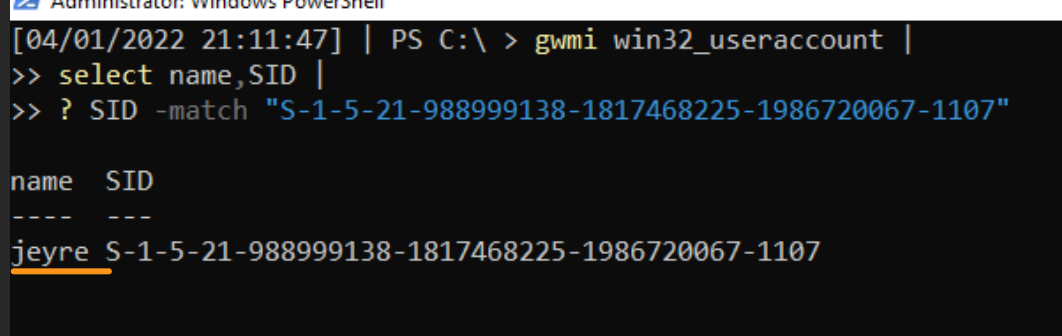
However, notice we don’t get a corresponding username gifted to us. Instead, we get the long SID string. To convert that to a username, try this:
Or over-engineer a solution!
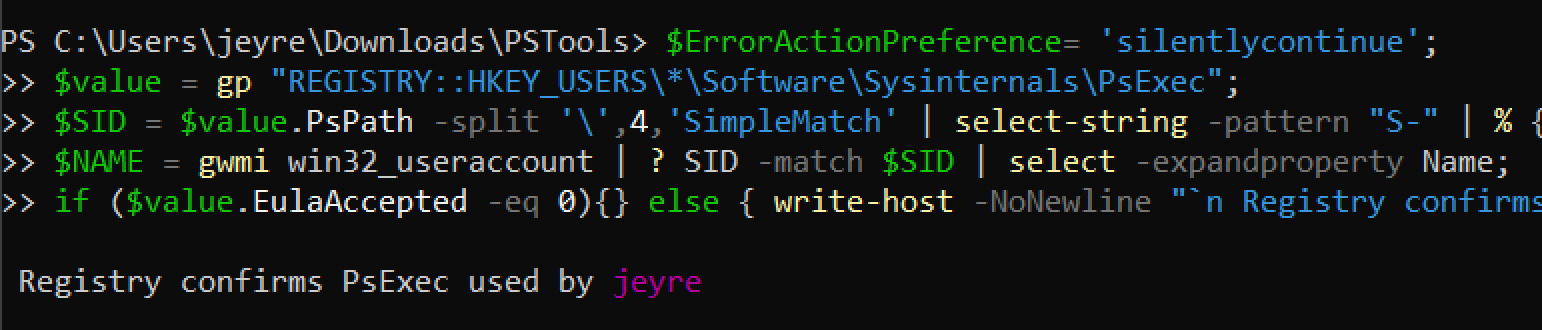
An issue with wrapping up our investigation here and now is that we have no clue when the registry was changed / when and if PsExec was actually executed.
If a user account previously and legitimately used PsExec, that now brings into doubt the validity of assumption that THIS particular PsExec activity was the threat actor and was malicious. All we can conclude from the registry data is that PsExec has been on disk and associated with the JEyre account.
Background Activity Moderator (BAM)
Background Activity Moderator is an interesting source of telemetry, seemingly available from Windows 10 onwards.
I’ve heard claims BAM can ONLY be found on Win10 machines, but this is definitely not true—the data below has all been pulled from a Windows Server (Server 2022, Version 2009 Build 20348). However, I cannot claim to have any semblance of knowledge on exactly which OS, builds and versions BAM is and is not present for. 🤷
BAM is useful for illuminating the full path of an executed program, the time it was executed and the SID / user account associated with this execution. This offers us a layer of evidence different from that of the EULA Accept, which could tell us PsExec once existed under JEyre but couldn’t offer a time.
To query BAM, you’ve got two options:
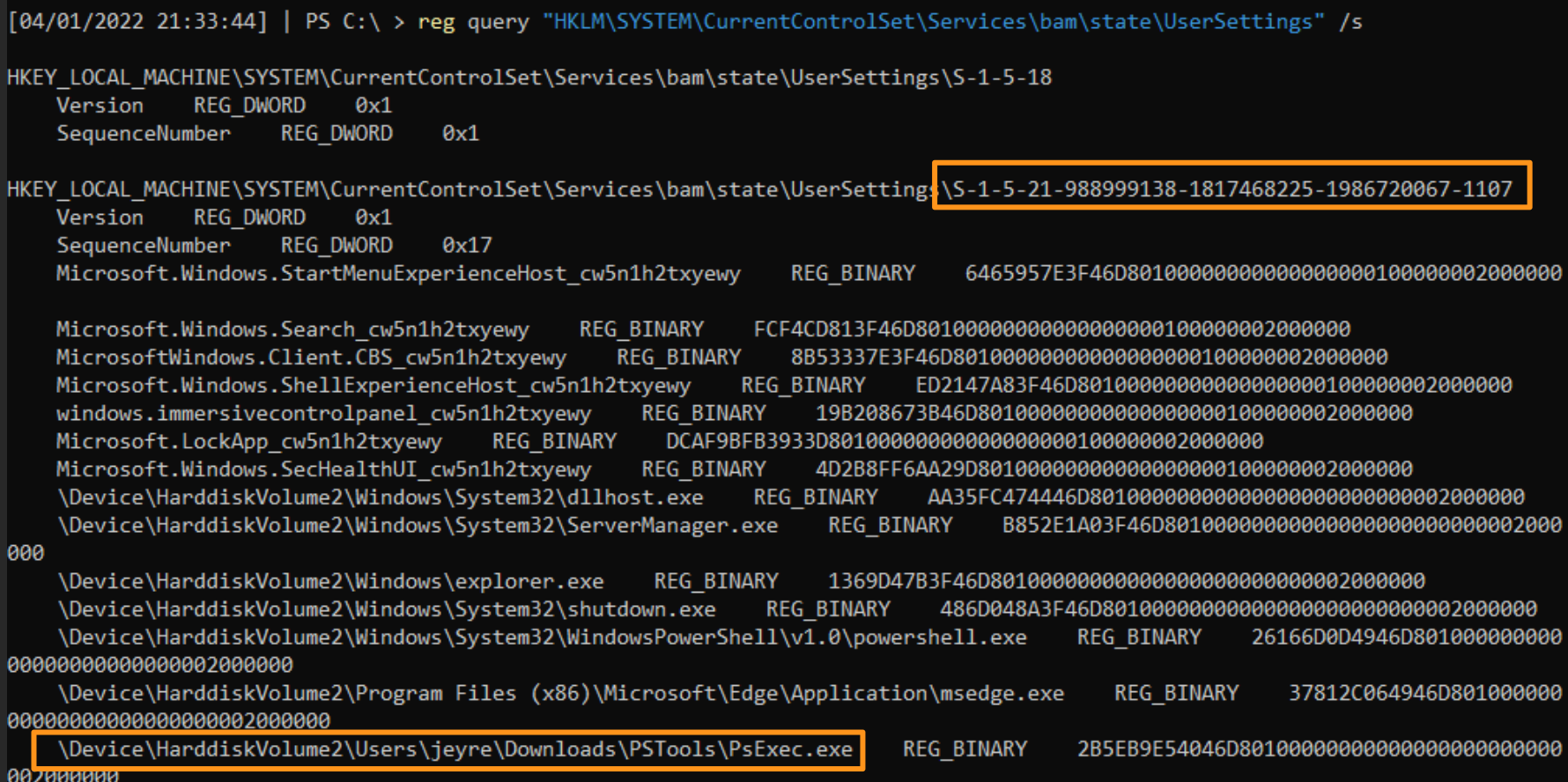
- The first is to simply manually look at the registry data. This can be messy and does not convert SIDs for you, but boy ain’t it nice to get your hands dirty sometimes?
- The second is to leverage Matthew Green’s Get-BAMParser.ps1 PowerShell script, which includes a nicer format and converts SIDs to user accounts. I made a change request on this script so it would work with Server 2022.
If manual: you don’t need a fancy script! Just good eyes. What we lose here, however, are timestamps.
And if you use the script, be ready to ZOOM in. We get timestamps via the PowerShell script, which is a huge and necessary layer of evidence.
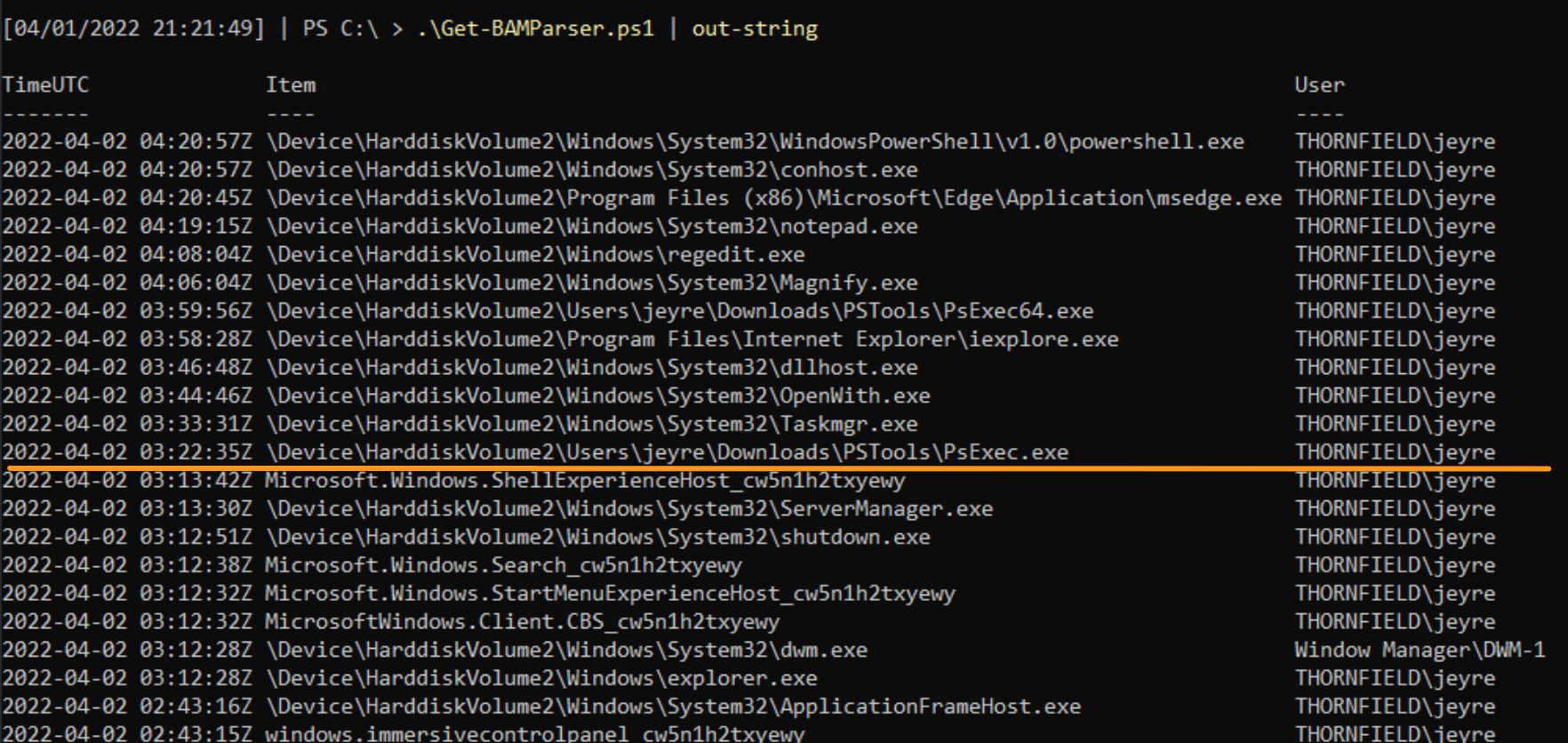

Analyzing BAM’s data on PsExec gives us the user account JEyre with the full path of execution. This is useful, as it corroborates what the EULA registry data stated about JEyre, and now we have specific directories that we can go and investigate to see if the threat actor dropped any other tools. Moreover, BAM offers a wider context of some activities that occurred, and we can start to contextualise what the threat actor did while they were in our environment.
A limitation of BAM is that it trusts the executable name. If we rename it NotPsExec.exe that is how BAM will record it and report it back to us after parsing. Unlike checking the EULA registry data, which confirms PsExec was run and accepted, BAM goes off the sincerity of the executable name. Moreover, BAM offers little clarification on the frequency of execution. Is this the first time, or last time, or any time that the threat actor used JEyre’s account to PsExec?
We have a much clearer picture than when we started. But now we need to start gathering actionable information for our reader.
Prefetch
I’ve spoken about prefetch before. It is automatically disabled on Windows Servers, but can be enabled with ease. If you’re unable to leverage prefetch to triangulate, might I suggest Amcache and Shimcache instead.
You can gain some early insight by looking in the prefetch directory on the host. Things executed will have a .PF file, but just looking at this directory alone is useful.
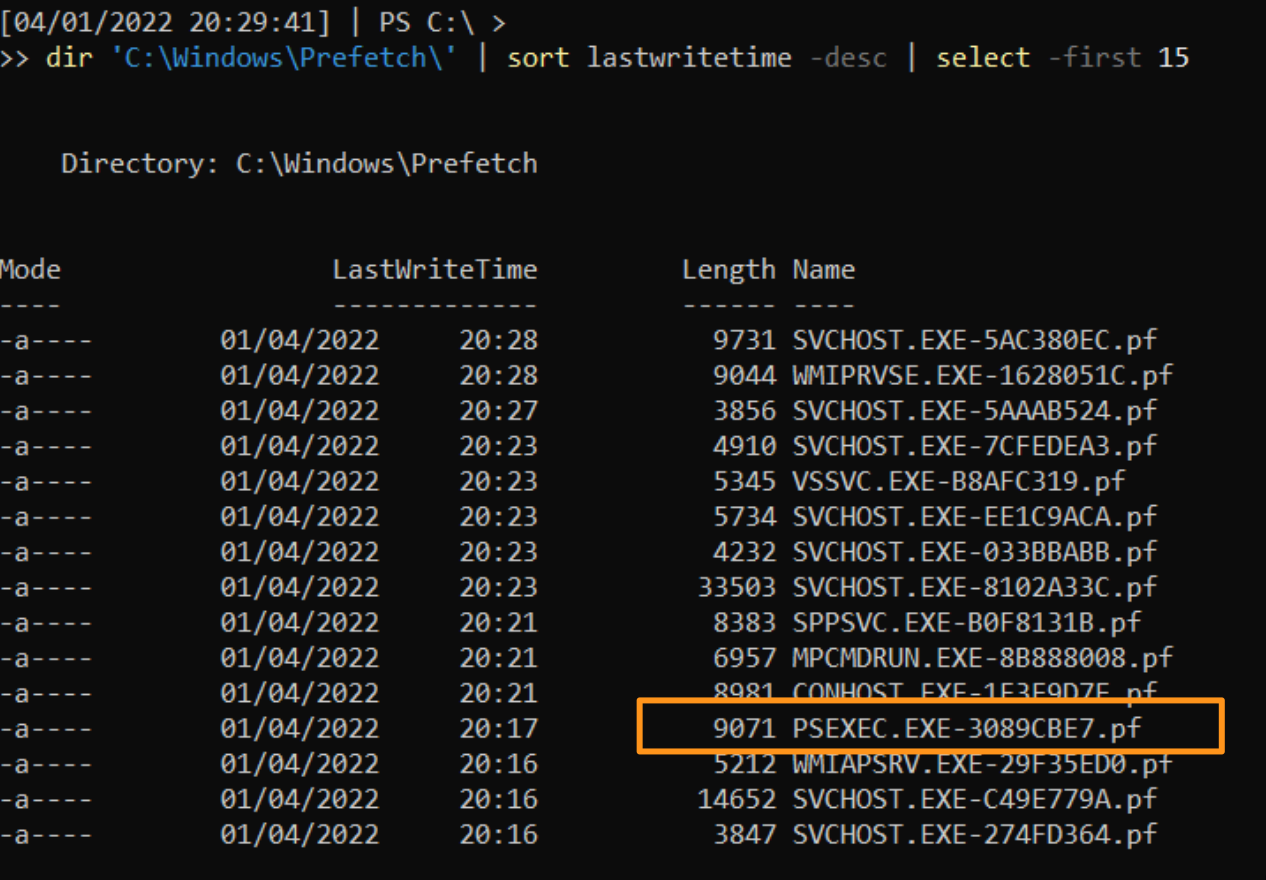
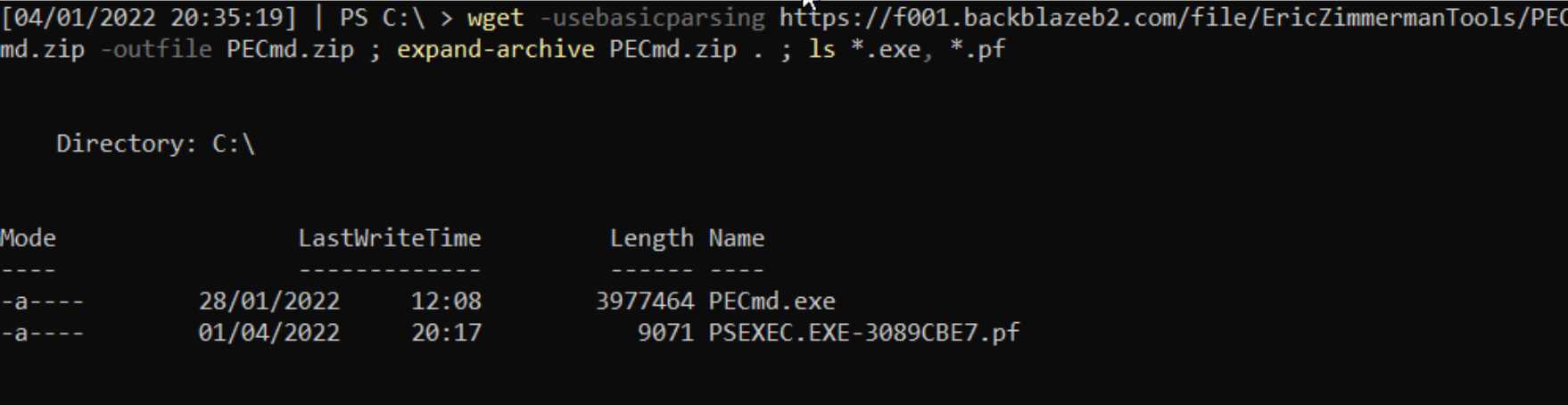
You can pick up a .PF file and parse it using Eric Zimmerman’s PECmd tool:
By leveraging prefetch, we gain something quite interesting that we did not have before: precise frequency of execution. We are told that an executable called PsExec.exe ran six times, and the run times are put precisely. Moreover, from prefetch, we do not get a user account confirmed, but we do get insight on the directories referenced when PsExec was evoked.
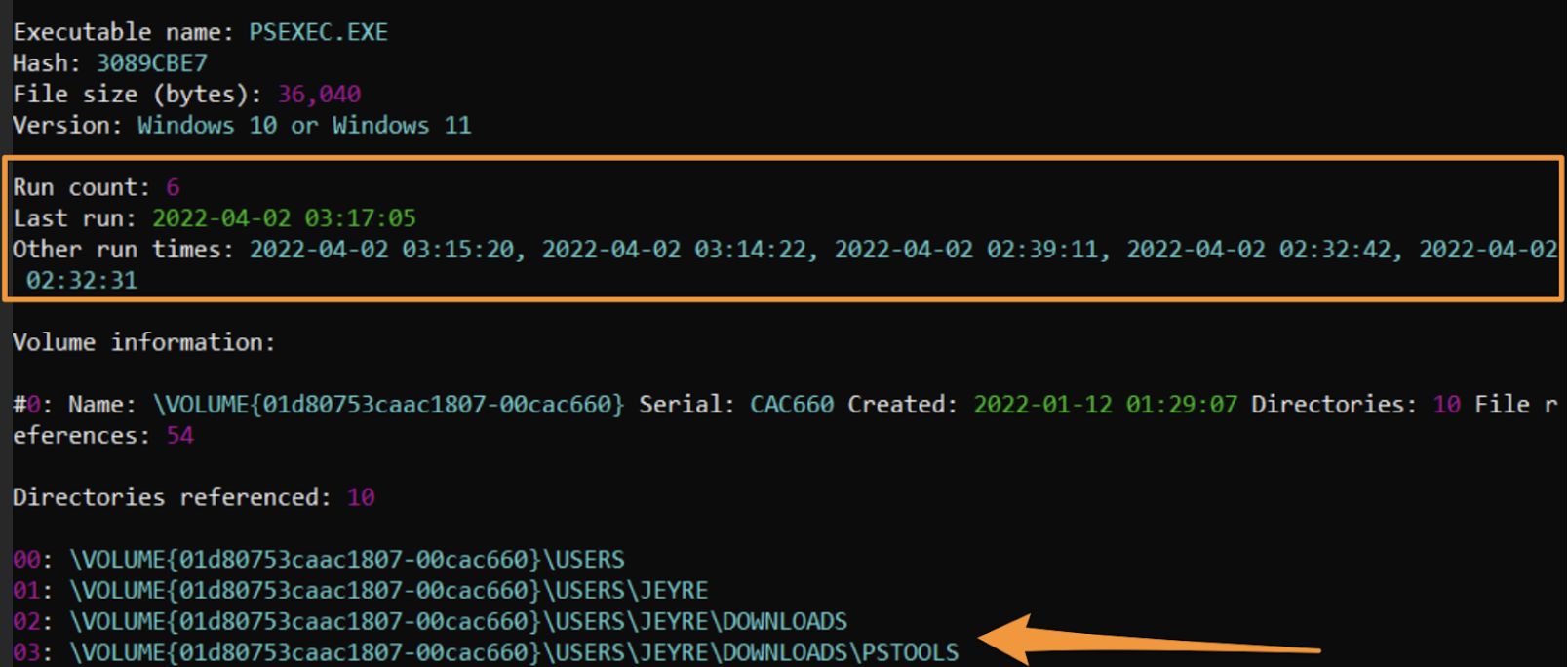
I say an executable called PsExec.exe, because prefetch is not able to qualify the executable name. Like BAM, it trusts the executable name and bases the recording of data from that name. So if this was renamed NotPsExec.exe, that is what we would see.
However, name manipulation does not make prefetch data useless. We can continue to triangulate our findings by pivoting over to the target machine. In the target’s prefetch directory, we can find record of PsExeSVC.exe: the reciprocating agent to PsExec.
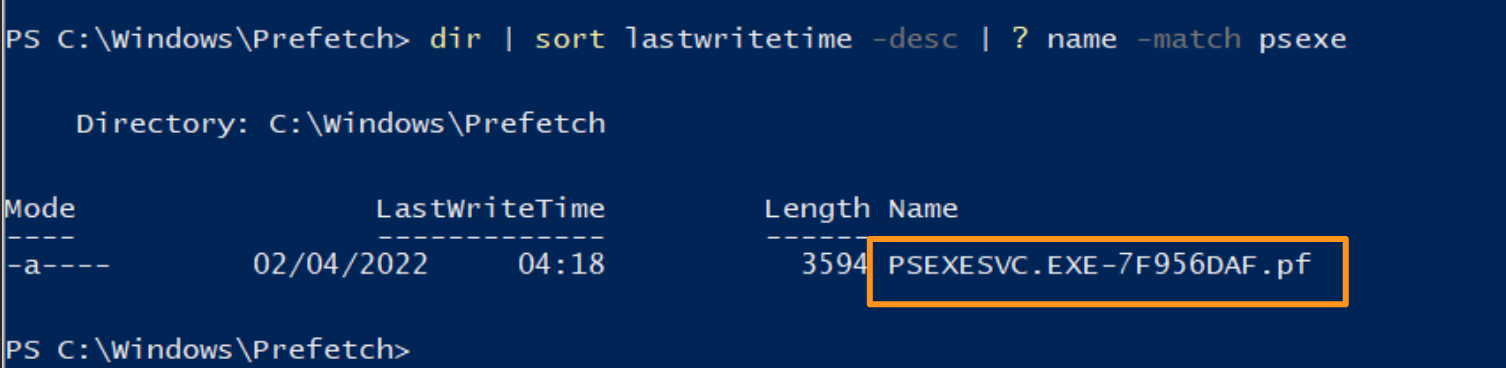
By parsing PsExeSVC’s prefetch file, we get a more certain timestamp. This assumes the threat actor did not change the service name (as we have noted), but we can see a far much specific time that grounds our above six PsExec times from prefetch.
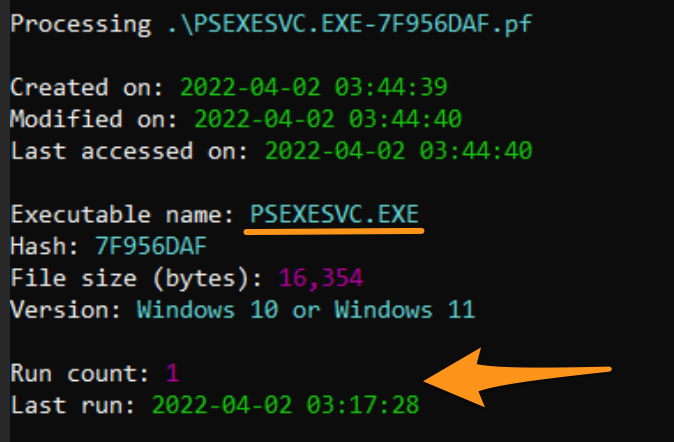
And going full circle in our triangulation, we actually already saw this timestamp when we looked at EventID 7045’s in the System log of the target machine. Thus, we have near factual conclusions about the time of activity.
A limitation of prefetch is that it first has to be present on the host, and second that it lacks the ability to attribute user accounts and is too trusting of the sincerity of executable names. But these flaws are addressed by the information in other telemetry we have leveraged, and moreover, we now have a better window of time that we can offer our reader for malicious activity.
Layers of Evidence
Like layers of Swiss cheese, the different sources of telemetry individually have gaps—but combined, they make a more cohesive block; a more definitive, credible story is told once we amass and triangulate our data.
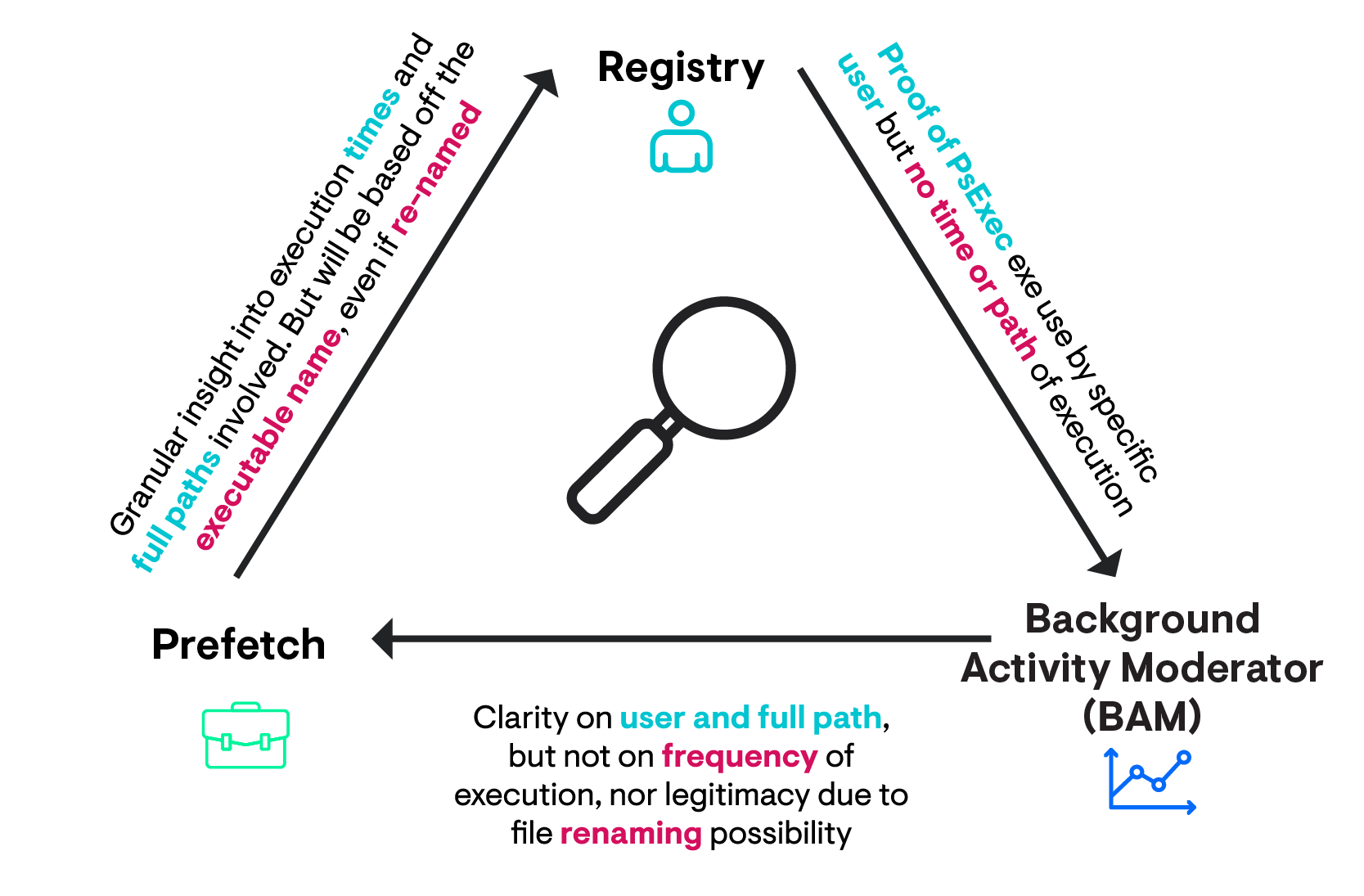
Our report about the lateral movement has been nuanced by our triangulation. We were able to confirm the lateral movement was indeed Psexec via the 7045s in the System log, the data in the EULA and in BAM in the registry, as well as prefetch that added greater nuance about frequency and path location.
By triangulating these different sources of telemetry, and using each of their strengths to compensate their weaknesses, we gathered incredibly specific data that our readers can take action on. We corroborated the user account associated with PsExec (JEyre), we established the directories involved (C:\Users\JEyre\Downloads\PsTools), and established a window of time with (April 2022 April 4th 02:32 - 03:17 UTC).
I hope I’ve successfully conveyed that triangulation is a worthy concept to stay conscious of during an investigation. Chances are you’re doing it already, and now you know a fancy word for it.
The point of triangulation isn’t to prove the same things ten times over. The point of triangulation is to know the limitations of an individual digital forensic component, and to assemble a number of these artefacts to compensate and bring with them unique findings that add nuance to the phenomena we are investigating.
Wrapping Up
We all know that the executive summary on page one will be where most readers begin and end. We might want people to read our reports in their entirety. But we also want our readers to trust us—to trust our recommendations and findings from page one onwards.
Through triangulation, we can offer reports that are laden with actionable information for a reader to run with—and the confidence that we, the investigators, have reported as close to fact as possible.
We don’t have to write verbosely to communicate our findings; it’s about specific language and certain phrases that demonstrate you are an investigator speaking with evidence-ordained authority on this matter. Maybe at some point, I’ll write about some of the particular vernacular I adopt when I’m writing up reports (stay tuned). At any rate, I hope you enjoyed reading about triangulation, and I hope it saves your behind when you next have to report to a technical senior or executive.
A major limitation of triangulation is that it requires the investigator to know and have access to multiple data sources that can all speak to a phenomenon they are studying. I don’t have a good answer for this one I am afraid—you’ll just have to check out some of the material in the DFIR community and start leveling yourself! Or you can just keep following my articles on our Huntress blog. 😉 Why not both!?