


Don’t let overlooked obligations become incidents. Learn how.
Utility navigation bar redirect icon
Portal LoginSupportContact
Search
Close search
Huntress Logo in Teal
  • Platform Overview
    Managed EDR

    Get full endpoint visibility, detection, and response.

    Managed EDR

    Get full endpoint visibility, detection, and response.

    Managed ITDR

    Protect your Microsoft 365 identities and email environments.

    Managed ITDR

    Protect your Microsoft 365 identities and email environments.

    Managed SIEM

    Managed threat response and robust compliance support at a predictable price.

    Managed SIEM

    Managed threat response and robust compliance support at a predictable price.

    Managed Security Awareness Training

    Empower your teams with science-backed security awareness training.

    Managed Security Awareness Training

    Empower your teams with science-backed security awareness training.

    Managed ISPM

    Continuous Microsoft 365 and identity hardening, managed and enforced by Huntress experts.

    Managed ISPM

    Continuous Microsoft 365 and identity hardening, managed and enforced by Huntress experts.

    Managed ESPM

    Proactively secure endpoints against attacks.

    Managed ESPM

    Proactively secure endpoints against attacks.

    Integrations
    Integrations
    Support Documentation
    Support Documentation
    See Huntress in Action

    Quickly deploy and manage real-time protection for endpoints, email, and employees - all from a single dashboard.

    Huntress Cybersecurity
    See Huntress in Action

    Quickly deploy and manage real-time protection for endpoints, email, and employees - all from a single dashboard.

    Huntress Cybersecurity
  • Threats We Stop
    Phishing
    Phishing
    Business Email Compromise
    Business Email Compromise
    Ransomware
    Ransomware
    Infostealers
    Infostealers
    View Allright arrowView Allright arrow
    Industries We Serve
    Education
    Education
    Financial Services
    Financial Services
    State and Local Government
    State and Local Government
    Healthcare
    Healthcare
    Law Firms
    Law Firms
    Manufacturing
    Manufacturing
    Utilities
    Utilities
    View Allright arrowView Allright arrow
    Tailored Solutions
    MSPs
    MSPs
    Resellers
    Resellers
    SMBs
    SMBs
    Compliance
    Compliance
    What Gets Overlooked Gets Exploited

    Most days, nothing happens. But one day, something will.

    Huntress Cybersecurity
    Cybercriminals Have Evolved

    Get the intel on today’s cybercriminal groups and learn how to protect yourself.

    Huntress Cybersecurity
  • Pricing
  • Community Series
    The Product Lab

    Shape the next big thing in cybersecurity together.

    The Product Lab

    Shape the next big thing in cybersecurity together.

    Fireside Chat

    Real people. Real perspectives. Better conversations.

    Fireside Chat

    Real people. Real perspectives. Better conversations.

    Tradecraft Tuesday

    No products, no pitches – just tradecraft.

    Tradecraft Tuesday

    No products, no pitches – just tradecraft.

    _declassified

    Exposing hidden truths in the world of cybersecurity.

    _declassified

    Exposing hidden truths in the world of cybersecurity.

    Resources
    Upcoming Events
    Upcoming Events
    Ebooks
    Ebooks
    On-Demand Webinars
    On-Demand Webinars
    Videos
    Videos
    Whitepapers
    Whitepapers
    Datasheets
    Datasheets
    Cybersecurity Education
    Cybersecurity 101
    Cybersecurity 101
    Cybersecurity Guides
    Cybersecurity Guides
    Threat Library
    Threat Library
    Real Tradecraft, Real Results
    Real Tradecraft, Real Results
    2026 Cyber Threat Report
    2026 Cyber Threat Report
    The Huntress Blog
    Huntress Lands on the Microsoft Marketplace
    Huntress Cybersecurity
    Huntress Lands on the Microsoft Marketplace
    Huntress Cybersecurity
    How Huntress & DEFCERT Are Streamlining CMMC Assessment Prep
    Huntress Cybersecurity
    How Huntress & DEFCERT Are Streamlining CMMC Assessment Prep
    Huntress Cybersecurity
    Live Hacking Into Microsoft 365 with Kyle Hanslovan
    Huntress Cybersecurity
    Live Hacking Into Microsoft 365 with Kyle Hanslovan
    Huntress Cybersecurity
  • Why Huntress

    Go beyond AI in the fight against today’s hackers with Huntress Managed EDR purpose-built for your needs

    Huntress Cybersecurity
    Why Huntress

    Go beyond AI in the fight against today’s hackers with Huntress Managed EDR purpose-built for your needs

    Huntress Cybersecurity
    The Huntress SOC

    24/7 Security Operations Center

    The Huntress SOC

    24/7 Security Operations Center

    Reviews

    Why businesses of all sizes trust Huntress to defend their assets

    Reviews

    Why businesses of all sizes trust Huntress to defend their assets

    Case Studies

    Learn directly from our partners how Huntress has helped them

    Case Studies

    Learn directly from our partners how Huntress has helped them

    Community

    Get in touch with the Huntress Community team

    Community

    Get in touch with the Huntress Community team

    Compare Huntress
    Bitdefender
    Bitdefender
    Blackpoint
    Blackpoint
    Breach Secure Now!
    Breach Secure Now!
    Crowdstrike
    Crowdstrike
    Datto
    Datto
    SentinelOne
    SentinelOne
    Sophos
    Sophos
    Compare Allright arrowCompare Allright arrow
  • HUNTRESS HUB

    Login to access top-notch marketing resources, tools, and training.

    Huntress Cybersecurity
    HUNTRESS HUB

    Login to access top-notch marketing resources, tools, and training.

    Huntress Cybersecurity
    Partners
    MSPs

    Join our partner community to deliver expert-led managed security.

    MSPs

    Join our partner community to deliver expert-led managed security.

    Resellers

    Partner program designed to grow your cybersecurity business.

    Resellers

    Partner program designed to grow your cybersecurity business.

    Tech Alliances

    Driving innovation through global technology Partnerships

    Tech Alliances

    Driving innovation through global technology Partnerships

    Microsoft Partnership

    A Level-Up for Your Business Security

    Microsoft Partnership

    A Level-Up for Your Business Security

  • Press Release
    Huntress Announces Collaboration with Microsoft to Strengthen Cybersecurity for Businesses of All Sizes
    Huntress Cybersecurity
    Press Release
    Huntress Announces Collaboration with Microsoft to Strengthen Cybersecurity for Businesses of All Sizes
    Huntress Cybersecurity
    Our Story

    We're on a mission to shatter the barriers to enterprise-level security.

    Our Story

    We're on a mission to shatter the barriers to enterprise-level security.

    Newsroom

    Explore press releases, news articles, media interviews and more.

    Newsroom

    Explore press releases, news articles, media interviews and more.

    Meet the Team

    Founded by former NSA Cyber Operators. Backed by security researchers.

    Meet the Team

    Founded by former NSA Cyber Operators. Backed by security researchers.

    Careers

    Ready to shake up the cybersecurity world? Join the hunt.

    Careers

    Ready to shake up the cybersecurity world? Join the hunt.

    Awards
    Awards
    Contact Us
    Contact Us
  • Portal Login
  • Support
  • Contact
  • Search
  • Get a Demo
  • Start for Free
Portal LoginSupportContact
Search
Close search
Get a Demo
Start for Free
HomeBlog
Analyzing a Malicious Advanced IP Scanner Google Ad Redirection
Published:
April 1, 2024

Analyzing a Malicious Advanced IP Scanner Google Ad Redirection

By:
Izzy Spering
Share icon
Glitch effectGlitch effectGlitch effect

So you found yourself responding to an alert about one of your employees downloading a malicious version of Advanced IP Scanner? This has become fairly common, as system admins and IT technicians want to download the tool to use legitimately within their environment. But threat actors have been hosting very convincing malicious versions that are being discovered through malvertising (e.g., “malicious advertising” like Google Ads). Now, suppose you want to take a deeper dive and grab the file for yourself, yet you find yourself dealing with some issues, namely:

  1. The employee deleted the downloaded file
  2. The URL they clicked redirects to the real Advanced IP Scanner website
  3. Trying to get the ad to pop up in Google searches just isn’t working 

I was recently dealing with this exact scenario, and the method I chose to use was to trick the site into thinking I was coming from a Google ad click. I chose this method mainly because it seemed like my only way to grab the initial file at the time. The original file was no longer in place on the user’s machine, but I still wanted to analyze it. When I navigated to the malicious URL, however, I discovered the website was redirecting me to the real Advanced IP Scanner website, so I decided to trick it! (I’ll illustrate later how this wasn’t even necessary, and I thought way too hard about it.)

The site we’re dealing with in this scenario is hxxps://advanced[.]ip-scanner[.]co (Please don’t visit this particular link).

As mentioned, I want to grab the original file so I can analyze it. My goal in analyzing this file is to simply see what it does. Does it connect back to a C2 (command and control server)? Does it drop persistence on the host so threat actors can connect to the system? Or for more malicious code to run after the file has been removed? Does it attempt to steal user credentials from the host? These are some basic questions I want answered in my analysis, but in order to do this, I need the file.

So let’s grab it. Let me show you what happens if we go to the site. In my case, I get redirected to the legitimate Advanced IP Scanner website instead of the malicious one:
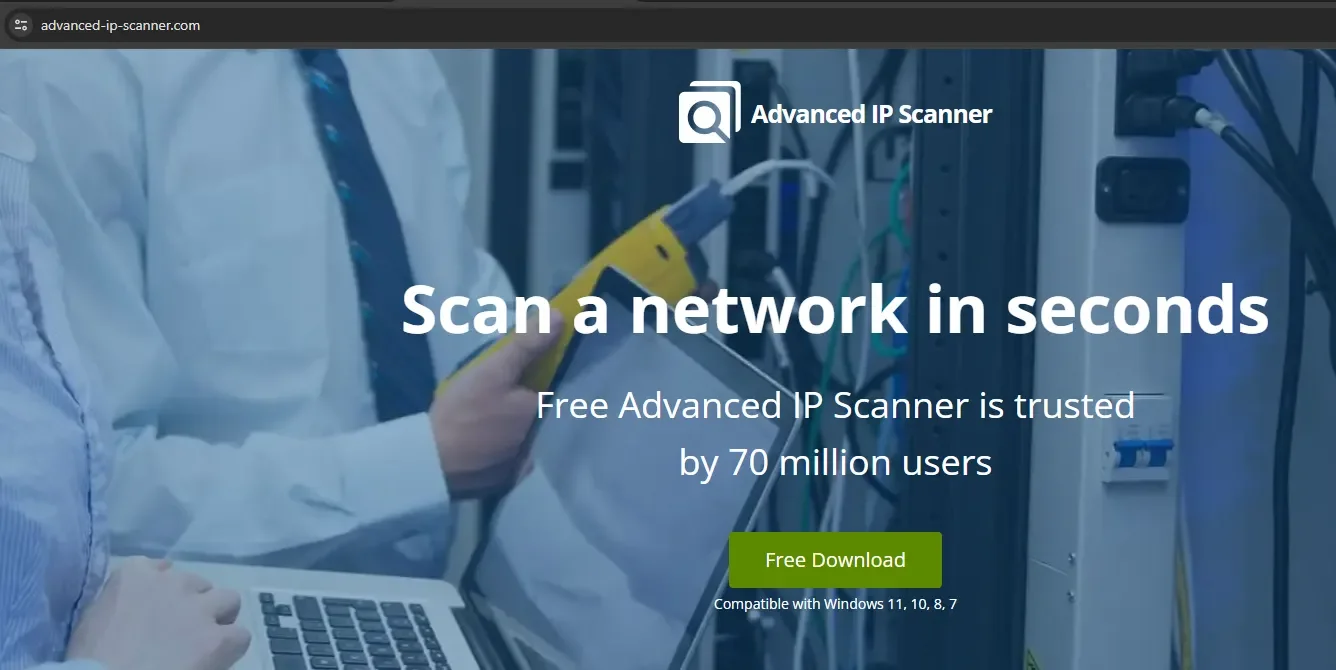
__wf_reserved_inherit
Note the legitimate URL. The fake website looks the same, however.

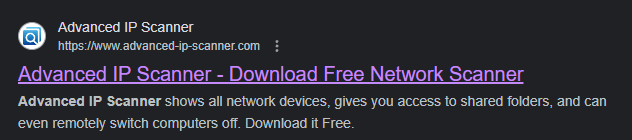
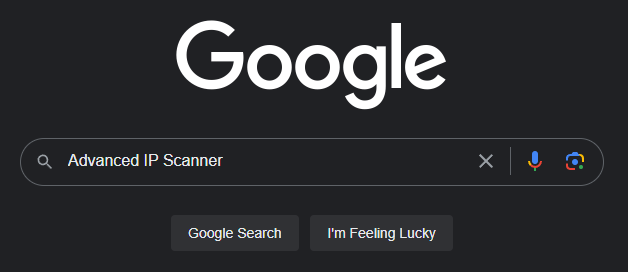
Okay, well, what if I try to Google it? Maybe I can get the ad to show up?
Nope, in this case I get the legitimate site. (Please note, previous malvertising campaigns were able to spoof the URL that was shown on the ad, but I confirmed this one by visiting the site.)

I still want to trick this website into thinking I’m coming from a Google ad click so it’ll serve up the malicious website instead of the legitimate one. I need to grab the malicious download, but how can I do that? Well, my first thought was to see what happens when I click an ad to another legitimate site. What kind of cookies or header data is applied to tell the website I’m coming from a Google ad click?

In this case, I opened up the browser’s developer pane with F12, clicked on the network tab, and went back to the legitimate advanced-ip-scanner.com via the ad click.
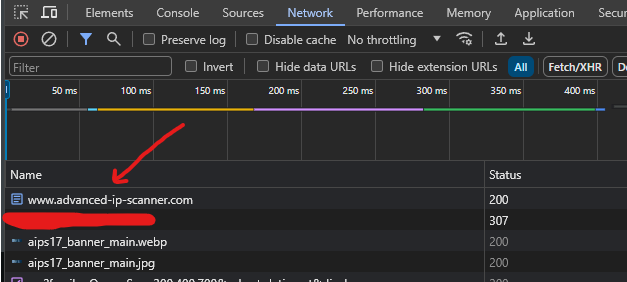
Finding the relevant network element in the developer pane to help us track down the headers we need to edit.

After some poking and prodding, I discovered the top result is the one we want to explore some more. So let’s click on this result and take a look at what we get.

If we scroll down to Request Headers we can see this line:

Okay let’s head over to Postman and give it a shot. In case you’re unfamiliar with it, Postman lets developers execute HTTP requests and test API responses. This way I can freely edit any headers or provide cookie data and see what kind of response I get from the website. In Postman I want to create a new GET request, and I want to append a Referer header with the value https://www.google.com/
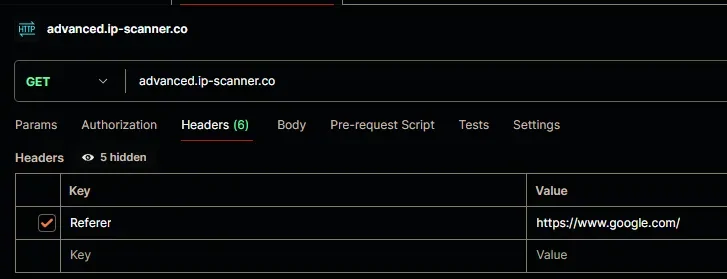
__wf_reserved_inherit
Using Postman to connect to the malicious site with the referrer header set to Google’s referrer.

Let’s see if this works. Let’s hit Send.

__wf_reserved_inherit
In this image we can see the raw HTML response from going to the malicious site with a header set.

That’s a thing! You’ll see some references in the screenshot to advanced-ip-scanner.com but that’s because the threat actors straight-up cloned the site. If we connect with and without the referrer, there are slight differences in the resulting pages.

So at this point I want to find the download. I’m going to Ctrl+F the word download.

Lo and behold! Let’s try to visit that directory at advanced-ip-scanner[.]com/download/.

That’s a thing too. Now, before we investigate a bit, remember earlier when I said, “I’ll illustrate later how this wasn’t even necessary, and I thought way too hard about it”?

Well, it turns out only the main page advanced[.]ip-scanner[.]co redirects if you have the incorrect referer. All I had to do was append /download and it would let me see the open directory with or without the referrer header. But, hey, hindsight is 20/20.

Let’s poke around a bit. I find that ipscanner.txt to be interesting mainly due to the naming convention. dl.php and dwnl.php are likely related to downloading logic, and I’m unsure about apps2co.php at the moment, so I’ll look at the ipscanner.txt first. So let’s check that out.
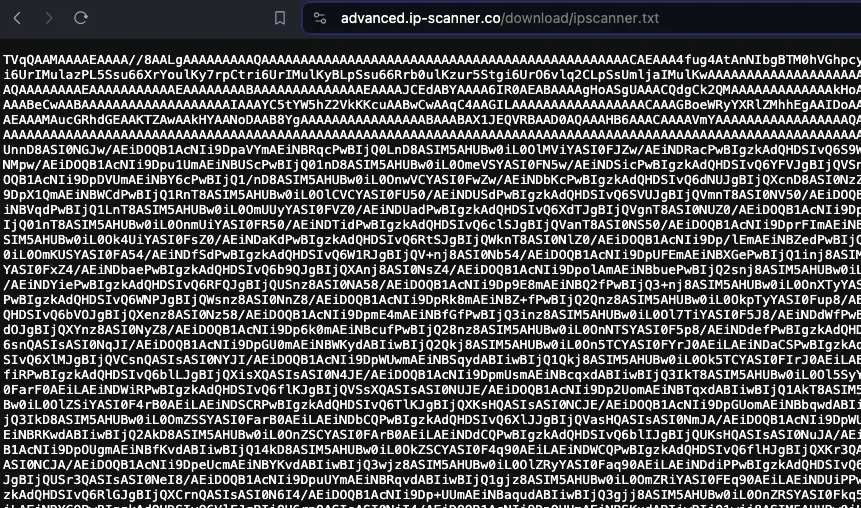
__wf_reserved_inherit
This is Base64 encoding, which is commonly used by threat actors to obfuscate code or make it easier to slip an executable past security controls.

It might not be immediately obvious, but this is incredibly interesting because that looks like Base64 encoding. Let’s decode that. Off to CyberChef! For anyone who’s unfamiliar, CyberChef is a fantastic web-based tool for data analysis. It can help us uncompress, decode, and decrypt data, and it’s a wonderful “Swiss army knife” for cybersecurity professionals.
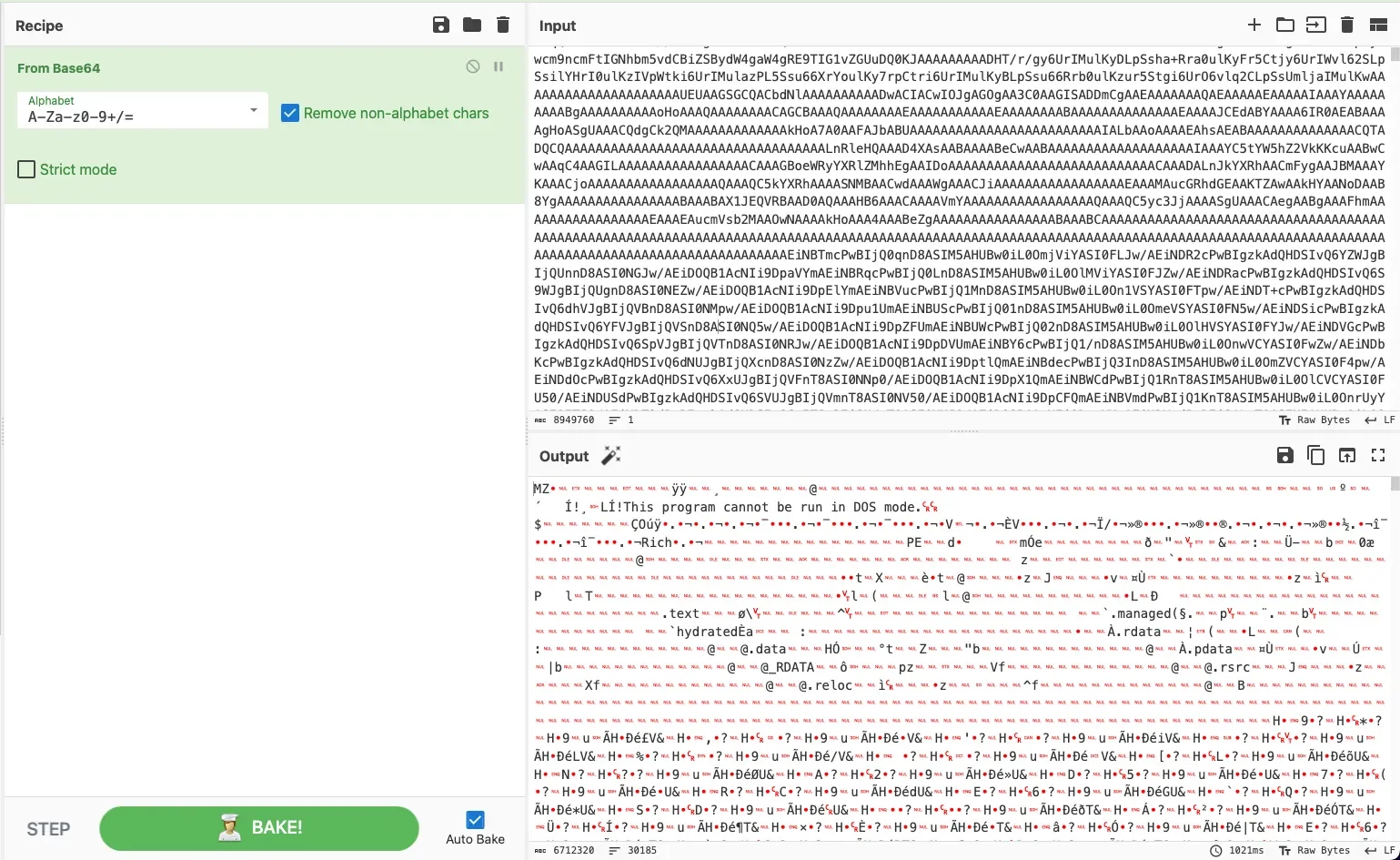
__wf_reserved_inherit

Now that’s interesting. In the above image we see the original output of ipscanner.txt on the top right with my decoding method shown on the left, highlighted in green. I’m simply applying “From Base64” to decode the text. On the bottom right, we can see the output. That’s an executable.

A quick and dirty way to tell this is an executable is that we can see “This program cannot be run in DOS mode.” near the top of the output. That’s a tell-tale sign of an .exe. We could download this a few different ways. We could click the “save output” button (the little floppy disk icon above the output) in CyberChef and save that as an .exe and we would have our malicious executable. But I want to illustrate another way.

I’m going to download the raw Base64 on to my VM (virtual machine) as a .txt file and use certutil to decode it using the command certutil -decode source dest.
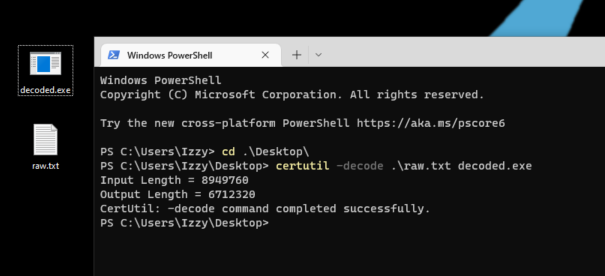
In the above screenshot, I’m simply running certutil -decode raw.txt decoded.exe against the raw.txt which contains the original Base64 and outputting it as decoded.exe. Certutil is often used exactly like this by threat actors to create an .exe from encoded data on a target system, so this will generally trigger most EDR products to create an alert. 

We got the file! I also used Get-FileHash to get the SHA256 hash to compare this against the hash originally referenced in the alert that triggered all of this, and it’s the same, which confirms I have the malicious file.

Okay, but what about the other links shown in the /download directory? Well, as it turns out, we’re working too hard yet again.
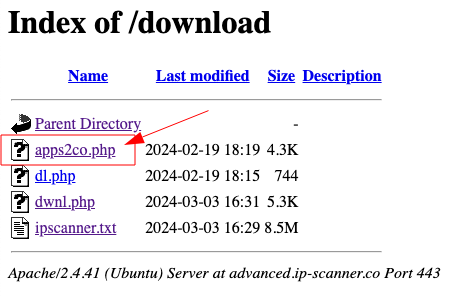
If we click the apps2co.php link on this page, it serves up the decoded .exe. And if I check that hash against the original hash from the alert and the hash of my decoded .exe we get the same hash.

(At this point, we won’t be going any further because then this would turn into a blog on static and dynamic malware analysis. But I hope you found reading this as enjoyable as it was for me to dig into.) 

Investigation theory tells us to form contextual and answerable questions while investigating an alert. The question I asked myself that caused me to go down this rabbit hole was, “What does this file do?” To answer this question, my initial intention was to download the original malicious file so I could analyze its behavior. This would help me not only understand what the file is doing, but also help me dig deeper and ensure the host is clean. 

I hope this blog was enjoyable and informative in showing how a security analyst might step through obtaining an original file when the malicious website is set to redirect as a method of hiding from security workers.

I’d like to thank my colleague Jai Minton for digging into this with me. For his insights, you can check out his blog here.

A version of this article originally appeared in Medium.

Categories
Threat Analysis
Summarize this postClose Speech Bubble
ChatGPTClaudePerplexityGoogle AI

See Huntress in action

Our platform combines a suite of powerful managed detection and response tools for endpoints and Microsoft 365 identities, science-backed security awareness training, and the expertise of our 24/7 Security Operations Center (SOC).

Book a Demo
Share
Facebook iconTwitter X iconLinkedin iconDownload icon
Glitch effect

You Might Also Like

  • Advanced Persistent Threat Targeting Vietnamese Human Rights Defenders

    Huntress identified an intrusion against a non-profit supporting Vietnamese human rights that’s likely spanned years. Jump in as we provide a thorough analysis of this malicious threat actor.
  • Dissecting CrashFix: KongTuke's New Toy

    Fake ad blocker crashes your browser, then offers a "fix." Go inside KongTuke's CrashFix campaign, from malicious extension to ModeloRAT for VIP targets.
  • Targeted APT Activity: BABYSHARK Is Out for Blood

    We discovered malicious, targeted advanced persistent threat (APT) activity on a partner's system. Here, we dive into the BABYSHARK malware strain.
  • Don’t Get Schooled: How to Catch a Phish

    This blog explores phishing and smishing, diving into how to analyze text messages for their validity and legitimacy.
  • Rapid Response: Microsoft Office RCE - “Follina” MSDT Attack

    A new attack vector enables hackers to more easily compromise users with malicious Microsoft Office documents.
  • Cleartext Shenanigans: Gifting User Passwords to Adversaries With NPPSPY

    We unravel an investigation that details one way threat actors are able to gather cleartext passwords via NPPSPY.
  • Cracks in the Foundation: Intrusions of FOUNDATION Accounting Software

    Threat actors have been successful in gaining entry using accounting software commonly used by construction companies.
  • How a College Student Lost $10,000 to “The IRS”

    In this testimonial, learn firsthand from one of our Security Awareness Consultants at Curricula about how a fake IRS phishing scam worked on one student.

Sign Up for Huntress Updates

Get insider access to Huntress tradecraft, killer events, and the freshest blog updates.
Privacy • Terms
By submitting this form, you accept our Terms of Service & Privacy Policy
Thank you! Your submission has been received!
Oops! Something went wrong while submitting the form.
Huntress Managed Security PlatformManaged EDRManaged EDR for macOSManaged EDR for LinuxManaged ITDRManaged SIEMManaged Security Awareness TrainingManaged ISPMManaged ESPMBook a Demo
PhishingComplianceBusiness Email CompromiseEducationFinanceHealthcareManufacturingState & Local Government
Managed Service ProvidersResellersIT & Security Teams24/7 SOCCase Studies
BlogResource CenterCybersecurity 101Upcoming EventsSupport Documentation
Our CompanyLeadershipNews & PressCareersContact Us
Huntress white logo

Protecting 215k+ customers like you with enterprise-grade protection.

Privacy PolicyCookie PolicyTerms of UseCookie Consent
Linkedin iconTwitter X iconYouTube iconInstagram icon
© 2025 Huntress All Rights Reserved.

Join the Hunt

Get insider access to Huntress tradecraft, killer events, and the freshest blog updates.

By submitting this form, you accept our Terms of Service & Privacy Policy