

Don’t let overlooked obligations become incidents. Learn how.
Utility navigation bar redirect icon
Portal LoginSupportContact
Search
Close search
Huntress Logo in Teal
  • Platform Overview
    Managed EDR

    Get full endpoint visibility, detection, and response.

    Managed EDR

    Get full endpoint visibility, detection, and response.

    Managed ITDR

    Protect your Microsoft 365 identities and email environments.

    Managed ITDR

    Protect your Microsoft 365 identities and email environments.

    Managed SIEM

    Managed threat response and robust compliance support at a predictable price.

    Managed SIEM

    Managed threat response and robust compliance support at a predictable price.

    Managed Security Awareness Training

    Empower your teams with science-backed security awareness training.

    Managed Security Awareness Training

    Empower your teams with science-backed security awareness training.

    Managed ISPM

    Continuous Microsoft 365 and identity hardening, managed and enforced by Huntress experts.

    Managed ISPM

    Continuous Microsoft 365 and identity hardening, managed and enforced by Huntress experts.

    Managed ESPM

    Proactively secure endpoints against attacks.

    Managed ESPM

    Proactively secure endpoints against attacks.

    Integrations
    Integrations
    Support Documentation
    Support Documentation
    See Huntress in Action

    Quickly deploy and manage real-time protection for endpoints, email, and employees - all from a single dashboard.

    Huntress Cybersecurity
    See Huntress in Action

    Quickly deploy and manage real-time protection for endpoints, email, and employees - all from a single dashboard.

    Huntress Cybersecurity
  • Threats We Stop
    Phishing
    Phishing
    Business Email Compromise
    Business Email Compromise
    Ransomware
    Ransomware
    Infostealers
    Infostealers
    View Allright arrowView Allright arrow
    Industries We Serve
    Education
    Education
    Financial Services
    Financial Services
    State and Local Government
    State and Local Government
    Healthcare
    Healthcare
    Law Firms
    Law Firms
    Manufacturing
    Manufacturing
    Utilities
    Utilities
    View Allright arrowView Allright arrow
    Tailored Solutions
    MSPs
    MSPs
    Resellers
    Resellers
    SMBs
    SMBs
    Compliance
    Compliance
    What Gets Overlooked Gets Exploited

    Most days, nothing happens. But one day, something will.

    Huntress Cybersecurity
    Cybercriminals Have Evolved

    Get the intel on today’s cybercriminal groups and learn how to protect yourself.

    Huntress Cybersecurity
  • Pricing
  • Community Series
    The Product Lab

    Shape the next big thing in cybersecurity together.

    The Product Lab

    Shape the next big thing in cybersecurity together.

    Fireside Chat

    Real people. Real perspectives. Better conversations.

    Fireside Chat

    Real people. Real perspectives. Better conversations.

    Tradecraft Tuesday

    No products, no pitches – just tradecraft.

    Tradecraft Tuesday

    No products, no pitches – just tradecraft.

    _declassified

    Exposing hidden truths in the world of cybersecurity.

    _declassified

    Exposing hidden truths in the world of cybersecurity.

    Resources
    Upcoming Events
    Upcoming Events
    Ebooks
    Ebooks
    On-Demand Webinars
    On-Demand Webinars
    Videos
    Videos
    Whitepapers
    Whitepapers
    Datasheets
    Datasheets
    Cybersecurity Education
    Cybersecurity 101
    Cybersecurity 101
    Cybersecurity Guides
    Cybersecurity Guides
    Threat Library
    Threat Library
    Real Tradecraft, Real Results
    Real Tradecraft, Real Results
    2026 Cyber Threat Report
    2026 Cyber Threat Report
    The Huntress Blog
    Huntress Lands on the Microsoft Marketplace
    Huntress Cybersecurity
    Huntress Lands on the Microsoft Marketplace
    Huntress Cybersecurity
    How Huntress & DEFCERT Are Streamlining CMMC Assessment Prep
    Huntress Cybersecurity
    How Huntress & DEFCERT Are Streamlining CMMC Assessment Prep
    Huntress Cybersecurity
    Live Hacking Into Microsoft 365 with Kyle Hanslovan
    Huntress Cybersecurity
    Live Hacking Into Microsoft 365 with Kyle Hanslovan
    Huntress Cybersecurity
  • Why Huntress

    Go beyond AI in the fight against today’s hackers with Huntress Managed EDR purpose-built for your needs

    Huntress Cybersecurity
    Why Huntress

    Go beyond AI in the fight against today’s hackers with Huntress Managed EDR purpose-built for your needs

    Huntress Cybersecurity
    The Huntress SOC

    24/7 Security Operations Center

    The Huntress SOC

    24/7 Security Operations Center

    Reviews

    Why businesses of all sizes trust Huntress to defend their assets

    Reviews

    Why businesses of all sizes trust Huntress to defend their assets

    Case Studies

    Learn directly from our partners how Huntress has helped them

    Case Studies

    Learn directly from our partners how Huntress has helped them

    Community

    Get in touch with the Huntress Community team

    Community

    Get in touch with the Huntress Community team

    Compare Huntress
    Bitdefender
    Bitdefender
    Blackpoint
    Blackpoint
    Breach Secure Now!
    Breach Secure Now!
    Crowdstrike
    Crowdstrike
    Datto
    Datto
    SentinelOne
    SentinelOne
    Sophos
    Sophos
    Compare Allright arrowCompare Allright arrow
  • HUNTRESS HUB

    Login to access top-notch marketing resources, tools, and training.

    Huntress Cybersecurity
    HUNTRESS HUB

    Login to access top-notch marketing resources, tools, and training.

    Huntress Cybersecurity
    Partners
    MSPs

    Join our partner community to deliver expert-led managed security.

    MSPs

    Join our partner community to deliver expert-led managed security.

    Resellers

    Partner program designed to grow your cybersecurity business.

    Resellers

    Partner program designed to grow your cybersecurity business.

    Tech Alliances

    Driving innovation through global technology Partnerships

    Tech Alliances

    Driving innovation through global technology Partnerships

    Microsoft Partnership

    A Level-Up for Your Business Security

    Microsoft Partnership

    A Level-Up for Your Business Security

  • Press Release
    Huntress Announces Collaboration with Microsoft to Strengthen Cybersecurity for Businesses of All Sizes
    Huntress Cybersecurity
    Press Release
    Huntress Announces Collaboration with Microsoft to Strengthen Cybersecurity for Businesses of All Sizes
    Huntress Cybersecurity
    Our Story

    We're on a mission to shatter the barriers to enterprise-level security.

    Our Story

    We're on a mission to shatter the barriers to enterprise-level security.

    Newsroom

    Explore press releases, news articles, media interviews and more.

    Newsroom

    Explore press releases, news articles, media interviews and more.

    Meet the Team

    Founded by former NSA Cyber Operators. Backed by security researchers.

    Meet the Team

    Founded by former NSA Cyber Operators. Backed by security researchers.

    Careers

    Ready to shake up the cybersecurity world? Join the hunt.

    Careers

    Ready to shake up the cybersecurity world? Join the hunt.

    Awards
    Awards
    Contact Us
    Contact Us
  • Portal Login
  • Support
  • Contact
  • Search
  • Get a Demo
  • Start for Free
Portal LoginSupportContact
Search
Close search
Get a Demo
Start for Free
HomeBlog
5 Phishing Email Scams and How NOT To Fall For Them
Published:
October 18, 2023

5 Phishing Email Scams and How NOT To Fall For Them

By:
Lily Lewis
Share icon
Glitch effectGlitch effectGlitch effect

Email is a cornerstone of communication today, but it’s also a favorite attack vector of threat actors. 

Phishing is a deceptively simple but highly effective technique used by threat actors to obtain sensitive information about a person, organization, or its computer systems. It's not driven by complex technology or elaborate hacking skills; instead, it preys on human psychology and behavior. Why? Because it works. Over 90% of all cyberattacks begin with phishing.

In this blog post, we will dive into the world of phishing and explore how phishing emails work, why they succeed in luring victims in, and most importantly, how you can protect yourself by spotting common red flags.

What is Phishing?

SSOMFA - Phishing

Phishing is a form of cyberattack in which an attacker attempts to trick individuals into revealing sensitive information, such as passwords, credit card numbers, or personal identification. This is typically done through deceptive emails, messages, or websites that impersonate trusted entities.

Social engineering attacks like phishing are regarded as one of the largest cyber threats organizations face today. They are fast, effective, and cannot be stopped with technology alone.

How Phishing Emails Work

To phish is to trick and deceive. In order to infiltrate an inbox or carry out their goal, threat actors will use phishing emails to play on a victim’s emotions and exploit their trust. This is done in a few distinct ways: 

  • Impersonation: Phishing emails often impersonate trustworthy sources, such as banks, well-known companies, and in target cases, trusted vendors or colleagues. Attackers can forge a sender's name and email address to appear legitimate at first glance, making it difficult to detect the deception.
  • Urgent or Threatening Language: Phishing emails often create a sense of urgency or use threatening language to pressure recipients into taking immediate action. This can include warnings of account suspension, fraudulent activity, or the need to update personal information.
  • Request for Personal Information: Phishing emails will request personal information, such as passwords, social security numbers, or credit card details. Legitimate organizations will never ask for such sensitive information via email.
  • Suspicious Links and Attachments: Phishing emails contain links or attachments that, when clicked, may lead to malicious websites or download malware onto your device. These links often appear legitimate but redirect you to a fraudulent site designed to steal your information.

Examples of Phishing Emails 

To better understand the dangers of phishing and social engineering, let's take a closer look at some common examples of phishing emails and the tactics they employ. 

Example 1: The Fake Financial Alert

Almost as classic as the Nigerian prince, this tactic still manages to catch people off guard. In this scenario, a user receives an email that appears to be from their bank or financial institution, alerting them to suspicious activity on their account. 

The email includes a link to report suspicious charges, but beware; it is a well-disguised trap.
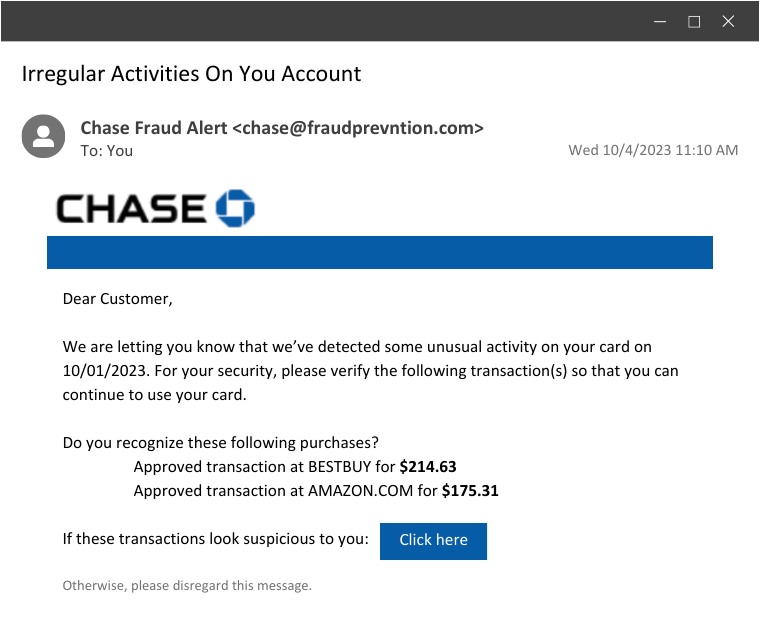
Chase Fraud Alert

How It Works: 

  • Knowing they didn’t spend hundreds of dollars at Best Buy and Amazon, the user would click on the link to “report” the charges. This would bring them to a malicious site that looks like Chase Bank, where they would enter their banking login details… straight into the attacker’s hands.

Social Engineering Tactics Used:

  • Fear and urgency play a significant role here. By impersonating a trusted source, the threat actors count on the user’s anxiety about their finances and the fear of losing money to fraudulent charges. They apply pressure, making them believe that immediate action is required to protect their assets. 

Example 2: The PayPal Password Ploy

Another common example is when a user receives an email claiming there's been unusual login activity on their PayPal account. To secure your account, they simply have to reset their password by clicking a link. Seems like a legit security measure, right? Not quite.
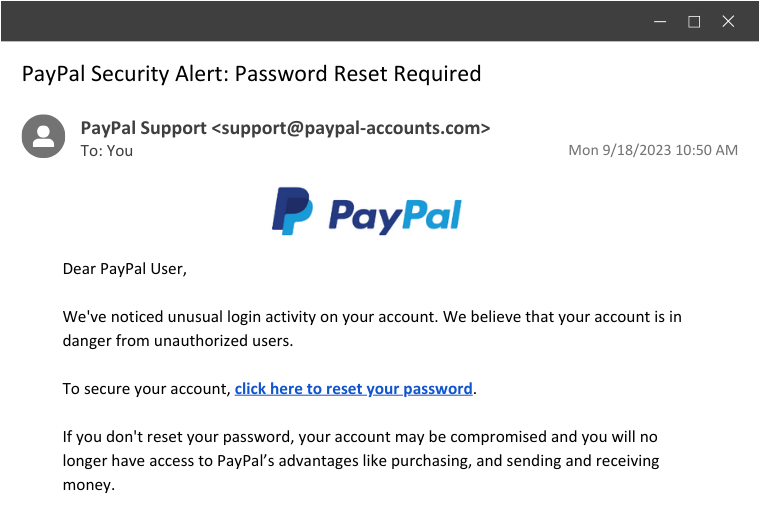
PayPal Security Alert-1

How It Works: 

  • Similar to the first example, this scenario is phishing for login credentials. The link would bring the user to a seemingly legitimate PayPal login page. Under the guise of resetting their password, they would be prompted to enter all their current login information, which the threat actor will swiftly take and use to take over their account. 

Social Engineering Tactics Used:

  • In this case, fear is the driving force. Fear of a compromised PayPal account is a nightmare for many users. Additionally, the email convincingly impersonates PayPal, making it seem like a genuine security alert from the platform.

Example 3: The Geek Squad Fraud

Here, we encounter a unique tactic—one that the Huntress SOC actually encountered. Instead of the typical malicious link, this phishing email almost uses reverse psychology and provides a phone number to call. 
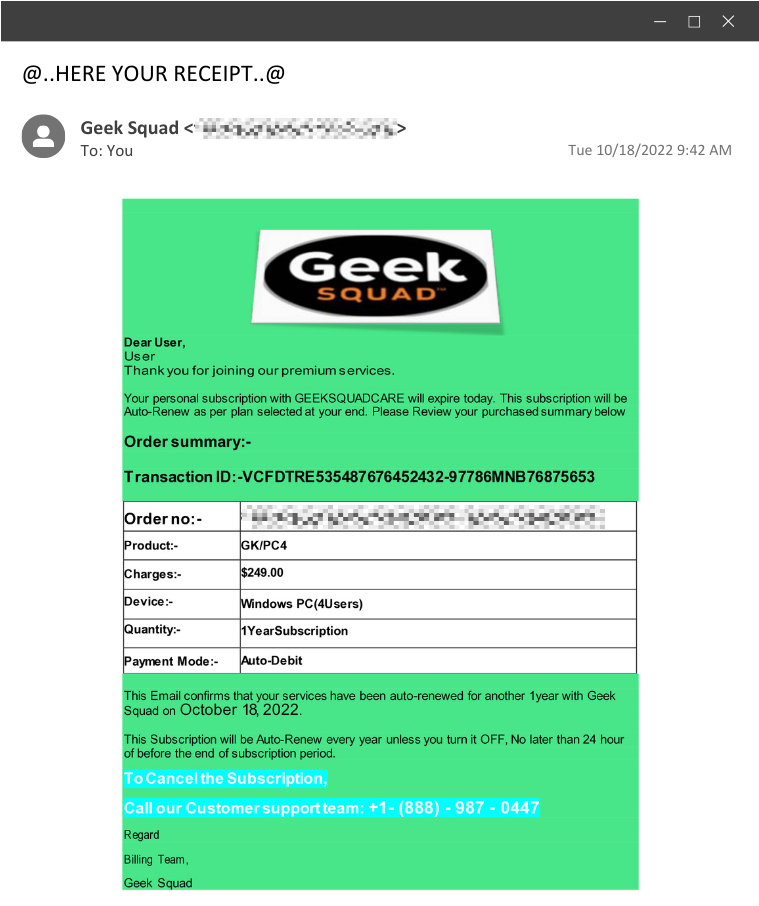
Group 4

How It Works: 

  • When the victim dials the provided phone number, the adversary is on the other end of the line and convinces them to run an installer. In this instance, the installer is a ScreenConnect installer, which will allow the adversary remote access into that environment.

Social Engineering Tactics Used:

  • This preys on trust and urgency. With the threat of auto-renewal, the user is forced to act fast. And since they are calling a provided number instead of clicking a link, they may believe they're receiving legitimate technical support.

Example 4: The QR Code Con

This is a relatively newer tactic that leverages the use of QR codes in order to bypass URL scanning.

In this example, the email notifies the user that their messages are quarantined until they scan the code to complete a security verification.
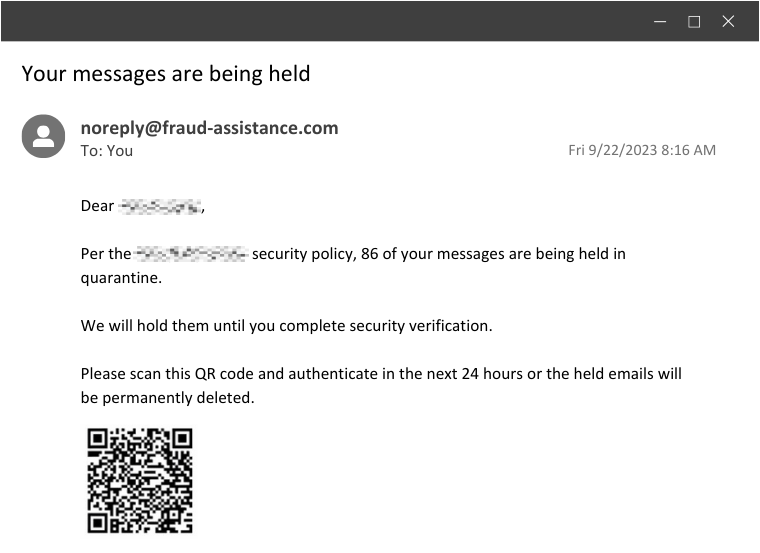
Group 5

How It Works: 

  • Instead of a malicious link, this uses something that’s harder to pre-scan or hover over: a malicious QR code. Upon scanning, it redirects the user to a malicious website or downloads malware onto their device.

Social Engineering Tactics Used:

  • This creates a sense of urgency, but it also takes a modern twist on using suspicious links. With QR codes being normalized in restaurants and other familiar places, the user likely won’t think twice before scanning—that’s exactly what these clever attackers are banking on.

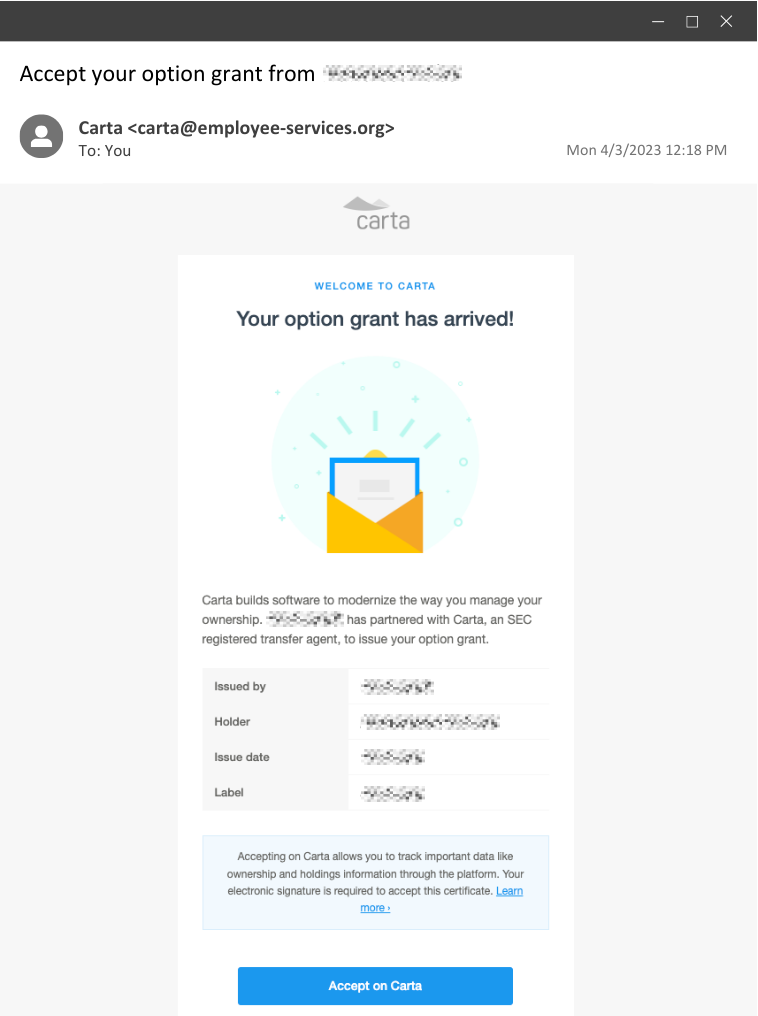
Example 5: The Stock Option Swindle

This example takes a more targeted approach. It masquerades as a stock option grant from the user’s workplace, enticing them to click a link to claim their options. This can be especially effective when targeting employees of a startup.
Group 3 (1)

Actually, this is a real phishing simulation we’ve sent as part of Huntress’ internal security awareness training. And truth be told, this one has been by far the most effective. 😈 

How It Works: 

  • If a threat actor were behind this, typically, the aim would be to steal user credentials or download a malicious payload once the button is clicked. But since this was a simulated phishing test as part of security awareness training, the user would be taken to a benign website where this message would appear… and hopefully, they would learn from their mistakes. 

image (20)

Social Engineering Tactics Used:

  • Trust and timing are the driving factors here. Trust is abused by impersonating an organization that employees are familiar with, and the timing is another factor because these emails are typically sent after actual, real stock options are granted to employees.

How to Spot A Phishing Email

Now that you understand how phishing emails work and what they could look like, the next step is knowing how to identify common red flags to protect yourself. Here are some key indicators to watch for:

  • Check the sender. Verify the sender's email address and name. Be cautious if it doesn't match the official domain of the organization or if there are typos or special characters in those fields.
  • Beware of urgency. If the email creates a sense of urgency, especially regarding sensitive information or immediate action, it might be a phishing attempt.
  • Don't click on suspicious links. Hover over links to reveal the actual URL before clicking. You can also use tools like Domain Dossier to learn about domain names and IP addresses, ICANN to see who domains are registered to, and urlscan.io to show a screenshot of the page you’d land on if you were to follow a link.
  • Double-check requests for personal information. Be cautious if an email asks for sensitive information via email. Always verify through official channels.
  • Look for spelling and grammar errors. Typos, awkward phrasing, and grammatical mistakes are often tell-tale signs of a phishing attempt.

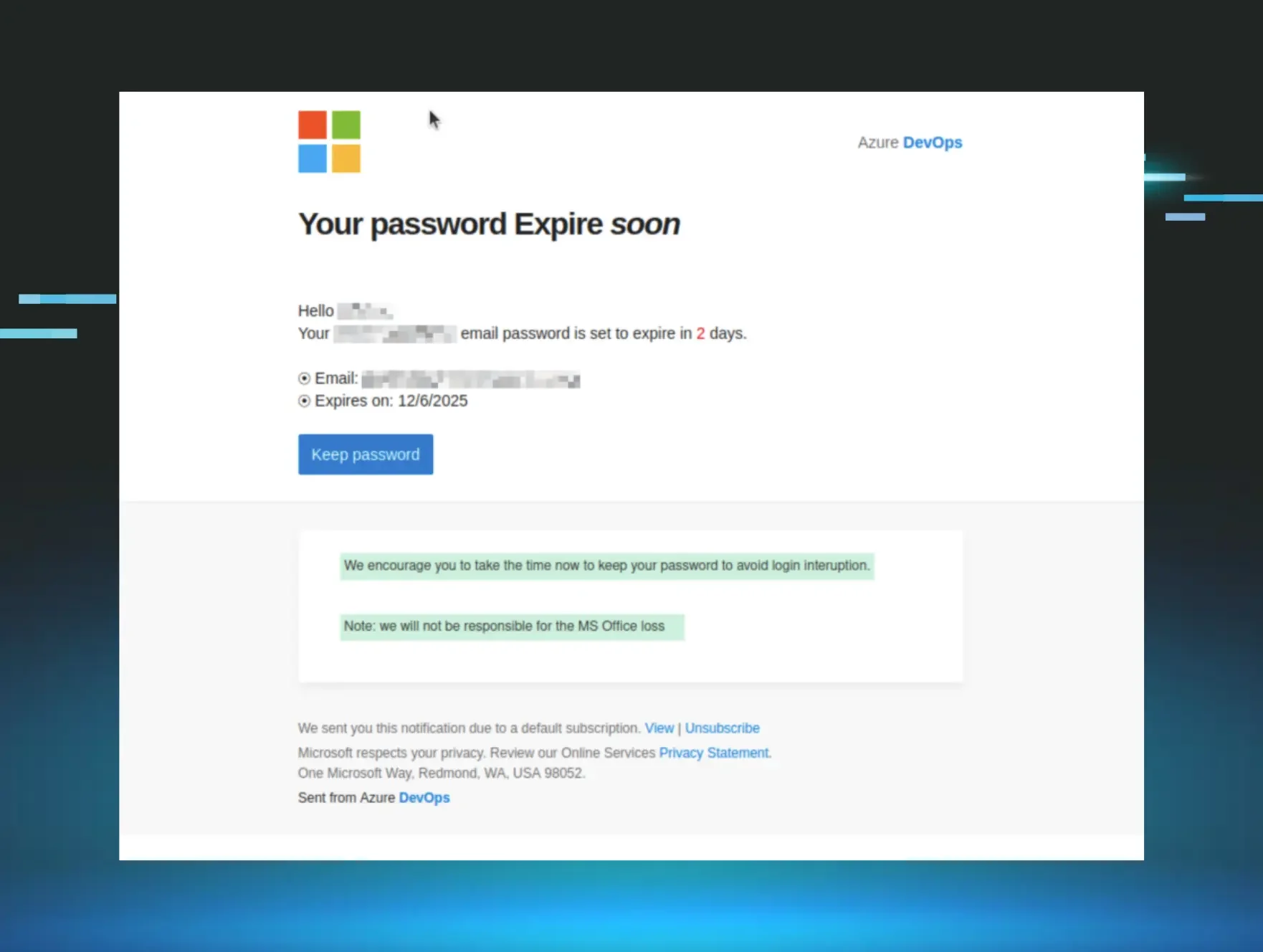
Huntress Managed SAT

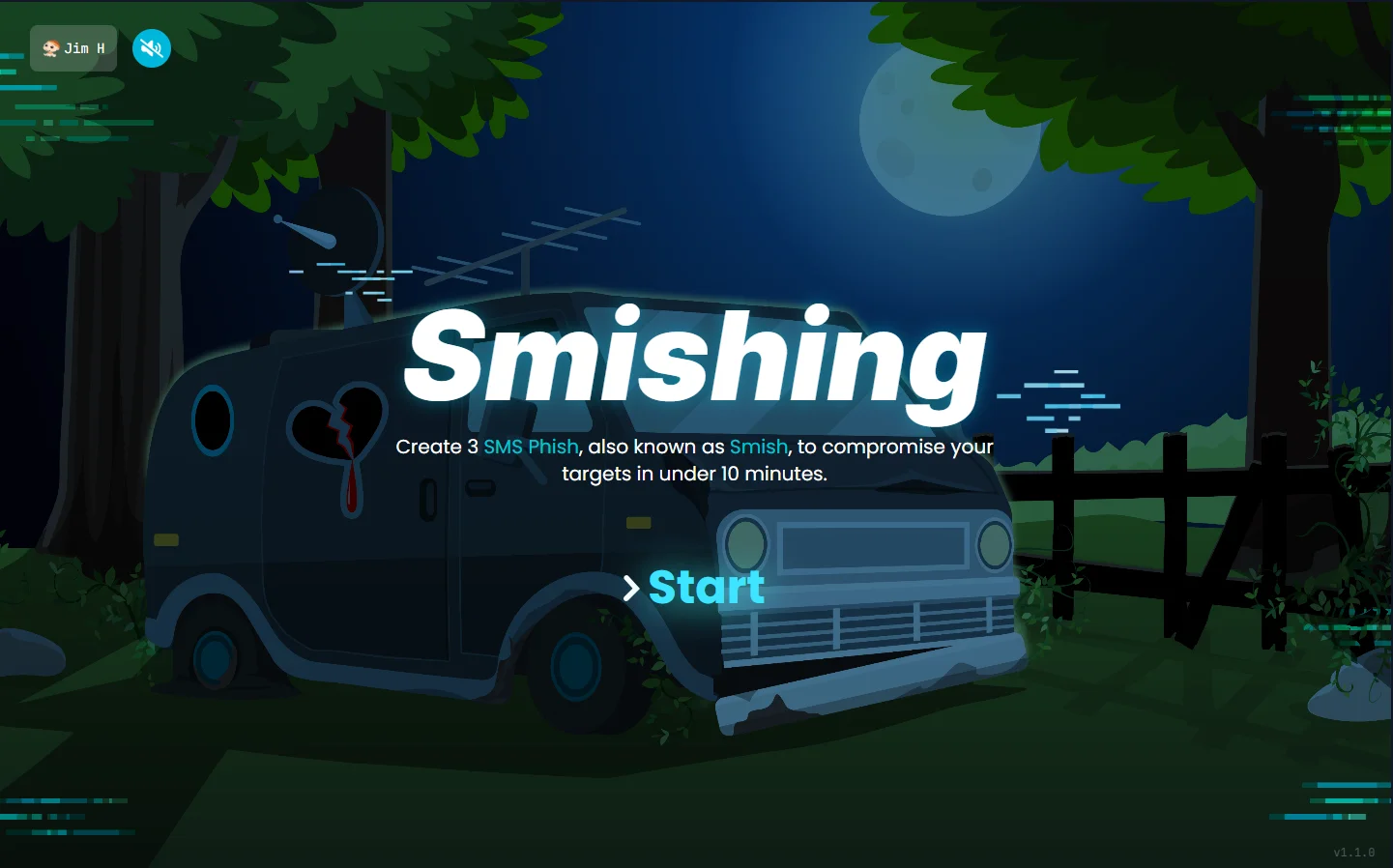
Smishing Simulation

Phishing doesn't just happen over email. See how Huntress SAT trains employees to spot SMS-based attacks too—with a free simulation preview.
Smishing simulation preview Watch the smishing simulation >

Knowledge is Power

Although phishing is a common attack method, the tricks and tactics that threat actors use are always improving, which means that users won’t always recognize the common red flags. That’s where security awareness training comes in.

Security awareness training is no longer an “as-needed” or “nice to have” thing; it's a necessity. Regular, consistent training ensures users stay ahead of the tactics employed by cybercriminals, keeping defenses sharp and information secure.

In a world where phishing emails will continue to be a favored weapon of threat actors, your best defense is knowledge. Make it a habit to educate yourself, share this knowledge with those around you, and become an invaluable line of defense against today’s clever hackers. 

Looking for a fun and effective security awareness training solution? Check out Huntress Security Awareness Training!

Categories
Cybersecurity Education
Summarize this postClose Speech Bubble
ChatGPTClaudePerplexityGoogle AI

See Huntress in action

Our platform combines a suite of powerful managed detection and response tools for endpoints and Microsoft 365 identities, science-backed security awareness training, and the expertise of our 24/7 Security Operations Center (SOC).

Book a Demo
Share
Facebook iconTwitter X iconLinkedin iconDownload icon
Glitch effect

You Might Also Like

  • Five Shady Phishing Email Techniques We Spotted in 2025

    From fake UPS shipping notifications to PayPal-themed callback phishing, here are the five top phishing techniques we’re seeing this year.
  • Exploring Package Tracking Smishing Scams

    Smishing (or SMS phishing) is far more frequent during the holidays. Learn to recognize the signs of a smish and how to avoid falling victim to one.
  • Teach Yourself to Phish: The Strategy Behind Phishing Simulations

    Get ready for a phishing trip! Learn about the strategy behind phishing simulations and how it can help your organization build resilience against real phishing threats.
  • Don't Get Played: How to Identify Recruiting Scams and How Huntress Is Fighting Back

    Recruitment scams are on the rise. Learn how to identify common scams and discover how Huntress is actively working to protect job seekers from fraudulent offers and identity theft.
  • Deceitful Tactics and Honest Mistakes: Remedying Human Error Amid the Rise of Social Engineering Across Healthcare

    Understand the impact of human error across healthcare, and discover how Huntress’ managed solutions can better defend your organization from social engineering scams.
  • Protect Yourself from Political Donation Scams

    Don’t let fraud disrupt your civic duty. Learn how to spot and avoid political donation scams that target voters through robocalls, fake websites, and deepfakes.
  • How My StubHub Account Got Hacked

    If you have a StubHub account, you are open to a major vulnerability of having your StubHub hacked. Learn more about how you are at risk & how Huntress' Security Awareness Training can help.
  • Experts Weigh in on the State of Email-Based Threats

    Cybersecurity experts John Hammond and Sébastien Goutal provide insider insight on the current state of phishing, ransomware and email-based attacks.

Sign Up for Huntress Updates

Get insider access to Huntress tradecraft, killer events, and the freshest blog updates.
Privacy • Terms
By submitting this form, you accept our Terms of Service & Privacy Policy
Thank you! Your submission has been received!
Oops! Something went wrong while submitting the form.
Huntress Managed Security PlatformManaged EDRManaged EDR for macOSManaged EDR for LinuxManaged ITDRManaged SIEMManaged Security Awareness TrainingManaged ISPMManaged ESPMBook a Demo
PhishingComplianceBusiness Email CompromiseEducationFinanceHealthcareManufacturingState & Local Government
Managed Service ProvidersResellersIT & Security Teams24/7 SOCCase Studies
BlogResource CenterCybersecurity 101Upcoming EventsSupport Documentation
Our CompanyLeadershipNews & PressCareersContact Us
Huntress white logo

Protecting 215k+ customers like you with enterprise-grade protection.

Privacy PolicyCookie PolicyTerms of UseCookie Consent
Linkedin iconTwitter X iconYouTube iconInstagram icon
© 2025 Huntress All Rights Reserved.

Join the Hunt

Get insider access to Huntress tradecraft, killer events, and the freshest blog updates.

By submitting this form, you accept our Terms of Service & Privacy Policy