

NFS (Network File System) is a common attack vector in enterprise environments. Learn what NFS is, how attackers exploit misconfigured shares, and the exact steps to secure NFS in your environment.
Key Takeaway: Lateral movement is the process by which a cyberattacker, after gaining an initial foothold, moves deeper into a network to locate high-value assets. Unlike "initial access" (getting in), lateral movement is about expansion and persistence. Detecting it requires monitoring "east-west" (internal) traffic rather than just perimeter defenses.
Lateral movement is the secret weapon of top-tier attackers and one of the most common attack tactics that attackers use once they're inside an organization. It’s stealthy, strategic, and designed to turn a small breach into a full-blown network-wide crisis. If you’ve heard the term but aren’t exactly sure how it fits into the world of cyberattacks, you’re not alone. But understanding what it is (and how to defend against it) can make or break your organization’s defenses.
Think of it this way: Lateral movement is what happens after a bad actor gains access to your network. It’s how they explore, dig deeper, and move closer to their ultimate goal, whether that’s sensitive data, control over your systems, or wreaking total havoc.
This guide will walk you through what lateral movement means, how it works, and most importantly, how to stop attackers in their tracks. If you care about keeping your business secure, grab a coffee; we’ve got work to do.
Lateral movement in cybersecurity refers to an attacker’s ability to move across a network after gaining initial access. It’s not about how they get in—that’s “initial access.” It’s about what they do once they’re inside. Attackers use lateral movement to gain deeper access, steal valuable data, escalate privileges, or even set the stage for a massive ransomware attack.
Key goals of lateral movement:
Access high-value targets: attackers aim for sensitive databases, domain controllers, backups, or intellectual property.
Establish persistence: they ensure they can maintain access, even if their initial breach is discovered.
Escalate privileges: attackers look to gain admin-level permissions that grant them full control over the network.
What sets lateral movement apart is how deliberate and stealthy it is. Attackers often mimic normal user behavior to avoid detection, making it one of the most dangerous phases of a cyberattack.
Lateral movement doesn’t happen all at once. It’s a calculated process that attackers execute step by step. Here’s how it typically unfolds:
The attacker starts by infiltrating one system through methods like phishing, malware, or exploiting vulnerabilities. They now have a “base” of operations within your network.
Next, they map out the network. Using tools like Netstat or PowerShell, attackers explore your environment to locate critical systems, users, and resources. Think of this phase as their “scoping out the joint.”
Before moving deeper, attackers use tools and attacks involving credentials for various means. They use tools like Mimikatz to dump cached passwords or Pass-the-Hash attacks to steal password hashes, allowing them to bypass normal system access controls.
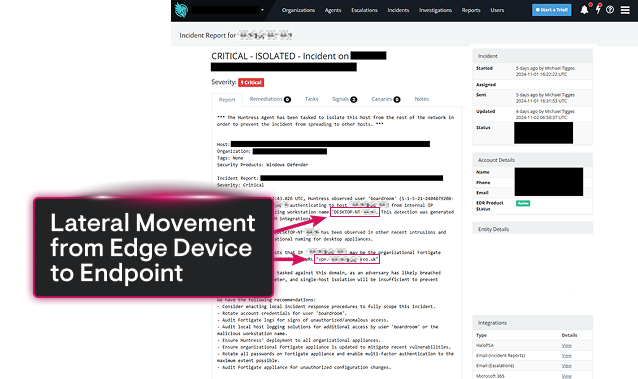
Equipped with credentials and a strong understanding of the network, threat actors begin hopping from system to system. This could involve leveraging protocols such as Remote Desktop Protocol (RDP) or Server Message Block (SMB) to bypass access controls.
After spreading through the network, they hit the jackpot. Whether it’s exfiltrating critical data, deploying ransomware, or taking over a domain controller, this is where the damage becomes catastrophic.
Still not sold on the danger lateral movement poses? Here are a few infamous cases where it was a key player:
NotPetya: This malware spread laterally using SMB vulnerabilities, crippling entire companies in minutes.
SolarWinds: Attackers gained initial access via a backdoored software update, then used malware for lateral movement and deploying additional payloads.
LockBit: functions as a Ransomware-as-a-Service (RaaS) model where affiliates are recruited to conduct ransomware attacks using LockBit ransomware tools and infrastructure
A single compromised system can escalate to an organization-wide breach faster than you think.
Advanced Persistent Threats (APTs) plan their movements step by step, making proactive monitoring essential.
Feature | Initial Access (The "Break-In") | Lateral Movement (The "Sneak") |
Primary Goal | To gain a foothold in the network. | To find high-value data/assets. |
Typical Vector | Phishing, stolen credentials, RDP exploits. | Pass-the-hash, RDP/SMB abuse, WMI. |
Focus of Defense | Perimeter (Firewalls, Email Filtering). | Internal (Micro-segmentation, EDR/ITDR). |
Traffic Type | North-South (Inbound from Internet). | East-West (Internal system-to-system). |
Stealth Level | Often noisy/identifiable. | High mimics legitimate admin behavior. |
Here’s the scary part: lateral movement is hard to detect. Once attackers slip past your perimeter defenses, they blend into “normal” network activity. Combine this with human intervention and rapidly evolving techniques, and you’ve got a recipe for disaster.
Key risks include:
Extended dwell times: Attackers can remain undetected for weeks or months.
Bypassing perimeter security: Firewalls and endpoint protection won’t save you if attackers are mimicking legitimate users.
Mass disruption: Once they reach critical systems, the fallout can be exponential.
That’s why detecting lateral movement is a race against the clock.
Stopping lateral movement starts with understanding how attackers operate. Here’s a playbook for building your defenses:
Isolate systems so that attackers can’t move freely. Adopting a zero trust architecture ensures every user and device is continually authenticated based on behavior.
EDR solutions like Huntress Managed EDR can spot suspicious behavior and proactively isolate compromised systems.
Install tools for monitoring lateral (east-west) traffic within your network to catch anomalies early.
ITDR solutions like Huntress ITDR can deliver proactive protection against OAuth-based threats and more.
Proactively hunt for signs of lateral movement, such as unexpected account usage or unusual command-line activity.
Huntress and Microsoft Defender make a powerhouse team when it comes to detecting and stopping lateral movement in cybersecurity. Microsoft Defender provides robust endpoint protection, identifying and blocking common threats before they can spread. Meanwhile, Huntress takes it a step further, hunting down the subtle, persistent threats that often fly under the radar, like rogue admin tools and hidden attack footholds. Together, they create a robust defense system, with Defender handling broad endpoint coverage and Huntress focusing on uncovering attacker tactics that enable lateral movement.
This combination ensures comprehensive network security by pairing automated threat response with human-led analysis for deeper scrutiny. Defender monitors endpoint behavior and stops the obvious threats, while Huntress digs into potential persistence mechanisms and stealthy attack paths. Whether you’re a small business or a larger organization, this duo provides the tools you need to lock down your network and prevent attackers from moving freely once inside.
Harden your environment with these best practices:
Implement least privilege access to ensure users only have permissions they truly need.
Disable unnecessary services/protocols that attackers commonly exploit, like SMBv1.
Maintain credential hygiene by regularly rotating passwords and using multi-factor authentication (MFA).
Audit systems frequently to patch vulnerabilities and identify misconfigurations.
Simulate attacks via red teaming exercises to test your defenses against lateral movement.
Lateral movement is like a digital game of sneaking through a maze. Once attackers wiggle their way into a network, they move around inside, hopping between systems and accounts. Why? To escalate their access, avoid getting caught, and aim for high-value targets like sensitive data or domain controllers. It’s what makes a small breach become a big problem.
When attackers want to spread inside a network, they get creative with how they move. Here’s how they pull it off:
Harvesting credentials left lying around on systems to unlock more doors.
Scanning the network to map out where valuable assets might be hiding.
Abusing trusted protocols like RDP, SMB, or WMI to blend in like they belong there.
Basically, they use legit tools to play the long con and bypass your security defenses.
Hackers don’t just wing it. They’ve got their go-to moves for lateral movement:
Pass-the-Hash or Pass-the-Ticket Attacks: Using stolen credentials to masquerade as an authorized user.
RDP Abuse: Taking over systems remotely with admin tools.
WMI Exploitation: Running commands on other devices without raising alarms.
PsExec Tool Usage: A favorite for executing commands on remote systems.
Credential Dumping from LSASS (Local Security Authority Subsystem Service): Extracting passwords from memory like cracking a safe.
Exploiting Weak Service Permissions or sloppy Active Directory setups.
Pro tip? Most of these have perfectly valid business purposes, which makes them extra hard to detect. Sneaky, right?
Catching lateral movement is tricky, but not impossible if your defenses are on point. Focus on:
East-West Traffic Monitoring: Keep an eye on internal network activity, not just inbound/outbound traffic.
EDR: These tools are your network’s watchdogs, alerting you to shady behavior on devices.
Unusual Login Patterns: Spot when users aren’t acting like their usual selves.
Behavior Analytics: User and Entity Behavior Analytics (UEBA) tools find anomalies in how users interact with systems. Weird patterns = red flags.
Log Correlation: Collect logs from all your systems and piece together the story. Think detective work, but automated.
Early detection makes all the difference. The sooner you spot them, the less damage they can do.
Want to stop lateral movement in its tracks? Gear up with these essentials:
Microsoft Defender for Endpoint for device monitoring and control.
BloodHound for mapping out Active Directory weaknesses.
Zeek or Suricata to analyze network activity like a boss.
On top of tools, adopt a zero trust approach. Assume every device or user could be the bad guy until proven otherwise. Add in strict access controls for good measure.
MITRE ATT&CK is like the attacker’s playbook, and lateral movement is definitely in there. Techniques like:
T1021 (Remote Services): Cover methods hackers use to exploit remote connections.
T1550 (Pass-the-Hash): Focuses on leveraging stolen credential hashes.
This framework gives cybersecurity teams a heads-up on what attackers might try next and helps them defend smarter, not harder.
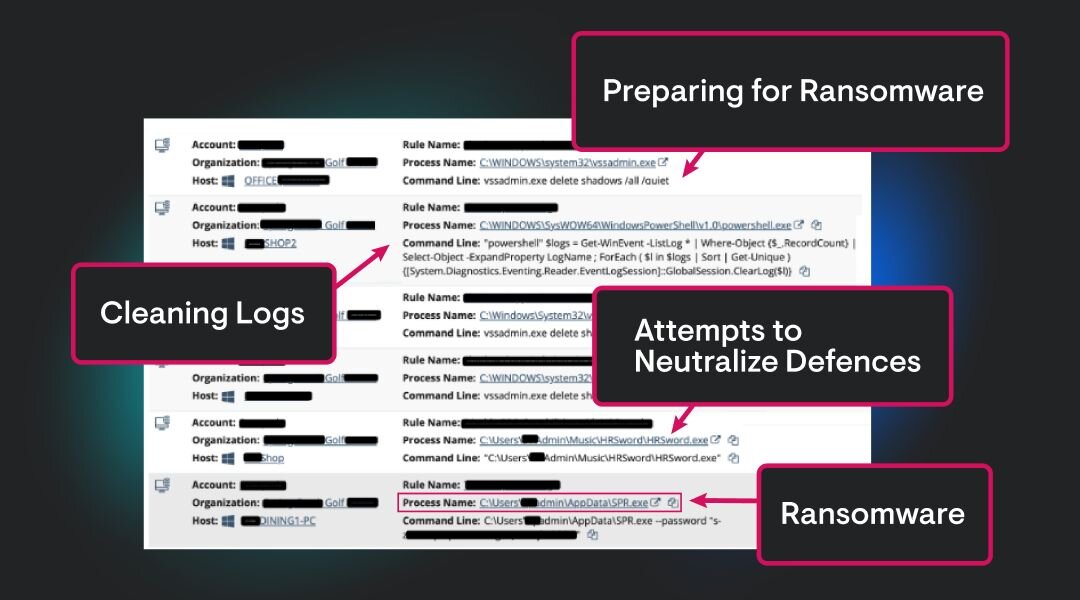
Ransomware operators love lateral movement. Why? It lets them hit the biggest, most critical systems before making their ransom demand.
Picture this: They quietly take over your backups, file servers, and domain controllers. Then, bam! They lock it all down at once. More damage means more leverage to force you to pay up. That’s why stopping lateral movement early is so important.
Hackers may be silent, but they leave clues. Don’t miss them.


Lateral movement isn’t just a technical term; it’s a wake-up call for businesses everywhere. Understanding how attackers move within networks is critical for stopping breaches before they escalate. The stronger your detection and prevention measures, the safer your organization will be.
At Huntress, we don't believe in “chasing” every technique. We build features that drive real value for our customers and give our SOC team the appropriate visibility to identify maliciousness, while keeping the collection noise low. Test drive Huntress’ Managed EDR today with a free trial or demo to learn more about our approach in defense.