


Background
During October 2024, Huntress analysts observed two incidents involving the deployment of SafePay ransomware across disparate customer infrastructures separated by business vertical and geography. In both incidents, the encrypted file extension was .safepay, and the name of the ransom note was readme_safepay.txt, something that Huntress analysts had not previously observed. Further, following the first incident, analysts were unable to locate any open reporting on this particular ransomware variant.
Dark Web Presence
The SafePay ransomware group is a more obscure cybercrime gang than others, and for that reason, there is not much discussion surrounding SafePay on illicit forums or chat rooms.
They do include a V3 onion link to their leak site in their ransom note, however, as well as a less common link to a “TON” site—apparently, “The Open Network” which claims to be a "decentralized and open internet, created by the community using a technology designed by Telegram."
Their Tor leak site simply lists past victims to be clicked on and expanded for more details.
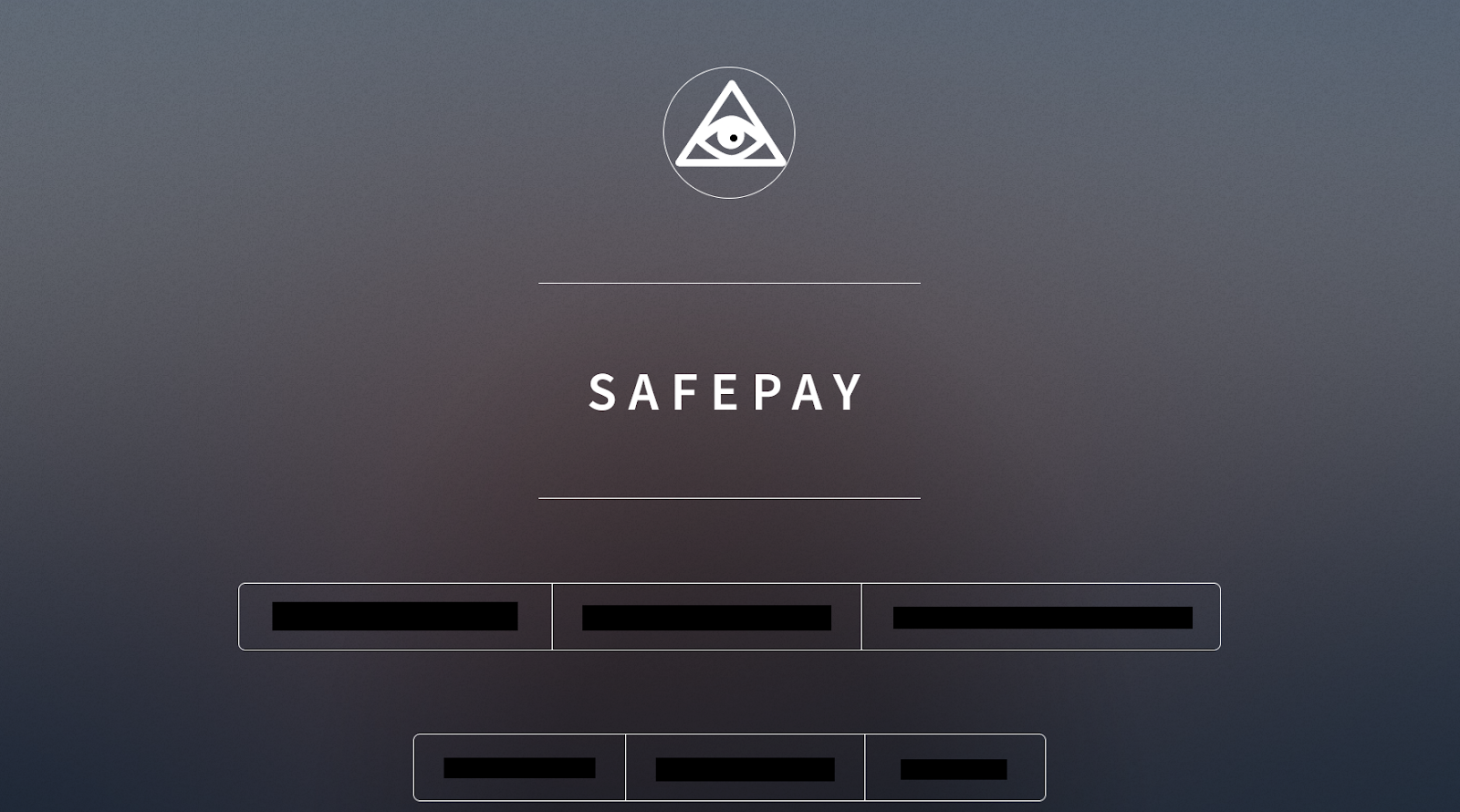
At the time of writing, there are 22 victims listed. Clicking on their name opens a modal to either download a text file that lists the filenames and folder structure for the stolen data, or the data itself if it is available. Their download folder is susceptible to directory indexing:

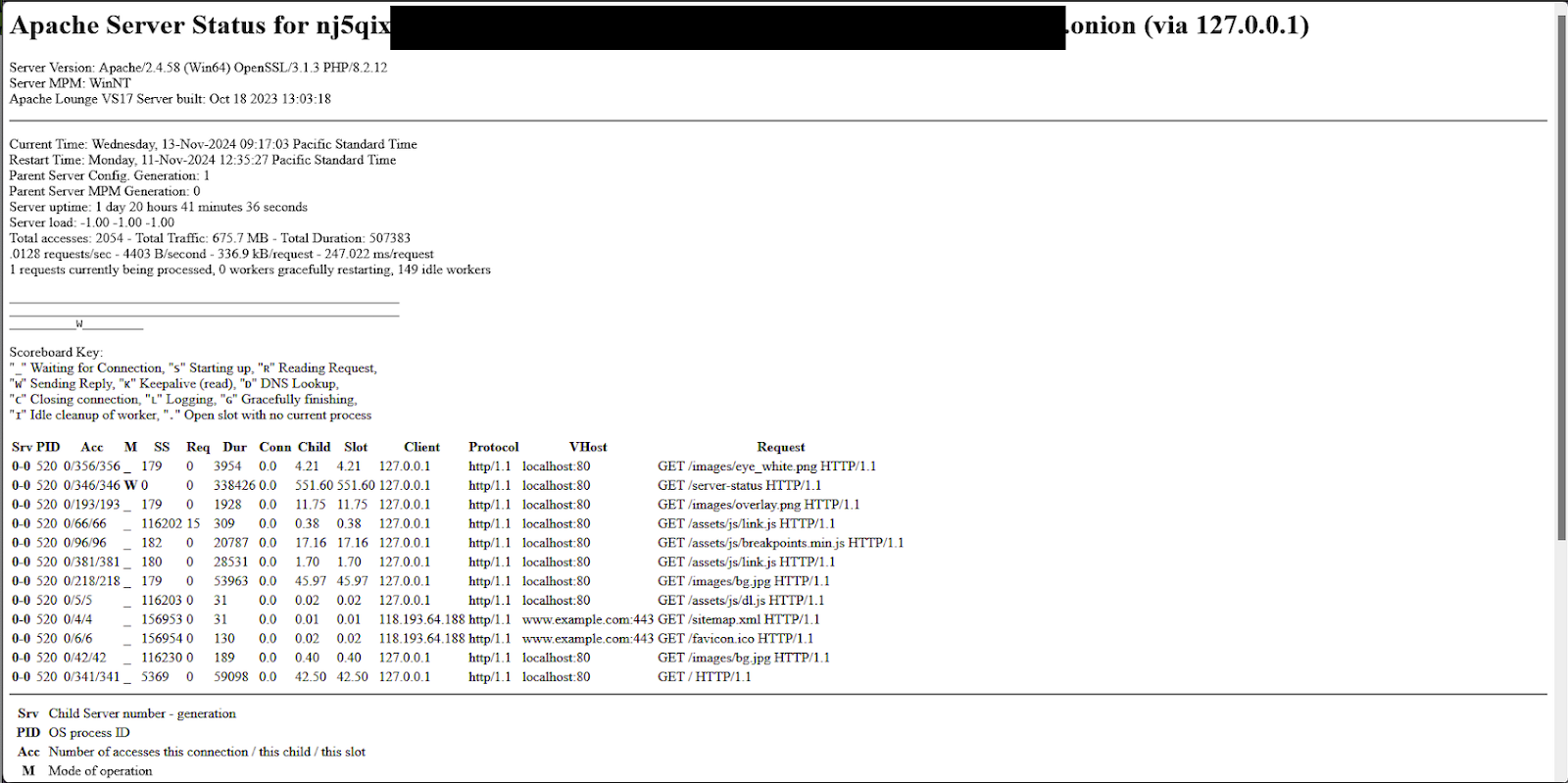
Additionally, the Apache server status endpoint is still accessible and exposes some further details about the backend server.
Incident 1
During incident 1, the first observed indication of the threat actor’s activity was an attempt to run ShareFinder.ps1, which was detected and blocked by Windows Defender. The threat actor had accessed the endpoint via the Remote Desktop Protocol (RDP), and as such, disabled Windows Defender using the same sequence of LOLBin commands observed during an INC ransomware deployment incident earlier this year and was then able to run the ShareFinder.ps1 PowerShell script.
About 40 minutes later, the same user archived files from the host with WinRAR.exe. An example command line of the attacker archiving files can be seen as follows:
WinRAR.exe a -v5g -ed -r -tn1000d -m0 -mt5 -x*.rar -x*.JPEG -x*.RAW
-x*.PSD -x*.TIFF -x*.BMP -x*.GIF -x*.JPG -x*.MOV -x*.pst -x*.FIT
-x*.FIL -x*.mp4 -x*.avi -x*.mov -x*.mdb -x*.iso -x*.exe -x*.dll
-x*.bak -x*.msg -x*.png -x*.zip -x*.ai -x*.7z -x*.DPM -x*.log -x*.dxf
-x*.insp -x*.upd -x*.db -x*.dwg -x*.nc1 -x*.metadata -x*.dg -x*.inp
-x*.dat -x*.TIFF -x*.tiger -x*.pcp -x*.rvt -x*.rws -x*.nwc -x*.tif
-x*.frx -x*.dyf -x*.rcs -x*.diff C:\[redacted].rar
\\[redacted]\C$\Users\
This was observed across three different hosts (remotely archiving files from user directories on other hosts).
A short time after that, FileZilla was installed using FileZilla_3.67.1_win64_sponsored-setup.exe, and filezilla.exe and fzsftp.exe both executed after that. They were quickly uninstalled as well.
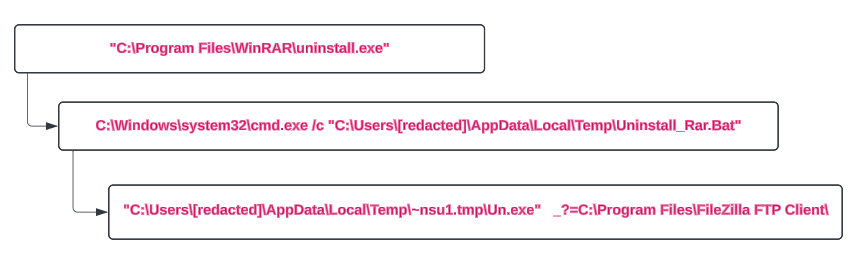
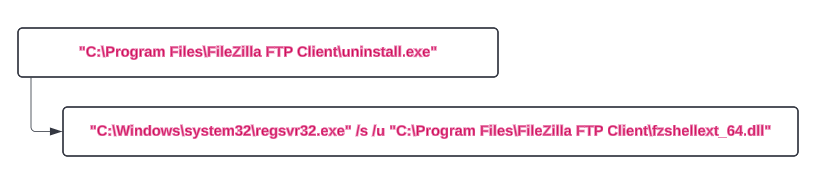
The following day, this process repeated (WinRAR and FileZilla installed, executed, and uninstalled).
This activity looks like potential Data Exfiltration from the network—collected and archived with WinRAR and then possibly exfiltrated out using FTP (no network evidence of this activity was collected).
Finally, on the second day following the use of the PowerShell script, the threat actor returned, logging in via RDP, and within approximately 15 minutes, began executing several commands that deployed file encryption via previously identified network shares. An example of one of those commands appeared as follows:
"C:\Windows\SysWOW64\regsvr32.exe" /n "/i:-pass=[REDACTED] -enc=3 -uac -path=\\[REDACTED]\[SHARE]\ -uac=[REDACTED]" C:\locker.dll
The Huntress platform generated alerts for this activity, as illustrated in Figure 6.

Following these alerts, the following commands were observed as part of the ransomware execution:
bcdedit / set{default} recoveryenabled no
wmic shadowcopy delete
Both of these commands were detected and alerted via the Huntress platform, but by that point, the file encryption process was already underway.
Incident 2
While investigating incident 2, analysts determined that the Huntress agent deployment was extremely limited, inhibiting visibility, detection, and response.
Huntress analysts did note that there was an initial successful network login to the Administrator account, originating from the threat actor workstation WIN-3IUUOFVTQAR, which was then followed by multiple failed login attempts to the non-existent Work user account, from the same workstation. Following this activity, the Administrator account was used to successfully log in via the Remote Desktop Protocol (RDP).
Huntress analysts were not able to recover a copy of the ransomware executable during this incident due to the fact that the file encryption deployment likely occurred from another endpoint that did not have an agent installed. This is supported by the fact that during incident 1, the ransomware was deployed via UNC paths.
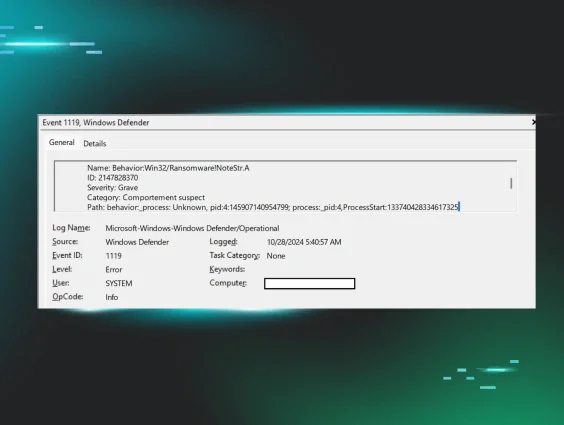
Also during this incident, there was no indication that the threat actor attempted to disable Windows Defender. Rather, in this instance, Windows Defender did detect the ransomware process, but recorded a Microsoft-Windows-Windows Defender/1119 failure event, as illustrated in Figure 7.
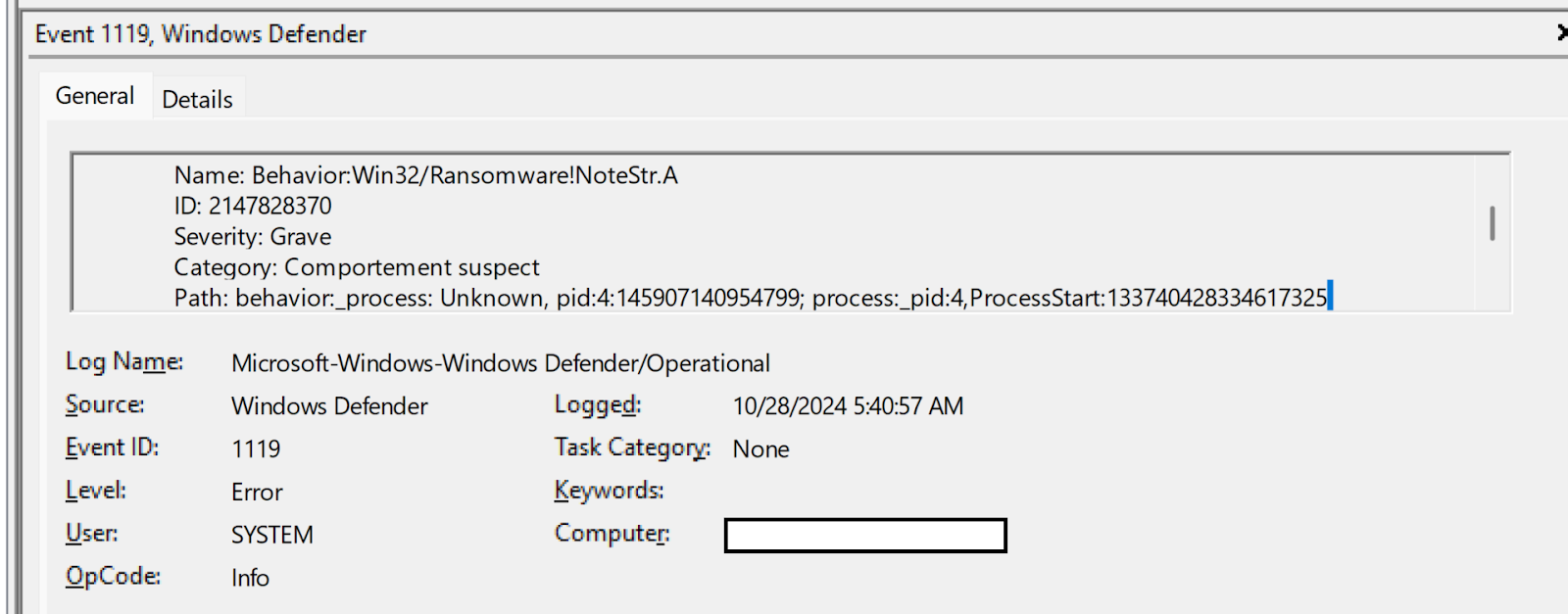
Unfortunately, the ransomware execution was not prevented, and as with the first incident, ransomware canary files were modified, prompting additional reporting from the Huntress SOC.
Reverse Engineering
During our analysis of the ransomware binary, we began to notice a large number of similarities to the extensively analyzed Lockbit samples from the end of 2022. This isn’t particularly surprising given that the source for Lockbit has been leaked several times.
Usage
The ransomware is run via regsrv32.exe and accepts the following flags:
| Flag | Usage |
|---|---|
|
-uac | UAC bypass flag |
|
-selfdelete | Enable self-delete flag |
|
-network | Network propogation |
|
-logging | Enable logging |
|
-pass | Password |
|
-netdrive | Network drive flag |
|
-path | Path for files to encrypt |
|
-enc | Encryption level |
Cyrillic Language Killswitch
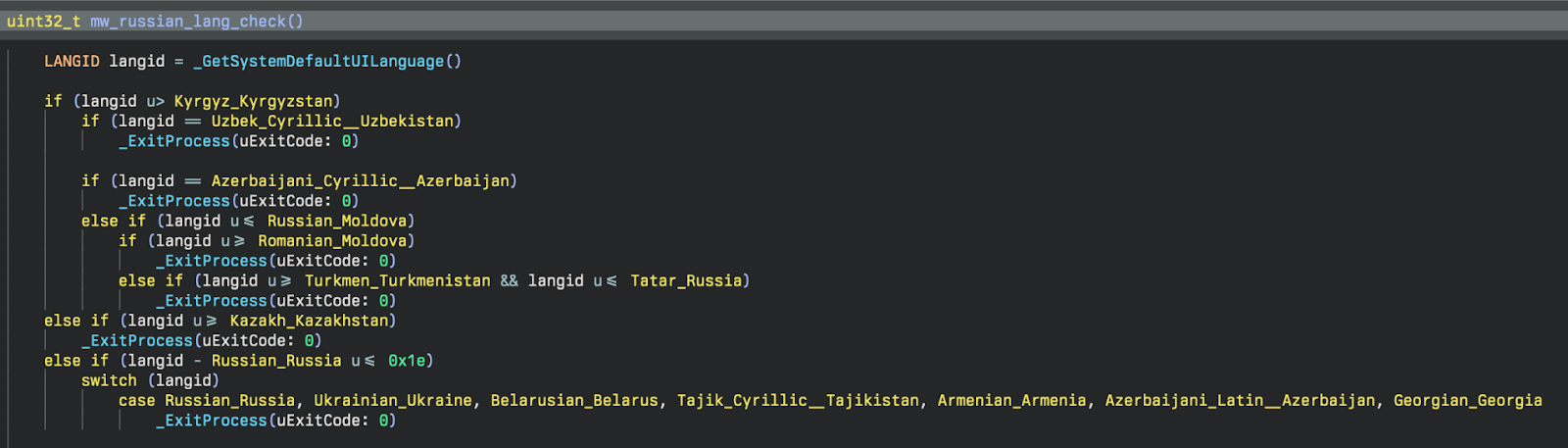
As is relatively common for ransomware, before executing encryption on a host, the malware attempts to verify that it isn’t running in any Eastern European countries. It does this by calling GetSystemDefaultUILanguage and checking that the resulting language ID is greater than the Cyrillic language IDs, as seen in Figure 8.
String Encryption
Most of the strings throughout the binary are obfuscated with a simple three-step XOR loop consisting of a random single-byte key, the index of the character, and the first byte of kernel32.dll (‘M’).
Process Termination
Malware attempts to stop certain processes that are running via ZwTerminateaProcess. Below is the list of processes that are attempted to stop:
- sql
- oracle
- ocssd
- dbsnmp
- synctime
- agntsvc
- isqlplussvc
- xfssvccon
- mydesktopservice
- ocautoupds
- encsvc
- firefox
- tbirdconfig
- mydesktopqos
- ocomm
- dbeng50
- sqbcoreservice
- excel
- infopath
- msaccess
- mspub
- far
- onenote
- outlook
- powerpnt
- steam
- thebat
- thunderbird
- visio
- winword
- wordpad
- notepad
- wuauclt
- onedrive
- sqlmangr
Service Termination
Ransomware attempts to stop services that are running via ControlService. Below are services it attempts to stop:
- vss
- sqlsvc
- memtas
- mepocs
- msexchange
- Sophos
- Veeam
- backup
- GxVss
- GxBlr
- GxFWD
- GxCVD
- GxCIMgr
Privilege Adjusting
This malware goes through the appropriate steps to enable SeDebugPrivilege for their current running token. This is done by the following APIs: ZwOpenProcessToken, LookupPrivilegeValueA, PrivilegeCheck, and AdjustTokenPrivileges. This is very common within malware, as setting SeDebugPrivilege circumvents certain access checks to Windows objects. If you are curious about this, you can read more about this here.
Token Impersonation
One of the ways that this malware likes to privilege escalate is through token impersonation. The way they are implementing this is by calling DuplicateToken to obtain an impersonation (thread) token from a primary (process) token. We can see this in the code snippet below:
After this token handle is set to a global variable, it is then used in another function that calls ZwSetThreadInformation. Let’s take a look at how this is called:
What we can see above is that a thread is created in a suspended state via CreateThread, passing in CREATE_SUSPENDED in dwCreationFlags. The purpose of this thread is to enumerate and parse network drives. If the thread is created successfully then the ThreadHideFromDebugger flag is set on the thread, which allows the thread to run without a debugger being able to trace the execution. Next, the duplicated token is set to the thread via ZwSetInformationThread. Lastly, the thread is able to execute via NtResumeThread.
Thread Creation & Management
In order to increase the performance of the ransomware, SafePay (or Lockbit really) create a number of worker threads for both encryption and network enumeration. The way they do this is interesting because in lieu of just a standard CreateThread, they use a custom implementation that provides better anti-analysis capabilities.
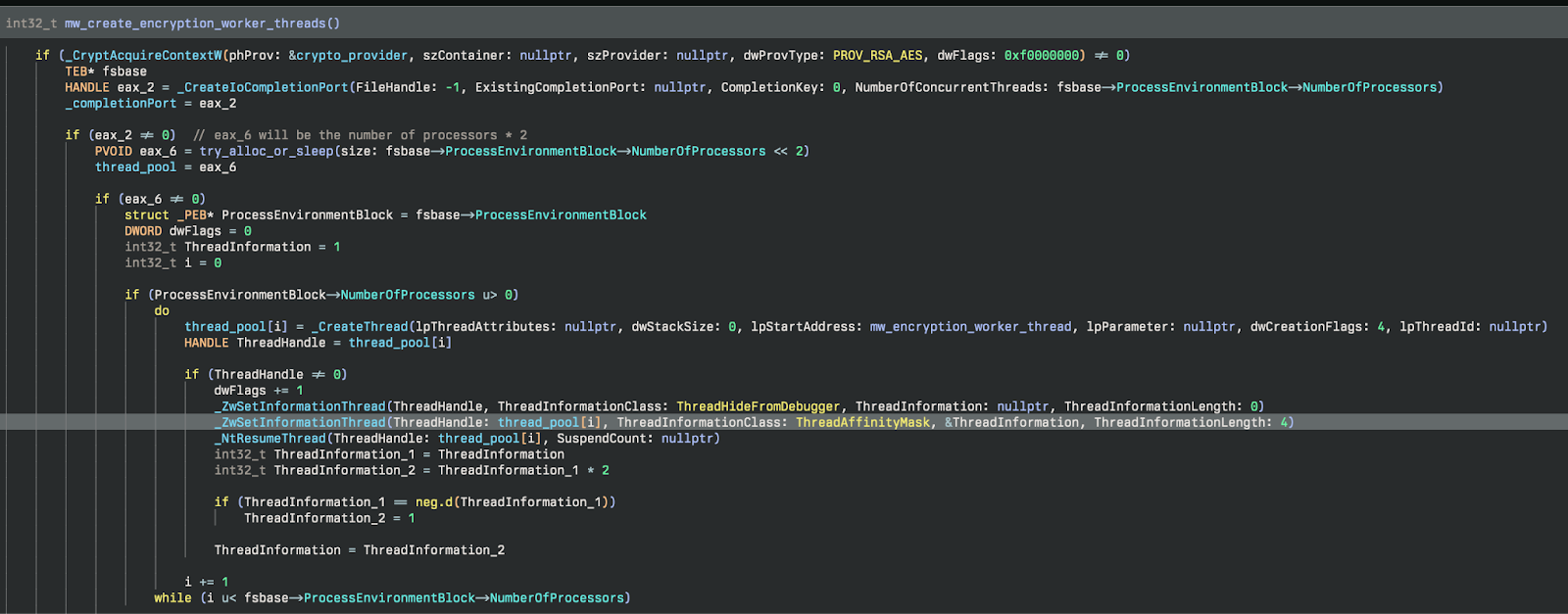
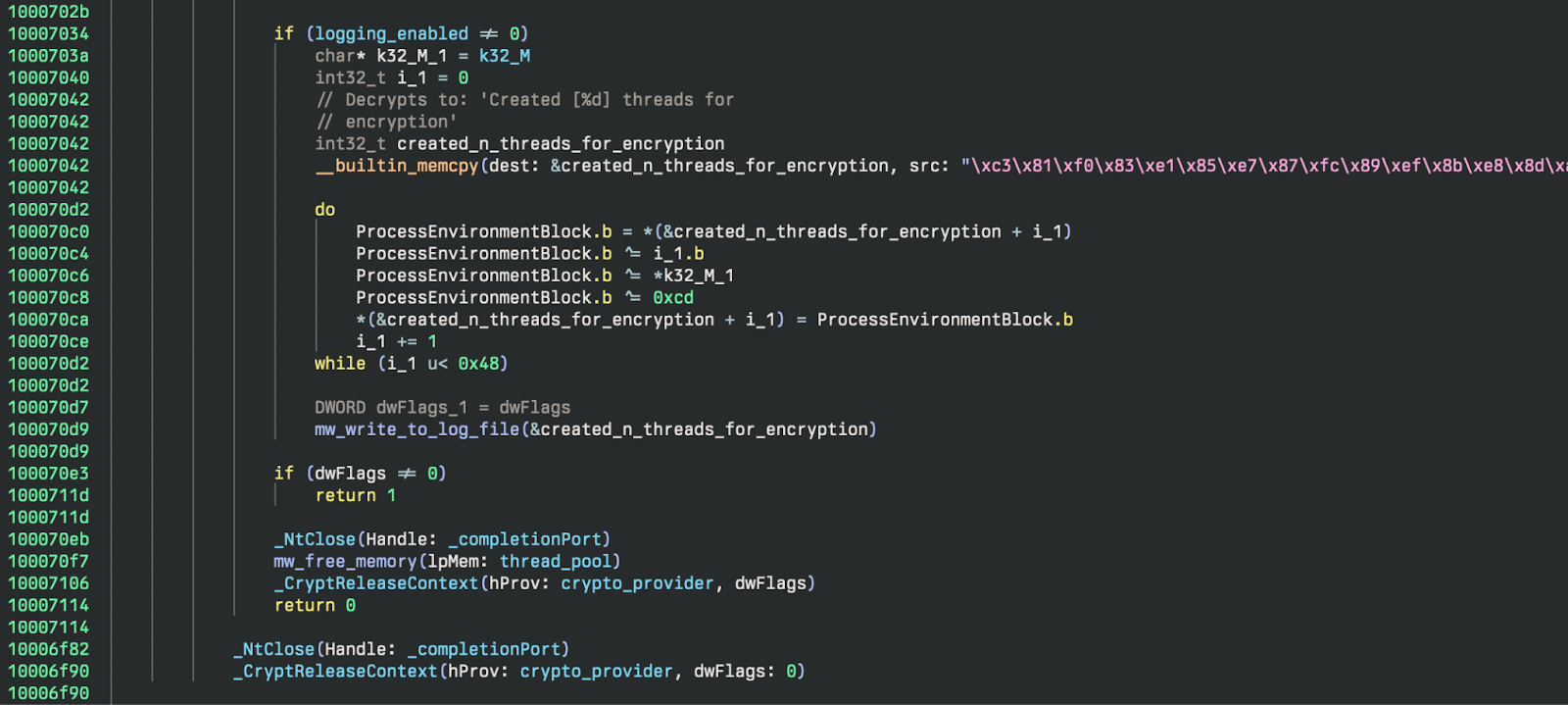
If logging is enabled it will return how many threads were created to the logfile. Finally, they clean up by freeing the memory allocated for the thread pool, close the completion port, and release the crypto context. The cleanup code can be seen in Figure 10.
Detection Opportunities
Defense Evasion
We observed the threat actor disabling some Windows Defender settings using the systemsettingsadminflows.exe binary. In this case, the parent process of SystemSettings.exe shows that the changes were made using the Windows Settings GUI, typically accessed through the Menu. This indicates the threat actor was moving around on the desktop interactively. While a user may do this occasionally as well, it is unlikely that most users would change Windows Defender Virus & Threat Protection settings very often. These are settings such as Automatic File Submission and Real-Time Threat Protection.
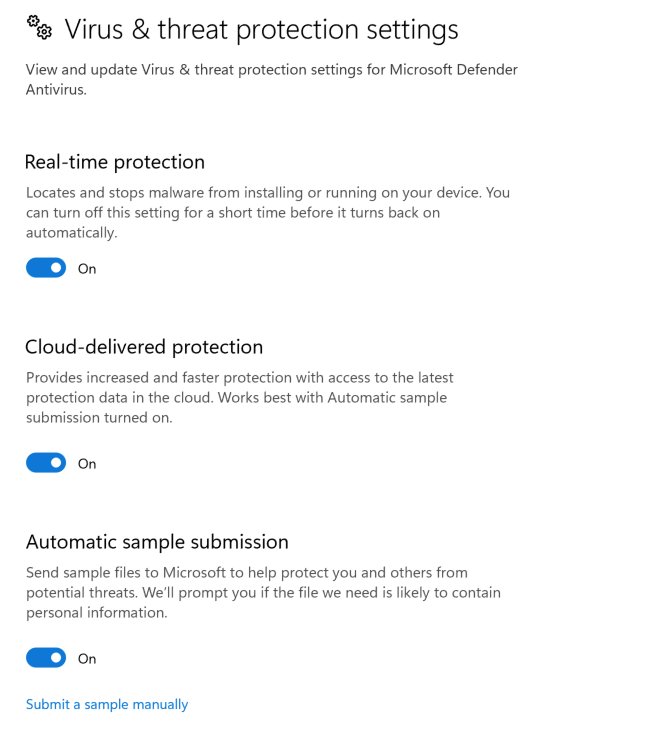
Normally, these settings are set by Group Policy, Local Security Policies, or by custom configurations during initial setup of the system. Changes made by Administrators will typically be made through PowerShell, direct registry changes, or updates to Security Policies (not by clicking on toggle switches in the GUI). For many environments, this may be unusual enough to alert on every time it happens. We have provided the following Sigma rules to detect this behavior:
- Windows Defender Threat Protection Settings Disabled via GUI
- Windows Defender Threat Protection Settings Disabled
Many changes to Defender can be detected with Windows Event logs as well, with events like Microsoft-Windows-Windows Defender/5001 (Defender RTP Disabled) and Microsoft-Windows-Windows Defender/5007 (Defender Malware Protection Configuration Change). The following are Sigma detectors that are available from the SigmaHQ repository that detect these changes:
- SigmaHQ rule for Disabling RTP
- SigmaHQ Windows Event Log rule for Malware Protection Configuration Change
- SigmaHQ Windows Event rule for Defender Configuration Change - Sample Submission
Privilege Escalation
The adversary likely used a well-known UAC Bypass Privilege Escalation technique, often utilized by several other ransomware groups such as Lockbit and BlackCat/ALPHV. This technique results in an elevated process created by a specified COM Object that can be used to execute malicious commands or binaries. When this technique is used, the parent process is DllHost.exe with the CLSID of the COM Object that is used (CMSTPLUA in this case) present in the command line. While this may happen legitimately at times, it should generally not happen often, especially with unsigned binaries, system binaries that can be used for proxy execution, or scripting interpreters as the child process executed.
Elastic has a good example rule for the general activity—UAC Bypass via ICMLuaUtil Elevated COM Interface, and a Sigma version can be found here. To look even more specifically, you can detect using the same logic, but looking only for child processes that:
1. Have invalid signatures (malicious binaries)
2. Are scripting interpreters (CMD, PowerShell, etc).
3. Can be used for System Binary Proxy Execution
These methods can be used to find signs of potential privilege escalation using this COM Object UAC Bypass method.
We created a couple of new Sigma rules to detect some of these more interesting behaviors:
- System Binary Proxy Execution Using CMSTPLUA COM Interface
- Scripting Interpreter Execution Using CMSTPLUA COM Interface
Data Collection
The adversary used WinRAR to archive data before exfiltration. This is a common and well-known tool used for this purpose. There were a number of interesting things happening in the commands used. Here are a couple of Sigma rules we created to detect some of this behavior that is often used maliciously and is less common during typical WinRAR use in many environments.
Conclusion
In both incidents, the threat actor’s activity was found to originate from a VPN gateway or portal, as all observed IP addresses assigned to threat actor workstations were within the internal range. The threat actor was able to use valid credentials to access customer endpoints, and was not observed enabling RDP, nor creating new user accounts, nor creating any other persistence. During incident 1, the threat actor was observed using a freely available PowerShell script to map accessible shares, which were then fed to the file encryption process. Across both incidents, the ransom note left as a result of the file encryption process starts with the words, “Greetings! Your corporate network was attacked by SafePay team,” and goes on to state that “important” data was stolen, as well as providing contact instructions.
IOCs
In addition to the use of known credentials and access via RDP, the following IOCs were observed:
| Item | Details |
|---|---|
|
WIN-SBOE3CPNALE | Workstation name used by threat actor in Incident 1 |
| locker.dll | Incident 1: SHA256 hash - a0dc80a37eb7e2716c02a94adc8df9baedec192a77bde31669faed228d9ff526 |
| WIN-3IUUOFVTQAR | Workstation name used by threat actor in Incident 2 |
| ShareFinder.ps1 | Known attacker tool Veil-PowerView https://github.com/darkoperator/Veil-PowerView/blob/master/PowerView/functions/Invoke-ShareFinder.ps1 |
| readme_safepay.txt | Ransomware note https://gist.github.com/gleeda/988da614e6740fac66dbaa6d92121302 |
MITRE ATT&CK Mapping
| Tactic | Technique ID | Technique Name | Description |
|---|---|---|---|
| Execution | T1059 | Command and Scripting Interpreter | Powershell used to download and execute payload, collect and archive files, and exfiltrate data |
| T1059.001 | Powershell | Executed sharefinder.ps1 | |
| T1059.003 | Windows Command Shell | Launched malicious dll | |
| Privilege Escalation | T1548.002 | Abuse Elevation Control Mechanism: Bypass User Account Control | UAC Bypass Using Elevated COM Interface to execute malicious dll |
| Defense Evasion | T1202 | System Binary Proxy Execution | Used regsvr32.exe to execute malicious dll |
| T1070.004 | File Removal | Removed zip file that was downloaded with powershell Removed files after archiving them using 7zip | |
| T1562.001 | Impair Defenses: Disable or Modify Tools | Disabled Windows Defender Settings | |
| Discovery | T1135 | Network Share Discovery | Used ShareFinder.ps1 script |
| Collection | T1560.001 | Archive Collected Data: Archive via Utility | Used WinRAR to archive files |
| Exfiltration | T1048 | Exfiltration Over Alternative Protocol | Exfiltration using FTP |
| Impact | T1486 | Data Encrypted for Impact | File encryption |
| T1490 | Inhibit System Recovery | Deleted Volume Shadow Copies, Disabled Windows Recovery in Boot Configuration |
Special thanks to Alden Schmidt, Jonathan Johnson, Matt Anderson, Jamie Levy, John Hammond, and others for their tireless efforts and contributions to this investigation and write-up.