


Don’t let overlooked obligations become incidents. Learn how.
Utility navigation bar redirect icon
Portal LoginSupportContact
Search
Close search
Huntress Logo in Teal
  • Platform Overview
    Managed EDR

    Get full endpoint visibility, detection, and response.

    Managed EDR

    Get full endpoint visibility, detection, and response.

    Managed ITDR

    Protect your Microsoft 365 identities and email environments.

    Managed ITDR

    Protect your Microsoft 365 identities and email environments.

    Managed SIEM

    Managed threat response and robust compliance support at a predictable price.

    Managed SIEM

    Managed threat response and robust compliance support at a predictable price.

    Managed Security Awareness Training

    Empower your teams with science-backed security awareness training.

    Managed Security Awareness Training

    Empower your teams with science-backed security awareness training.

    Managed ISPM

    Continuous Microsoft 365 and identity hardening, managed and enforced by Huntress experts.

    Managed ISPM

    Continuous Microsoft 365 and identity hardening, managed and enforced by Huntress experts.

    Managed ESPM

    Proactively secure endpoints against attacks.

    Managed ESPM

    Proactively secure endpoints against attacks.

    Integrations
    Integrations
    Support Documentation
    Support Documentation
    See Huntress in Action

    Quickly deploy and manage real-time protection for endpoints, email, and employees - all from a single dashboard.

    Huntress Cybersecurity
    See Huntress in Action

    Quickly deploy and manage real-time protection for endpoints, email, and employees - all from a single dashboard.

    Huntress Cybersecurity
  • Threats We Stop
    Phishing
    Phishing
    Business Email Compromise
    Business Email Compromise
    Ransomware
    Ransomware
    Infostealers
    Infostealers
    View Allright arrowView Allright arrow
    Industries We Serve
    Education
    Education
    Financial Services
    Financial Services
    State and Local Government
    State and Local Government
    Healthcare
    Healthcare
    Law Firms
    Law Firms
    Manufacturing
    Manufacturing
    Utilities
    Utilities
    View Allright arrowView Allright arrow
    Tailored Solutions
    MSPs
    MSPs
    Resellers
    Resellers
    SMBs
    SMBs
    Compliance
    Compliance
    What Gets Overlooked Gets Exploited

    Most days, nothing happens. But one day, something will.

    Huntress Cybersecurity
    Cybercriminals Have Evolved

    Get the intel on today’s cybercriminal groups and learn how to protect yourself.

    Huntress Cybersecurity
  • Pricing
  • Community Series
    The Product Lab

    Shape the next big thing in cybersecurity together.

    The Product Lab

    Shape the next big thing in cybersecurity together.

    Fireside Chat

    Real people. Real perspectives. Better conversations.

    Fireside Chat

    Real people. Real perspectives. Better conversations.

    Tradecraft Tuesday

    No products, no pitches – just tradecraft.

    Tradecraft Tuesday

    No products, no pitches – just tradecraft.

    _declassified

    Exposing hidden truths in the world of cybersecurity.

    _declassified

    Exposing hidden truths in the world of cybersecurity.

    Resources
    Upcoming Events
    Upcoming Events
    Ebooks
    Ebooks
    On-Demand Webinars
    On-Demand Webinars
    Videos
    Videos
    Whitepapers
    Whitepapers
    Datasheets
    Datasheets
    Cybersecurity Education
    Cybersecurity 101
    Cybersecurity 101
    Cybersecurity Guides
    Cybersecurity Guides
    Threat Library
    Threat Library
    Real Tradecraft, Real Results
    Real Tradecraft, Real Results
    2026 Cyber Threat Report
    2026 Cyber Threat Report
    The Huntress Blog
    Huntress Lands on the Microsoft Marketplace
    Huntress Cybersecurity
    Huntress Lands on the Microsoft Marketplace
    Huntress Cybersecurity
    How Huntress & DEFCERT Are Streamlining CMMC Assessment Prep
    Huntress Cybersecurity
    How Huntress & DEFCERT Are Streamlining CMMC Assessment Prep
    Huntress Cybersecurity
    Live Hacking Into Microsoft 365 with Kyle Hanslovan
    Huntress Cybersecurity
    Live Hacking Into Microsoft 365 with Kyle Hanslovan
    Huntress Cybersecurity
  • Why Huntress

    Go beyond AI in the fight against today’s hackers with Huntress Managed EDR purpose-built for your needs

    Huntress Cybersecurity
    Why Huntress

    Go beyond AI in the fight against today’s hackers with Huntress Managed EDR purpose-built for your needs

    Huntress Cybersecurity
    The Huntress SOC

    24/7 Security Operations Center

    The Huntress SOC

    24/7 Security Operations Center

    Reviews

    Why businesses of all sizes trust Huntress to defend their assets

    Reviews

    Why businesses of all sizes trust Huntress to defend their assets

    Case Studies

    Learn directly from our partners how Huntress has helped them

    Case Studies

    Learn directly from our partners how Huntress has helped them

    Community

    Get in touch with the Huntress Community team

    Community

    Get in touch with the Huntress Community team

    Compare Huntress
    Bitdefender
    Bitdefender
    Blackpoint
    Blackpoint
    Breach Secure Now!
    Breach Secure Now!
    Crowdstrike
    Crowdstrike
    Datto
    Datto
    SentinelOne
    SentinelOne
    Sophos
    Sophos
    Compare Allright arrowCompare Allright arrow
  • HUNTRESS HUB

    Login to access top-notch marketing resources, tools, and training.

    Huntress Cybersecurity
    HUNTRESS HUB

    Login to access top-notch marketing resources, tools, and training.

    Huntress Cybersecurity
    Partners
    MSPs

    Join our partner community to deliver expert-led managed security.

    MSPs

    Join our partner community to deliver expert-led managed security.

    Resellers

    Partner program designed to grow your cybersecurity business.

    Resellers

    Partner program designed to grow your cybersecurity business.

    Tech Alliances

    Driving innovation through global technology Partnerships

    Tech Alliances

    Driving innovation through global technology Partnerships

    Microsoft Partnership

    A Level-Up for Your Business Security

    Microsoft Partnership

    A Level-Up for Your Business Security

  • Press Release
    Huntress Announces Collaboration with Microsoft to Strengthen Cybersecurity for Businesses of All Sizes
    Huntress Cybersecurity
    Press Release
    Huntress Announces Collaboration with Microsoft to Strengthen Cybersecurity for Businesses of All Sizes
    Huntress Cybersecurity
    Our Story

    We're on a mission to shatter the barriers to enterprise-level security.

    Our Story

    We're on a mission to shatter the barriers to enterprise-level security.

    Newsroom

    Explore press releases, news articles, media interviews and more.

    Newsroom

    Explore press releases, news articles, media interviews and more.

    Meet the Team

    Founded by former NSA Cyber Operators. Backed by security researchers.

    Meet the Team

    Founded by former NSA Cyber Operators. Backed by security researchers.

    Careers

    Ready to shake up the cybersecurity world? Join the hunt.

    Careers

    Ready to shake up the cybersecurity world? Join the hunt.

    Awards
    Awards
    Contact Us
    Contact Us
  • Portal Login
  • Support
  • Contact
  • Search
  • Get a Demo
  • Start for Free
Portal LoginSupportContact
Search
Close search
Get a Demo
Start for Free
HomeBlog
A Catastrophe For Control: Understanding the ScreenConnect Authentication Bypass (CVE-2024-1709 & CVE-2024-1708)
Published:
February 21, 2024

A Catastrophe For Control: Understanding the ScreenConnect Authentication Bypass (CVE-2024-1709 & CVE-2024-1708)

By:
Team Huntress
Share icon
Glitch effectGlitch effectGlitch effect

On February 19, 2024, ConnectWise published a security advisory for ScreenConnect version 23.9.8, referencing two vulnerabilities and software weaknesses. The same day, Huntress researchers worked to understand this threat and successfully recreated a proof-of-concept exploit demonstrating its impact.

This write-up will discuss our analysis efforts and the technical details behind this attack, which we’re coining as “SlashAndGrab.”

The ConnectWise advisory indicated that in all versions of ScreenConnect below 23.9.8 there were two vulnerabilities:

  1. CVE-2024-1709: Authentication bypass using an alternate path or channel (CWE-288)
  2. CVE-2024-1708: Improper limitation of a pathname to a restricted directory (“path traversal”) (CWE-22)

The first vulnerability was disclosed with a critical base CVSS scoring of 10, the highest possible severity. The authentication bypass would ultimately open the door for the second vulnerability.

ConnectWise made a patch available and expressed that all on-premise versions of ScreenConnect 23.9.7 and below must be updated immediately—cloud instances were already automatically patched.

At the time of release, the ConnectWise advisory was very sparse on technical details. There was not much information available as to what these vulnerabilities really consisted of, how they might be taken advantage of, or any other threat intelligence or indicators of compromise to hunt for.

Once we recreated the exploit and attack chain, we came to the same conclusion: there should not be public details about the vulnerability until there had been adequate time for the industry to patch. It would be too dangerous for this information to be readily available to threat actors.

But, with other vendors now publicly sharing the proof-of-concept exploit, the cat is out of the bag. We now feel that sharing our analysis shares no more threat than what is already available. So, we’re ready to spill the beans.

The “exploit” is trivial and embarrassingly easy.

Below is a video demonstration of our recreated proof-of-concept exploit, which performs the simple authentication bypass but takes it a step further to showcase remote code execution.


Our Analysis

When the Huntress team was made aware of the ConnectWise advisory, our team began to dig into what changes were made in the patch that could help explain what these vulnerabilities were.

We could simply look for the differences between code present in the new, patched version, and the previous, unpatched version. Creating a local testing environment for both of these states of the ScreenConnect software, we could easily see the delta that might clue us into the potential exploit.

We observed that these files differed: 

CVE-2024-1709 - Authentication Bypass

Most of these changes observed in the new version were binary files, which require decompilation to compare; however, SetupWizard.aspx is a text file. When looking at the differences in this file, it immediately looked promising:

Loading Gist...

In the newest update, we can see there is a new check to ensure that the instance is set up before allowing the user to use the setup wizard. This piqued our interest as, at face value, version 23.9.7 already blocked access to the setup wizard after authentication. Looking closer into ScreenConnect.SetupModule inside of ScreenConnect.Web.dll sheds more light on the exploitation path. 
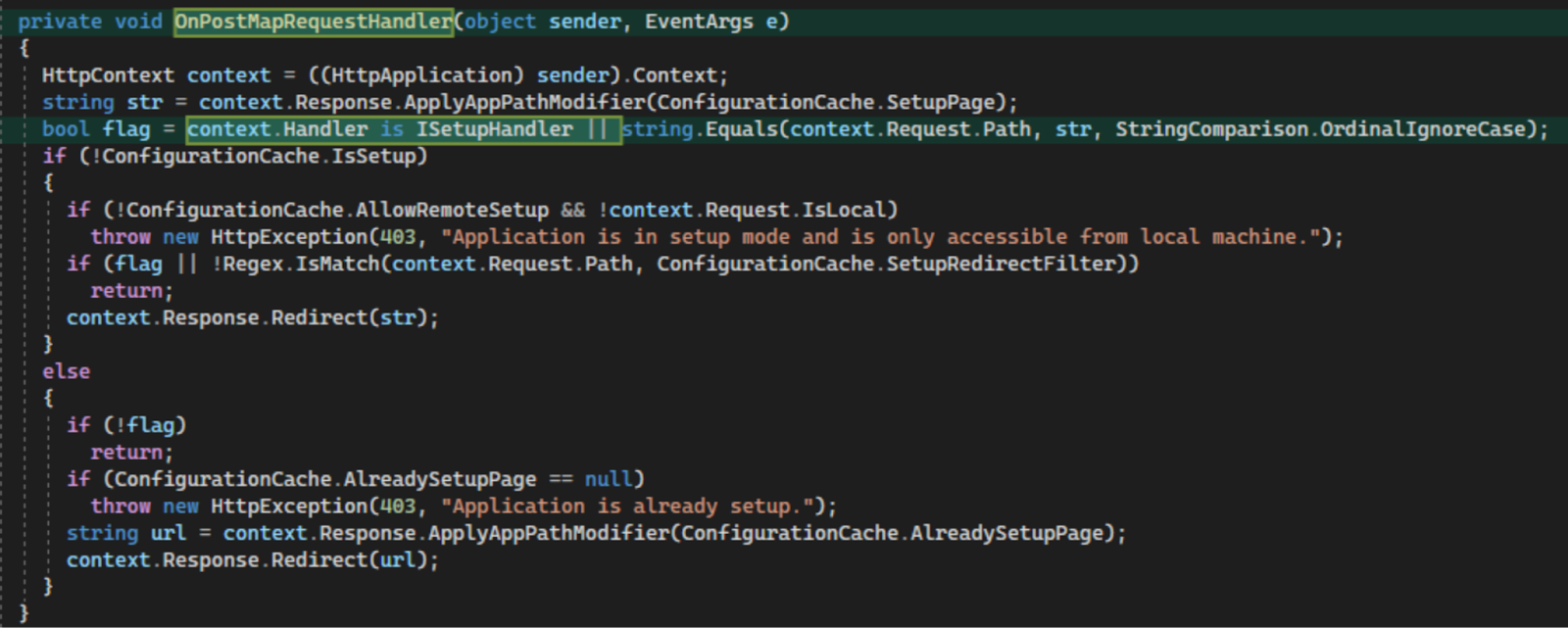
In previous versions of ScreenConnect, this handler was registered for the OnBeginRequest event, while in 28.9.8 it is registered for the OnPostMapRequestHandler event. This was seemingly done so that the context.Handler field will be populated. A new check is added to validate if the resolved HTTP handler implements the new ISetupHandler interface whereas the old code simply checked that Request.Path string matched “/SetupWizard.aspx”. This change implies that there was some way to bypass the string comparison of Request.Path in previous versions. If the request path does not match “/SetupWizard.aspx,” then the setup wizard will be allowed regardless of the setup state of the instance.

This would normally not be exploitable, but .Net has weird functionality that allows URL path components after a mapped legitimate URL to be passed along to the application. This information is exposed in Request.FilePath, Request.PathInfo and Request.Path. For example, if there is a legitimate path “/something.aspx”, then .Net will allow the user to request “/something.aspx/anythingelse” and will pass along the trailing bit after the file path via the Request.PathInfo. However, Request.Path always contains both Request.FilePath and Request.PathInfo per MSDN documentation:

Putting this together, it means we can simply request “/SetupWizard.aspx/literallyanything” and we should be allowed to access the setup wizard on already-configured ScreenConnect instances.
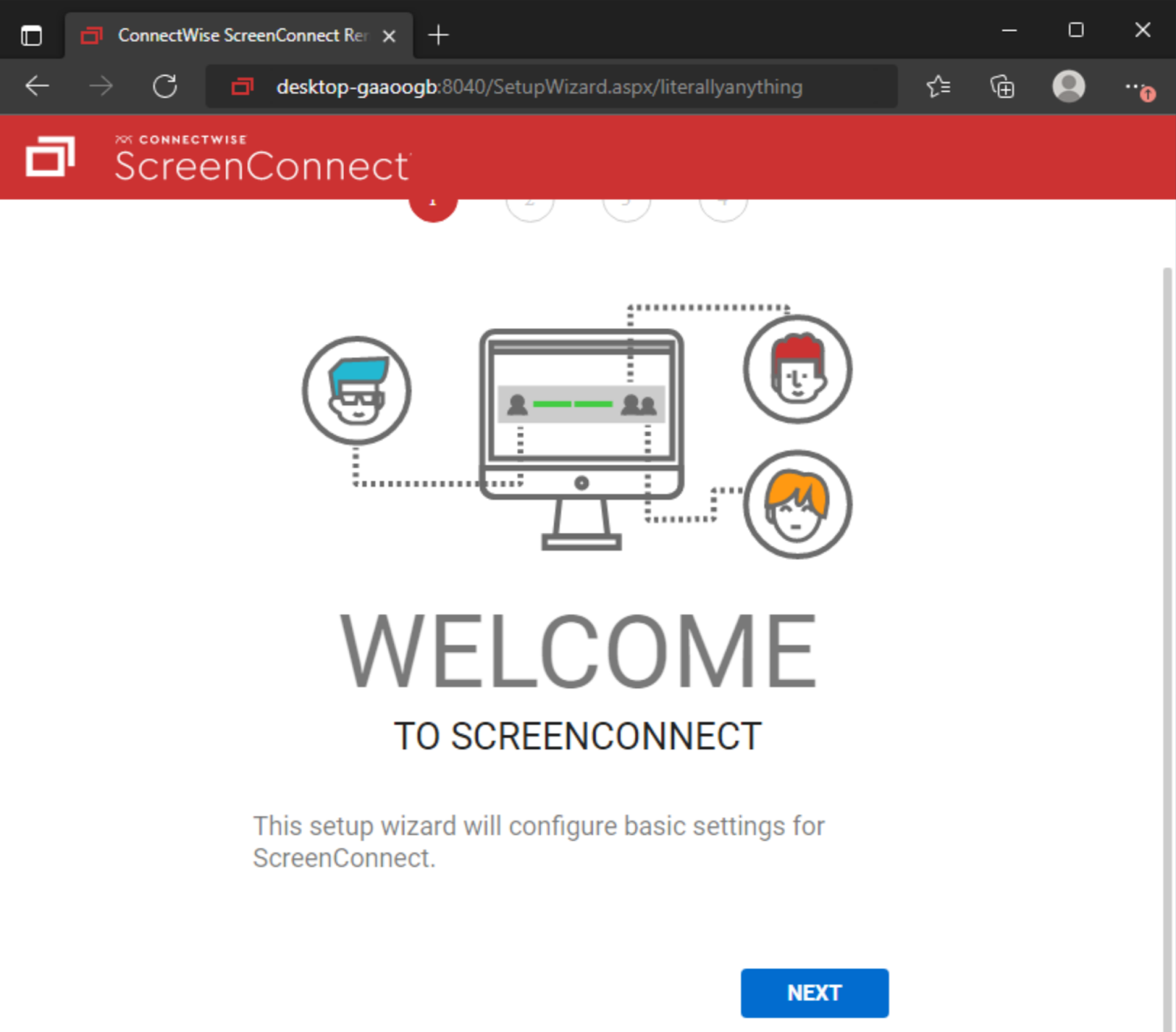
The setup wizard is responsible for setting up the initial administrative user and installing a license on the system during initial setup. The user creation portion of this setup happens immediately after clicking the “Next” button on the setup page, so there is no need to complete the setup wizard fully to exploit the system (i.e. you do not need to replace or have access to a valid license key). Completing this step will completely overwrite the internal user database. All other local users will be deleted aside from the user you specify in the setup wizard.

Once you have administrative access to a compromised instance, it is trivial to create and upload a malicious ScreenConnect extension to gain Remote Code Execution (RCE). This is not a vulnerability, but a feature of ScreenConnect, which allows an administrator to create extensions that execute .Net code as SYSTEM on the ScreenConnect server.

CVE-2024-1708 - Path Traversal

The second vulnerability referenced in the ConnectWise ScreenConnect advisory presents a risk of ZipSlip attacks. We observed changes to ScreenConnect.Core.dll:

Loading Gist...

and ScreenConnect.Server.dll: 

Loading Gist...

This adds new function arguments to strictly handle file paths when extracting content from a ZIP file. Looking through the code base, we can see these utility functions only seem to be used when handling ScreenConnect extensions. Prior to this patch, a malicious extension could potentially write files anywhere within C:\Program Files (x86)\ScreenConnect\App_Extensions instead of being properly restricted to their extension subdirectory.

While this is another vulnerability fixed in version 23.9.8 that could lead to remote code execution in certain conditions, it relies upon having administrative credentials and access to be able to use the Extensions functionality. This capability is “unlocked” by the authentication bypass, but is less severe on its own.

In our recreated proof-of-concept exploit, taking advantage of this potential ZipSlip attack vector was not necessary; after gaining administrator access with the authentication bypass, it was already possible to run arbitrary code with the typical Extensions feature set. The primary difference being that malicious code written using this vulnerability does not necessarily need an installed extension to execute. This means that it may go unnoticed more easily within your environment. Any .aspx or .ashx files within the root of C:\Program Files (x86)\ScreenConnect\App_Extensions\ are likely malicious artifacts. ScreenConnect does not place any files within this directory normally.

Detection Guidance

While researching the above vulnerabilities, Huntress identified Indicators Of Compromise (IOCs) and developed a set of detections that can be used to notify ScreenConnect users of potential malicious activity.

As a reminder, per Huntress’s previous post, the below listed SIGMA rules that leverage Windows Event ID 4663 requires that the Advanced Auditing policy be configured, and an appropriate SACL applied to the directory. Please refer to the previous blog post for how to generate this event.  

CVE-2024-1709 - Authentication Bypass

While replicating the Authentication Bypass exploit, Huntress observed IIS logs for the malicious SetupWizard.aspx URL path, which can be used as an indicator of compromise:

The following Sigma rule will detect requests made to SetupWizard.aspx with a trailing path segment. This behavior is never legitimate, and should clearly indicate malicious intent if observed in the wild.

Loading Gist...

After accessing the Setup Wizard, an attacker will input new credentials to gain access to Screen Connect. Doing so will write a new user database to a temporary XML file. The following Sigma rule can be used to detect the ScreenConnect server writing to a temporary XML file on the server. While this may be an indicator of compromise, this activity is known to also be observed when legitimately modifying local users or their permissions in ScreenConnect, so there is a non-zero false positive rate.

Loading Gist...

The following YARA rule is similar to the IIS log Sigma rule given above. It will detect IIS log entries that reference SetupWizard.aspx with a trailing path component. As mentioned previously, a trailing path component on this file is always associated with malicious activity.

Loading Gist...

CVE-2024-1708 - Path Traversal

The path traversal exploit allows attackers to write files within the root of the App_Extensions directory. The following Sigma rule should alert on file modifications at the root of the App_Extensions directory while excluding legitimate modifications to extensions themselves. 

Loading Gist...

We encourage customers and partners to reach out if they need assistance. If you are not currently using Huntress and need help monitoring for activity related to this vulnerability, you can use Huntress' free trial.

Categories
Response to Incidents
Summarize this postClose Speech Bubble
ChatGPTClaudePerplexityGoogle AI

See Huntress in action

Our platform combines a suite of powerful managed detection and response tools for endpoints and Microsoft 365 identities, science-backed security awareness training, and the expertise of our 24/7 Security Operations Center (SOC).

Book a Demo
Share
Facebook iconTwitter X iconLinkedin iconDownload icon
Glitch effect

You Might Also Like

  • SlashAndGrab: ScreenConnect Post-Exploitation in the Wild (CVE-2024-1709 & CVE-2024-1708)

    Adversaries have been VERY busy in the wake of the ScreenConnect vulnerabilities (CVE-2024-1709 & CVE-2024-1708). Here’s all the post-exploitation details, tradecraft, and tactics we’ve observed so far!
  • SlashAndGrab: The ConnectWise ScreenConnect Vulnerability Explained

    Huntress gives you a non-technical breakdown of the SlashAndGab ConnectWise ScreenConnect Vulnerability; dig into the insights on how we discovered it and supported the community along the way.
  • Detection Guidance for ConnectWise CVE-2024-1709

    Stay secure with Huntress! Learn about critical vulnerabilities tied to ConnectWise, including CWE-288 authentication bypass. Patch now to version 23.9.8 for protection.
  • Vulnerability Reproduced: Immediately Patch ScreenConnect 23.9.8

    Huntress has validated the vulnerabilities referred to in the latest February 19 ConnectWise ScreenConnect advisory. For on-premise users, it is our strongest recommendation to patch and update to ScreenConnect version 23.9.8 immediately.
  • Think Your ScreenConnect Server Is Hacked? Here’s What To Look For.

    Huntress Guide: Review this guide on how to tell which ScreenConnect Server autoruns are found on your endpoint so you can quickly find and remove them.
  • 2024: Revisiting a Year in Threats

    Take a look back at some of the biggest threats we observed and analyzed in 2024.
  • Validating the Bishop Fox Findings in ConnectWise Control

    The Huntress team validates eight vulnerabilities found in ConnectWise Control that ranged from low to high severity.
  • The Top Four CVEs Attackers Exploit

    Learn about the top four Common Vulnerabilities and Exposures (CVEs) attackers are exploiting—and how you can defend against them.

Sign Up for Huntress Updates

Get insider access to Huntress tradecraft, killer events, and the freshest blog updates.
Privacy • Terms
By submitting this form, you accept our Terms of Service & Privacy Policy
Thank you! Your submission has been received!
Oops! Something went wrong while submitting the form.
Huntress Managed Security PlatformManaged EDRManaged EDR for macOSManaged EDR for LinuxManaged ITDRManaged SIEMManaged Security Awareness TrainingManaged ISPMManaged ESPMBook a Demo
PhishingComplianceBusiness Email CompromiseEducationFinanceHealthcareManufacturingState & Local Government
Managed Service ProvidersResellersIT & Security Teams24/7 SOCCase Studies
BlogResource CenterCybersecurity 101Upcoming EventsSupport Documentation
Our CompanyLeadershipNews & PressCareersContact Us
Huntress white logo

Protecting 215k+ customers like you with enterprise-grade protection.

Privacy PolicyCookie PolicyTerms of UseCookie Consent
Linkedin iconTwitter X iconYouTube iconInstagram icon
© 2025 Huntress All Rights Reserved.

Join the Hunt

Get insider access to Huntress tradecraft, killer events, and the freshest blog updates.

By submitting this form, you accept our Terms of Service & Privacy Policy